Explore 8 workflow template examples for sales, projects, planning, and more, with practical ways to adapt each one in Fluidwave.
August 25, 2026 (2mo ago)
8 Workflow Template Examples for Smarter Work
Explore 8 workflow template examples for sales, projects, planning, and more, with practical ways to adapt each one in Fluidwave.
← Back to blog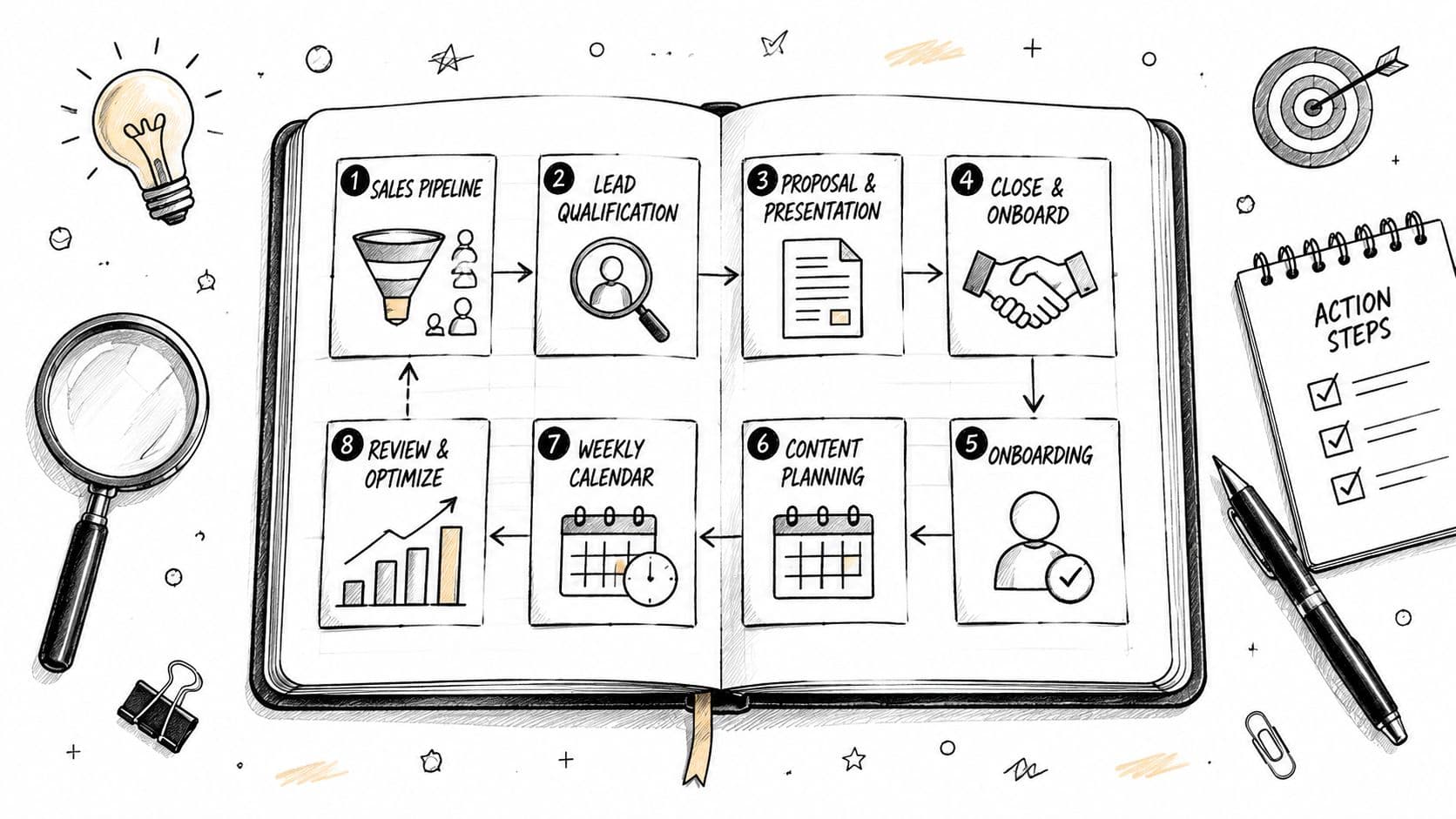
You're managing project tasks, incoming requests, recurring planning, and long-term goals in the same system. Some work needs a deadline and a clear finish line. Other work arrives unpredictably, depends on someone else, or gets postponed because the next action isn't obvious. Using one rigid process for all of it creates noise instead of control.
The best workflow template isn't the most complex one. It's the one that matches the pace, uncertainty, and decision-making needs of the work. The eight workflow template examples below cover iterative delivery, continuous flow, personal planning, project governance, delegation, strategic alignment, communication processing, and professional development.
Each example focuses on the best use case, operating rhythm, trade-offs, Fluidwave setup, and first adaptation to make. If your work happens across devices, you can also streamline your iPad workflow by choosing a view that makes the next action easy to see rather than forcing every task into the same layout.
1. Agile Sprint Workflow
Agile sprints work best when a team can define a meaningful slice of work, commit to it for a short period, and learn from the result. A product team might move through discovery, design, build, testing, and review within a repeating sprint rhythm. The structure creates focus without pretending that the entire roadmap will remain stable.
The operating pattern is straightforward. During planning, the team chooses a sprint goal and assigns work. Daily standups surface blockers and changes. At the end, the team demonstrates completed work, then holds a retrospective to decide what to improve. Software teams at companies such as Spotify and Stripe are commonly associated with sprint-based product and engineering work, while SaaS startups often organize roadmap delivery around short iterations.
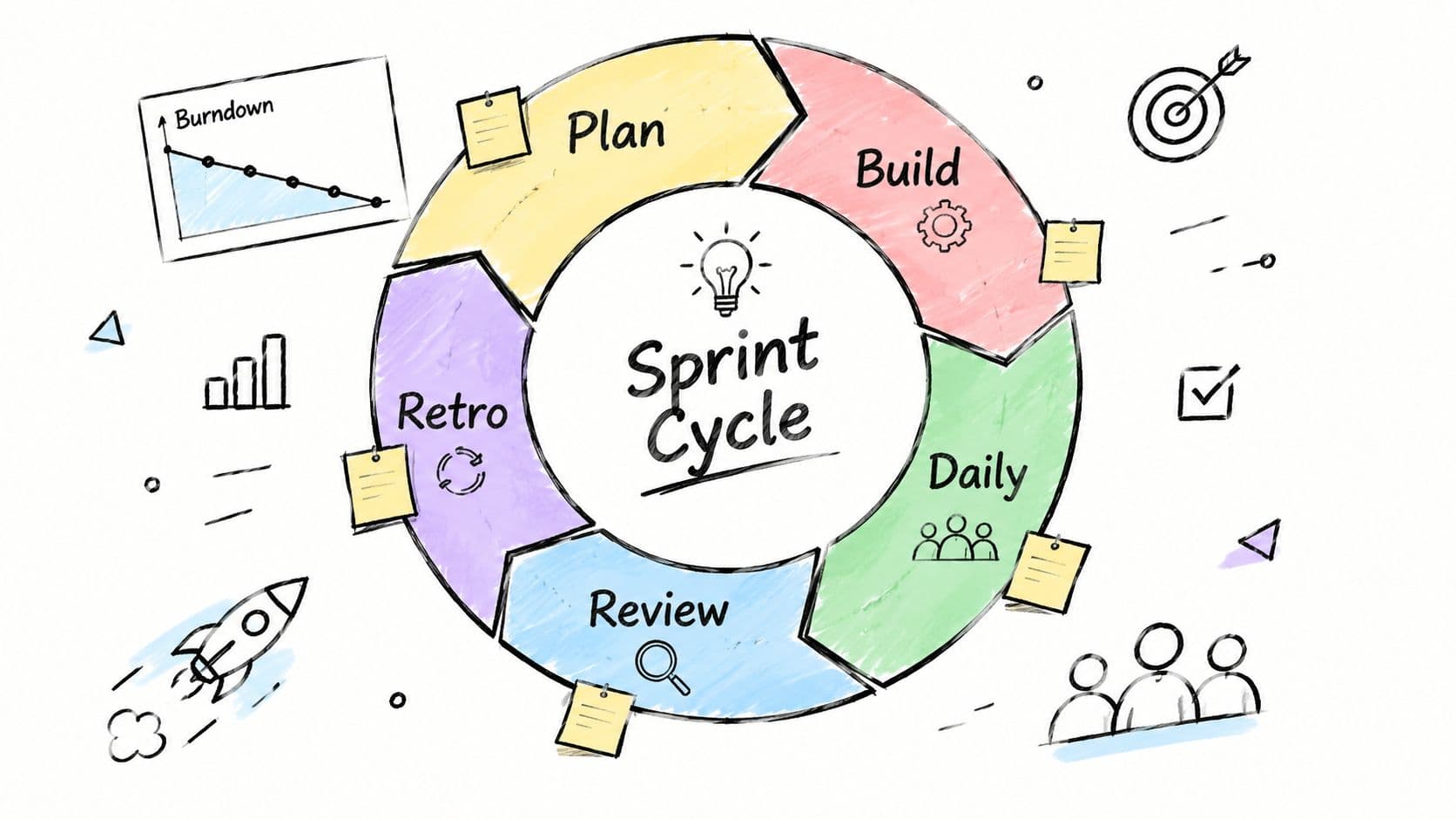
Build the sprint around a usable outcome
In Fluidwave, create a project for the product initiative and use the Kanban view for sprint visibility. Your columns might be Backlog, Ready, In Progress, Review, Blocked, and Done. Add the sprint name, owner, acceptance notes, and dependency to each task. Non-critical documentation, meeting preparation, and research cleanup can go to a virtual assistant, while architecture, product decisions, and final quality judgments stay with the core team.
The main trade-off is commitment versus adaptability. A sprint that's overloaded turns planning into wishful thinking, while a sprint with no meaningful goal becomes a loose task list. Keep the target achievable, protect time for review, and use auto-prioritization to surface blockers early instead of discovering them at the closing meeting.
Practical rule: A sprint should produce a reviewable outcome, not merely a collection of completed activities.
Adapt first by adding a retrospective task to the template. Ask what slowed delivery, which handoff failed, and what should change before the next cycle. Without that step, the workflow repeats the same friction under a new sprint label.
2. Kanban Flow Workflow
Kanban is the stronger choice when work arrives continuously and the team can't reliably predict what will enter the queue next. A support team handles new tickets, a marketing operations group processes requests, and a content team moves drafts through production. None of these groups benefits from pretending that every task belongs to a fixed iteration.
Use a simple flow such as To Do, In Progress, Review, and Done, then add Blocked when external dependencies regularly stop work. GitHub's issue tracking, customer-support operations associated with Zendesk, and editorial planning at Buffer all illustrate the kind of varied work that benefits from visual status and ongoing prioritization.
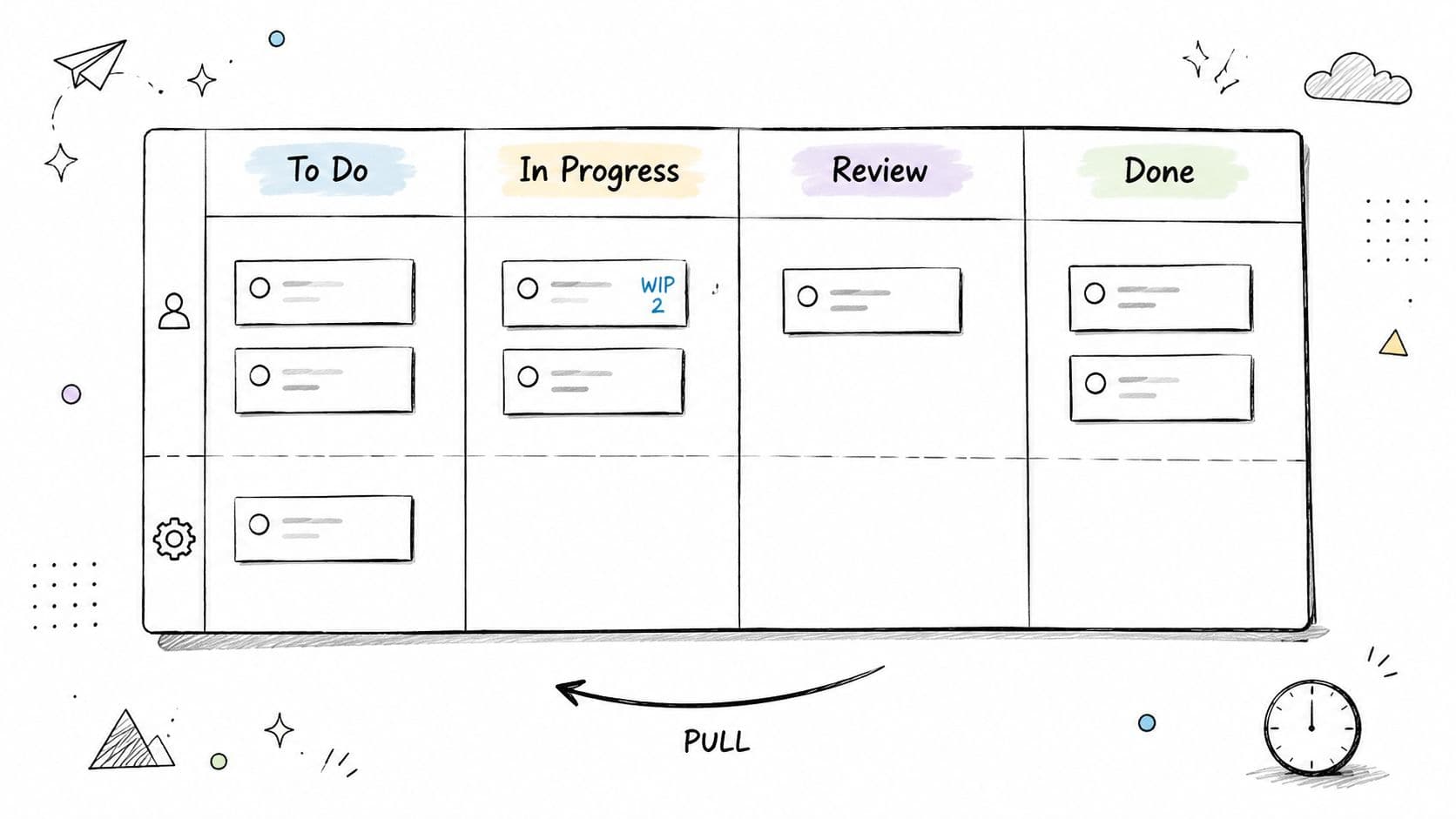
Make work in progress visible
Set a limit on how many items can sit in each active stage. The exact limit depends on team capacity, but the principle is firm: starting more work doesn't increase throughput if review and completion remain constrained. In Fluidwave, use the table view to sort by stage, owner, due date, or blocker, then use the Kanban view when the team needs a fast visual read.
Useful adjustments include:
- Limit active work: Ask each person to finish or unblock current work before pulling in another item.
- Separate blocked tasks: Make waiting visible instead of allowing stalled work to look active.
- Delegate repeatable checks: A virtual assistant can handle formatting, basic quality checks, or status preparation when judgment isn't required.
- Review flow regularly: Look for recurring queues, unclear acceptance criteria, and handoffs that keep pushing work backward.
The trade-off is flexibility versus urgency. Kanban absorbs changing demand well, but without priorities and WIP limits, the board becomes a storage area for every request. Use Fluidwave's Kanban board guidance to keep stages meaningful and make the next pull decision clear.
Your first adaptation should be a blocked-state rule. Define who owns the follow-up, what evidence is needed to unblock the task, and when the item gets reviewed again. A blocked column without an owner makes delay more visible without helping anyone resolve it.
3. Weekly Review and Planning Workflow
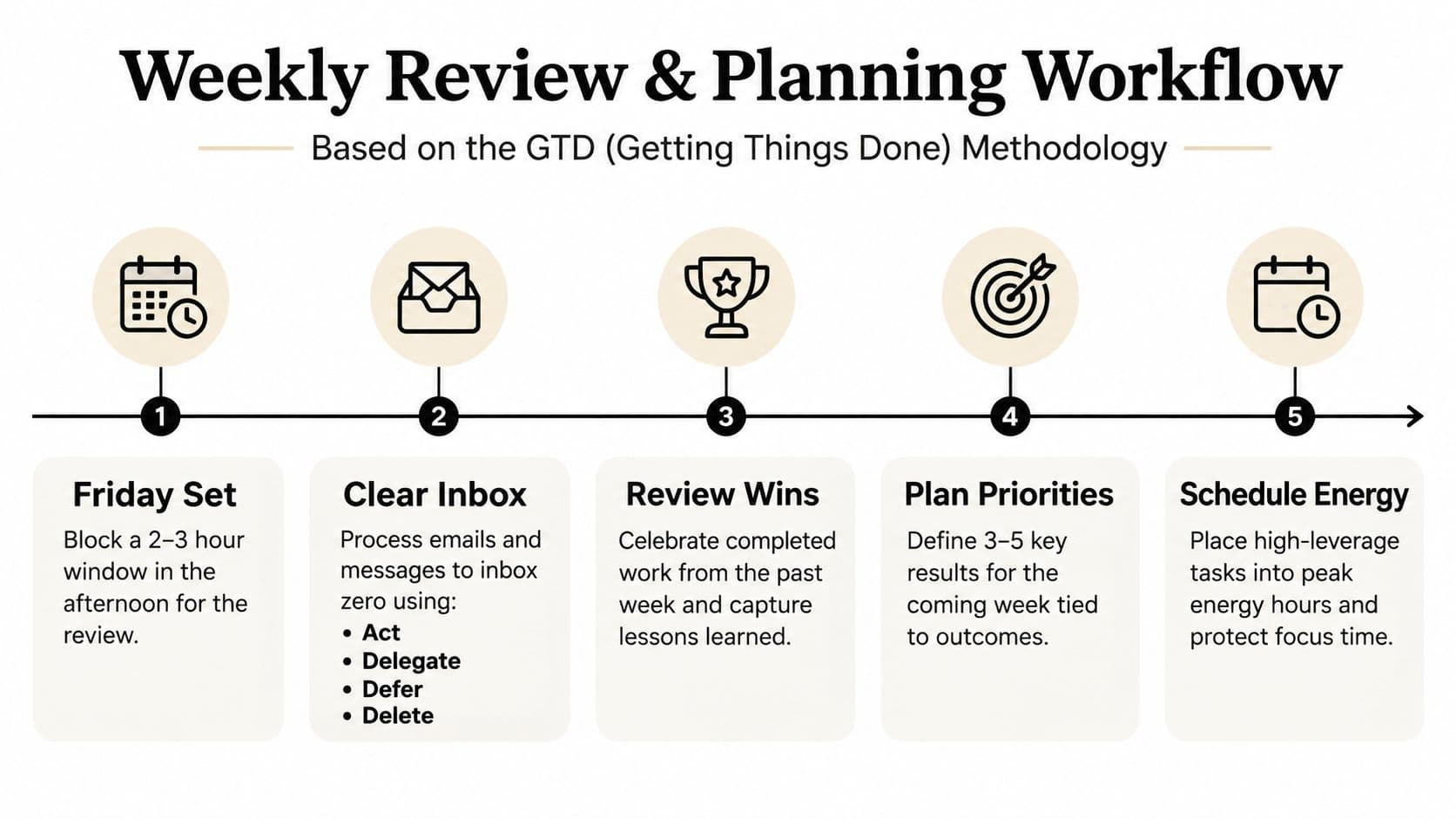
A weekly review gives one person control over work that has spread across projects, messages, notes, and commitments. It suits executives, founders, freelancers, and knowledge workers who move between multiple domains and need a reliable reset rather than another productivity trick.
The rhythm has three parts. First, close open loops by reviewing completed work and unresolved commitments. Next, process inboxes and update task status. Finally, choose the priorities and appointments that will shape the coming week. David Allen's GTD methodology helped popularize this style of review, and many leaders use a protected end-of-week planning block to regain perspective.
Treat the review as a control point
Create a recurring Weekly Review project in Fluidwave with tasks for inbox processing, completed-work review, upcoming commitments, waiting items, and next-week priorities. The calendar view helps reveal overloaded days and unused capacity. A someday or maybe list gives ideas a home without allowing them to compete with current commitments.
Delegate email triage, scheduling cleanup, and routine research before the review when those tasks don't require your judgment. The review should be reserved for decisions, trade-offs, and commitments. Starting with completed work also matters because it gives you an accurate record of progress before the next set of demands arrives.
A review isn't a ceremony. It's the point where scattered information becomes a deliberate set of commitments.
The trade-off is time spent planning versus time available for execution. Skipping the review may feel efficient during a busy week, but unresolved tasks and vague promises then consume attention throughout the following one. Protect the recurring appointment, keep the agenda stable, and use auto-prioritization to distinguish important work from accumulated noise.
Adapt this template after the first cycle by removing any review step that doesn't lead to a decision. A long ritual that produces no clearer ownership or next action is administrative overhead, not control.
4. Project Kickoff to Closure Workflow
Large initiatives need more than a task list. A project that moves from initial idea to planning, execution, testing, launch, and retrospective needs explicit gates so that the team knows when it can advance and who has authority to make the next decision.
This phase-based workflow fits a product release, website redesign, client implementation, hiring initiative, or operational change. Companies such as Google and Salesforce are associated with structured release and stage-gate practices, while consulting teams often use phase-based project management to control scope and coordinate stakeholders.
Put decisions between the phases
Save a reusable Fluidwave project template with the major phases already created. Within each phase, include deliverables, an accountable owner, dependencies, due dates, and a gate task that records the approval to continue. Use the table view to identify unfinished prerequisites and blockers. Stakeholder updates, meeting scheduling, and document organization can be delegated, but scope decisions and launch approval should remain with the responsible project leader.
Read Fluidwave's project kickoff meeting agenda before tailoring the kickoff stage. The template should establish the outcome, decision-makers, communication pattern, assumptions, and definition of done at the beginning, not after the project starts drifting.
A useful project sequence might include:
- Planning: Confirm the brief, owners, risks, dependencies, and acceptance criteria.
- Execution: Track production work and record scope changes as decisions.
- Testing: Assign validation tasks with evidence requirements.
- Launch: Confirm readiness, communication, support, and rollback ownership.
- Retrospective: Capture lessons while the details are still fresh.
A phase gate prevents scope creep, but excessive gates slow a small project. Use more governance when dependencies and risk are high, and fewer approvals when the work is reversible. Add schedule buffer to estimates based on known uncertainty rather than treating every delay as a personal failure.
The first adaptation is an exception path. Define what happens when testing fails, a stakeholder changes the brief, or a dependency misses its date. A workflow that only describes the ideal path will break precisely when the project needs it most.
5. Daily Standup and Task Delegation Workflow
A daily standup should help people decide what deserves attention today, not force them to read status updates aloud. The most effective version is lightweight: review priorities, identify blockers, and delegate work that doesn't require the leader's judgment.
This pattern works for a founder managing operations, a distributed engineering group, or a project manager coordinating several contributors. Twitter, now X, Slack, and Buffer are associated with daily or asynchronous standup practices for distributed teams. The format can be live, written, or a combination, as long as it produces clear actions.
Turn the ritual into a delegation filter
Create a recurring daily task in Fluidwave with three prompts: What must move today? What is blocked? What can someone else complete? Use list view for fast scanning, then create delegated tasks with a clear brief, budget, deadline, and completion standard. Documentation, data gathering, scheduling, and repetitive formatting are often suitable for a virtual assistant. High-judgment conversations aren't.
A practical daily sequence looks like this:
- Scan commitments: Identify deadlines and consequences before choosing new work.
- Choose the critical few: Limit the day's focus to work that materially changes an outcome.
- Log blockers immediately: Record the dependency, person responsible, and follow-up date.
- Delegate deliberately: Send tasks with enough context that the assistant doesn't need repeated clarification.
- Close the loop: Review returned work and update the main task, not just the message thread.
Use Fluidwave's sample meeting notes format to keep standup records consistent. The trade-off is speed versus discussion. A short ritual preserves momentum, but complex blockers need a separate decision meeting rather than a rushed explanation inside the standup.
Adapt after the first week by identifying which recurring tasks should become their own templates. If the same delegation brief appears repeatedly, save it once and improve the instructions instead of rewriting them each morning.
6. Quarterly OKR Planning and Execution Workflow
OKRs connect strategic intent with weekly execution. The workflow starts with an objective that describes the desired direction, then defines key results that indicate whether the team is making progress. Weekly tasks should support those results, while operational work remains visible rather than consuming the entire quarter.
Google is strongly associated with the adoption of OKRs, and organizations such as Spotify and Airbnb have used the framework to align teams during periods of growth and change. The practical value isn't the label. It's the forced conversation about what matters, how progress will be recognized, and which work should not receive priority.
Keep strategic work connected to daily tasks
Create a quarterly project in Fluidwave with objectives at the top level, key results beneath them, and weekly execution tasks linked to each result. Add an OKR status custom field so you can filter related work. Auto-prioritization can help surface tasks connected to active objectives, while delegated research, reporting preparation, and administrative support give leaders more time for strategic decisions.
A good operating rhythm includes quarterly definition, weekly progress checks, and a closing review. Keep weekly syncs focused on movement toward the key result, not on reading every task. The trade-off is strategic focus versus operational reality. Teams still need to maintain customers, systems, and basic administration, so an OKR workflow that ignores operational work will create hidden overload.
An objective without linked actions is an aspiration. A key result without an owner is a measurement nobody can improve.
The first adaptation is to add a “why this matters” note to every objective. It gives delegated contributors and adjacent teams enough context to make better decisions when the original planner isn't available. Review the template after the quarter and remove key results that measured activity instead of meaningful progress.
7. Inbox Triage and Processing Workflow
An inbox is useful when it helps you make decisions. It becomes a liability when email, Slack messages, notifications, and requests remain in an unresolved state because nobody has decided whether to act, delegate, defer, or delete.
The GTD-style processing workflow gives every incoming item a destination. An actionable message becomes a task with an owner and next step. A request that needs someone else's effort becomes a delegated task. Reference material gets filed, while irrelevant information leaves the system. The approach is useful for executives, client-facing professionals, and remote workers whose communication arrives across several channels.
Decide once, then move the work
Create an Inbox project in Fluidwave and use a short processing sequence:
- Act: Handle the item when the response is quick and contained.
- Delegate: Assign the outcome, context, and deadline to a capable assistant or teammate.
- Defer: Create a dated task when the item matters but doesn't belong in the current focus.
- Delete or archive: Remove information that requires no action or future reference.
Fixed processing windows reduce the temptation to react to every notification. Turn off interruptive alerts between those windows, convert actionable messages into Fluidwave tasks, and use response templates for repeated communication. The trade-off is responsiveness versus concentration. Some roles require immediate escalation, so define exceptions for urgent clients, incidents, or executive decisions instead of allowing every message to claim urgency.
The system breaks down when tasks are created without a clear next action. “Reply to client” may still leave the actual work undefined. Write the decision required, the information needed, and the completion condition in the task description.
Adapt this workflow by adding an owner field and a waiting-for status. That small change distinguishes work you control from work that depends on another person and prevents follow-ups from disappearing inside an unread thread.
8. Personal Learning and Development Workflow
Learning becomes reliable when it has a place in the operating system. Otherwise, books, courses, saved articles, and skill goals compete with urgent client work and remain permanently “in progress.”
A personal learning workflow suits knowledge workers, founders, specialists, and anyone adapting to changes in their field. Google's “20% time” policy is often cited as an example of protected time for exploration, while companies such as Amazon emphasize employee learning and development. The specific policy matters less than the operating principle, learning needs scheduled attention and a path from information to application.
Move from consumption to practice
Create a Learning project in Fluidwave with separate tracks for reading, courses, deliberate practice, and application. Break a resource into tasks such as read a chapter, capture the useful idea, test it against current work, and record what changed. List view works well for a personal queue, while calendar view helps protect learning during your highest-energy period.
Research collection can go to a virtual assistant when the brief is specific. Ask for sources, summaries, comparisons, or examples, then keep interpretation and application for yourself. A weekly implementation task is more valuable than another item added to the reading list because it tests whether the knowledge changes behavior.
The trade-off is breadth versus depth. Collecting resources feels productive, but too many parallel courses create unfinished commitments and dilute attention. Choose one active capability, define the work problem it should improve, and pause resources that don't support that outcome.
Learning is complete only when the new idea changes a decision, a skill, or a piece of work.
The first adaptation is an application task attached to every learning unit. After the first cycle, review which activities produced usable results and redesign the template around those activities. A simple workflow that gets practiced will outperform an elaborate curriculum that remains untouched.
8 Workflow Templates Comparison
| Workflow | Implementation complexity (🔄) | Resources & speed (⚡) | Expected outcomes (⭐️📊) | Ideal use cases & key advantages (💡) |
|---|---|---|---|---|
| Agile Sprint Workflow | Medium 🔄, regular ceremonies (planning, daily, retro) | Team-level setup, tracking tools; ⚡ Fast iteration cadence | ⭐️⭐️⭐️; 📊 Predictable deliveries, rapid feedback loops | Product teams / software, predictable cycles, velocity tracking |
| Kanban Flow Workflow | Low 🔄, continuous, minimal ceremonies | Low setup, discipline on WIP limits; ⚡ High responsiveness to incoming work | ⭐️⭐; 📊 Improved flow, visible bottlenecks | Support / ops / content, flexible, reduces multitasking |
| Weekly Review & Planning Workflow | Low–Medium 🔄, single weekly ritual to protect | Individual time block (2–3 hrs); low tooling; ⚡ Improves weekly planning speed | ⭐️⭐; 📊 Reduced decision fatigue, better weekly alignment | Executives / entrepreneurs, prevents dropped initiatives, clears priorities |
| Project Kickoff to Closure Workflow | High 🔄, phase gates and stakeholder checkpoints | Cross-functional resources, documentation, budget tracking; ⚡ Slower but thorough | ⭐️⭐️⭐️; 📊 Comprehensive coverage, lower scope/risk creep | Large projects / launches, stakeholder alignment, risk management |
| Daily Standup & Task Delegation Workflow | Low 🔄, 15‑minute daily ritual | Minimal time; relies on virtual assistants for delegation; ⚡ Very fast daily cadence | ⭐️⭐; 📊 Quick blocker resolution, time saved via delegation | Team managers / busy pros, syncs team, offloads repetitive work |
| Quarterly OKR Planning & Execution Workflow | High 🔄, quarterly planning + regular check‑ins | Executive time, cross-team coordination; ⚡ Strategic cadence (not immediate) | ⭐️⭐️⭐️; 📊 Strong strategic alignment, measurable quarterly impact | Executive teams / scaling orgs, focus on what matters, mid-course corrections |
| Inbox Triage & Processing Workflow | Low 🔄, repeated, disciplined time‑boxes daily | Individual discipline, email filters, possible assistant help; ⚡ Rapid inbox control | ⭐️⭐; 📊 Fewer missed items, reduced email anxiety | High-volume communicators, prevents inbox overload, enables quick decisions |
| Personal Learning & Development Workflow | Medium 🔄, scheduled learning blocks + projects | Protected hours (5–10 hrs/wk), courses/resources; ⚡ Slow ROI but cumulative gains | ⭐️⭐; 📊 Measurable skill growth over time, better problem solving | Knowledge workers / career builders, deliberate practice, applied learning |
Turn the Best Template Into a Working Habit
The right workflow depends on operating reality. Use sprints when the team can plan iterative delivery around a defined goal. Choose Kanban when incoming work varies and flow matters more than fixed commitments. Use a weekly review and inbox process when the main problem is personal control across scattered responsibilities.
For major initiatives, a phase-based workflow adds gates, ownership, and closure. OKRs connect weekly execution to strategic direction. Daily standups and delegation rituals create efficiency for leaders who are spending too much time on coordination or repeatable work. A learning workflow supports sustained development by turning reading and courses into deliberate practice.
Workflow automation itself isn't new. The historical progression runs from machine-to-machine workflows in Electronic Data Interchange during the 1960s through formal business process management in the 1990s and early workflow platforms such as FileNet workflow in 1993 and Lotus Notes workflow in 1995. This history of automation helps explain why reusable process designs now appear across project management, CRM, marketing, and productivity software.
Modern template ecosystems also show how complex reusable workflows can become. One open repository reports 365 integrations, 29,445 total nodes, and an average of 14.3 nodes per workflow in its collection of templates. The n8n workflow-template repository demonstrates that a template can represent a substantial operating system, not just a checklist.
But complexity isn't the same as usefulness. A controlled benchmark recorded 185.35 seconds per manual execution and 1.23 seconds per automated execution, with a reported 5% manual error rate and zero observed errors in automated runs. The benchmark study illustrates the potential of automation, but it doesn't remove the need for clear inputs, exception handling, ownership, and human review.
Start your Fluidwave adaptation with one outcome. Define the stages that work passes through, then add priorities, deadlines, dependencies, and accountable owners. Identify delegation points where a virtual assistant can complete the task without creating more supervision. Select the view that fits the work, Kanban for flow, calendar for time commitments, table for detailed control, or list for rapid scanning.
Run the template through one complete cycle before adding more fields. Review where tasks stalled, which instructions caused questions, where priorities changed, and which step nobody used. Then revise the template so it reflects the actual operating conditions, including exceptions and handoffs.
A simple workflow used consistently is more valuable than a complex template nobody maintains. The strongest workflow template examples don't merely map steps. They make the next decision, owner, deadline, and review point visible enough that work can continue when attention is limited.
Fluidwave combines reusable task templates, multiple work views, auto-prioritization, recurring workflows, and delegation to human virtual assistants. Visit Fluidwave to turn one of these workflow template examples into a practical system for planning, execution, and follow-through.
Focus on What Matters.
Experience lightning-fast task management with AI-powered workflows. Our automation helps busy professionals save 4+ hours weekly.