Use workflow optimization to diagnose bottlenecks, automate routine work, delegate smarter, measure results, and build a sustainable system that fits your role.
August 19, 2026 (1mo ago)
How to Master Workflow Optimization
Use workflow optimization to diagnose bottlenecks, automate routine work, delegate smarter, measure results, and build a sustainable system that fits your role.
← Back to blog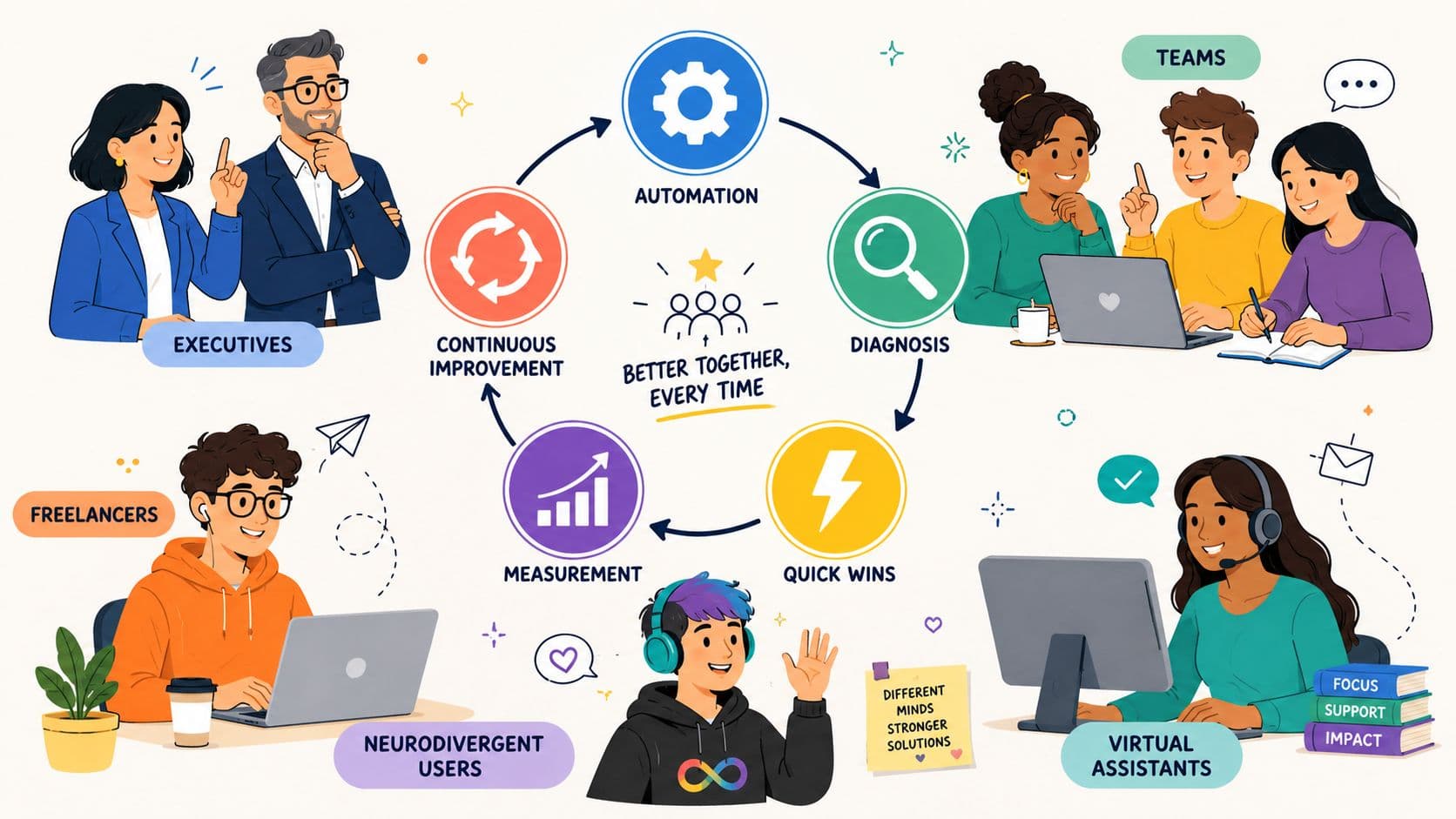
You finish a day full of meetings, messages, approvals, and task updates, then look at the important work and realize very little moved. The calendar was full, but the workflow was not productive. A request sat in someone's inbox, a draft waited for feedback, and three different tools held three different versions of the same information.
Workflow optimization fixes that gap between activity and progress. It treats work as a connected system, one that must balance speed, quality, attention, coordination cost, and human judgment. The practical aim isn't to cram more tasks into the day. It's to remove avoidable waiting, unclear ownership, repeated corrections, and unnecessary decisions.
The same principles apply whether you're an executive managing priorities, a team coordinating projects, a freelancer serving clients, a virtual assistant handling delegated work, or a neurodivergent professional protecting focus. The tools and defaults change, but the diagnostic method stays consistent.
Why Busy Workflows Still Feel Broken
A marketing lead starts Monday with a clear launch plan. By midmorning, a sales director needs a change to the offer, a designer asks which version is final, and a manager adds an approval step in a chat thread. The lead spends the afternoon forwarding messages and checking status. By evening, everyone has worked hard, but the campaign still hasn't reached the person who can make the next decision.
That pattern appears in onboarding, content production, finance, customer support, and executive administration. High activity can hide low throughput when people spend their time locating information, waiting for responses, translating vague requests, or repairing work that passed through an unclear handoff.
Practical rule: If a task repeatedly pauses, changes owners, or returns for correction, treat the workflow as the problem before treating the people as the problem.
The common causes are recognizable:
- Fuzzy handoffs: Nobody knows what “ready for review” means.
- Overlapping tools: A task exists in email, a project board, a spreadsheet, and a chat channel.
- Decision stalls: The right approver is unavailable, or the team doesn't know who has final authority.
- Hidden rework: A request looks complete until another person discovers missing context.
- Attention leakage: Frequent interruptions force people to reload the same mental context.
Task switching creates an immediate performance cost. Responses are typically slower and more error-prone immediately after a switch, as described in this classic task-switching review. A separate controlled study found that people can struggle to disengage from unfinished work, leaving attention residue that weakens performance on the next task, although time pressure while wrapping up can help the transition (attention residue research).
The answer isn't automatically another productivity app. Sometimes the right move is to automate disconnected B2B processes, but automation won't repair an undefined approval rule or a task nobody owns. Start by asking whether the workflow converts effort into a finished outcome without unnecessary delay, rework, or cognitive strain. For professionals already operating near capacity, protecting recovery and workload boundaries also matters, as the practical guidance in how to avoid burnout makes clear.
Diagnose the Real Workflow Bottleneck
Don't map the workflow from the org chart. Map it from the last completed piece of work.
An org chart might say that a content request moves from marketing to writing, design, legal, and publishing. The process may involve a writer asking for missing facts, a designer working from an outdated brief, legal reviewing a link in a private message, and a coordinator rebuilding the schedule in a spreadsheet. The operational workflow is what people do, including workarounds and delays.
Start with evidence, not opinions
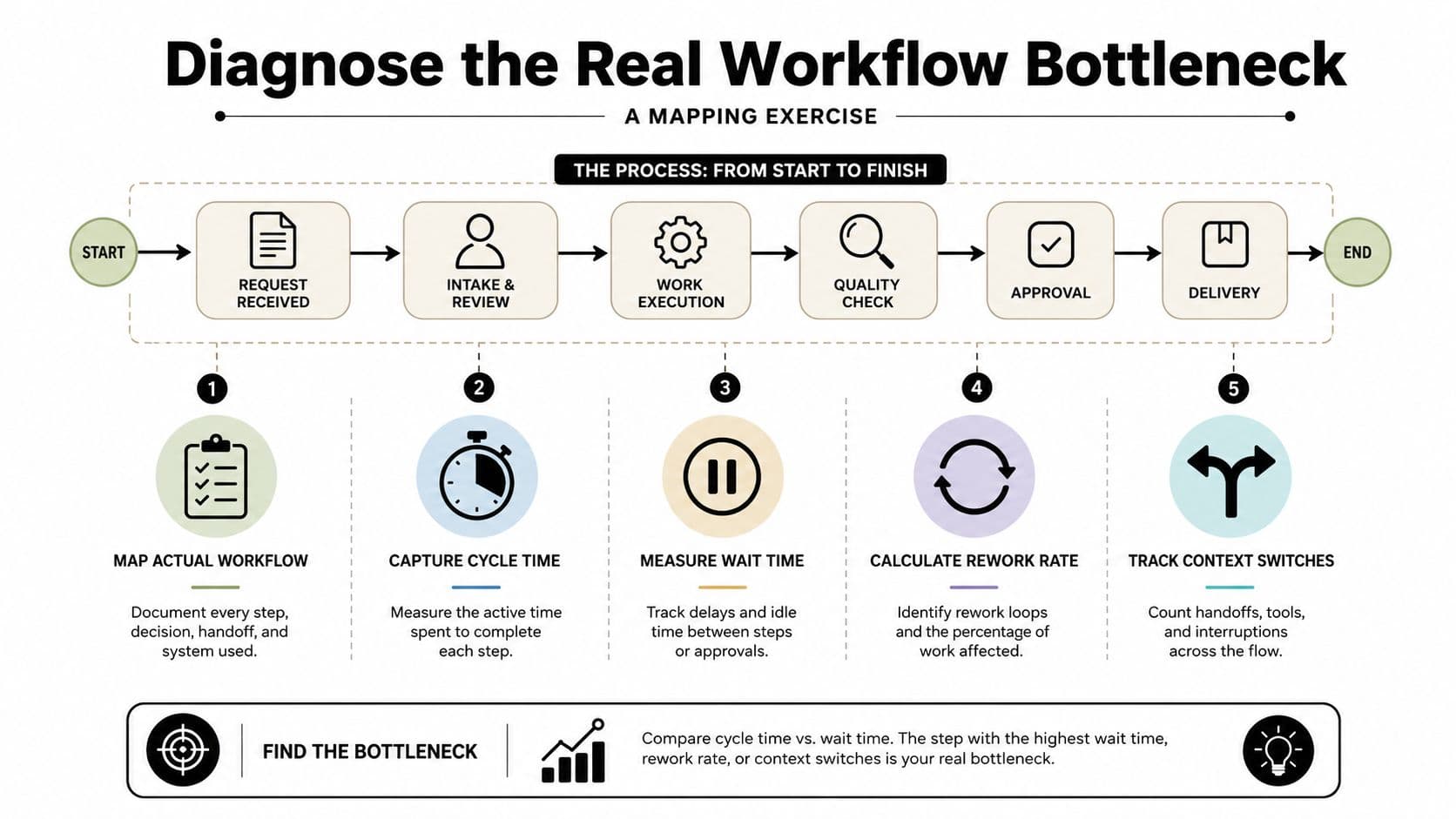
Choose one workflow with a clear outcome, such as client onboarding or content approval. Follow a recent item from intake to completion and record:
- Cycle time: How long the item takes from accepted request to completed outcome.
- Wait time: How long it sits between active steps.
- Rework: How often someone sends it backward for correction or missing information.
- Context switches: How often the owner leaves the main task to search, clarify, or update another system.
- Decision latency: How long the item waits for an approval, answer, or interpretation.
Benchmarking guidance recommends a shared metric vocabulary, representative real-world workflow suites, reproducible performance traces, and measures that include latency, wall-clock time, tool-call count, and cost per successful outcome, not accuracy alone (workflow benchmarking methodology). For ordinary business workflows, you don't need a research lab. You do need consistent definitions.
Classify the constraint
Most bottlenecks fit one or more of four patterns.
Delay means work is ready but idle. A content draft waits three days because the reviewer has no visible queue or reminder.
Rework means the workflow produces an output that fails a quality check. A client onboarding form lacks billing details, so the assistant returns it to the account manager.
Overload means one person, queue, or approval stage absorbs more demand than it can process. The manager becomes the default reviewer for every minor decision.
Decision bottleneck means the work lacks a clear rule or authority. Several people comment, but nobody knows whose decision closes the discussion.
Take a client onboarding request and draw each handoff as a separate step. Add the person responsible, the input required, the expected output, and the condition that moves the work forward. Then mark every pause, return, and clarification. A simple root cause analysis template can help separate the visible symptom, such as “onboarding is slow,” from the underlying constraint, such as incomplete intake data.
Fixing the wrong bottleneck wastes effort. A new dashboard won't help if the issue is unclear authority, and an automation rule won't help if the input arrives incomplete. Diagnose the point where work loses momentum, then redesign that point first.
Prioritize Changes That Deliver Results
Once the bottleneck is visible, resist the urge to improve everything. A workflow can contain many irritations, but only a few constraints determine whether work moves.
Score each proposed change against four dimensions:
- Impact: How directly will it relieve the diagnosed bottleneck?
- Effort: How difficult is implementation, including training and maintenance?
- Frequency: How often does the problem occur?
- Regression risk: How likely is the change to create errors or new work elsewhere?
Use a simple scale from 1 to 5 for each dimension. High impact and high frequency increase priority. High effort and high regression risk reduce it. The exact formula matters less than forcing a visible comparison.
Suppose a freelancer's weekly reporting process stalls because data collection is manual and client commentary arrives late. The candidate changes might look like this:
Prioritization Scoring Example
| Candidate | Impact (1-5) | Effort (1-5) | Frequency (1-5) | Risk (1-5) | Priority |
|---|---|---|---|---|---|
| Create a standard client intake form | 4 | 2 | 4 | 1 | High |
| Automate recurring data export | 5 | 3 | 5 | 2 | High |
| Delegate first-draft commentary | 4 | 3 | 4 | 3 | Medium |
| Redesign the entire reporting dashboard | 2 | 5 | 2 | 4 | Low |
The intake form is a quick win. It reduces clarification without changing the reporting system. Automated export is a structural improvement because it removes repeated collection work. Delegated commentary may help, but it needs a clear brief and review standard, so its coordination risk deserves attention. The dashboard redesign looks advanced but doesn't address the main delay.
Pareto principle examples can sharpen judgment. Look for the small set of recurring failures that consume disproportionate attention, rather than polishing low-impact steps because they're easy to change.
Sequence the work in three groups:
- Quick wins: Small changes that reduce friction and build confidence.
- Structural redesigns: Changes to ownership, systems, intake, or approval rules.
- Strategic bets: Larger changes that may reshape capacity but need testing first.
Don't call a change successful because it feels cleaner. Tie it to the evidence from diagnosis. If wait time was the bottleneck, measure wait time. If rework was the problem, inspect revision cycles and defect patterns.
Design Automation and Delegation Together
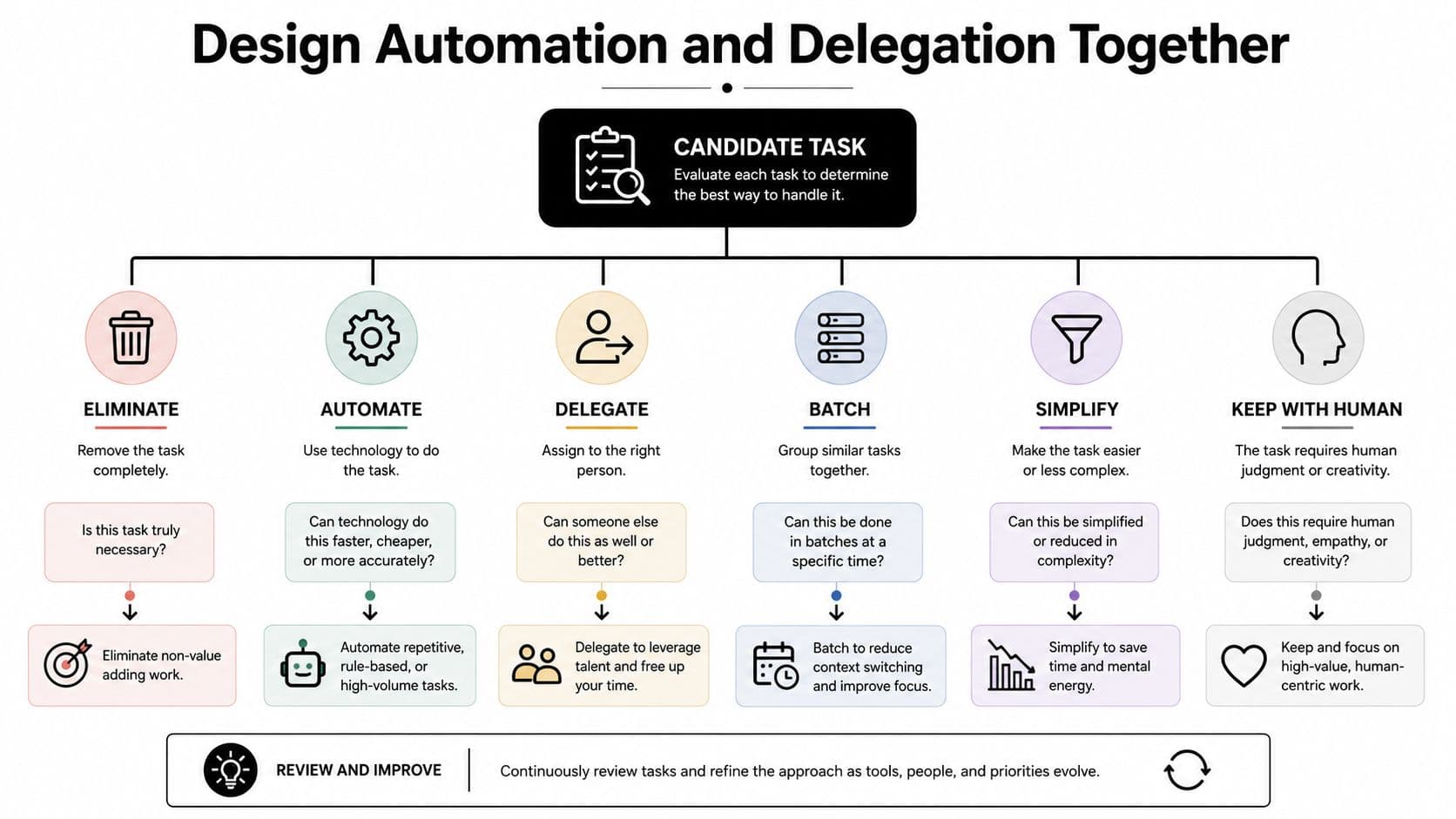
Automation and delegation solve different parts of the same design problem. Treating them as separate initiatives often creates a new mess, because an automated task may still require human review, and a delegated task may still depend on poorly structured inputs.
For every workflow step, ask six questions:
- Can it be eliminated? Remove a report, approval, or update that no longer supports a decision.
- Can it be automated? Use rules for repetitive, predictable, high-volume actions.
- Can it be delegated? Give context-dependent work to someone with the right capacity and a clear brief.
- Can it be batched? Group similar decisions or communications to reduce switching.
- Can it be simplified? Reduce fields, choices, or approval stages.
- Should it stay with a human? Keep work that depends on judgment, trust, sensitive context, or strategic accountability.
Use the right channel for each step
Consider monthly client reporting. Data exports can run automatically. Formatting can follow a reusable template. Distribution can trigger when the report passes review. A virtual assistant can prepare narrative commentary from a structured brief, while the account lead keeps strategic recommendations and client-sensitive interpretation.
That division works because it protects specialized judgment without forcing the principal operator to handle every mechanical action. It also makes accountability clear. The assistant owns preparation, the automation owns routing, and the account lead owns the decision.
The hidden cost is coordination. Every handoff requires an understandable request, usable source material, a due date, and a definition of done. If those elements are missing, delegation creates follow-up messages instead of capacity.
A delegated task isn't off your plate if the recipient has to reconstruct the assignment from scattered conversations.
Write briefs that answer five questions: What outcome is required? What source material should be used? What constraints apply? What does finished look like? When should the work return for review? Keep recurring instructions in one place, and turn common corrections into checklist items.
The operating model should route work instead of relying on memory. Fluidwave combines task organization, priority queues, deep-focus blocks, shared collaboration spaces, and pay-per-task delegation to vetted assistants, so a user can decide which work should be automated, delegated, or retained. Teams evaluating the wider tooling ecosystem may also benefit from a practical guide to platform selection for B2B SaaS marketing, especially when several systems need to share ownership and status.
A workflow is ready for automation when its inputs, rules, exceptions, and completion signal are stable. If people still debate what the task means, simplify and document it first. Automation should remove routing work, not make ambiguity move faster.
A short visual explanation of task routing can help teams align on the distinction between mechanical execution and human judgment:
Adapt Workflows to Different Roles
A workflow that helps an executive can frustrate a freelancer. A detailed team board can overwhelm someone who needs a low-friction capture system. Keep the measurement backbone consistent, but change the defaults around attention, authority, and handoffs.
| Role | Primary Optimization Focus | Default Workflow Habit |
|---|---|---|
| Executive | Decision quality and calendar protection | Review a short priority queue, delegate preparation, and define escalation paths |
| In-house team | Visibility and dependable handoffs | Use shared ownership, explicit status rules, and agreed response expectations |
| Freelancer | Pipeline control and client continuity | Combine delivery tasks, communication, billing, and protected focus blocks |
| Virtual assistant | Brief quality and predictable intake | Require structured requests, source material, deadlines, and review feedback |
| Neurodivergent or ADHD user | Reduced switching and externalized memory | Capture tasks immediately, limit active priorities, and use flexible focus windows |
Executives usually don't need granular visibility into every subtask. They need a reliable filter for what requires personal judgment, what can wait, and what should escalate immediately. Their workflow should protect decision blocks and keep routine preparation away from the calendar.
Teams need shared definitions more than individual productivity tricks. A status such as “in review” should mean the same thing to the writer, manager, designer, and client coordinator. Service expectations should clarify when a request is acknowledged, when blockers are raised, and who makes the final call.
Freelancers need a single-player operating system that doesn't imitate a large corporation. A lightweight pipeline can connect inquiry, proposal, delivery, revision, invoice, and follow-up. The system should show the next action without requiring a separate planning ritual.
Virtual assistants need quality at intake. A vague request produces avoidable questions, while a structured brief lets the assistant work independently and return a usable result. Feedback should improve the next brief, not merely correct the current task.
Neurodivergent professionals and people with ADHD often benefit from fewer context changes, visible working memory, and lower-friction capture. A WHO-linked study reported that workers with ADHD missed an average of 8.4 more workdays per year, experienced 21.7 more days of reduced productivity, and had 13.6 more days of reduced quality or effort, adding up to 22.1 more days out of role (Reuters' report on the WHO-linked study). That evidence supports designing for accessibility and sustainable work, not treating attention differences as a character flaw.
Measure Impact and Fix What Fails
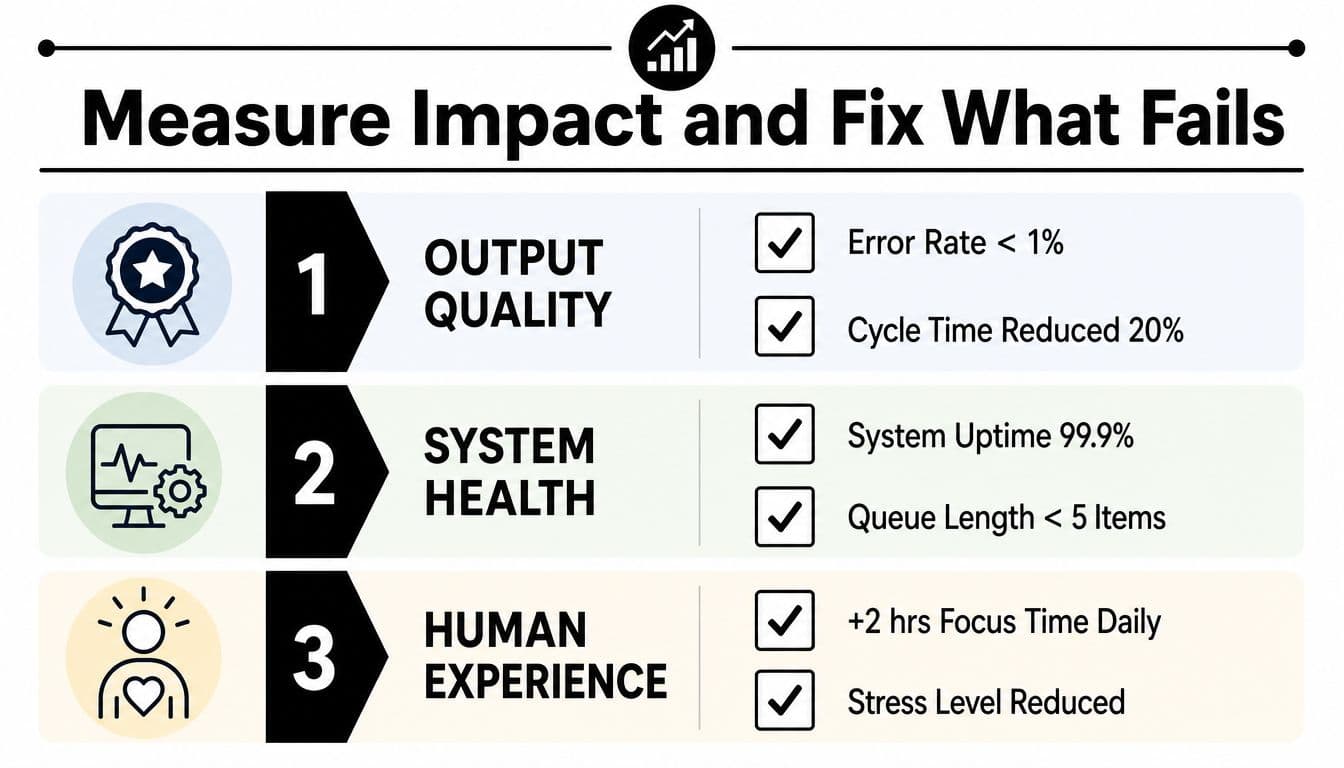
A tidy board can still hide a failing workflow. Measure three layers together: output quality, system health, and human experience.
Track errors, revision cycles, completeness, and stakeholder satisfaction for output quality. For system health, monitor cycle time, throughput, queue depth, and recurring bottlenecks. Human experience includes cognitive load, meeting burden, interruption frequency, and whether people can control their work. A fast process that creates rework or exhausts reviewers has not improved the system.
Run a controlled change
Record the current state before changing the process, using measures connected to the constraint you want to address. Choose one intervention, such as a structured intake form or automatic reminder, then review its effect after a defined period. Changing approval rules, task ownership, reporting format, and meeting cadence together removes the ability to identify the cause.
Efficiency measures need to sit beside quality measures. Latency, wall-clock time, tool calls, and cost per successful outcome can expose a workflow that appears accurate while consuming excessive resources (survey guidance on workflow efficiency metrics).
When results disappoint, test the failure in a practical order:
- Diagnosis error: Did you measure the wrong constraint?
- Design error: Does the new step address the actual cause?
- Rollout error: Did people receive enough context, training, or time?
- Metric error: Did the measure reward local speed while hiding quality or coordination damage?
- Capacity error: Did automation increase incoming work beyond review capacity?
Speed can shift pressure elsewhere. A 2026 study found that faster AI-assisted task execution may increase congestion, rework, and human oversight burden. Reducing a bottleneck can therefore produce a stronger workflow than maximizing raw speed (research on AI workflow congestion and rework). A separate academic evaluation found average execution time falling from 185.35 seconds to 1.23 seconds, an approximately 151-fold speedup, after manual work was replaced with automation (academic workflow automation evaluation). Use that kind of result to examine the whole system, not to justify automation by speed alone.
Keep review steps that protect quality, and repair approval chains before automating them. The right change removes friction while preserving judgment, attention, and coordination.
Build a Continuous Improvement Rhythm
Workflow optimization decays when nobody owns the system. People create shadow spreadsheets, bypass old rules, and keep forgotten automations active because the original process no longer matches the work.
A lightweight rhythm is enough for many teams:
- Weekly quick check: Review one key metric, open blockers, and recurring rework.
- Monthly deep review: Inspect feedback, queue patterns, handoff failures, and unused steps.
- Quarterly reset: Re-align the workflow with current goals, role capacity, and strategic priorities.
Assign a workflow steward. This person doesn't need to approve every task. They maintain the improvement backlog, facilitate reviews, remove stale rules, and ensure that experiments don't consume unlimited attention.
The steward should watch leading indicators such as handoff count, rework rate, and decision latency. Output results matter, but they arrive after the system has already created the problem. Early signals let the team intervene before delays become normal.
Attention needs explicit protection. Limit simultaneous workflow experiments, batch small changes, and keep a visible focus scorecard that shows when deep work is protected. A 2025 workplace study reported that people deviated from their main task every 3.5 minutes on average, with self-initiated interruptions making up nearly 60% of off-task time, and an average of only 6 minutes of focused work in the main working sphere (exploratory workplace attention study). Those findings make attention a workflow input, not a personal afterthought.
Start at the next planning session by naming one bottleneck, recording its current evidence, assigning a steward, and selecting one low-risk change. Review the result, retire what failed, and keep the rhythm small enough that people can sustain it.
Fluidwave brings task organization, AI-assisted prioritization, shared collaboration, focus-friendly work views, and pay-per-task delegation into one operating model for fragmented workflows. Visit Fluidwave to create a task, define its owner and outcome, and decide whether the next step belongs with automation, a virtual assistant, or you.
Focus on What Matters.
Experience lightning-fast task management with AI-powered workflows. Our automation helps busy professionals save 4+ hours weekly.