Struggling with time perception? Discover 8 practical time blindness strategies for ADHD & neurodivergent minds. Boost focus & task management.
July 16, 2026 (2mo ago)
Time Blindness Strategies: Improve Focus & Planning
Struggling with time perception? Discover 8 practical time blindness strategies for ADHD & neurodivergent minds. Boost focus & task management.
← Back to blog
You sit down to finish one small task before lunch. A message pulls you sideways. A tab you opened to check one detail turns into three. Then the clock snaps back into focus and the day is already slipping. Lunch is gone, the meeting starts soon, and the work that felt close to done is still scattered across half-finished steps.
That pattern is common with time blindness. For many neurodivergent people, especially people with ADHD, the problem is not motivation or carelessness. It is difficulty sensing the passage of time, estimating how long work will take, and holding future commitments in mind strongly enough to act on them at the right moment.
The practical fix is external structure. Time has to live somewhere outside your head, in calendars, reminders, visible task sequences, review habits, and clear handoff points. A good system does more than help you remember. It reduces decision load, catches drift earlier, and makes the day visible before it gets away from you.
That is the standard most advice misses. A list of tips is not enough if those tips never become a working setup. The strategies in this guide are meant to connect. You will see how to place work on a calendar, route reminders through a task platform, track what takes time, and build delegation into the workflow so your day is not clogged with tasks that should not stay on your plate. If you use a tool like Fluidwave, that matters even more, because strategy only helps once it has a home. Start with a time blocking system designed for ADHD brains, then layer the rest around it.
No one becomes perfectly time-aware. The goal is smaller and more useful. Build a system that catches you sooner, recovers faster, and makes follow-through easier on hard days.
1. Time Blocking with Visual Calendars
A plain to do list is too vague for a time-blind brain. “Write proposal” can sit there all day because it doesn't occupy real space. A calendar block forces the task to become visible, finite, and scheduled.
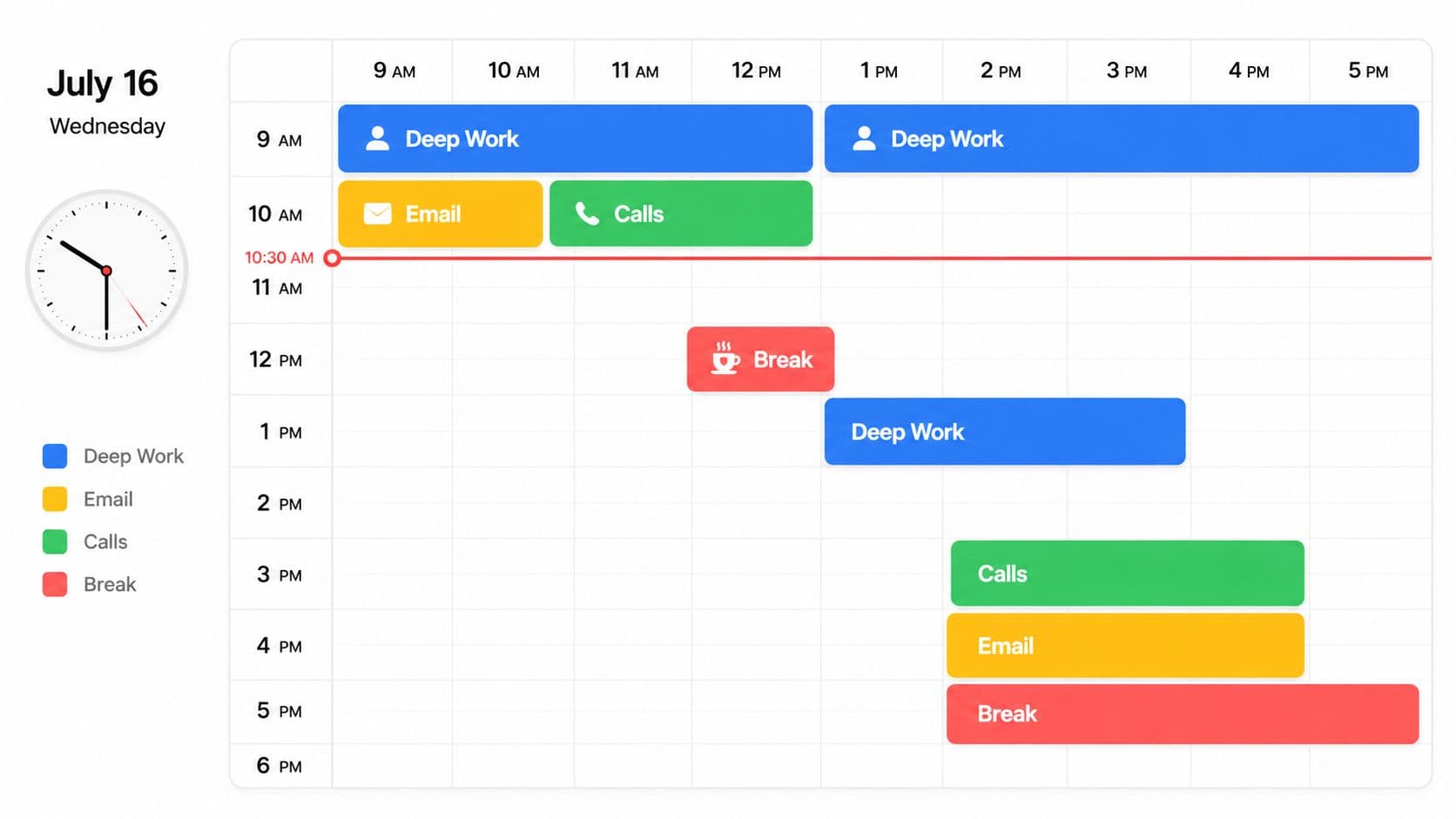
A marketing executive might block 9 to 11 for campaign strategy, 11 to 12 for email, 1 to 2 for client calls, and late afternoon for review work. A freelancer can do the same inside Fluidwave's calendar view, then reserve a separate block for delegation review so admin tasks don't bleed into writing time. A founder might protect Monday mornings for team meetings and Friday afternoons for one-on-ones, instead of letting meetings scatter across the week.
Make the day visible
This method works because the calendar becomes the clock your brain can see. CHADD recommends a time estimation multiplier of 2.0x to 3.0x in workplace settings, so a task you think will take 30 minutes should often be scheduled for 60 to 90 minutes. That sounds excessive until you live through one underestimated block collapsing the rest of the day.
Practical rule: Block the task, then block the recovery time around it.
If you want a more structured version of this setup, Fluidwave's guide to time blocking for ADHD is a useful model because it pairs calendar blocks with task visibility instead of keeping them in separate systems.
A few details matter more than people think:
- Start with only key blocks: Put your highest-value work on the calendar first. Fill in the rest later.
- Use color by category: Deep work, meetings, admin, and personal tasks should look different at a glance.
- Schedule by energy, not intention: Put cognitively heavy work where your focus is usually strongest, not where you wish it were.
- Review the week realistically: If your 90-minute writing block always becomes 2 hours, your calendar should admit that.
Later in the day, visual reinforcement helps again.
2. External Reminders and Alarm Systems
A reminder system shouldn't only warn you when you're already late. It should keep pulling you back into awareness before drift turns into a missed deadline.
That's a common mistake. They set one alarm for a meeting, swipe it away, and assume motivation will handle the rest. It usually won't. Time blindness needs repeated contact with reality.
Use layered prompts, not one heroic alarm
A better setup uses start reminders, transition reminders, and deadline reminders. An executive with back-to-back meetings might use one alert before prep time, another shortly before the meeting, and a final one at the transition point. A remote team can use Fluidwave notifications to flag when delegated work needs review so nobody discovers a deadline at the last second.
The reminder itself should tell you what action to take. “Meeting soon” is weak. “Stop current task and open agenda” is much better.
A reminder isn't useful if it only informs you. It needs to trigger the next behavior.
Try a structure like this:
- Start alerts: Set reminders before the task begins so you can shift, gather materials, or wrap up what you're doing.
- Transition alerts: Use a distinct sound for “stop now” moments, not the same tone you use for every notification.
- Recurring anchors: Add fixed reminders for repeat actions like lunch, email review, or end-of-day planning.
- Visible pairing: Put a desk timer or phone countdown where you can see it, not just hear it.
I've seen people resist this because it feels childish or overly controlled. In practice, it's the opposite. Once the reminders are working, you stop spending so much mental energy trying to hold the whole day in your head. That frees up attention for the work itself.
3. Task Delegation and Time Auditing
One of the most practical time blindness strategies has nothing to do with clocks. It's reducing how many moving parts you personally have to manage.
If every inbox check, scheduling task, follow-up, receipt, and project update sits on your plate, your day becomes impossible to estimate. Time blindness gets worse when volume gets messy. Delegation doesn't just save time. It removes low-value decisions that distort your sense of the day.
Audit first, then delegate
Start with a time audit for one normal workweek. Don't make it fancy. Just notice what keeps stealing your focus, what repeats, and what drains time without requiring your expertise. Entrepreneurs often discover that email triage, scheduling, document cleanup, and routine reporting consume attention that should go to sales, strategy, or delivery.
Once you know the pattern, delegation gets easier. Fluidwave is useful here because you can assign work, see status clearly, and build a review rhythm instead of chasing updates manually. If you're building that muscle, this guide on how to delegate is the right starting point.
A founder might delegate calendar coordination and reporting prep. A freelancer might hand off invoicing and follow-ups. A project manager might route repetitive admin to support staff so meetings and decisions get proper attention.
What works and what backfires
Delegation only works when the handoff is concrete.
- Delegate repeatable work first: Scheduling, data entry, follow-ups, and file organization are easier to transfer than vague strategic tasks.
- Document the finish line: “Help with onboarding” is unclear. “Send welcome pack, schedule kickoff, confirm account access” is usable.
- Batch similar tasks: Handing off all scheduling together is cleaner than sending scattered requests all day.
- Keep a review checkpoint: You still need a time to verify quality and unblock issues.
What doesn't work is delegating randomly because you're overwhelmed. That creates more confusion, not less. Good delegation reduces cognitive load because the workflow is visible, owned, and checked at known times.
4. Body Doubling and Accountability Partnerships
Some tasks don't need more software. They need another human in the room.
Body doubling works because another person provides structure your nervous system can borrow. You're not relying only on internal momentum. You're working in a social frame where starting, staying with the task, and ending on time all become easier.
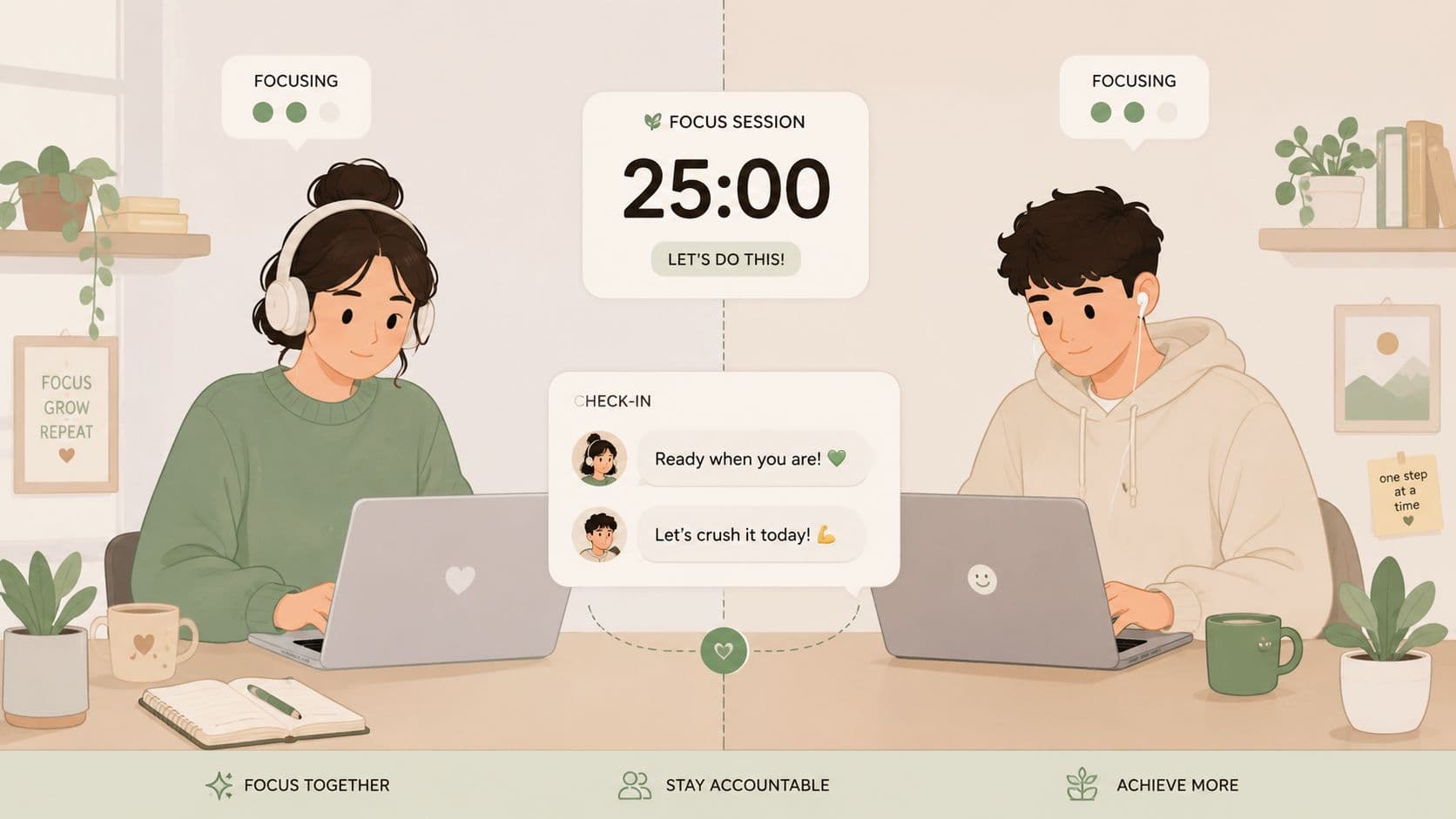
A freelancer might join a virtual coworking room for a 45-minute sprint. An entrepreneur might meet with a coach twice a week and work through a preselected list while sharing progress. A team can create a light version of body doubling by using shared task visibility in Fluidwave during focused work blocks.
Borrow the structure of another person
The key is specificity. “Let's both work this afternoon” is too loose. “We start at 10, state our target, and check in at 10:45” works much better.
Work alongside someone who understands time blindness. Shame makes the system weaker.
Useful patterns include:
- Short sessions first: Start with brief work rounds before attempting long deep-work blocks.
- Avoid performance theater: Your partner isn't there to watch you struggle. They're there to help hold the frame.
- Use it for friction tasks: Admin, planning, outreach, and overdue tasks often improve fastest with accountability.
- Put the session on the calendar: If it lives as a vague intention, it usually disappears.
Body doubling won't solve bad planning on its own. But when someone can help you begin, notice transitions, and close the task cleanly, it often turns a stuck day into a workable one.
5. The Two-List System with Priority Sequencing
A long task list creates fake productivity. You capture everything, feel briefly organized, then freeze because nothing on the list tells you what matters now.
The two-list system fixes that. You keep one master list for everything, then a smaller today list for the few items that deserve your attention. Busy professionals often fight this idea because they're afraid of ignoring important work. In reality, the giant undifferentiated list is what causes important work to disappear.
Separate storage from action
A knowledge worker might keep every incoming request in Fluidwave, but only move a small set onto today's list: write proposal, attend client call, review team reports, respond to the one urgent email thread. A founder might limit the day to one strategic meeting, one hiring decision, and one investor update, while lower-value admin gets scheduled later or delegated.
This strategy gets stronger when you sequence the list. If five tasks are all “top priority,” none of them are. The question is simple: what comes first, what comes second, and what can wait?
A reliable setup looks like this:
- Everything list: Capture all tasks, ideas, asks, and follow-ups in one trusted place.
- Today list: Pull only a small number of real priorities into active view.
- Sequence by importance or dependency: Do the task that enables the next one, not the easiest one.
- Replenish only after completion: If you finish early, pull from the master list intentionally instead of flooding the day.
Why this works better than motivation hacks
The smaller list lowers friction at the exact moment time blindness tends to create drift. You don't waste half an hour deciding where to start. You also get better at estimating because you're planning a real day, not fantasizing about an ideal one.
The trade-off is emotional. You have to accept that not everything gets today-status. That discomfort is part of the method. Constraint is what makes the plan usable.
6. Transition Timers and Structured Breaks
Time blindness often shows up at transitions. Starting is hard. Stopping is hard. Shifting from one task to another can eat far more time than the task itself.
That's why timers work best when they support transitions, not just focus. The point isn't to force yourself into a rigid productivity ritual. The point is to create an external cue that tells your brain, “This part is ending. The next part begins now.”
Build breaks into the work, not after it
Some people do well with 25-minute rounds. Others hate them and work better in 50-minute or 90-minute blocks. There's no moral value in any one interval. What matters is that the timer gives shape to the work and protects the shift out of it.
Refresh Psychiatry recommends adding a 50% buffer to standard task estimates, so a task you think needs 20 minutes should be scheduled for 30 minutes. That extra room matters most at the edges, where transition costs tend to hide.
A writer might use long focused blocks with a visible Time Timer, then take a real walk between sessions. A developer might do 50 minutes of coding and 10 minutes of inbox cleanup or movement. A team can run shared work sessions with one visible countdown so everyone breaks together instead of drifting.
The break has to be a break
Use your pauses well:
- Step away physically: Stand up, refill water, stretch, or go outside for a minute.
- Avoid fake breaks: Scrolling social media often keeps your brain activated without resetting it.
- Match the interval to the task: Creative or analytical work usually needs longer windows than admin.
- Log completed rounds: Marking intervals inside Fluidwave creates a visible work record, which helps when the day feels slippery.
A timer that interrupts productive flow too often becomes noise. A timer that never asks you to surface becomes irrelevant. The sweet spot is a rhythm you can respect without resenting.
7. Visual Progress Tracking and Milestone Breaks
Many people with time blindness don't just lose track of time. They lose track of progress. A project can be moving, but if the movement isn't visible, it still feels vague, unfinished, and endless.
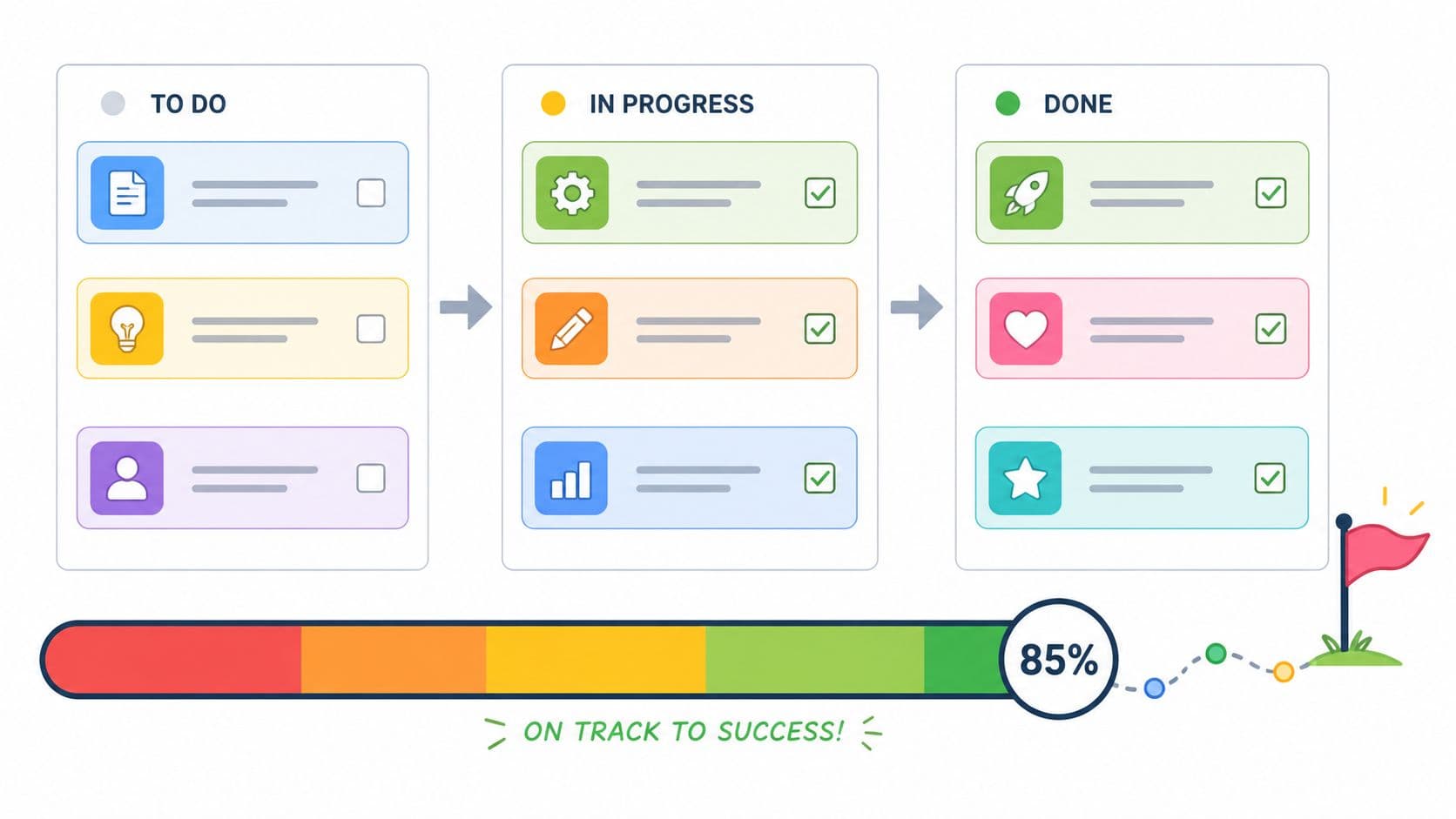
That's why visual tracking matters. A board, checklist, or milestone view gives you proof that effort is accumulating. It turns “I've been working all week and have nothing to show for it” into visible stages you can point to.
Break the project where momentum can be seen
A content creator might use a Kanban board in Fluidwave with columns for outline, drafting, editing, and published. A freelancer might turn one client project into visible checkpoints like intake, concept, first draft, revision, and delivery. A team might track handoffs in a table or board view so everyone can see where work is stuck.
UCI Health notes that recent clinical guidance emphasizes breaking tasks into 3 to 6 micro-steps with defined finish lines and estimated times per step to help calibrate ADHD time perception. That advice is more useful than generic “break it down” tips because it tells you where the line should be drawn. Each step needs a clear done-state.
Small milestones aren't busywork if they make completion visible.
A few rules keep this system useful:
- Use milestones that are concrete: “Research done” is fuzzy. “Three sources gathered and notes saved” is clearer.
- Update daily: Stale boards stop helping fast.
- Choose a visual style you'll refer to: Kanban works well for flow. Checklists work well for sequential tasks.
- Notice completion on purpose: Screenshot it, check it off, or tell your accountability partner.
What doesn't help is over-fragmenting a project into tiny administrative crumbs. If the board becomes more work than the work, simplify it.
8. Time Estimation Practice with Historical Data
You block 45 minutes for a task that looked simple on Monday morning. It is still open two hours later, your next block is blown up, and now the whole day feels like a recovery exercise. That pattern usually is not a motivation problem. It is an estimation problem.
People with time blindness often plan from intention instead of evidence. The fix is to build estimates from completed work, then use those estimates inside the same system where you schedule, sequence, and delegate tasks.
Use completed work to set future time budgets
A marketer may learn that writing a proposal takes far longer than expected, while client calls stay relatively stable. A freelancer may find that invoicing itself is quick, but finding the right files, switching tabs, and restarting focus adds another 20 minutes. A team may notice that approvals look short on paper but stretch across a day because each handoff creates waiting time.
SpunOut suggests starting by doubling your first estimate when time blindness regularly leads to underestimation. That rule is blunt, but it helps while you collect your own numbers. After a few weeks, your own history gives you a better baseline than any generic advice.
Fluidwave helps because the estimate, actual time, status, owner, and due date can live in one place. That matters in practice. Once historical data sits beside your task list, you can stop treating time blocking as a guess and start treating it as capacity planning. If you want a tighter method, Fluidwave's guide to project timeline estimation with real task data lays out the mechanics.
Track enough to improve, not enough to avoid the system
This method fails when it turns into bookkeeping.
Start with three to five task types you repeatedly misjudge. Log the estimated time before you begin. Log actual time right after you finish, while the details are still fresh. Include setup, admin, and switching costs if they are part of how the work gets done.
Then review patterns, not one-off mistakes.
If writing newsletters usually takes 90 minutes instead of 45, change the default estimate. If meeting prep keeps spilling because slides, context gathering, and follow-up all count, split that work into separate blocks or hand part of it off. If a recurring task is predictable but still hard to start, keep the estimate and improve the trigger. Historical data should change the system around the task, not just the number beside it.
A simple review framework helps:
- Compare estimate vs. actual by task type: Look for repeat gaps, not bad days.
- Flag work with hidden overhead: Prep, switching, and follow-up often distort the total.
- Separate solo work from collaborative work: Waiting on replies and approvals changes the timeline.
- Mark tasks that should be delegated: If low-value admin work keeps consuming more time than expected, document it and move it off your plate.
- Update default durations in your planner: Your calendar should reflect reality, not hope.
That last point matters more than people expect. Historical tracking is useful only if it changes your weekly plan. The win is not better data. The win is fewer overloaded days, cleaner time blocks, and better decisions about what you should do yourself versus what should be automated, templated, or delegated.
Time Blindness: 8-Strategy Comparison
| Strategy | 🔄 Implementation complexity | ⚡ Resource requirements | 📊 Expected outcomes | 💡 Ideal use cases | ⭐ Key advantages |
|---|---|---|---|---|---|
| Time Blocking with Visual Calendars | Moderate setup and weekly refinement; requires planning habit 🔄 | Calendar app + initial planning time; color-coding tools ⚡ | Better schedule adherence; fewer task switches 📊⭐⭐⭐ | People needing external structure, deep-work scheduling 💡 | Creates concrete time boundaries; reduces decision fatigue ⭐ |
| External Reminders and Alarm Systems | Low to set up; requires tuning to avoid fatigue 🔄 | Phone/apps/alarms; minimal ongoing effort ⚡ | Increased moment-to-moment awareness; fewer missed events 📊⭐⭐ | Hyperfocus interruption, beginners building time cues 💡 | Automated prompts; low cognitive load; runs passively ⭐ |
| Task Delegation and Time Auditing | High, audit, onboarding, and oversight needed 🔄 | Paid assistants/platforms + time to document processes ⚡ | Reduced cognitive load; more capacity for high-value work 📊⭐⭐⭐ | Busy professionals with high task volume or low bandwidth 💡 | Frees time for priority work; improves ROI on time spent ⭐ |
| Body Doubling and Accountability Partnerships | Moderate, coordination and scheduling required 🔄 | People or communities; shared sessions/tools ⚡ | Improved focus and social accountability; clearer time sense 📊⭐⭐ | Tasks needing motivation or social pressure (e.g., writing) 💡 | External time reference; motivates through social presence ⭐ |
| The Two-List System with Priority Sequencing | Low, simple routine but needs daily discipline 🔄 | Task list or app + few minutes daily planning ⚡ | Clear next actions; reduced decision fatigue; steady progress 📊⭐⭐⭐ | Overwhelmed lists, knowledge workers, daily prioritization 💡 | Limits scope to top priorities; improves throughput ⭐ |
| Transition Timers and Structured Breaks | Low, easy tools, habit formation required 🔄 | Timer app/device; visible countdowns ⚡ | Prevents hyperfocus burnout; sustained energy and rhythm 📊⭐⭐⭐ | Deep work with risk of losing track of time; creatives 💡 | Enforces transitions and breaks; makes time audible/visible ⭐ |
| Visual Progress Tracking and Milestone Breaks | Moderate, initial project breakdown and upkeep 🔄 | PM tools (Kanban/progress bars); regular updates ⚡ | Tangible sense of progress; better pacing and motivation 📊⭐⭐ | Project-based work and multi-step deliverables 💡 | Makes incremental progress visible; improves estimation over time ⭐ |
| Time Estimation Practice with Historical Data | Moderate–high, consistent tracking and review needed 🔄 | Time-tracking tools + analysis time; discipline to log entries ⚡ | More accurate future estimates; data-driven planning 📊⭐⭐⭐ | Roles requiring realistic scheduling and capacity planning 💡 | Reveals true task durations; informs scheduling and delegation ⭐ |
From Strategies to a System: Building Your Time-Aware Workflow
You block two hours for focused work, then spend the first 30 minutes answering messages, the next 20 hunting for the right file, and the final hour reacting to whatever feels hottest. By noon, the calendar says you worked on the right thing. Your actual output says otherwise.
That gap is where people get stuck. Individual tactics can help, but time blindness usually improves when those tactics are connected into a workflow that makes time visible, protects attention, and reduces avoidable switching.
A practical setup starts with two anchors. Put work on a visual calendar so tasks live in real time, not in vague intention. Pair that with a short daily list that names the few items that deserve today's capacity. The calendar answers when. The list answers what. Reminders, alarms, and transition cues handle the handoff between one block and the next so the system does not rely on memory, motivation, or guesswork.
Delegation belongs in that workflow from the start. I see people treat it as a last resort, then wonder why their plan keeps collapsing under admin work, follow-ups, and repeatable tasks. If low-value work still demands tracking, context switching, and completion, it consumes the same limited attention as meaningful work. A time-aware system gets stronger when it includes a regular audit of what should be automated, handed off, deferred, or removed.
That is also why the tool choice matters. Fluidwave supports this setup in one place. You can time block on a calendar, keep a focused Today view, track multi-step work on boards, assign repeatable tasks, and review progress without rebuilding your process across five different apps. For someone with time blindness, fewer handoffs between tools often means fewer dropped tasks and fewer false starts.
The stakes are real. As noted earlier, time blindness can show up as missed deadlines, schedule drift, and chronic underestimation of how long work will take. Telling someone to "be more disciplined" does not solve a visibility problem. External structure does.
Keep the structure light enough to survive a bad week.
Overbuilt systems fail fast. Color-coded dashboards, layered reminder stacks, and complicated rules can look organized while adding maintenance you will not keep up with under stress. A better standard is simple and repeatable: if the system takes too much energy to run, strip it down until you will still use it on an overloaded Tuesday.
Start with the point of failure that hurts you most. If hours disappear, begin with calendar blocking and visible timers. If priorities blur together, use a short daily list with clear sequencing. If support work keeps swallowing your week, audit and delegate it first. Once one layer is stable, add the next.
You do not need a better internal clock. You need a workflow that shows where time goes, what matters now, and what should leave your plate.
If you want one place to build that external structure, Fluidwave is a practical option. It brings together task capture, calendar planning, visual boards, notifications, collaboration, and delegation with virtual assistants, so you can turn these time blindness strategies into a workflow you'll use.
Focus on What Matters.
Experience lightning-fast task management with AI-powered workflows. Our automation helps busy professionals save 4+ hours weekly.