Unlock effective team capacity planning. Prevent burnout, meet deadlines with our 2026 guide, offering frameworks, metrics, and tools for balanced workloads.
June 15, 2026 (3mo ago)
Team Capacity Planning: Prevent Burnout, Hit Deadlines
Unlock effective team capacity planning. Prevent burnout, meet deadlines with our 2026 guide, offering frameworks, metrics, and tools for balanced workloads.
← Back to blog
A widely cited 2026 benchmark found that 86% of organizations now do capacity forecasting either regularly or occasionally, up from 81% in 2025, while only 6% say their forecasting capabilities are poor, according to this capacity planning benchmark. That should be reassuring. Instead, for a lot of teams, it's a warning.
Most companies now know they should plan capacity. Plenty still overload good people, mistake motion for progress, and commit to deadlines before checking whether the hours, focus, and skills are there. The result is familiar: a team that looks busy all day and still feels behind by Friday.
The problem usually isn't laziness or weak management. It's that many teams still run on optimistic assumptions. They plan from wishful headcount, not real availability. They track tasks, but not drag. They approve work, but don't account for the cost of interruptions, handoffs, meetings, and surprise requests.
Good team capacity planning fixes that. It gives you a way to compare incoming demand against actual delivery ability before you promise anything. It also changes the conversation. Instead of asking people to “push a bit harder,” you start asking better questions: What can this team realistically absorb? What has to wait? What should be delegated, automated, or dropped?
That shift matters for output, but it matters even more for sustainability. If burnout is already showing up in your team, practical ways to prevent employee burnout usually start with workload design, not motivation speeches.
The End of Overbooked and Overwhelmed Teams
Teams don't break because one project went sideways. They break because overload becomes normal.
You can see it in the small habits. People stop taking clean lunch breaks. Managers start using “quick favor” language for real work. Calendar gaps disappear. Work spills into evenings, then into weekends, then into planning itself. At that point, the team isn't operating. It's absorbing impact.
The hard truth is that overbooking often looks responsible in the short term. A leader says yes to a customer, keeps a launch moving, or protects a revenue target. But if that decision ignores available capacity, the team pays for it later in defects, rework, missed handoffs, and resentment.
Why this has become a management issue
Capacity planning used to be treated like a scheduling detail. It isn't anymore. It's a management discipline because modern teams do more invisible work than most plans acknowledge. Coordination, reviews, internal approvals, tool upkeep, status updates, and context switching all consume real effort.
Teams rarely fail because no one worked hard enough. They fail because leaders committed work against time that didn't exist.
That's why strong team capacity planning starts with realism. Not ideal conditions. Not best-case throughput. Real calendars, real interruptions, real people, and real trade-offs.
What changes when you use a system
When a team has no capacity system, every new request feels urgent and every deadline feels negotiable until suddenly it isn't. Priorities get declared, then replaced, then revived. Work starts faster than it finishes.
A functioning system changes the sequence:
- Work gets evaluated before it's accepted. That stops quiet overload.
- Managers see constraints early. That creates options while options still exist.
- Teams get fewer fake emergencies. Many “urgent” problems are just delayed planning.
That's the end state worth aiming for. Not perfect utilization. Not a color-coded spreadsheet nobody trusts. A team that knows what it can take on, what it can't, and what has to move for the plan to stay honest.
What Team Capacity Planning Really Means
Think of team capacity planning like a household budget for time.
A family can't spend against gross income and ignore rent, groceries, taxes, and utility bills. A team can't plan against nominal work hours and ignore meetings, leave, support work, and collaboration overhead. The budget only works when it's based on what's available after the fixed costs come out.
That's the most useful definition I know. Team capacity planning is the practice of matching incoming work to the time, focus, and skills your team can realistically use to deliver it.

The three parts that matter
At a practical level, team capacity planning comes down to three things.
| Part | What it means in practice | What goes wrong when it's missing |
|---|---|---|
| True availability | Knowing who is actually available to do delivery work | You plan against calendars that were never open |
| Demand forecast | Knowing what work is likely to hit the team and when | Everything arrives as a surprise |
| Decision rules | Knowing how you'll respond when demand exceeds capacity | You say yes first and negotiate damage later |
A lot of teams only do the middle part. They estimate project demand. That's useful, but incomplete. If you don't also know availability and decision rules, estimation just gives you a cleaner version of the same overload.
This is not micromanagement
Bad capacity planning tries to squeeze every hour out of people. Good capacity planning protects attention.
That distinction matters. A manager who treats every open slot as assignable time creates constant task-switching. A manager who treats focus as a limited resource creates better sequencing, fewer half-finished items, and calmer delivery.
If you work with product, engineering, or cross-functional delivery teams, it helps to pair scheduling discipline with a broader view of how teams operate. This guide on understanding software team dynamics is useful because it gets beyond the org chart and into the nature of coordination, dependencies, and human limits.
Practical rule: If your plan depends on everyone having an interruption-free week, you don't have a plan. You have a fantasy.
What the best plans protect
The strongest capacity plans don't maximize busyness. They protect four things:
- Focus blocks so deep work can happen without constant interruption
- Slack so surprise work doesn't wreck the week
- Skill fit so the right people handle the right tasks
- Choice points so leaders can defer, delegate, or descale work instead of pushing everything through
That's why capacity planning isn't administrative overhead. It's a control system for sustainable delivery.
A Repeatable Framework for Balancing Your Team's Workload
If your workload planning feels fragile, it's usually because one part of the equation is missing. Teams estimate demand but don't measure real capacity. Or they know capacity but won't make prioritization calls. Or they build a plan once and never touch it again.
The fix is a loop, not a one-time exercise.
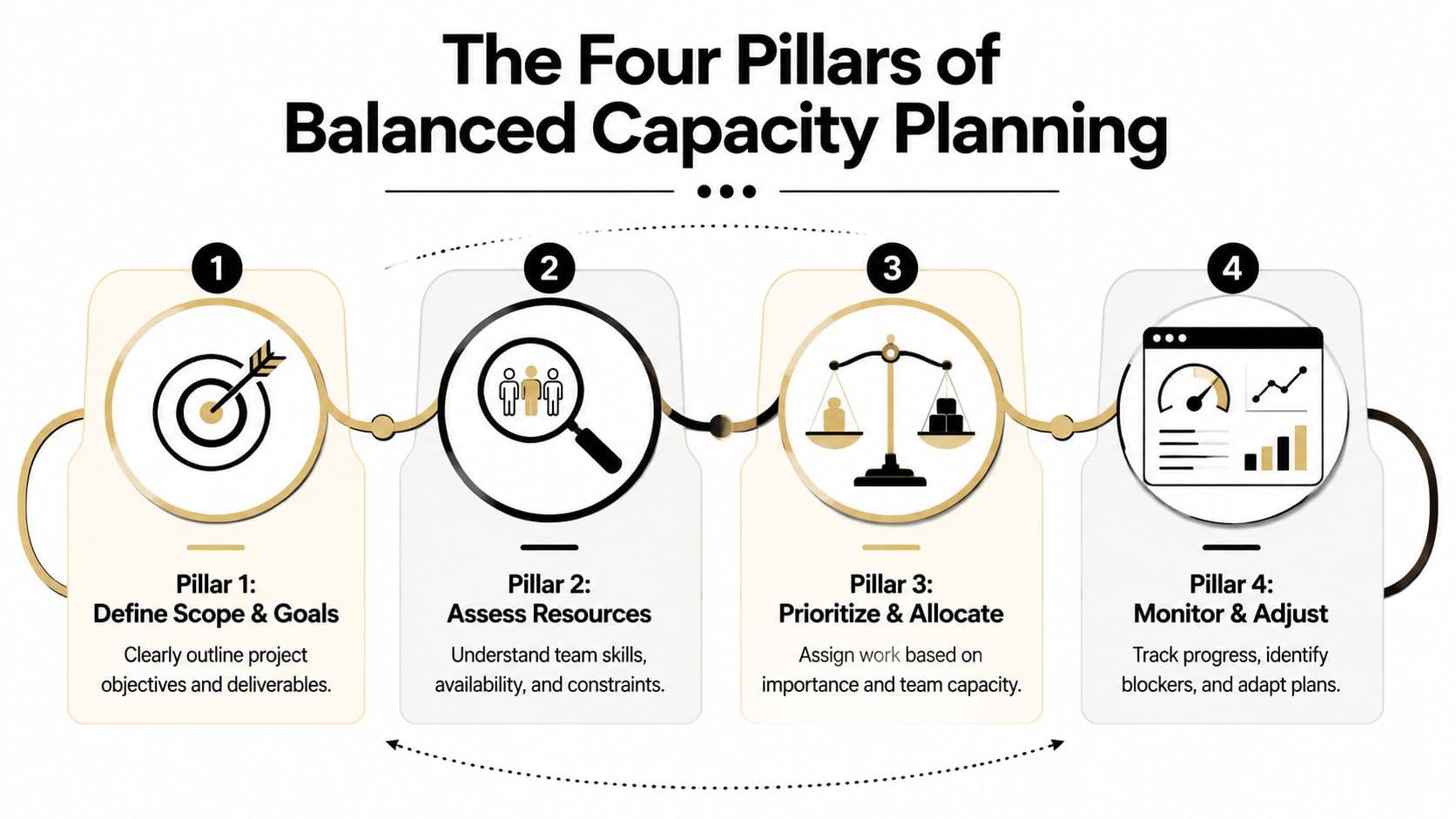
Pillar one measures true capacity
Start with the gross hours available to the team. Then subtract everything that isn't delivery work.
A structured utilization-based approach recommends calculating total available hours as team size × working hours, then subtracting vacation, holidays, training, sick leave, and other non-project time before deciding whether work is feasible, according to this team capacity planning guide. That same guidance also reflects a widely used practice: plan for only 75%–80% utilization rather than 100%, so you keep a buffer for unexpected work.
That buffer is where many plans live or die.
If you skip it, every unplanned task becomes a threat. If you include it, you can absorb support issues, late reviews, urgent fixes, and normal human variability without blowing up the schedule.
What to subtract before you commit
- Planned absences such as vacation, holidays, and sick leave
- Recurring internal work such as standups, one-to-ones, reporting, and admin
- Non-project obligations such as training, hiring loops, support rotation, and documentation
- Skill constraints because available hours only help if the right skills are attached to them
A team with open hours on paper may still be constrained if the work requires a specific capability held by one person.
Pillar two forecasts demand
Demand forecasting doesn't require perfect prediction. It requires a disciplined view of what's coming and how likely it is to land.
I've seen the most planning damage come from teams that treat all incoming work as equal. A signed project, a likely request, an internal initiative, and a vague executive idea do not belong in the same planning bucket.
Use categories that reflect confidence and timing. Keep them visible. Then estimate work in the same units your team already trusts, whether that's hours, tasks, or throughput-based delivery units.
Separate committed work from possible work. The first drives scheduling. The second drives preparation.
When managers collapse those categories together, teams start work too early and lose room for the things that are locked.
Pillar three balances the equation
At this stage, team capacity planning stops being a reporting exercise and becomes management.
When forecast demand exceeds available capacity, one of five things has to happen:
- You defer work
- You reduce scope
- You reassign work
- You add help
- You accept delay
What doesn't work is pretending the mismatch will disappear through effort.
This is also where work-in-progress discipline matters. If your system allows too many active items at once, people spread their attention thin and throughput gets worse. Teams that want a cleaner execution layer should understand how work in progress limits reduce overload by capping active work instead of letting every request start immediately.
A simple decision lens
| If demand is higher than capacity because... | Best response |
|---|---|
| Too much low-value work is active | Pause or stop lower-priority items |
| A few large items are crowding the board | Break work into smaller chunks and sequence it |
| One role is overloaded | Rebalance by skill, not just by hours |
| Urgent work keeps arriving | Protect a buffer and formalize intake |
| The workload is genuinely too large | Renegotiate deadline, scope, or staffing |
Pillar four reviews and adjusts
No capacity plan survives real work untouched. That's normal.
The point of review isn't to prove the original plan was smart. It's to catch drift early. Review planned versus actual effort, where the plan underestimated interruptions, where skill bottlenecks showed up, and which work types consistently create hidden load.
A useful review cadence is lightweight and recurring. Teams don't need another ceremonial meeting. They need a short habit of asking whether the math still matches reality.
The planning loop gets better when you track questions like these:
- Which tasks repeatedly take longer because they involve approvals or handoffs
- Which roles are interrupted most often
- Which commitments were accepted without a capacity check
- Which recurring work items should be automated or delegated next cycle
That's the repeatable system. Measure real capacity. Forecast demand with honest categories. Balance the equation through explicit trade-offs. Review and adjust before the plan becomes fiction.
Common Pitfalls That Derail Capacity Planning
Most failed capacity planning doesn't fail because the math is complicated. It fails because teams build plans around flattering assumptions.
A packed calendar looks productive. A fully assigned team looks efficient. A manager who never says no can look responsive. In practice, those are often the early warning signs.
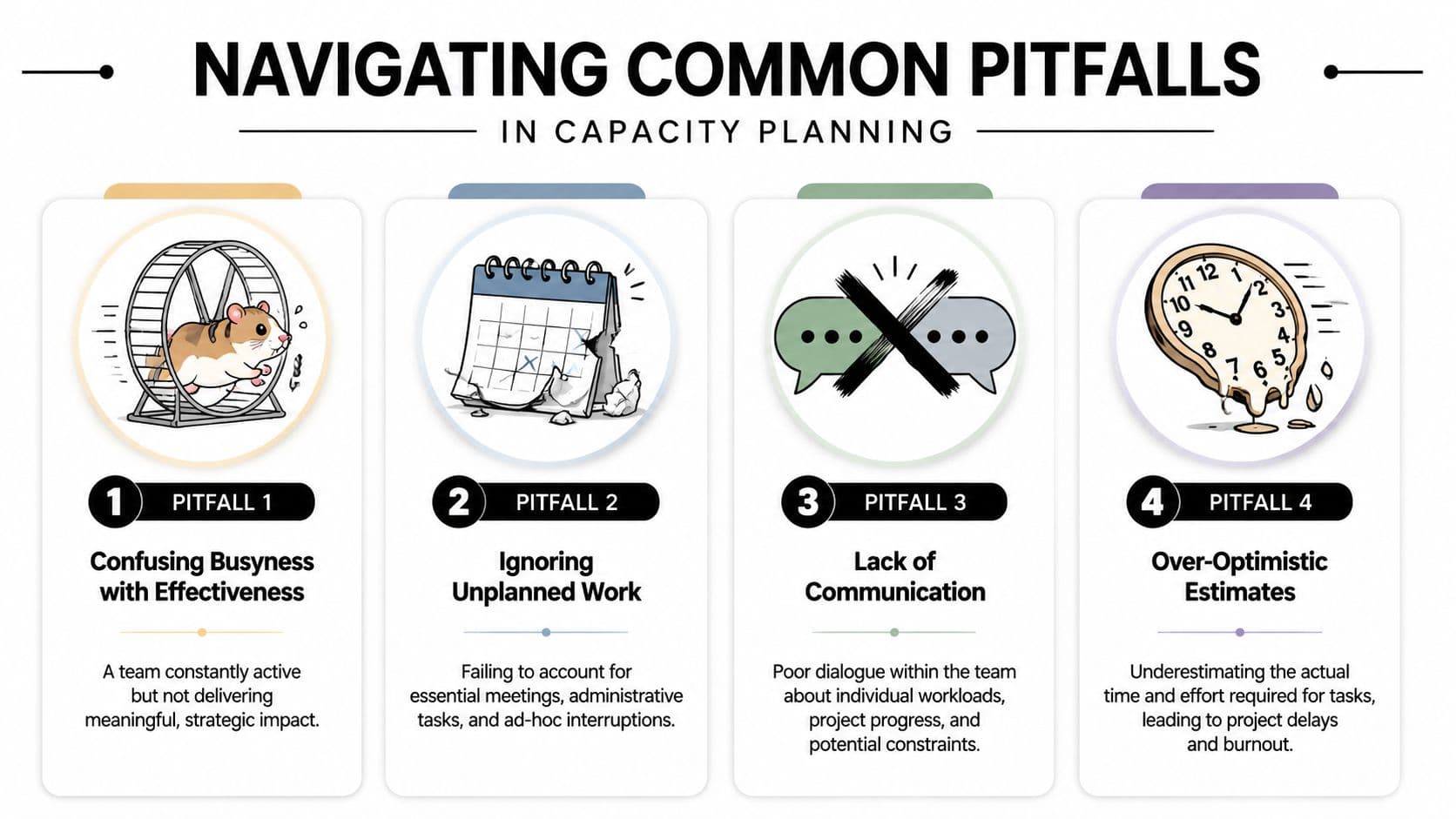
Planning against gross hours
This is the classic mistake. Leaders see available work hours and assume most of them can be used for delivery.
A more robust approach starts from gross capacity, subtracts non-project commitments, and then applies a focus factor for interruptions, context switching, and collaboration overhead. A practical benchmark used by software teams is a 70% to 85% focus factor, according to this capacity planning best-practices guide. One example in that guidance shows 300 gross hours × 0.75 = 225 effective delivery hours.
That gap is where bad planning hides.
What gross-hours planning misses
- Meetings that split the day into unusable fragments
- Context switching between projects, channels, and tools
- Support work that appears randomly but can't be ignored
- Collaboration overhead such as reviews, clarifications, and handoffs
When managers plan against gross hours, they don't create a stretch target. They create a guaranteed miss.
Confusing busyness with effectiveness
A busy team can still be stalled.
You'll see lots of task movement, lots of messages, lots of meetings, and not much finished work. That usually means too many open threads, weak prioritization, or a system that rewards starting over finishing.
Busyness is a visibility metric. Delivery is a completion metric. Don't confuse them.
The sidestep is simple. Track completed work and blocked work separately. If the team looks overloaded but completed work stays flat, stop adding new items and identify what is trapping attention.
Ignoring shadow work
Shadow work is everything necessary that never makes it into the plan. Status checks. Internal handholding. Vendor follow-ups. Approval chasing. “Can you just review this quickly?” requests. It's real work, but because it feels small, people rarely budget for it.
That's why a clean-looking plan can still crush a team.
A better approach is to create recurring placeholders for known overhead and leave room for the unknown kind. Teams that refuse to name shadow work keep rediscovering it every week.
Treating estimates like promises
An estimate is a planning input. It is not a contract with reality.
Teams get into trouble when they freeze an estimate early, then keep using it after scope changes, dependencies shift, or complexity becomes clearer. This creates fake certainty. People become afraid to update the plan because changing the number feels like failure.
Better behavior than estimate worship
| Bad habit | Better move |
|---|---|
| Using the first estimate forever | Re-estimate when scope or assumptions change |
| Punishing misses | Review why the miss happened and update patterns |
| Forcing precision early | Use ranges and confidence levels when work is still fuzzy |
| Equating speed with commitment | Slow down intake so the team can size work properly |
Poor communication around load
A capacity plan can look balanced at the portfolio level while one person is drowning.
That's common when managers assign work by role or function and never ask how the week feels on the ground. One engineer may be carrying hidden review debt. One project manager may be spending most of the day unblocking others. One designer may own every urgent request because they respond quickly.
The sidestep is regular workload conversation. Not performative check-ins. Real discussion about what's heavy, what's fragmented, and what keeps getting reopened.
When those conversations are normal, teams flag overload earlier. When they aren't, the plan remains technically neat and operationally false.
Implementing Your Plan with Modern Tools
A workable capacity plan lives or dies in the tool people already use every day. If the system requires separate tracking, heroic spreadsheet upkeep, or end-of-week memory, it won't stay accurate for long.
Modern task management systems make this easier because they let you see the same workload through different lenses. That matters. Capacity problems often aren't visible in one view alone.
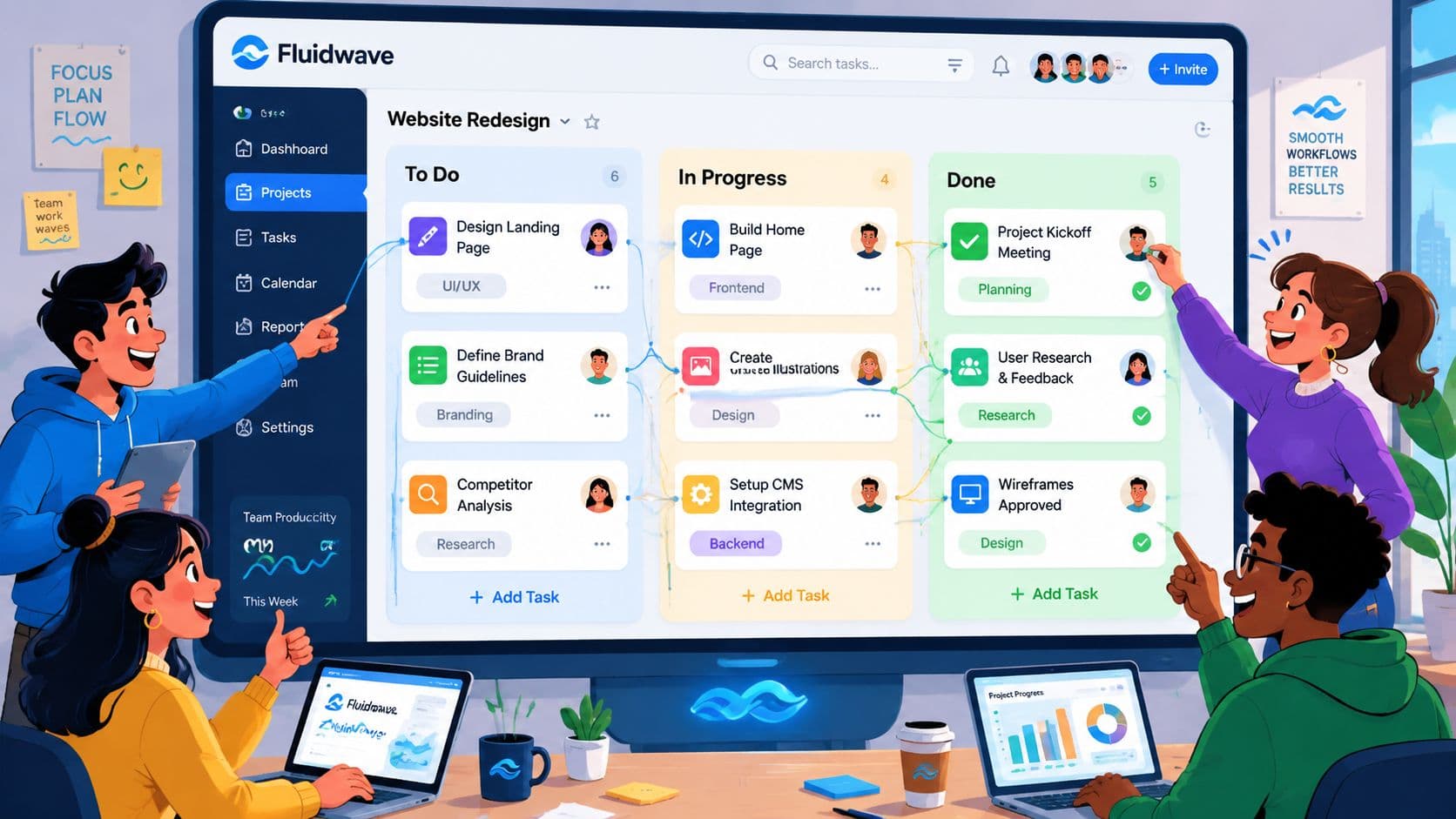
Match the view to the question
Different planning questions need different layouts.
| View | Best use in capacity planning | What it reveals quickly |
|---|---|---|
| Calendar | Time off, deadlines, milestone clustering | Whether the week is even workable |
| Kanban | Active workload and blocked items | Whether too much work is in motion |
| Table | Ownership, due dates, effort notes, budget fields | Where commitments are piling up |
| List | Fast triage and sequence changes | What should happen next |
| Card or detail view | Task-level context and dependencies | Why an item is bigger than it looked |
If you only use one view, you usually miss one category of problem. A Kanban board might show too much in progress but hide a cluster of deadlines. A calendar might show a clean timeline but hide role imbalance.
Automate the parts people hate
Manual updates kill planning accuracy.
The best tool setups reduce the amount of data people have to enter just to keep the plan alive. Status changes should trigger follow-up steps. Repeated admin should become templates. Recurring work should recreate itself. Time-related metadata should update when tasks move states, not because someone remembered to fill out a field after the fact.
That's why teams shopping for systems should look closely at resource management software that combines planning visibility with automation instead of treating them as separate layers.
The more your system depends on perfect human data entry, the less you're doing capacity planning and the more you're doing hope management.
Use delegation as a pressure valve
There's a point where prioritization alone won't solve the load problem. The team is at capacity, the work is legitimate, and the remaining issue is execution bandwidth.
That's where delegation becomes a structural lever, not just a personal productivity trick.
The smartest teams separate work into categories:
- Core work that must stay with internal owners because it requires judgment, context, or accountability
- Supportive work that can be delegated with a clear brief, checklist, or review step
- Repeatable admin that should be automated before anyone touches it manually
This is the practical bridge between planning and execution. If your tool lets you assign, route, template, and monitor delegated work in the same environment as core project tasks, overflow stops being a binary yes-or-no problem.
Build a weekly operating rhythm
Tools work best when the team uses them with a simple cadence.
A useful operating rhythm often looks like this:
- Review capacity at the start of the week using calendar and board views
- Check active work midweek for blocked items and hidden overload
- Close the loop at week's end by comparing planned work with completed work
- Adjust automation and delegation rules when the same friction shows up again
That's what modern implementation should feel like. Less chasing updates. More visible constraints. Faster decisions when demand changes. And a clear path for automation and delegation when the team's core people shouldn't be the ones carrying every task themselves.
Moving Your Team From Reactive to Proactive
Reactive teams run on interruption. Proactive teams run on decisions.
That's the payoff of team capacity planning. Not prettier dashboards. Not tighter status meetings. Better decisions made earlier, while there's still room to change scope, sequence work, protect focus, or get help.
When this shift takes hold, the culture changes with it. People stop earning praise for last-minute heroics and start getting support for clean planning. Managers stop asking who can squeeze in one more task and start asking what should move to protect delivery. Trust improves because the plan starts matching lived experience.
What a proactive team does differently
- Measures real capacity instead of assuming it
- Keeps a buffer instead of booking every hour
- Uses tools to surface constraints, not hide them
- Delegates and automates overflow work before the team burns out
- Treats planning as a rhythm, not an annual event
That doesn't make work easy. It makes work legible.
If you want another perspective on how managers can sharpen planning decisions with better signal and less guesswork, Productivity Radar insights for managers are worth a look.
The teams that stay healthy over time aren't the ones with the fewest requests. They're the ones with the clearest rules for handling them. They know what they can absorb. They know what needs trade-offs. And they don't wait for overload to become visible damage before acting.
If you want a practical way to put these ideas into action, Fluidwave gives teams a clean place to organize work across calendar, Kanban, list, and table views, while also using automation and built-in delegation to handle overflow without adding chaos. It's a strong fit for managers who want capacity planning to become part of daily execution instead of a spreadsheet ritual nobody trusts.
Focus on What Matters.
Experience lightning-fast task management with AI-powered workflows. Our automation helps busy professionals save 4+ hours weekly.