Compare 9 task management methods, including GTD, Kanban, Pomodoro and Eisenhower Matrix, with pros, cons, best-fit scenarios and setup tips.
November 7, 2026 (1d ago)
9 Task Management Methods for 2026: A Practical Guide
Compare 9 task management methods, including GTD, Kanban, Pomodoro and Eisenhower Matrix, with pros, cons, best-fit scenarios and setup tips.
← Back to blog
It's Monday morning. Your inbox has 80 unread emails, a client deadline lands on Thursday, and you still haven't started the report you promised last week. You open your task app, rearrange a few priorities, and answer another message. The report remains untouched.
A new app might make that list look cleaner, but the underlying problem is often a mismatch between the method and the work. Personal admin needs reliable capture. Team delivery needs visible ownership and handoffs. Deep work needs protected attention, not another color-coded priority label.
There's a solid reason to take planning seriously without expecting miracles. A 2021 meta-analysis of time management examined 158 studies and found a moderate positive relationship with workplace performance, approximately r = .25, an association rather than proof that any particular method causes better results.
Choose a method for the problem you need to solve, not for the person you hope a complicated system will turn you into.
These nine task management methods, from David Allen's Getting Things Done to Scrum, handle different problems. Some help you remember commitments; others help you decide, start, or finish. You don't need to adopt them all, and you don't need to rebuild your workflow before testing one.
1. Getting Things Done (GTD)
Best for scattered commitments, personal admin, and multi-project responsibilities. David Allen's Getting Things Done system starts with getting open commitments out of your head and into a trusted external system. Its workflow is capture, clarify, organize, reflect, and engage.
The useful distinction is between a project and its next action. Preparing a budget is a project; emailing Priya for the revised supplier costs is an action you can take. An executive balancing hiring, contracts, and household responsibilities needs both levels, not a flat list mixing them together.
A study of Finnish government knowledge workers found that fewer than half regularly captured all tasks in one place. That makes consistent capture a sensible starting point before adding elaborate categories.
Keep the system smaller than the workload
Use a straightforward structure:
- Inbox: Capture incoming commitments without sorting them immediately.
- Next actions: Store concrete, available actions, written with verbs.
- Waiting for: Track requests and delegated work that need follow-up.
- Projects: Keep outcomes that require multiple actions separate from individual tasks.
GTD breaks down when capture becomes collecting. If you never clarify the inbox or review projects, you've built another place to lose work. It also doesn't automatically tell you which meaningful task deserves your best attention.
For software work, contexts such as @review or @meetings can help, but only if they change what you choose to do.
Setup tip: Start with a single inbox, process it daily, and book a 30-minute weekly review. During the first review, give every active project a concrete next action and remove categories you haven't used.
2. Eisenhower Matrix
Being needed immediately doesn't make a task important. The Eisenhower Matrix separates urgency from importance so managers, founders, and freelancers can stop treating every incoming request as equally deserving.
The framework is named after Dwight D. Eisenhower and was popularized by Stephen Covey. Its practical value lies in the decisions attached to each quadrant, not the act of drawing boxes.
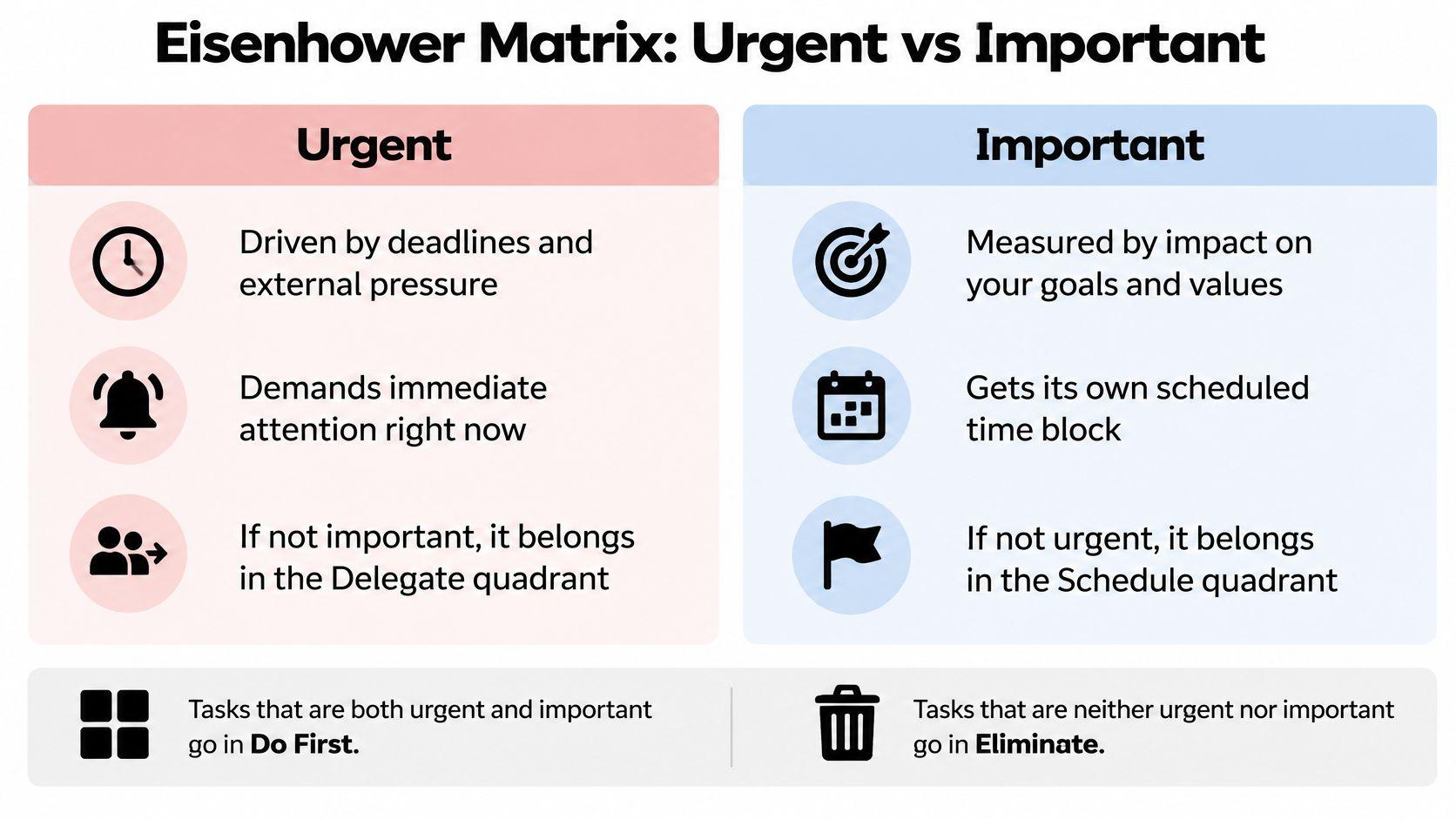
- Do first: Urgent, important work with meaningful consequences.
- Schedule: Important work that doesn't yet have deadline pressure.
- Delegate: Time-sensitive work someone else can responsibly handle.
- Eliminate: Work that merits neither immediate attention nor future capacity.
Say a freelancer has a client correction due today, a proposal for a valuable prospect, and a request to reformat archived documents. The correction needs action, the proposal needs calendar space, and the formatting needs a delegation or deletion decision.
Define importance before sorting
Use a sentence such as advancing a committed business goal or protecting an essential obligation. Without a shared definition, a team's matrix becomes a negotiation over whose request sounds most urgent.
Good planning and prioritizing connects those choices to available capacity. If urgency and importance don't distinguish your work clearly enough, find the right prioritization method for the decisions you face.
The limitation is execution: a scheduled quadrant isn't a calendar appointment, and delegation isn't complete until someone accepts ownership.
Setup tip: Sort your current list, limit Do First to three items per day, and move important, nonurgent work directly onto your calendar.
3. Pomodoro Technique
Best for starting bounded tasks when attention keeps drifting. Francesco Cirillo's Pomodoro Technique uses a timer to create a clear commitment: work on a defined task until the interval ends, then take a break.
The traditional pattern is 25 minutes of work, followed by about five minutes of rest. After four pomodoros, take a longer 15-to-30-minute break. Cirillo named the method after the tomato-shaped kitchen timer he used as a student.

For a writer, a useful interval might cover drafting a report's opening argument, not working on the report in general. A developer might use an interval to reproduce a bug and document the failing conditions.
Don't confuse timer compliance with progress
The timer helps bound effort, but it doesn't choose worthwhile work. You can complete a satisfying run of intervals while avoiding the difficult decision your project needs.
- Before starting: Write the specific output you intend to produce.
- During interruptions: Note the request and either resume or restart, depending on its impact and your team's expectations.
- During breaks: Step away from the task rather than opening another demanding stream of messages.
Pomodoro is less useful for live support, unpredictable calls, or work where stopping interrupts a productive train of thought. For deeper work, try 45-minute blocks instead of forcing yourself to stop mid-argument.
Setup tip: Test the traditional pattern on a clearly bounded task this week. Record both the output and interruptions, then adjust interval length based on whether you could start and sustain useful work.
4. Kanban
A marketing team has articles waiting for review, designs waiting for approval, and new requests arriving daily. Kanban fits this continuous flow better than a private checklist, because everyone can see where work stands and where it's stuck.
Cards move through columns such as To Do, In Progress, Review, and Done. The approach grew from Toyota's production practices, associated with Taiichi Ohno, and David J. Anderson later adapted Kanban for knowledge work.
A simple board makes the workflow visible:
The board alone isn't the method. Limiting work in progress matters because a team can otherwise fill every column with half-finished work and call it organized.
Manage the queue, not just the cards
Give each card an owner and a clear completion condition. For an article, that might mean approved copy, checked links, and publication scheduled, rather than an ambiguous finished status.
Practical rule: When review fills up, help clear review before starting another draft.
Jira and Trello can support this workflow, but the tool won't resolve an overloaded reviewer. The team must decide who can help, what can wait, or whether it needs to reduce incoming work.
Kanban suits ongoing delivery and changing demand. It's less helpful when cards are enormous projects or nobody agrees on what each status means.
Setup tip: Build a board around your actual handoffs, start with a work-in-progress limit of two or three tasks per person, and mark blocked cards visibly. Review where cards wait longest at the end of the week.
5. Time Blocking
Time blocking is for work that needs reserved capacity. Instead of hoping to find time for a proposal, analysis, or strategic review, you place that work on your calendar alongside meetings.
Cal Newport's Deep Work helped popularize deliberate attention management among knowledge workers. The practical distinction is simple: a task list records demand, while a calendar exposes how little capacity you have to meet it.
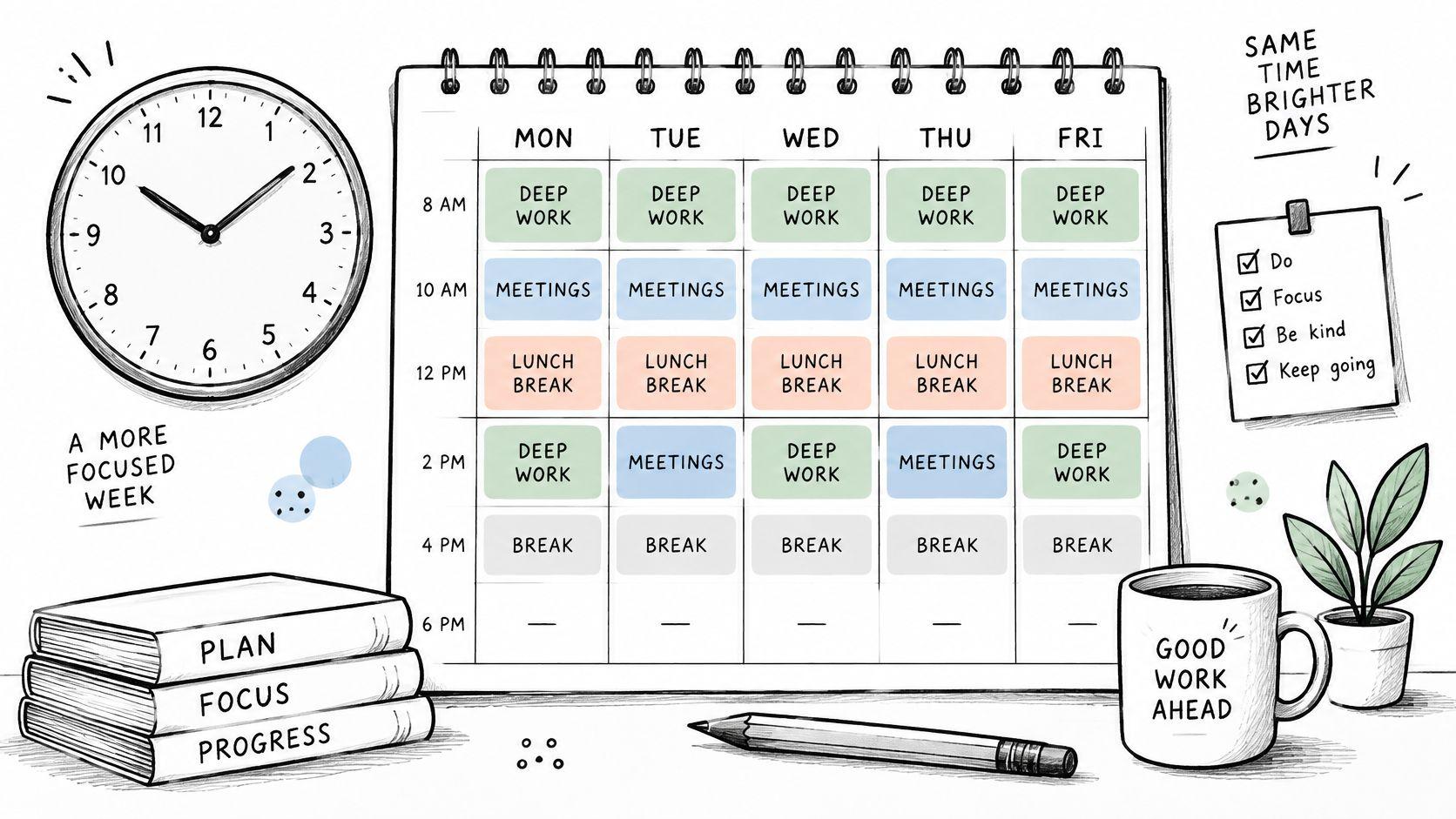
Interruption patterns matter. Microsoft's 2025 Work Trend Index reports that knowledge workers are interrupted approximately every two minutes during core hours across meetings, email, and chats. A calendar block needs an agreed interruption policy, not just a reassuring color.
Schedule outcomes and leave room to recover
A freelancer might separate client drafting, prospecting, and billing into distinct blocks. An executive might reserve an early strategy block while keeping later capacity available for decisions and meetings.
- Name the output: Use Draft proposal recommendation rather than Work.
- Match the attention window: Put high-context analysis where interruptions are least likely.
- Leave a restart note: Record the next action before switching away.
Don't schedule every available minute. Overruns and genuine urgent work will turn a rigid calendar into a daily rescheduling exercise.
For people with ADHD, shorter blocks, visible timers, and explicit start cues are useful options to test, not universal prescriptions.
Setup tip: Schedule two or three blocks per day, leave 10-to-15-minute buffers, and check whether each block produced its intended output before adding more.
6. Eat the Frog
Sometimes the problem isn't scattered tasks. It's the important task you keep moving to tomorrow.
Eat the Frog, associated with Brian Tracy, means tackling your most difficult or important task before routine work takes over. It suits sales conversations, difficult writing, consequential decisions, and other work you're actively avoiding.
Say a sales manager needs to prepare a difficult renewal discussion. Checking email first can become an escape route into easier requests. Preparing the discussion first gives that responsibility protected attention.
Make the first move unambiguous
The hardest task is often too broadly defined to start. Replace preparing the renewal strategy with opening the account history and listing the customer's unresolved concerns.
Specific start cues have a stronger evidence base than vague intentions. A meta-analysis of implementation intentions covered 94 independent studies and found a medium-to-large effect on goal achievement, d = .65, for plans connecting a situation with an intended action.
Apply that principle by deciding what you'll open and do when your protected work period begins. Don't leave the first step to another round of morning deliberation.
Your frog should be consequential work you're avoiding, not simply the most unpleasant chore on your list.
Morning isn't automatically everyone's best thinking time. If your role requires immediate coverage, or your concentration improves later, protect the earliest realistic high-quality window instead.
Setup tip: Choose tomorrow's frog before finishing today. Break off a first action you can begin in under 15 minutes, prepare the materials, and protect your first hour from nonessential notifications.
7. Bullet Journaling
Best for personal planning that benefits from handwriting and flexibility. Ryder Carroll's Bullet Journal method combines tasks, events, and notes in a notebook using rapid logging, simple symbols, and regular review.
Carroll developed the approach around his own attention-management needs. You don't need decorative spreads or an elaborate stationery collection to use it.
A student might combine assignment deadlines with study actions. A creative professional might capture project ideas beside daily commitments, then decide during review which ideas deserve active work.
Migration is the useful friction
The notebook typically includes an index, future log, monthly log, and daily logs. During migration, you rewrite unfinished tasks where they belong, schedule them, or decide they no longer deserve attention.
- Task marker: Use a dot for an open action.
- Completion marker: Use an X when you finish.
- Migration marker: Use an arrow when moving an action forward.
Rewriting isn't just administration. It forces you to reconsider tasks that would otherwise sit indefinitely in a digital backlog.
The trade-off is manual upkeep. A paper journal won't notify a teammate, update a shared deadline, or remind you automatically about a hidden future commitment. Use journaling for productivity to clarify your own work, while keeping shared obligations in the team's agreed system.
For someone who finds dense pages distracting, a single active list per page may be easier to scan. Treat that as an experiment rather than a requirement.
Setup tip: Use an existing notebook, keep the symbols simple, and log in the same place each day. At your migration review, challenge anything you've carried through more than two cycles rather than automatically copying it again.
8. Scrum
Scrum fits complex team delivery where people need to inspect results and adapt together. It isn't a personal productivity routine or a synonym for having a daily meeting.
Developed by Jeff Sutherland and Ken Schwaber, Scrum organizes work around a product goal, an ordered backlog, and short sprints, commonly one to four weeks. Its accountabilities include the Product Owner, Scrum Master, and Developers.
A software team might use a two-week sprint to deliver a usable improvement to onboarding. A marketing team can borrow the cadence for a campaign experiment, provided it has a clear outcome and can review meaningful results.
Protect the goal, not a frozen task list
Sprint planning establishes why the work matters and what the team expects to accomplish. Daily coordination helps people adapt; the review examines the outcome, and the retrospective addresses how they worked.
- Product Owner: Makes ordering and value decisions clear.
- Scrum Master: Helps the team use Scrum effectively and address impediments.
- Developers: Plan and deliver the work needed for a usable increment.
A shared task management board helps make progress visible, but moving cards isn't evidence that the sprint goal was achieved.
Scrum becomes expensive when teams add ceremonies without shared ownership or decision authority. It also fits poorly when constant unrelated emergencies make a coherent sprint goal unrealistic; Kanban may suit that demand better.
Setup tip: Define a measurable sprint goal, order the backlog, and agree on what done means. Keep daily coordination to 15 minutes, and use the retrospective to change one working practice rather than collecting an unmanageable improvement list.
9. Ivy Lee Method
At the end of today, choose tomorrow's six most important tasks, rank them, and start with the first. That's the appeal of the Ivy Lee Method: a short decision process, not a new organizational system.
The method is attributed to productivity consultant Ivy Lee. Its usefulness doesn't depend on the often-retold story involving Charles Schwab and Bethlehem Steel; the practical mechanism is a limited, ordered daily list.
It suits freelancers, managers, and independent professionals whose main difficulty is choosing what to do next. It works best when the tasks are concrete and you have some control over their sequence.
Rank actions, not ambitions
A workable list might begin with finishing a proposal recommendation, then sending a contract revision, then reviewing an applicant shortlist. Launching a company or fixing operations is too broad to serve as a daily task.
- Decide beforehand: Write the list before ending work, rather than opening tomorrow with another planning session.
- Work sequentially: Finish the current action before voluntarily switching.
- Carry work forward deliberately: Reconsider unfinished tasks instead of allowing them to disappear or roll over indefinitely.
The weakness is rigidity. If your first task becomes blocked by someone else, waiting doesn't demonstrate discipline. Record the dependency and move to the next available priority.
Likewise, a genuine urgent issue can justify changing the order. The method should prevent casual switching, not prevent sound judgment.
Setup tip: Write tomorrow's ranked list this evening, keeping each entry small enough to finish meaningfully. At day's end, record why any task remained unfinished and revise its scope or ranking before carrying it forward.
How the nine task management methods compare at a glance
| Item | Core Unit | Best For | Main Drawback | Origin |
|---|---|---|---|---|
| Getting Things Done (GTD) | Captured and clarified next actions | Managing many commitments and projects | Requires disciplined upkeep and regular reviews | David Allen; 2001 book |
| Eisenhower Matrix | Urgent-versus-important quadrants | Quickly prioritizing tasks | Sorting does not explain how to execute tasks | Named after Dwight D. Eisenhower; popularized by Stephen Covey |
| Pomodoro Technique | Timed focus intervals | Starting tasks and sustaining focused work | Interruptions can disrupt a work interval | Francesco Cirillo; late 1980s |
| Kanban | Cards moving through workflow stages | Visualizing work and reducing bottlenecks | Needs maintenance and a separate prioritization method | Toyota Production System; adapted for knowledge work by David J. Anderson |
| Time Blocking | Calendar blocks assigned to work | Protecting time for focused or important work | Rigid schedules can be disrupted by urgent requests | Popularized by Cal Newport's 2016 book Deep Work |
| Eat the Frog | One difficult or important daily task | Tackling avoided work early in the day | Can overlook other urgent tasks | Commonly linked to Brian Tracy's 2001 book |
| Bullet Journaling | Rapid-logged tasks, events, and notes | Flexible analog planning and reflection | Manual upkeep can be time-consuming | Developed by Ryder Carroll |
| Scrum | Time-boxed sprints | Coordinating teams delivering complex work | Can feel ceremonial and requires team buy-in | Developed by Jeff Sutherland and Ken Schwaber in the early 1990s |
| Ivy Lee Method | Six ranked daily tasks | Simple daily prioritization and focused execution | Less suited to long-term projects or collaborative work | Attributed to Ivy Lee; reportedly shared with Charles Schwab in 1918 |
Pick One Method This Week and Test It Honestly
No method stays useful on autopilot. Choose the approach that matches your most common problem and run it for five working days before judging it.
Don't choose based on which system sounds most impressive. Choose based on the point where your work regularly stalls, whether that's remembering commitments, deciding priorities, starting difficult work, or coordinating delivery.
Match the trial to the bottleneck
- Scattered commitments: Test GTD's capture and clarification habits.
- Constant firefighting: Use the Eisenhower Matrix to separate urgency from importance.
- Difficulty starting: Try Pomodoro or Eat the Frog on a defined task.
- Unfinished focus work: Reserve calendar capacity with time blocking.
- Unclear team handoffs: Make work visible with Kanban.
- Complex shared delivery: Consider Scrum when the team can work toward a coherent goal.
- Overcomplicated personal planning: Try Bullet Journaling or a ranked Ivy Lee list.
Keep a brief note of what you finished and where the system got in the way. A full calendar, an empty inbox, and a tidy board can all coexist with unfinished important work, so review outputs rather than organizational activity.
Also record the cost of maintaining the method. If you spend your best attention categorizing tasks, simplify the categories. If work repeatedly rolls forward, inspect its size, dependencies, and priority before blaming your discipline.
Separate planning problems from capacity problems
A better method can expose overload; it can't make every commitment feasible. When demand exceeds available capacity, decide what to defer, reduce, delegate, or decline.
Keep responsibility clear when delegating. Automate predictable administration, give people bounded deliverables with acceptance criteria, and retain review of sensitive or high-consequence decisions. In a Stanford survey of workers' preferences for AI, 45.2% preferred an equal human-AI partnership, a useful reminder that assistance needn't mean surrendering control.
If you want a digital home for the method you choose, Fluidwave supports plain-language task capture, auto-prioritization, and scheduling long tasks across multiple work sessions. Use those capabilities to support a clear working habit, not to create another list you won't review.
At the end of the trial, keep what helped you complete meaningful work and remove what created friction. Combine methods only when they solve distinct problems, such as using a board for team flow and calendar blocks for your own drafting.
Fluidwave combines task capture, automatic prioritization, scheduling, and delegation to human assistants across personal and team workflows. Visit Fluidwave to organize a real project around your chosen method and test whether it makes your next action clearer.
Focus on What Matters.
Experience lightning-fast task management with AI-powered workflows. Our automation helps busy professionals save 4+ hours weekly.