Unlock your potential with journaling for productivity. Our guide offers templates, ADHD-friendly tips, and workflows to turn reflection into action.
July 22, 2026 (1d ago)
Journaling for Productivity: A Practical Guide to Focus
Unlock your potential with journaling for productivity. Our guide offers templates, ADHD-friendly tips, and workflows to turn reflection into action.
← Back to blog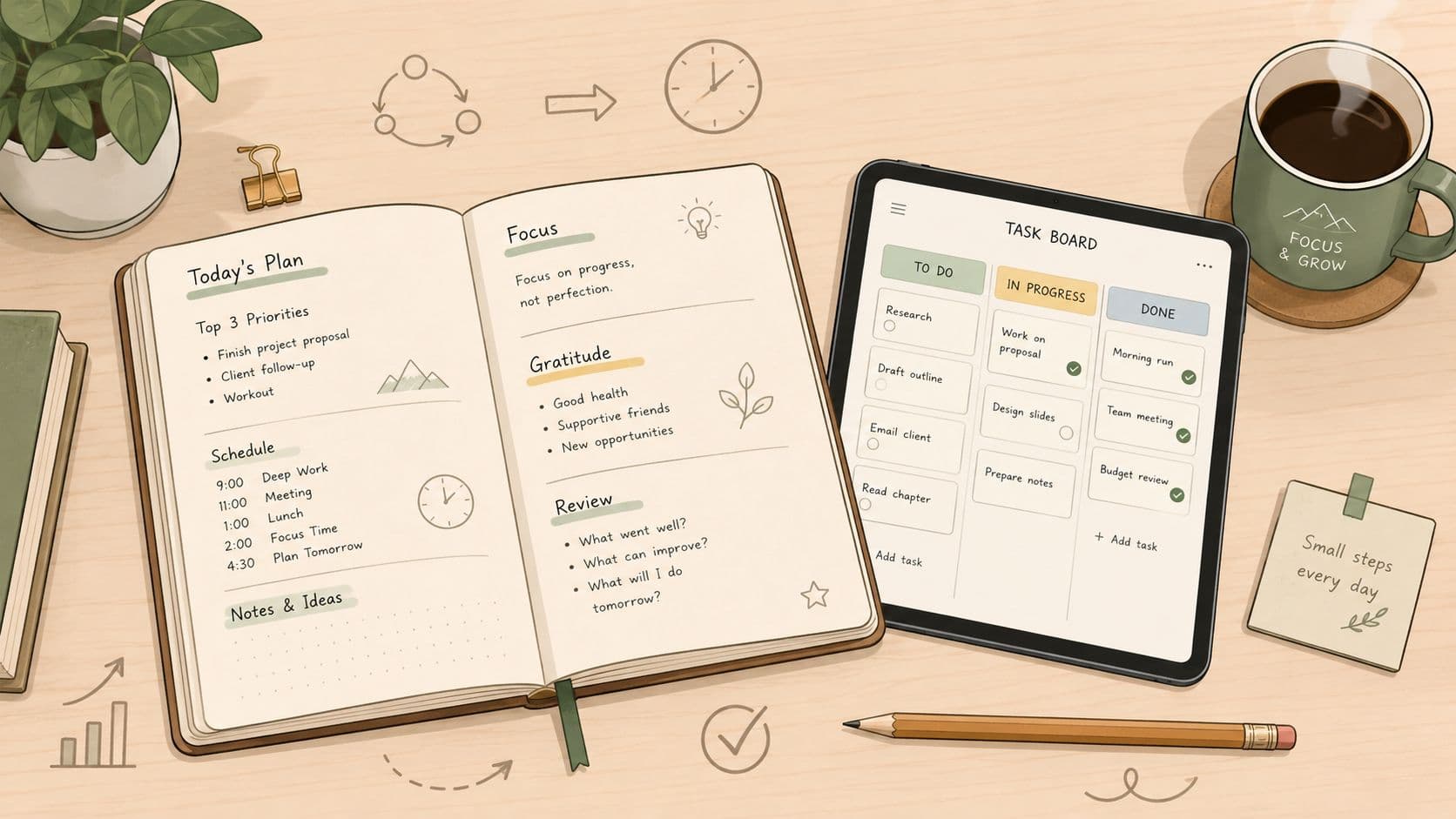
Journaling for productivity gets mislabeled all the time. People hear the word and picture a private diary, a mood log, or a vague self-care ritual that feels productive only because it's quiet. That framing misses the point. The useful version is a work tool, a way to reduce mental clutter, sharpen priorities, and turn reflection into decisions you can act on.
That matters because the payoff isn't theoretical. A widely cited Harvard Business School study found that employees who spent 15 minutes reflecting and journaling at the end of the workday improved performance by 22.8% on subsequent tasks, and that gain was measured as a productivity improvement on learned work, not just a feeling of being more organized. Harvard Business School study summary If you want a broader mental-health angle alongside the productivity lens, the expert tips for mental health journaling resource from Refresh Psychiatry & Therapy is a useful complement.
The practical shift is simple. Stop asking whether journaling feels profound, and start asking whether it helps you choose better, remember faster, and follow through more reliably. That's the version busy professionals can keep using.
Beyond the Dear Diary Myth Why This Works
Many people quit because they start with the wrong model. If journaling becomes a place to narrate the day in full, it turns into overhead. If it becomes a command center for priorities, friction, and follow-through, it starts earning its place in the workday.
Think in decisions, not paragraphs
Productivity journaling works best when every entry has a job. One guide describes it as a tool for brainstorming, planning, tracking, and analyzing work activities, while another points to goals, to-do lists, productivity patterns, frustrations, and progress reviews as the right raw material. That is a very different job from preserving a day for posterity.
Practical rule: if a sentence will not change what you do next, it probably does not belong in your work journal.
For overloaded or distractible people, journaling becomes useful because it lowers mental load. A short reflection can act like a mental unload, so your brain does not have to keep holding every open loop, half-finished thought, and emotional snag at once. This overlap is why many people pair work journaling with broader reflection practices, including emotional processing and stress management, because the two serve different jobs but support each other in real life. If you want that broader layer, the expert tips for mental health journaling resource from Refresh Psychiatry & Therapy is a useful complement.
The highest-value question is not, “What happened today?” It is, “What needs to be seen, sorted, or decided so tomorrow goes better?” Once you shift to that frame, the practice becomes easier to keep using.
Why a little can still matter
The strongest productivity case for journaling is not volume, it is consistency with a clear purpose. Short reflective work has been linked to better performance after the fact, and the mechanism is straightforward. You are turning experience into a usable pattern instead of letting it evaporate. That matters especially in knowledge work, where the problem usually is not lack of effort, it is too many competing inputs.
The takeaway is blunt. Journaling for productivity is not about being eloquent, emotionally dramatic, or spiritually enlightened. It is about lowering decision friction.
Setting Up Your Productivity Journal
The best journal is the one you will open when your brain is full. Start with the format that creates the least resistance, then refine the structure later. Paper works. Digital works. A hybrid setup works too, as long as it reduces friction instead of becoming one more place to manage your life.

Choose the format that fits your workday
A notebook is the cleanest option when you want no setup and no notifications. A digital journal works better when you need search, speed, or easy copying into a planning system. A hybrid setup fits people who like handwriting for thinking but still need digital capture for execution.
For many professionals, the primary question is not paper versus app. It is whether the format makes it less likely that an insight disappears before it becomes a task. If you already spend your day in a notes app, task manager, or calendar, the journal should sit close to that workflow instead of living in a separate corner you forget to open.
That matters even more for busy people and ADHD minds. If the system asks for too many extra steps, the habit usually breaks before it becomes useful.
Use the journal as a prioritization tool
Keep the scope narrow. One approach frames the journal as a place for brainstorming, planning, tracking, and analyzing work activities, and another points to writing down goals, to-do lists, productivity patterns, frustrations, and progress reviews. Wrike on journaling for productivity That is the model to copy.
The journal should help you choose, not just remember.
A practical setup is to give every entry the same four sections, even if the labels are rough at first:
- Top priorities: what matters most today.
- Blockers: what could slow you down.
- Open loops: anything unfinished that is still taking mental bandwidth.
- Next actions: the smallest visible step you can take.
This keeps the journal from turning into a loose dump of thoughts. It also makes review easier later, because you are not digging through a wall of prose to find the useful part.
If you want to see how structured planning supports execution, the Nick Kozmin routine breakdown from The Sleep Consultant is a useful comparison. The pattern is simple, start with structure, then let the day run inside it.
Keep the first version boring
Skip clever prompts. Choose repeatability. If the first version feels like a small planning dashboard, you are on the right track.
The 15-Minute Daily Practice
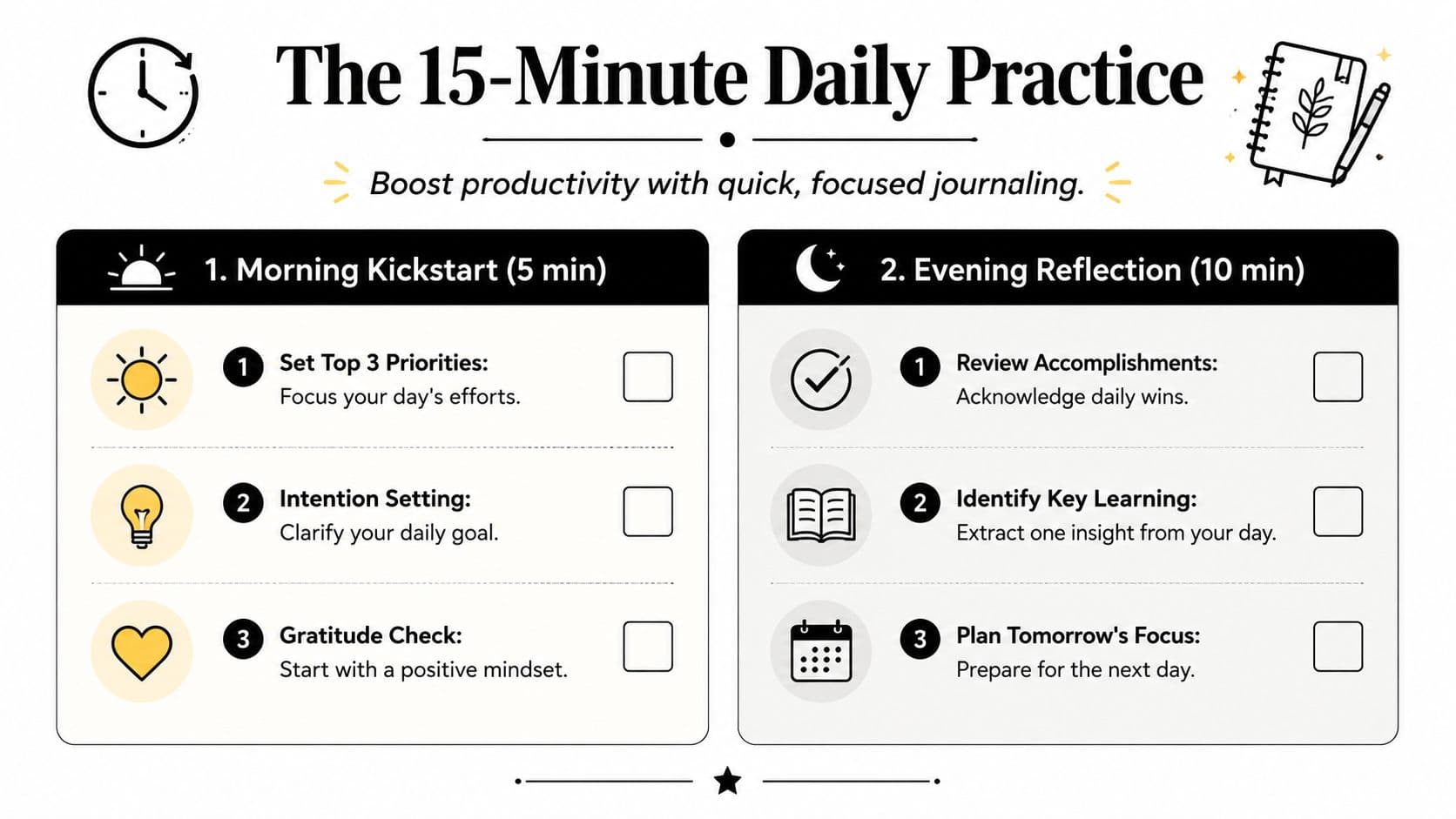
The daily routine has to stay short enough that you do not debate it with yourself. A practical target is about 15 minutes, because the best check-ins are brief, specific, and easy to repeat. A productivity journal works best when it trims the noise and keeps the focus on what you will do next. Checklist productivity journal method
Morning kickstart in five minutes
Use the morning session to clear up the day before it starts stacking up. Write your top 3 priorities, one sentence about what would make the day successful, and one likely obstacle. That is enough to give the day shape without turning breakfast into a planning ritual.
If you want a simple structure, keep it this spare:
- Priority 1: the task that would make the biggest difference if completed.
- Priority 2: the supporting task that prevents bottlenecks.
- Priority 3: the small win that keeps momentum alive.
- Risk check: what might distract you, delay you, or derail you.
This keeps the journal practical. You are not trying to predict every problem, only to start the day with a working map instead of a reactive posture.
Evening reflection in ten minutes
The evening review turns the journal into a cleanup tool. Capture what got done, what got delayed, and what is still hanging around in your head. It also helps to log task duration and interruptions if you want a clearer view of where your time is really going, which matters when a day feels fuller than it was.
A useful closing prompt is, “What needs to move to tomorrow's plan?” That one question can reduce a lot of low-grade mental churn. It keeps the journal tied to action instead of self-judgment, which is a better trade-off for busy professionals and anyone whose attention drifts easily.
The high-rigor approach stays simple. Record only 3-5 key metrics, split the practice into brief check-ins, and use weekly and monthly reviews to spot patterns in energy, focus, and output. Checklist productivity journal method That keeps the burden low and the signal high.
For people who want a pre-built routine structure, The Sleep Consultant on Nick Kozmin's routine is a useful reminder that the day runs better when a few habits happen in the same order.
Your Weekly Review That Drives Results
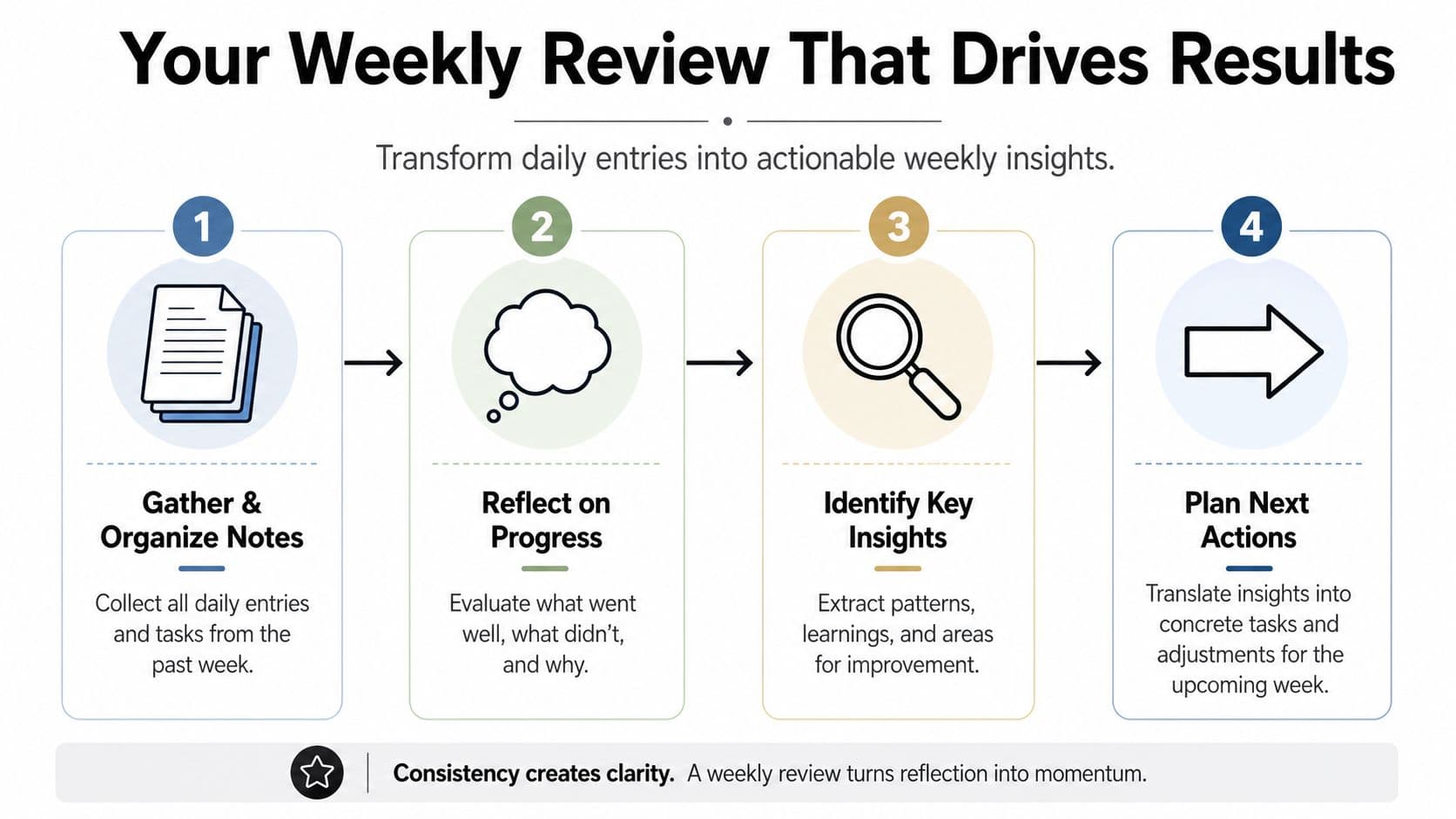
Daily entries are not the finish line. They're the evidence trail. The weekly review is where those fragments get turned into decisions about how you work, what you stop doing, and where your energy goes.
Review the week as a pattern, not a story
Start by gathering the entries from the week and sorting them into three buckets, wins, friction, and unfinished work. Don't reread everything with the goal of reliving it. Read for repetition. The recurring issue is usually more important than the dramatic one.
A simple review agenda works well:
- Collect notes: bring together the week's entries, tasks, and loose ideas.
- Scan for repetition: look for repeated blockers, energy dips, and time sinks.
- Spot useful conditions: identify when your work felt easier, faster, or cleaner.
- Decide adjustments: choose one or two changes for next week.
This is also the moment to ask whether your journal is helping you prioritize or just documenting chaos. If the same friction keeps showing up, the journal has already done its job by making the problem visible.
Ask better questions than “How did it go?”
Use questions that force comparison and adjustment. Which tasks drained you without moving important work forward. Which blocks of time were most productive. Which interruptions kept stealing focus. Which decisions should be made earlier next week.
What gets reviewed gets improved, but only if the review ends in a change.
That matters because journaling can become a passive archive if you never convert insight into action. The weekly pass is the handoff point. It's where you decide what to keep, what to delete, and what needs a different approach.
Turn insights into next week's plan
The cleanest output from the review is a short list of operational changes. Maybe you move a deep-work block earlier. Maybe you batch messages instead of checking them all day. Maybe you stop starting the day with low-value admin.
A good weekly review leaves you with fewer vague intentions and more visible next steps. That's the whole reason to keep doing it.
From Insight to Action with Fluidwave
Reflection only matters when it lands somewhere concrete. A recurring frustration in journaling is that the page can hold the insight, but the task still lives somewhere else. If you want the practice to pay off in real work, every useful note should end up as an assigned action, not just a thought that felt helpful in the moment.
Convert entries into tasks immediately
When a journal entry reveals a next step, write it down as a task with a clear outcome. If the note says a project is stuck because the client hasn't answered, the task is not “think about client follow-up.” The task is “send follow-up email and set reminder for Thursday.”
That kind of translation matters because journals are great at surfacing ideas, but execution systems are what move work forward. In a platform like Fluidwave, that means turning the insight into a task, putting it into the right view, and assigning it a priority so it doesn't disappear into the noise of the week.
Use the journal as a decision filter
Not every note deserves your attention. Some entries are reminders, some are problems, and some are things you should hand off. A good rule is to ask three questions: does this need to be done by me, does it need to be done now, and does it need to be done at all.
That's where a closed loop helps. Journal the issue, convert the useful part into a task, and move it into your operating system. If the work is low-impact or outside your lane, delegate it. If it's important but not urgent, schedule it. If it's just noise, leave it out.
A journal becomes far more valuable when it stops being the place where tasks are stored and starts being the place where tasks are discovered. That's the bridge most productivity advice skips.
Let delegation clear the bottleneck
For teams, founders, and overloaded independents, the biggest win is often not doing more, it's deciding faster. A note about research, admin, scheduling, formatting, or follow-up can become a delegated task instead of a personal backlog item. That keeps the journal from becoming a guilt ledger.
Once a week, scan your entries for anything that feels repetitive, mechanical, or outside your highest-value work. Those are the candidates to route elsewhere. When your execution system can absorb the output of your reflection, journaling stops being a side habit and starts becoming part of your workflow.
Making the Habit Stick Especially with ADHD
The habit breaks when it asks for too much at the exact moment attention is already stretched. That is the core problem, not laziness. For busy professionals and people with ADHD or similar distractibility issues, the better move is to make the practice small, predictable, and easy to restart after a missed day.
Keep the entry short enough to finish
Several journaling guides recommend keeping sessions under 10 minutes at first and attaching them to something you already do, like coffee or opening your laptop. Review entries after 30 days to confirm the practice is creating value. Journaling for productivity habit guidance That is the right mindset. Do not romanticize the habit, measure it.
Use a hard stop. When the timer goes off, you are done. That keeps journaling from turning into a sprawling project that competes with the day's actual work.
Reduce cognitive load, especially for ADHD brains
ADHD-friendly systems usually fail when they demand too much recall and too much formatting. Keep prompts visible, keep the structure stable, and keep the writing brief. The goal is to capture enough signal to be useful without asking your brain to do extra sorting.
A few tactics help a lot:
- Anchor the habit: pair it with something already automatic.
- Keep the same template: reuse the same prompts every day.
- Use one restart rule: if you miss a day, restart without catching up.
- Make it useful fast: move one insight into your task system the same day.
Small, repeatable beats ambitious and inconsistent.
That same logic explains why some people benefit from reading adjacent journaling resources that match their situation. If your attention gets pulled in many directions, a resource like tips for a faith journal can offer a different kind of structure, especially when the habit needs a stable emotional anchor as much as a productivity function.
Track value, not perfection
Do not ask whether you journaled flawlessly. Ask whether it helped you start faster, choose better, or recover sooner after distraction. If the answer is no after a month, change the format rather than abandoning the idea.
The most sustainable version is usually the least dramatic one. Short. Repeatable. Tied to action. That is the version that sticks.
If you want a journal that changes how your day goes, build it around capture, review, and execution, not around perfect writing. Start with a short daily template, run a weekly review, and push every useful insight into a task system that can hold it. If you are ready to make that loop easier to maintain, try Fluidwave and turn your journal into a real work pipeline.
Focus on What Matters.
Experience lightning-fast task management with AI-powered workflows. Our automation helps busy professionals save 4+ hours weekly.