Build reliable staff schedules with this hands-on staff schedule creator guide. Get templates, fairness rules, and automation tips.
August 12, 2026 (2mo ago)
Staff Schedule Creator: Build Smarter Rosters in 2026
Build reliable staff schedules with this hands-on staff schedule creator guide. Get templates, fairness rules, and automation tips.
← Back to blog
Monday morning starts the same way for a lot of managers. A half-built spreadsheet is open, two employees are texting about a shift swap, someone is out sick, and payroll still has to be right by Friday. A staff schedule creator is supposed to take that scramble and turn it into a workable roster, but too many teams still treat scheduling like a clerical chore instead of an operational system.
That mindset is expensive. In 2026, 55% of managers still spend more than 8 hours a week building schedules manually, and automated scheduling software is reported to cut that time by 3.5x in the source benchmark from SchedulingKit's employee scheduling statistics. Another industry benchmark says 46% of businesses with hourly workers already use dedicated scheduling software, while 32% of small businesses still rely on paper or spreadsheets in the same source set. When managers spend 6 to 11 hours weekly on scheduling and related admin, that's not a side task anymore, it's a recurring productivity drain that touches labor, payroll, and morale.
The hidden part is that manual scheduling rarely fails in one dramatic moment. It fails in small ways, a missed rest period, a double-booked person, a payroll correction, a weekend nobody wanted, then the next week starts with less trust than the last one. The true job of a better system is to make those errors visible before they become habits.
Why Manual Schedules Cost More Than You Realize
The worst schedules I've seen didn't fall apart on day one. They looked fine on Monday, then the week got messy, and by Thursday the manager was patching gaps with texts, favors, and overtime. By the time payroll hit, the spreadsheet had become a record of compromises rather than a plan.
That's where manual scheduling gets expensive. Managers lose hours each week building and fixing rosters, and that time disappears from floor coverage, customer demand, and coaching the team. A schedule that changes five times before the shift starts also creates payroll errors, because the spreadsheet keeps pretending the original plan still matches reality.
The history matters here. Staff scheduling used to be paper rosters and a marker on the wall. Now it is a recurring planning process that shapes labor utilization, wage control, and team sentiment, which is why the line between admin and operations disappeared.
A schedule isn't just names in boxes. It's the operating plan for who shows up, when they're useful, and how much friction the week will create.
I've also watched morale drop when the same people keep getting the undesirable shifts because the manager is under pressure to fill holes fast. That is the part a spreadsheet hides. The weekly repair work and the people cost show up later, and by then the “cheap” process has already burned through time, trust, and flexibility.
The Inputs a Strong Schedule Creator Must Capture First
A staff schedule creator can't start with blank slots. It has to start with demand, because staffing without demand data is just guesswork with names attached. The strongest workflow begins by analyzing past business performance to identify peak hours, seasonal fluctuations, and how many employees are needed for each shift, with the right roles covered at all times, as described by WebHR's staffing and scheduling guidance.
Build the intake around real constraints
If you're scheduling retail, that means the intake should know when foot traffic spikes, which shifts need a register lead, and where floor coverage can't dip. In healthcare, you need credentials, unit coverage, and the fact that a shift without the right certification isn't a shift at all. For remote teams, demand may be tied to ticket volume, live support hours, or project handoffs rather than physical presence.
Availability collection needs more than “yes” or “no.” Turnozo recommends collecting the days each employee is available each week, their maximum hours, recurring commitments like school or a second job, and preferred shifts when possible, while Homebase advises collecting availability before mapping coverage and checking conflicts and overtime during assignment, as noted in Turnozo's schedule creation guide. If a person can only work after 3 p.m. on Tuesdays, that has to live in the input, not in a manager's memory.
When teams debate whether to staff in-house or use outside help, it helps to compare the labor model before the roster even exists. A useful framing is this compare in-house vs agency staffing resource, because the staffing model changes the constraints the creator has to respect.
| Input | Why It Matters | Example |
|---|---|---|
| Demand by hour or shift | Prevents undercoverage and overstaffing | More cashiers needed from 11 a.m. to 2 p.m. |
| Employee availability | Keeps the draft schedule realistic | A server is unavailable every Wednesday after class |
| Maximum hours | Helps control overtime exposure | A part-timer can't exceed a weekly cap |
| Recurring commitments | Avoids predictable conflicts | Childcare pickup every weekday at 5 p.m. |
| Certifications and roles | Keeps critical work covered | Only licensed staff can handle certain tasks |
| Preferred shifts | Helps with fairness when coverage is already met | An employee prefers closing over opening |
| Nice-to-have notes | Useful, but not required to build the draft | Commute preference or personality fit |
The difference between a useful intake form and a bloated one is simple. Capture what changes the schedule. Leave the rest for later.
Turning Demand and Availability Into a Working Draft
Scheduling gets easier when you stop thinking in individual names and start thinking in constraints. In practical terms, the objective is coverage, the decision variables are the people and shifts, and the constraints are the hard and soft rules that determine whether the schedule is valid. That's the same structure used in Google's OR-Tools employee scheduling framework, which is built to search for feasible or near-optimal assignments under multiple constraints.
Use a template before you assign people
A blank calendar invites chaos. A template gives the draft a shape. Fixed-block templates work best when coverage is predictable, rotating templates help when undesirable shifts need to move around, and elastic templates make sense when staffing should follow demand forecasts instead of a rigid pattern.
The simplest build flow is straightforward. Start with the Monday-through-Sunday grid, drop in the core shifts, and then layer role coverage on top. If a store needs one opener, two floor staff, and one closer, those aren't interchangeable boxes. They're different coverage requirements.
Build the schedule in layers. First demand, then roles, then people. If you start with names, the draft gets biased toward whoever answered fastest.
For service teams that run time-specific bookings, the same logic applies in a narrower lane. The how to schedule tutoring sessions efficiently page is a useful parallel because tutoring schedules also live or die on matching time blocks, availability, and session demand without overloading the same person repeatedly.
What doesn't work is trying to make every shift equally flexible. That sounds efficient until the week changes. A strong schedule creator should let the manager set a core pattern, then allow substitutions only where the coverage rules still hold. That's how you get a working draft instead of a beautiful mess.
Balancing Coverage, Cost, and Fairness in One Pass
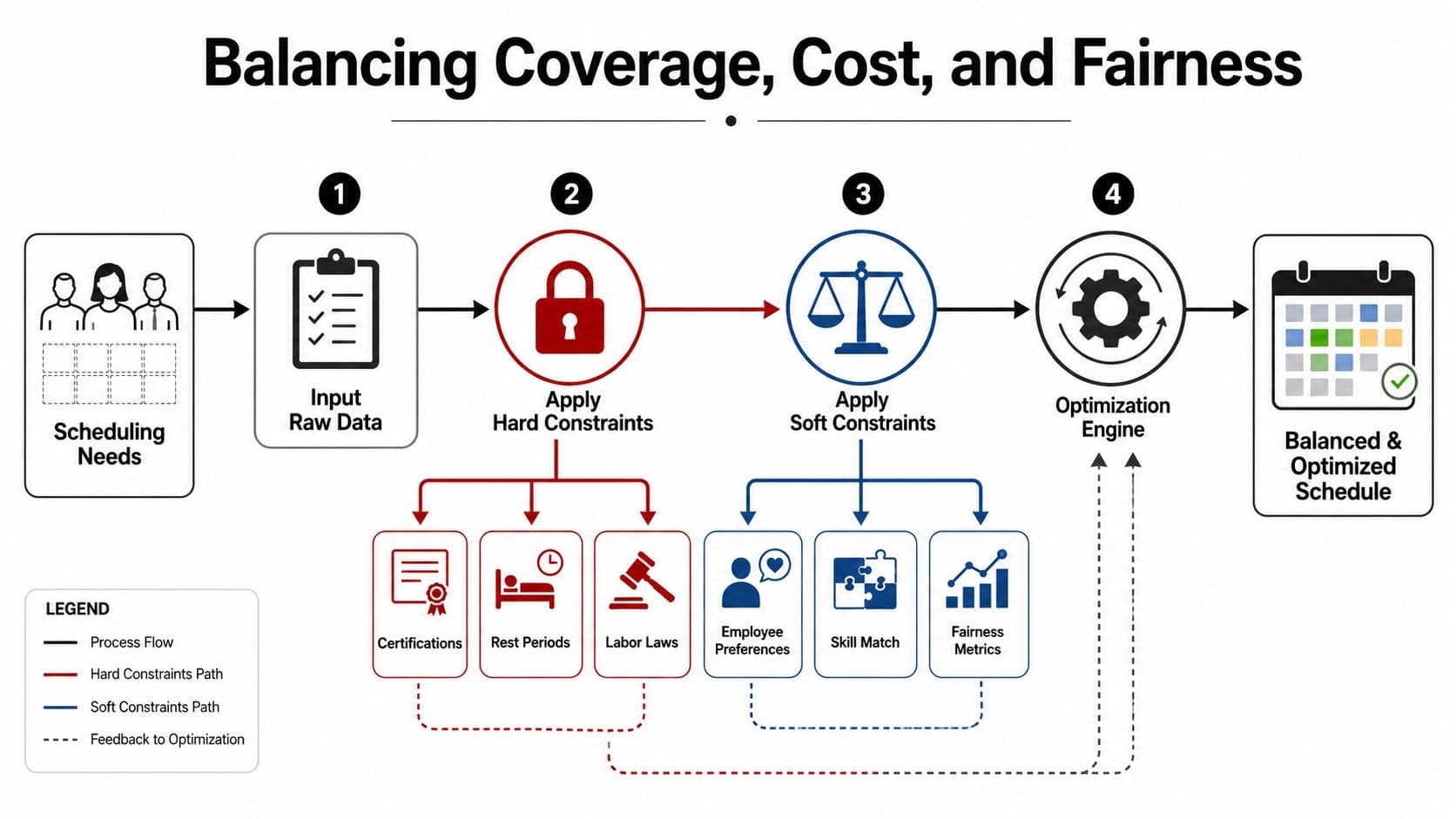
A schedule can look efficient and still wear people down. If the same employees keep absorbing the worst shifts, the roster may satisfy coverage and labor cost, but the team will feel the imbalance fast. The better way to build the draft is to treat coverage, cost, and equity as one measurable tradeoff, with hard constraints protecting legality and soft constraints protecting whether the schedule is livable.
Hard rules and soft rules aren't the same thing
Hard rules are the line you do not cross. Certifications, labor-law rest periods, and maximum hours have to be satisfied before the roster can go live. Soft rules are where management judgment comes in. Weekend rotation, consecutive late shifts, fatigue, and preference matching can all be weighted, but they cannot override coverage.
That tradeoff is where a lot of scheduling writeups get vague, even though fairness, fatigue, and rest are the questions managers raise most often. The gap shows up in tools that can optimize assignments but leave managers guessing about how to balance weekend equity against overtime exposure in a way they can review, a problem called out in WritingTools.ai's discussion of staff schedule generators.
A simple example makes the tension clearer. Two employees can both cover Saturday closing. One already worked last weekend, and the other is close to overtime. If you only optimize for fairness, you may create a cost problem. If you only optimize for cost, the same person keeps carrying the burden. A good schedule creator surfaces both constraints so the manager can choose the lower overall cost, not just the cheaper line item.
That kind of tradeoff belongs in broader capacity planning too. A useful team capacity planning workflow helps teams see where coverage demand, labor budget, and employee load collide before the roster is locked.
The stronger systems handle this with rotating desirability scores, preference weighting, and audit trails. That also makes the MyCulture.ai review of HR tools useful, because it lets teams compare scheduling features against the rest of their HR workflow instead of treating staffing as a standalone toy.
Fairness also has to be measurable enough to review later. If the roster cannot show who got weekends, who carried late shifts, and where exceptions were made, then “fair” is just a feeling. The creator should make those tradeoffs visible even when the final decision still sits with the manager.
Keep the schedule readable
IONOS says a work schedule should include the employee's first and last names, the working hours, and the planning period, and should stay limited to essentials so it is clear and self-explanatory for workers, not just managers, in its work schedule guide. That matters here because a schedule can be mathematically sound and still fail if people cannot read it quickly.
The cleanest roster I have seen was plain on purpose. It showed only what people needed to know, and nothing extra.
Matching Automation Levels to Your Team's Reality
Not every team needs the same level of automation, and pretending otherwise creates resentment fast. A ten-person shop with one manager and steady demand can survive on templates longer than a multi-site team with rotating roles and constant exceptions. The trick is choosing the amount of automation that reduces drag without removing judgment.
Four ways teams usually run scheduling
| Mode | Weekly Effort | Fairness Control | Best Fit |
|---|---|---|---|
| Manual spreadsheet | High | Low unless the manager is extremely disciplined | Very small teams with stable demand |
| Template-based creation | Medium | Moderate through rotating patterns | Teams with repeatable coverage blocks |
| AI-assisted generation | Low to medium | High if constraints are configured well | Managers who want faster drafts and audit trails |
| Fully delegated scheduling | Very low | Depends on the rules and review cadence | Leaders who want the workflow handled in the background |
Manual scheduling still works when the team is tiny and the manager knows every person's limits. The downside is obvious, the burden stays on one human brain. Template-based scheduling removes some of that pressure, but it still breaks when demand shifts or someone calls out.
AI-assisted creation sits in the middle. It can draft against the rules, flag conflicts, and keep a traceable record of why a shift went where it went. For teams that want that middle layer, Fluidwave's human-in-the-loop setup is one option, because it can pair automation with delegated assistants that keep the workflow moving while the rules stay visible. The related human-in-the-loop automation model is useful when you want the system to do the heavy lifting but still want a person reviewing the edge cases.
Fully delegated scheduling makes sense when the manager's real job is oversight, not weekly roster assembly. That works only if the rule set is stable and the review loop is tight. If the rules are still changing every week, delegation just moves the chaos somewhere else.
The mistake is choosing the fanciest mode too early. Pick the lowest-friction model that can still enforce your real constraints.
Validating, Publishing, and Learning from Every Cycle
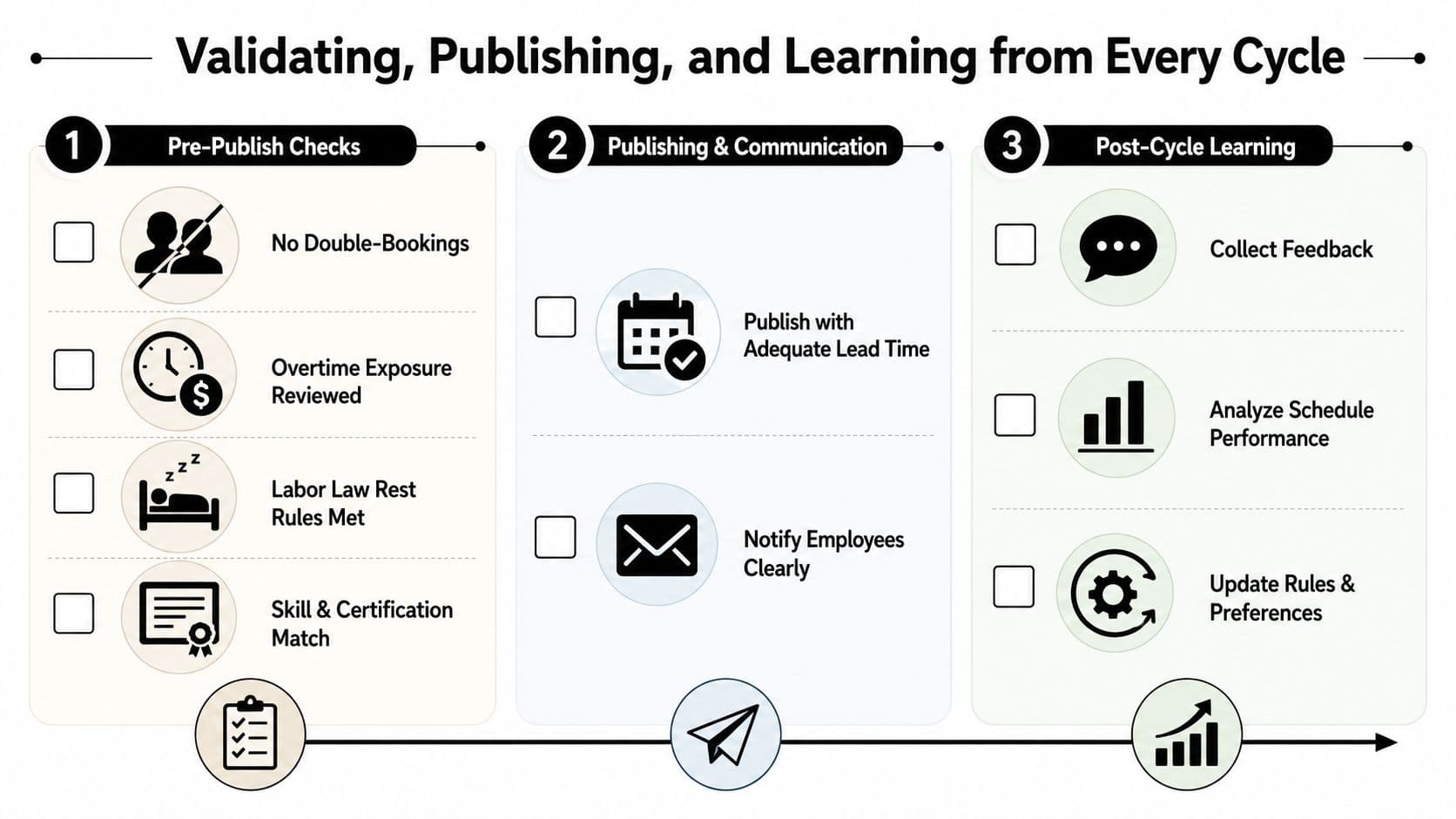
The schedule isn't done when the draft looks tidy. It's done when it survives pre-publish checks, reaches employees early enough to be usable, and then feeds the next planning cycle with real data. A scheduling guide from TimeTrex recommends publishing at least 14 days in advance in many jurisdictions, and that lead time matters because people need time to arrange childcare, transport, and second jobs.
The pre-publish checklist should be ruthless
Before anything goes live, check for double-booking, under- or over-scheduling, overtime exposure, and labor-law violations. That same source also recommends comparing planned-versus-actual hours after the period ends so the next schedule can be recalibrated.
If a schedule needs a manager to explain it three times, it's not ready.
The post-cycle review should be short and concrete. Compare forecasted demand with actual coverage, look at wage cost against what was planned, and note where exceptions happened. If Friday always runs hot and Wednesday always runs light, the next roster should reflect that instead of repeating the old assumption.
A solid validation loop doesn't need a giant dashboard to be useful. It needs a few reliable questions.
- Did every shift have the right coverage?
- Did any person exceed the intended hour target?
- Were rest rules and certifications respected?
- Where did the plan diverge from the actual week?
That's the closed loop many organizations skip. They publish, survive, and move on. The better habit is to treat each roster as a test case, because every week teaches the creator something about demand, fatigue, and the people carrying the work.
Rolling Out Your New Scheduling Workflow Without the Chaos
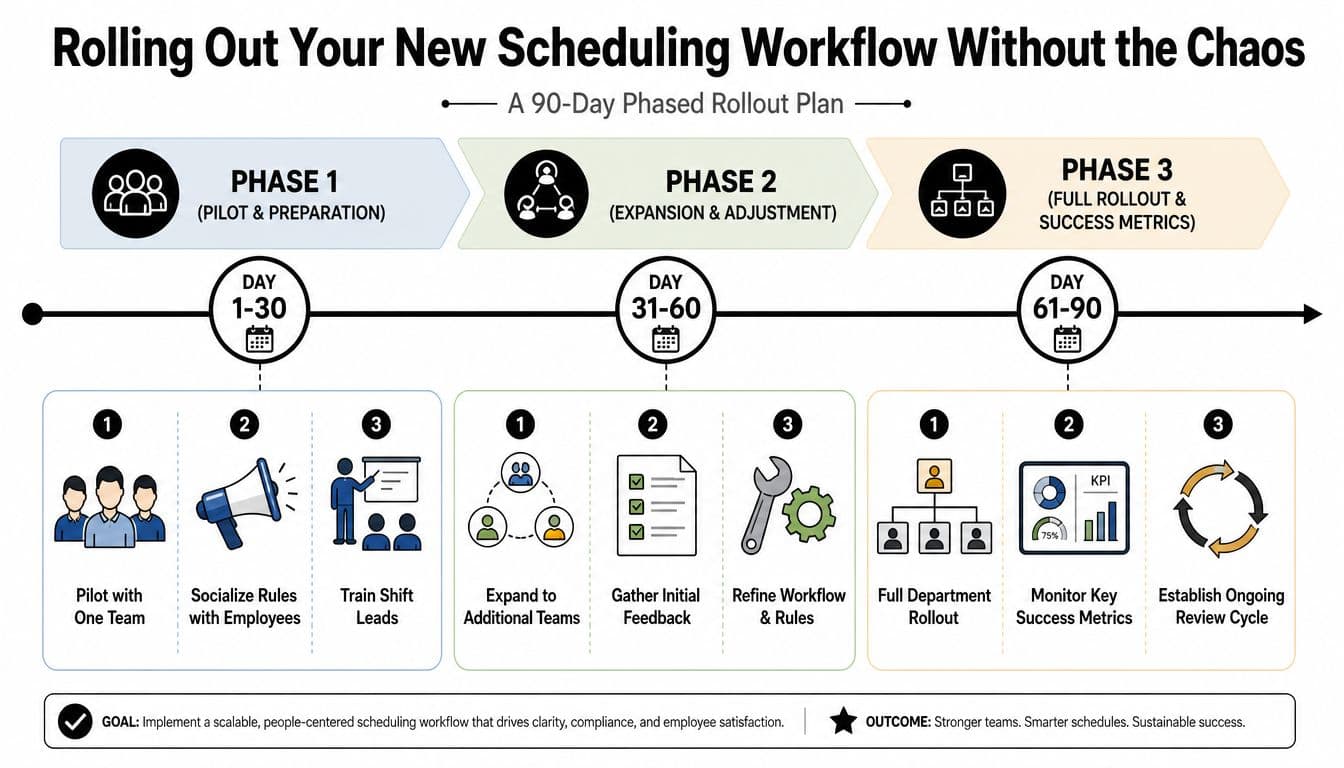
The cleanest rollout I've seen started small and stayed boring on purpose. One team piloted the new process for two cycles, the rules were explained before anything changed, and the shift leads were trained before employees ever saw a new roster. That pacing mattered because people will accept a better system faster than they'll accept a surprise.
Use a 30, 60, 90-day arc
The first 30 days should focus on one team, visible rules, and fast fixes. By day 60, the workflow should expand only after the initial friction is understood and the templates stop breaking in obvious ways. By day 90, the department should be using the same logic, with a steady review cycle instead of constant redesign.
The internal how to create a schedule for employees guidance fits well here because it reinforces the same practical rollout logic, start with structure, then add flexibility after the basics work. That's also where delegation becomes valuable, once the rules and templates are stable enough that someone else can execute them without guessing.
I'd watch three success signals during the rollout. First, managers should spend less time rebuilding the roster. Second, employees should see fewer surprises in their shifts. Third, the schedule should require fewer emergency edits as the weeks go by.
Don't sell the rollout as transformation. Sell it as fewer late-night fixes, clearer rules, and a schedule people can actually trust.
The end state isn't “no human involvement.” It's a calmer operating loop where AI can draft, delegated assistants can keep the work moving, and managers can spend their attention on exceptions instead of staring at a spreadsheet until midnight.
If your team is still building schedules by hand, it's time to move the work into a system that can enforce demand, fairness, and coverage without turning every week into a cleanup project. Fluidwave helps teams automate planning, delegate repetitive scheduling work, and keep review points visible, so the roster stops living in one person's inbox. Visit Fluidwave and see how a more structured scheduling workflow can replace the weekly scramble.
Focus on What Matters.
Experience lightning-fast task management with AI-powered workflows. Our automation helps busy professionals save 4+ hours weekly.