Learn how to create a schedule for employees that boosts morale & efficiency. Our guide covers planning, compliance, communication, & AI automation.
April 29, 2026 (5mo ago)
How To Create A Schedule For Employees That Works
Learn how to create a schedule for employees that boosts morale & efficiency. Our guide covers planning, compliance, communication, & AI automation.
← Back to blog
It’s late, next week’s schedule is still open, and the spreadsheet has started to look like a negotiation instead of a plan. Someone requested time off. Someone else can only work mornings. One high-performer is close to overtime. Another team member can cover, but only if they aren’t paired with a trainee.
That’s the moment most managers realize scheduling isn’t clerical work. It’s operations, people management, compliance, cost control, and culture all compressed into one document.
If you’re trying to figure out how to create a schedule for employees that works, the fix usually isn’t “try harder.” It’s building a better system. One that fits the kind of team you run, whether that’s a retail floor, a support desk, a remote project team, or a mixed workforce with different energy patterns, constraints, and working styles.
More Than a Rota It's Your Operating System
A weak schedule creates problems long before anyone misses a shift. It frustrates employees, pushes managers into constant firefighting, and makes labor costs harder to control. A good one gives people clarity. They know when they’re needed, what kind of day they’re walking into, and how decisions are being made.
That matters because manual scheduling is expensive in ways that don’t always show up on one line of a report. Managers in businesses with hourly workers spend over 8 hours per week on manual scheduling, and businesses that adopt digital tools speed that work up by 3.5 times. Those same tools are also associated with a 23% reduction in employee turnover, while 74% of employees cite poor scheduling as a primary reason for leaving according to SchedulingKit’s employee scheduling statistics.
Practical rule: If your schedule takes too long to build, causes frequent changes, or triggers constant complaints, the process is broken even if the shifts are technically covered.
I’ve seen the same pattern across very different teams. Managers treat scheduling like an admin task, so they build it at the last minute, patch problems as they appear, and assume the actual work starts after the schedule is published. In reality, the schedule is what shapes the work. It determines who gets interrupted, who gets overloaded, who feels respected, and who starts discreetly looking for another job.
What bad scheduling actually costs
Poor scheduling usually shows up in familiar ways:
- Last-minute gap filling: Managers spend their day texting, calling, and reshuffling instead of leading.
- Hidden overtime pressure: Coverage looks fine on paper, but weak planning pushes people into extra hours.
- Morale problems: Employees stop believing the process is fair.
- Turnover risk: People don’t just leave over pay. They leave when work feels chaotic and unpredictable.
For hourly teams, the schedule is the operating system. For knowledge teams, it plays the same role even if the work isn’t shift-based. Either way, when the schedule is sloppy, everything downstream gets harder.
Lay the Groundwork Before You Build the Schedule
Most scheduling mistakes happen before the first shift gets assigned. Managers jump straight into names and hours without defining what coverage is required, what constraints exist, and what the week is likely to demand.

Start with coverage, not people
Begin by asking a simple question: what must be covered for the business to operate well?
That sounds obvious, but many schedules get built around availability instead of operational need. You need both. Start with the work itself. Define the minimum viable coverage for each part of the day or week. In a store, that might mean floor coverage, opening and closing responsibility, and who can handle returns or escalations. In a service team, it might mean response coverage, subject matter expertise, and handoff capacity.
Write it down in plain language.
- Critical roles: Which positions must always be staffed?
- Skill requirements: Who can open, close, approve, train, or handle exceptions?
- Peak coverage needs: Where does demand spike?
- Support work: What work happens behind the scenes that still needs time blocked for it?
Forecast demand from real data
If you’ve got historical information, use it. Don’t rely on instinct when your systems already show patterns.
Using 3 to 6 months of historical data to predict peak hours can reduce understaffing by up to 25% and cut overtime costs by 15% to 20%, according to Soon’s guide to creating an employee schedule. That applies whether your demand signal is sales, footfall, ticket volume, appointments, or project intake.
A practical workflow looks like this:
- Review past weeks or months for repeat demand patterns.
- Mark the periods where service levels slipped or overtime climbed.
- Identify work that always shows up even when customer demand is low.
- Build staffing around likely demand, not around habit.
Stable scheduling starts with honest forecasting. Repeating last week’s template only works when demand hasn’t changed. Most of the time, it has.
Lock in your constraints early
A schedule gets messy fast when legal, contractual, and practical limits are treated as afterthoughts. Put those boundaries in place before you start assigning shifts.
Check items like these first:
- Maximum hours: Know who is approaching weekly limits.
- Rest and break rules: Build them in, don’t patch them later.
- Time-off approvals: Finalize what’s already been granted.
- Role restrictions: Separate certified, trained, and trainee coverage if needed.
- Team-specific rules: Union terms, equal rotation policies, or site-specific practices.
Managers often think this prep work slows them down. It does the opposite. It removes false options before you waste time arranging them.
Design Shifts That Balance Fairness and Flexibility
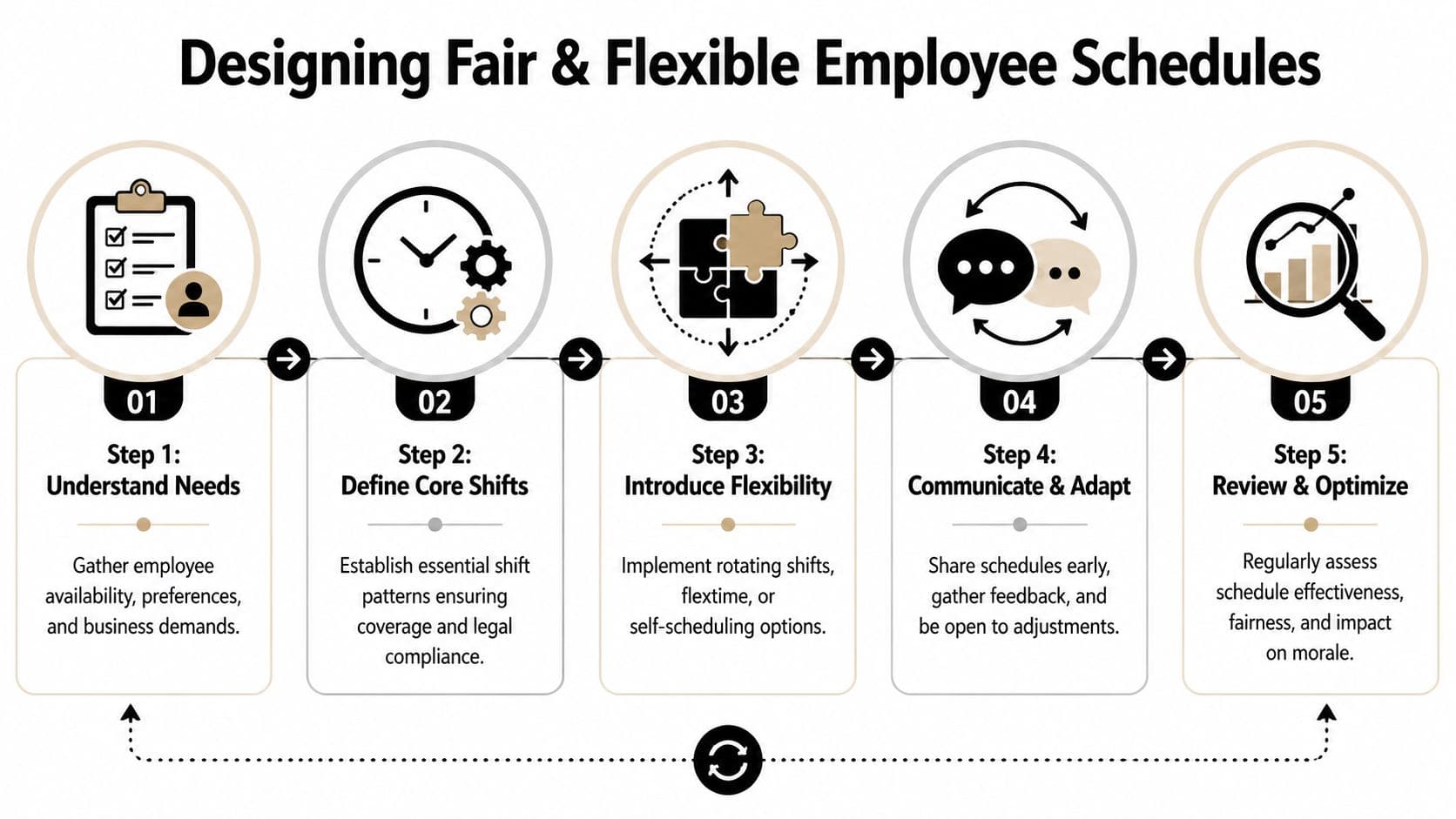
A schedule can be efficient and still fail if employees experience it as arbitrary. Coverage matters, but so does whether people feel the system respects their time, preferences, and real life constraints.
The best schedules are firm where the business needs consistency and flexible where employees need breathing room.
Choose the right shift pattern for the work
Not every team should use the same schedule model. Fixed shifts work well when demand is steady and tasks are repeatable. Rotating shifts can spread less desirable hours more fairly, but they need clear rules or they start feeling random. Split shifts may solve a coverage problem while creating a morale problem. On-call systems work in some environments, but they often create stress if expectations are vague.
A better approach is to match the pattern to the operating reality.
| Shift pattern | Works best when | Watch out for |
|---|---|---|
| Fixed shifts | Demand is consistent and employees value routine | Can become unfair if preferred shifts stay locked to the same people |
| Rotating shifts | Unpopular shifts need to be distributed | Confusion rises fast if rotation rules aren’t transparent |
| Flexible windows | Output matters more than strict start times | Team handoffs can break without overlap rules |
| Self-scheduling elements | Employees can choose among approved options | Coverage gaps appear if guardrails are weak |
| On-call coverage | Demand is unpredictable and response speed matters | Burnout risk rises when availability expectations are unclear |
Gather preferences before drafting
Many managers make a mistake by publishing a nearly finished schedule, then asking for feedback. At that point, employees aren’t collaborating. They’re appealing decisions.
Integrating availability and preferences through self-service portals and feedback loops can reduce no-shows by 35% to 50%. Top-quartile firms that reach an 85% match rate between schedules and employee preferences see an 18% gain in productivity, according to Factorial’s work scheduling guidance.
That doesn’t mean everyone gets their perfect schedule. It means you build a process that captures what matters before the plan is finalized.
Here’s what works better than open-ended back-and-forth:
- Availability windows: Ask when people can work, not just when they’d prefer to.
- Preference ranking: Let employees indicate strong preferences versus nice-to-haves.
- Known constraints: Childcare, study commitments, commuting limits, and recovery time all affect reliability.
- Draft review: Give people a short window to flag real conflicts before publication.
Fairness has to be visible
Employees don’t need perfect equality. They need a process they can trust.
If one person always gets weekends off, another always closes, and another always gets first pick because they complain the loudest, the schedule stops feeling legitimate. Burnout follows quickly, especially in teams already under pressure. If that’s happening, it helps to tighten your workload design and review practices, not just your rota. Consequently, guidance on preventing employee burnout becomes part of scheduling, not a separate HR topic.
The team doesn’t need a “fairness statement.” They need to see that unpopular shifts, late changes, and approval rules are handled consistently.
Good managers keep a simple fairness record. Who worked the last holiday period? Who covered the recent call-outs? Who has absorbed the most closes or weekends lately? You don’t need a complicated formula. You do need a memory that doesn’t depend on who spoke to you last.
Select the Right Tools for Your Team's Needs
A spreadsheet can work for a while. So can a whiteboard. The problem isn’t that these tools are useless. The problem is that they stop working well once scheduling becomes collaborative, fast-moving, and tied to different work styles.
If your team is small, stable, and local, a simple template may be enough. If people need mobile access, conflict alerts, approval flows, visibility across roles, or different ways to view work, basic tools become a bottleneck.
Compare the method to the job
Here’s the simplest way to think about it.
| Method | Best For | Pros | Cons |
|---|---|---|---|
| Paper or whiteboard | Very small teams in one location | Easy to start, visible on-site | Hard to update, easy to miss changes, no audit trail |
| Spreadsheet | Managers who need flexibility and already know the process well | Familiar, customizable, low barrier | Version confusion, manual conflict checking, weak collaboration |
| Scheduling software | Shift-based teams with recurring staffing needs | Better visibility, easier approvals, conflict detection, mobile access | Requires setup and process discipline |
| Task and workflow platforms | Knowledge teams, remote teams, mixed async work | Supports outcome-based planning, multiple views, easier coordination | Needs clear operating rules so work doesn’t become too loose |
What modern teams need that old tools miss
Traditional scheduling tools were built for shifts. That’s still useful, but it’s not enough for many teams now. Project-based teams, assistants, freelancers, support staff, and hybrid workers often need scheduling that combines time, workload, and dependency management.
That’s especially important for neurodivergent employees. Rigid scheduling is a major workflow barrier for 78% of neurodivergent knowledge workers, and flexible methods like focus-block scheduling plus varied visual formats can improve output by as much as 37% according to Koalendar’s scheduling article.
For those employees, the issue often isn’t willingness. It’s fit. A dense grid with constant context switching can make work harder to start and harder to sustain.
Look for tools that support:
- Multiple visual views: Calendar, list, and Kanban don’t serve the same brain equally well.
- Task-level planning: Not all work should be assigned as a block of hours.
- Clear priorities: Employees need to know what matters first.
- Low-friction updates: Confusion rises when changes are buried in email threads.
- Mobile access: People should be able to check and respond without hunting for information.
A good scheduling tool doesn’t just show time slots. It reduces ambiguity.
In some sectors, specialized tools make more sense than general scheduling apps. If you manage lessons, appointments, or instructor time, a focused option like tutoring scheduling software can be more practical than forcing a generic rota tool to fit.
The right tool depends on the shape of the work. Don’t buy software because it looks advanced. Buy the tool that matches how your team plans, communicates, and adapts.
Publish and Communicate the Schedule with Clarity
A schedule isn’t finished when it’s built. It’s finished when every employee knows where to find it, trusts that it’s current, and understands how changes will be handled.
Many scheduling failures are communication failures. The draft may be solid, but if one update goes out by text, another by email, and a third gets mentioned in passing, confusion takes over. Then managers blame employees for missing information that was never managed properly in the first place.
Use one source of truth
Pick one place where the live schedule always exists. That might be scheduling software, a shared workspace, or a team calendar. What matters is that everyone knows this is the place to check, and that unofficial side channels don’t replace it.
If your team still relies on scattered messages to communicate updates, move toward a cleaner system like a shared team calendar workflow. It reduces the “I didn’t see that” problem because the schedule and the update process live together.
A few rules make a big difference:
- Publish on a predictable cadence: Employees plan their lives around your schedule.
- Set a cutoff for routine changes: Constant edits erode trust.
- Document update requests: Don’t rely on memory or hallway conversations.
- Confirm change approval clearly: A request isn’t approved because someone asked.
Handle last-minute changes without chaos
Things will change. Someone gets sick. A client deadline shifts. Demand is higher than expected. The answer isn’t pretending last-minute changes can be eliminated. It’s making sure they aren’t handled arbitrarily.
Use a standard process:
- Record the gap or conflict in the same system the team already uses.
- Check approved backup options or available staff first.
- Apply the same cover and swap rules each time.
- Confirm the final change in writing where everyone can see it.
Clear communication is a form of respect. Employees don’t mind change nearly as much as they mind confusion.
Managers sometimes think speed is the only priority during schedule disruption. It isn’t. Consistency matters too. If one person gets flexibility because they’re outspoken and another gets denied because they’re quiet, the team notices. They always do.
Automate and Delegate Scheduling for Modern Teams
For a lot of modern teams, the old question of scheduling, “who works which hours,” is too narrow. Remote teams, freelance-heavy teams, founders, assistants, and project groups often need a different system. They need to decide what gets done next, who should do it, and when human effort should be supplemented instead of stretched.

That’s where automation changes the game. In distributed and gig worker teams, 70% of workflows are asynchronous, and AI-driven scheduling that integrates task automation can reduce overstaffing by 28%. The same source notes that 62% of project managers report scheduling breakdowns in hybrid teams, which is why task-aware scheduling and pay-per-task delegation models matter more now than rigid weekly grids. Those figures come from Agendrix’s guide to creating better schedules.
Move from shift planning to capacity planning
A fixed rota still has value when physical coverage matters. But knowledge work often falls apart when managers force it into a shift-first model.
A better way to schedule modern teams is to separate three things:
- Non-negotiable time: Meetings, support windows, live collaboration, customer-facing coverage.
- Focused work blocks: Protected time for deep work, writing, analysis, design, or execution.
- Overflow handling: Tasks that can be reassigned, delegated, or completed asynchronously.
When managers don’t separate those categories, everyone ends up “available” all day while the actual work keeps slipping.
Use automation where humans are weakest
Humans are good at judgment. We’re not great at constantly reprioritizing dozens of moving tasks across multiple people without dropping context.
That’s why workflow automation helps. It can surface urgent tasks, route repeatable work, and reduce the amount of manual sorting managers do every day. If you’re rethinking your process, this guide on automating workflows for teams is a useful companion to scheduling because the two systems should support each other.
For a broader view of how operations and people systems are changing, Transforming human resources management is worth reading. It frames AI less as a replacement for managers and more as a support layer for repetitive coordination work.
This is a good point to see the idea in action:
Delegation is part of scheduling now
Managers often treat delegation as a separate skill from scheduling. It isn’t. If a team member is overloaded, unavailable, or stuck in work that doesn’t require their specific expertise, that’s a scheduling issue.
For modern teams, especially small ones, the smartest schedule sometimes includes outside support. Not another full hire. Not a bloated staffing plan. Just the ability to move specific tasks to capable help when timing, capacity, or attention becomes the constraint.
The strongest schedule is the one that protects momentum, not the one that keeps every task attached to the original person.
That’s the future-facing shift. Scheduling isn’t only about assigning hours. It’s about designing flow.
Your Schedule Is a Reflection of Your Culture
Employees read your schedule the way they read your management style. If it shows up late, changes constantly, ignores preferences, and depends on private side deals, they take the message immediately. Their time is secondary.
A strong schedule sends the opposite signal. It says the business is organized, the rules are visible, and people are being treated like adults with lives outside work. That doesn’t mean every request gets approved or every week runs smoothly. It means the process is stable, fair, and easy to follow.
A practical standard to hold
If you want a schedule that works in practice, pressure-test it against these questions:
- Is coverage based on actual demand? Or are you copying old patterns that no longer fit?
- Are constraints built in early? Legal limits, rest time, skill needs, and approved leave shouldn’t be patched in later.
- Do employees have input before publication? Not after the fact, when the key choices are already made.
- Can people understand why the schedule looks the way it does? Transparency matters.
- Is the tool fit for the team? Shift work, project work, remote work, and neurodivergent work styles don’t all need the same interface.
- Is communication centralized? One live version beats five partial versions every time.
- Can the system adapt when work changes? Good scheduling includes a plan for change, not just a plan for ideal conditions.
What works and what doesn't
What works is boring in the best way. Clear rules. Early publication. Honest demand planning. Shared visibility. Documented changes. Tools that fit the work.
What doesn’t work is also predictable. Last-minute building. Spreadsheet guesswork with no process behind it. Favoritism dressed up as flexibility. Treating scheduling as a weekly nuisance instead of the framework that shapes performance.
A team can tolerate a hard week. It struggles with a chaotic system.
That’s the takeaway. Learning how to create a schedule for employees isn’t about making a prettier rota. It’s about building an operating rhythm people can rely on.
If your team needs more than a basic rota, Fluidwave helps you organize work across calendar, list, table, Kanban, and card views, automate repetitive coordination, and delegate tasks on a pay-per-task basis without adding fixed overhead. It’s a practical fit for busy professionals, modern teams, and anyone who needs scheduling to support focus and execution, not just fill time slots.
Focus on What Matters.
Experience lightning-fast task management with AI-powered workflows. Our automation helps busy professionals save 4+ hours weekly.