Discover 10 proven project planning techniques to set goals, manage timelines, allocate resources, and track progress with practical steps for each.
November 19, 2026 (Today)
10 Project Planning Techniques That Keep Projects on Track
Discover 10 proven project planning techniques to set goals, manage timelines, allocate resources, and track progress with practical steps for each.
← Back to blog
Only half of projects succeed. PMI's 2025 research was reported as finding that 50% of projects succeed, 37% partly deliver and 13% fail outright, while 81% of surveyed project professionals say projects have become more complex (Konfuzio's summary of the PMI findings). The pattern repeats across portfolios: teams lose less often to hard technical problems than to a plan that never named the dependency, the owner or the uncertainty.
Planning quality decides most of that. A schedule built on a real work breakdown, honest durations and explicit owners survives bad weeks. A schedule built on a wish and a spreadsheet doesn't survive a single sick day.
What follows are ten project planning techniques, each framed by the failure it prevents rather than its textbook definition. For every one you get the failure, the mechanism, a worked use case, an implementation set you can apply this week, and a straight verdict on when to skip it. Some are heavy, some are a whiteboard and twenty minutes. All of them have a failure mode of their own, and knowing that failure mode is the difference between using a technique and performing one.
Read it as a menu, not a curriculum. Teams need two or three of these running well, not ten running badly.
1. Work Breakdown Structure (WBS)
Most schedule slips don't come from slow work. They come from work nobody wrote down. A work breakdown structure prevents that by decomposing the final deliverable into phases, deliverables, work packages and tasks before anyone commits a date.
The failure it prevents is forgotten scope: the integration, the data migration, the legal review that surfaces mid-project as an unpriced surprise. Once the surprise lands, the original schedule was fiction all along.
Build it top-down. Start at the finished thing, ask what must exist for it to be complete, then keep splitting until each piece can be estimated and assigned to one person. A construction firm does this instinctively: site prep, foundation, structure, systems, finishing. Each of those splits again until a foreman owns a piece of it.
The control value runs deeper than a tidy list. Earned-value tracking depends on the WBS: once work packages are defined, each needs its own cost account so planned, earned and actual cost can be compared, and NASA's earned-value guidance is built on the same principle (the handbook is linked below).
- Work backward from the deliverable: listing tasks at random guarantees gaps at the edges.
- Stop at assignable size: a few days to two weeks of effort for one person is the usual cutoff.
- Load it into your tool: a work package that lives only in a document never gets tracked. In Fluidwave, for example, each work package can go in as a task, and the tool breaks big items into small, doable steps.
- Review it with the doers: the people executing the work will find the missing pieces in ten minutes.
When to skip it
Full earned-value control is overkill for most work. NASA requires EVM only for projects with an expected initial life-cycle cost of $250 million or more under its project-management policy (NASA's EVM implementation handbook). Scale the ceremony to the financial exposure: a small project needs a page of nested deliverables and nothing heavier.
2. Gantt Chart
A Gantt chart is the cheapest way to end the "I thought you were doing that" conversation, because it puts duration, sequence and ownership in one frame.
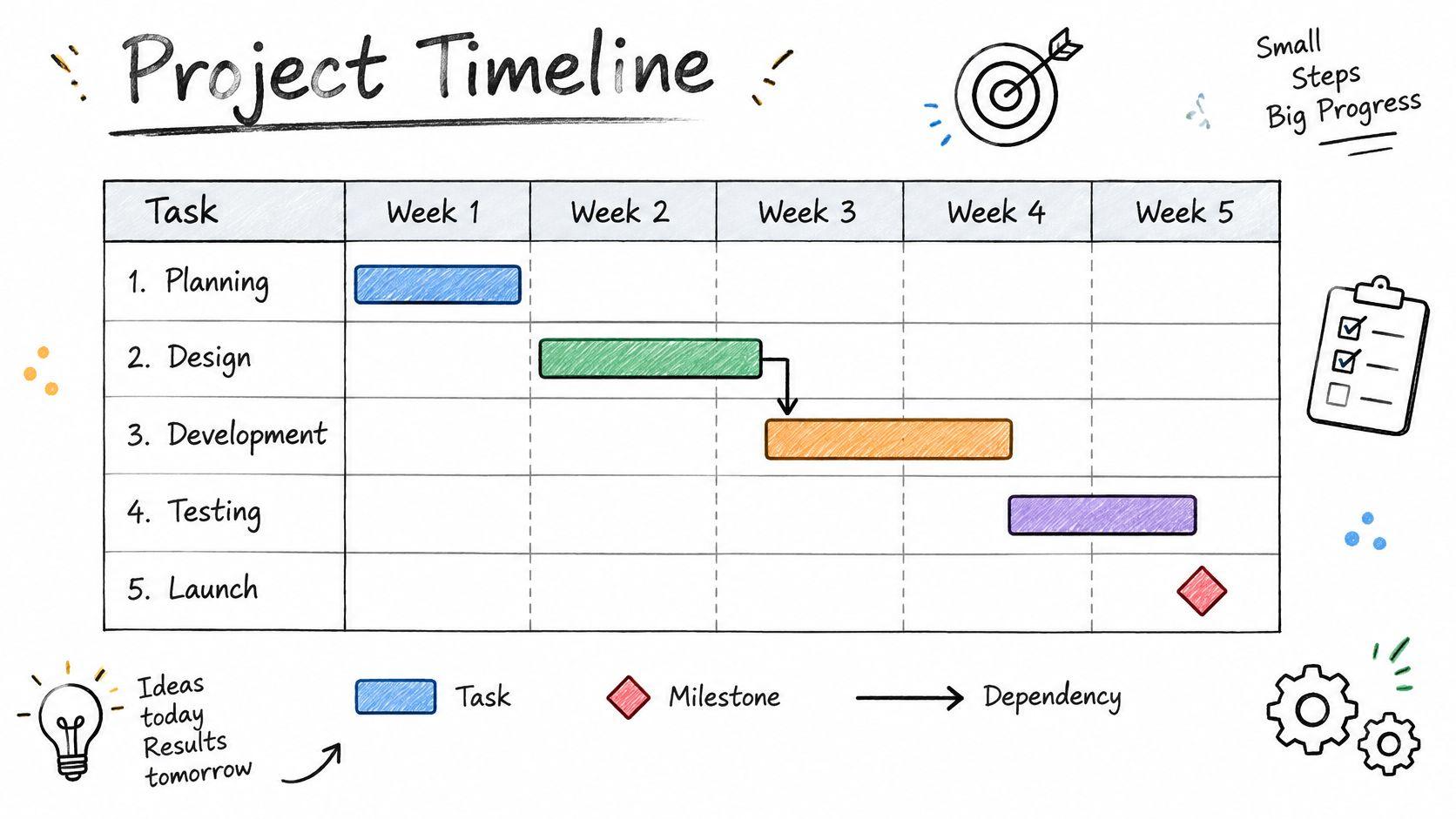
Henry Gantt's charts were used on large industrial and construction projects in the 1910s and 1920s, and the format survives because it answers two questions at once: what happens when, and what has to finish first. Bar length shows duration, bar position shows dates, connecting lines show dependencies, and diamonds mark milestones.
The failure it prevents is false confidence about timing. A task list says nothing about overlap, and overlap is where most deadlines die. A software release plan that shows design, development, testing and launch as parallel bars when they're sequential will look healthy right up to the week it collapses.
- Build it from the WBS: every bar should map to a real work package, not a vague phase name.
- Mark milestones for approvals: progress is easier to judge against a sign-off than against 60% of a bar.
- Update it weekly: an out-of-date Gantt is worse than none, because people trust it.
- Collapse completed phases: a readable chart gets read.
Skip it when the plan is two weeks of five tasks you can hold in your head, or when the chart runs to 300 rows and nobody scrolls past row 12. At that point it's a reporting artifact, not a plan. For release-level coordination, though, it beats every dashboard.
3. Critical Path Method (CPM)
CPM answers the only scheduling question that matters under pressure: which delay moves the finish date?
The method identifies the longest sequence of dependent activities, which sets the minimum possible duration. A forward pass calculates each activity's earliest start and finish, a backward pass calculates the latest allowable start and finish, and total float is late start minus early start, or late finish minus early finish. Activities with zero float are critical, and delaying one delays the planned completion date (PMI's guide to CPM calculations).
Float isn't one thing. Total float measures how long an activity can slip before it affects the planned project finish, while free float measures how long it can slip before delaying the early start of its earliest successor. Free float can't be negative, and negative total float means the dates you published are already infeasible (PMI's practice standard for scheduling).
Recheck the path after every update. It moves more often than people expect, usually onto the approval chain nobody was watching.
A film production is the clearest case. Camera tests, casting, location permits and equipment hire intersect in ways that make the shoot day immovable, and one late permit ruins the schedule regardless of how fast the edit goes. If you'd rather see the chain drawn than calculate passes by hand, critical path software does the arithmetic for you.
Skip CPM when the work has no real dependencies, such as eight independent articles for the same campaign. Use float on non-critical tasks to absorb interruptions instead of pushing the whole schedule, and put your best oversight on zero-float activities.
4. Program Evaluation and Review Technique (PERT)
PERT was invented for work nobody had done before. The U.S. Navy's Polaris Missile Weapons System program needed to coordinate thousands of interdependent activities across contractors, and the method was publicly documented in 1959 (PMI's history of project management practices).
Its defining feature is three time estimates per activity: optimistic, most likely and pessimistic. That lets planners represent uncertainty instead of pretending one deterministic duration is real. The spread between best and worst case is the useful output. A narrow spread means the team understands the work; a wide one means they're guessing and the schedule needs a buffer.
The same period produced DuPont and Univac's Critical-Path Planning and Scheduling System, which used linear programming to find a least-cost schedule and analyze the tradeoff between project duration and cost, before Kelley and Walker simplified it into CPM with a single estimate.
- Collect honest bounds: ask for best and worst case separately, and never let the pessimistic number become a padded commitment.
- Reserve it for the unknown: apply three-point estimates to the riskiest fifth of the work and single estimates elsewhere.
- Buffer the wide spreads: the activities with the largest gap between best and worst case are where contingency belongs.
- Recalculate as data arrives: an estimate that never gets revised is a guess with tenure.
Research and construction teams use three-point estimates to size contingency buffers. Skip PERT on routine work with reliable history. Your invoice run doesn't need a probability distribution.
5. Kanban Board Planning
A Kanban board prevents the most common failure in busy teams: too much started, nothing finished.
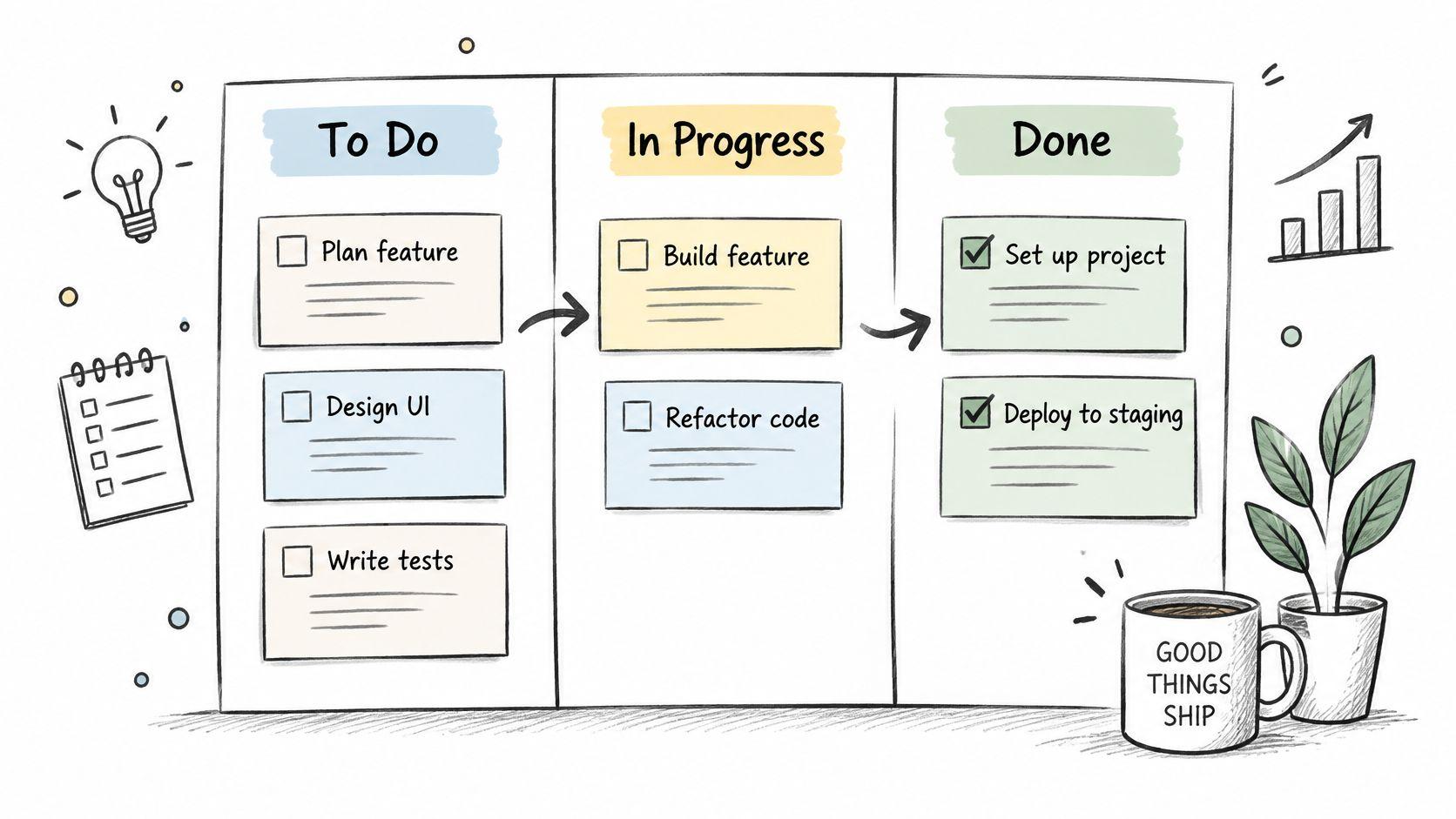
Toyota's production system used cards to signal when parts were needed, cutting waste and overstock. The knowledge-work version keeps the logic: columns represent workflow stages, cards represent work items, and work-in-progress limits are the actual mechanism. Without the limit you've built a to-do list with extra steps.
The visibility matters for teams with mixed cognitive styles. The Association for Project Management's neurodiversity research identifies strengths among neurodivergent professionals including creativity, systems thinking, sustained focus, pattern recognition and risk management, alongside barriers such as sensory overload, communication differences and disclosure concerns (APM's neurodiversity research). A board with four columns and a hard cap of two cards per person is a quieter, clearer planning surface than a 40-field intake form.
- Start with three to five columns: match how work moves, not how a template says it should.
- Cap work in progress at two or three items per person: more than that and everything moves at half speed.
- Review the board briefly and often: a ten-minute check beats a weekly status essay.
- Read stuck cards as delegation signals: a card that hasn't moved in a week needs a different owner or a smaller scope.
Skip Kanban when you have a contractual end date and hard finish-to-start dependencies, because a board tells you what's moving, not when you'll finish. Pair it with CPM in that case.
6. Scrum Sprint Planning
Sprint planning prevents the slow decay of a plan that never gets revisited. Scrum works in fixed cycles, usually one to four weeks, where the team picks items from a prioritized backlog and commits to a sprint goal by the end of the cycle.
The professional acceptance is well documented. The Association for Project Management surveyed more than 600 project professionals and found almost 70% intended to increase their use of agile methods, with seven recurring benefits reported: improved quality, stronger priority management, shorter delivery times, higher customer satisfaction, lower risk in changing environments, greater project visibility, and improved team morale and productivity (APM's agile research).
What goes wrong in practice
Sprints fail when the team treats the commitment as a wish list and carries half of it forward every cycle. That's not a framework problem, it's a capacity problem, and the fix is boring: size the sprint to what the team finished last time, minus room for support work and interruptions.
- Write a sprint goal you can say in one sentence: "Ship the billing retry logic to staging" beats "continue improvements."
- Leave a fifth of capacity unallocated: surprises aren't optional.
- Time-box the daily check-in: blockers surface faster in ten minutes than in forty.
- Change one thing per retrospective: ten changes at once means zero changes stick.
Marketing and design teams get the same benefit by shipping campaign assets in two-week batches. Skip Scrum when the work can't be sliced, such as a single regulatory submission with one fixed deadline, or when one person's day is dominated by inbound tickets. Kanban handles that flow better.
7. Critical Chain Project Management (CCPM)
CCPM exists because of a habit every estimator has: padding each task a little, then watching the padding evaporate anyway.
The distinction that makes it work is between float and buffer. Float emerges from the dependency network and represents time already available because a constraint prevents a successor from starting earlier. A buffer is deliberately added during planning to absorb uncertainty and variation in estimated task durations. CPM analyzes naturally occurring flexibility, while critical-chain methods explicitly reserve time to protect the delivery date (PMI's comparison of critical path and critical chain).
So the method strips safety from individual task estimates, levels the schedule against resource constraints rather than dependencies alone, and places project buffers at the end plus feeding buffers ahead of tasks that feed the critical chain.
A shared buffer is visible and manageable. Ten private buffers are invisible, and they get spent on day one.
- Remove padding before adding buffers: otherwise you've doubled the contingency.
- Encourage handoffs over half-finished work: early starts on the next task cost more than they save.
- Track buffer consumption weekly: a buffer burning at twice the planned rate is your earliest warning.
- Name one owner for the critical chain: shared ownership is how buffers disappear.
Engineering firms use CCPM to shorten product development cycles, and IT teams apply buffer tracking across shared specialists. Skip it on short projects and anywhere you can't control specialist allocation, because the method depends on protecting constrained resources. It also fails in cultures that re-add padding the first time a stripped estimate slips.
8. Rolling Wave Planning
Rolling wave planning prevents wasted planning effort. Detailing work nine months out that will almost certainly change is a way of generating rework with extra steps.
The mechanics are simple. Near-term work gets detailed to task level, later phases stay at deliverable or milestone level, and the detail rolls forward on a fixed cadence as reality replaces assumption. Infrastructure and construction projects run this way by default, designing the next phase while keeping later phases at a high level. Product launches use the same pattern: campaign tasks detailed for the next month, long-term goals left broad.
The supporting evidence is about agility, not the technique itself. PMI research covering 1,469 project professionals and leaders across the United States, Canada, Brazil and several European countries found that 75% of organizations with high agility reported at least 5% year-over-year revenue growth, against 29% of organizations with low agility (PMI's agile research). That's an association, not proof of cause, but the planning habit behind it is instructive: lock near-term deliverables with owners, budgets and deadlines, and keep later work in a ranked, revisable queue.
- Set a fixed roll cadence: every two or four weeks, no exceptions.
- Keep a milestone list visible: stakeholders need the big picture even when the detail is thin.
- Detail only the next phase: break it into tasks you can delegate today.
- Record forecast errors at each roll: that log is the most useful planning document you'll own.
Skip it where funding or regulation demands a complete fixed plan upfront. In that case plan fully, but label every assumption with a review date so nobody mistakes it for a fact.
9. MoSCoW Prioritization
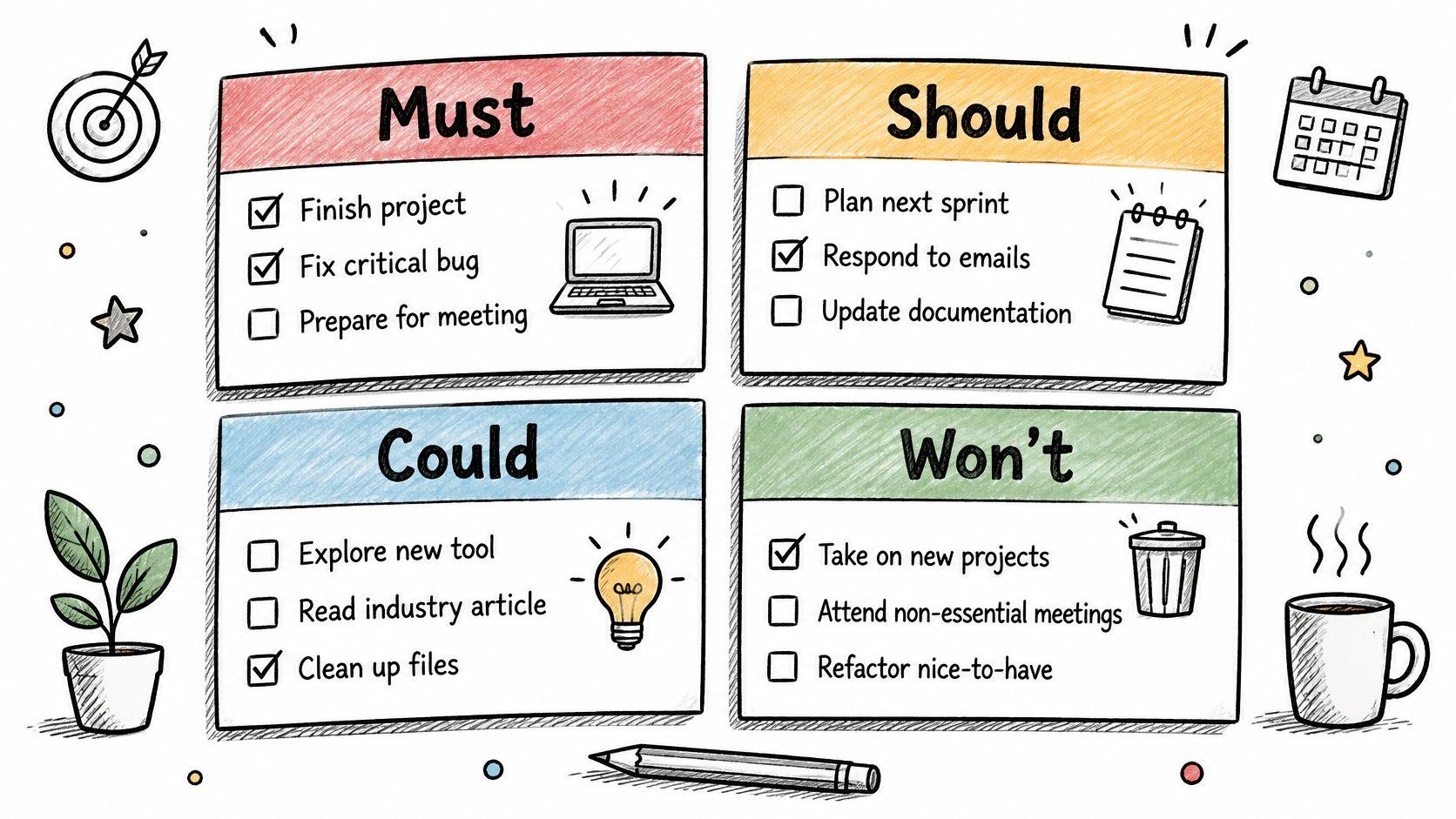
Scope creep rarely announces itself. It arrives as one more small request, then another, until the deadline is doing the negotiating. MoSCoW exists to stop that conversation before it starts.
The mechanic is four buckets: Must have, Should have, Could have and Won't have this time. The last one carries the weight. Writing down what you're deliberately not doing turns a private hope into a shared decision, and it's the only bucket that stops scope creep politely.
Practical rule: if your Must-haves exceed about 60% of total estimated effort, you don't have priorities. You have a wish list with headings.
- Define the criteria before sorting: "breaks the checkout flow" is a criterion; "feels important" isn't.
- Cap Must-haves at roughly 60% of effort: the remainder is your room to absorb slippage.
- Revisit at every planning review: priorities move, and stale categories mislead.
- Publish the Won't list: it's the cheapest protection against late additions.
An event planner sorting venue, safety and capacity requirements into Must-haves while decorations land in Could shows the method at its best: the cut is visible and agreed before the budget conversation. Skip MoSCoW when the Must list is fixed by contract, safety or regulation, because relabeling obligations teaches the team that the categories mean nothing. When the decision sits one level up, between whole projects rather than features inside a release, this guide on how to prioritise projects covers the portfolio-level trade-offs.
10. RACI Responsibility Matrix
RACI prevents the failure that surfaces as "I assumed legal had it."
The grid maps tasks or deliverables against the people involved and gives each intersection one of four letters: Responsible does the work, Accountable owns the outcome and signs off, Consulted gives input before the work starts, and Informed hears about it after. One rule carries most of the weight: a single Accountable name per row. Two accountable people means zero accountable people, and the row becomes a polite way to delay a decision.
Build the matrix straight from your WBS so every work package gets a row. A product launch shows why: who owns the copy, the design file, the legal review and the final sign-off has to be settled before the week it matters, because that week is when ownership disputes cost the most. IT and operations teams run the same grid for incidents, change approvals and communications, where an unowned approval is an outage waiting to happen.
- One Accountable per row, always: this single check catches most ownership gaps.
- Keep columns under ten: a 40-column matrix is a document nobody maintains.
- Be stingy with Consulted: every extra consultee adds a review queue to the row.
- Re-check on every team change: one joiner or leaver can invalidate half the rows.
A blank grid is still a blank argument, so start from something you can adapt: a RACI matrix template walks through the column layout and typical role assignments, which saves the first hour of debating format instead of ownership.
Skip RACI for three people in the same room, where a conversation settles ownership faster than a spreadsheet. Across departments, vendors or time zones, it is the cheapest clarity you can buy.
10 Project Planning Techniques at a Glance
| Technique | Best For | Planning Effort | Handles Uncertainty | Key Strength |
|---|---|---|---|---|
| Work Breakdown Structure (WBS) | Defining and organizing project scope | High for large projects | Limited; focuses on scope | Reduces the chance of missed work |
| Gantt Chart | Showing tasks, durations, and timelines | Medium; requires regular updates | Limited; depends on reliable estimates | Makes schedules easy to communicate |
| Critical Path Method (CPM) | Identifying tasks that control the finish date | High; needs accurate task data | Limited when durations are uncertain | Highlights tasks where delays affect the deadline |
| Program Evaluation and Review Technique (PERT) | Scheduling novel or uncertain work | High; uses three-point estimates | Strong; estimates a range of likely durations | Accounts for uncertainty in task timing |
| Kanban Board Planning | Managing continuous, changing work | Low; simple to set up | Moderate; accommodates changing priorities | Makes bottlenecks and stalled work visible |
| Scrum Sprint Planning | Delivering work in short, iterative cycles | Medium; requires recurring planning | Strong; adapts through feedback and backlog changes | Delivers results regularly while adapting to change |
| Critical Chain Project Management (CCPM) | Scheduling work with shared resource constraints | High; requires buffer and resource planning | Moderate; makes schedule risk visible through buffers | Reduces multitasking and monitors buffer use |
| Rolling Wave Planning | Planning projects with unclear future scope | Medium; requires regular replanning | Strong; details near-term work as information emerges | Avoids overplanning distant work |
| MoSCoW Prioritization | Deciding what is essential under time or budget constraints | Low; quick to apply | Moderate; supports shifting priorities | Clarifies essential work and explicit scope cuts |
| RACI Responsibility Matrix | Clarifying roles and ownership | Low to medium; depends on project complexity | Limited; focuses on responsibilities | Makes accountability and handoffs explicit |
Choosing the Right Techniques and Putting Them to Work
Ten techniques make a catalogue, not a plan. Pick two or three and run them properly. A WBS plus a RACI for scope and ownership, a Gantt or CPM network for timing, MoSCoW for the weeks when scope pressure arrives, and rolling wave or Kanban for the ongoing work that never quite fits a baseline cover the most ground with the least overhead.
The sequencing matters more than the selection. Build the WBS first, because every other technique consumes its output: Gantt bars, CPM nodes, RACI rows and MoSCoW items all come from work packages. Get the decomposition wrong and you'll spend the rest of the project maintaining an elegant structure around missing work.
The pattern behind all ten
Every technique here exists to make one thing visible that would otherwise stay hidden: scope in the WBS, timing in the Gantt and CPM, uncertainty in PERT and buffers, capacity in Kanban, priority in MoSCoW, ownership in RACI. When a method starts producing documents instead of decisions, it has stopped doing that job and you should cut it.
- Match the technique to the failure you're having: missed dependencies point to CPM or dependency maps, not to a better Gantt design.
- Give each method one owner: techniques without owners decay into templates.
- Measure before and after: track cycle time, missed commitments, rework and stakeholder satisfaction for a month.
- Drop anything nobody uses: an unread plan costs credibility every week it stays open.
Running the plan day to day is where most of these methods die, so it's worth having the mechanics in one place. A tool like Fluidwave handles the sequencing part well: its Gantt view draws dependency arrows between tasks and flags circular dependencies as you add them, auto-prioritization reorders your list using tunable criteria such as due dates, quick wins, importance and dependencies, and typing a task in plain words sets the date, priority and project for you.
Start this week with one technique. Take your current project, build the WBS to assignable work packages, and see how much scope appears that wasn't in the plan. Track what changes over the next month, then add the second technique that addresses the failure you observed.
Fluidwave gives you the planning surface the techniques above need: Gantt views with dependency arrows and circular-dependency detection, Kanban, list and calendar views of the same work, and auto-prioritization that keeps today's order honest using criteria you control. Type a task in plain words and the date, priority and project get set for you. Visit Fluidwave to put one of these techniques into practice this week.
Focus on What Matters.
Experience lightning-fast task management with AI-powered workflows. Our automation helps busy professionals save 4+ hours weekly.