Master how to post to Instagram automatically in 2026. This guide covers native tools, schedulers, Zapier, best practices, and workflows for effortless
July 9, 2026 (3mo ago)
How to Post to Instagram Automatically: 2026 Guide
Master how to post to Instagram automatically in 2026. This guide covers native tools, schedulers, Zapier, best practices, and workflows for effortless
← Back to blog
You've probably hit the same wall commonly encountered with Instagram automation. You set up a scheduler, queue a week of content, feel organized for five minutes, then something breaks. A Reel won't publish. A Story turns into a phone notification. The image crop looks wrong. Someone still has to jump in, approve captions, answer comments, and fix the post that looked fine everywhere except Instagram.
That's why “post to Instagram automatically” is a bigger topic than scheduling software.
The workable version is a system. One part approved publishing. One part content workflow. One part review. And, if you're busy, one part delegation so you're not the person babysitting every post.
The Ground Rules for Instagram Automation
Instagram automation works when you stay inside Meta's approved lane. It gets risky fast when you don't.
The first essential requirement is account type. If you want to publish automatically through a scheduler, your Instagram account needs to be a professional account, meaning Business or Creator, because personal accounts are excluded from automatic publishing through Meta's API. That restriction has been in place since Instagram opened third-party API access for auto-posting, and it still shapes what every tool can and cannot do today, as outlined in Buffer's explanation of Instagram auto-publishing limits.
The second rule is connection. Your professional Instagram account needs to be linked to a Facebook Business Page or the setup usually stalls. A lot of people think the scheduler is broken when the actual issue is the account structure behind it.
What's allowed and what gets you flagged
The clean distinction is simple. API-based scheduling is allowed. Bot behavior is not.
According to Instagram automation policy guidance, API-based automation using Instagram's official Graph API or Creator API to schedule posts is explicitly allowed and encouraged by Instagram, whereas activity-based tools that simulate human app interaction (auto-liking, auto-following) are universally banned.
That means these are generally safe:
- Approved publishing tools: Buffer, Hootsuite, Later, Planoly, and Meta's own tools when they connect through official API pathways.
- Scheduling workflows: Queueing feed posts, videos, and some stories in advance.
- Operational automations: Moving assets, generating drafts, assigning approvals, and routing content for review.
These are the wrong tools to touch:
- Engagement bots: Anything that auto-follows, auto-likes, auto-comments, or mass-DMs.
- Fake mobile emulators: Tools that pretend to be a real user tapping around inside the app.
- Password-sharing gray tools: If the software asks for direct account behavior that doesn't rely on official integrations, assume it's a bad bet.
Practical rule: If a tool helps you publish content through Instagram's approved API, you're in safer territory. If it tries to imitate a human using the app, back away.
What this means in practice
For most businesses, the smart move is boring on purpose. Use approved scheduling for publishing, and use automation around the publishing process, not around fake engagement.
If you work in a niche where compliance matters, that matters even more. A good example is specialized workflows like tools for real estate social media automation, where consistency matters but reputation risk matters just as much.
People usually overcomplicate this. The rules are quite usable once you accept one thing: Instagram lets you automate publishing workflows, not relationship-building shortcuts.
Your First Step Native and Approved Schedulers
A common early failure looks like this. A founder wants to post to Instagram automatically, picks three tools in a week, then still ends up approving captions in text messages and uploading assets from a camera roll at 9 p.m.
Start smaller.
If publishing itself is still manual, the first win is getting onto a scheduler Instagram already supports. Meta Business Suite handles a lot of simple use cases. Approved third-party schedulers earn their keep once content involves multiple people, multiple asset sources, or any kind of repeatable approval process. That distinction matters if the long-term goal is delegation, not just scheduling a few posts.

Meta's tools versus third-party schedulers
Meta Business Suite is usually the right first stop because it removes extra software from the equation. You can draft posts, queue them, and publish from a tool that sits inside Meta's own system. For a solo operator, that is often enough.
Third-party schedulers become more useful once the core work shifts from publishing to coordination. That happens fast for agencies, ecommerce teams, multi-location brands, and founders who are already handing content tasks to a VA or junior marketer.
Here's the practical difference:
| Option | Best for | Where it works well | Where it gets annoying |
|---|---|---|---|
| Meta Business Suite | Solo operators, basic posting | Native access, simple scheduling, fewer moving parts | Limited planning depth and lighter workflow controls |
| Buffer, Later, Planoly, Hootsuite | Teams, agencies, content-heavy brands | Calendar views, asset organization, approvals, reporting | More setup, another subscription, more process to manage |
The main requirement is simple. Use Instagram-approved schedulers that publish through official API connections. That keeps the posting layer stable and gives you a clean base to build on later with AI drafting, content routing, or assistant-led execution.
When free is enough
Meta's native scheduler works well for a narrow but very common setup:
- One account, one owner: The same person writes, reviews, and schedules.
- Simple posting needs: Feed posts, Reels, and occasional Stories without a complex campaign calendar.
- No approval chain: Nothing waits on legal review, client signoff, or brand checks.
- No asset chaos yet: Photos, captions, and links are easy to find because one person still controls everything.
That setup is common for consultants, local businesses, and early-stage brands testing whether Instagram deserves more time.
When paid tools save real time
A paid scheduler starts making sense when the problem is not "how do we publish?" It is "how do we keep this organized enough that someone else can run it without constant interruptions?"
That usually means you need a few specific things:
- Visual planning: A calendar or grid view that makes campaign timing easier to catch before posts go live.
- Asset storage: Approved captions, brand phrases, product shots, and recurring creatives in one place.
- Approval steps: Draft, edit, approve, schedule. Clear ownership beats constant Slack follow-up.
- Reporting: Enough feedback to decide what deserves to be repeated and what should be dropped.
I usually judge schedulers by one question. Can a contractor or VA open the tool and do the right thing without asking six clarifying questions? If the answer is no, the workflow is still too dependent on the founder or marketing lead.
That is also why this choice affects much more than posting. A scheduler can become the operational center of a larger system. Once your team has a calendar, asset library, naming rules, and approvals in place, it becomes much easier to add supporting automations or hand pieces of the process to an assistant. These workflow automation examples for marketing operations show the kind of structure that makes delegation possible instead of chaotic.
If you're weighing software costs against output, this guide on boosting small business social media ROI is useful because it frames tool selection around time saved and consistency gained.
The mistake I see most often is buying an advanced stack before the team has a usable publishing system. If folders are messy, captions live in five places, and nobody owns approvals, the tool will not fix the process. Clean scheduling comes first. Then automation. Then delegation.
Advanced Automation with Zapier and Make
Once scheduling is stable, the next step is connecting Instagram to the rest of your work.
Zapier and Make prove valuable. They don't replace Instagram-approved publishing tools. They sit around them and remove the repetitive steps that happen before a post gets queued.
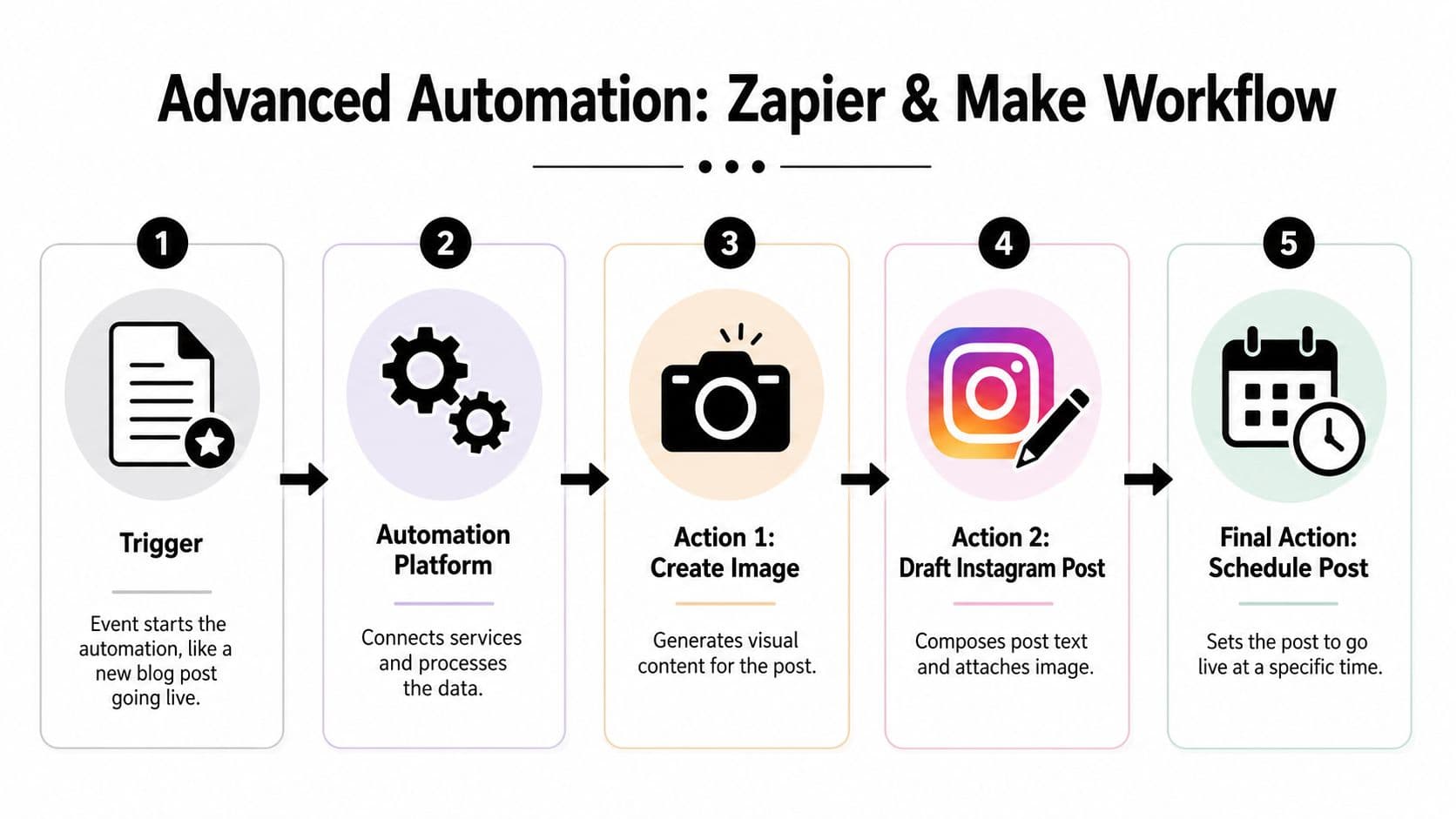
What these automations actually do
Think in triggers and actions.
A trigger happens somewhere else in your business. A blog post goes live. A new Shopify product is added. A YouTube video is published. A new case study gets approved in Notion or Google Docs.
Then the automation platform handles the handoff:
- Capture the source content
- Pull the needed text or media
- Create a draft caption or post brief
- Send assets into your scheduler or review queue
- Schedule or assign for approval
That's the practical use case. Not “AI runs your whole brand.” More like “your team stops copying and pasting the same information five times.”
For teams looking for examples beyond social posting, this roundup of workflow automation examples gives a good sense of how these systems fit into broader operations.
A useful blog-to-Instagram workflow
A simple version looks like this:
- Trigger: New article published on your site RSS feed
- Formatter step: Pull headline, excerpt, author, and URL
- Creative step: Generate a quote card or branded image from the article title
- Draft step: Build an Instagram caption draft with a CTA
- Final step: Send the asset and caption into Buffer or another approved scheduler for review
That's enough to keep your channel active without turning every post into a custom production.
Here's a quick visual walkthrough before going further.
Where AI fits and where it needs supervision
AI is useful at the draft layer. It's less useful as an unsupervised brand manager.
According to Apaya's breakdown of AI Instagram automation, AI-driven Instagram automation enables daily auto-posting by connecting a brand's website URL, which the AI crawls to extract value propositions and tone, then presents a refined brand framework for approval. Users who adopt this model reduce content creation time by over 90%.
That's a real advantage if your problem is draft production. It helps with:
- Caption generation: Turning website or product copy into social-first language
- Content batching: Creating a queue faster than starting from a blank page
- Tone consistency: Using your site copy as a baseline instead of improvising every day
It still needs a human check for brand voice, compliance, and plain common sense.
Automation is strongest when it removes assembly work. Approval, judgment, and audience context still need a person.
If you want to post to Instagram automatically at scale, the machine then begins to hum. New content enters once, gets processed, and lands in a queue. The trick is resisting the urge to remove human review entirely.
Navigating Automation Limits and Common Pitfalls
The failure usually shows up at the worst moment. The post is queued, the team assumes it will publish, and then someone notices 20 minutes later that Instagram turned it into a mobile notification instead of a live post.
Automation on Instagram works best when the content fits the rules exactly. Once you add native music, special story features, product tags, or collaboration settings, the process gets less predictable. That is where teams lose time. Not in planning, but in recovery.
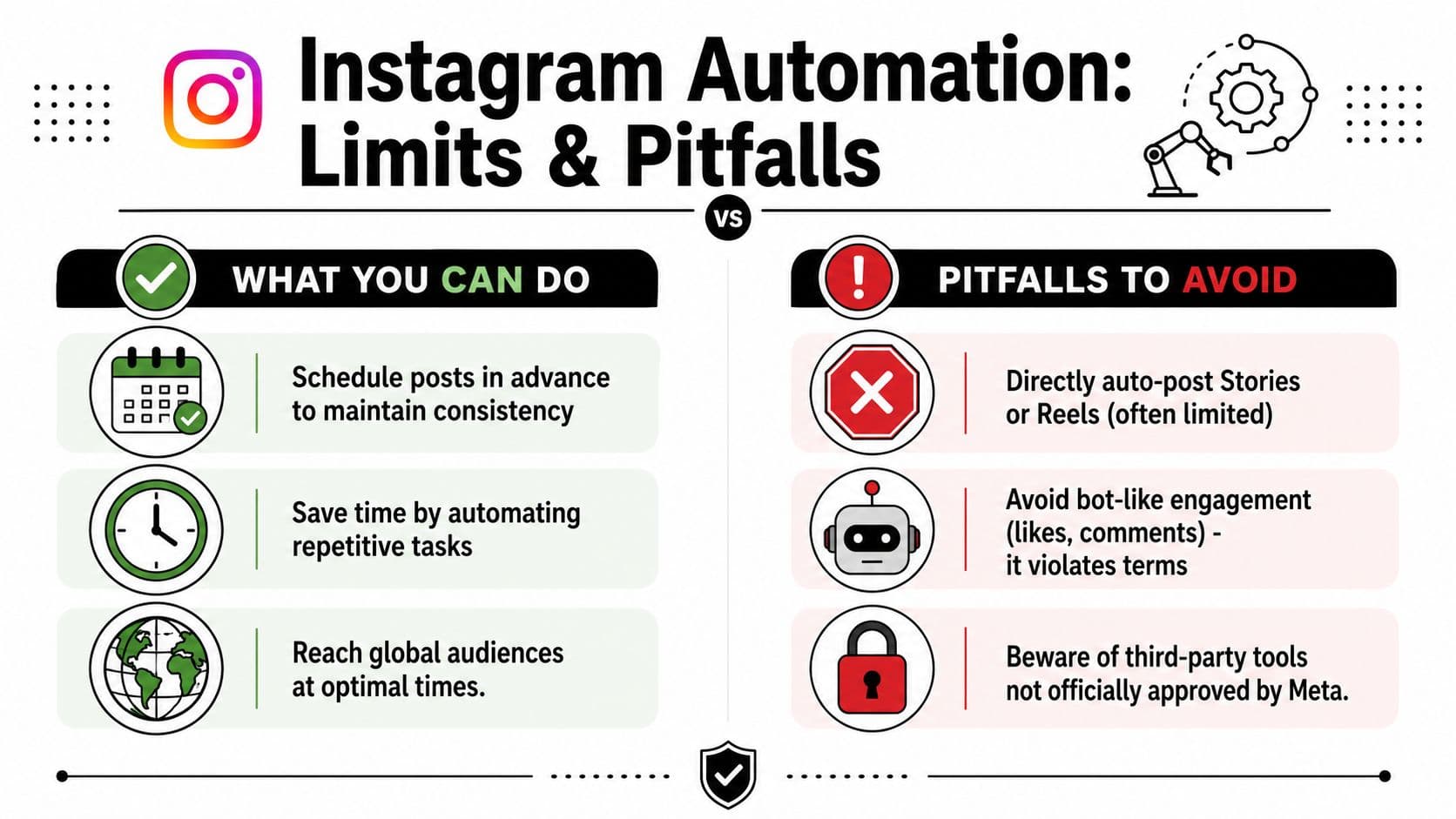
Features that still don't auto-publish cleanly
The biggest mistake is assuming every Instagram format is equally automatable. It isn't.
Some content types still require manual completion or a final check inside Instagram. In practice, these are the usual trouble spots:
- Stories or Reels that depend on Instagram's native music library: The creative works, but full automation often does not.
- Story posts with interactive or enhanced native elements: Links, stickers, and overlays can force a manual step.
- Product tags and collaboration posts: These often break the hands-off workflow teams expect from a scheduler.
- Media with incorrect dimensions: A file can look fine in a content calendar and still fail because the crop or aspect ratio falls outside what the publishing route accepts.
That last issue causes more problems than teams expect. A post can be approved, loaded into a scheduler, and still fail on publish because the exported file was sized for design, not for Instagram delivery.
The less obvious stuff that trips teams up
The technical limit is one problem. The operational mess after it fails is the bigger one.
If a post misses auto-publishing, someone has to catch it, open the app, fix the asset, rebuild the caption, and publish manually. If that person is in a different time zone or offline, the content misses its slot. For brands running launches, promos, or partner content, that is not a small inconvenience. It breaks the system.
That is why good automation setups keep a review layer. A scheduler handles the repeatable work. A person checks the edge cases before they go live. Teams building that kind of safeguard should read this guide to human-in-the-loop automation for operational review points.
I have found that the cleanest setups treat Instagram automation as a production line, not a magic button. The scheduler publishes standard feed posts. AI helps draft captions, repurpose source material, and flag formatting issues. A virtual assistant or coordinator handles exception cases, final app-only features, and spot checks. That structure is much easier to delegate than a pile of half-automated tasks.
Formatting bugs are another repeat offender. Non-square images, long captions pasted from other systems, missing tags, and mismatched video exports can all pass through one tool and fail in the next. Zapier or Make can move assets around efficiently, but they cannot judge whether a Reel cover looks wrong or whether a Story needs a human tap inside the app.
That is the fundamental boundary. You can automate publishing, routing, caption drafting, approvals, and handoffs. You still need a fallback for posts that depend on native Instagram features or break under API limits. Teams that accept that early build better systems, and they are the ones that can hand the workflow off to a VA or operations partner without constant cleanup.
Building an Automated Content Workflow
Monday morning is where weak Instagram systems show themselves. The caption is in one doc, the Reel cover is in another folder, approvals happened in Slack, and someone still has to ask whether the post should go out automatically or wait for a manual check. If that sounds familiar, the problem is not the scheduler. The workflow is incomplete.
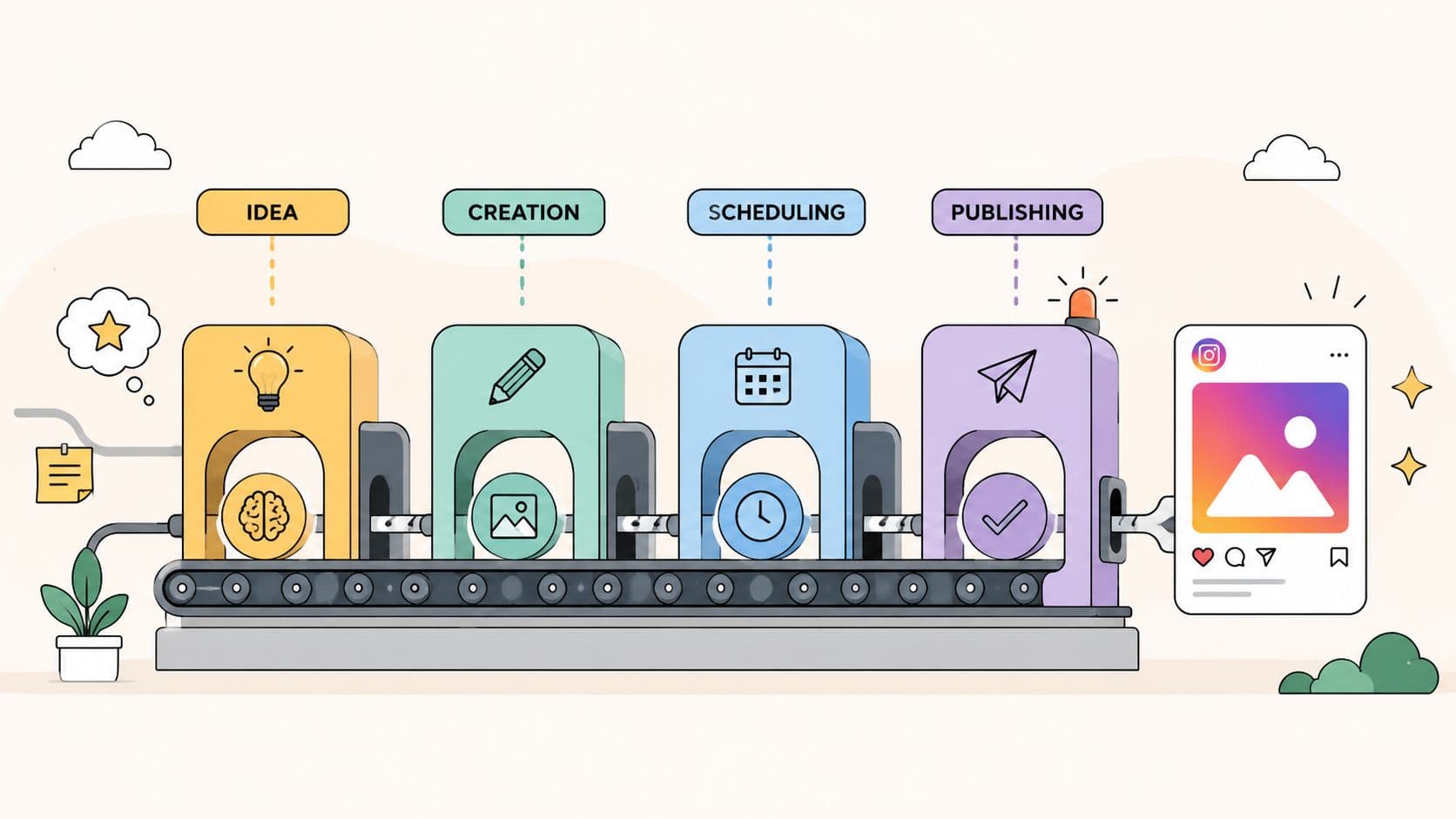
The teams that post to Instagram automatically without constant cleanup build the process backward from handoff. They decide what a coordinator, VA, or ops partner should be able to run without asking daily questions, then document the steps, files, checks, and exceptions around that target.
Build the workflow in batches
Batching keeps Instagram from becoming a stream of small interruptions.
A monthly workflow usually works better than a daily one because it gives enough room for planning, approvals, and fixes before content reaches the scheduler. A practical cycle looks like this:
- Planning block: Choose campaigns, content pillars, launch dates, and required formats
- Production block: Draft captions, design assets, export video, name files consistently, prep links
- Review block: Check brand voice, legal or compliance requirements, CTA clarity, and post-specific details
- Scheduling block: Queue approved posts, assign publish windows, and flag anything that still needs an in-app step
- Support block: Monitor comments, track failures, collect performance notes, and queue revisions for the next batch
That structure is simple on purpose. It gives AI a clear place to help and gives a human a clear place to intervene.
Standardize the parts that create delays
Automation gets easier once every repeatable decision has a default.
A usable system usually defines the following:
| Workflow element | What to standardize |
|---|---|
| Captions | Hook format, CTA style, hashtag rules, brand voice limits |
| Creative | Templates, dimensions, thumbnail rules, file naming conventions |
| Approvals | Who signs off, what needs legal review, what can be pre-approved |
| Publishing | Which post types can auto-publish, which need manual completion in the app |
| Storage | Where drafts, approved assets, final exports, and post URLs live |
AI fits best at the draft and prep stage. Use it to turn long-form content into caption options, generate variants for different offers, or rewrite copy to match a specific content pillar. Keep the final check with a person who can catch awkward phrasing, bad cropping, or a CTA that does not match the actual post.
I would also document failure handling early. If a post misses its slot, someone needs a written rule for what happens next: publish manually, reschedule, or skip it. That one decision alone saves a lot of Slack messages.
Build a workflow someone else can run
A strong automation setup is not just efficient. It is assignable.
That means the system should answer operational questions without relying on memory:
- What content is approved for auto-publishing?
- What content always needs a manual Instagram check?
- Where does the VA pull the final asset and caption from?
- Who handles a failed post or formatting issue?
- What happens after publishing, including comments, DMs, and basic reporting?
If those answers live in a documented SOP, delegation gets much easier. If they live in your head, you are still the workflow.
For teams trying to get out of the day-to-day posting loop, this guide on how to delegate recurring marketing work is a useful next step because it shows how to assign ownership before tasks start breaking.
Leave room for exceptions
No Instagram workflow stays fully automatic for long. A last-minute campaign change, a collaborator tag, an app-only feature, or a creative export problem will interrupt the clean plan. Good systems account for that instead of pretending the exceptions do not exist.
The practical model is a three-part stack. Approved scheduler for standard publishing. AI for drafting, repurposing, and prep. Human support for reviews, exception handling, and platform-specific finishing steps. That is the version that scales, and it is the version you can realistically hand off to a VA through a service like Fluidwave without spending your week fixing preventable mistakes.
The Final Step Delegating Your Instagram Workflow
The highest level of Instagram automation isn't more software. It's getting yourself out of the daily loop.
That only works after the process is clear. A virtual assistant or team member can't rescue a vague system. They can run a documented one. If your content pillars, approval rules, posting windows, asset folders, and fallback steps are already defined, delegation becomes practical instead of stressful.
The handoff usually works best when responsibilities are split cleanly:
- Content prep: Draft captions, format images, organize assets
- Scheduling: Load approved posts into the selected scheduler
- Quality check: Catch formatting issues and unsupported features before publish time
- Post-publish support: Monitor notifications, comments, and basic engagement tasks
- Reporting: Surface what needs attention instead of dumping raw data on you
The shift is mental as much as operational. Stop treating Instagram as a task you personally need to touch every day. Treat it like a repeatable business process.
If you need help building that handoff, this guide on how to delegate is a strong place to start because it focuses on turning recurring work into assignable tasks with clear ownership.
Good delegation doesn't remove oversight. It removes unnecessary involvement. You still set direction. Someone else keeps the machine moving.
If you want a practical way to turn Instagram posting into a delegated workflow instead of another task on your plate, Fluidwave is built for that kind of handoff. You can organize recurring content tasks, assign approvals, and delegate execution to virtual assistants on a pay-per-task basis, which makes it a useful fit for busy teams that need structure without adding another bloated process.
Focus on What Matters.
Experience lightning-fast task management with AI-powered workflows. Our automation helps busy professionals save 4+ hours weekly.