Learn how peer learning works, what the research says, and how to implement it in teams and remote work for measurable results.
August 7, 2026 (1mo ago)
Peer Learning: A Practical Guide for Teams and Remote Work
Learn how peer learning works, what the research says, and how to implement it in teams and remote work for measurable results.
← Back to blog
You joined a team, opened Slack, and realized the fastest way to learn wasn't a course. It was a senior teammate's half-finished draft, a thread full of corrections, and one good pair-writing session that exposed what the docs never said out loud. That's peer learning in the wild, and when it works, it feels less like “training” and more like finally getting access to how the work gets done.
The problem is that many teams treat it as a happy accident. They put capable people in a channel, hope knowledge spreads, and then wonder why the same mistakes keep showing up in onboarding, handoffs, and reviews. If you run distributed work, peer learning is worth treating as an operating system, not a vibe.
What Peer Learning Actually Means at Work
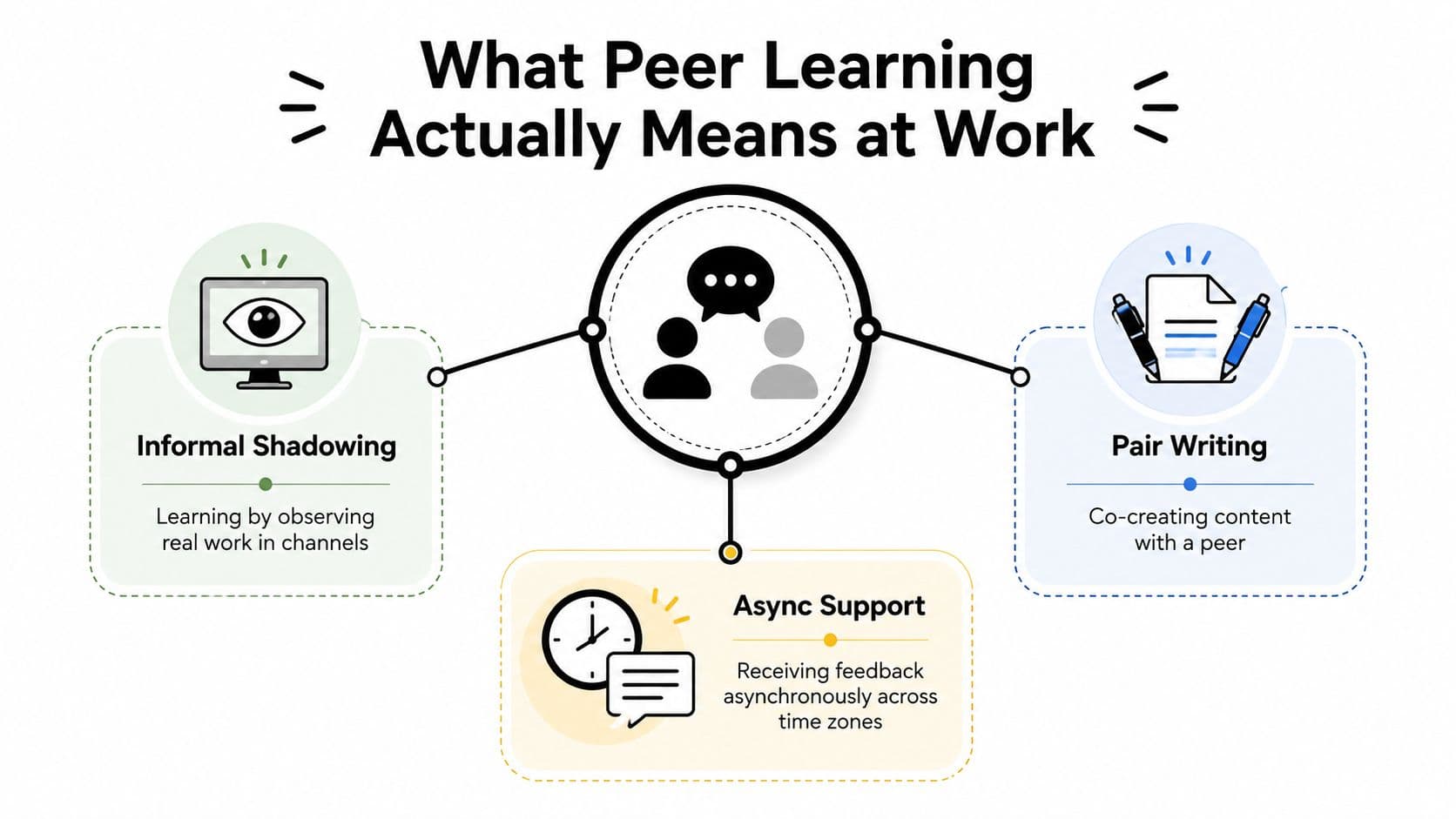
A new product marketer joins a fully remote team and spends her first two weeks inside Slack threads, pair-writing sessions, and quick async reviews. No formal course shows her the product story. A handful of peers do, one draft and one decision at a time.
That's the cleanest way to think about peer learning at work. It's a deliberate instructional method where people of similar status teach, challenge, and assess each other through real tasks, not a loose promise that “smart people will figure it out together.” It's different from mentoring, where the relationship is usually one-way and long-term. It's different from self-study, because the learning doesn't happen in isolation. It's also different from generic collaboration, because the purpose isn't just to finish work, it's to build capability while doing the work.
Practical rule: if nobody can say what knowledge should change by the end of the session, you probably have collaboration, not peer learning.
That distinction matters because teams often confuse working together with learning together. A shared doc full of comments can be peer learning, but only if someone has intentionally designed the task, the feedback loop, and the follow-up. Otherwise, it's just another busy channel where the loudest person shapes the outcome.
What usually gets missed
Peer learning works best when the task itself carries the lesson. A new hire shadowing a senior peer in a live customer thread learns phrasing, prioritization, and judgment at the same time. A pair-writing session teaches how to structure an argument, not just how to hit “publish.”
One useful outside reference on focus and mental load is how to improve mental clarity. In practice, that kind of clarity is what peer learning depends on, because learners need enough structure to notice the pattern they're being shown.
The takeaway is simple. Peer learning is something you design for, not something that magically appears when competent people share a workspace.
The Evidence Base and Why It Matters
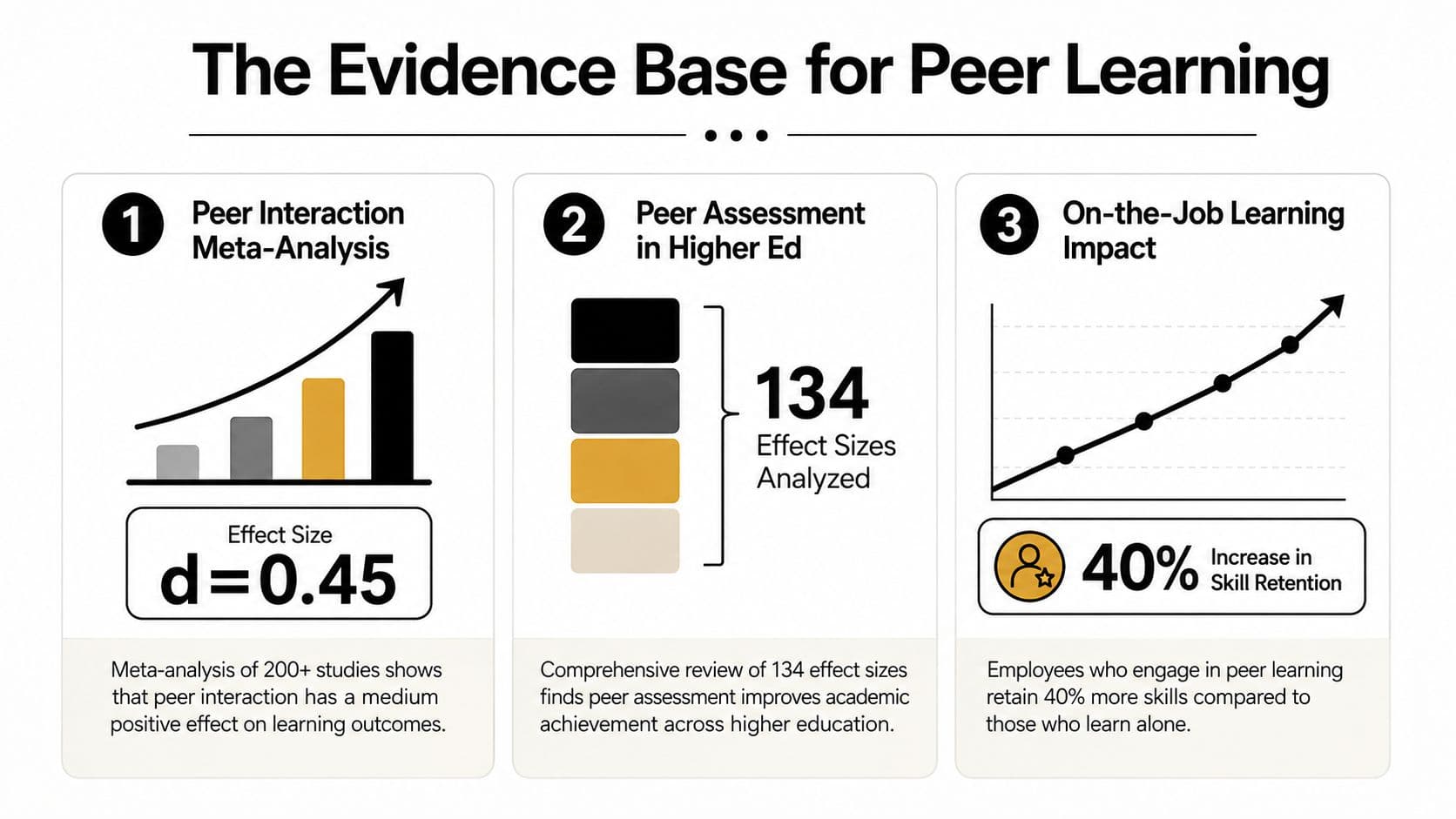
The reason peer learning deserves a place on a team roadmap is that it has moved well past anecdote. In a meta-analysis of peer interaction in children ages 4 to 18, the average effect size was Hedges' g = 0.40 with a 95% confidence interval of 0.27 to 0.54, which points to a small-to-medium learning gain over other conditions. In higher education, a separate meta-analysis of peer assessment covering 134 effect sizes from 58 studies found a 0.291 standard deviation performance lift for students who participated in peer assessment compared with those who did not. Peer instruction research also found that the odds of answering correctly increased by 1.57 times after peer discussion, with a 95% confidence interval of 1.31 to 1.87. All three results are summarized in the APA source on peer learning evidence, which makes the case that this is a repeatable instructional method, not a soft perk. APA peer learning evidence summary
Why those numbers matter in a business setting
Numbers like these are useful because they answer the question leaders always ask first. Does this do anything beyond making people feel busy and connected? Here, the answer is yes, across different ages, settings, and formats.
That doesn't mean peer learning is a universal fix. It does mean you can justify giving it time, structure, and measurement the same way you'd justify any other learning intervention. When a method produces measurable gains in classrooms and higher education, it's reasonable to test it inside onboarding, sales enablement, engineering reviews, and manager development.
The strongest business case isn't that peer learning is cheap. It's that it can improve learning without waiting for scarce expert time.
The point for L&D is not to turn every team into a classroom. The point is to use peer interaction where practice, feedback, and explanation will make people better at the work they already do.
Why leaders should care
Peer learning is also easier to scale than expert-led instruction alone. One experienced person can only coach so many others at once. A structured peer format turns distributed know-how into a usable system, which is why it belongs on the same planning sheet as other productivity and capability initiatives.
The evidence doesn't say “replace all formal training.” It says peer learning is credible enough to earn a pilot, a metric, and a budgeted slot in the workflow.
Four Common Peer Learning Formats Compared
The fastest way to choose a format is to match the learning problem to the workflow. A new hire ramping on product knowledge needs a different setup than a sales team tightening call quality or an engineering team reviewing code. The wrong format usually fails for a boring reason. It's too broad, too loose, or too far from the actual work.
| Format | Group size | Cadence | Best for | Main risk |
|---|---|---|---|---|
| Study groups | 3 to 6 | Weekly or biweekly | Onboarding, certification prep, shared reading | Drift into social chat without a prompt |
| Pair work | 2 | Daily or task-based | Drafting, coding, live problem-solving | One person dominates and the other watches |
| Peer coaching | 2 to 4 | Recurring, scheduled | Performance reflection, skills practice, goal setting | Becomes advice-giving without follow-through |
| Peer review | 2 to 5 reviewers | On submission or milestone | Quality control, writing, design, code, proposals | Feedback turns vague or overly polite |
Study groups work well when the team needs a shared baseline. In a remote customer success team, a weekly group can read one policy update, test each other on edge cases, and leave with the same language for clients.
Pair work is better when the output itself teaches the skill. Pair programming and pair writing both force people to explain choices as they make them. That's why they're useful for quality, but only if the pair has a narrow task and a clear end point.
Peer coaching sits closer to reflection than production. It's useful when someone needs help turning experience into a next move, like a manager preparing for a difficult conversation or a designer trying to sharpen critique skills. Peer review fits when the work already exists and needs feedback before it ships. If you want a practical platform lens for structured learning, this internal guide on microlearning platforms shows how smaller units of work can support repeated practice.
Pick the format by failure mode
Use peer review when the team keeps missing quality standards.
Use pair work when the team needs faster skill transfer inside active tasks.
Use study groups when people need a shared base of knowledge.
Use peer coaching when the team needs better judgment, not just more information.
The biggest mistake is mixing all four and calling it a program. Pick one format, match it to one problem, and make the workflow visible.
A Seven-Step Peer Instruction Cycle for Distributed Teams
A good peer learning ritual needs a sequence people can repeat without guessing. Mazur's classroom model gives you that sequence, and the structure translates well to remote work when you make every step visible in a task system.
The cycle in practice
- Pose the question in a shared doc or task card. Use one decision or concept, not a bundle of them.
- Think individually before anyone comments. Add the thinking window right in the task description so nobody skips it.
- Record the first answer in a comment, form field, or checklist item.
- Discuss with a peer in a short call or threaded comments. Keep the discussion focused on reasoning, not personality.
- Revise the answer after the exchange.
- Send results back into a table, Kanban board, or shared view so the facilitator can scan patterns.
- Debrief the group with the correct explanation and one practical takeaway.
That 7-step classroom process is described in the peer instruction review of Mazur's model, and it's specific enough to adapt rather than improvise. Peer instruction review of Mazur's model
The remote version works because each step has a home. The question lives in the doc. The first answer lives in the card. The discussion can happen in a call, a thread, or a voice note. The revised answer moves back into the same task so nothing disappears when people go offline.
The short version is that the tool is not the method. The method is the sequence.
Here's a useful contrast. A team can run a one-off “knowledge share” call and still lose half the learning because nobody captures the initial answer or the revision. A structured cycle makes the learning traceable, which is exactly what distributed teams need.
If the answer can't be found later, the session didn't really happen from an L&D perspective.
Instructional video on peer discussion workflows
Implementing Peer Learning in Remote and Hybrid Teams
Start small. A pilot in one team is enough to test whether the format fits the work, the schedule, and the people. Most programs fail because they try to solve culture, training, and knowledge management at the same time.
A rollout that doesn't collapse
Begin with one clear purpose, like onboarding, quality review, or skill practice. Then choose a group size that feels social without becoming noisy, usually 3 to 5 people. Set a recurring slot if the learning depends on live interaction, or a recurring deadline if it lives in async review. Recent guidance on peer-led learning also points to the importance of clear purpose, group size, scheduling support, and evaluation, and notes that age-matched cohorts and facilitation can matter when the group composition is sensitive. Peer-led learning guidance
Next, name the measurement hook before the first session. If you only measure attendance, you'll optimize for showing up. If you only measure output, you'll miss whether people learned anything.
A simple task system can carry the whole rollout. Table views help you track who's in the cohort and what they're working on. List views are good for the session agenda and follow-up tasks. Calendar views make recurring peer sessions visible across time zones. Kanban boards work well when you want each review to move from draft to feedback to approved. Cards help when the unit of learning is a single scenario or prompt. That's why an operational guide like asynchronous collaboration tools matters here, because peer learning in distributed teams depends on making time, status, and ownership obvious.
What to assign and what to leave alone
Use delegation for the work around the learning, not just the learning itself. A senior peer can own a feedback task, set a deadline, and carry a budget if the program uses paid review or specialist input. That keeps the session from depending on memory or goodwill.
One caveat from hybrid work is worth keeping in view. A useful overview of thriving in hybrid teams frames the challenge well, because peer learning fails quickly when people assume everyone has the same access, the same schedule, and the same confidence to speak up. In practice, the best rollout makes participation visible, predictable, and optional in the right places.
Implementation work is mostly sequencing and naming. Decide who owns the prompt, who records the outcome, and where the next action lives. Once that's clear, the software becomes support instead of the main event.
Where the Evidence Still Has Gaps
The strongest evidence supports peer learning in structured settings, but the story gets less certain when the format moves online, hybrid, or AI-supported. A 2022 review in higher education said peer learning was “not fully developed or researched” in online and hybrid universities, and a 2025 systematic review said that an overview of learner characteristics, environment conditions, learning processes, learning outcomes, and their interplay in AI-supported peer learning is still lacking. Review of peer learning in online and hybrid universities
That gap matters because teams now assume digital equals equivalent. It doesn't. An async Discord channel can be useful, but it won't automatically reproduce the same interaction pattern as a well-facilitated in-person session. A ChatGPT-assisted study group can speed up idea generation, but it can also blur who learned what unless the group is still doing the thinking itself.
The practical warning is to avoid overpromising. Peer learning works because of interaction quality, not because of the label. If the environment is noisy, the prompt is vague, or the accountability is weak, the method loses shape fast.
Don't assume the medium carries the pedagogy.
That means online and AI-supported versions need tighter design, not looser standards. Keep the prompt narrow, make the role of each participant explicit, and preserve a human checkpoint where reasoning gets reviewed before anyone calls it learned.
Adapting Peer Learning for Neurodivergent and ADHD Users
Treat neurodivergent needs as part of the design brief, not as edge cases. Smaller groups usually feel calmer, and written async peer review often works better than live pair work when attention shifts fast or social load is high.
A neurodivergent engineer joining a pair-programming session shouldn't have to guess what's expected. A written agenda, a defined 25-minute block, and the option to switch to async code review without explanation make the session safer and more usable. Clear structure lowers the cognitive cost of participation, which is why “no surprise pop quizzes” should be a real rule, not a friendly suggestion.
Design choices that help
- Use smaller cohorts: Fewer voices means less interruption and less pressure to perform on the spot.
- Put the agenda in writing: Shared docs give people time to prepare, which is especially helpful for ADHD brains.
- Prefer low-stakes feedback first: Start with draft review or scenario practice before live critique.
- Offer an opt-out path: Let people move from live work to async comments without forcing them to justify the switch.
- Reduce social rituals: Not every learning session needs icebreakers or forced rapport.
This kind of flexibility is one reason to keep the workflow visible inside tools people already use. If you want a concrete set of ADHD-friendly workflow ideas, ADHD productivity tips is a practical reference point for reducing friction without adding more noise.
The broader lesson is that accommodations usually improve the program for everyone. When people know the agenda, the timing, and the expected output, they spend less energy decoding the session and more energy learning from it.
Measuring Success and Avoiding Common Pitfalls
If you can't measure peer learning, it tends to become a nice story instead of an operating habit. The metrics that matter most are the ones that show whether people showed up, finished the cycle, learned something, and used it later.
The metrics worth tracking
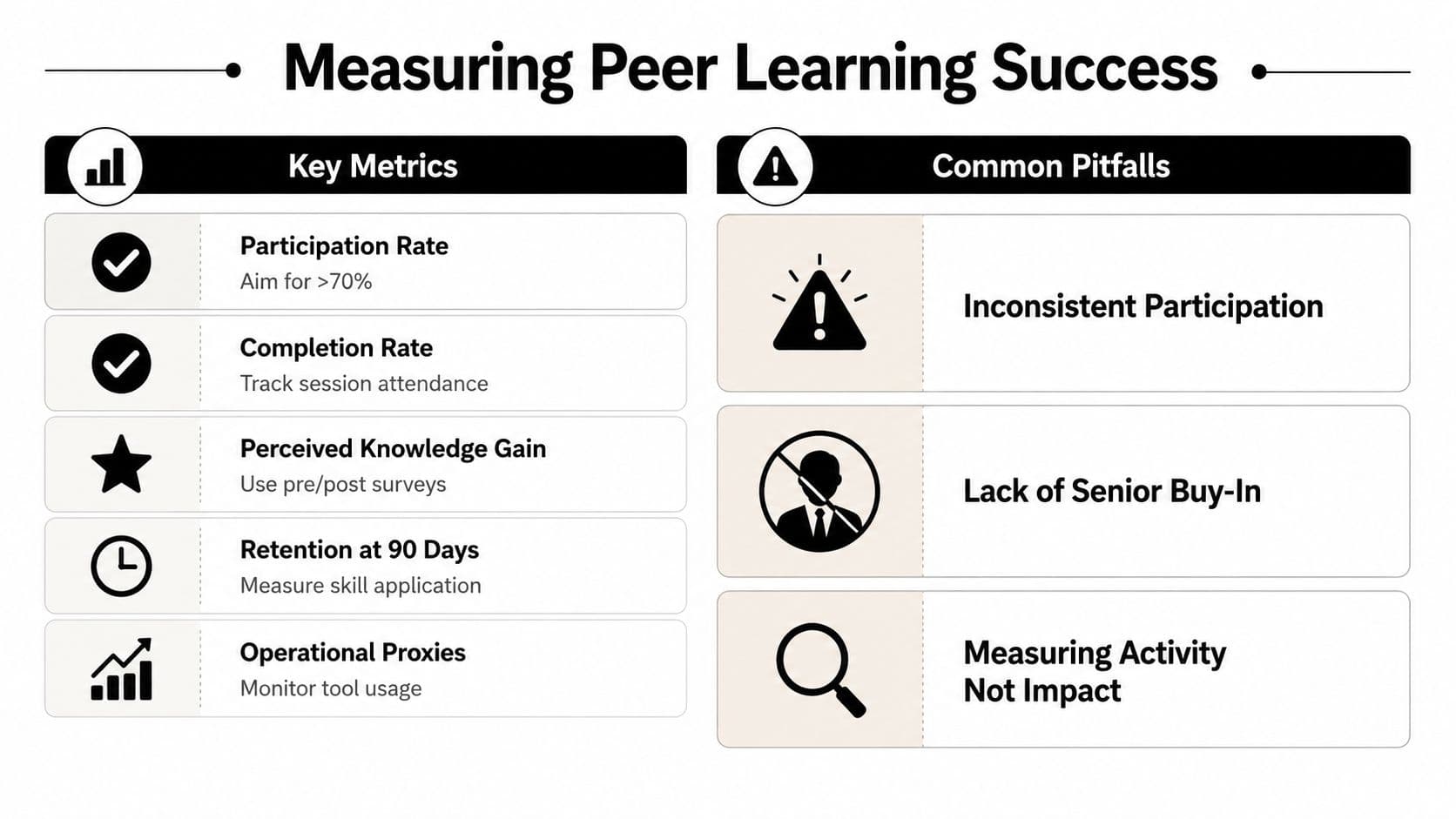
Participation rate tells you whether the format has buy-in. Completion rate shows whether people move through the whole session or review cycle. Perceived knowledge gain is useful when you pair a short pre/post survey with a specific skill or scenario. Retention at 90 days helps you see whether the learning stuck long enough to affect the job. Operational proxies, like cycle time or ticket quality, show whether the program touches real work.
The biggest failure modes are predictable. Vague purpose leads to wandering conversations. Mismatched cohorts put people in the room who can't help each other. No facilitation lets the loudest voice set the pace. Equity issues show up when the same people always teach. “Workshop tourism” happens when everyone attends and nobody changes behavior.
Fixes you can apply this week
- Vague purpose: Write one sentence that names the skill or decision the session should improve.
- Mismatched cohorts: Group people by shared work, shared level, or shared problem, not by convenience.
- No facilitation: Assign one person to keep the prompt tight and close the loop.
- Unequal teaching load: Rotate who leads, who summarizes, and who reviews.
- No follow-through: End every session with one task and one deadline.
A simple operating checklist is enough to keep the program alive. Pick one format, define one purpose, set one cadence, assign one facilitator, choose two metrics, and host it in one task-management view. A shared Kanban board can hold peer review queues, a calendar can hold recurring slots, and delegated tasks can keep senior peers accountable for feedback.
The reason this works is boring in the best way. Peer learning doesn't need a big budget, it needs a small set of repeatable choices made on purpose.
If you want peer learning to become part of how your team works, not just another initiative that fades after the pilot, use Fluidwave to turn sessions into visible tasks, scheduled reviews, and accountable follow-through. It gives teams a place to organize peer coaching, track feedback, and keep the work moving without adding another layer of complexity. Visit Fluidwave to see how a structured workspace can support the kind of learning your team already needs.
Focus on What Matters.
Experience lightning-fast task management with AI-powered workflows. Our automation helps busy professionals save 4+ hours weekly.