Boost productivity with our guide to the Kanban board app. Learn features, how to choose the right one, and practical workflow examples for 2026.
July 8, 2026 (3mo ago)
Kanban Board App Guide: Unlock Productivity for 2026
Boost productivity with our guide to the Kanban board app. Learn features, how to choose the right one, and practical workflow examples for 2026.
← Back to blog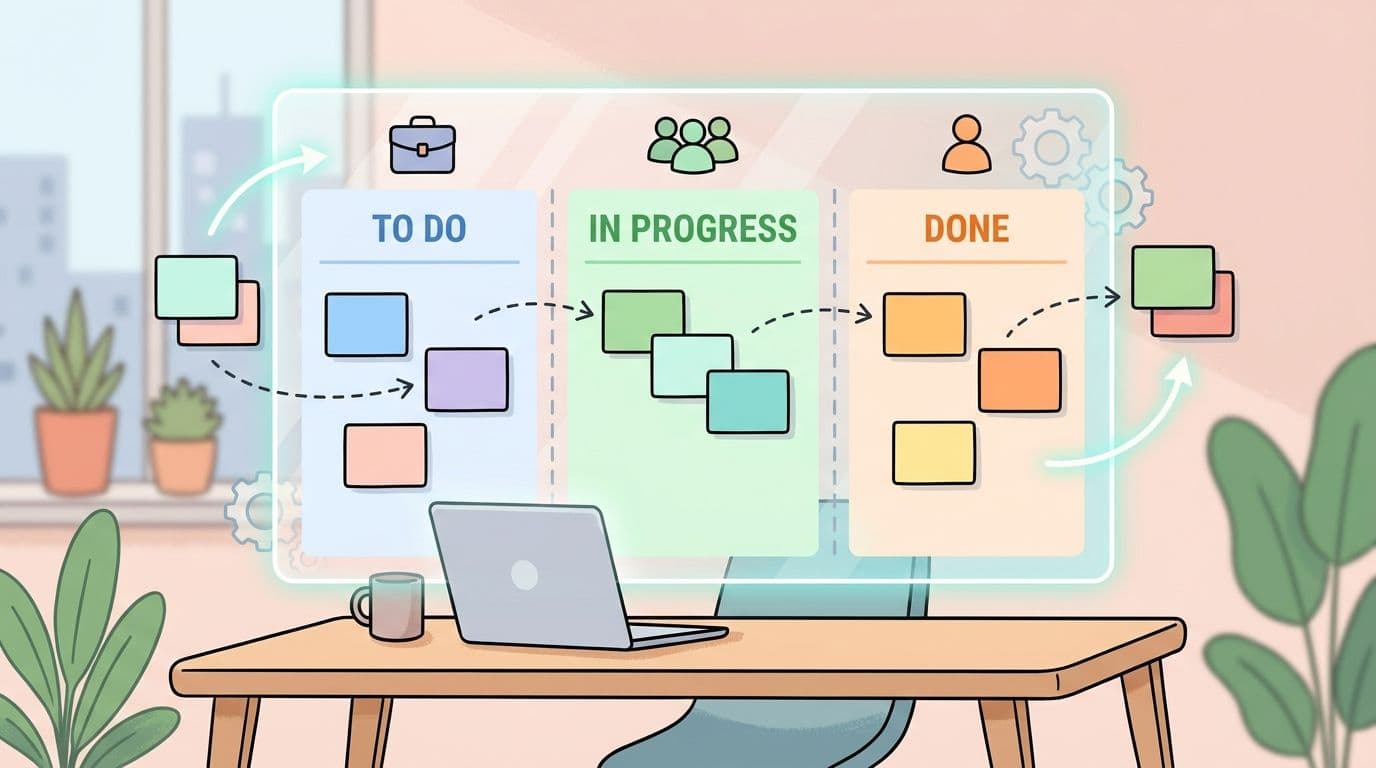
Monday starts with good intentions. By Tuesday, your work lives in five places. A Slack thread has the latest feedback. Your inbox holds the file you need. Someone updated the deadline in a calendar invite, but the task list still shows the old date. You're busy all day and still end the afternoon with that nagging feeling that the important work didn't really move.
That's the kind of mess a Kanban board app is built to fix.
Not by adding more noise. Not by turning your week into a bigger pile of notifications. A good Kanban board app gives work a visible home. You can see what's waiting, what's active, what's blocked, and what's finished. For busy professionals, that shift matters more than most feature lists admit.
Taming the Chaos of Modern Work
A founder I worked with had a familiar system. Client work in email. Product ideas in Notes. Team follow-ups in Slack. Personal reminders on sticky notes. He wasn't disorganized. He was overloaded.
By noon each day, he had answered a lot of messages and completed almost nothing substantial. The problem wasn't effort. The problem was visibility. He couldn't see the whole flow of work in one place, so he kept reacting to the loudest thing in front of him.
That's where a Kanban board app changes the game. It turns scattered commitments into a visual system. Instead of asking, “What am I forgetting?” you can ask, “What should move next?” That's a much better question.
This is one reason the category keeps expanding. The global Kanban board software market was valued at USD 1,158.4 million in 2024 and is projected to reach USD 3,500 million by 2035, growing at a 10.6% CAGR, according to Wise Guy Reports' Kanban board software market analysis. You don't need market research to feel that shift, though. You can see it in how many teams now want visual workflow tools instead of static task lists.
Why busy people get stuck
Most professionals don't have a motivation problem. They have a coordination problem.
A typical day looks like this:
- Too many inputs: New work arrives through chat, meetings, email, and hallway conversations.
- Hidden priorities: Only a few people know what's urgent, and everyone else guesses.
- Constant switching: You start one task, get interrupted, then start another before finishing the first.
- No shared picture: Teammates ask for status because the system doesn't show it.
If that sounds familiar, you might also appreciate practical guidance beyond software itself, like Founder Connects' founder time tips, which do a good job of addressing how leaders protect attention before they try to optimize tools.
A cluttered workflow usually isn't a sign that people don't care. It's a sign that the work has no visible structure.
What a Kanban board app actually changes
A Kanban board app gives each task a card and each stage of work a column. That simple setup does something powerful. It makes work observable.
You stop managing from memory. You stop relying on the person who “just knows what's going on.” You stop mistaking motion for progress.
For a solo consultant, that can mean seeing client deliverables, admin work, and waiting items at a glance. For a team, it can mean fewer status meetings because the board already answers the basic questions.
The Three Pillars of the Kanban Method
Kanban is a method first and a piece of software second. If you skip that distinction, you can end up with a very pretty board that doesn't improve anything.
The easiest way to understand Kanban is to think about a fast-moving kitchen. Orders come in. Cooks can't prepare everything at once. If the grill station starts ten meals before finishing any, the counter gets jammed, quality drops, and customers wait longer. Good kitchens make the work visible, limit what's active, and keep orders moving.
That's Kanban.

Visualize work
The first pillar is simple. Show the work.
When work stays trapped in inboxes, meeting notes, or people's heads, teams guess. A board gives each task a visible place in the process. At minimum, that means columns such as To Do, In Progress, and Done. In more complex environments, those columns can reflect real workflow stages.
Often, confusion arises. Many people think the board should mirror org charts or departments. Usually, it should mirror the path the work takes.
For example:
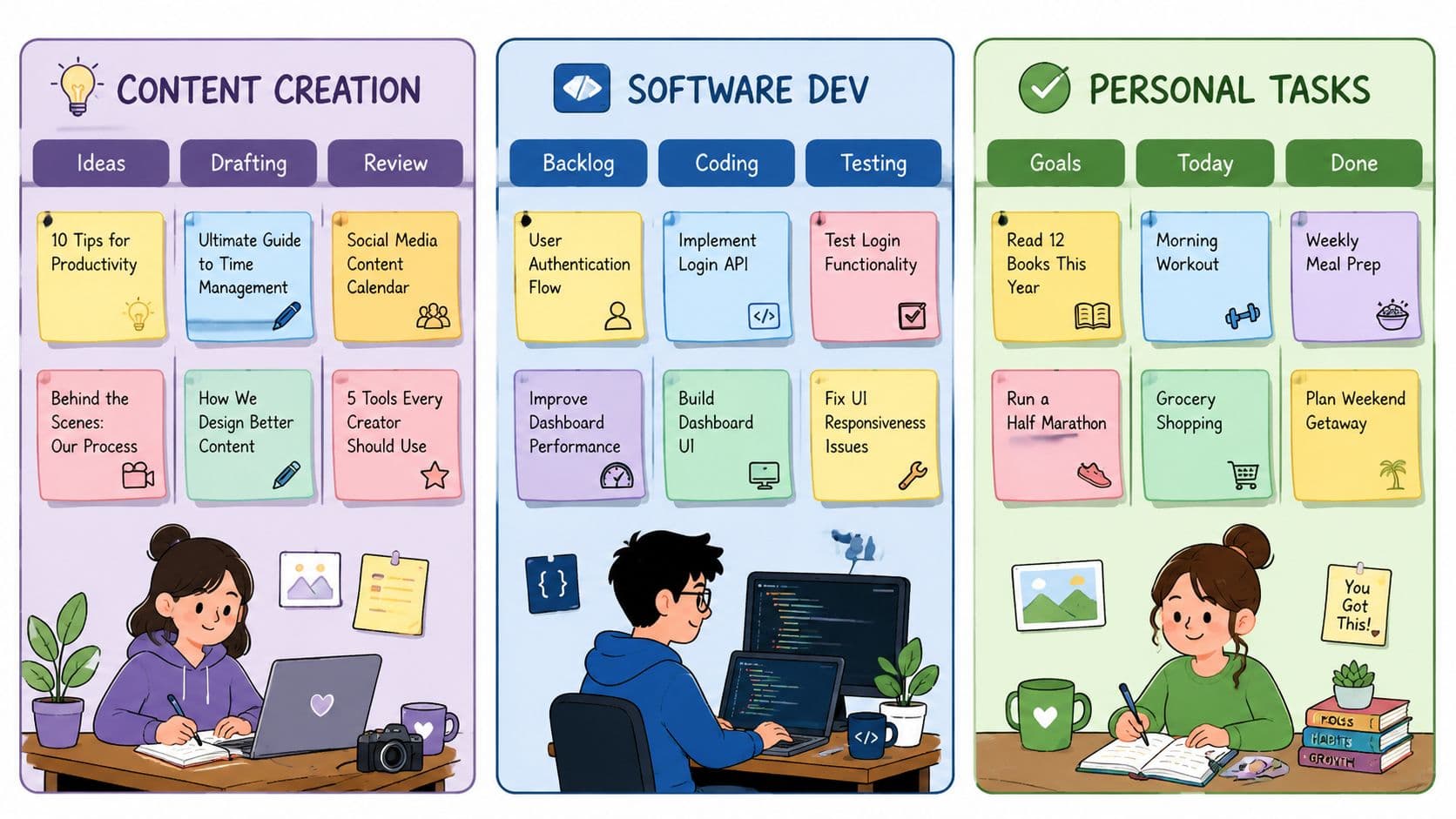
- Marketing: Ideas, Drafting, Review, Scheduled, Published
- Product: Backlog, Ready, Building, Testing, Released
- Operations: Intake, Processing, Awaiting Approval, Completed
If you've ever wondered how Kanban fits with other delivery styles, this short comparison helps learn about Agile and Scrum without turning the topic into jargon soup.
Limit work in progress
This is the part people resist, then later realize was the whole point.
A Kanban board app must enforce Work-in-Progress limits, which are hard caps on tasks in a stage. Setting these limits prevents team overload and forces completion before new work begins, according to Planview's buyer's guide for Kanban board software.
In plain language, WIP limits stop you from pretending that starting more work means producing more work.
Practical rule: If a column is full, don't add another task. Help move an existing one forward.
A team with five active tasks often feels productive. A team finishing two before starting two more usually is productive.
If you want a concrete way to think about this, Fluidwave's guide to work in progress limits explains why constraints often create more momentum, not less.
Manage flow
Once work is visible and active work is capped, the key question becomes: How smoothly does work move?
Flow is the movement from request to completion. In a healthy system, cards move steadily. In a struggling system, they clump. You'll see tasks pile up in review, sit untouched in approval, or bounce back because nobody clarified the handoff.
Managing flow means paying attention to friction points:
- Review bottlenecks: Work gets done but not approved
- Unclear ownership: Cards stall because nobody owns the next action
- Oversized tasks: One card contains too much work to move cleanly
- Hidden blockers: A dependency lives in someone's inbox instead of on the board
A Kanban board app doesn't remove the work. It reveals where the work gets stuck. That's why teams that use Kanban well often feel calmer. The chaos becomes legible.
Anatomy of a Kanban Board App
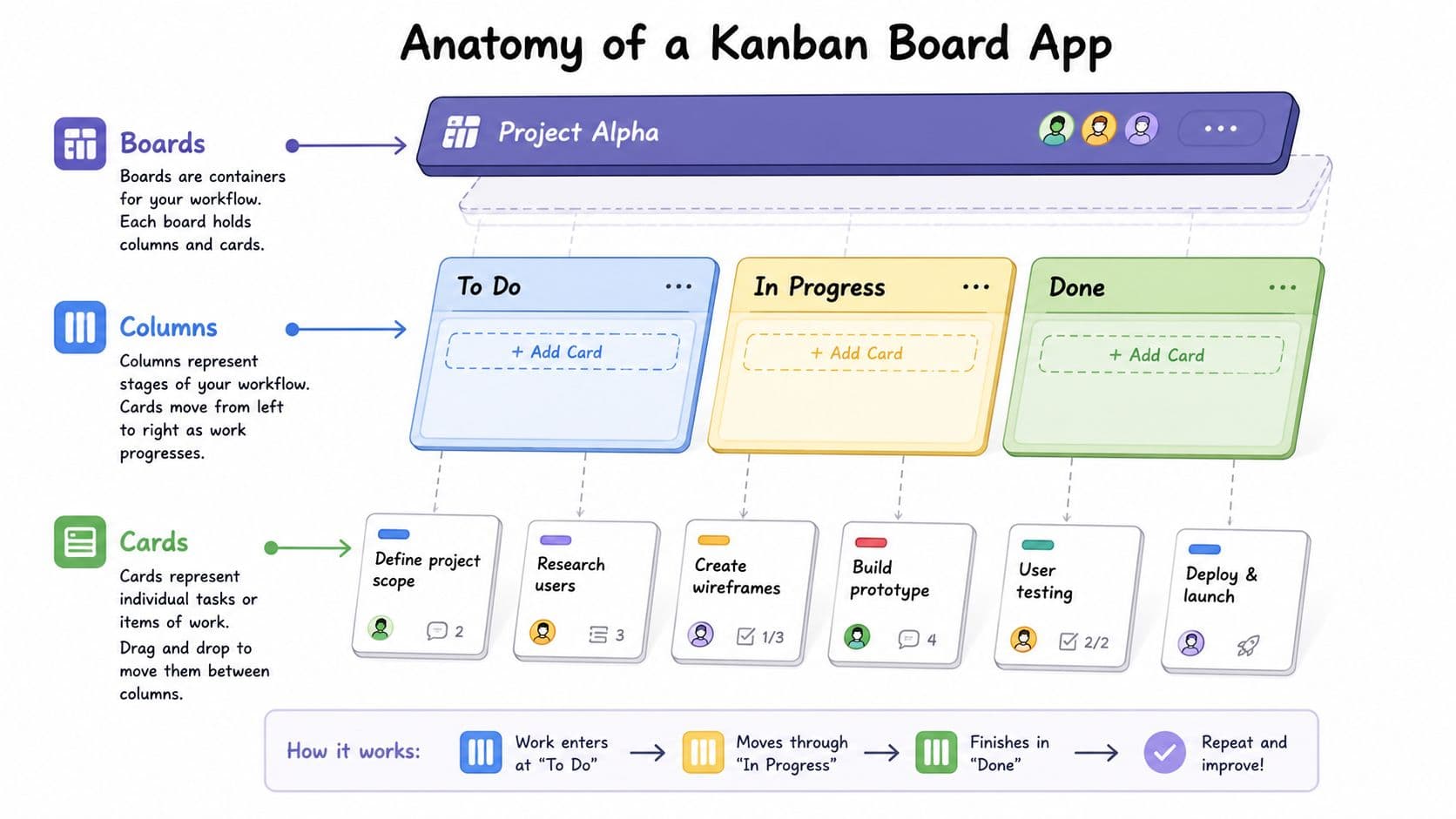
Once you understand the method, the software makes more sense. Most Kanban board apps use the same building blocks. The labels may vary, but the structure is familiar.
Boards, columns, and cards
A board is the big container. It might represent one project, one team, one client account, or one part of your life. Some people keep separate boards for personal tasks, team delivery, and strategic planning. Others use one board with careful filtering.
A column represents a stage in the workflow. Its implementation reveals whether software helps or hurts. Good apps make columns easy to rename and reorganize so the board matches reality.
A card is the unit of work. It could be “Send proposal,” “Draft landing page copy,” or “Approve hiring plan.” The card usually includes an owner, due date, notes, labels, checklists, and attachments.
A strong default setup for many teams is a five-column structure: Backlog, To Do, In Progress, Ready to Review, and Done. PMI's Disciplined Agile guidance notes that this setup is often an effective configuration because the dedicated review stage catches interdisciplinary coordination and quality-control delays that commonly stall work. You can see that reasoning in PMI's Kanban board design guidance.
The parts people overlook
New users usually understand cards and columns quickly. They often miss the features that make a board useful over time.
- Swimlanes: Horizontal lanes that group work by client, priority, team, or project type.
- Labels: Quick visual cues for urgency, department, or task category.
- Due dates: Helpful when deadlines matter, dangerous when every card gets an arbitrary date.
- Attachments and comments: Keep context with the task instead of scattering it across email and chat.
- Blocked markers: A simple visual signal that tells the team a task needs help, not silence.
Here's a short walkthrough if you want to see one board structure in action before building your own.
How to tell if your board is built well
A useful board answers these questions quickly:
| Question | What the board should show |
|---|---|
| What are we committed to? | Cards in backlog and ready states |
| What's active right now? | A tight in-progress column |
| Where is work stuck? | Crowded or aging middle columns |
| What just finished? | A clear done column |
If you need a meeting just to understand the board, the structure probably needs work. The best Kanban board app setups feel obvious at a glance.
How to Choose the Right App for Your Needs
The best app depends less on hype and more on context. A solo consultant doesn't need the same setup as a product team. An executive doesn't interact with work the same way a project manager does.
The simplest buying mistake is choosing by feature volume. More menus don't always mean more control. Often they mean more maintenance.
Start with your role, not the app store
Three groups tend to need very different things.
Individual professionals need speed. They want a board that opens fast, works well on mobile, and doesn't force them to configure a dozen fields before they can enter a task. If you manage your own workload, personal clarity matters more than enterprise reporting.
Small teams need coordination. Comments, shared visibility, flexible statuses, and integrations with tools like Slack, email, or calendars become more important because handoffs happen between people.
Executives need signal. They usually won't live inside every card. They want a clean view of initiatives, blockers, ownership, and progress across multiple streams without sorting through operational clutter.
Kanban app features by user type
| Feature | Individual User | Small Team | Executive |
|---|---|---|---|
| Ease of setup | High priority | High priority | Moderate priority |
| Mobile access | High priority | Useful | Useful |
| Shared comments | Nice to have | Essential | Useful |
| Custom workflows | Moderate | Essential | Essential |
| Reporting view | Basic is fine | Helpful | Essential |
| Integrations | Useful | Important | Important |
| Delegation support | Helpful | Helpful | Important |
| Portfolio visibility | Low | Moderate | High |
What to watch for before you commit
A few decision points matter more than the marketing copy:
- Match the app to your real workflow: If your work is mostly sequential, Kanban fits naturally. If you need heavy documentation or deep spreadsheets, you may need a tool with stronger non-board views too.
- Check reconfiguration speed: Your process will change. Choose a tool that lets you edit columns, fields, and views without a mini IT project.
- Look for decision support: If you're comparing tools with review and feedback needs, it can help to see alternative client review tools so you don't force one app to do every job badly.
- Think about task routing: Some professionals benefit from systems that don't just organize tasks, but help sort and direct them. Fluidwave's perspective on AI task management is useful here if you're interested in how prioritization and delegation are evolving.
Pick the app you'll maintain on a tired Thursday afternoon, not the one that looks impressive in a product demo.
A practical selection filter
Ask these questions before choosing a Kanban board app:
- Will I update this daily?
- Can my team understand it without training fatigue?
- Does it make blocked work obvious?
- Can it grow from simple tracking to broader coordination?
If the answer is “not sure” on most of those, keep looking. A Kanban board app should reduce friction, not create a new hobby.
Three Practical Kanban Workflow Examples
Theory helps. Templates help more.
The easiest way to start is to copy a board shape that already fits your kind of work, then adjust it after a week or two. Don't build for edge cases on day one. Build for the work you do most often.
Personal productivity board
This is the cleanest place to begin if you're overwhelmed by task sprawl.
Use these columns:
- To Do
- Doing
- Waiting On
- Done
Why add Waiting On? Because many personal systems break down when tasks depend on someone else. “Send contract after legal review” isn't active work, but it isn't done either. Without a waiting column, those tasks disappear mentally and then return as stress.
Keep Doing tight. One to three cards is usually enough for most knowledge work days. If you keep moving everything into Doing, the board becomes a prettier version of your old overload.
Team marketing campaign board
Marketing work usually moves through multiple hands, which makes Kanban a strong fit.
Try this flow:
- Ideas
- In Writing
- In Design
- Awaiting Approval
- Scheduled
- Published
This board works because it mirrors actual handoffs. A strategist creates the idea. A writer drafts it. A designer builds assets. A manager or client approves it. Then someone schedules and publishes.
The board also surfaces where the campaign slows down. If cards stack up in Awaiting Approval, the bottleneck isn't creativity. It's review capacity.
When a board maps reality, blame shifts less. The team can see whether the problem is workload, handoff quality, or approval delay.
Executive overview board
Executives need altitude, not task clutter. This board tracks strategic movement without drowning in detail.
Use columns like:
- Q3 Initiatives
- In Progress
- Blocked or Needs Attention
- Completed
Each card should represent a meaningful initiative, not a subtask. “Launch new regional service line” belongs here. “Schedule kickoff meeting” does not.
Add brief metadata to each card:
- Owner
- Current risk
- Next milestone
- Decision needed
This setup works well in leadership reviews because it keeps the conversation focused. The board doesn't try to do the project manager's job. It gives leaders a live picture of what's moving, what's exposed, and where intervention matters.
If you're building your first version, start with the simplest board that can still show blocked work. That one detail prevents a lot of polite confusion.
Best Practices and Advanced Automation
Most Kanban board failures aren't software failures. They're habit failures. Teams build a board, feel a burst of optimism, then slowly stop trusting it. Cards go stale. Side conversations take over. Work starts living off-board again.
A good system stays useful because people maintain it with discipline and improve it with automation where it makes sense.
Best practices that keep the board alive
A few habits make a visible difference:
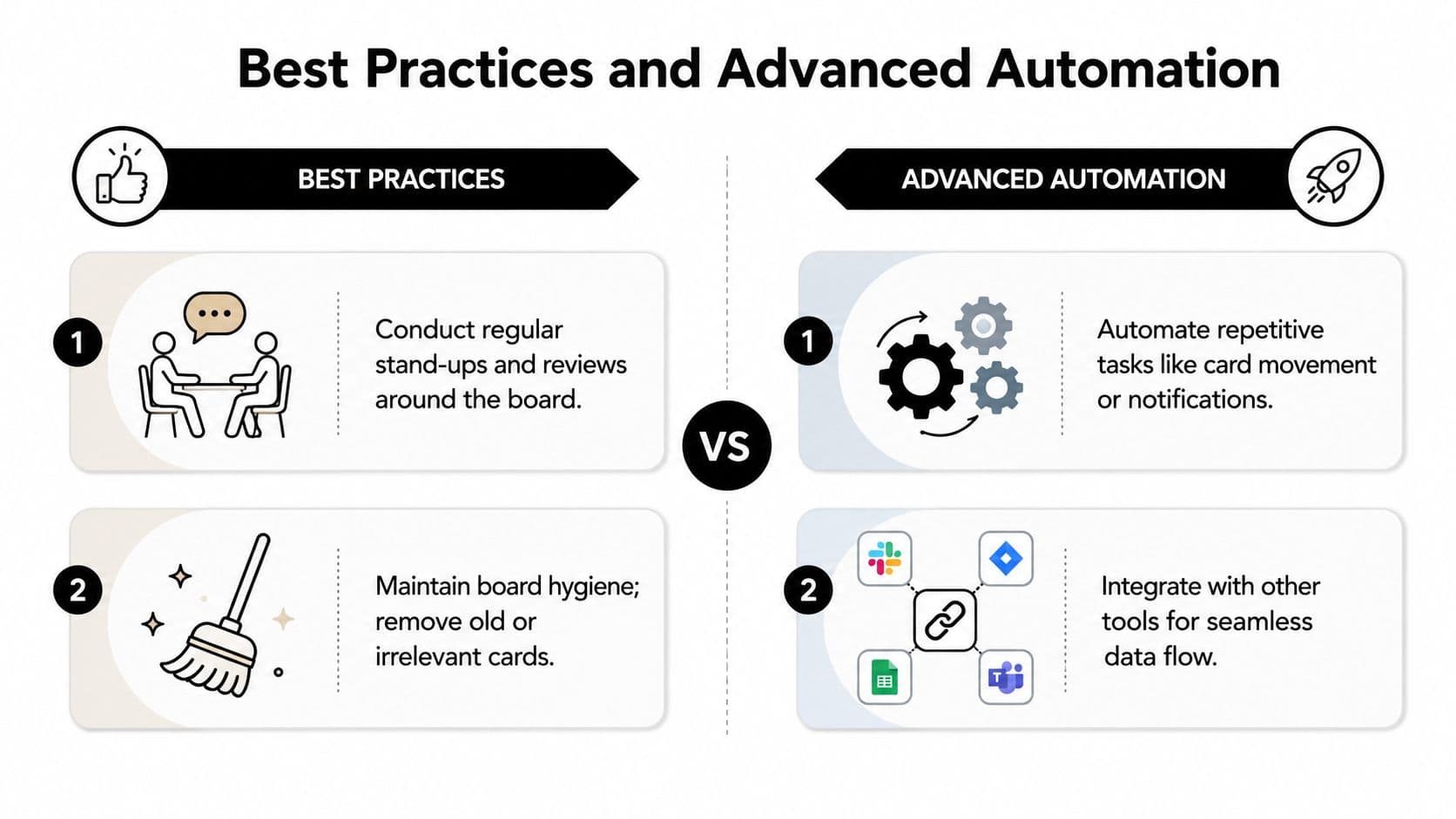
- Run short check-ins around the board: Use the board as the shared reference point for stand-ups, weekly reviews, or one-on-ones.
- Keep the board clean: Archive old cards, merge duplicates, and remove abandoned ideas that no longer matter.
- Respect WIP limits: If active columns are full, solve the jam before adding more.
- Write clear cards: A card should tell someone what done looks like without needing a detective story in Slack.
A board usually starts to decay when columns become too clever. If you need to explain the workflow every week, simplify it. Teams benefit more from clearer stages than from more stages.
Automation that helps instead of distracts
Useful automation removes repetitive admin. Bad automation creates more motion than meaning.
Modern Kanban board apps automate the collection of key workflow metrics such as cycle time and lead time, which helps teams improve processes without manually gathering statistics, according to Businessmap's Kanban board overview.
That matters because measurement shouldn't become another task on the list. The app should quietly show how work moves, where delays happen, and whether changes are helping.
Good automation often includes:
- Card movement rules: Move a task to review when a checklist is complete
- Notifications: Alert the right person when a task is blocked or assigned
- Recurring task creation: Generate routine work automatically
- Tool integrations: Connect the board to communication and delivery systems
If you want concrete examples of where automation helps most, these workflow automation examples give a practical sense of what's worth automating and what's better left manual.
A strong Kanban setup doesn't just display work. It makes the next decision easier.
Where advanced teams pull ahead
The most mature teams do one thing differently. They treat the board as an operating system, not a reporting artifact.
That means they review patterns, not just tasks. Which stage keeps clogging up? Which approvals consistently lag? Which task types bounce backward? Once the board starts answering those questions, the app becomes more than a visual checklist. It becomes a management tool.
From Chaos to Clarity Your First Step
A Kanban board app works because it does something most productivity systems fail to do. It makes work visible enough to manage properly.
You can see what's active. You can spot what's stuck. You can stop pretending that ten half-started tasks are progress. That alone reduces a lot of stress.
Kanban board software enables teams to visualize workflows, limit work-in-progress, and maximize efficiency. Atlassian's overview of Kanban boards also notes that these practices can significantly increase productivity by reducing context-switching, which is a major source of lost efficiency. If you want the original phrasing, it's in Atlassian's Kanban boards guide.
That benefit applies whether you're managing your own workload, running a small team, or reviewing strategic initiatives across a company. The board gives you a shared picture of reality. Once you have that, better decisions come faster.
You don't need a perfect setup to begin. You need a visible one.
Start small. Sketch your current workflow on paper. Turn it into three or four columns. Add the tasks already competing for your attention. Move one card all the way through before you worry about advanced settings.
That first small board often teaches more than hours of app comparison ever will.
If you want a modern way to put this into practice, Fluidwave gives you Kanban, list, calendar, table, and card views in one place, with AI-driven task organization and built-in delegation support. It's a practical option for busy professionals who don't just want to track work, but also want help moving it forward.
Focus on What Matters.
Experience lightning-fast task management with AI-powered workflows. Our automation helps busy professionals save 4+ hours weekly.