Learn how instant response systems work, where they actually improve outcomes, and how to roll one out for task management, support, and incident response.
August 14, 2026 (1mo ago)
Instant Response Systems: A Practical Guide for Busy Teams
Learn how instant response systems work, where they actually improve outcomes, and how to roll one out for task management, support, and incident response.
← Back to blog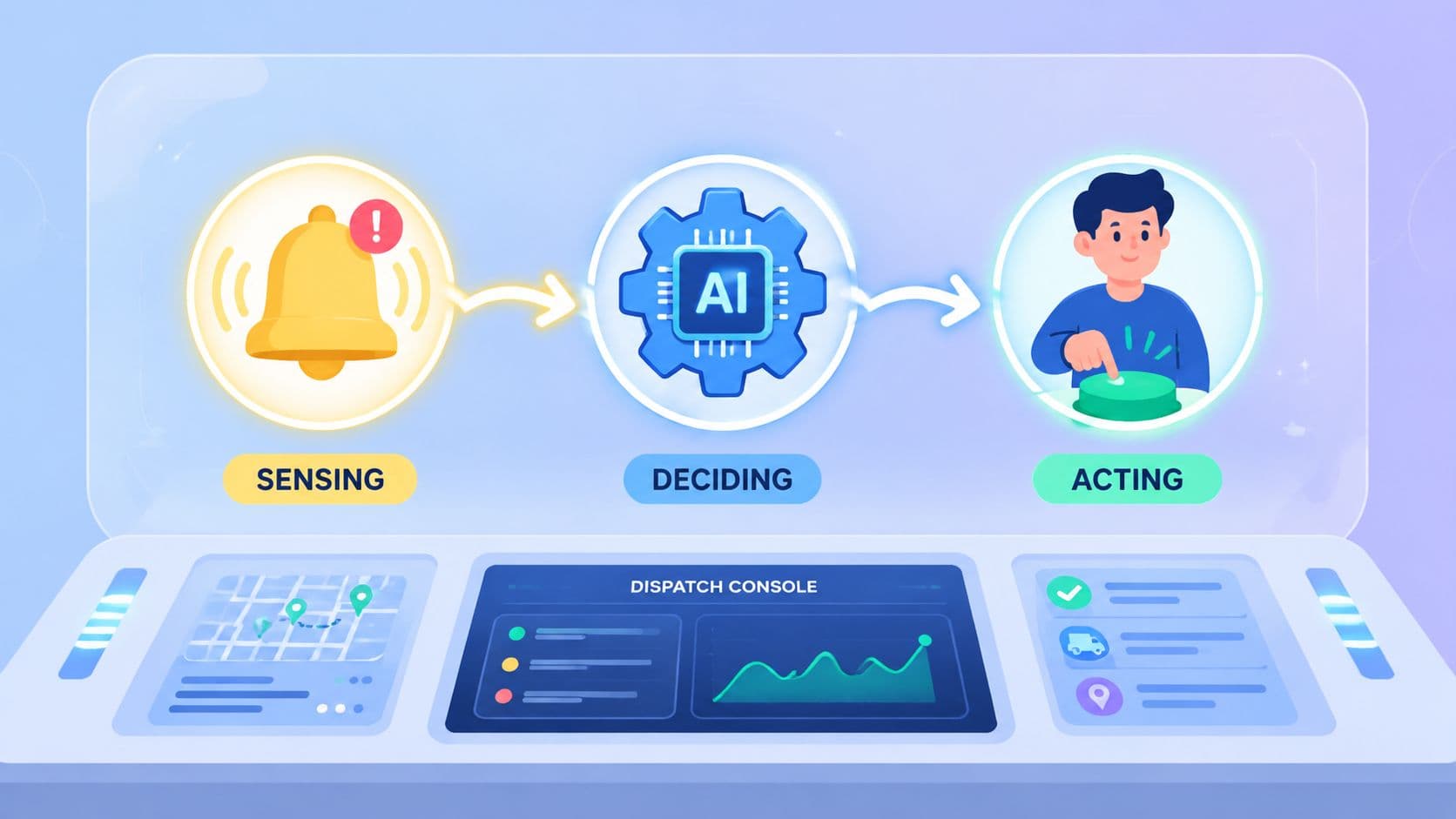
Your inbox fills before your coffee cools. A customer thread waits for a reply, a task slipped overnight, and an alert sits in a dashboard that nobody has time to open yet. The work isn't hard in the abstract, it's hard because every pause forces someone to switch context, decide what matters, and then start again from scratch.
That's the problem instant response systems try to solve. They're not just faster tools, they're systems built to shrink the gap between an event arriving and the right action happening. For busy teams, that gap is where leads go cold, tickets age, alerts get missed, and simple work turns into catch-up.
When Messages Stop Waiting for You
The day usually starts with the same trap. A Slack thread needs a quick answer, an email has a customer asking for next steps, and a task manager turned yesterday's “I'll get to it” into today's headache. You can handle all of it, but each interruption charges a tax in attention, and the tax gets bigger every time you switch back and forth.
That's why the buzz around instant response systems exists at all. People aren't really asking for more software. They're asking for a way to make sure important events don't sit in a queue while a human notices them late.
Practical rule: if the delay between a trigger and a useful reply creates pain, someone should design that delay out of the process.
Once you see the problem that way, the category gets easier to name. It's the pattern that tries to collapse waiting, routing, and first action into a tighter loop. That can mean a task gets assigned, a customer gets triaged, or an alert gets pushed to the right person before the issue grows legs.
The reason this matters is simple. Teams already have enough signals. What they lack is a consistent way to turn those signals into action fast enough to matter.
What an Instant Response System Actually Is
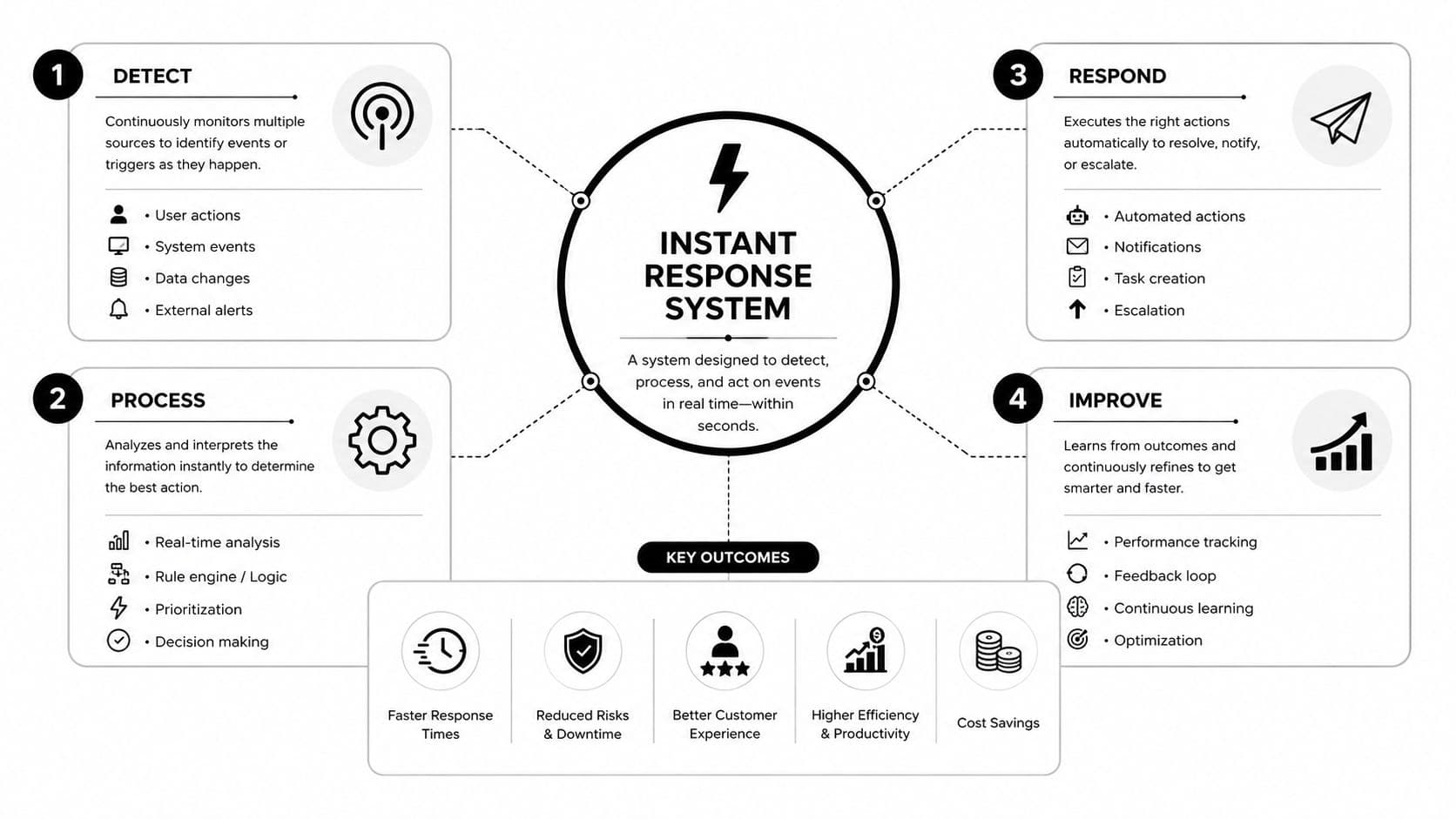
Think of a well-run dispatch desk. A signal comes in, someone or something sorts it quickly, and an action follows while the issue is still fresh. An instant response system works the same way. It detects a trigger, decides what it means, and sends the next move without making the user chase the process.
What it is not
A real-time system can move data quickly without deciding anything useful. A dashboard that updates fast is helpful, but speed alone doesn't tell you what to do next. An automated system can run on a schedule or a rule without urgency, which is different from reacting the moment something important happens.
An AI-native tool can understand language, summarize a message, or classify a request, but that still doesn't make it immediate. The key question is whether the system shortens the time from event to action. That's the part people mean when they say they want instant response.
The overlap with healthcare can confuse readers, because rapid response systems in hospitals are a separate literature. Those systems are about clinical escalation and emergency intervention, not general workflow design. Even there, the evidence is mixed, which is a useful reminder that speed only matters if the response changes the outcome.
For a concrete product example, an appointment booking AI system is useful only when it can pick up a request, interpret it correctly, and move the person to the next step without forcing a long wait. The same logic shows up in workflow tools. A clear overview of workflow automation helps separate plain process automation from systems that react with urgency.
The Three Moving Parts Inside the Architecture
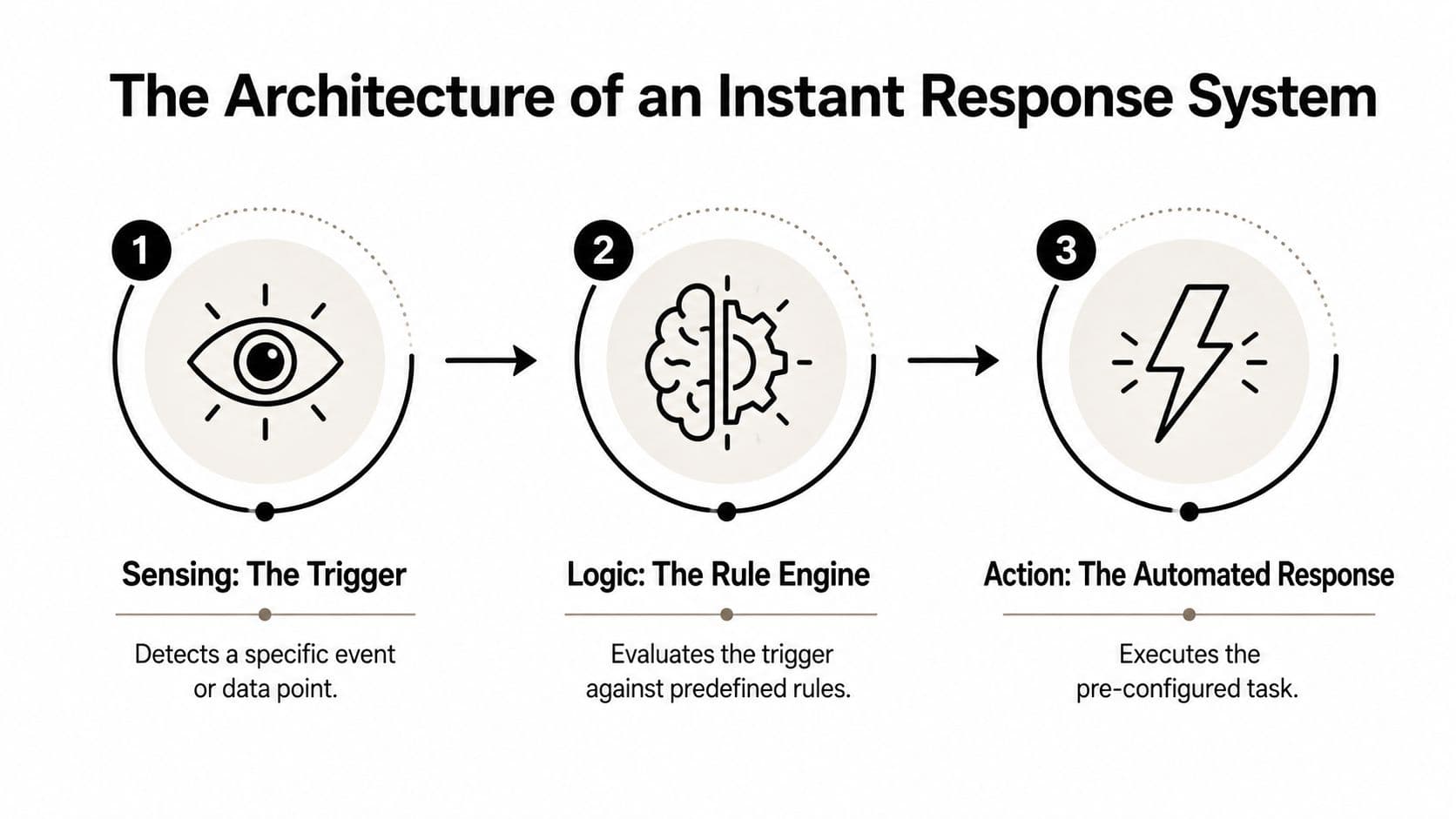
An instant response system is built around three stages. Sensing catches the trigger, deciding interprets it, and acting sends the response. The chain only feels instant when each part stays short enough that the person waiting does not have time to lose momentum or wonder whether anything is happening.
Sensing, deciding, acting
Sensing is the point where the event enters the system. That event might be a form submission, a customer message, a sensor reading, or an alert from another system. Cleaner triggers give the rest of the pipeline less noise to sort through.
Deciding is the routing step. Automation works well when the rule is stable and the path is clear. AI helps when the message is messy, the wording changes, or the classification depends on context. Human judgment still matters where accountability is on the line, because some responses need a person to confirm the next move. A practical way to design that handoff is to use human-in-the-loop automation so the system can route routine cases quickly without forcing a person to review everything.
A good instant response system does not remove people from the loop. It places them at the point where judgment matters most.
Acting is the visible response. That can be a notification, a task assignment, a customer reply, or an escalation to a human operator. If the action does not reach someone in the channel they already use, the system still feels slow, even if the logic behind it ran quickly.
A real-time chat application starts to matter here, because fast logic without a fast surface still leaves users waiting. For teams building messaging flows, adding AI to chat applications shows how routing and response can live inside an active conversation instead of sitting beside it.
A customer ticket can move through the full pattern in a few steps when the trigger is clean, the rule is simple, and the response path is already defined. That is the architecture in plain language. The challenge is not making every step clever, it is making the right step happen without friction.
Where Instant Response Systems Earn Their Keep
The same architecture earns value in different ways depending on the work. In task management, the main gain is removing friction from the next decision. A platform like Fluidwave uses an instant-response style interface to help people capture work, sort it, and delegate it before the task pile starts acting like a second inbox.
Customer support works differently. The system earns its keep when it can triage quickly, answer common questions, and send the rest to the right place without making the customer repeat the story. The aim is not to make every issue disappear at once. It is to make the first useful move happen before the request feels ignored.
Incident response carries the most pressure. The first action may be an alert, an on-call handoff, or a human acknowledgment, but a quick acknowledgment is not the same as a fix. If the workflow cannot separate those two steps, it creates motion without resolution.
Match the use case to the risk
- Task management: works best when delay mostly means lost momentum, scattered attention, or forgotten delegation.
- Customer support: works best when the first response lowers anxiety, sorts urgency, or sends the ticket to the right queue.
- Incident response: works best when the system needs to notify, coordinate, and leave time for the people who solve the problem.
An API for scraping social platforms can help in workflows such as monitoring inbound signals, but it only matters if the downstream response is designed well. Data collection by itself is not instant response, it is only the front door.
Different jobs have different latency budgets, different tolerance for mistakes, and different expectations for human review. That is why the same system shape can feel clean in one department and noisy in another. The value comes from the fit.
When Faster Is Not Actually Better
Speed has a habit of looking more useful than it is. If a workflow doesn't need an immediate decision, forcing it into an instant pipeline just creates more notifications, more false urgency, and more cleanup work later. Some work gets better when it has a little space.
The healthcare literature makes this point well at a broader level. Reviews of hospital rapid response systems show mixed evidence, with one systematic review finding moderate evidence for lower mortality and non-ICU cardiac arrest, while also noting that results vary by context and intervention design. Another review says the impact is not uniformly established across studies. That's a reminder that speed helps only when the downstream result changes.
A quick decision check
Ask three questions before you automate for speed.
- Does something meaningful happen if the response is delayed? If not, urgency is probably cosmetic.
- Is the trigger reliable enough to act on? If the system fires too often on bad signals, the human team will stop trusting it.
- Can the response safely happen at the speed you want? If not, fast action may create a new class of errors.
The point isn't to avoid instant response systems. The point is to aim them where delay is costly and the response is trustworthy. That keeps you from buying speed as a feature when what you need is better judgment, better routing, or better prioritization.
Useful test: if a 30-minute response would produce the same outcome, don't pay for a five-second one.
That's also why operators should watch the process quality, not just the clock. A fast system that regularly sends the wrong action is expensive in a way that's hard to see on day one. The win is when speed and outcome move together.
Rolling Out Your First Instant Response System
Start with one workflow, not the whole company. Pick a process where delay has a visible cost, such as a missed lead, an unacknowledged alert, or a task that keeps slipping between people. If you can't name the cost of waiting, the pilot probably isn't ready.
Then define the trigger and the response in plain language. One event should start the process, one rule should decide the path, and one action should happen first. Keep the first version narrow enough that the team can explain it without opening a diagram.
The channel matters too. A response that lands in the wrong place is just another notification. If the team already lives in chat, email, mobile, or a dashboard, put the response there and avoid spreading attention across too many surfaces.
What to measure
- Response latency: how long it takes from trigger to first useful action.
- Action completion: whether the response gets finished, not just started.
- Override rate: how often humans need to step in and change the system's choice.
Warm capacity deserves attention before you launch. In real-time and instant-response systems, the latency budget is often dominated by start-up overhead, not raw compute speed. One deployed inference pattern reports instant start when the endpoint is already running, but a cold start adds 2–5 minutes when scaling from zero, versus 10–30 seconds for a different serverless setup, so keeping warm workers alive can matter more than shaving a few milliseconds off processing time. The operational trade-off is straightforward, warm instances reduce delay, but they also add cost.
A strong pilot is small, observable, and easy to reverse if needed. That gives the team enough confidence to learn without locking itself into a system nobody trusts yet.
Integration Choices You Will Regret If You Skip Them
Channels look like a convenience decision, but they are really an adoption decision. If the response does not show up where the user already works, the system can be fast on paper and still be ignored in practice. Adding more surfaces usually creates more noise, not more clarity.
The harder choice is data access. An instant response system is only as useful as the signals it can read, so every extra source brings another integration to maintain, another permission path to manage, and another place where ownership can blur. Identity and permissions matter just as much, because an automated action taken on someone's behalf needs a clear owner and a trail people can audit later. If you are mapping those connections, a practical place to start is integration capabilities, because the question is not just what can connect, but what should connect cleanly.
Cost sits underneath all of it. Warm capacity, polling, and model inference each add pressure, and the least expensive system is often the one that runs less often or only on the workflows that need it. Architecture and budget stop being separate conversations as soon as you decide how often the system should listen.
For teams building on social or external data, a resource like API for scraping social platforms can help with capture, but it does not solve trust, routing, or ownership. Those need to be designed into the workflow from the start.
Comparing three instant response deployment shapes
| Deployment shape | Typical latency | Relative cost | Accountability | Best fit |
|---|---|---|---|---|
| Fully automated | Lowest once stable | Higher if it runs warm and often | Lower unless controls are strict | Repetitive, low-risk actions |
| AI-assisted | Fast, but depends on model and review | Moderate | Shared between system and human | Triage, summarization, routing |
| Human-confirmed | Slower than the other two | Lower operational risk, not always lower labor | Highest | Sensitive or high-stakes actions |
The right shape depends on the job, not the trend cycle. A system that acts for people needs permissions and auditability from the start, or the team will spend time cleaning up after avoidable mistakes. That kind of cleanup is usually more expensive than setting the guardrails early.
Questions Busy Professionals Ask Before They Commit
What latency should you target? Enough to beat the point where the user gets frustrated or the issue gets worse. For some workflows that means seconds, for others it means a clear same-hour response, and the right number is the one tied to the outcome you care about.
What happens when the system fails? It should fail visibly. A good design pauses, routes to a person, and leaves a record of what it tried to do.
How long does ROI take? That depends on how often the workflow occurs and how expensive the delay is. If the process only fires rarely, the payoff is slow. If it handles recurring work with clear delays, the payoff shows up sooner because the time savings compound.
How do you keep humans accountable? Put ownership in the workflow, not outside it. Someone should review exceptions, approve sensitive actions, and watch the override pattern so automation doesn't drift away from how the team works.
The strongest instant response systems don't feel magical. They feel calm, specific, and dependable, which is exactly what busy teams need.
Fluidwave brings instant-response task handling, auto-prioritization, and human delegation into one workflow, so teams can move work forward without living in a crowded inbox. If you're mapping your first instant response system, visit Fluidwave and see how its task management and assistant delegation fit a faster operating rhythm.
Focus on What Matters.
Experience lightning-fast task management with AI-powered workflows. Our automation helps busy professionals save 4+ hours weekly.