Learn how to manage projects step by step: set scope and milestones, prioritize tasks, delegate, track progress and close with retrospectives.
November 4, 2026 (Today)
How to Manage Projects: A Step-by-Step Playbook
Learn how to manage projects step by step: set scope and milestones, prioritize tasks, delegate, track progress and close with retrospectives.
← Back to blog
Organizations in PMI's 2024 survey reported an average project performance rate of 73.8%, defined as the mean percentage of completed projects that met their business goals, according to the PMI Pulse of the Profession 2024 report. That means roughly one in four completed projects didn't deliver what it was for, even if the task list got finished. That's the gap good project management closes.
Learning how to manage projects isn't about a bigger spreadsheet or a busier board. It's about checkpoints that protect outcomes, tasks people can start and finish, and honest reforecasts when reality disagrees with the plan. Keep the system simple enough that your team uses it without being chased, and strict enough that drift shows up early.
The Five Phases That Keep a Project on Course
The Standish Group's original 1994 CHAOS research found only 16.2% of projects were successful, meaning delivered on time, within budget, and with all specified features, according to the CHAOS report by year. By 2009 the reported success rate had increased to 32%, but 24% still failed outright. Starting quickly doesn't fix those numbers.
Progress came from treating delivery as phases with exits, not a long stretch of activity. Each phase answers one question and produces something a sponsor can inspect. If you can't name the output, you haven't finished the phase.
The Five Project Phases and What Each One Produces
| Phase | Core question | Output | Checkpoint |
|---|---|---|---|
| Define | What outcome counts as done? | Scope statement and success criteria | Sponsor sign-off |
| Plan | When is each milestone due? | Milestone list with owners and estimates | Baseline review |
| Execute | What is in progress and blocked? | Assigned tasks moving through stages | Weekly status check |
| Control | What is drifting? | Risk register and change log | Fortnightly review |
| Close | Did it deliver the intended result? | Final deliverable and lessons learned | Retrospective within two weeks |
Practical rule: A phase ends when its output passes its checkpoint, not when the calendar says it should.
When a project slips, diagnose the phase before you add effort. People arguing about what done means are stuck in Define. Dates nobody believes point to Plan. Work moving but results drifting points to Control. Fix that phase's missing output first, because extra execution on an undefined outcome just produces more rework, faster.
How to Define Scope, Goals and Milestones
Most projects don't fail in week twelve. They fail in week one, when requirements stay in people's heads. PMI reported that 47% of unsuccessful projects failed to meet their goals because of poor requirements management, and inaccurate requirements were identified as the primary reason for project failure by 37% of organizations, according to PMI's requirements management survey. Only 47% had a formal process for validating requirements. Don't be in the other half.
Seven Steps Before Delivery Work Starts
- Write the outcome in one sentence. Name who benefits and what changes for them, because “launch a portal” describes activity, not value.
- List success criteria across time, budget, scope and stakeholder value. You need more than a date, since hitting a date with an unusable result isn't success.
- Write what's out of scope. Explicit exclusions stop quiet additions later, and our guide on how to define out of scope clearly shows how to phrase them without starting an argument.
- Name one owner for each deliverable. Shared ownership usually means nobody escalates until it's already late.
- Set milestones as verifiable outputs. “Pricing page approved by finance” can be checked. “Work on pricing” can't.
- Estimate each milestone with a range. A single date pretends you know more than you do at the start.
- Reserve contingency for named risks. Generic padding gets spent without notice, while risk-linked contingency stays visible.
Estimating Methods Compared
| Method | Best for | Main risk |
|---|---|---|
| Single-point estimate | Small, familiar tasks you have done before | Hides uncertainty and invites false confidence |
| Three-point estimate (optimistic, most likely, pessimistic; expected = (O + 4M + P) / 6) | Tasks with real unknowns | Optimistic number is often too hopeful without evidence |
| Range with confidence level | Early planning when scope is still moving | Stakeholders may only remember the low end |
| Past-project benchmark | Repeat work with the same team | Old data may not match new people or tools |
| Milestone-based budget with contingency | Multi-month projects with several gates | Contingency gets spent quietly unless tracked separately |
Ranges aren't pessimism. They're honesty. McKinsey reports surveyed projects overrun budgets and schedules by 30% to 45% on average, and only 5% of more than 500 large global projects met their original budget and schedule, according to McKinsey's analysis of megaproject transparency. So commit in stages. At each milestone, decide formally whether to continue, hold or replan, and track forecast at completion rather than spend to date.
Fund the requirements work itself. NASA cost-analysis research cited by PMI found projects devoting less than 5% of total cost to requirements experienced cost overruns of 80% to 200%, while projects investing 8% to 14% experienced overruns below 60%, according to PMI's summary of effective requirements management. Put a line in the budget for it and review that line at every gate.
If your sponsor won't fund requirements work, they are choosing to pay for the same decisions later, at rework prices.
I would rather show a sponsor an uncomfortable range in week one than a confident single date that collapses in week six. The first conversation is awkward. The second one is worse.
How to Turn Milestones into Prioritized Tasks
A milestone tells you what must be true. Tasks are how individual people make it true. If a task can't be started, finished and checked by one person, it's still a milestone wearing a task's clothes.
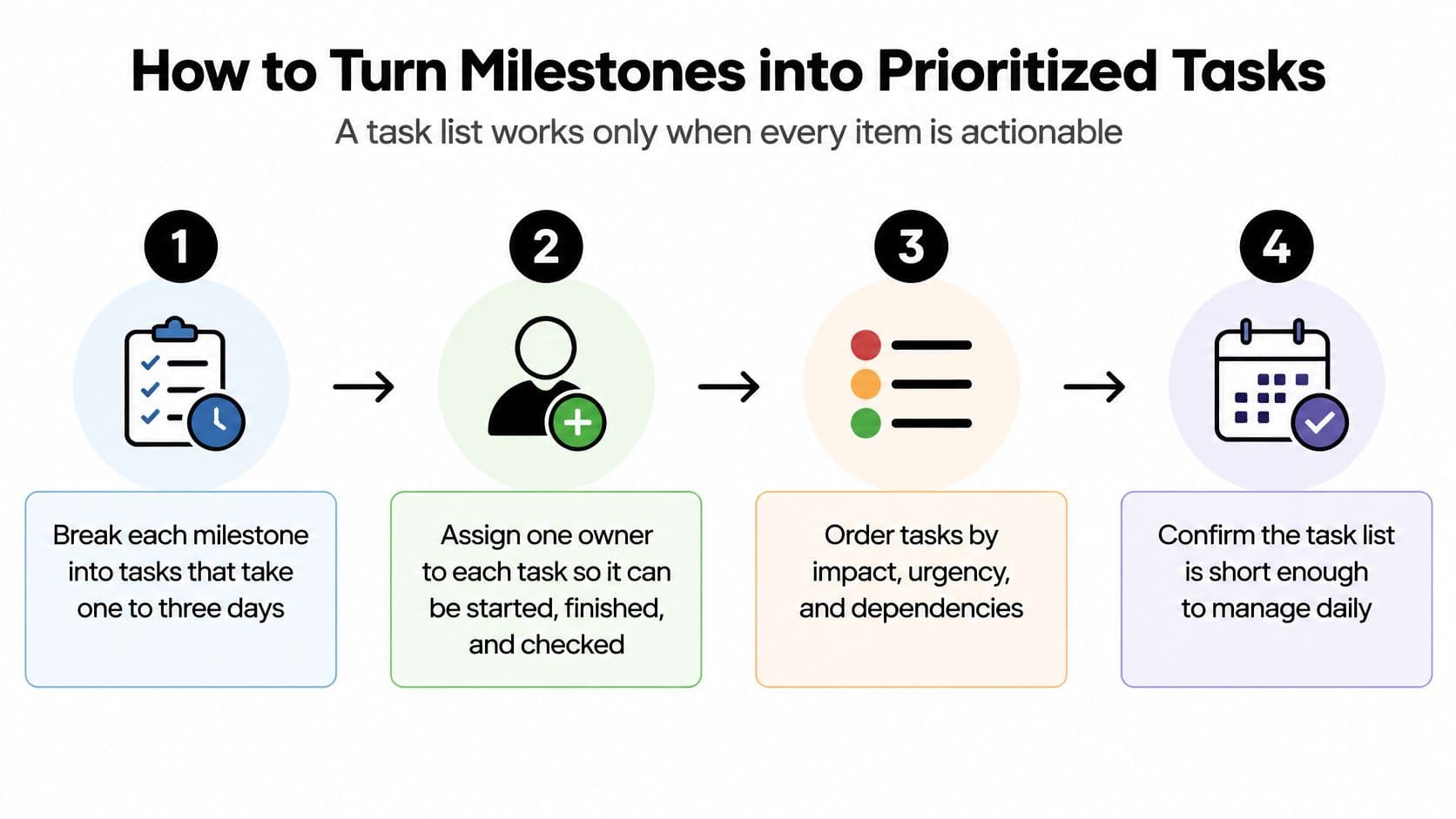
From Milestone to Daily Work
- Break each milestone into tasks of one to three days. Anything longer hides slippage until recovery is expensive.
- Write each task as a verb plus a finished result. “Draft onboarding email for sign-off” beats “onboarding email” because the finish line is visible.
- Add a definition of done someone else could verify. Include the file, approver or test that proves completion.
- Give each task one owner and one due date. Two owners means each waits for the other.
- Rank by due date, quick wins, importance and dependencies. Priority isn't a feeling. It's an order you can defend.
- Keep only actionable tasks in the working list. Park anything blocked by another person so today's list shows what can move today.
- Split long tasks into work sessions. A large piece given a daily slot progresses. A large piece “due Friday” gets discovered on Thursday night.
Say your milestone is “sales handover pack approved.” That becomes draft the one-page summary, record the walkthrough video, get pricing confirmed by finance, and send the pack for approval. Each has an owner, a date and a checkable finish. Nobody needs a meeting to interpret it.
One Source of Truth, Different Ways of Working
Standardizing the record doesn't mean standardizing the human. A 2025 Association for Project Management study identified barriers including sensory overload in busy offices and insufficient workplace support, while reporting strengths among neurodivergent professionals including pattern recognition, risk management and adaptability, according to the Association for Project Management neurodiversity research. It recommended flexible policies, redesigned meeting environments and strength-based task assignment.
Use low-friction task briefs, shorter work units and explicit definitions of done. Offer asynchronous updates and both visual and text alternatives, protect focus periods, and set escalation rules based on risk, not reply speed or online presence. A contributor with ADHD who works in intense bursts and updates in writing at day's end can be fully accountable inside the same task record as someone who prefers live standups. You're checking the output against the definition of done. That's the control.
Quick test: Could a new team member pick up this task without asking a question? If not, the brief isn't finished yet.
Don't confuse a long list with a managed one. A short, ordered list of startable tasks tells a person what to do next without a sorting session first. That's what turns planning into momentum.
Delegating Tasks Without Losing Control
Delegate work with clear inputs and a checkable finish. Keep work that depends on context only you hold, trust you've built, or accountability you can't transfer. That one rule prevents most delegation disappointments, because most of them start with vague work handed to a competent person who then guesses.
Which Tasks to Delegate and Which to Keep
| Task type | Delegate? | Reason |
|---|---|---|
| Repeatable admin such as formatting, data entry or scheduling | Delegate | Clear inputs and an easy definition of done |
| First drafts of research or content | Delegate with review | You check quality before the work moves on |
| Scope, budget or priority decisions | Keep | Needs full context and sits with the owner |
| Stakeholder conversations about risk or delay | Keep | Trust and judgment cannot be handed off cleanly |
| Specialist technical design | Delegate to a specialist | Skill fit matters more than who is cheapest |
Handing Work to a Virtual Assistant
Post the task to the marketplace with its definition of done, then agree on the price and milestones with the assistant before work starts. Payments for delegated tasks are paid into escrow through Stripe, and each payment is released when the work is done. You pay for completed milestones instead of hours, which keeps the incentive pointed at finished work.
A few checks make this reliable:
- Review the first deliverable before the assistant continues. One early correction saves a whole batch of rework.
- Use a short written brief with examples. One good example of the output format beats three paragraphs describing it.
- Set one point of contact. Instructions from three people produce three versions of the task.
- Map who decides what. A simple responsibility chart, like the one in our RACI matrix template guide, stops delegated work stalling on unowned approvals.
Don't delegate “handle the client project.” The assistant will make scope and tone decisions that belong to you, and you'll spend more time unwinding them than the task would've taken. There's a useful framing of this trade-off in these leadership insights from Kushan Business Solutions from Kushan Business Solutions LLC, which treat delegation as a way to build capacity in others rather than offload hours. That mindset matters. You're giving someone a bounded piece of work they can succeed at, not your ambiguity.
You stay accountable for the outcome even when someone else does the work. Review each completed milestone against the success criteria you set, release payment when it passes, and feed corrections back into the brief so the second task goes better than the first.
Tracking Progress Across Views and Channels
My rule of thumb is simple. Use Kanban to see flow across stages, the calendar to protect time, and a Gantt view when dependencies decide the date. Each view answers a different question, and most tracking frustration comes from asking one view to answer all of them.
The visual below compares the main views you'll switch between on a typical project.
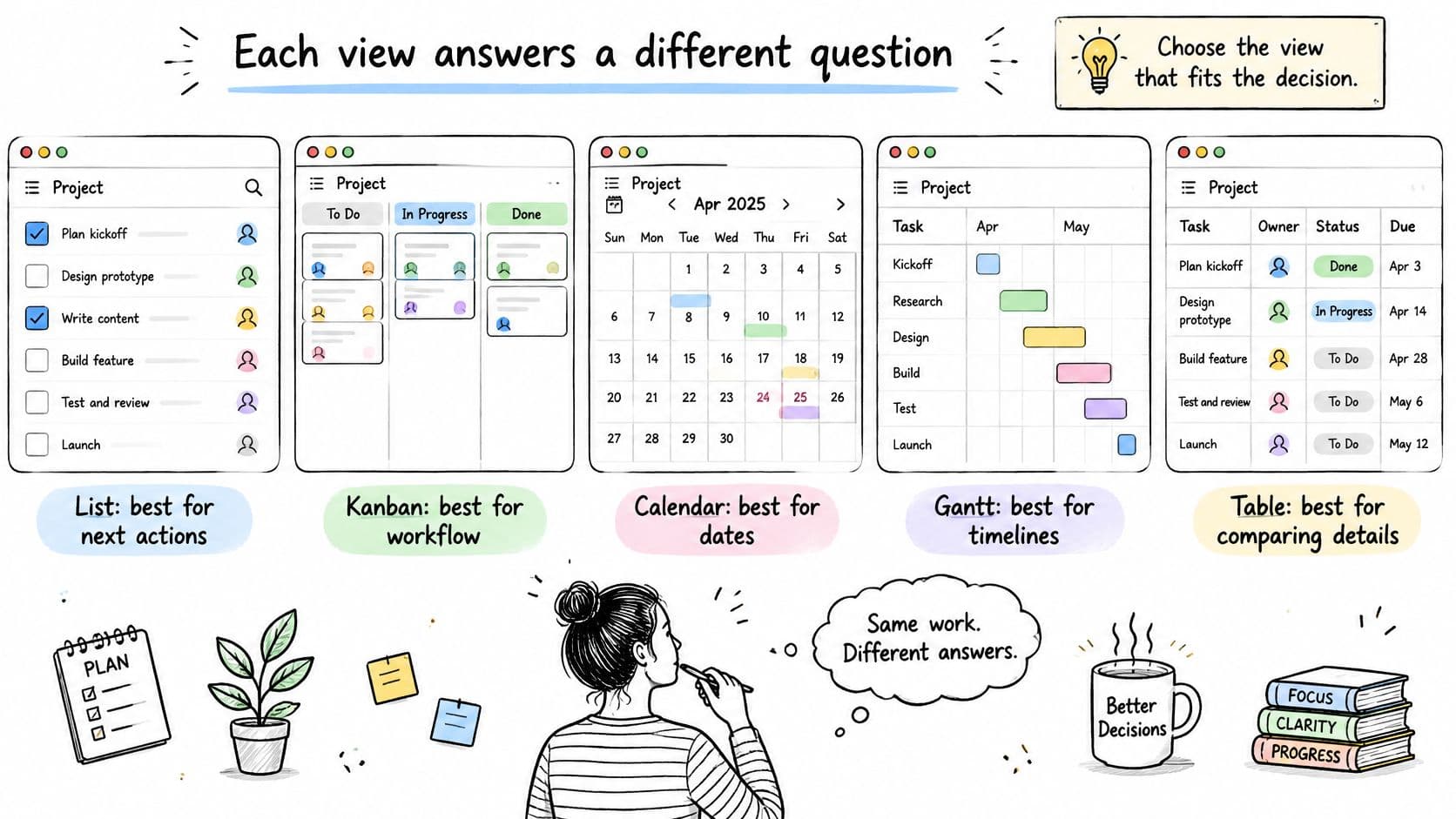
Project Views and What Each One Is Good For
| View | Best for | What it shows | Watch out for |
|---|---|---|---|
| List | Working through one person's queue | Next actions in priority order | Hides how tasks relate to each other |
| Kanban board | Seeing flow and bottlenecks | Tasks by status column | Columns multiply without a clear rule |
| Calendar | Protecting deadlines and time blocks | Dates and work sessions | Ignores dependencies between tasks |
| Gantt chart | Checking the critical path | Task chains and timeline | Slow to maintain on small projects |
| Table | Comparing many tasks by field | Owners, dates, status and priority side by side | Dense for a single person's day |
For a fuller walk-through of keeping these views honest, our guide on tracking project progress without micromanaging covers the habits that keep a board trustworthy.
Communication Norms That Keep Views Honest
- One place for decisions. If it was decided in chat, copy it onto the task or it didn't happen.
- Threaded comments on the task itself. Context travels with the work instead of scattering across channels.
- @-Mentions only when someone must act. Mention everyone and you'll train people to ignore mentions.
- Written updates across time zones. Replace the fifteen-minute weekly status meeting with a written update when the team can't meet sensibly.
Keep the weekly format to four lines: what finished, what's blocked and who unblocks it, what changed in scope, and what's planned next week. Anything longer gets skimmed.
The short video below gives a sense of how switching views changes the questions you can ask of the same task list.
AI-generated status summaries can collect updates quickly, but they only summarize what the record contains. A 2025 global survey of 2,545 respondents found 41% identified AI-adoption issues as their top project-management software challenge, citing skill gaps, weak onboarding and poor workflow alignment, according to Capterra's 2025 project management software trends research. Fix the task records and status routines first. Then have a person check any AI summary against those records before it reaches a sponsor. An unchecked summary just makes stale data sound confident.
Handling Risks, Changes and Recurring Reviews
Control is a loop, not a report. Run it in this order: define measurable success criteria, set a baseline with named owners, build a risk register, review leading indicators at a fixed cadence, then reforecast and escalate when a threshold is crossed. Skipping steps is how teams end up with a beautiful register nobody acts on.
The diagram below shows the loop and where the risk register sits inside it.
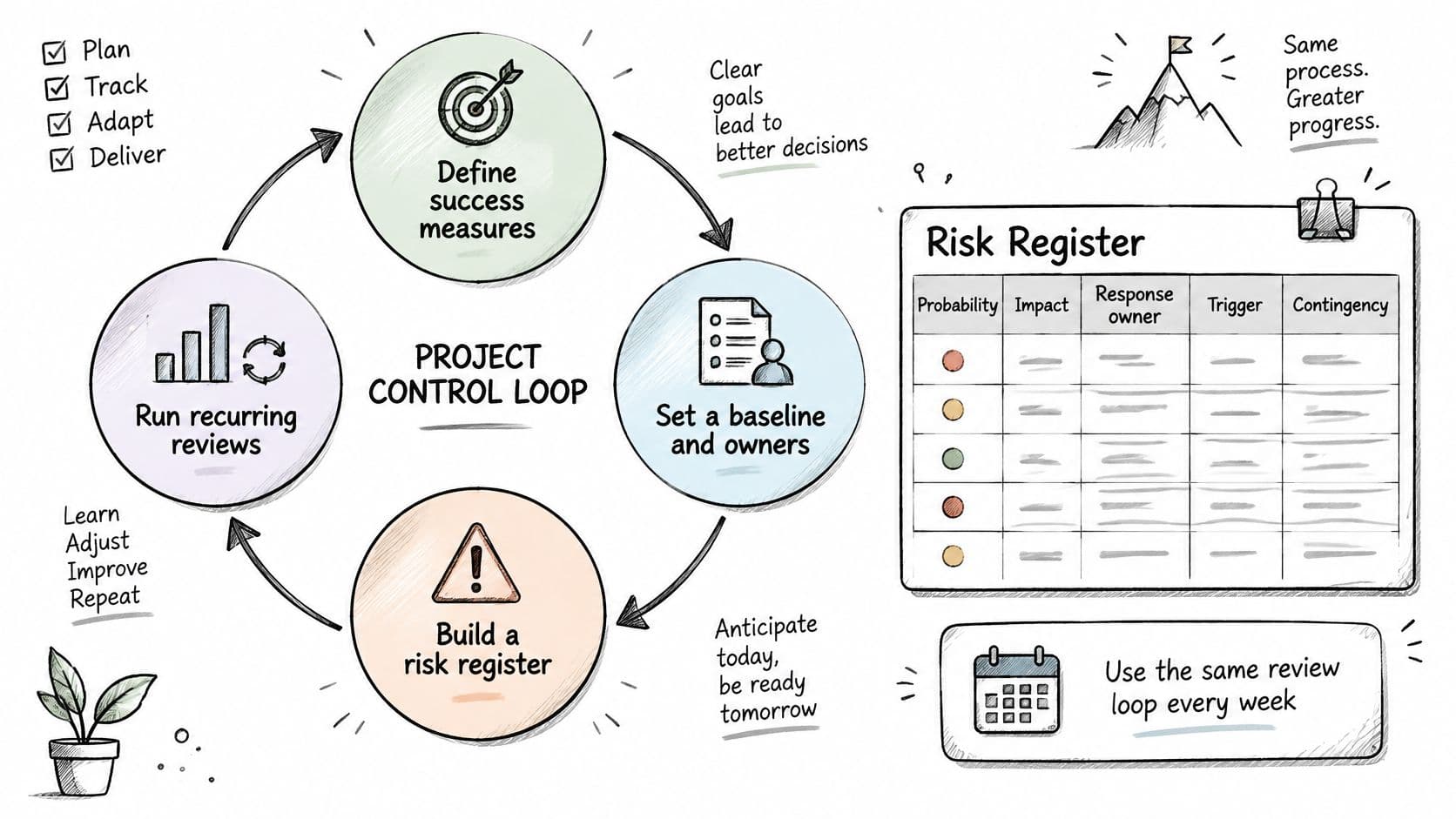
The evidence for bothering is strong. PMI data indicates projects with risk monitoring had a Net Project Success Score of 41 versus 14 without it, and standardized practices raise the proportion of projects meeting goals and intent from 58% to 74%, according to PMI's project success report.
What Goes in the Risk Register
Each risk needs five fields: probability, impact, response owner, trigger and contingency. Turn every response into an assigned task with a due date and evidence requirement. A register entry that isn't a task is a worry you've written down.
Say a supplier delivery gates your launch. Probability is medium, impact is high, the owner is your operations lead, the trigger is no shipping confirmation ten days before launch, and the contingency is the backup supplier quote you obtained in week two. The mitigation task, confirm shipping date in writing, sits on the owner's list with a date. When the trigger fires, you escalate to the sponsor with the contingency priced, instead of holding an emergency meeting to invent options.
Five Numbers for the Weekly Dashboard
- Milestone variance. How far the forecast date has moved from baseline.
- Budget variance. Forecast at completion against approved budget, not just spend so far.
- Unresolved high-impact risks. Count only those with owners and dates.
- Age of open decisions. Old decisions are silent schedule killers.
- Forecast confidence. A plain high, medium or low, owned by whoever's closest to the work.
For changes, set one clear threshold. Require sponsor approval when a change touches a critical-path milestone, the approved budget or a benefit target. Log every approved change with its effect on budget, schedule, dependencies and expected benefit, so nobody measures “on time” against a moving baseline.
An accepted risk with no owner isn't accepted. It's abandoned.
Schedule the weekly review as a recurring task so it happens without anyone remembering it. Cadence beats intensity here. Fifteen honest minutes weekly catches drift that a two-hour monthly review finds too late.
Close Out and Run Your First Week
Run the retrospective within two weeks of delivery, while people still remember why decisions were made. It answers three questions: which parts of the plan held, where the estimates were wrong, and which decisions took too long. Write the answers down where the next project will find them.
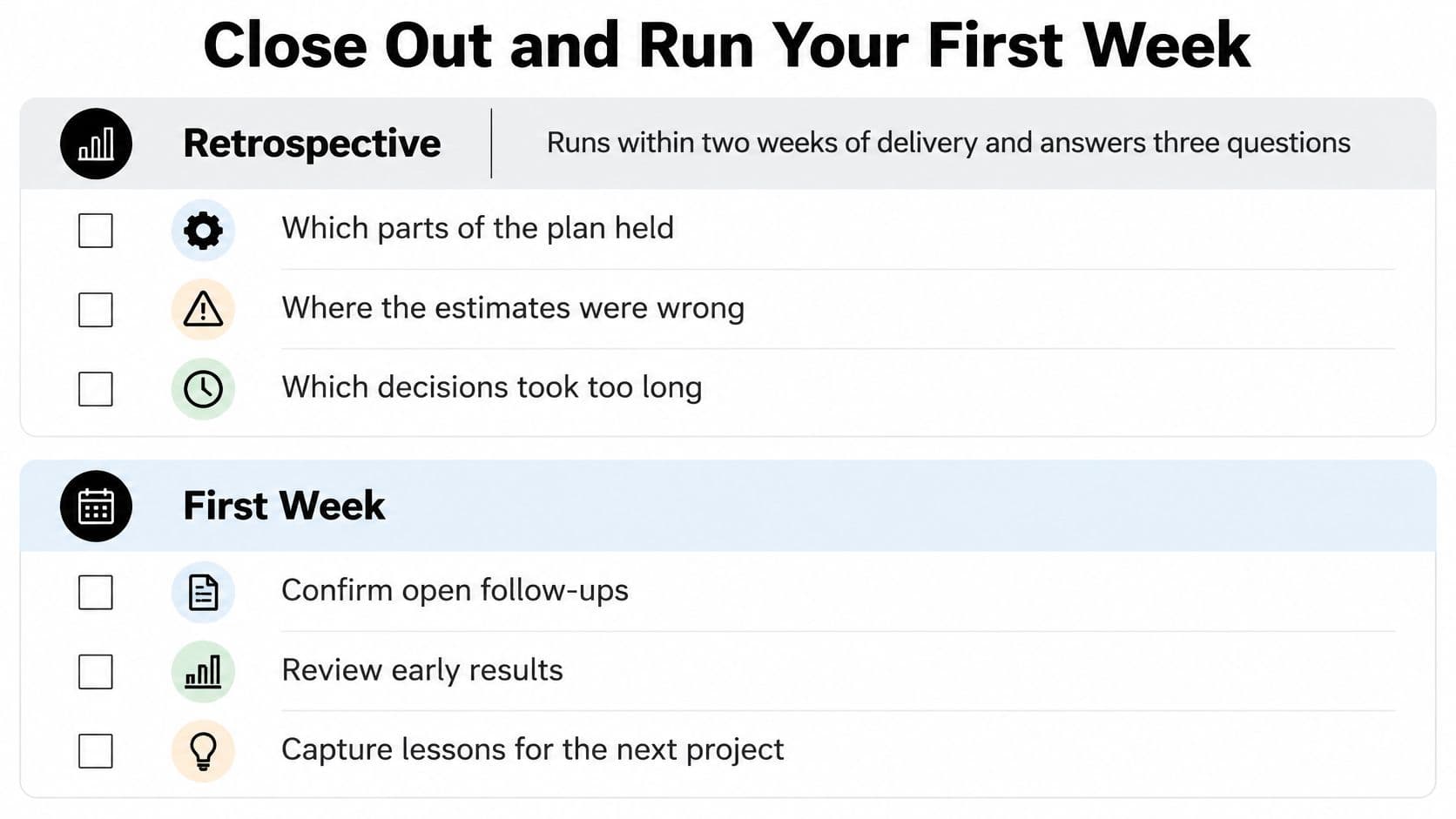
Save what you learned as a reusable template containing the milestone list, the estimating ranges that proved realistic and the review cadence you used. Your next plan then starts from evidence instead of memory. Teams that skip this step re-estimate the same work badly every quarter and call it bad luck.
Your First Week
Pick one live project and, before Friday, write its outcome in one sentence and list its milestones with owners. Two artifacts, one project. Group the task list by assignee for that week, since each task can be assigned to one team member and the grouped view shows each person's queue at a glance. You'll spot instantly if one person is holding up four tasks.
If you want help structuring that first list, Fluidwave offers free tools including a Daily Task Generator, Task Prioritization Matrix, Task Prioritizer Quiz, Microtask Generator and Inbox to Action Converter. They're useful starting points for turning a messy inbox into ordered tasks.
Be honest about fit. This workflow suits individuals and small teams, and Fluidwave is built for individuals and small teams rather than large-scale project portfolios. If you're coordinating many concurrent programmes with cross-portfolio budgets, you'll outgrow a lightweight task system and need dedicated portfolio tooling. For a small team that needs outcomes, owners and dates in one place, simple wins.
Put this playbook into practice with Fluidwave, where you can turn milestones into prioritized tasks, switch between list, Kanban, calendar and Gantt views, and delegate bounded work to human virtual assistants on a pay-per-task basis with payment released from escrow when the work is done. Start with one live project this week, write the outcome in a single sentence, and let the checkpoints do the heavy lifting from there.
Focus on What Matters.
Experience lightning-fast task management with AI-powered workflows. Our automation helps busy professionals save 4+ hours weekly.