Learn how feedback loops drive productivity, from positive vs negative types to designing effective loops for teams and workflows with Fluidwave.
August 15, 2026 (1mo ago)
Feedback Loops Explained How to Build Smarter Workflows
Learn how feedback loops drive productivity, from positive vs negative types to designing effective loops for teams and workflows with Fluidwave.
← Back to blog
You've finished a full morning of work, but you can't clearly say what improved. Tasks moved between apps, a few messages were answered, and a project meeting produced more notes than decisions. By late afternoon, you're busy but still uncertain whether your effort is moving the important work forward.
That uncertainty is a feedback problem. Work becomes easier to improve when each action produces a useful signal, someone compares that signal with a goal, and the next decision changes because of what was learned. Without that final adjustment, activity remains disconnected from progress.
Feedback loops give individuals and teams a practical way to turn effort into learning. They help you see what's working, detect drift, correct course, and build better habits without relying on memory or motivation alone. The challenge is that faster feedback isn't always better. A loop can become noisy, stressful, biased, or distracting, particularly for people with ADHD and professionals who need uninterrupted time for deep work.
This guide moves from the basic mechanics to workflow design, habit formation, measurement, and the situations where slowing a loop is the smarter choice. The aim is simple: build systems that make useful learning easy to capture and meaningful action easy to take. Tools such as Fluidwave can support that process by keeping tasks, ownership, timing, and progress visible in one working environment.
Introduction Why Work Feels Stuck Without Feedback
A founder assigns a product task on Monday. By Thursday, the work is technically complete, but nobody has reviewed whether it solved the customer problem. A manager asks for an update, the employee explains what was done, and the conversation ends with another vague instruction to “keep going.” The team has produced output, yet it hasn't converted that output into a better decision.
The same pattern appears in personal work. You write several pages, but you don't know whether the argument is getting clearer. You spend hours clearing email, but urgent work keeps returning. You delegate a task, but you don't define the expected result or the point at which you'll review it. Each situation creates an open loop, work that starts but doesn't reliably return information to guide the next action.
An open loop consumes attention because your brain has to keep the unfinished question active. What happened? Did it work? What should change? When those questions stay unanswered, you may compensate by checking more often, adding more status meetings, or working longer without improving the process.
A closed feedback loop follows a different pattern:
- A goal gives effort direction.
- A result creates evidence.
- A review compares the result with the goal.
- A corrective action changes what happens next.
That final step matters. Information alone doesn't improve a workflow. A dashboard can show that a deadline slipped, but the loop only closes when someone changes the plan, clarifies ownership, adjusts the scope, or allocates more time.
Practical rule: If a review never changes a decision, it's reporting, not a feedback loop.
The rest of this article treats feedback loops as design choices rather than motivational tricks. You'll see why some loops should amplify momentum, why others should stabilize a system, and how to choose a cadence that supports both performance and well-being.
What Feedback Loops Are and How They Work
A feedback loop is a recurring process in which information about a system's output returns as input and influences future behavior. A thermostat offers a familiar example. It measures the room temperature, compares that reading with the target, turns the heating on or off, and then measures the result again.
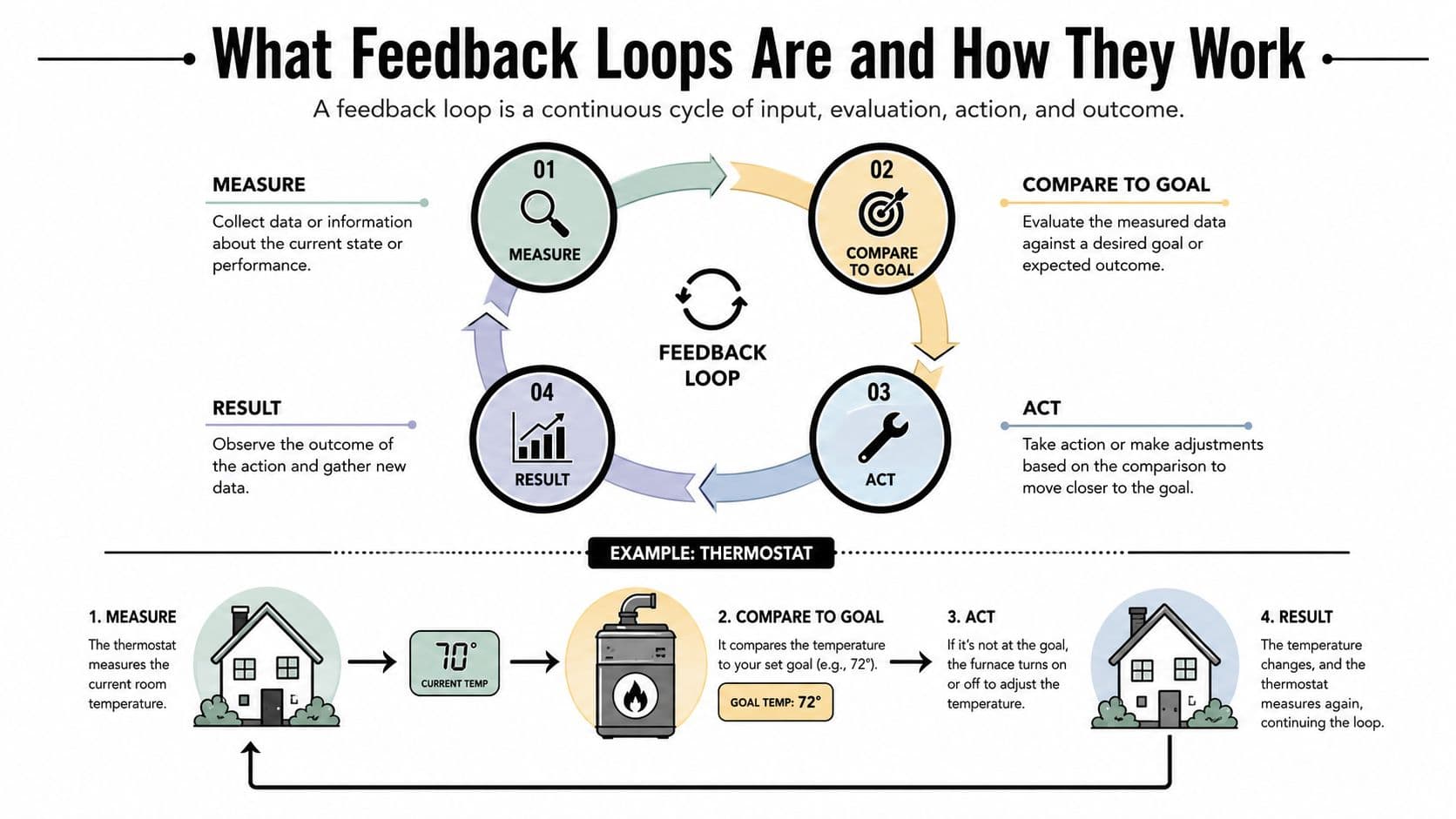
The same logic works in a professional workflow, although the components are people, tasks, decisions, and evidence rather than sensors and machinery. Suppose your goal is to publish a useful client report. You define what “useful” means, collect reviewer comments, compare the report with that standard, revise the weak sections, and check the new version.
The three phases that close the loop
Educational research describes a closed feedback process through feed-up, feedback, and feedforward. Feed-up establishes the goal. Feedback compares current performance with that goal. Feedforward turns the comparison into a specific next action, as described in this review of feedback processes.
Consider a team preparing a launch:
- Feed-up: The team agrees that the launch checklist must identify every owner, dependency, and approval.
- Feedback: During review, the team finds that several dependencies have no named owner.
- Feedforward: The project lead assigns owners, adds a review point, and changes the checklist template for the next launch.
If the team only records the missing owners, the loop remains open. The information is accurate, but it hasn't changed future behavior.
Open loops and closed loops
An open-loop workflow acts without using outcome information to adjust the next action. You send a standard reminder to every client, regardless of whether the client has already replied. You repeat the same meeting format after each project, even though participants keep raising the same concerns.
A closed-loop workflow includes a deliberate return path. The task produces a result, the result is reviewed against a defined expectation, and the review changes the next task or decision.
The useful question isn't “Did we collect feedback?” It's “What will we do differently because of it?”
Feedback loops appear in many fields because the underlying pattern is broad. The history of the idea reaches back to a float valve used to maintain a constant water level in Alexandria in 270 BC, while Norbert Wiener's work on automatic aiming systems in the 1940s helped establish cybernetics as a formal field, according to the history of feedback. The concept has therefore moved from practical control devices into biology, economics, education, machine learning, and everyday work design.
Reinforcing and Balancing Loops and the Types That Matter
Not every loop should push harder. Some loops build momentum, while others prevent a system from drifting too far. Confusing those purposes can create a workflow that either stalls or accelerates in the wrong direction.
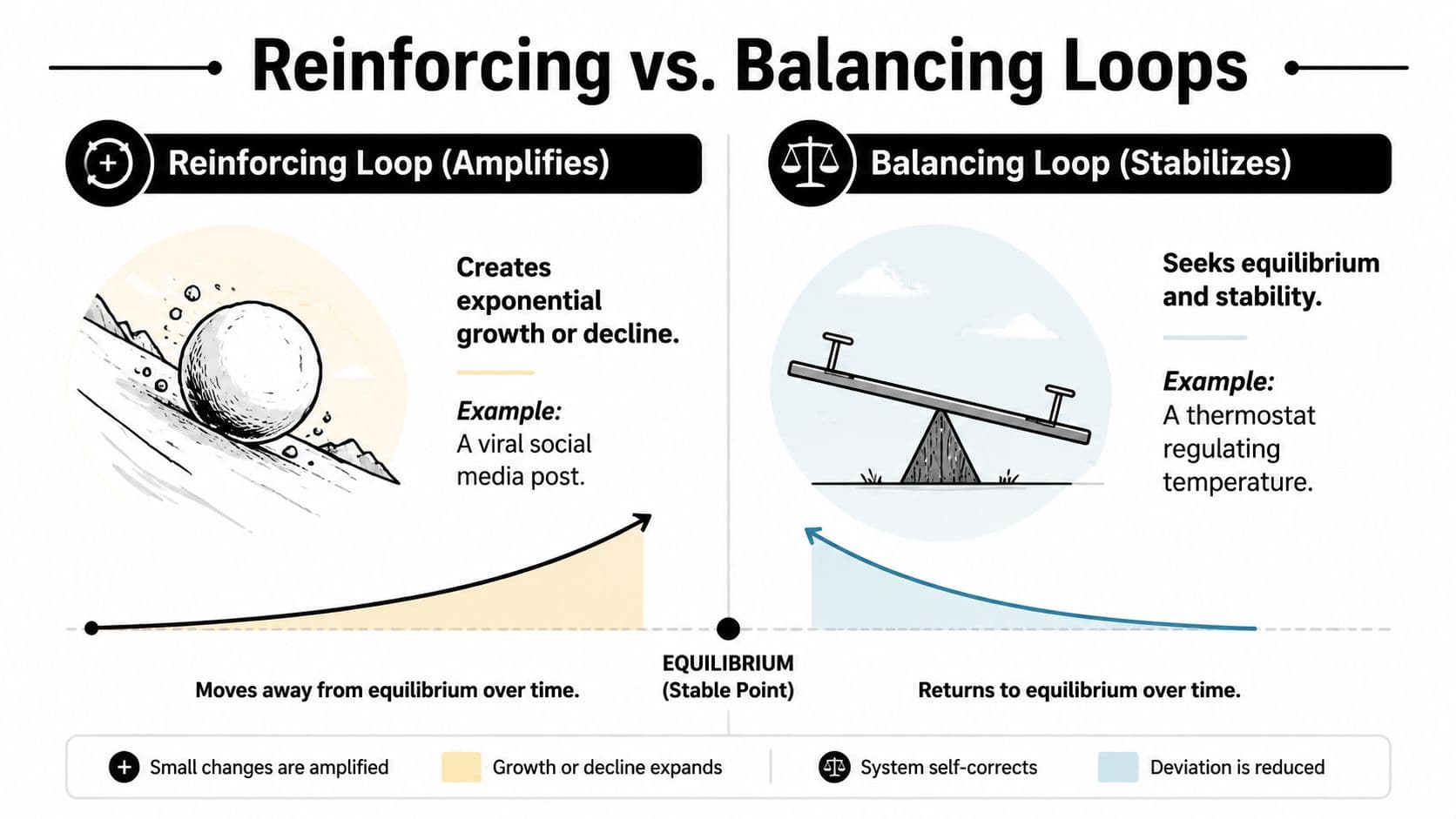
A reinforcing loop amplifies change. A small improvement creates conditions for another improvement, which strengthens the original direction. For example, a team that documents decisions clearly may reduce repeated questions. Fewer interruptions create more time for documentation and focused work, which can reduce interruptions further.
A balancing loop counters deviation. It compares the current state with a desired condition and applies corrective pressure. A project with a rising backlog might trigger scope reduction, additional delegation, or a reprioritization session. The loop aims to restore stability rather than create unlimited growth.
Choose amplification or stability
| Loop type | Main purpose | Workflow example | Risk when misused |
|---|---|---|---|
| Reinforcing | Increase momentum | A completed task makes the next task easier to start | A weak process can scale its own problems |
| Balancing | Correct deviation | A review adjusts workload when deadlines begin to slip | Too many checks can slow independent work |
A reinforcing loop helps when the behavior is aligned with the goal. A team that learns from each completed customer interview may sharpen its product decisions over time. But if the team optimizes for a shallow metric, such as closing conversations quickly, the same reinforcing structure can reward the wrong behavior.
A balancing loop helps when a target is clear and measurable. It becomes less useful when the target is vague or when every small variation triggers an intervention. A writer who reviews every sentence while drafting may keep correcting local details instead of finishing the argument.
Modern classifications reveal more complexity
Researchers don't treat feedback loops as one universal mechanism. An ACM classification distinguishes sampling, individual, non-adversarial, and adversarial forms in algorithmic systems, showing that the source of feedback and the relationship between participants affect how a loop behaves. Education research has identified 14 distinct feedback models, which reflects the multi-agent nature of learning and performance rather than a simple sender-to-recipient exchange. The ACM discussion provides useful background on these classifications and their application across systems.
The distinction matters in business. A manager's review, a customer rating, an automated recommendation, and a model-generated priority are all feedback, but they don't carry the same authority, context, or risk. Before adding a loop, ask what it's amplifying, what it's correcting, and who controls the next action.
How Feedback Loops Shape Habits Attention and Performance
A workflow loop can change more than your task list. It can influence what you notice, what you repeat, and which actions begin to feel automatic.
A common habit model has four stages: cue, craving, response, and reward. A cue signals an opportunity to act. The craving creates an expectation. The response is the behavior itself. The reward reinforces the connection between the cue and the response, as explained in this overview of the habit loop.
For a professional, a calendar reminder might cue a daily planning session. A clearer sense of control can create the craving. Reviewing priorities becomes the response, and ending the session with a manageable plan becomes the reward. Over time, the planning action may require less deliberate effort.
Feedback also changes attention allocation. A study on habit formation found that feedback can shape habits through attention-based mechanisms, meaning that feedback affects not only what people know about performance but also what they notice repeatedly. If your task system constantly highlights message counts, you may begin to prioritize visible responsiveness over less visible strategic work.
That tradeoff is especially important for ADHD users. Immediate signals can make a task easier to re-enter, but excessive alerts can fragment attention and encourage compulsive checking. Deep-work users face a similar tension. A loop that reports progress every few minutes may provide reassurance while breaking the concentration required to produce high-quality work.
Repetition needs the right conditions
Habit automaticity varies by person and behavior. A commonly cited finding places the average time for a behavior to become automatic at 66 days, with a range from 18 to 254 days, as reported in this summary of habit automaticity. The practical lesson isn't to chase a fixed deadline. It's to design a loop that remains usable while the behavior is still effortful.
Feedback can also have a threshold. A threshold is a boundary at which a system changes mode. Below it, a signal may produce little response. Above it, the same kind of input can trigger a much larger or qualitatively different reaction, according to this explanation of feedback thresholds.
In practice, a single missed task may prompt a calm adjustment. A long sequence of missed tasks may trigger avoidance, anxiety, or a complete breakdown in trust. Good design catches drift early without turning every variation into an emergency. For guidance on delivering corrective information without creating defensiveness, see how to give feedback.
How to Design and Measure Effective Feedback Loops for Work
A useful work loop needs more than a metric. It needs a goal, a decision owner, a review rhythm, and a clear response when the result differs from the expectation.
Start with the outcome. “Improve the project” is too broad to guide action. “Complete the client draft, gather review comments, and resolve the major open questions” gives the team something concrete to observe.
Build the loop in five decisions
- Define the goal. State the result in language that a colleague could recognize without asking for interpretation.
- Choose a metric. Use a measure that reflects progress toward the outcome, not merely activity. Cycle time can reveal how long work takes to move through a process. Completion rate can show whether commitments are being finished. Correction rate can reveal whether the team is learning early or discovering problems late.
- Set the frequency. Match cadence to the work. A daily check-in may suit a short operational process, while a creative project may need a slower review so people can produce without interruption.
- Implement the review. Decide who sees the result, what comparison they'll make, and which decisions are available.
- Iterate and adjust. Change the task, owner, scope, sequence, or metric when the evidence shows that the current design isn't working.
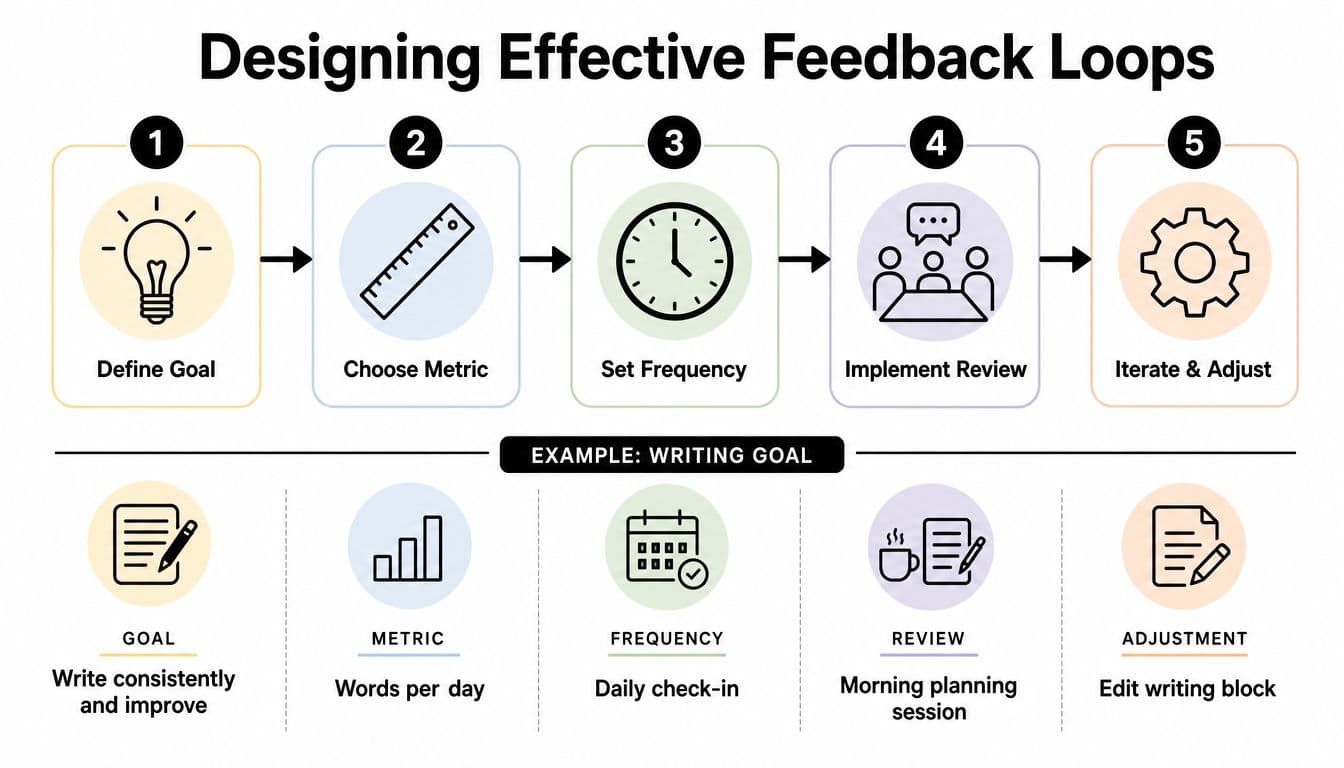
A team might define a writing goal, track words per day, review progress during a daily check-in, discuss it in a morning planning session, and adjust the writing block when the schedule repeatedly fails. The metric supports a decision instead of becoming a score to admire.
For operational teams, dashboards can make this evidence easier to discuss. A resource on performance analytics for dental teams illustrates how performance information can support recurring conversations about workload, service quality, and operational improvement. The same principle applies to project teams: measurement becomes useful when people use it to decide what happens next.
Use two-way communication whenever the loop affects people. A manager shouldn't interpret a missed target without hearing from the person doing the work. The employee may have found a hidden dependency, an unclear requirement, or an unrealistic deadline that the metric alone can't reveal.
Formal loops work best when they sit inside recurring decision cycles. Research on organizational structures describes cycles that collect outcome information and feed it back into planning and operations, with reinforcing loops supporting progress and balancing loops correcting deviations. A recurring retrospective, service review, or planning session gives the information a place to change work rather than letting it disappear into a report. You can also explore managing continuous improvement for a broader approach to turning repeated observations into process changes.
Real World Feedback Loop Examples With Fluidwave Workflows
A solo consultant begins the week with a general intention to handle client work. Several competing tasks make that intention difficult to act on. A clearer loop starts by defining each task, deadline, budget, and expected outcome. As work progresses, the consultant reviews what changed, identifies anything blocked, and chooses the next priority.
The task view provides the loop's return path. A list or Kanban view separates waiting, active, and review stages. A calendar adds timing, while a table makes owners and due dates easier to scan. These views work like different windows into the same system. The goal is enough context to compare current work with the plan without rebuilding the project state from memory.
The review frequency should match the work. A consultant handling short requests may need frequent status checks, while someone doing deep client analysis may need longer uninterrupted blocks. A loop that checks too often can create activity without improving decisions.
Delegation closes a different kind of loop
An executive preparing for a decision meeting may need background research. The executive creates a task, defines the deliverable, sets a budget and timeline, and delegates the work to a human assistant. The assistant returns the research, and the executive compares it with the brief. Missing details become specific follow-up tasks instead of another vague request.
Fluidwave combines task organization, automated prioritization, multiple task views, and delegation to human virtual assistants. Its pay-per-task model is organized around completed delegated work, which can reduce the friction between recognizing a task and assigning it to someone who can complete it. The loop has a clear start, owner, expected result, and review point.
Teams can apply the same pattern to shared projects. A project manager creates work, assigns owners, sets timing, monitors progress, and adjusts dependencies when an item stalls. Real-time collaboration keeps the current state visible, reducing dependence on scattered status messages.
Teams that work from an inbox can also use this guide to manage projects in Gmail. The design principle stays consistent across tools: capture work where it appears, convert it into an owned task, and return the outcome to planning.
For rapid operational requests, instant-response workflow design can shorten the distance between a new need and a visible next step. Speed still needs guardrails. A quick reply that creates an unclear task carries confusion into the next review. A concise response that records the owner, deadline, and expected result gives the loop useful information.
Frequency, accuracy, and well-being should be balanced. A fast loop suits urgent coordination, while a slower loop may protect attention during deep work. The right design is the one that improves the next decision without making people monitor the system constantly.
Common Pitfalls, KPIs, and When to Slow Your Feedback Loops
Productivity advice often treats faster feedback as automatically better. In practice, a loop can interrupt attention, raise anxiety, or reward a proxy while the actual outcome declines. Frequency is a design choice, not a performance virtue.
Research on AI-driven feedback loops in digital technologies found that streaks, badges, and real-time nudges may support goals while also increasing anxiety, mental fatigue, technostress, and loss of autonomy. In a survey of 200 users, respondents reported that app feedback could shape behavior unconsciously and reduce productivity when systems encourage constant feedback-seeking, as described in this research on AI-driven feedback loops.
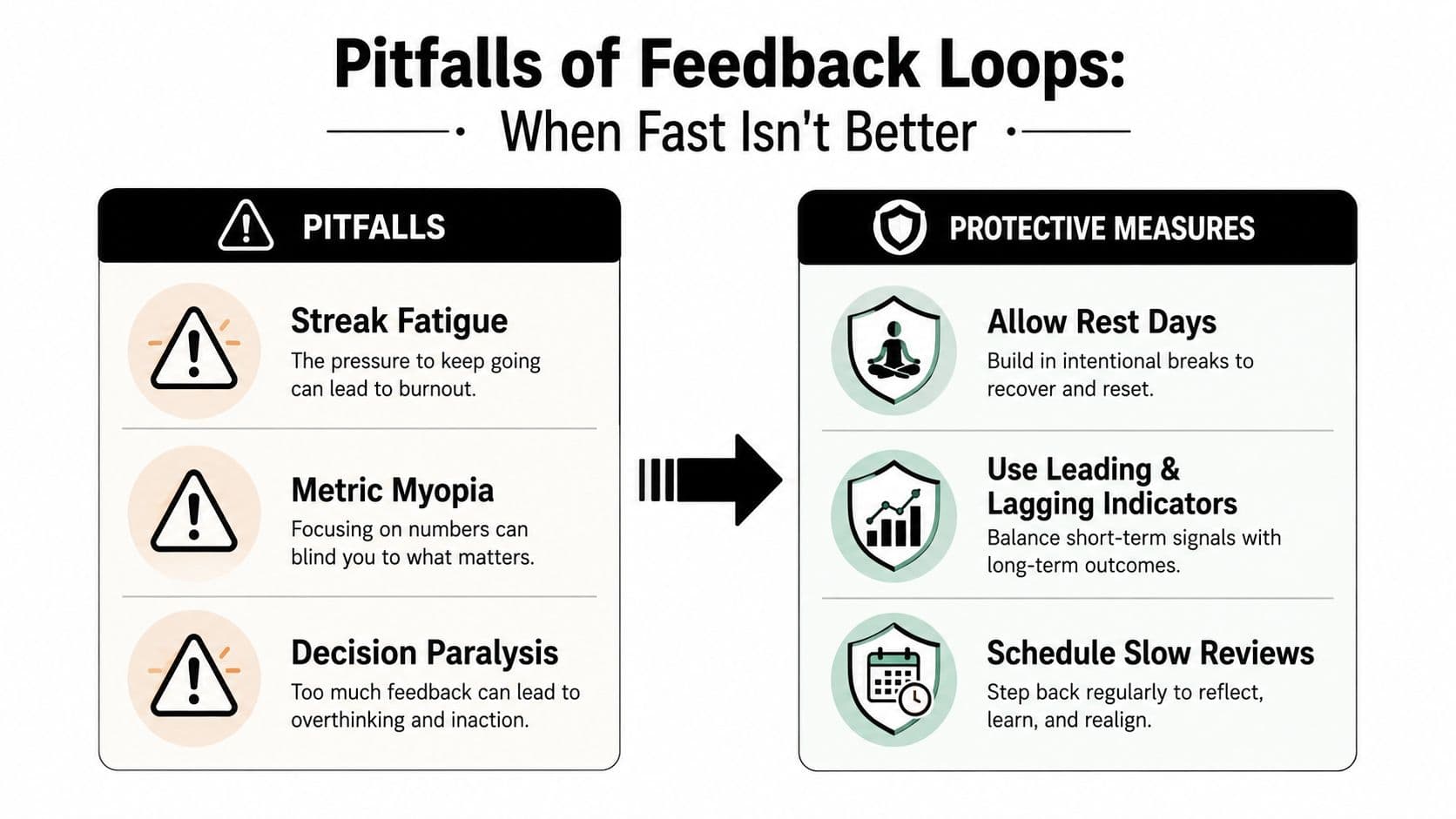
Watch for these failure signals:
- Streak fatigue: A missed day creates guilt rather than useful learning. Allow rest and judge the loop by sustained outcomes.
- Metric myopia: People optimize the visible number while quality slips. Pair leading indicators with outcome measures.
- Decision paralysis: Too many alerts and reviews delay choices. Batch low-urgency feedback and protect focus blocks.
Human-AI loops add a bias risk. A Nature Human Behaviour study found that slight bias in training data can be amplified by algorithms, while later interaction with biased outputs can increase human bias. The study reported that this effect was not observed in human-human interaction. Human review therefore matters when AI helps prioritize, recommend, or evaluate work. The findings in this Nature Human Behaviour study of AI feedback effects support treating these loops as risk surfaces rather than automatic correction systems.
Slow the loop when decisions affect people, the metric is easy to game, or users report pressure. Use scheduled reviews, explicit human approval, and qualitative checks. For ADHD users and deep-work schedules, fewer interruptions can protect attention better than constant prompts. Reduce frequency when checking replaces focused work or repeated corrections leave the underlying cause untouched.
Fluidwave organizes tasks, priorities, ownership, deadlines, and delegated work in one place. Create a task with a clear outcome, review progress at a deliberate cadence, and visit Fluidwave to build a focused, sustainable system for personal or team work.
Focus on What Matters.
Experience lightning-fast task management with AI-powered workflows. Our automation helps busy professionals save 4+ hours weekly.