Learn how to identify and manage communication preferences in your team. This practical guide covers tools, tips, and strategies for 2026.
August 5, 2026 (Today)
Communication Preferences: A Practical Guide for Teams
Learn how to identify and manage communication preferences in your team. This practical guide covers tools, tips, and strategies for 2026.
← Back to blog
The message sat in Slack for six hours. By the time someone spotted it, the owner had already sent a follow-up email, two people had joined the wrong meeting, and the task itself had been reassigned twice. None of that came from bad intent. It came from a team that never agreed on how urgent work should travel, who should answer where, or what “send me a quick update” meant.
That's the problem with communication preferences. They're not personal quirks you can politely ignore. They shape whether work moves, whether people feel heard, and whether a team burns time translating each other's habits into something usable. A simple social style assessment like the Synopsix social style model can help people name differences, but the operational payoff only shows up when those preferences are built into everyday systems.
Why Communication Preferences Matter More Than You Think
A team can survive one ignored Slack ping. It can't thrive on a pattern of ignored preferences. The hidden cost shows up in small failures first, a missed dependency, a status update sent to the wrong place, a meeting that should've been a written note, and then in bigger ones like delayed approvals and frayed trust.
The workplace data backs that up. In the Institute of Internal Communication's 2025 IC Index, 65% of employees said they rely on email, making it the single most-used channel, while 35% use one-to-ones with line managers, 34% use newsletters, and 34% use team meetings. The same report found that 53% of employees prefer to access information about employer plans and priorities in writing, and 74% said they receive the right amount of information from their employer. That mix matters because it shows the issue isn't just “more communication” or “less communication”, it's whether the right message shows up in the right form. The source is the 2025 IC Index on workplace communication channels.
Where teams usually go wrong
Practical rule: If people keep asking the same question in different places, the problem usually isn't effort. It's routing.
I've seen teams blame employees for “not paying attention” when the issue was a channel mismatch. One group used Slack for urgent work, email for approvals, and meetings for decisions, but nobody wrote those rules down. The result was predictable. People with deep-focus work habits got interrupted. People who needed a paper trail felt forced into live conversations. The team didn't need more noise. It needed a shared default.
That's where preference systems pay off. They reduce guessing, and they make it easier for people to work in the mode that fits the task. They also prevent the classic trap of assuming a single style works for everyone. For a useful framing on why people sort communication differently, the communication style model from TeamGantt is a practical reference point, especially if you're trying to spot where direct, relational, data-heavy, or patient styles collide.
The Five Core Categories of Communication Preferences
A useful model starts with five categories, because “prefers email” is never the full story. Channel, cadence, tone, availability, and accessibility each affect how a message lands. If you only capture one, you'll still make avoidable mistakes.
Channel and cadence
Channel is the medium, email, Slack, phone, or in-person. Cadence is how often and how quickly someone wants to hear from you. A person may want Slack for quick operational nudges but email for anything that needs a record. Another may want a daily digest instead of ten interruptions.
Consumer data shows why channel can't be treated as fixed. A 2025 survey from Qualtrics and XM Institute found 61% of consumers across countries and activities prefer one of three human-mediated channels, chatting with a person on a computer, talking by phone, or meeting in person. Separate 2025 UK data found 74% of adults prefer email, SMS, or portals for day-to-day updates, while 20% still depend on post for sensitive sectors such as banking, healthcare, and utilities. That mix is a reminder that routine updates and high-stakes communication don't belong in the same bucket. The source is Qualtrics and XM Institute's global channel preference survey.
Tone and availability
Tone is whether someone wants direct language, collaborative framing, or detailed context. Availability is the window in which they're reachable, and whether they need do-not-disturb blocks or async-only time. These two often conflict. A person may want a direct tone but only after they've had time to think. Another may welcome collaboration but only if the message arrives during core hours.
People don't just differ on how they like to be contacted. They differ on how much processing time they need before they can answer well.
Accessibility
Accessibility covers plain language, visual aids, captioning, and anything else that reduces friction for the reader or listener. It's not a bonus feature. It's part of the communication format. A short message can still be hard to act on if it's vague, full of jargon, or missing context.
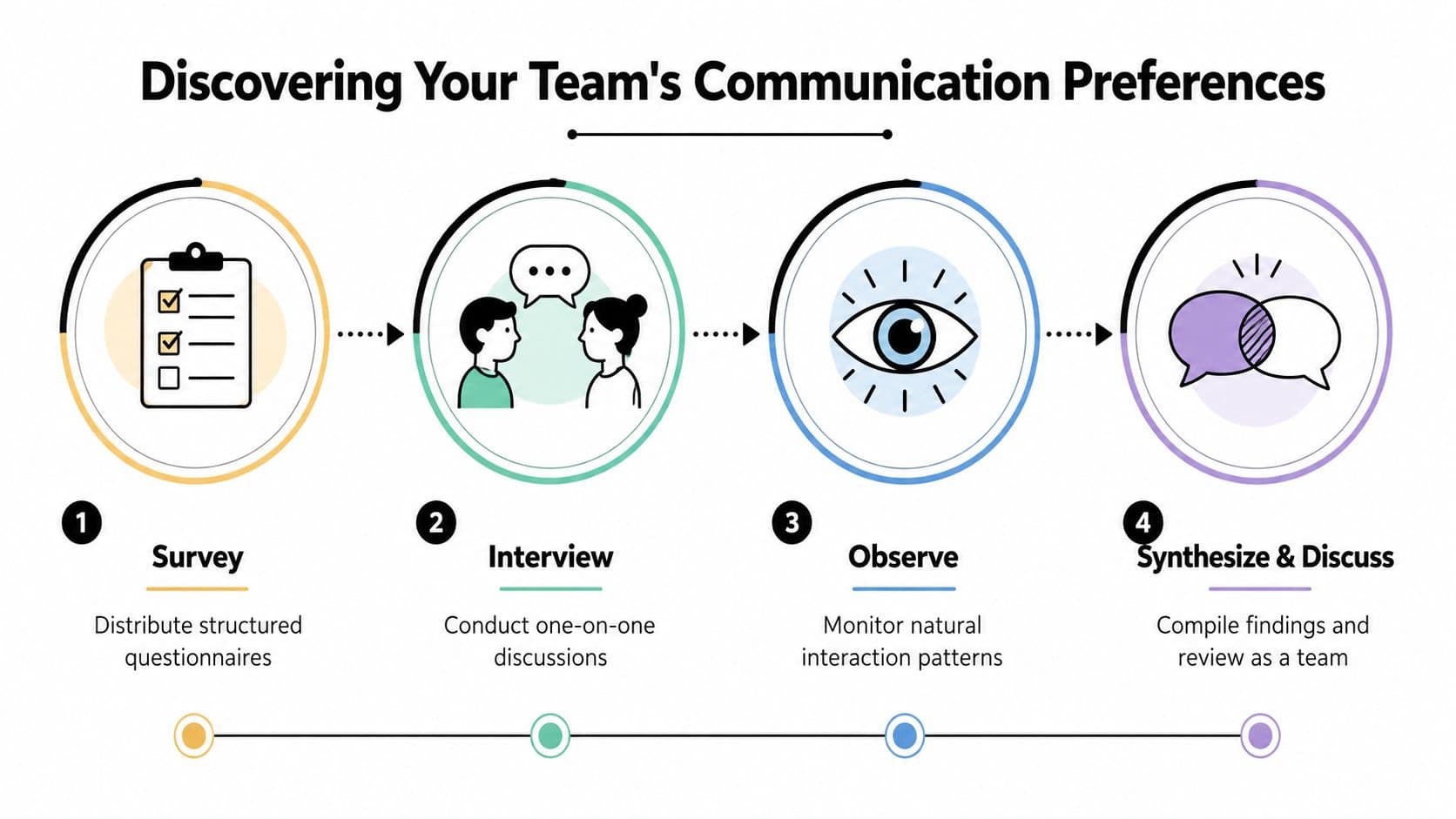
A four-part process helps teams uncover these categories without guessing. The image above is a good reminder that surveys, interviews, observation, and team discussion all have a role. If you want a deeper operational map for turning that discovery into action, use a structured process rather than relying on memory or personality.
A quick conflict check
- Direct tone vs. collaborative cadence: Someone may want the final answer written plainly, but only after discussion.
- Async availability vs. urgent channel: A person may prefer email, but still need a real-time escalation path for blockers.
- Plain language vs. dense documentation: Shorter isn't always clearer if the action steps disappear.
- Visual-first processing vs. meeting-only updates: Some people need a board or written summary before they can respond.
- Workstyle vs. sender preference: A manager may prefer calls, but the team may need written records to avoid repeat work.
Discovering Your Team's Communication Preferences
Teams often think they already know this stuff. They don't. They know what works for the loudest people, the most senior people, or the people who complain fastest. That's not the same thing as a preference map.
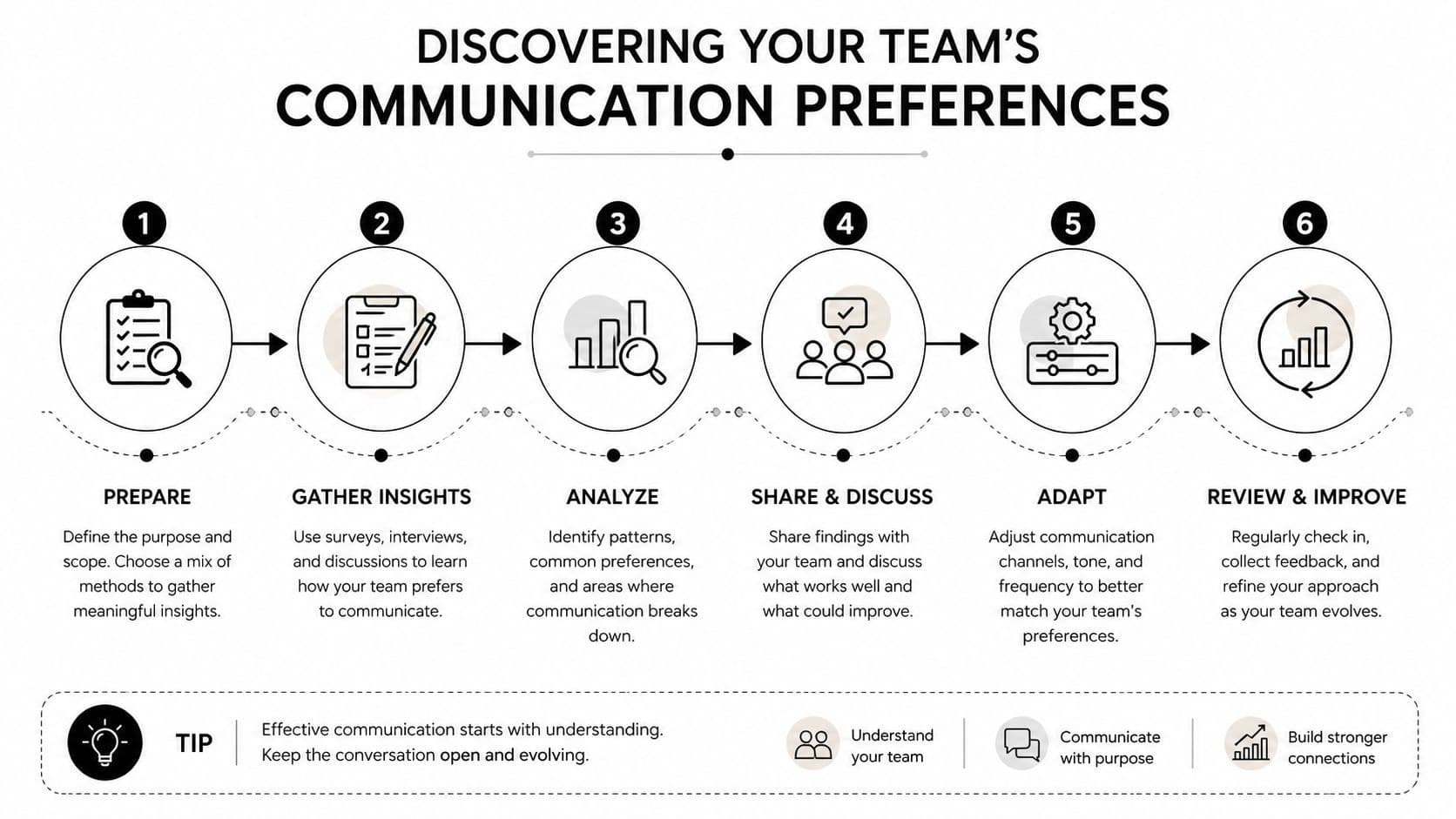
The cleanest way to discover preferences is to combine stated input with observed behavior. A good survey tells you what people say they want. A good interview tells you what they're worried about. Observation tells you what they use when deadlines get close. Those three signals don't always match, and when they don't, the mismatch is useful.
What to ask and what to avoid
Ask about task type, urgency, and context. Don't ask a vague question like “How do you like to communicate?” because it invites generic answers. Better questions sound like this, “For urgent blockers, what channel gets your attention fastest?” or “For decisions you need to revisit later, what format is easiest to use again?”
The strongest signal comes from patterns, not preferences in the abstract. In one 12-person team I've worked with, the people who claimed they wanted quick Slack messages kept missing action items that arrived there. Once we looked closer, they weren't avoiding responsiveness, they were filtering out messages they couldn't process under interruption. Their real preference was structured written updates with a clear action label. That's the kind of difference a survey alone would miss.
The Carnegie Mellon Open Psychology Initiative defines communication preference as both the mode and the style of communication, including whether someone wants email, phone, or in-person contact, and whether they prefer direct or more detailed communication. That's a useful reminder to capture both what channel they want and how much framing they need. The reference is Carnegie Mellon's communication preference definition.
How to interpret conflicting signals
When a stated preference conflicts with observed behavior, don't assume the person is being inconsistent. Often the task changed, the sender changed, or the stakes changed. The evidence on chronic-disease patients, depression, and autism in this research summary points to the same operational reality, preferences shift with trust, familiarity, and sensitivity. A known contact can make face-to-face or written formats acceptable. An unknown sender can make phone calls feel wrong. High-stakes situations can push people toward slower but safer formats.
Practical rule: Treat preference data as a living profile, not a checkbox. Update it after real interactions, not once a year.
That's also why the most reliable systems keep version history and confidence scores. Preference data should be layered. Explicit self-selected settings should outrank guessed signals, and fallback attributes like timezone or language only make sense when nothing clearer is available. That approach reduces misrouting and keeps the system honest about what it knows, as described in this preference-data framework.
Documenting and Sharing Communication Preferences
Once you know the patterns, write them down where people can use them. Not in a forgotten doc. Not in somebody's memory. A living communication record only works if people can find it at the moment they need to send, route, or delegate something.
The simplest structure is individual, team, and project. Individual profiles capture the basics. Team charters set the default rules. Project notes handle exceptions. That gives people one place to check before they guess.
A documentation template that actually gets used
| Category | Individual Preference | Team Default | Exceptions |
|---|---|---|---|
| Channel | |||
| Cadence | |||
| Tone | |||
| Availability | |||
| Accessibility |
Use the template above to capture only what matters for action. If you add too many fields, nobody updates it. If you make it too thin, it won't help when a task lands in the wrong place.
A useful rule is to separate preference from policy. A person may prefer email, but the team might still require Slack for incident response. A project may favor written summaries, but a client call might still be necessary. That's normal. The point isn't to let every preference win. The point is to make the exception visible before it creates friction.
HubSpot's guidance on subscription types shows how communication settings can be organized as categories people manage deliberately, which is useful thinking even outside marketing. Their subscription setup workflow is a good reference for turning communication choices into manageable records, and you can compare the structure with this communication plan template if you want a simpler operational format.
Handling conflict without making it personal
When preferences clash, use the task, not the person, as the deciding factor. Urgent operational work can justify faster channels. Sensitive or ambiguous work usually needs a slower, clearer path. If you let seniority decide every time, people quickly stop trusting the system.
Here's the part teams miss: documentation should also include what happens when preferences change. People change roles. Workloads change. Some people discover that what they wanted in a calmer season doesn't fit a more complex one. The record has to allow that without turning into bureaucracy.
Communication Preferences for Neurodivergent Team Members
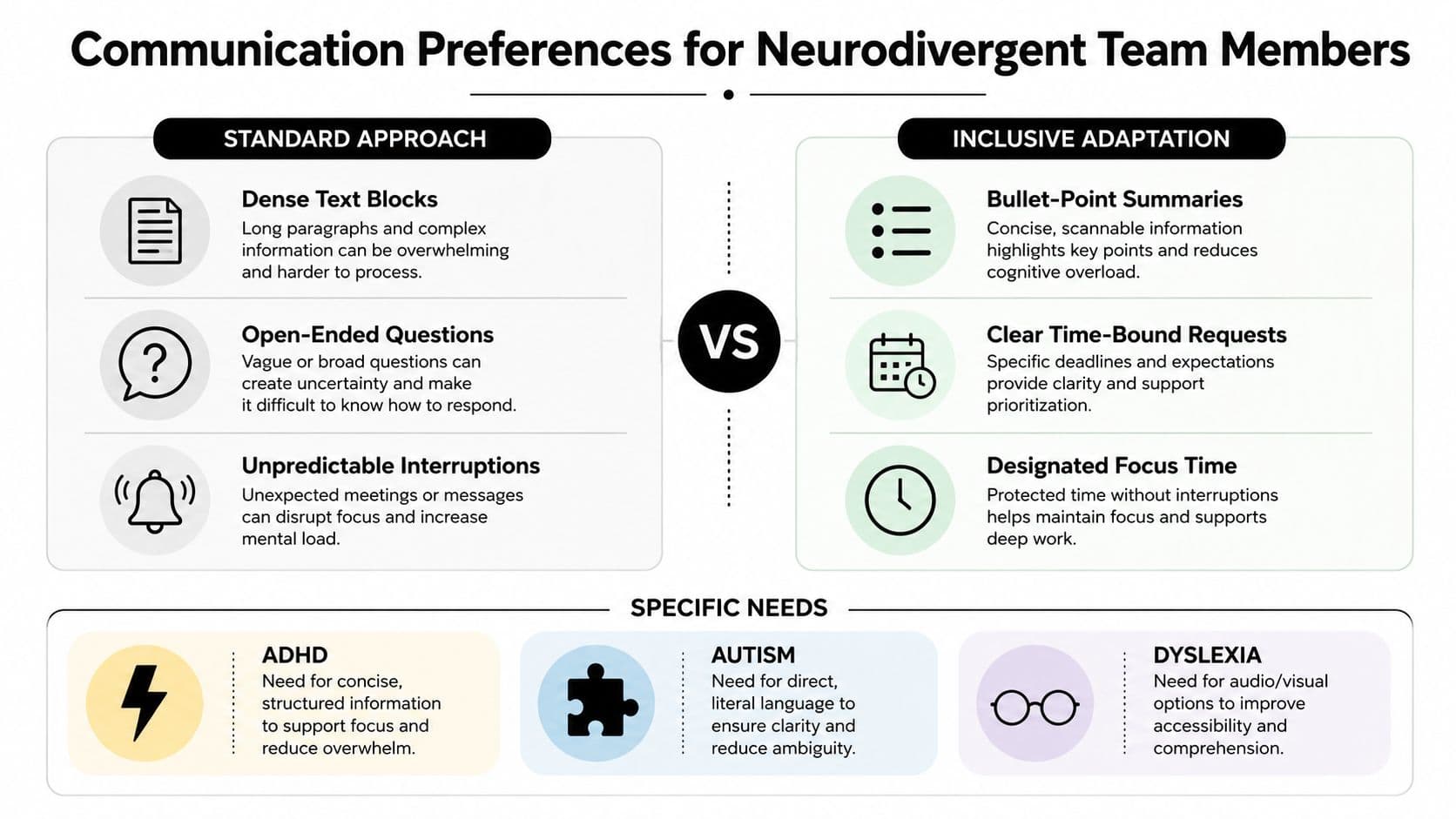
Standard advice often assumes everyone processes information the same way, at the same speed, and with the same tolerance for interruption. That's not how many neurodivergent teammates experience work. ADHD, autism, dyslexia, and other cognitive differences can change what feels clear, what feels exhausting, and what feels accessible.
The practical difference is often obvious once you stop romanticizing “quick communication.” A phone call can be fine for one person and draining for another. A dense paragraph can feel efficient to a manager and unusable to someone who needs structure. A spontaneous meeting can seem collaborative and still create real sensory or processing strain.
What tends to help
For ADHD, concise structure matters because it reduces scanning effort and makes priorities visible. For autism, direct and literal language often works better than hints or implied meaning. For dyslexia, audio and visual options can make the same information easier to process than dense text alone. Those aren't stereotypes, they're design constraints.
If you're building a more accessible workflow, start with message shape before you start with personality. Use bullet-point summaries, clear deadlines, and explicit asks. Add visual task boards where possible, and don't bury the next action inside a long narrative. That's where a tool or process can either support people or make them compensate all day.
A useful accommodation is real-time captions for meetings, especially when people are splitting attention, processing in a second language, or working from a noisy environment. If you want a practical product-level example, real-time captions for meetings is the kind of feature that reduces strain without asking people to self-identify in a public way.
What not to do
Don't force disclosure just to grant basic support. Don't make someone explain why a phone call is hard if a written update would do. Don't confuse friendliness with clarity. Warmth matters, but it doesn't replace direct instructions.
There's also a mental health layer here. People who are already managing overload often do worse when communication is unpredictable, vague, or excessively synchronous. A thoughtful policy set can lower that friction without turning every interaction into a special case, which is why it helps to align communication norms with broader support practices like the ones discussed in this mental health at work resource.
Practical rule: Inclusive communication is usually about making the default easier, not creating a separate process for a few people.
Implementing Preferences in Task Management Platforms
A preference map only matters if the tools can use it. Otherwise it becomes a nice internal document that nobody checks when work is assigned. The operational move is to convert preferences into routing rules, notification rules, and task-view rules.
That means your platform should answer a simple question. Who needs to know, in what format, and at what speed? If the system can't do that consistently, people will keep improvising in chat.
What to configure first
Start with delegation. A task assigned to an async-first teammate should land with enough context to act without a live back-and-forth. A task for a person who prefers quick clarification can include an escalation path, but the default shouldn't assume interruption is welcome. That's one reason platforms with multiple views matter, especially when you need to switch between list, calendar, Kanban, and card-based work without losing the thread.
For a concrete example of how task software can support team flow, task management software for teams is a useful reference point for thinking about visibility, ownership, and handoff design. The principle is simple. If the task board, notification layer, and priority logic don't agree, the user experiences noise instead of control.
How to translate preferences into workflows
- Async handoffs: Use these for deep-focus work and anything that needs written context.
- Urgent escalation paths: Reserve these for blockers, incidents, and deadlines that can't wait.
- Format templates: Build templates that include the tone, deadline, and definition of done.
- Task views: Let people choose the layout that matches their processing style.
- Notification rules: Match cadence to the person and the task, not just to the project.
Automation helps, but only when it respects the preference record. A daily digest might be perfect for status updates and awful for an incident channel. A Kanban board can be great for visual thinkers and unhelpful if nobody updates it. The goal isn't to automate everything. It's to make the default path match how the team works.
If a platform forces every message into one format, the team will create shadow systems outside it.
Building a Sustainable Communication Strategy
A sustainable system doesn't try to freeze preferences. It gives people a way to update them, and it keeps the team from drifting back into whatever feels fastest for the loudest voice. Start with an audit, define the default rules, then roll changes out in small steps so people can adapt without overload.
A 90-day rollout usually works better than a big-bang reset. Early on, you're looking for obvious mismatches, not perfection. If urgent items are still getting buried, if people keep answering in the wrong channel, or if a new hire has no idea where to find the rules, the system needs a tune-up.
For broader routing and escalation thinking, a multichannel contact center guide can be useful even outside support teams, because the core challenge is the same, making sure each message lands in the right place with the right level of urgency.
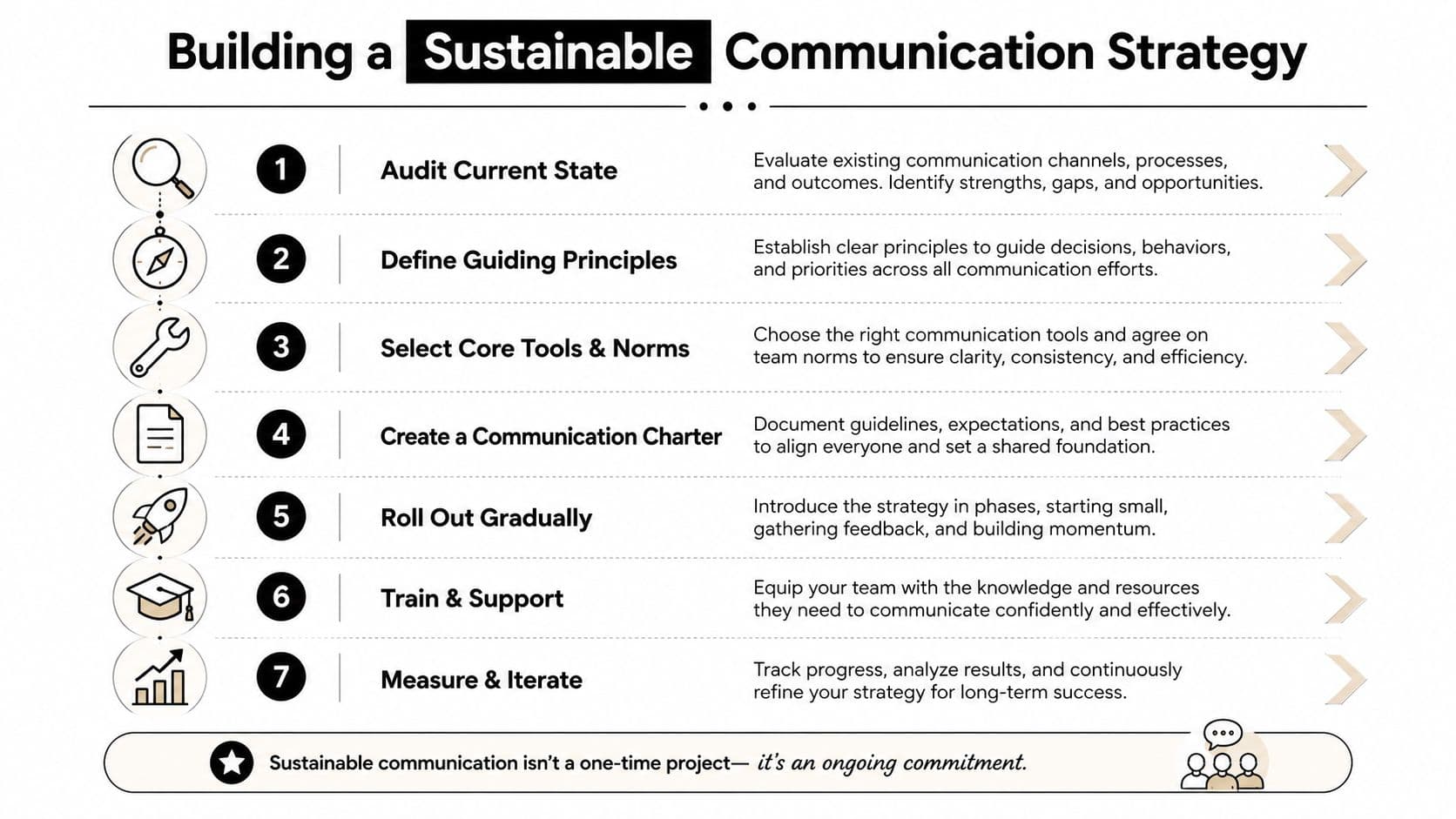
The long-term win is simple. Teams stop guessing, neurodivergent teammates get fewer unnecessary friction points, and managers spend less time cleaning up communication fallout. That's the difference between knowing preferences exist and running the business around them.
If you want a task system that respects how people work, Fluidwave is built for that kind of clarity. It helps teams route work, manage delegation, and keep communication tied to the task instead of scattered across too many places. Visit Fluidwave to see how it can support a more deliberate communication workflow.
Focus on What Matters.
Experience lightning-fast task management with AI-powered workflows. Our automation helps busy professionals save 4+ hours weekly.