Learn how a calendar for projects turns milestones, dependencies, and buffers into a schedule you can keep. Types, integrations, and best practices.
October 24, 2026 (Today)
Calendar for Projects: Plan Milestones and Timelines
Learn how a calendar for projects turns milestones, dependencies, and buffers into a schedule you can keep. Types, integrations, and best practices.
← Back to blog
You probably don't have a deadline problem. You have a visibility problem. The dates are in an inbox thread, a chat message, a notebook, and somewhere in your head. Each one looks manageable on its own, and then two of them land on the same morning.
A good calendar for projects doesn't fix that by reminding you louder. It puts durations, sequence, and progress in one place so you can see a collision while it's still cheap to move something. That's the whole idea, and it's older than any app you use.
How a Project Calendar Turns Dates Into a Shared Plan
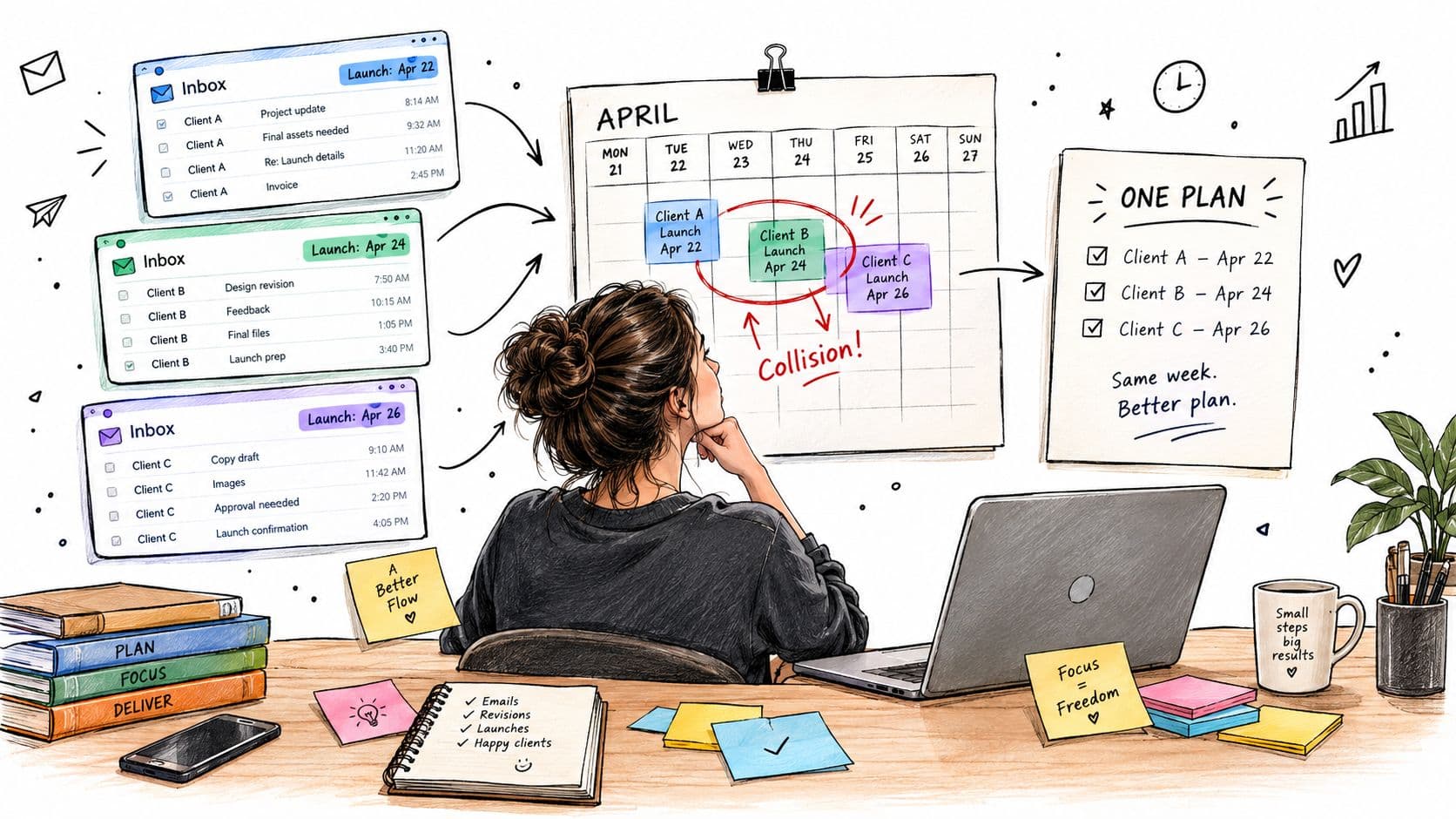
A freelancer I picture often when I explain this is juggling three client launches. Client A lives in email. Client B lives in a shared doc. Client C sends voice notes. On a Tuesday she realises two launches need final checks that same week, and both need the same designer, who is booked elsewhere.
Nothing was hidden, exactly. It was scattered. A list of due dates told her when things ended, but not how long the work took, what had to happen first, or where two projects were competing for the same hours.
Why a timeline beats a list of dates
Put those three launches on one timeline and the problem changes shape. You can see task durations as blocks, not points. You can see that copy approval sits before design, and design sits before build. The overlap stops being a surprise and becomes a decision you make early, which launch moves, which one gets help, which one shrinks.
A kitchen rail of order tickets offers a useful comparison. A single ticket tells a cook one dish is due. The rail tells her which dish started late, which one is blocking the pass, and which table will wait longest. It's the same information, arranged to show relationships.
A due date tells you when work must finish. A timeline tells you whether finishing is still possible.
Where the idea came from
This way of seeing work isn't new. The modern project calendar evolved from visual systems that mapped work against time, starting with Polish engineer Karol Adamiecki, who in 1896 developed a process-planning diagram called a harmonogram while managing steelworks operations, as traced in the history of the Gantt chart. Between 1910 and 1915, American engineer Henry Gantt popularized a related horizontal bar chart that compared planned work with actual progress. During World War I, the U.S. Army Ordnance Department used those charts to organize expanded arms and munitions production.
Modern calendar, timeline, and Gantt-style views keep that same structure. They add dependencies, milestones, deadlines, and live status updates, but the core move is unchanged.
You'll see the same logic in smaller, everyday tools too. A tutor who repeats the same slots weekly benefits from a calendar that handles recurring lessons, because the pattern is visible at a glance rather than rebuilt from memory each week. Recurring or one-off, the calendar earns its keep when it shows shape, not just dates.
Choosing the Right Project Calendar for Your Work
Not every project needs the same calendar, and picking the wrong kind creates friction you'll feel every day. A heavyweight timeline for a solo two-week job is paperwork. A simple list of deadlines for a six-person launch is wishful thinking.
Start by naming what you have. Most work falls into one of a few shapes, and each shape asks for a different view.
The main types, side by side
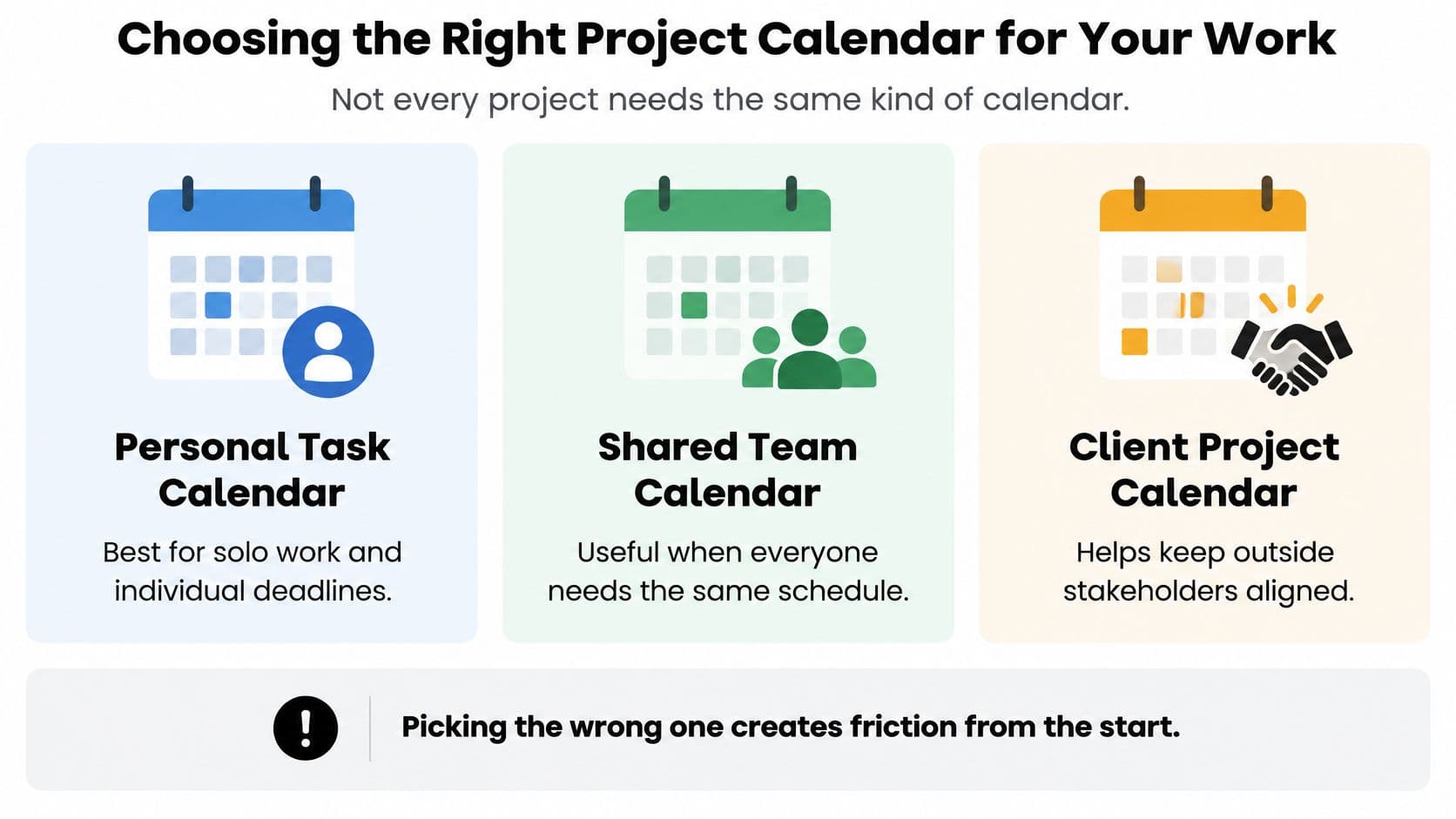
- Personal task calendar: Best for solo work and individual deadlines. You need your own commitments in one place, and nobody else has to read it.
- Shared team calendar: Useful when everyone needs the same schedule. The point is shared visibility, so a change made by one person is seen by all.
- Timeline or Gantt-style view: Fits ordered work where tasks depend on each other. You need to see sequence and duration, not just endpoints.
- Simple deadline calendar: Enough for one-off events with a fixed date and little prep work in between.
A client project calendar is a variation on the shared type. It helps keep outside stakeholders aligned without exposing your internal scratch work, drafts, and half-formed tasks.
Three questions that settle the choice
If you're unsure, test your project against three criteria.
How many people touch the work? One person can keep a personal view honest. The moment a second person waits on your output, you need a shared view, because private notes don't coordinate anyone.
How tightly do tasks depend on each other? If tasks can happen in any order, a deadline calendar is fine. If B can't start until A ships, you need a timeline that draws that link, or you'll keep rediscovering it the hard way.
How often does the plan change? Stable plans tolerate simple tools. Plans that shift weekly need a calendar where moving one block visibly moves the rest, so replanning takes minutes instead of a rebuild.
Practical rule: Choose the simplest calendar that still shows the relationships you can't afford to lose track of.
Fluidwave is one option worth knowing about. Its calendar view sits alongside table, list, Kanban, and card views, so the same tasks can be read by date or by status without re-entering anything. Auto-prioritization helps clarify what to tackle next when several dates compete, and real-time collaboration keeps a team looking at the same shared timeline rather than private copies.
Whatever you pick, run one honest test first. Put a real project on it for a week, with real overlaps. If you can spot a collision and fix it in a few minutes, the tool fits. If you can't, no feature list will save it.
Setting Milestones With Clear Start and Finish Anchors
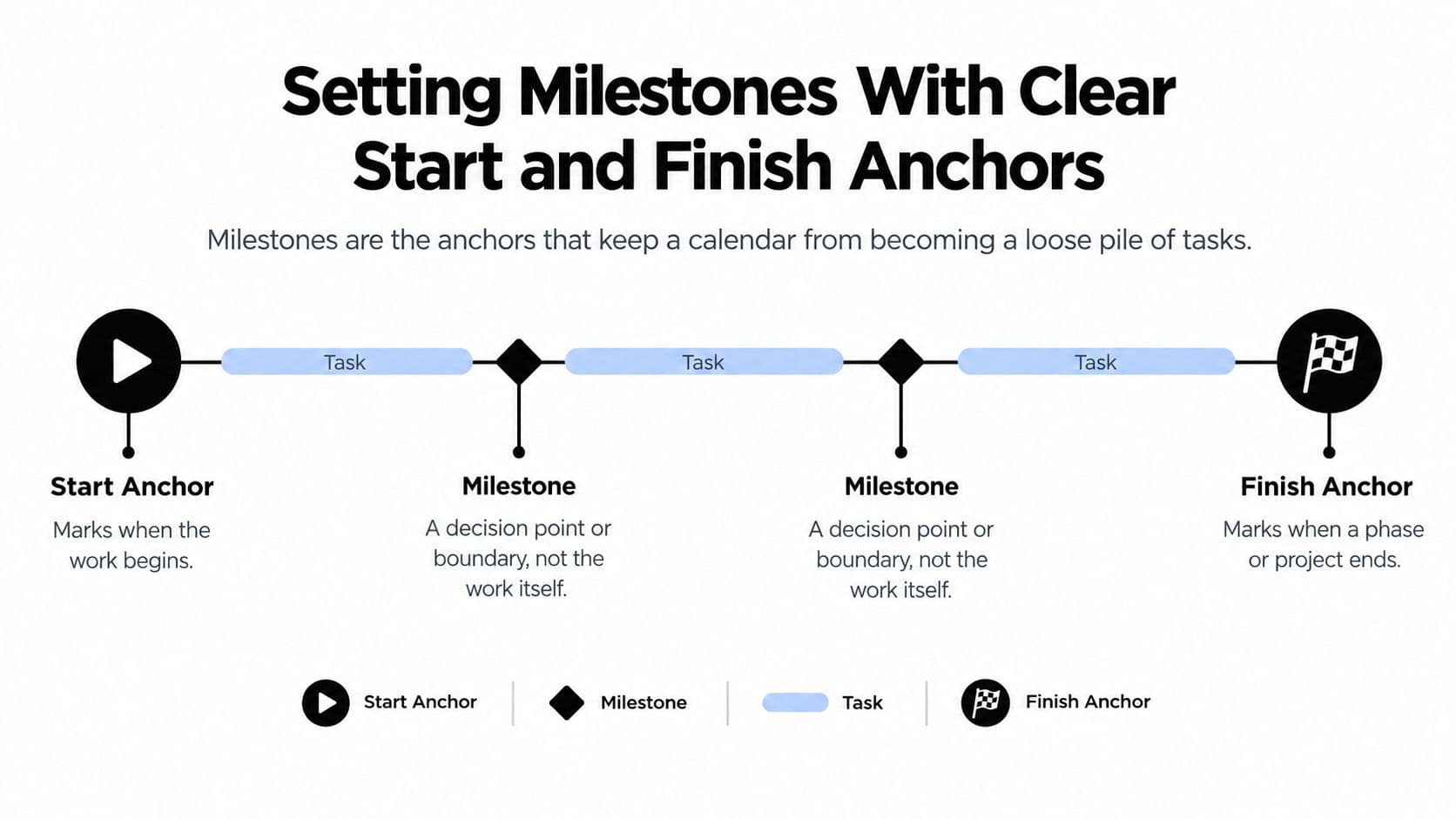
Milestones are the anchors that keep a calendar from becoming a loose pile of tasks. People confuse milestones with tasks all the time, so let's separate them plainly. A task is work that takes time, like drafting a homepage. A milestone is a boundary or decision point, like the client approving that draft.
Tasks have duration. Milestones have a yes or no answer. Either the design is approved or it isn't.
The two anchors every project needs
Every project gets a start milestone and a finish milestone before anything else goes on the calendar. The logic is strict, and it's worth borrowing. The U.S. Government Accountability Office states that no work should begin before the start milestone, while all project scope must be completed before the finish milestone, in its schedule assessment guidance.
That sounds bureaucratic until you've lived without it. Without a start anchor, work dribbles in early and unfocused. Without a finish anchor, a project ends whenever people get tired, and leftover scope turns into awkward follow-up emails.
Think of tent poles. The start and finish anchors go in first, and everything else hangs between them. For more shape on what belongs in between, it helps to study examples of milestones in project management before you start inventing your own.
A website launch, worked through
Say you're launching a client website. A vague finish milestone would be "site done." That phrase will betray you, because "done" means different things to the designer, the developer, and the client paying for it.
Rewrite it as a named, checkable deliverable.
- Start anchor: Signed brief and deposit received. No design work begins before this.
- Middle milestone: Homepage design approved by the client in writing.
- Finish anchor: Approved site live on the client's domain, with all agreed pages published.
Notice each one can be verified. You don't debate whether a deposit arrived. You check.
If you can't answer a milestone with a plain yes or no, it isn't a milestone yet. It's a hope wearing a date.
The quick check before anything goes on the calendar
Run every milestone through three questions. Can someone other than you verify it? Does it mark a decision or a boundary, rather than hours of effort? Would missing it change what happens next?
If a milestone fails those questions, reword it before it earns a place on the calendar. Ten minutes of rewording now saves the familiar meeting later where five people discover they meant five different things by "ready."
Mapping Dependencies and the Critical Path
A date on its own tells you very little. What matters is what that date is standing on. When a task slips, you need to know whether it's an inconvenience or the start of a chain reaction.
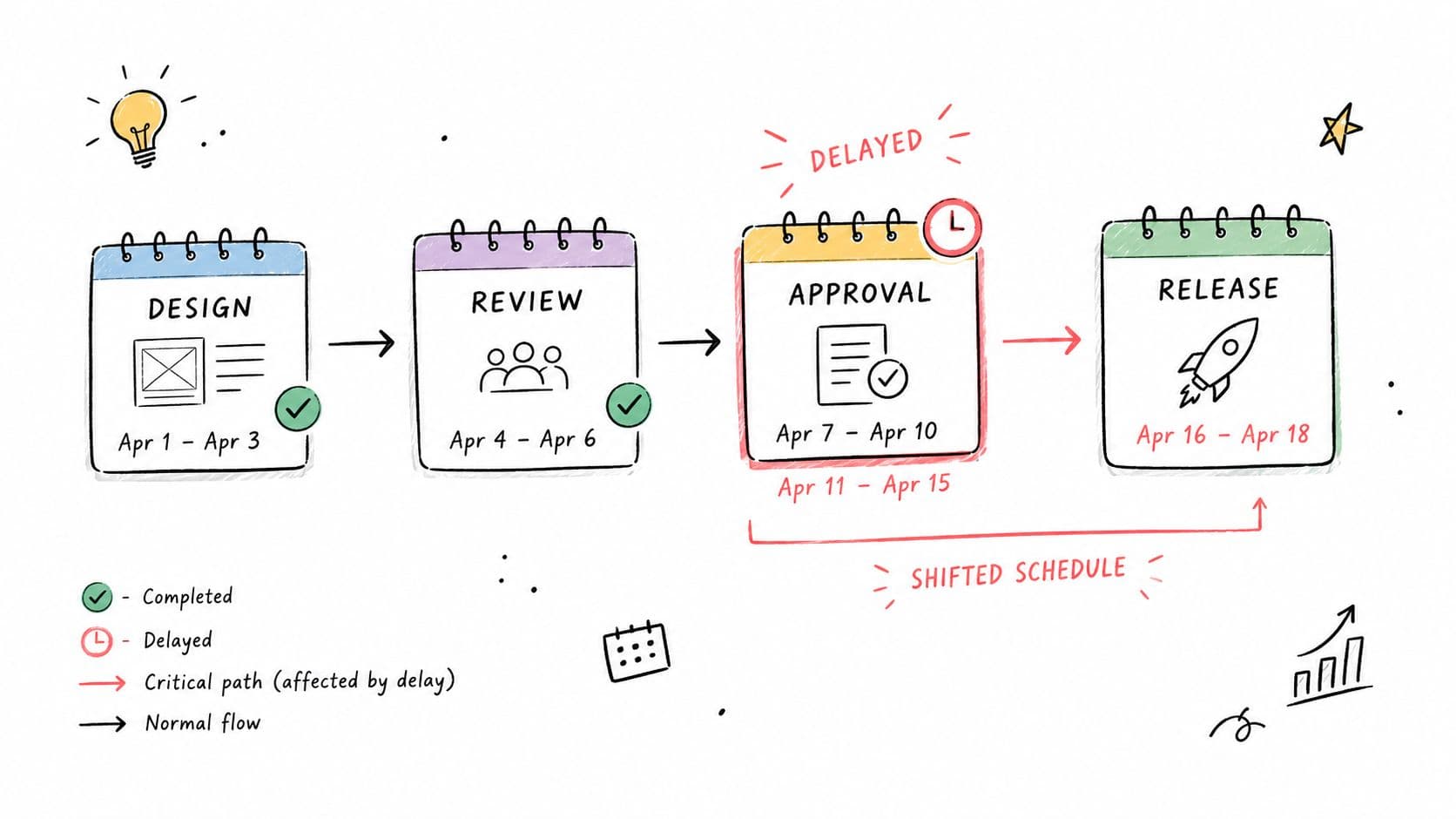
The sketch below shows the shape of the problem, a short project where a delay appears in one stage and the later stages have nowhere to go.
Linking tasks so consequences become visible
Take a simple chain from a website project. Design approval must come before development, and development must come before testing. Testing can't start early to be helpful. There's nothing to test.
Write each task down and name its predecessor, the task that must finish first. That one habit turns a reminder list into a map. You stop asking "what's due Friday" and start asking "what breaks if Thursday's approval doesn't land."
This is also where honest conversations happen. Half the delays I've seen came from a dependency nobody wrote down, usually an approval sitting in someone's inbox. Drawing the link forces that hidden wait into the open, where you can plan around it. A fuller treatment of dependency management is worth reading once your chains get longer than three or four tasks.
Finding the chain with no room to slip
Connect all your links and one chain will be longer than the rest. The U.S. Department of Health and Human Services defines the critical path as the generally longest sequence of scheduled activities that determines project duration, and tasks on that path have no usable slack, so a delay in one can delay the entire project, as set out in its project scheduling practices guide.
Slack is the forgiving part. A task off the critical path can slip a little and the finish date holds. A task on the path can't. Treat both kinds of delay the same and you'll panic about the wrong things while the problem sits unguarded.
The video below walks through this visually, which helps if the chain idea only clicked halfway.
A short routine you can repeat
- List each task: Keep names concrete enough that a teammate knows what finished looks like.
- Name the predecessor: For every task, write what must be done before it can start.
- Find the longest chain: That chain sets your earliest realistic finish.
- Mark and protect those dates: When something must give, move work with slack first.
You won't get the chain perfect on the first pass. That's fine. An approximate map of consequences beats a precise list of dates that hides them.
Planning for Uncertainty and Replanning When Plans Break
Here's where calendars mislead you. You add up your best estimates, the calendar shows a finish date, and the date looks solid because it's typeset nicely. It isn't a promise. It's a forecast built on guesses, some of them optimistic.
Being honest about that isn't pessimism. It's the difference between a plan you can steer and one that ambushes you.
Why a single date creates false confidence
A Project Management Institute example shows a simple project's critical-path completion date of December 11 had only a 10 to 15 percent likelihood of being adequate once evaluated through schedule-risk analysis, in a paper on quantitative schedule risk. The plan wasn't careless. It just assumed each task would take its expected time, and real tasks rarely cooperate all at once.
Statistical techniques such as Monte Carlo simulation address this by repeatedly modeling possible combinations of task durations. Instead of one finish date, you get a range of outcomes and how likely each one is. That range is what honest planning looks like.
You probably won't run simulations for a client website. But you can borrow the mindset, and better timeline estimation habits will take you most of the way there.
Three kinds of dates, kept separate
Most calendar arguments happen because three different dates share one box.
- Target date: What the team aims for. Motivating, but not a commitment to outsiders.
- Forecast date: What realistic durations and current progress suggest. This one should move as facts arrive.
- Deadline: The date you've committed to, ideally with an explicit confidence level attached.
When a client hears your target date as a deadline, you've created a conflict nobody intended. Label which date you're sharing, every time.
A forecast that never changes isn't a forecast. It's a wish you stopped checking.
Buffers and clear triggers for action
For most projects, a simpler version of risk planning works well. Add buffers where uncertainty is highest, usually around approvals, work you've never done before, and anything waiting on a third party. Keep buffers visible on the calendar as their own blocks. Hidden padding inside every task just gets spent without anyone noticing.
Then decide your triggers in advance, while you're calm.
- Move the task: Use this when it has slack and the delay is short.
- Delegate it: Use this when the work matters, it's on the critical path, and your own hours are the bottleneck.
- Split it: Break a large deliverable into smaller pieces so part of it can ship and unblock whoever waits downstream.
Review the calendar whenever an assumption dies, not on a fixed schedule only. A supplier delay, a scope addition, a team member leaving, each one is a replanning trigger. Plans break. A calendar that expects that, and shows you what to move first, is doing its real job.
Best Practices for Flexible Calendars and Integrations
Most calendar advice assumes a worker who starts at the same time daily, focuses on demand, and has the same energy at 9 a.m. as at 4 p.m. If that isn't you, or isn't your team, rigid scheduling advice will keep failing and you'll blame yourself for a design problem.
So let's be direct. A calendar packed edge to edge isn't a sign of productivity. It's a plan with no recovery capacity, and the first interruption will collect payment from somewhere.
What variable attention actually needs
In a 2025 survey-based study of 106 employed people with ADHD across 21 industries, 79.3% said ADHD negatively affected work performance, yet only 58.5% used workplace adjustments, according to research on ADHD and workplace relationships. Flexible hours, remote or hybrid work, and noise control were among the most beneficial accommodations, while rigid structures were rated least effective.
Read that as a calendar design brief, not just a workplace finding. If rigid structures work worst, a calendar of fixed blocks with no give is the wrong tool shape for a large group of capable people.
- Separate fixed from flexible: Mark events that must happen at a set time differently from work that's best done inside a window. A client call is fixed. Drafting a report usually isn't.
- Use micro-deadlines: Break a Friday deadline into smaller dated checkpoints. Urgency arrives earlier and in survivable doses.
- Show the next action: Every task on the calendar should name the very next physical step. "Open the draft and fix the intro" starts easier than "finish report."
- Leave white space on purpose: Empty blocks absorb rework, approvals, and urgent requests without toppling the week.
None of this lowers standards. The finish milestone stays firm. What flexes is when the effort happens inside the window, which respects how attention behaves.
A note on fairness: Flexible windows only work if using them doesn't quietly mark someone as less committed. Judge the delivered milestone, not the hour it was produced.
Integrations that reduce double work
A project calendar that lives apart from your daily calendar will drift out of date, because nobody updates two systems faithfully. Sync project dates into the personal calendar you already check, and let reminders come from there.
For teams, the same logic applies to handoffs. Plan asynchronous handoffs with clear notes attached to the task, so a colleague in another time zone can pick up work without a meeting. Always write time zones next to shared deadlines. "End of day Thursday" has ended more goodwill than any hard task.
Look at how other fields handle this joining-up problem. Event and education teams, for instance, rely on connected workflows for credits and evaluations so records move between systems instead of being retyped. Your calendar deserves the same treatment. Every date you copy by hand is a date that will eventually be wrong in one of the two places.
Start with one integration, the calendar sync. Add more only when you've felt a specific repeated pain. Connected tools should remove friction you have, not impress anyone.
Building Your First Project Calendar This Week
Don't rebuild your whole working life this week. Pick one active project, something already underway with real stakes, and give it a proper calendar. One honest example teaches you more than a perfect system applied to everything at once.
Here's a sequence that fits inside a normal week, in short sittings.
A one-week build, step by step
- Set the two anchors: Write the start milestone and finish milestone, worded so each can be answered yes or no.
- List the main tasks: Keep the list coarse at first. Ten clear tasks beat forty vague ones you won't maintain.
- Link the dependencies: Name the predecessor for each task, especially approvals and waits on other people.
- Find the critical path: Mark the longest chain. Those dates get protected first when something slips.
- Add buffers where you're guessing: Put visible buffer blocks after uncertain tasks, not hidden inside estimates.
- Put it where you'll look: If the calendar isn't open during your week, it's a document, not a tool.
In Fluidwave, the practical version of this is straightforward. You create tasks, define budgets and timelines, and monitor progress as work moves forward, all in the calendar view alongside the other views of the same work.
What to do when your own hours run out
At some point the calendar will show you a week that doesn't fit your life. That's information, not failure. Your options are the ones covered earlier, move, split, or hand work over.
On that last option, Fluidwave offers delegation on a pay-per-task basis with no subscription required, so handing off a task doesn't mean signing up for an ongoing commitment. It also offers a free forever tier, which means you can test this whole approach on one real project without paying for the experiment.
Start ugly. A rough calendar you review weekly will outperform a beautiful one you built once and abandoned.
The habit that keeps it alive
Close the week with a short review, fifteen minutes is enough. Move what slipped, on purpose, and note why. Check the critical path still holds. Confirm next week's first task has a visible next action.
Do that for a few weeks and something changes. Missed deadlines stop feeling like character flaws and start looking like what they usually are, invisible overlaps and unguarded chains that you can now see early enough to fix.
Put your next project on a calendar that shows durations, dependencies, and progress in one shared view, and let Fluidwave help you create tasks, set timelines, and delegate the overflow when your week fills up. Start with one real project on the free tier and see your first collision before it costs you anything by visiting Fluidwave today.
Focus on What Matters.
Experience lightning-fast task management with AI-powered workflows. Our automation helps busy professionals save 4+ hours weekly.