Learn what is inbox zero, how the method works, where it falls short, and the practical workflows that help busy professionals reclaim attention.
September 3, 2026 (Today)
What Is Inbox Zero and How It Actually Works
Learn what is inbox zero, how the method works, where it falls short, and the practical workflows that help busy professionals reclaim attention.
← Back to blog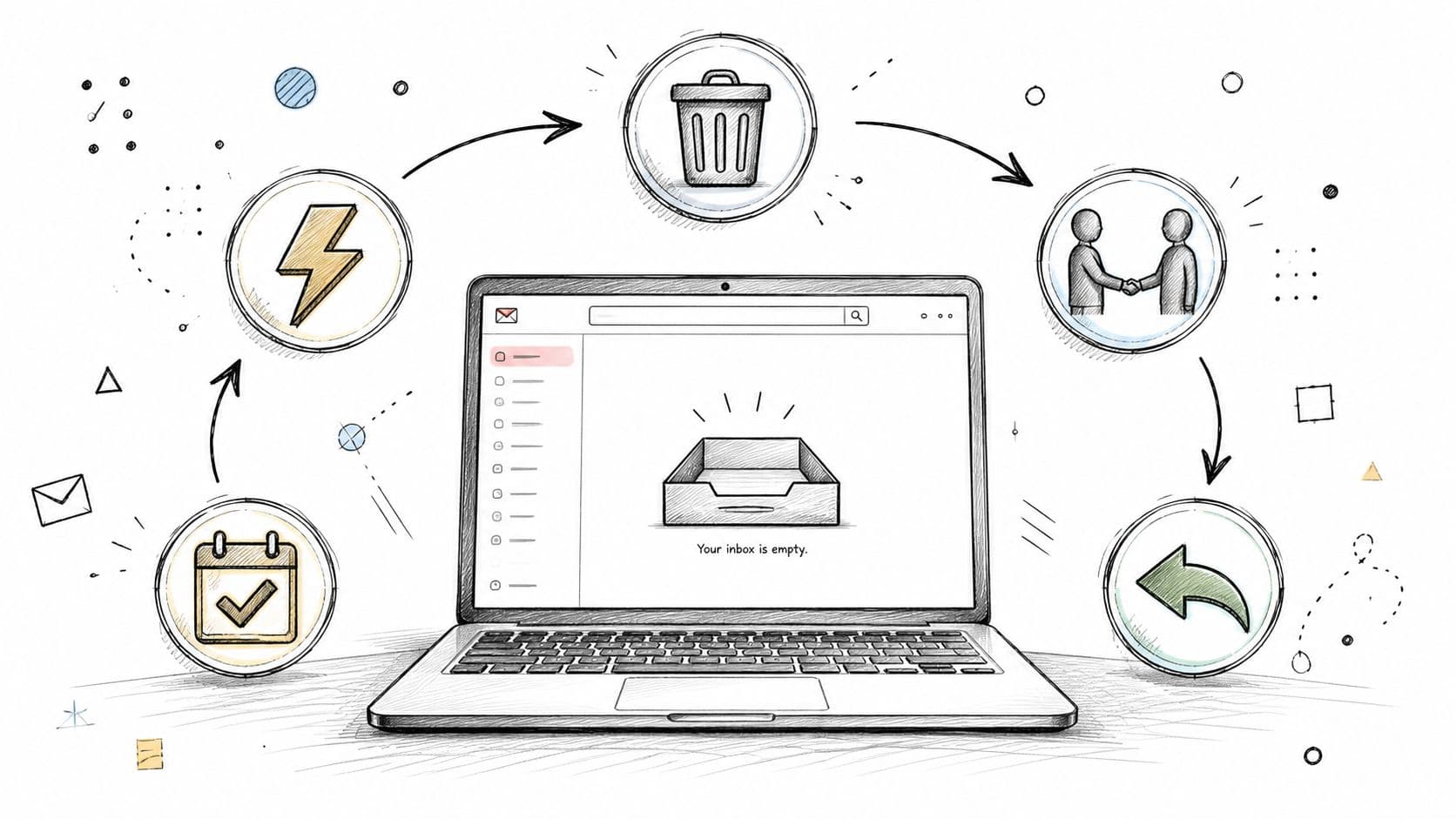
Inbox Zero is an email-processing method coined by Merlin Mann: decide whether each message belongs in delete, delegate, respond, defer, or do, so your inbox stops consuming attention. With knowledge workers handling roughly 117 to 121 emails a day, the method is less about seeing an empty screen than protecting your ability to think.
You may know the scene well. Monday begins with a crowded inbox, a few urgent chat messages, and a calendar appointment starting before you've finished your coffee. You open one email, remember an unrelated task, switch to another thread, and then spend the rest of the morning reacting to whichever message arrived most recently.
That experience explains what is Inbox Zero better than a perfectly empty inbox does. It's a way to make a clear decision about every message instead of allowing email to become an accidental task list. We'll explore where the method came from, how its five actions work, when it helps, when it backfires, and how delegation and automation can make the system sustainable.
The Email Avalanche Most Professionals Live In
At 8:51 on Monday morning, a director at a mid-sized company sees 412 unread messages. Three Slack pings from her boss are waiting, her calendar begins in nine minutes, and the first unread subject line asks for a decision she can't make without checking a project document.
Nothing is technically broken. Her email account works, the messages are searchable, and several of the emails may be useful. The problem is that each subject line makes a small claim on her mind. She has to remember who sent it, decide whether it matters, estimate the effort involved, and hold the unfinished decision while moving to the next message.
An inbox like this resembles a kitchen sink full of dishes. You can still cook, but the mess keeps forcing itself into your awareness. Every refresh adds another choice, and every choice competes with the work that requires sustained attention.
The pressure is especially difficult for people who already manage attention differences or interruption-heavy routines. Practical support, such as evidence-based ADHD coaching, can help professionals understand why open loops, notifications, and unclear next actions feel so costly, then build systems that fit how they work.
The hidden task list
The inbox has become a to-do list nobody deliberately designed. It mixes receipts, project decisions, meeting invitations, newsletters, requests from senior leaders, and messages where the recipient is only copied for visibility.
That mixture creates false urgency. A message at the top feels important because it's new, while an older message may contain the decision with greater business impact. The inbox doesn't rank work by consequence. It ranks it by arrival, which is a poor substitute for judgment.
Inbox Zero offers a different starting point. You don't ask, “How do I answer everything?” You ask, “What should happen to this message?” That small shift turns email from a stream of demands into a series of deliberate choices.
Where Inbox Zero Came From and Why It Stuck
Productivity writer Merlin Mann coined Inbox Zero in 2006, and the idea became widely recognized after his 2007 Google Tech Talk, as documented in this history of the Inbox Zero method. The name sounded literal, so many people assumed success meant having no messages in the inbox at any moment.
Mann's point was more useful than the slogan. The “zero” refers to the amount of attention email consumes, not the number of messages sitting in a folder. You might have messages in an archive, a project label, or a deferred queue and still have Inbox Zero if you know what each message means and what will happen next.
The sink is not the meal
Consider a kitchen sink. An empty sink doesn't mean you'll never use a plate again. It means the dishes aren't deciding what you cook, where you stand, or whether you can begin.
Email works the same way. A message can remain accessible without remaining mentally active. Once you've decided that an email is irrelevant, owned by another person, answered, scheduled for later, or tied to a concrete task, it no longer needs to occupy the front of your mind.
That philosophy connects Inbox Zero with broader systems such as Getting Things Done, while differing from the casual idea of Inbox Infinity, where messages remain in place and users search or scan whenever something feels urgent. Inbox Zero became durable because it replaces vague guilt with a repeatable decision ritual.
The practical meaning of “zero”: email shouldn't be allowed to consume attention simply because a message hasn't been classified.
For executives, founders, and knowledge workers, that ritual provides a boundary. You can process a message without solving the entire project it represents. You can defer a complicated request without pretending it doesn't exist. You can also delete an item without treating deletion as a moral failure.
The Five Actions That Power the Method
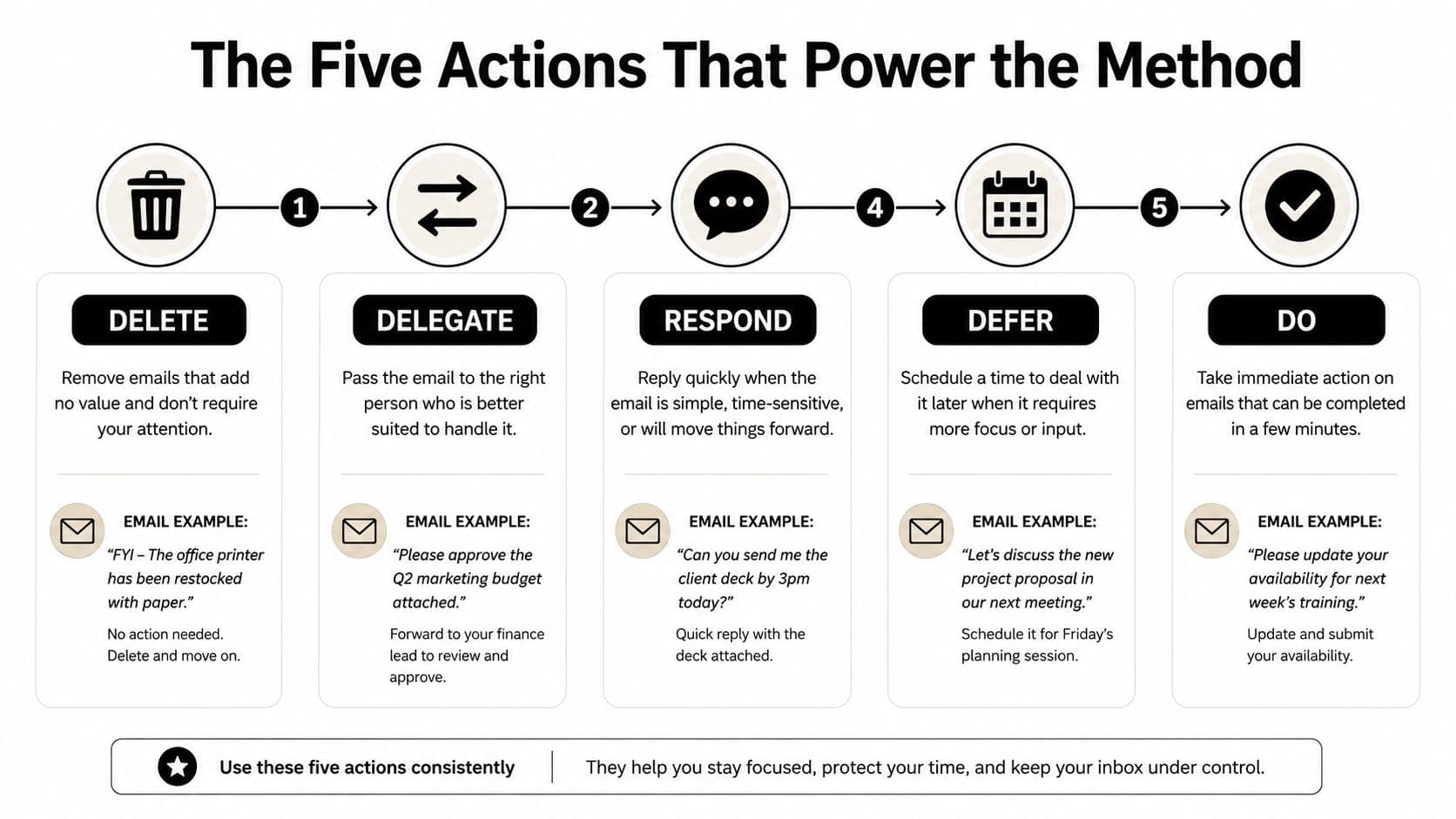
The framework is a mental checklist. It isn't a demand to type faster or reply to every message immediately. When you open an email, choose the action that accurately describes its next destination.
Delete
Remove messages with no meaningful future value. That may include an irrelevant promotion, an FYI thread you don't need to retain, or a stale copied chain that has already concluded.
Deletion is a judgment about usefulness, not a reaction to annoyance. If a message contains no action, reference value, or relationship context, keeping it visible only creates another decision later.
Delegate
Send ownership to the person who can handle the request. Suppose a client asks to schedule a meeting with an executive. An executive assistant can coordinate availability, propose times, and close the loop, while the executive receives only the decision that requires executive judgment.
A good delegation message names the owner and the expected outcome. “Could you coordinate this with the client and confirm the final time?” is clearer than forwarding the thread with no explanation.
Respond
Answer when a short reply will close the loop or unblock someone. A two-line confirmation, a direct approval, or a brief answer to a factual question may belong here.
Don't confuse a short email with a simple decision. If the response needs research or careful thought, defer it instead of sacrificing focus for the appearance of speed.
Defer
Move the message to a trusted future location. A vendor proposal may need comparison, internal discussion, and a considered reply. Flag it, snooze it, convert it into a task, or place a calendar block around the work.
Deferral only works when the future action is visible. “Later” is not a system. “Review the vendor proposal during Thursday's planning block” gives the message a responsible next step.
Do
Complete the work immediately when the email contains a small, self-contained action and finishing it won't disrupt more important work. This might mean approving a document, sending an attachment, or confirming a decision already made.
Process in batches when possible. The goal is decision velocity, not frantic speed. You're reducing the number of unresolved choices, not proving that every message deserves instant attention.
What the Research Says About Email Overload
Email consumes enough working time to justify a deliberate operating system. A widely cited 2025 to 2026 estimate places knowledge-worker email volume at roughly 117 to 121 messages per day, while workers spend about 28% of the workweek managing email, according to the email overload estimates summarized by Alkmist. Another independent 2025 study cited in the same coverage reports about 300 business emails per week and more than 30 inbox checks per hour for the average knowledge worker.
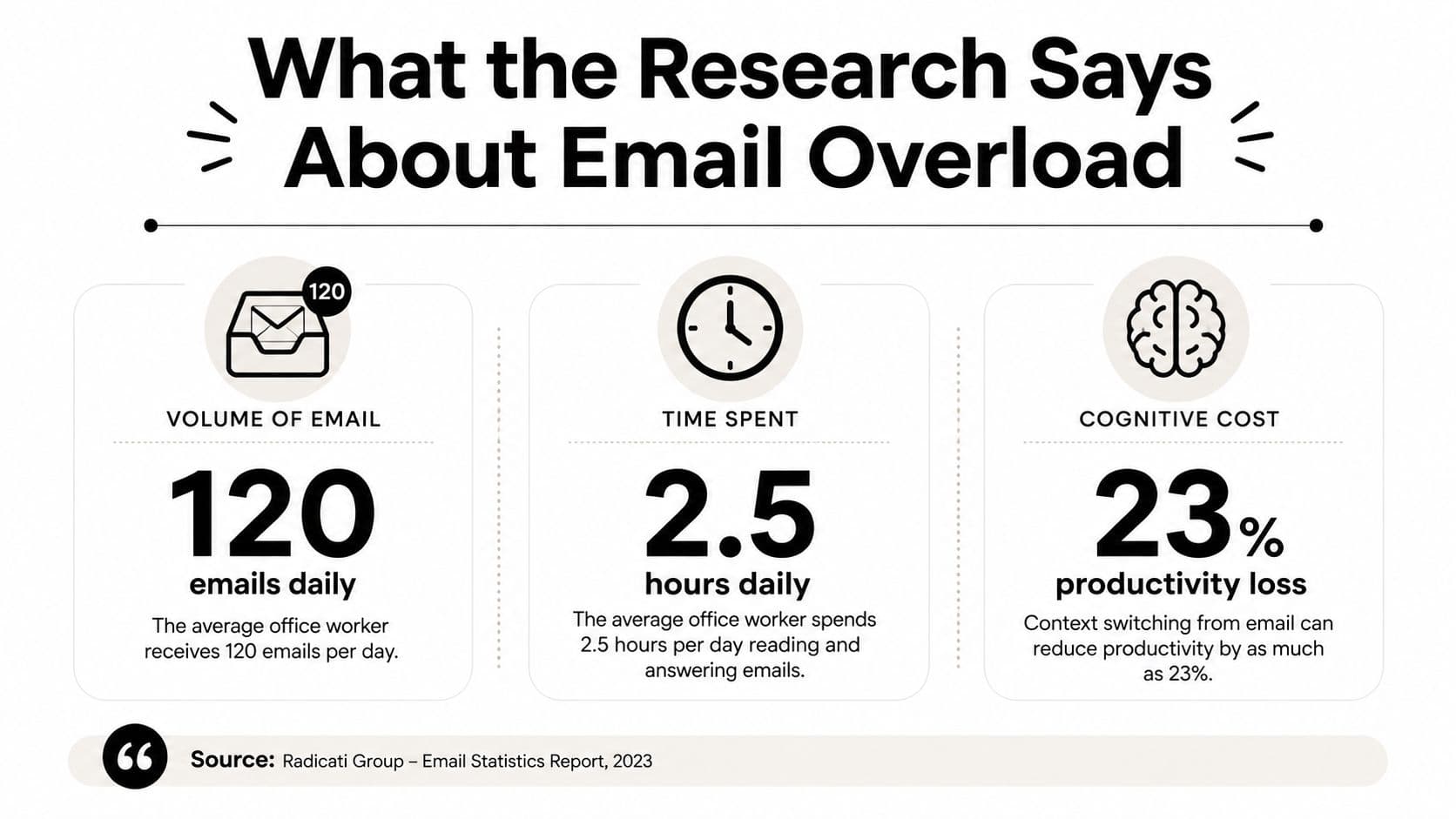
These figures describe a productivity tax rather than a personal weakness. Each check asks you to reconstruct context, decide whether to act, and return to the work you were doing. The interruption may last only a moment, but the mental reset can take longer.
Research from the University of California, Irvine, found that longer daily email duration was significantly negatively related to perceived productivity, and its findings on email interruptions show why repeated checking can undermine focus. The University of California, Irvine email-duration study is useful because it treats email behavior as a measurable work pattern, not merely an inconvenience.
Strict Inbox Zero still has limits. A 2024 academic study found that high email load had a positive lagged effect on strain even after controlling for other stressors, and it challenged the idea that message volume alone explains the problem in its research on email load and strain. Constant clearing can become another form of checking, especially when the workflow rewards a low visible count more than meaningful progress.
For a practical companion on reducing unnecessary decisions, see this guide to reducing decision fatigue. The useful conclusion isn't that email should be ignored. It's that processing must serve attention, rather than become another source of interruption.
When Inbox Zero Helps and When It Hurts
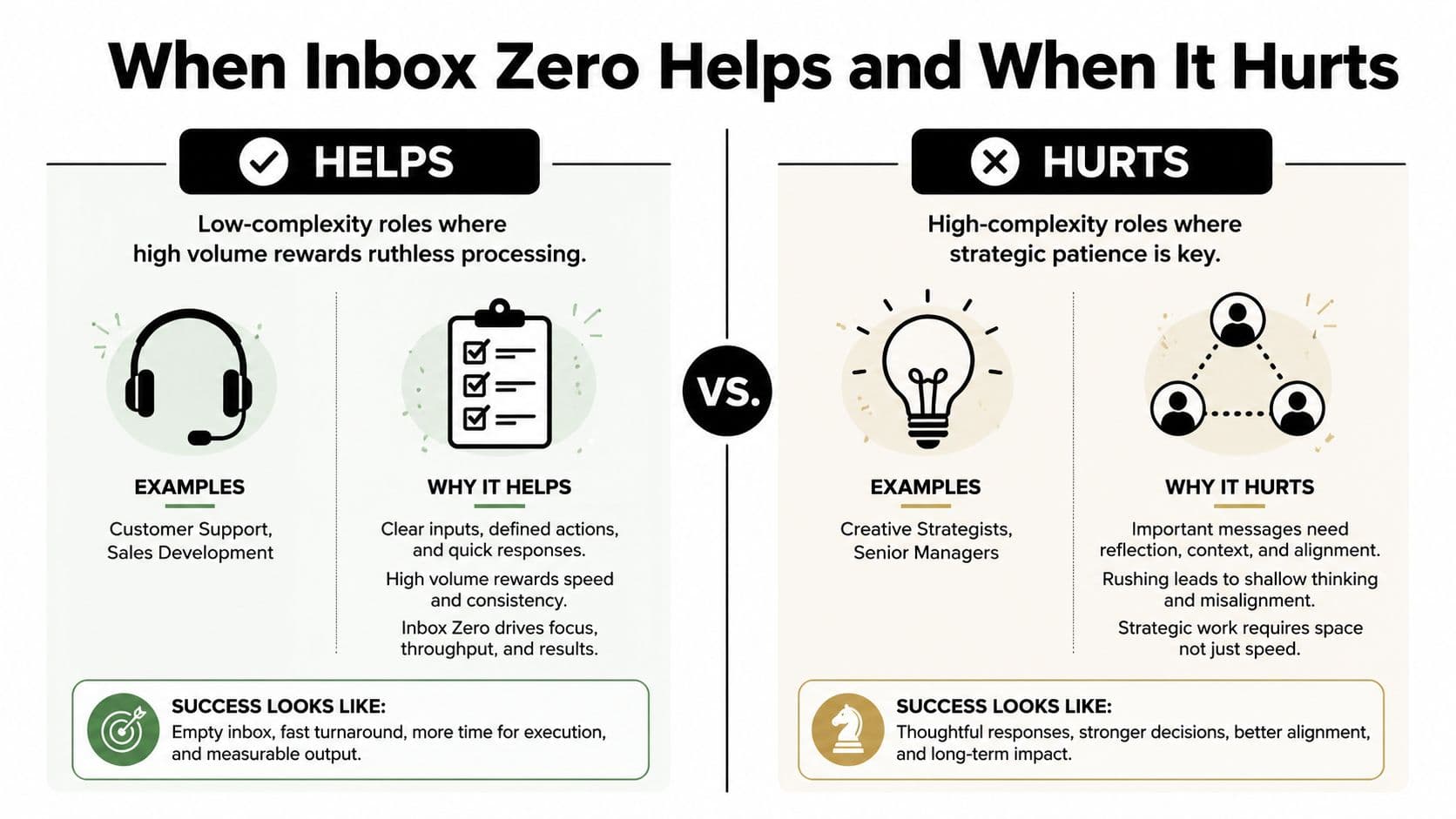
Inbox Zero works best when messages have clear owners and predictable actions. Customer support and sales development roles often benefit from fast classification because many messages fit known categories, such as answer, route, close, or escalate.
High-complexity work is different. A senior manager may receive an email whose value won't be obvious until a project changes direction. A creative strategist may need to preserve a loose thread for later synthesis. A founder might archive a partner's outreach because it isn't actionable today, then lose the relationship context that could have mattered later.
The central question isn't whether the inbox looks clean. It's whether the processing style matches the work.
| Inbox condition | A strict clearing style may help | A more flexible system may help |
|---|---|---|
| Message meaning | Clear and easy to classify | Depends on context that may emerge later |
| Typical work | Routing, support, scheduling | Strategy, research, leadership, creative work |
| Useful destination | Archive, task, reply, or owner | Project thread, read-later queue, or review block |
| Main risk | Slow triage | Premature closure or lost context |
Common failure modes
A constantly resetting unread count can create anxiety. You may start checking email to restore a feeling of control, only to train yourself to interrupt deeper work more often.
Strict clearing can also create false closure. Deleting or archiving a message removes the visual reminder, but it doesn't guarantee that the underlying responsibility has been handled. A relationship-building email, a review thread, or a complex approval may need patience rather than immediate classification.
Better framing: Inbox Zero is a processing style, not a universal destination.
Use a read-later folder for material that deserves attention without immediate action. Keep project threads connected to the project's task system. Reserve calendar blocks for work that requires thought. The strongest professionals combine rapid triage with deliberate preservation, rather than forcing every role into the same empty-inbox routine.
A Practical Workflow You Can Start This Week
Start with a reset that creates trust in the system. A Sunday sweep can give you a clean operating surface without requiring you to solve every old message.
Sunday setup
Set aside 60 minutes for a deliberate sweep. Archive everything older than two weeks that no longer needs active visibility, unsubscribe from your top five recurring offenders, and create filters for receipts, newsletters, and notifications so routine messages bypass the main inbox.
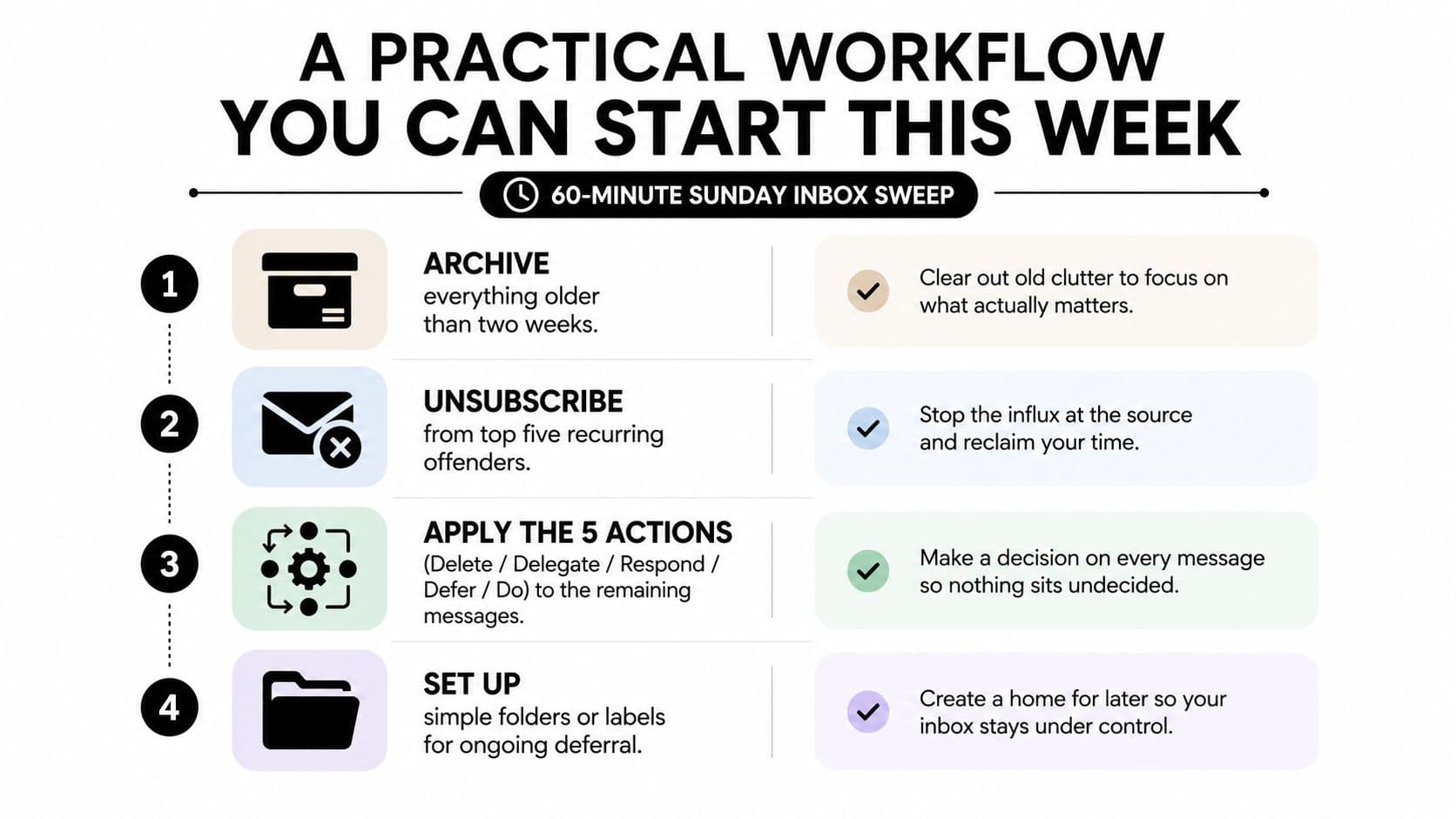
Don't create a complicated folder maze. Choose destinations you'll recognize quickly, such as “Waiting,” “Read Later,” and project-specific folders. The system should reduce decisions, not give you another information architecture project.
Monday and daily handling
Review your calendar before opening email. That order protects the commitments and preparation your day already contains, instead of allowing the inbox to rewrite the morning.
Cap email at two 45-minute blocks. During each block, apply the five actions to every message you touch. Use a time blocking guide if you need help designing boundaries that match your meeting schedule, and connect the blocks to Google Calendar time blocking when calendar visibility matters.
Turn off desktop notifications. Use a separate browser profile for personal mail, so a private message can't pull you into a different attention stream during a work block.
Friday closure
Reserve 30 minutes at the end of the week for an audit. Anything still in the inbox must become a task in Todoist, ClickUp, or Asana, or receive a calendar block for the following week.
That rule prevents deferral from becoming disguised avoidance. You don't need to finish every task on Friday, but you do need to know where the responsibility lives.
Delegation, Automation, and Tools That Multiply the Method
Inbox Zero becomes more useful when you stop treating yourself as the only processing layer. A virtual assistant, executive assistant, or operations partner can manage routine scheduling, gather missing details, route vendor requests, and prepare responses that don't require your judgment.
Delegation needs clear boundaries. Give the assistant examples of messages they may answer, messages they should forward, and messages they must escalate. A short decision guide can cover tone, approval limits, sensitive topics, and the conditions that make an email urgent.
If the volume exceeds your available attention, consider whether it's time to hire a virtual assistant to own recurring inbox operations rather than asking for occasional cleanup.
Let rules handle repetition
Filters can auto-archive newsletters, label receipts, and route notifications away from the main inbox. Rules can send vendor emails to a project channel or apply a project label based on the sender and subject.
AI triage assistants can suggest categories and draft replies, but a human should review anything involving sensitive information, commitments, conflict, or high-stakes judgment. Automation should remove repetitive sorting, not remove accountability.
Give deferred work a real home
Todoist, Asana, Things 3, and Notion can hold work that email merely announces. An email-to-task workflow can preserve the original message while adding an owner, due date, and project context.
A layered stack usually works better than a single overloaded tool:
- Email client: Receives and searches messages.
- Rule engine: Sorts predictable traffic.
- Task manager: Holds commitments and deferred work.
- Human support: Handles judgment, context, and exceptions.
Fluidwave can fit into this layer by converting emails and notes into actionable tasks with due dates, while its delegation features connect tasks with human assistance. You can explore workflow automation for email-driven work before deciding which processes deserve automation.
Measure the system by whether it returns attention to valuable work. Track inbox count, response time, and reclaimed focus hours. A lower count isn't success if you spend more time maintaining it.
Putting It Together and Choosing Your Next Move
Inbox Zero is a decision-making system, not a permanent numerical condition. Merlin Mann's five actions, delete, delegate, respond, defer, and do, give each message a next destination, while filters, task managers, calendar blocks, and human support keep that decision from becoming a recurring burden.
The caveat matters. A low-complexity inbox may reward rapid processing, while a high-complexity role may need project threads, read-later queues, and protected time for interpretation. A clean inbox is useful only when it preserves context and moves responsibility to the right place.
Choose one 30-day commitment. For example, process messages during two scheduled blocks each day for four weeks and log every deferred item in a task manager. At the end of the trial, adjust your delegation threshold, expand or reduce automation, and remove tools that add maintenance without improving clarity.
Identify one hour this week to begin. Use it to create your first filters, classify the messages already waiting, and schedule the next review block.
Fluidwave helps turn email and notes into actionable tasks, organize work across task views, and delegate defined tasks to virtual assistants when routine processing shouldn't stay with you. Visit Fluidwave to see whether its task conversion and delegation workflow fits the Inbox Zero system you're building.
Focus on What Matters.
Experience lightning-fast task management with AI-powered workflows. Our automation helps busy professionals save 4+ hours weekly.