Learn how to reduce decision fatigue with proven techniques, prioritization frameworks, and delegation strategies designed for busy professionals.
August 27, 2026 (1mo ago)
How to Reduce Decision Fatigue: A Practical Guide
Learn how to reduce decision fatigue with proven techniques, prioritization frameworks, and delegation strategies designed for busy professionals.
← Back to blog
You're ten minutes into the workday and already making decisions about breakfast, messages, meeting requests, priorities, and a problem someone dropped into your inbox. By the time the first serious question reaches you, your attention has been spent on choices that never needed your judgment.
That's the wrong way to think about decision fatigue. It isn't a character flaw or a test of discipline. In a busy workflow, it's usually a system-design problem. Your day is asking you to repeatedly choose, switch context, interpret incomplete information, and revisit decisions that should have been settled by a rule.
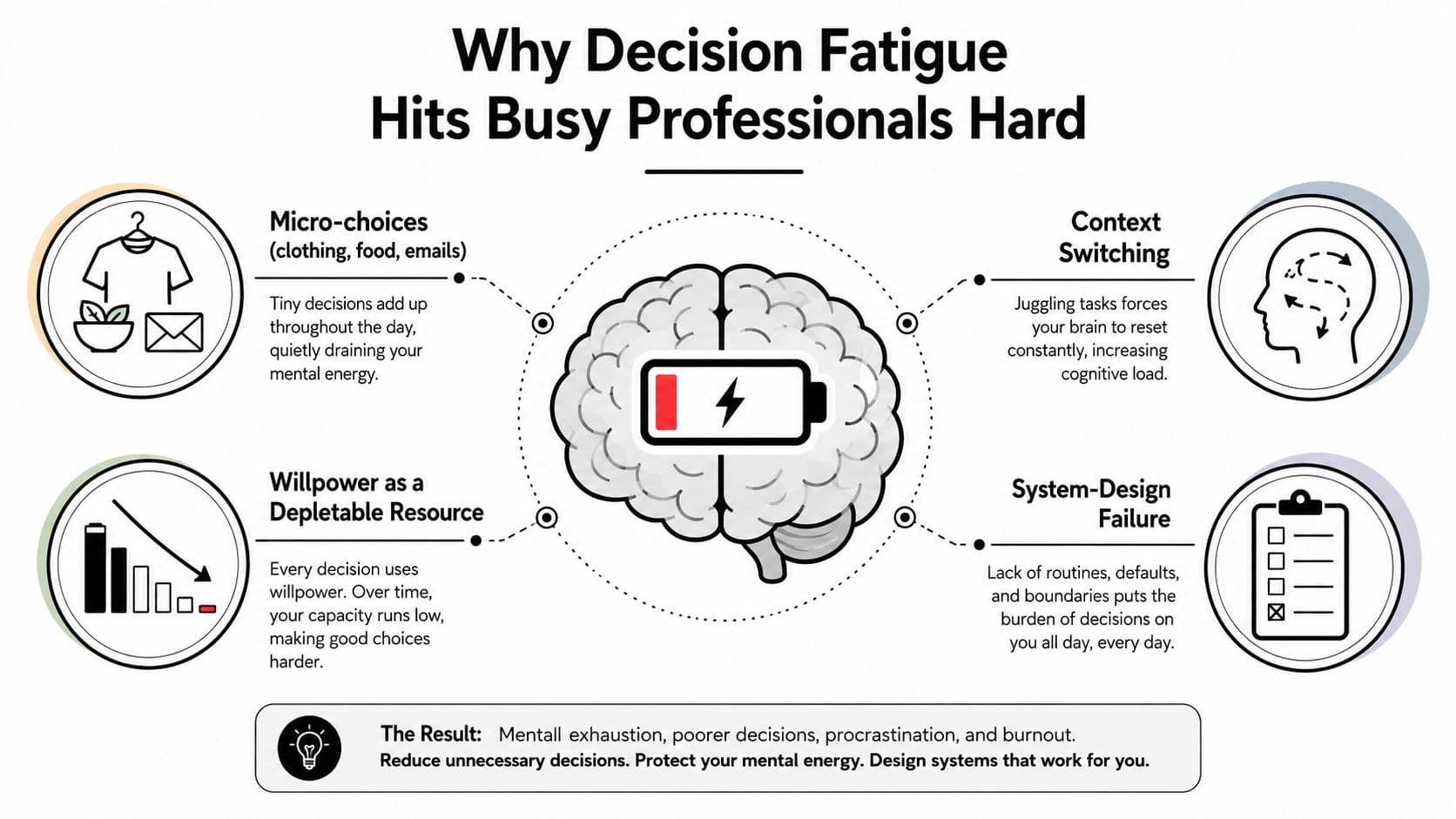
Why Decision Fatigue Hits Busy Professionals Hard
A senior manager can make dozens of micro-choices before the first meaningful meeting: which message to open, whether to accept a calendar request, which dashboard to check, whether to answer a question personally, and what to postpone. None of those choices is individually difficult. Together, they consume attention without producing proportional value.
The problem becomes more serious when the workday has no operating structure. A crowded calendar forces constant decisions about what deserves time. Messaging platforms turn every notification into an invitation to interrupt yourself. Dashboards and project tools create ambient choice architecture, with multiple views, filters, threads, labels, and status fields competing for attention. Meanwhile, deep work and reactive work share the same hours, so you keep deciding whether to focus or respond.
Four pressure points in a modern workday
- Calendar density: Every meeting creates preparation, attendance, follow-up, and rescheduling choices. A full calendar also removes the recovery space needed to make considered decisions.
- Constant messaging: Slack, email, and text notifications turn other people's priorities into your immediate decision queue.
- Ambient choice architecture: Tools expose more options than most tasks require. You can sort, tag, filter, rearrange, compare, and reopen instead of deciding.
- Blurred work modes: When focused work and reactive work happen in the same channel, you must repeatedly choose which mental mode to enter.
These pressure points multiply decision load without increasing decision value. The fix is to design the day, prioritize what remains, delegate what shouldn't be yours, and reset the system every week. You're not trying to remove every choice. You're removing unnecessary moments of reconsideration.
By the end, you should be able to identify which decisions deserve your attention, convert routine choices into defaults, and stop treating every incoming request as a fresh problem.
What the Research Actually Shows About Decision Fatigue
The popular version of decision fatigue says that every choice drains a finite supply of willpower. That explanation is too neat. The research history is more useful when treated as a set of signals, not a universal law.
The influential 2011 study of Israeli parole rulings analyzed 1,112 judicial decisions across 50 days. Favorable rulings were about 65% at the start of a decision session, fell to nearly 0% before a break, and returned to about 65% afterward. The result suggested that decision timing and break structure can affect outcomes in high-stakes environments with repeated judgments. The historical evidence and later critiques are summarized here.
That finding supports a practical rule: schedule demanding judgments before long runs of similar decisions, and insert recovery before a critical call. It doesn't prove that every person experiences a predictable depletion curve.
A 2025 systematic review in healthcare found statistically significant support in 58 of 130 quantitative cases, or 45%, while 32% did not support the hypothesis and 23% were inconclusive. The review's findings and intervention discussion support using structured safeguards, while also showing that much of the intervention evidence remains low-maturity and largely non-randomized.
Match the technique to the decision
A low-stakes, reversible choice should usually have a default. Use a standard lunch, meeting template, approval threshold, or software setting when changing your mind later is cheap.
A high-stakes, irreversible choice needs deliberation. Hiring a senior leader, signing a major contract, changing a pricing model, or ending a strategic relationship shouldn't be forced into a shortcut because you're tired. The right intervention is a protected decision window, clear criteria, and input from the people affected.
The often-repeated glucose explanation also needs restraint. Early ego-depletion research connected self-control tasks with blood glucose and suggested that glucose drinks could restore performance. Later evidence rejected glucose or glycogen depletion as the actual cause of self-regulatory fatigue, so “eat sugar when tired” isn't a sound operating system. The review of ego-depletion mechanisms is a better basis for separating fatigue from the disputed mechanism.
| Claim | Evidence Strength | Applies To |
|---|---|---|
| Repeated judgments can affect later choices | Mixed, with influential early findings and substantial later debate | High-volume decision sessions |
| Breaks and earlier scheduling can protect judgment | Practical support, but intervention evidence is still developing | High-stakes decisions after sustained work |
| Every choice mechanically drains willpower | Contested | Don't use it as a universal explanation |
| Glucose directly restores self-control | Not supported as the underlying mechanism | Don't build fatigue plans around sugar |
| Defaults reduce repeated choice points | Strong practical logic for recurring decisions | Low-stakes, reversible routines |
A PubMed-indexed status review of self-control theory describes a shift away from a simple resource-exhaustion model toward conservation and effort allocation. That framing is more useful for operations: people protect limited effort by avoiding, simplifying, or postponing choices. Design your workflow so that conservation serves the right priorities.
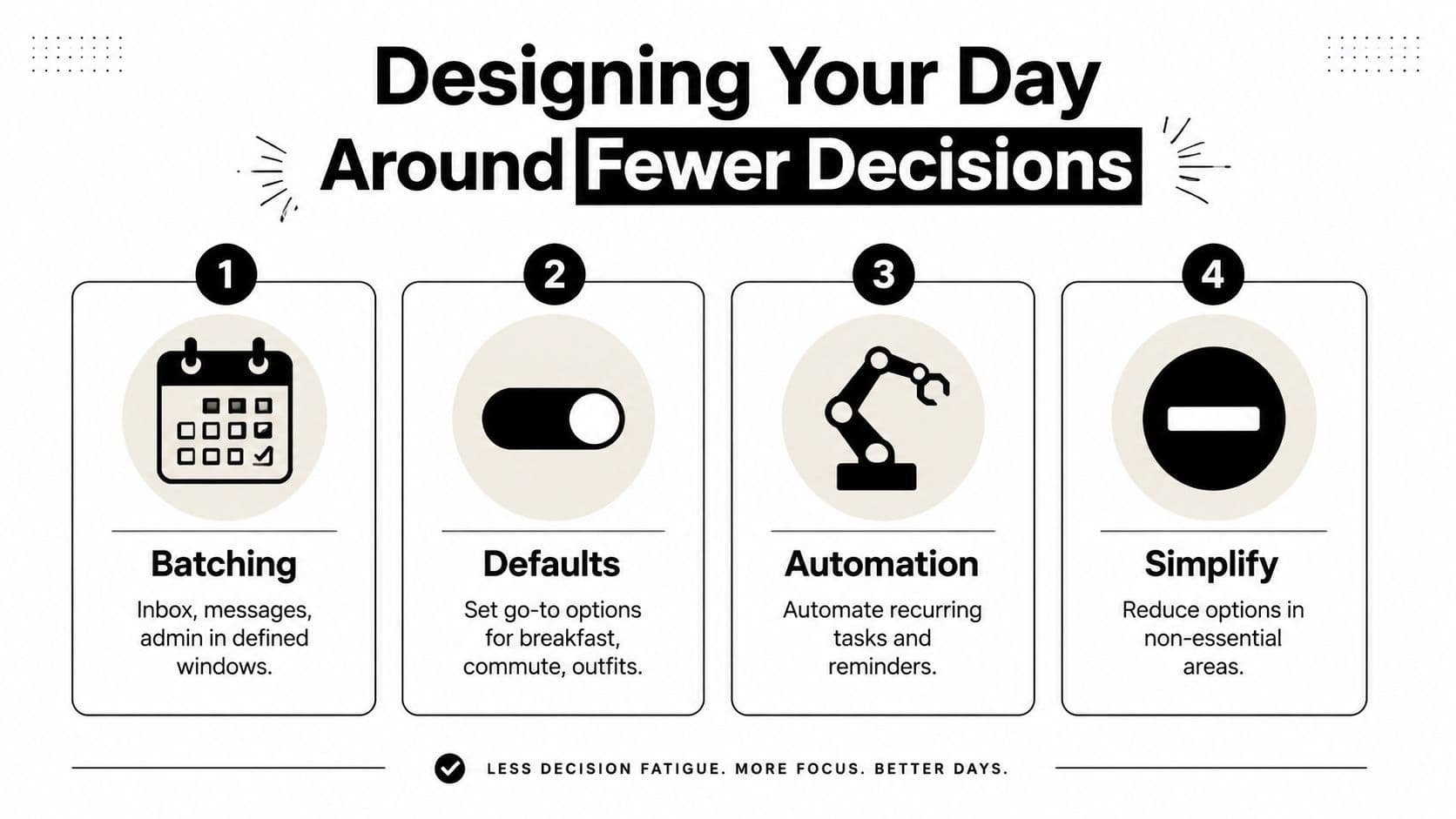
Designing Your Day Around Fewer Decisions
Build your day as a decision budget, not a blank calendar. Every open channel, unscheduled approval, and undefined task asks you to decide what happens next. Close those loops before they reach your attention.
Batch decisions that belong together
Handle similar work in defined windows. Inbox review, messages, expense approvals, and administrative requests don't deserve access to every hour. Batching prevents each item from forcing a new context switch.
A workable implementation is simple: two message sweeps at 10:30 and 16:00, nothing else. If your role requires faster response, create an explicit escalation route rather than keeping every notification active.
Use time blocking to build a schedule around focused work, but don't fill every minute. A decision window needs enough room to review the relevant information, make the call, and record the outcome.
Set defaults for recurring choices
Defaults are appropriate when the choice is low-stakes and easy to reverse. Choose a default breakfast, a short rotation of lunches, a standard meeting agenda, and a dependable outfit for video calls. The point isn't minimalism for its own sake. The point is refusing to spend premium attention on decisions with little operational upside.
Write the rule where you'll see it:
- Meals: Use the same breakfast on workdays and rotate a small set of lunches.
- Meetings: Decline requests without an agenda, owner, or requested decision.
- Approvals: Use a standard threshold for routine purchases and route exceptions to a named owner.
- Documents: Start from a template instead of choosing a format each time.
Automate triggers and protect serious judgment
Rules, filters, reminders, and templates should handle predictable events. Route invoices to an approval folder, label newsletters automatically, create recurring tasks from calendar events, and use saved responses for common questions.
Reserve your best cognitive window for decisions that are consequential, ambiguous, or difficult to reverse. Put the decision in the calendar with a written question, the relevant facts, and a stopping condition. “Review vendor proposal” is vague. “Choose whether to renew based on cost, service reliability, and switching risk” gives your attention a job.
Practical rule: Don't eliminate choices that matter. Eliminate the interruptions that make trivial choices feel urgent.
Prioritization Frameworks That Protect Mental Energy
Prioritization should remove judgment calls, not create another system to maintain. Use a framework only long enough to classify the work, assign the right level of attention, and choose the next action.
The Eisenhower Matrix handles low-stakes urgency problems. Sort each item by urgency and importance: schedule important, urgent work immediately; protect time for important work that is not urgent; delegate urgent work with little importance; remove work that is neither. This filter works best for crowded calendars and routine requests that compete for attention.
The $100 Test handles opportunity cost. Ask, “If I had only $100 of attention left for this week, how much would I spend on this request?” A client escalation may deserve nearly all of it. A vendor email may deserve none. Accept a meeting only when it changes a decision, removes a serious risk, or builds a relationship you personally need to develop. For more help sorting competing demands, use a practical prioritization guide for task management.
Apply a third filter after ranking the work: high-stakes versus routine. High-stakes decisions need evidence, consultation, and a defined review window. Routine decisions need a rule, a delegate, or a default. Add reversibility to the check. A cheap-to-reverse decision can move quickly. A decision with lasting consequences deserves more review.
A marketing director's working example
A marketing director receives four types of requests in one week:
- Client escalation: Important, urgent, and high-stakes. She schedules a focused review, gathers the account facts, and makes the call herself.
- Campaign approval: Important but not immediately urgent. She places it in a protected decision window and sets approval criteria before reviewing the creative.
- Vendor email: Urgent only because the vendor is waiting. She delegates the response under an existing purchasing rule.
- Meeting invite: Neither important nor decision-bearing. She declines it and requests written context if the organizer needs her input.
The matrix sorts the work. The $100 Test exposes the attention cost. The high-stakes and reversibility filters determine how much deliberation each item receives.
Copy this one-page template into your task system:
- Decision: What exactly must be decided?
- Class: High-stakes or routine?
- Reversibility: Can you undo it cheaply, or will it create lasting consequences?
- Owner: Who has the authority and context to decide?
- Window: When will the decision be made?
- Threshold: What counts as good enough?
- Next action: Schedule, delegate, automate, decline, or decide.
Anything that is routine and easy to reverse should default to a rule, delegation, or quick satisficing decision. A practical decision-fatigue protocol from the American Academy of Family Physicians also warns against repeated second-guessing and unbounded decision windows.
Skip the frameworks when the answer is obvious. A framework that takes longer than the decision is another source of decision load.
Delegating and Automating Low-Stakes Decisions
Delegate the work that drains you before it starts. The best candidate isn't necessarily the task that takes the longest. It's the recurring task that forces you to remember, inspect, choose, and follow up.
Inbox triage is a good example. A virtual assistant can apply a written rule to separate urgent requests, routine replies, newsletters, and items that need your judgment. Scheduling can follow a narrow availability policy. Travel booking can use approved airlines, hotels, budgets, and cancellation rules. Expense categorization can run through software defaults with exceptions routed for review.
Use the cheapest reliable owner:
- SOP plus virtual assistant: Best for judgment within clear boundaries, such as inbox triage or calendar coordination.
- Automation recipe: Best for predictable triggers, such as creating a task from a form submission or moving a completed item into an archive.
- SaaS default: Best for repetitive classification, reminders, recurring tasks, and standard notifications.
For a practical overview of how AI can absorb repetitive workflow steps, review this Coachful guide to AI automation. Keep the principle simple: automate predictable work, delegate bounded judgment, and retain decisions that depend on trust or context.
| Recurring Decision | Best Owner | Time Saved per Week |
|---|---|---|
| Sort incoming email | SOP plus assistant | Qualitative recovery from repeated triage |
| Schedule routine meetings | Assistant or scheduling tool | Recovery from back-and-forth coordination |
| Categorize expenses | Finance software with exception review | Recovery from repeated classification |
| Publish approved content | Content scheduler | Recovery from manual posting |
| Create follow-up tasks | Automation rule | Recovery from remembering handoffs |
| Collect weekly status updates | Form plus task workflow | Recovery from chasing responses |
Tasks worth handing off this week include inbox sorting, calendar proposals, travel research, expense labeling, recurring invoice reminders, meeting-note formatting, CRM updates, content scheduling, file naming, document conversion, status-report collection, research aggregation, recruiting coordination, task assignment from forms, follow-up reminders, spreadsheet cleanup, newsletter filtering, appointment booking, routine customer-service replies, and project archive maintenance.
Don't invent precise savings or cost estimates where you haven't measured them. Track the time and friction before and after the handoff, then adjust the owner.
Keep relationship-bound calls, high-stakes financial decisions, and sensitive personnel conversations with the person who owns the consequence. If explaining the decision takes longer than doing it, delegation may cost more attention than it saves.
Before handing off a task, write the desired outcome, constraints, examples, deadline, and escalation condition. Use a delegation workflow with clear ownership and expectations, then review the first completed cycle rather than hovering over every step.
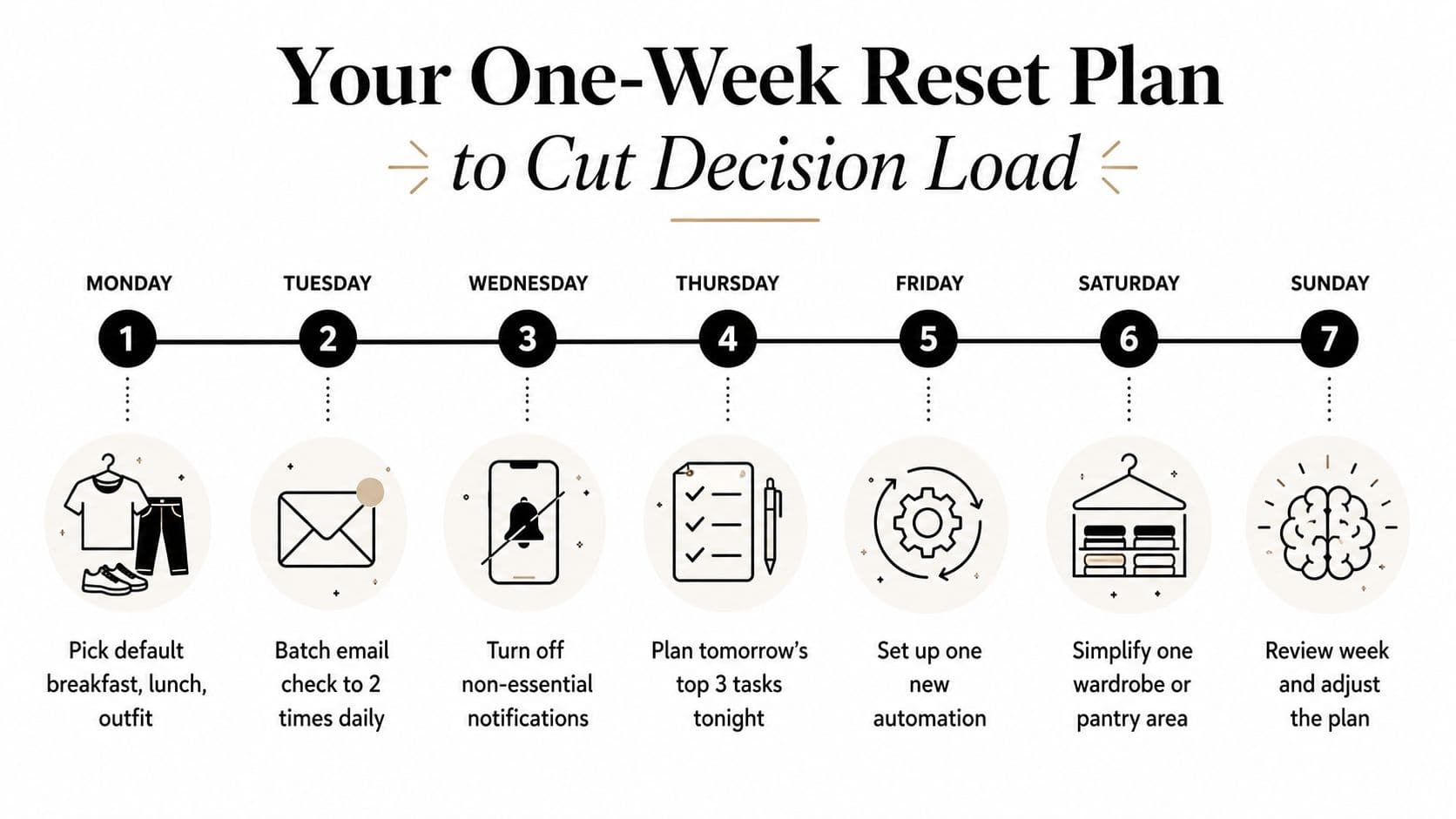
Your One-Week Reset Plan to Cut Decision Load
Don't rebuild your entire operating system in one sitting. Start Monday with one default, add one protection each day, and keep only the changes that reduce friction.
Monday: Pick a default breakfast, lunch, and work outfit. Put the choices in a note or recurring calendar entry so you don't renegotiate them each morning.
Tuesday: Protect a 90-minute deep-work block with notifications off. Give the block one defined output, not a vague intention to “catch up.”
Wednesday: Write an SOP for one recurring task and hand it to a virtual assistant or automation tool. Choose something bounded, such as sorting meeting requests or preparing a weekly status summary.
Thursday: Apply the $100 Test to every calendar invite for the rest of the month. Accept only meetings where your presence changes the outcome, and request an update or written decision when it doesn't.
Friday: Batch administrative decisions into one 30-minute decision window. Approve, delegate, schedule, or delete each item. Don't carry unfinished administrative choices into the weekend.
For a standard 9-to-6 workday, try this shape:
- Morning: High-stakes work before reactive channels.
- Late morning: Messages and routine approvals.
- Midday: Meetings or collaborative work.
- Afternoon: A second communication window, followed by lower-risk execution.
- End of day: Record tomorrow's priorities and close open loops.
For a meeting-heavy day, protect the decision before the meeting rather than after it. Read the briefing, write the decision question, and define what information would change your position. Use the gaps between meetings for recovery or routine tasks, not another stream of notifications.
Watch the embedded walkthrough for another perspective on structuring the reset:
At the end of the week, audit the system:
- Which defaults did you follow without reconsidering?
- Which notifications interrupted work without changing an outcome?
- Which task should move to a delegate or automation rule?
- Which meeting could become an update?
- Which high-stakes decision received your best attention?
- Which rule created friction and needs adjustment?
Keep the defaults that worked, remove the ones that felt artificial, and schedule the next weekly reset. You're building a workflow that protects judgment instead of demanding more willpower.
Fluidwave can help you turn this system into a working queue by organizing tasks, applying AI-assisted prioritization, and routing bounded work to virtual assistants on a pay-per-task basis. If you're ready to stop carrying every low-stakes decision in your head, visit Fluidwave and start by delegating one recurring task.
Focus on What Matters.
Experience lightning-fast task management with AI-powered workflows. Our automation helps busy professionals save 4+ hours weekly.