Choosing the right task management software means matching features, views, and pricing to your team’s workflow. This guide compares leading platforms, explains core concepts, and offers migration and accessibility tips so you can make a confident choice.
December 18, 2025 (10mo ago) — last updated April 8, 2026 (6mo ago)
Task Management Software Comparison: Pick the Right Tool
Compare features, pricing, integrations, and accessibility of top task management tools to find the best fit for your team.
← Back to blog
Task Management Software Comparison Guide
In this task management software comparison, we evaluate core features, pricing, accessibility, integrations, and migration tips so you can pick the right tool for your team.
Comparing Leading Task Management Platforms
When you’re choosing a new task manager, focus on what matters most: core features, your team’s workflow, and budget. This side-by-side snapshot shows how Trello, Asana, and Monday.com stack up.
Below are the main evaluation criteria that drive our comparison:
- AI automation - built-in reminders and rule-based workflows
- Delegation ease - quick assignments and balanced workloads
- View options - list, board, timeline, and calendar modes
- Pricing flexibility - useful free tier plus tiered plans
- Accessibility support - options for neurodivergent users
- Integration options - APIs, native apps, and third-party connectors
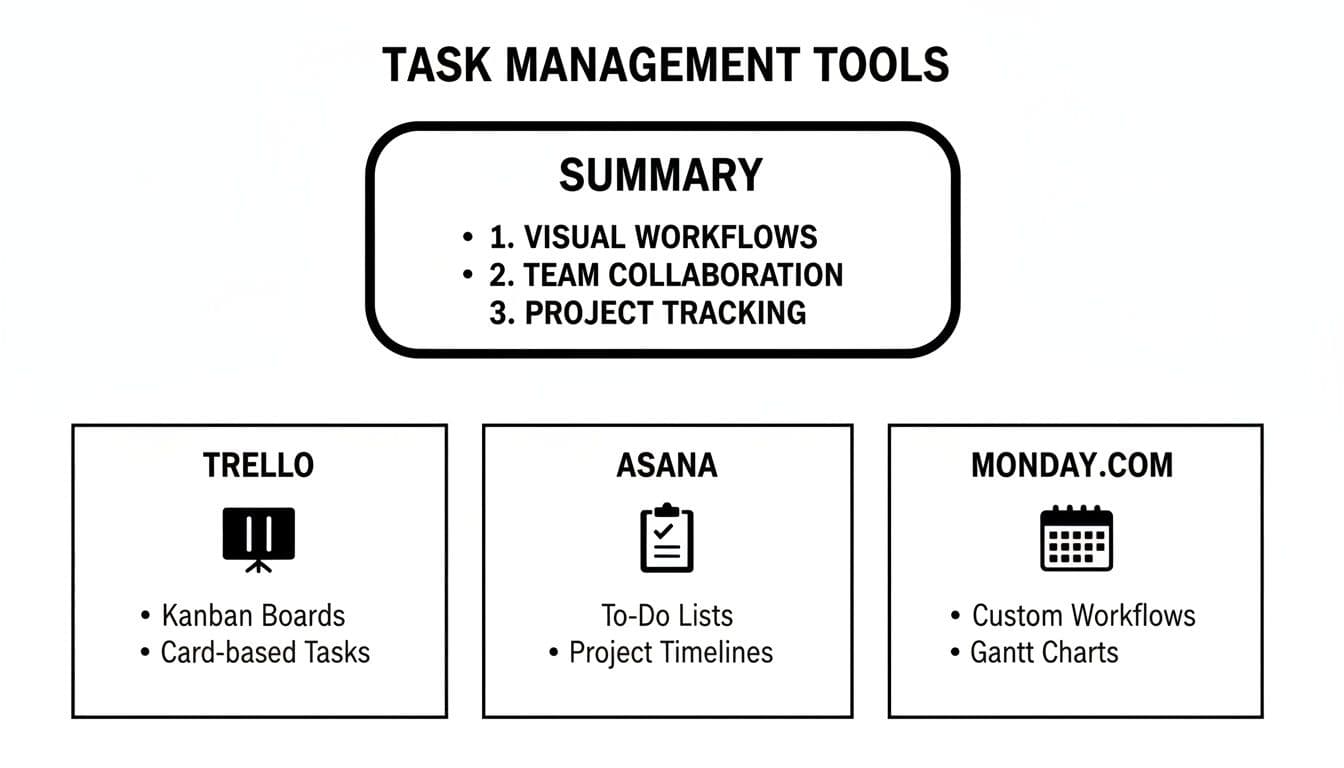
Key Features Comparison
| Tool | Best For | Pricing Starting | Standout Feature |
|---|---|---|---|
| Trello | Small teams & Kanban workflows | Free | Intuitive boards |
| Asana | Complex projects & templates | Free | Advanced templates |
| Monday.com | Timeline planning & resources | Free | Custom timelines |
Use this chart to match a platform to your team’s habits and goals. Below, you’ll find real-world scenarios, persona-driven recommendations, and step-by-step migration advice.
Understanding Task Management Concepts
Before diving into tools, here are the core concepts that make task platforms effective:
- Workflows: steps that move tasks from creation to completion
- Task delegation: assigning work to individuals or teams
- View options: list, board, calendar, timeline, or Gantt
Here’s where each view shines:
| View Option | Ideal For | Key Benefit |
|---|---|---|
| List | Simple to-do lists | Step-by-step clarity |
| Board | Agile workflows | Visual status at a glance |
| Calendar | Time-sensitive tasks | Scheduling and deadlines |
| Timeline | Project planning | Highlighting dependencies |
| Gantt | Complex projects | Detailed sequencing and workload |
Delegation can be a single owner on a card or a balanced round-robin setup. Add approval gates or auto-assign overdue items to keep work moving. Lists work for linear tasks, boards for agile teams, and timelines or Gantt charts for deadline-driven projects.
Integrations and Automations
Connect your task manager to the apps you already use to save hours each week. Whether it’s syncing calendars or messaging in Slack, integrations fill workflow gaps. Code repositories like GitHub and bug trackers also plug in neatly.
Automations handle repetitive work - sending reminders or nudging overdue items forward. A large share of teams report measurable gains from automation, especially when reminders and routing reduce manual follow-ups2.
Key connectors and automations include:
- API links to in-house systems
- Integration with HR and finance platforms for approvals
- Automated alerts based on status changes or upcoming deadlines
Clear communication features - comment threads, mentions, and shared boards - keep everyone aligned so messages don’t get lost in chat.
- Inline comments for context
- Role-based permissions to secure sensitive tasks
- Live editing of task details
Accessibility and Customization
Good software should fit how your team works. High-contrast modes, full keyboard navigation, and distraction-free layouts aren’t extras - they’re essential for teams with ADHD or other neurodivergent members.
- Color-coded labels for visual learners
- Custom notifications to protect focus
- Templates to simplify repetitive workflows
Templates replicate your process without coding. Custom fields help projects scale while tracking what matters most.
For deeper techniques on prioritizing tasks, see our guide on task prioritization techniques.
Market Overview of Task Management Tools
The global task-management software market has been growing rapidly. Recent estimates put the market at about USD 4.45 billion in 2024, with continued growth into 20251. The top vendors claim a significant share of revenue as consolidation continues3.
Key forces driving adoption include:
- AI automations, integrations, and real-time collaboration
- Ecosystems linking CRMs, calendars, and chat tools
- Flexible pricing that balances free tiers and enterprise agreements
Smaller vendors often win niche audiences - creative teams or sprint-driven developers - by fine-tuning workflows. Subscription and usage-based plans are rising, matching costs to team size and needs.
Strategic Positioning of Standalone and Enterprise Suites
Standalone apps serve lean teams with simple task lists, while enterprise suites offer customization, governance, and analytics.
| Category | Focus Area | Typical Pricing |
|---|---|---|
| Standalone Apps | Core task boards and simple lists | Free–$10/user/mo |
| Enterprise Suites | Workflow customization and analytics | $25–$75/user/mo |
Cloud Native Trends and Niche Advantages
Cloud-native platforms deliver fast deployment and regular updates, and some specialized tools build UIs tailored for neurodivergent users.
- Instant deployment with no server maintenance
- Regular feature drops and security updates
- Custom interfaces for focused review cycles and sprints
Industry Consolidation and Future Direction
Mergers and partnerships are tightening the landscape. Alliances with CRM and ERP suites extend integration reach, and AI features are moving from add-ons to core functionality4.
- Mid-size vendors merging through acquisitions
- Partnerships tying task apps to CRM/ERP ecosystems
- Built-in AI shifting to core functionality
For more on boosting team productivity, see our guide on team productivity apps.
Detailed Feature Comparison Analysis
Choosing a task manager is about matching real needs to real workflows. We compare Fluidwave, Asana, Trello, and Monday.com across seven dimensions:
- AI-driven automation
- Delegation workflows
- View options
- Collaboration tools
- Accessibility features
- Pricing transparency
- Customization flexibility
AI-Driven Automation
Fluidwave’s queue can nudge urgent tasks higher based on past behavior. Asana provides rule templates, Trello offers Butler commands for simple triggers, and Monday.com provides conditional logic for complex flows.
Automations often save teams multiple hours per week when they reduce manual reassignments and manual reminders2.
Task Delegation Workflows
Fluidwave mixes human virtual assistants paid per task, with budget and deadline controls. Asana supports load-balancing and approvals. Trello relies on manual assignments and labels, while Monday.com adds a workload view to help spot capacity.
Feature Matrix for Leading Platforms
| Feature | Fluidwave | Asana | Trello | Monday.com |
|---|---|---|---|---|
| AI Automation | Auto-prioritization and smart reminders | Rule templates and custom triggers | Butler commands | Conditional logic automations |
| Task Delegation | Pay-per-task virtual assistants | Balanced load and approvals | Manual assignments with labels | Workload charts and auto-assign rules |
| View Options | List, Kanban, calendar, table, cards | List, board, timeline, calendar | Board, calendar (Power-Up) | Table, Kanban, timeline, chart |
| Collaboration Tools | Real-time editing and assistant chat | Comment threads and inbox | Card comments and mentions | Updates section and dashboards |
| Accessibility | Distraction-free mode and focus timer | High contrast and keyboard shortcuts | Power-Up themes | Custom views and color schemes |
| Pricing | Free tier and pay-per-task assistance | Free and paid tiers from $10.99/user/mo | Free and paid from $5/user/mo | Free and paid from $27/mo (3 seats) |
| Customization | Custom fields, AI workflows, templates | Custom fields, forms, goals | Power-Ups and custom boards | Automations, custom columns |
Collaboration and Accessibility
Kanban views keep tasks color-coded by priority and sorted by due date. Clean layouts reduce visual clutter—important for neurodivergent users. Asana’s nested comments help keep discussions tied to tasks, Trello’s Power-Ups add themes or timers, and Monday.com’s filters and color schemes support accessibility.
Pricing and Customization
Fluidwave’s pricing is transparent: start free and pay only for extra assistance. Asana and Trello offer free tiers but reserve advanced automations and views for paid plans. Monday.com’s per-seat pricing can grow quickly with headcount.
Fluidwave enables teams to build AI scripts without code. Asana supports custom fields and workflows, Trello adds modular Power-Ups, and Monday.com offers enterprise dashboards and API access.
Use Cases for Different User Personas
Teams vary, so workflows need to adapt. Here are four personas and practical setups.
Enterprise Project Manager
Enterprise PMs handle many concurrent projects. They need overviews, smooth handoffs, and reliable forecasting.
| Feature | Enterprise Setting | Outcome |
|---|---|---|
| Auto-prioritization | Urgency threshold | Critical tasks surface |
| Budget guardrails | Pause at 80% spend | Prevents overruns |
| Multi-view sync | Gantt - Calendar | Roadmap and deadlines align |
Implementation tips:
- Sync with your CRM to auto-generate tasks from sales milestones.
- Use per-task assistants to redistribute overflow without manual updates.
Agile Marketing Team
Marketing teams pivot quickly and need clear handoffs. They switch between Kanban for sprints and list views for editorial calendars.
| Stage | Task Count | Next Action |
|---|---|---|
| Drafting | 5 | Review |
| Design | 3 | Approve assets |
| Publishing | 2 | Schedule |
Pro tip: Create chained notifications that trigger handoff tasks and integrate social schedulers to auto-populate posting timelines.
Startup Founder
Founders wear many hats. A mobile-first interface with concise summaries helps them stay ahead.
- Create core tasks: fundraising, prototyping, investor updates
- Assign budgets: cap spending per task
- Delegate: use per-task assistants for research and admin
Neurodivergent User
Distraction-free modes and focus timers help neurodivergent team members stay on task. High-contrast themes and keyboard shortcuts reduce cognitive load.
- Focus timer: 25-minute work cycles with 5-minute breaks
- Minimalist board: collapse details until needed
- Color-blind mode: custom palettes for sensitivity
For freelancers, see our guide on best project management tools for freelancers.
Run pilots on free plans or demos to verify which settings match your team’s flow. Start small, iterate quickly, and measure results.
Choose and Implement Task Management Software

Selecting a platform is more than a checklist. It’s about what feels natural for your team’s size, structure, and growth plans. Smaller groups often do well with Trello or Asana Basic. At scale, look for enterprise features such as audit trails, approval flows, and detailed reporting.
Define Selection Criteria
- Team size and structure: current headcount and planned hires
- Security and compliance: data residency, encryption, audit logs
- Budget threshold and ROI: total cost of ownership and premium connectors
- Integration needs: CRM, code repo, calendars, chat tools
- Accessibility requirements: keyboard navigation, high-contrast themes
Consider Regional Market Trends
North America accounts for roughly one-third of global spend, while APAC is growing fastest thanks to mobile-first SMEs1.
Plan Your Migration Strategy
A phased rollout keeps disruption low:
- Audit current projects, fields, and user groups
- Archive old boards and standardize naming
- Export data via CSV or API and verify backups
- Import to the new platform, map fields, and test workflows
- Pilot with a small team and gather feedback
- Scale in waves, monitor metrics, and tweak automations
“Breaking the rollout into three waves helped us maintain momentum without overwhelming teams,” says an IT project lead.
Customize Workflows and Train Teams
Templates are a starting point. Your real process lives in custom fields, statuses, and automations.
- Rename stages to match company lingo
- Add fields for budget, risk, or approval status
- Fine-tune automation rules for reminders and handoffs
Combine live workshops, short screencasts, and peer mentors to boost adoption. Keep feedback channels open so you can adjust quickly.
Integration With Existing Systems
Linking your task tool to CRM, development tools, calendars, and chat reduces manual updates and errors.
| System | Integration Method | Benefit |
|---|---|---|
| CRM | Native plugin | Auto-create tasks from new deals |
| Code repository | Webhooks | Sync issue status with commits |
| Calendar service | Two-way sync | Keep deadlines aligned |
| Chat platform | Bot commands | Create tasks directly in chat |
Inline API example:
POST /api/v1/tasks { "title": "Onboard Q3 Client", "assignee": "alice@example.com", "due_date": "2024-08-15" }
Measure Success and Optimize
Real-time dashboards help catch bottlenecks and track adoption. Focus on metrics tied to efficiency and engagement:
- Task completion rate and average lead time
- User adoption vs. licenses purchased
- Successful automation triggers and failure counts
- Support tickets during and after launch
“Weekly dashboards confirmed we hit an 85% adoption rate within three weeks,” reports an operations director.
Case Study
A mid-sized marketing agency moved from simple lists to an enterprise suite in four waves. Involving department heads at each stage secured buy-in. Within eight weeks, they saw a 40% reduction in task backlog and a 20% increase in on-time delivery.
FAQ
- Which platform offers the strongest AI automation across mixed teams?
- How do you spot truly inclusive accessibility for neurodivergent users?
- What hurdles surface when shifting tasks to a new system?
- What’s the smartest way to match pricing plans with your budget?
Quick Answers
-
Robust AI automation
Fluidwave uses machine learning to reorder queues. Asana relies on custom rules, Trello uses Butler recipes, and Monday.com offers conditional triggers. Teams handling heavy workloads can reclaim hours per week with the right automations2.
-
Accessibility for neurodivergent users
Look for full keyboard navigation, distraction-free modes, and color-blind palettes. Fluidwave’s focus timers and minimalist interface help users batch tasks with fewer distractions.
-
Migration challenges
Mapping custom fields and preserving project history can slow cutovers. Archive obsolete projects first and roll out new workflows in phases.
-
Comparing pricing tiers
Match per-user costs to must-have features and factor in premium automations and connectors.
| Migration Challenge | Pro Tip |
|---|---|
| Data loss during migration | Export a CSV backup and run a small import test first |
| Team pushback | Start with a pilot group, gather feedback, iterate quickly |
Further Reading
For deeper walkthroughs on automations, accessibility, migrations, and pricing, explore the linked guides throughout this article.
Ready to boost your team’s efficiency? Start a risk-free trial with Fluidwave.
Quick Q&A (Concise)
Q: Which tool is best for small teams that prefer Kanban?
A: Trello is ideal for small teams that want intuitive Kanban boards and a lightweight workflow.
Q: Which platform works best for complex projects with dependencies?
A: Asana or Monday.com - both support timelines, custom fields, and advanced templates for cross-team projects.
Q: How should I pilot a new task manager?
A: Run a small pilot, export/import a subset of projects, gather feedback, and scale in waves while tracking adoption metrics.
1.
Amra & Elma, “Task platform marketing statistics,” https://www.amraandelma.com/task-platform-marketing-statistics/
2.
Asana, “The Anatomy of Work” report, 2023, https://asana.com/resources/anatomy-of-work-2023
3.
AppsRunTheWorld, “Top 10 HCM software vendors in task management market segment,” https://www.appsruntheworld.com/top-10-hcm-software-vendors-in-task-management-market-segment/
4.
AppsRunTheWorld, vendor market share analysis, https://www.appsruntheworld.com/top-10-hcm-software-vendors-in-task-management-market-segment/
Focus on What Matters.
Experience lightning-fast task management with AI-powered workflows. Our automation helps busy professionals save 4+ hours weekly.