Master task management for executives with proven strategies to prioritize, delegate, and automate workflows. Reclaim focus and drive results.
August 31, 2026 (3d ago)
Task Management for Executives: A Practical Playbook
Master task management for executives with proven strategies to prioritize, delegate, and automate workflows. Reclaim focus and drive results.
← Back to blog
Task management for executives is not a time-management problem. It's a prioritization and decision system problem, and the data makes that obvious. In a landmark Harvard Business School study of 27 CEOs, top executives worked an average of 62.5 hours per week, but only 43% of that time went to high-value work, while meetings and administrative overhead swallowed the rest (Harvard Business School executive time fragmentation study). If the most capable leaders in the room are still losing most of their week to fragmentation, the answer isn't “work harder.” It's build a better system around the role.
Why Executive Task Management Is a Structural Problem
The biggest mistake executives make is treating task chaos like a personal discipline issue. It usually comes from the role itself. In a Harvard Business School study of 27 CEOs, analysts found calendars packed with coordination work instead of deep leadership work, and executives spent only 43% of their time on high-value work (Harvard Business School executive time fragmentation study). When that happens, the executive agenda becomes a dumping ground for unresolved decisions, unclear ownership, and low-impact work.
Decision debt is the bottleneck
Decision debt is every choice you postpone and every task you half-delegate. It grows fast. A delayed call on vendor strategy turns into extra meetings, email threads, and a rushed decision under pressure. A half-delegated board request comes back to you because no one knew who owned the call.
Practical rule: If a task keeps returning to your desk, execution is usually not the problem. The decision rights were never defined.
Leaders add value by making calls, setting direction, and building a clean operating system for everyone around them. They do not add value by touching every task. The calendar exposes that failure fast. If too much of the week is spent in coordination, your organization is routing decisions upward instead of pushing them to the right level.
For a useful external perspective on scheduling discipline, this piece on leadership time management advice is worth reading once. The point here is simpler. Stop asking how to fit more into the week. Start asking which meetings, decisions, and updates should never reach you in the first place.
| Activity Category | Avg. Hours/Week | % of Total Time | Could Be Delegated? |
|---|---|---|---|
| High-value strategic work | 43% | Partly | |
| Meetings | Large share | Often | |
| Administrative work, email, scheduling, travel, file management | Roughly 16% | Mostly | |
| Coordination-heavy work and task triage | Remainder of the week | Often |
The right fix is structural. If your organization keeps sending unresolved work upward, no productivity app will save you.
Building a Prioritization System That Actually Works
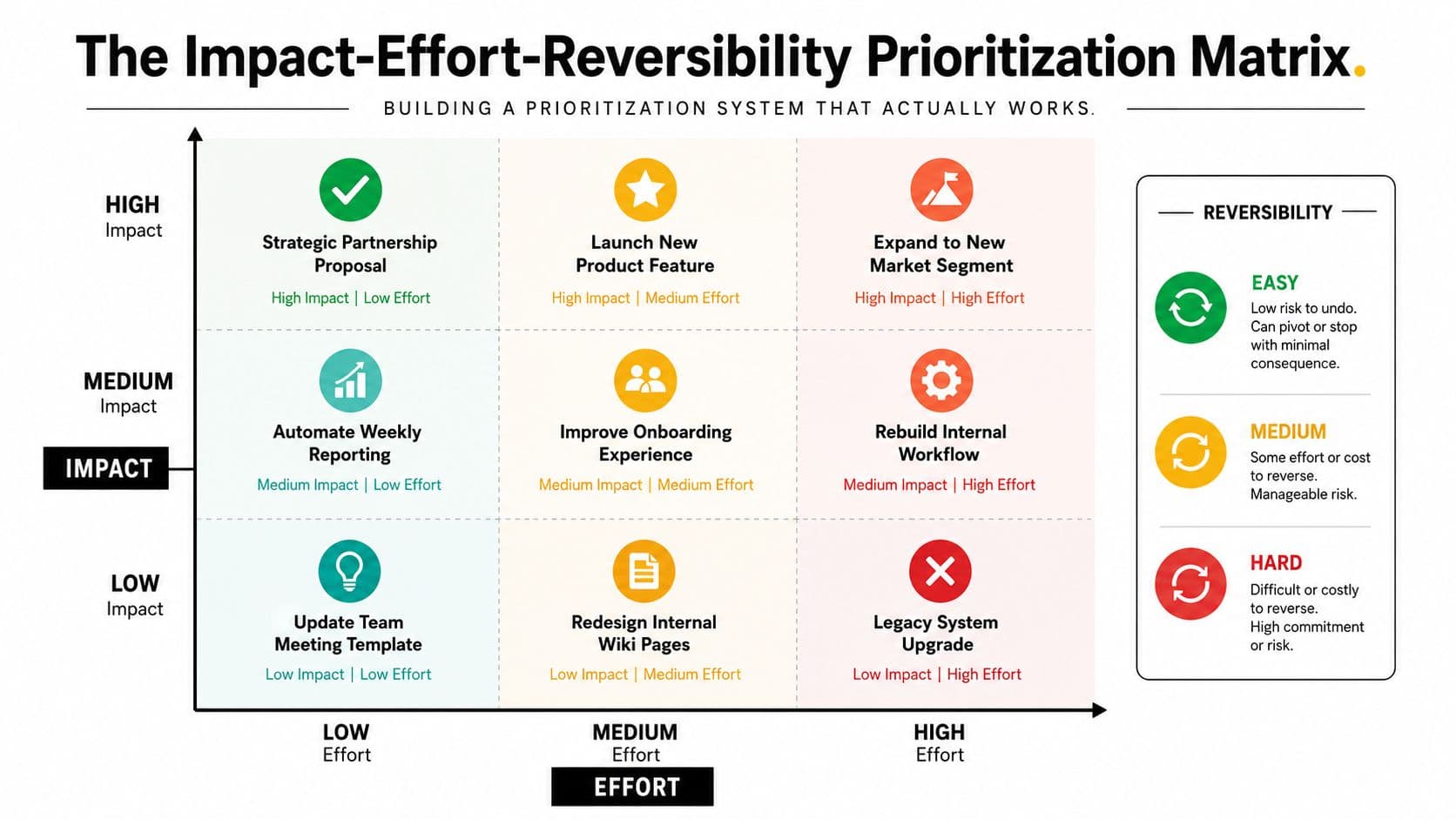
Executives don't need a prettier to-do list. They need a harder filter. The cleanest one I've seen is the Impact-Effort-Reversibility matrix, because it forces three separate questions that most leaders blur together: does this matter strategically, how much of me does it really require, and how dangerous is it if I'm wrong?
Use the matrix to sort urgency from importance
Start with impact. If the task doesn't move strategy, revenue, risk, talent, or operating clarity, it probably doesn't deserve your direct attention. Then score effort by asking how much executive time the task consumes, not how much work exists in total. Finally, check reversibility. A reversible choice can be delegated or tested. A hard-to-reverse choice may need your direct involvement.
A lot of executive burnout comes from treating reversible noise like irreversible strategy.
Use this rule in your weekly priority audit:
- List every open item. Pull in requests, follow-ups, pending decisions, and “quick asks” from email, Slack, and meetings.
- Score each item. Mark impact as high, medium, or low. Mark effort as high, medium, or low. Mark reversibility as easy, medium, or hard.
- Keep only the top tier. Anything low impact or easy to reverse gets delegated, delayed, or deleted.
- Cap the active list. If it stays above a manageable threshold, your system is failing, not your focus.
The matrix works because it exposes emotional urgency. A task can feel urgent and still be a waste of your time. That distinction matters more when priorities are unstable, because unclear ranking is one of the reasons leaders burn out. A 2025 Outlook-user survey found executives reported 10.0 hours/week of productive focus time versus 19.6 hours/week they said they needed, a 49.1% shortfall, and they also logged 11.5 meetings/week versus 9.0 preferred, with 4.5 hours/week on calendar administration (executive context switching survey).
One COO I worked with used this system to cut her active task list from 47 items to 12 in a week. The point wasn't minimalism. It was clarity. Once the noise was out of the way, she got back 14 hours for strategic planning because she stopped pretending every request deserved equal status.
For a practical companion framework, I'd also point you to this internal guide on prioritizing tasks at work. Use it as support, not as your operating system.
If you want another useful reference for executive focus and attention habits, this summary of tips for busy professionals aligns with the same idea. The win is not more discipline. It's fewer open loops.
Delegation Patterns and Templates for High-Impact Work
Executives under-delegate for a simple reason. Doing it themselves feels faster than clarifying ownership, and that shortcut drains time from the work only they can do.
Use delegation as a design choice, not a favor
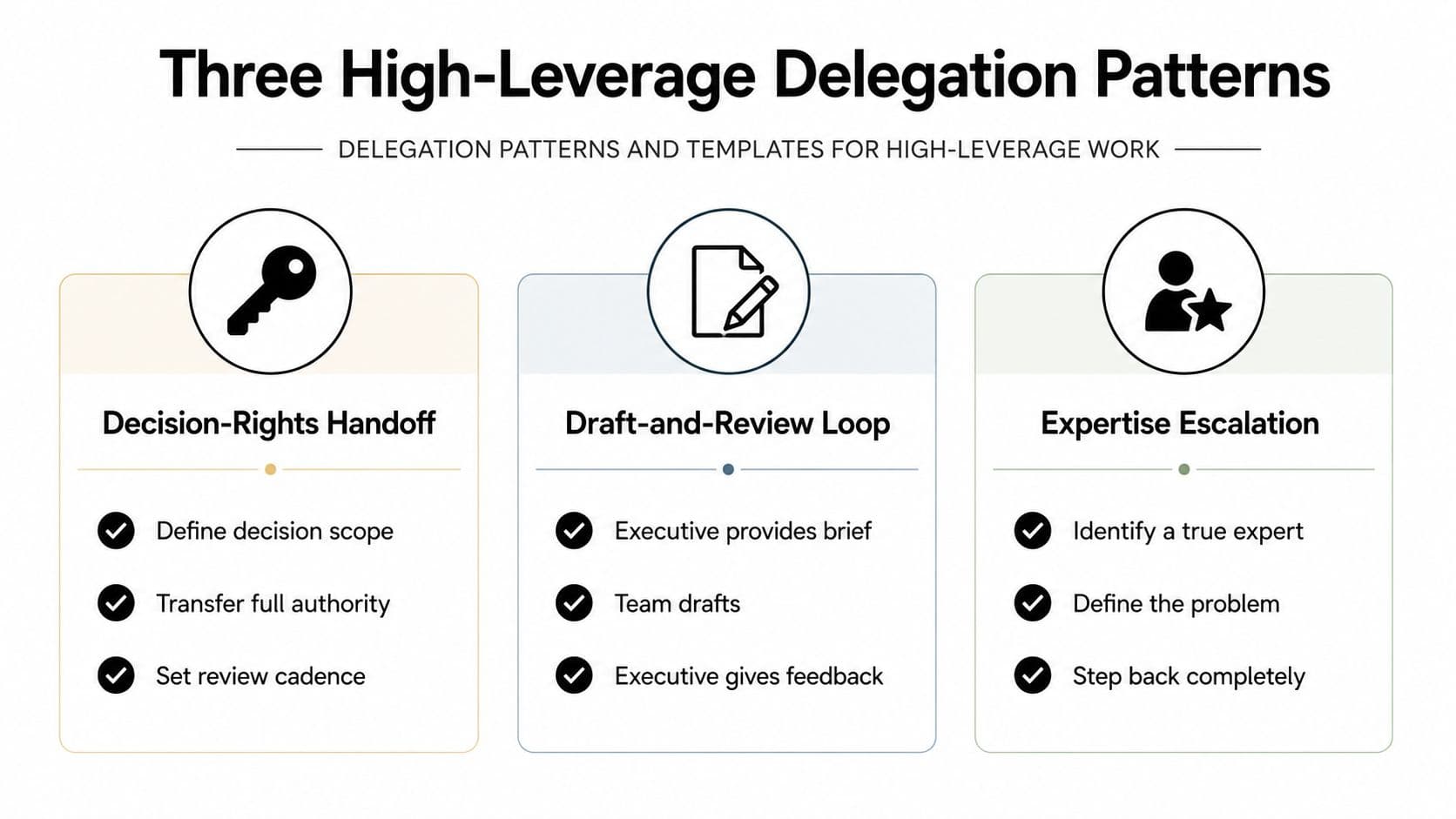
The first pattern is the Decision-Rights Handoff. Use it when someone should own a category of decisions, not just a task. Vendor negotiations are a clean example. Set the budget range, the risk limits, and the escalation points, then hand over authority. You stay informed without becoming the choke point.
The second pattern is the Draft-and-Review Loop. Use it for board decks, leadership updates, and policy docs. A team member produces the first draft, you refine the final version, and the output still reflects executive standards. That is the difference between editing and doing. If you are writing the whole deck from scratch, you are spending executive time on work that should have been drafted elsewhere.
The third pattern is the Parallel Track. Use it when continuity matters during a transition. A shadow owner runs the work while you keep veto power for a short period. Hiring pipeline reviews fit this pattern well. The new owner makes the call, and you stay available until the handoff is stable.
If you do not define the decision boundary, delegation turns into supervision.
Use this delegation brief every time:
- Context. What problem are we solving, and why does it matter now?
- Constraints. Budget, brand, legal, timing, and stakeholder limits.
- Decision rights. What the person can decide without coming back to you.
- Check-in cadence. When you want updates, and what counts as escalation.
- Success definition. What outcome is acceptable, and what is not.
The trap is the belief that speed equals value. A leader who answers everything personally becomes a bottleneck with a title. A stronger model is to reserve your attention for the decisions that shape direction, and to delegate the rest with clear boundaries. That is where how to delegate helps. Use it to sharpen the handoff, not to excuse weak ownership.
Reducing Context Switching and Digital Fragmentation
The cost of chaotic task management is not a messy inbox. It is the attention reset that happens every time an executive jumps between tools, threads, and half-finished decisions. A context switching research summary shows how much time gets burned just reorienting after app switches, and what is context switching explains why each jump breaks momentum and raises cognitive friction.
Start by cutting interfaces before adding anything new.
Map every place work enters your world, email, Slack, CRM, project boards, meeting notes, texts. Then mark the duplicates. If two channels can receive the same request, one of them is creating noise. Executives do not need more intake points. They need one trusted entry point that every request passes through first.
I recommend a unified inbox for capture, then a hard split between capture and execution. Keep live work on one screen and the task queue on another. That setup reduces the temptation to keep checking other channels while you work. It also makes it easier to decide what deserves your attention before you start acting on it.
Use a simple operating rule:
- Batch communication windows. Check reactive channels at set times.
- Consolidate task capture. Route every request into one system first.
- Kill duplicate alerts. Turn off repeated notifications from the same source.
- Separate capture from execution. Decide first, then do the work.
More tools do not create more control. They create more interruptions.
The better your system, the less your day gets eaten by work about work. Research summaries on context switching describe environments where a large share of the workday disappears into switching, triage, and re-entry, not real progress. That is the hidden tax on executive time. Every extra surface you maintain adds another place where decisions stall and follow-up slips.
Internal education matters too. If direct reports keep fragmenting your day, teach them one standard for where work lives and how it reaches you. Use what is context switching as the shared reference point, then make the rules operational. One system, one queue, one owner at a time.
Fluidwave can serve as that kind of consolidation point when teams need tasks, email, calendar, and contacts in one place and routed to the right owner. The point is not the brand. The point is reducing the number of times your brain has to restart.
If your current stack creates more switches than it removes, the fix is not better self-discipline. It is cleaner interface design.
Time Blocking and Automation for Protected Focus
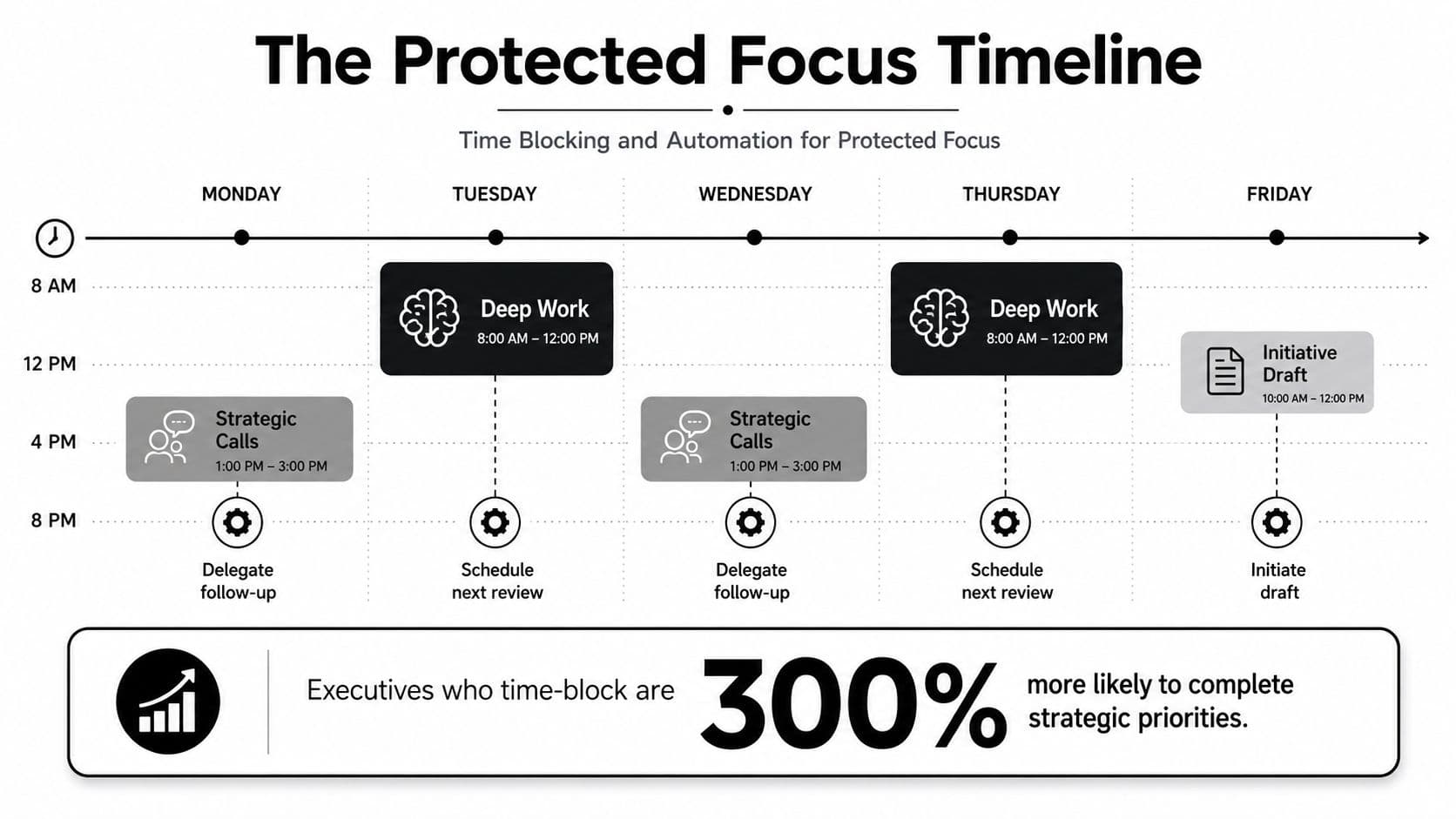
Executive schedules collapse when every hour is treated as equal. Protect your best thinking for the work that changes outcomes, then stop burning it on low-value reactivity. If you are sharp in the morning, put strategy, writing, forecasting, or board prep there. Save approvals and escalations for the part of the day when you can still decide clearly, but do not need creative depth.
Build fortress blocks that survive the calendar
Your calendar needs protected blocks that meetings cannot casually erase. I call these fortress blocks. If a block is labeled “deep work” but any invite can push it aside, it is not a block. It is a placeholder.
Use a simple rhythm.
- Morning deep work. Put your hardest thinking in your strongest cognitive window.
- Early afternoon decision batch. Group approvals, escalations, and high-context review items together.
- Late-day communication window. Push Slack, email, and low-stakes follow-ups here, when switching costs hurt less.
That structure matters because executive calendars are already crowded. A recent executive context switching survey found leaders wanted far more focus time than they were getting, while meetings and calendar admin kept eating the day. Time blocking is the practical response.
Automation does the rest. Route inbound requests by category, trigger weekly status digests from direct reports, and auto-decline meetings that do not match your priority rules. If a request can be sorted without your judgment, let software handle it.
Protect focus first. Automate the friction second.
The rule is simple, blocks without automation get attacked all day. Automation without blocks just moves the chaos faster. Put both together, and you stop paying the scheduling tax every time someone wants ten minutes of your attention.
Your Weekly Executive Task Management Workflow
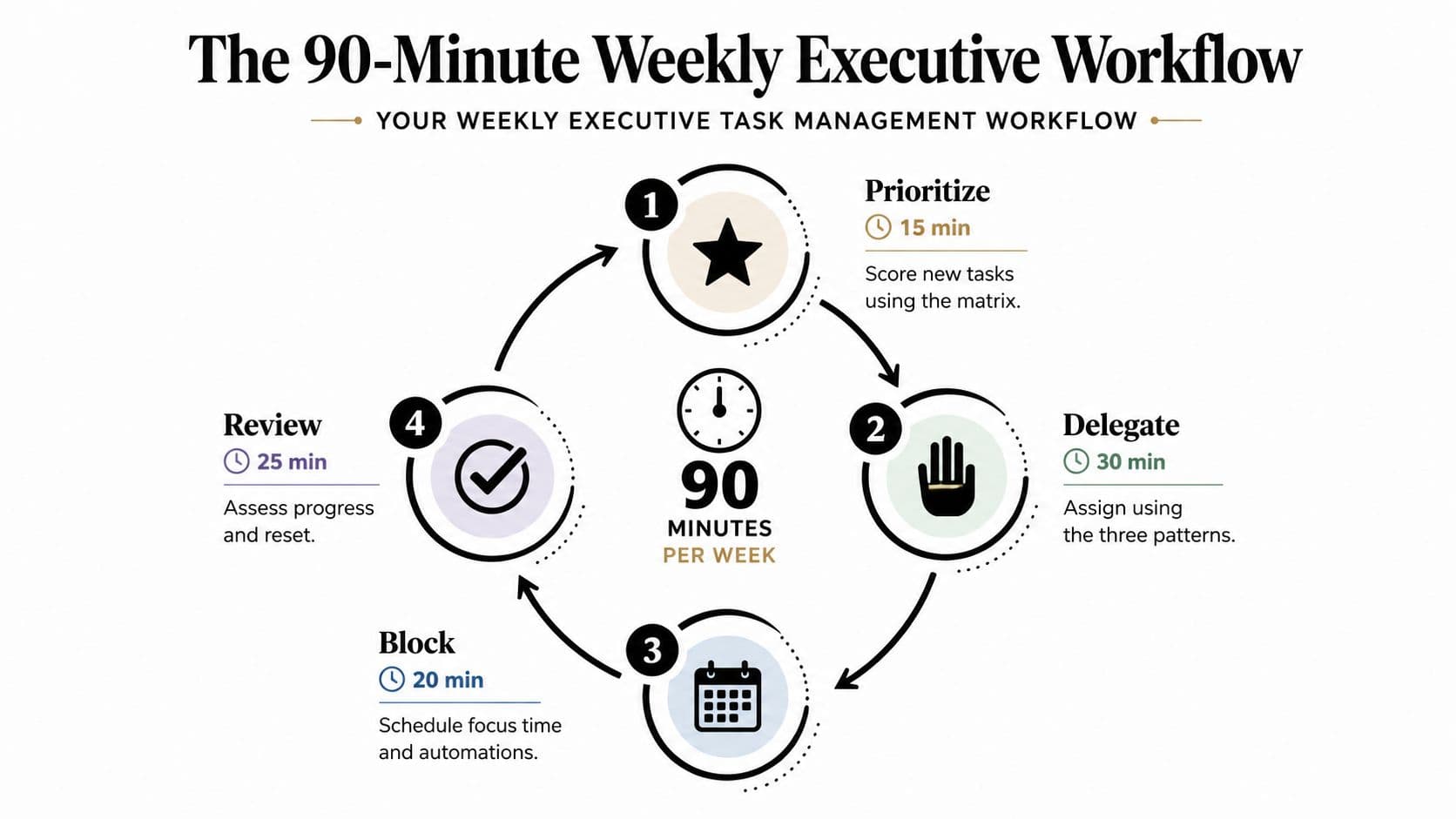
A good system collapses without a weekly rhythm. Keep this one simple enough to repeat and strict enough to matter. Run the whole thing in under 90 minutes, and don't improvise your way out of it when the week gets messy.
Monday prioritization sprint
Spend 30 minutes scoring the week's open work through the Impact-Effort-Reversibility lens. Start with the top three outcomes, not the top 30 tasks. Then assign owners to everything below your line of direct attention. If you can't explain why a task belongs with you, it doesn't.
Daily delegation check-in
Use 15 minutes to review what moved, what's blocked, and what needs a cleaner handoff. The delegation brief matters. If your team keeps bringing you partial work, the cadence is too loose or the decision rights are still unclear.
Friday review
Reserve 45 minutes to inspect the week. Ask three questions. What shipped? What stalled? What should be killed? That last question is the one most executives avoid, and it's usually the most valuable.
Success should be visible. Track how many tasks you delegated versus completed yourself. Track how many uninterrupted focus blocks survived the week. Track whether after-hours email volume is falling or staying sticky. If those numbers aren't improving, the system is leaking.
Start with a two-week pilot using only Monday and Friday. Keep the daily check-in for later. Once the weekly cadence is stable, add the daily layer and tighten the handoffs.
If your current system still depends on you catching every request, you're carrying too much of the company on your own calendar. Fluidwave helps executives centralize tasks, prioritize work, and delegate the low-priority pieces instead of letting them pile up in inboxes and chat threads. Visit Fluidwave and set up a cleaner operating rhythm before the week starts owning you.
Focus on What Matters.
Experience lightning-fast task management with AI-powered workflows. Our automation helps busy professionals save 4+ hours weekly.