Find sprint planning software that fits your team in 2026. Compare features, AI workflows, virtual assistants, and metrics that improve sprint delivery.
September 26, 2026 (Today)
Sprint Planning Software That Actually Works in 2026
Find sprint planning software that fits your team in 2026. Compare features, AI workflows, virtual assistants, and metrics that improve sprint delivery.
← Back to blog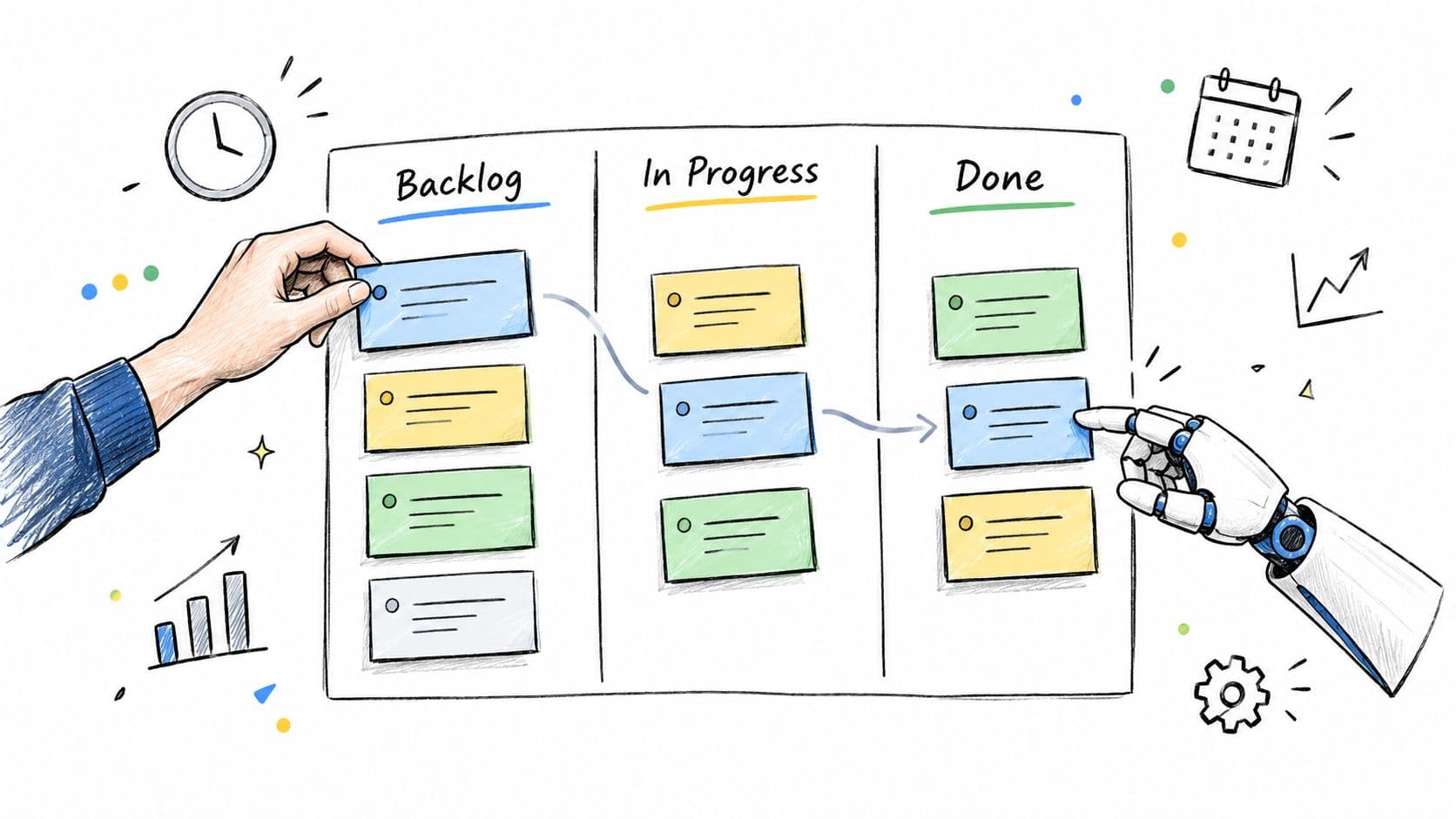
Monday morning starts with a familiar failure. The backlog is crowded, several developers are already blocked, and the forecast on the screen bears little resemblance to what the team delivered last sprint. Everyone can see activity, but nobody can confidently answer the only questions that matter: what will be finished, what will roll over, and why?
That's the job sprint planning software should handle. It should turn a prioritized backlog into a realistic commitment, expose constraints before they become blockers, and preserve enough delivery context to improve the next decision. A polished board is useful, but it isn't the outcome.
The standard is higher now. Sprint planning is a common Scrum ritual, with 83% of organizations reporting its use in the 15th State of Agile report, alongside daily standups at 87%, retrospectives at 83%, and sprint reviews at 81% (15th State of Agile report). The software has to improve the system around that ritual, not merely give the meeting a nicer interface.
What Sprint Planning Software Actually Does
A delivery lead opens the backlog and sees 312 tickets. Three developers are waiting on another team. Several stories have estimates, but the estimates haven't been calibrated against recent work. The product owner wants to pull in a late request, while the team is still carrying unfinished work from the previous sprint.
A generic task list can display all of that. It can't necessarily tell you whether the proposed sprint is achievable.
Sprint planning software is agile tooling built around the Scrum cadence. It supports backlog refinement, capacity sizing, sprint commitment, daily execution tracking, sprint review preparation, and retrospective follow-through. The important distinction is that it connects these activities over time. An estimate should inform a commitment, the commitment should shape the sprint view, and the result should feed the next forecast.
The recurring failures are predictable:
- Hidden dependencies: A story looks ready until a service owner, designer, or security reviewer becomes a bottleneck.
- Boundary acceptance: Work reaches a sprint boundary in a technically accepted state, but the customer-facing outcome remains incomplete.
- Untrusted velocity: Teams keep reporting velocity because the dashboard expects it, even though scope changes and interruptions have made the number meaningless.
- Retrospective drift: The team identifies a process problem, assigns no clear owner, and encounters the same problem in the next cycle.
A useful tool makes those failures visible early. It should distinguish committed work from added scope, show blocked time, preserve sprint goals, and connect unfinished work to the next planning decision. If the platform only shows that a ticket moved from “To do” to “Done,” it's tracking motion, not delivery.
Delivery rule: Judge every feature by whether it reduces rollover or improves forecast accuracy. If it does neither, it's probably administrative decoration.
The category is expanding with the wider agile planning market. One estimate valued the global Agile Planning Tools market at $4.8 billion in 2025 and projected $10.5 billion by 2034, with a 10.2% CAGR. The same estimate said software represented 68.3% of the market and North America represented 41.2% of revenue (Agile Planning Tools market estimate). Those figures don't prove that a particular vendor improves delivery, but they do show that backlog, capacity, scheduling, and cross-team coordination have become a substantial enterprise software category.
When comparing products, start with two outcome tests. Rollover rate tells you how much planned work survives into the next sprint. Forecast accuracy tells you whether the team can make a commitment that reflects reality. The interface matters only after the tool can help the team improve those measures.
For teams coordinating remote planning sessions or external stakeholders, a practical companion resource is this guide to plan international calls with BubblyPhone. Scheduling isn't the core planning problem, but avoidable coordination friction can still consume the time needed to prepare a realistic sprint.
Core Features That Matter in 2026
The best evaluation starts with failure prevention, not feature count. A vendor can demonstrate boards, cards, filters, and colorful dashboards in minutes. The harder question is whether the tool stops the team from making the same bad commitment again.
Capacity must reflect real availability
A capacity view should account for planned leave, meetings, support work, on-call duties, and focus time. Digital.ai recommends reviewing sprint capacity and adjusting the basic team-hours calculation for planned time off, meetings, and support work (Digital.ai sprint planning guidance). A tool that treats every person as fully available will produce confident nonsense.
Story estimation needs similar discipline. Reference previous sprints, flag outliers, and show whether a large story is consuming a disproportionate share of the commitment. Auto-estimation can help when it uses historical velocity and code complexity, but it should support discussion rather than replace it. These are core evaluation criteria in current agile tooling assessments (sprint planning tool evaluation criteria).
Dependencies should appear before commitment
A dependency map earns its place when it shows that a “ready” story relies on an API change, an environment request, or another team's approval. Cross-team visibility prevents the common situation where the sprint board looks healthy until the work reaches a blocked state.
Sprint goals also deserve their own object. A free-text field buried in a ticket encourages teams to treat every item as equally important. A locked goal gives the product owner and engineers a clear test for scope changes: does this help the goal, or is it merely urgent?
Progress reporting must expose churn
A flat burndown can create false confidence when scope is added during the sprint. Look for reporting that separates completed work, original commitment, added scope, removed scope, rollover, and blocked time. Retrospectives should carry action ownership forward, so the team can see whether an agreed improvement was completed rather than merely discussed.
| Capability | Planning Failure It Prevents | Success Signal |
|---|---|---|
| Availability-aware capacity | Over-commitment based on ideal staffing | Commitment reflects leave, support, and interruptions |
| Historical estimation | Velocity drift and oversized stories | Estimates are compared with reference work |
| Dependency mapping | Mid-sprint blockers | Risks have owners before sprint start |
| First-class sprint goals | “Everything is urgent” planning | Scope changes are tested against one outcome |
| Scope-aware burndown | False confidence from added work | Original scope and churn remain visible |
| Owned retrospective actions | Repeated process failures | Actions close and influence the next sprint |
Jira's configurability is valuable when your workflow needs it. Linear's minimalism is valuable when it keeps teams moving. Neither style wins automatically. Choose the product that survives contact with a real backlog, real dependencies, and real support load. A useful adjacent perspective is AI-powered task management, especially for teams deciding which planning work should be automated outside the core engineering system.
Sprint Planning Software vs General Project Management Tools
Asana, Monday, Trello, and Notion are capable coordination tools. They become less convincing when a Scrum team needs the software to recalculate a commitment, preserve velocity history, or explain why a sprint missed its goal.
A general project management tool usually handles tasks, owners, due dates, comments, and broad roadmaps well. That makes it useful for intake and cross-functional visibility. The problem appears when engineering needs a connected operating model for iterative delivery.
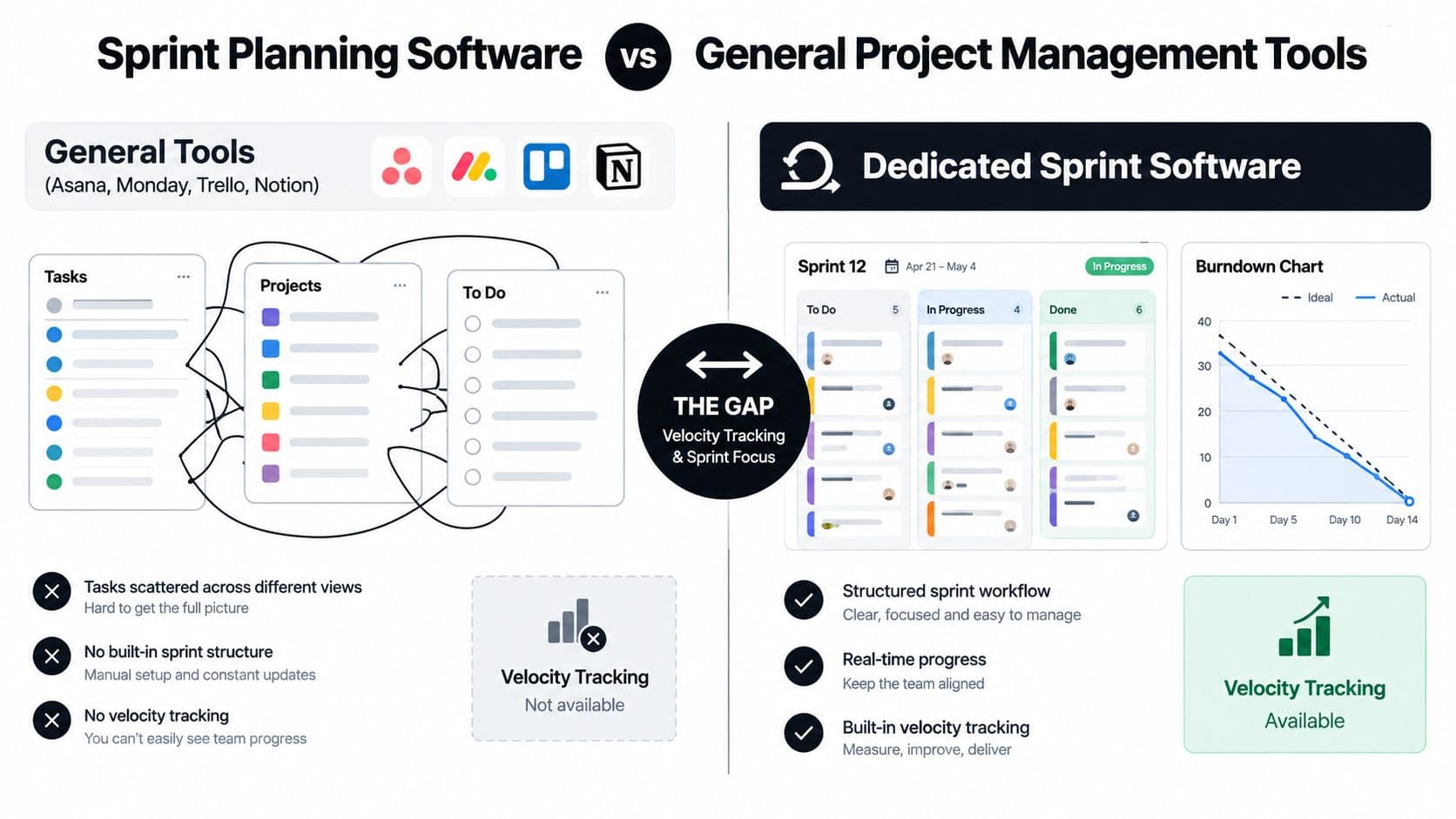
Consider five practical tests:
- Scope changes: Can the tool recalculate remaining capacity when an urgent item enters the sprint?
- Velocity history: Can the team compare planned, completed, and rolled-over work across multiple sprints?
- Dependencies: Can engineers see cross-team sequencing without maintaining a separate spreadsheet?
- Hierarchy: Can a sprint goal contain stories, subtasks, technical tasks, and acceptance criteria without losing context?
- Reporting: Can the system produce a burndown and scope-churn view, rather than only a timeline or Gantt chart?
A Trello board or Notion database often becomes a manual system. Someone maintains estimates in custom fields, someone else exports data for reporting, and the delivery lead reconstructs the story in a review slide deck. The tool may feel simple, but the process around it becomes expensive.
Generalist tools still win in specific situations. Marketing, operations, finance, and executive stakeholders often adopt them faster because the concepts are familiar and the administration is lighter. For task management for frontline teams, a flexible task system may be more appropriate than an engineering-focused Scrum platform.
My preferred setup is hybrid. Use a generalist tool for intake, broad roadmaps, and coordination with non-engineering partners. Use dedicated sprint planning software inside the engineering pod, where capacity, dependencies, estimation, and delivery signals need to stay connected.
If your sprint review is a slide deck because the tool can't generate a trustworthy report, you're using the wrong tool for the job.
An Evaluation Checklist Before You Buy
Don't shortlist tools by counting checkboxes. Run each candidate through three blocks: capability, integration, and execution signals. Ask the same questions, request the same evidence, and test the workflow with one real team.
Capability
Ask the vendor to plan an actual upcoming sprint using your backlog, not sample tickets. Can the tool show story-point history, capacity versus commitment, dependency risk, sprint-goal locking, and scope-change approval? Request a view of the last several sprints with rollover and completed work intact.
This prevents a familiar failure: the software looks agile in a demo, but the team still estimates in one place, tracks blockers in another, and reports delivery from a spreadsheet.
Integration
Test two-way sync with the code repository, CI/CD pipeline, incident system, calendars, Slack or Teams, and identity provider. Ask what happens when a pull request closes, a deployment fails, or a ticket changes in the repository. Request the API rate limits, export format for historical velocity, and rules for handling deleted or duplicated records.
A one-way integration is often just an import button. You need the planning system and delivery system to agree without manual reconciliation.
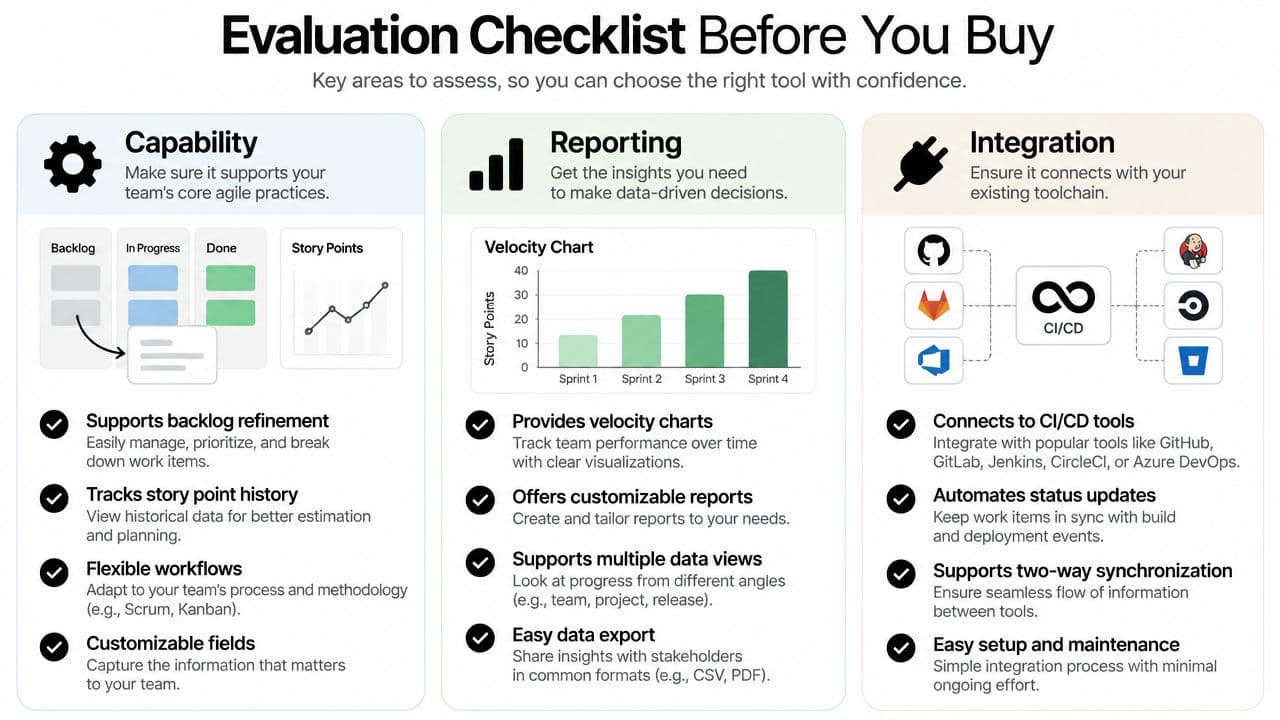
Execution signals
Ask the vendor to show rollover visibility, blocker aging, WIP limits, and historical forecast accuracy. Don't accept a generic “custom dashboard” answer. Ask which fields feed the calculation, whether scope changes are separated from original commitment, and whether the report remains accurate after work is moved between sprints.
Demo test: Add a blocked dependency, remove a team member for planned leave, and introduce an urgent story. If the forecast doesn't change in a visible way, the capacity model isn't doing useful work.
Run a paid pilot on one real sprint. Sandbox data hides the messy states that expose weak integrations and unclear workflows. Weight integration depth above visual polish, because broken synchronization creates more planning rework than a missing button.
Where AI Automation and Virtual Assistants Fit In
AI should handle repetitive work driven by clear signals. People should own judgment, negotiation, and accountability. Confusing those roles is how teams end up with automated scope changes that nobody approved.
A planning assistant can cluster backlog items by theme, suggest estimates from historical velocity, flag tickets that breach WIP limits, draft standup summaries, detect scope creep against the sprint goal, and rank blockers by age. Those tasks reduce administrative load because they transform existing information into a usable view.
The system should still ask for human confirmation before commitment. An AI model can notice that a story resembles previous work, but it doesn't know whether the product owner would trade a reliability improvement for a customer-facing feature. It can identify a dependency, but it may not understand the relationship between two teams or the political cost of changing a date.
Human virtual assistants fill the coordination layer that automation often handles poorly:
- Acceptance criteria: Chase stakeholders for missing decisions and record the response against the correct ticket.
- Backlog hygiene: Find stale stories, resolve duplicates, and prepare candidates for refinement.
- Calendar coordination: Reconcile availability for planning, review, and retrospective sessions.
- Review preparation: Gather demo notes, links, screenshots, and unresolved questions.
- Retrospective logistics: Collect input, organize themes, and track assigned actions after the meeting.
A useful delegation prompt is: “Summarize unresolved tickets older than 14 days, grouped by owner, and list the missing decision for each.” Another is: “Find sprint items with changed scope, identify who approved the change, and prepare a review note.” The value comes from giving a person or system a precise output, a boundary, and a source of truth.
For teams combining task automation with human delegation, AI personal assistant workflows offer a useful model for separating repetitive coordination from decisions that need context.
Never let AI auto-commit work without product owner approval. Silent scope changes are the fastest route to rollover because the team loses the moment when a tradeoff should have been made visible.
Two Real-World Sprint Workflows
A seven-person product team is preparing a checkout redesign in a two-week sprint. The product owner enters planning with a refined backlog, and the delivery lead opens the capacity-versus-commitment view before anyone selects work. The team removes planned leave and support coverage, then chooses stories that support the sprint goal instead of filling every available slot.
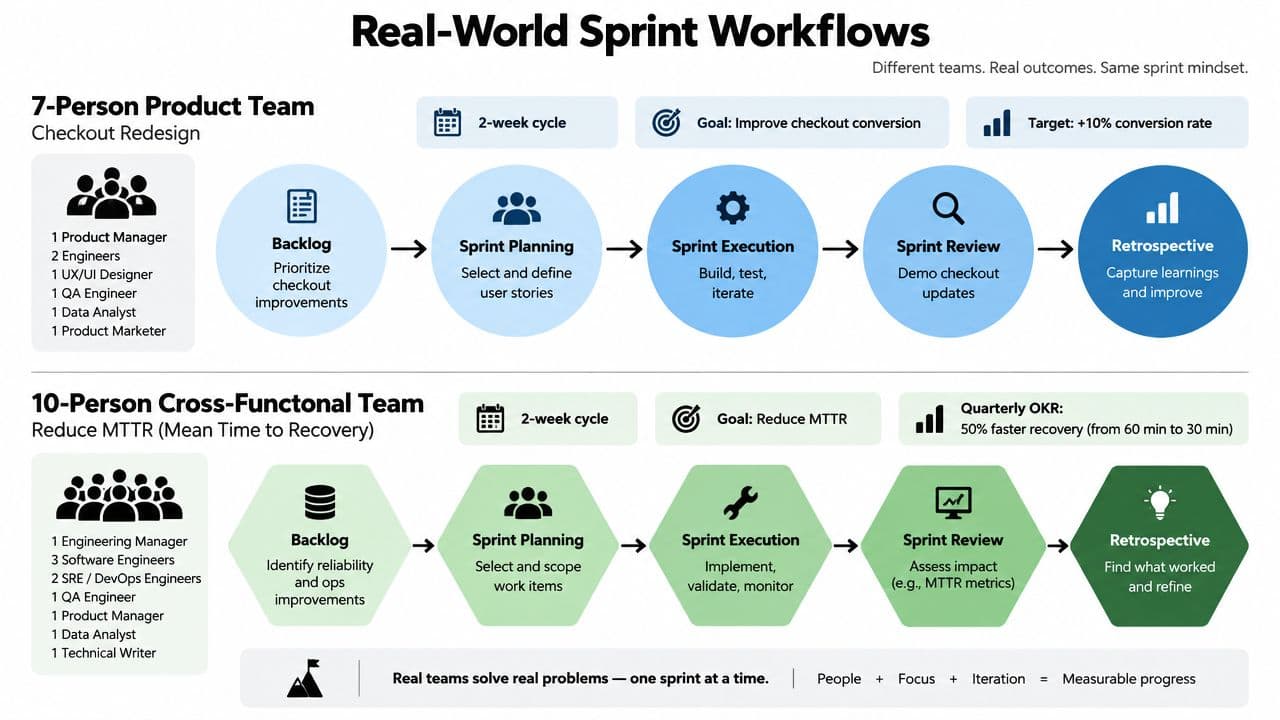
The planning screen shows estimates, assignees, acceptance criteria, and dependencies. During the sprint, developers update the board from their delivery workflow, while the AI-generated standup digest summarizes completed work, active blockers, and tickets that haven't moved. On the midpoint check, the delivery lead filters for scope changes and opens the dependency heatmap. If a payment-service dependency threatens the goal, the product owner decides whether to remove scope or resolve the dependency.
On Friday, the review dashboard filters for review-ready stories rather than tickets merely marked complete. The retrospective records one owned action and links it to the next sprint. The useful measures are forecast accuracy, rollover percentage, blocker aging, and review-ready story count.
A second example is a ten-person cross-functional team working against a quarterly OKR to reduce incident MTTR. Its work spans engineering, support, operations, and product, so the team uses a broader goal view alongside the sprint board.
Planning begins with the OKR outcome and a capacity-versus-commitment review. The team assigns stories across functions, then uses the dependency heatmap to expose reliance on incident data, service owners, or release approvals. During daily execution, the standup digest highlights aging blockers and scope drift, while the delivery lead checks whether the current sprint still contributes to the quarterly objective.
At the midpoint, the team doesn't ask whether everyone is busy. It asks whether the selected work is producing evidence toward the goal. Friday's review uses the review-ready story filter and incident-related delivery signals. The key health measures are forecast accuracy, rollover percentage, blocker aging, and the number of stories ready for stakeholder review.
The software enforces visibility and preserves history. The team still has to negotiate tradeoffs, clarify acceptance criteria, and decide whether a goal remains valuable.
Implementation Best Practices and Metrics to Track
Rollout fails when teams configure every workflow before they know which problem they're solving. Start with one squad, run two real sprints, and use the results to decide what should become standard.
Build the operating baseline first
Lock the Definition of Done and agree on how the team uses story points before adding automation. Without a shared baseline, the tool will faithfully report inconsistent estimates. Add backlog grooming and capacity rules after the team trusts the basic workflow.
Before each planning meeting, require a pre-filled capacity table. The meeting should debate tradeoffs, not discover holidays, support rotations, or missing people for the first time.
Track the following across a rolling six-sprint window:
- Sprint burndown: Whether completed work follows a credible path through the sprint.
- Planned versus committed scope: Whether the team keeps changing the baseline.
- Rollover rate: How much planned work remains unfinished.
- Escape defects: Whether “done” work creates downstream quality problems.
- Forecast accuracy: How closely the commitment matches completed delivery.
A useful benchmark is sobering. An industry analysis of nearly 2,000 teams reported average planning accuracy below 50% (sprint planning accuracy analysis). That doesn't mean every team needs the same target, but it does mean a forecast should be tested against delivery rather than accepted because the planning meeting felt orderly.
| Metric | What It Measures | Warning Threshold |
|---|---|---|
| Burndown | Progress against the sprint baseline | Repeated flat periods without an explained blocker |
| Planned versus committed scope | Governance of the sprint commitment | Frequent additions after planning |
| Rollover rate | Work that survives into the next sprint | A sustained rise across the review window |
| Escape defects | Quality of completed work | Defects linked to stories marked done |
| Forecast accuracy | Reliability of team commitments | A forecast gap above 15% is a review signal |
Treat a rollover spike or a forecast gap above 15% as a reason to revisit WIP limits, dependency handling, and scope governance. Don't respond by buying more dashboards. Teams usually need better constraints before they need more reporting, and velocity tracking practices can help structure the historical view without turning velocity into a performance score.
The Habits That Make Any Tool Work
No sprint planning software can compensate for a backlog full of stale stories. It can't write missing acceptance criteria, force a product owner to make a priority decision, or make engineers comfortable pushing back on an unrealistic commitment.
The habits that improve delivery are ordinary:
- Prepare before planning: Product owners clarify acceptance criteria and priorities before the meeting.
- Protect real capacity: Engineering leads account for support, interruptions, and leave instead of planning against an imaginary full week.
- Refine continuously: Teams remove ambiguity before stories reach the commitment conversation.
- Assign one retrospective action: The team chooses an owner and checks completion in the next cycle.
- Treat capacity as negotiation: A number on a dashboard starts the conversation. It doesn't settle it.
Sprint planning itself has a clear purpose. The Scrum Guide frames the event around what can be delivered and how the work will be achieved, with a maximum time-box of eight hours for a one-month Sprint (Scrum Guide). Scrum Alliance describes the discussion through three topics: why the sprint is valuable, what can be done, and how the work will be completed (Scrum Alliance sprint planning guidance). Software should make those decisions easier to see, not disguise them.
Buy the simplest tool your team will use every day. Then spend your energy improving refinement, commitment discipline, dependency ownership, and follow-through. A smaller system with reliable habits will beat a complex platform that nobody trusts.
Fluidwave combines AI-driven task automation with human virtual assistants who can handle coordination work such as backlog cleanup, meeting preparation, and follow-up. Visit Fluidwave to see how it can complement your sprint planning system and close the execution gaps that a board alone won't fix.
Focus on What Matters.
Experience lightning-fast task management with AI-powered workflows. Our automation helps busy professionals save 4+ hours weekly.