Imagine a digital teammate that handles scheduling, summaries, and admin busywork so you can focus on high-value work. Learn what AI personal assistants do, how they work, and how to choose the right one.
January 10, 2026 (9mo ago) — last updated April 17, 2026 (6mo ago)
AI Personal Assistant: What It Is & How It Works
Learn what an AI personal assistant does, how it works, and how to choose the best one to boost productivity and reduce cognitive load.
← Back to blog
AI Personal Assistant: What It Is & How It Works
Discover what an AI personal assistant is and how it can transform your productivity. Learn how they work, who they’re for, and how to choose the right one.
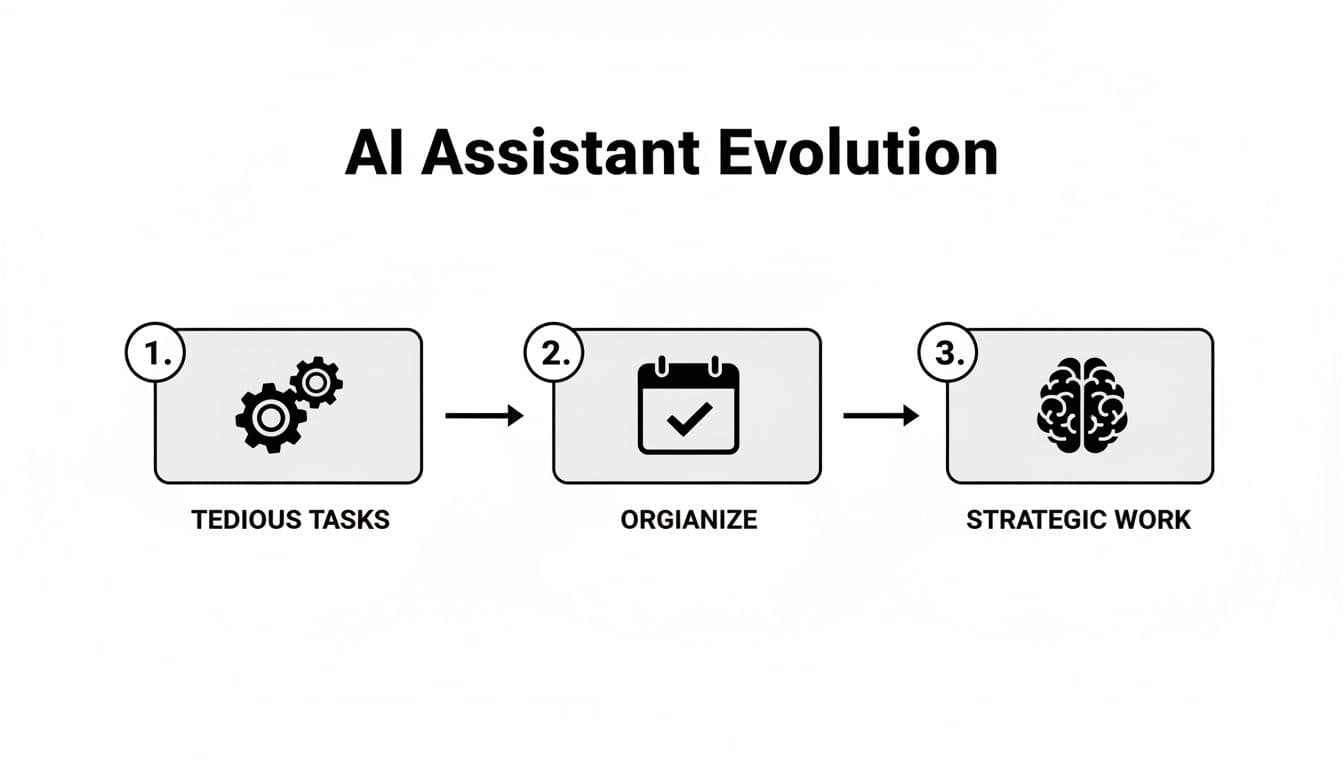
Imagine having a teammate who takes tedious, time-sucking tasks off your plate—someone who organizes your schedule, summarizes research, and handles administrative busywork so you can focus on what matters. That’s the reality of a modern AI personal assistant.
What Is a Modern AI Personal Assistant?
If you’ve ever felt stretched thin because of meetings, an overflowing inbox, or routine admin, an AI personal assistant can help. These tools go beyond simple voice commands or timers: they integrate into your workflow and act as an extension of your capabilities, handling complex, multi-step tasks.
More Than a Smart To‑Do List
Think of an AI personal assistant as a digital chief of staff. It learns your preferences and work patterns so it can proactively manage tasks in a way that feels intuitive.
The market for personal AI assistants is growing rapidly: one projection estimates a market size of about USD 2.23 billion in 2024, rising toward USD 56.3 billion by 2034, reflecting strong compound annual growth1. That growth reflects a shift: these tools are becoming essential for reclaiming time and energy.
Common benefits include:
- Delegating tedious work like scheduling across time zones, managing expense reports, and handling routine data entry.
- Organizing information by summarizing long documents, transcribing meeting notes, and extracting key facts from large datasets.
- Protecting your focus by handling busywork so you get uninterrupted blocks for deep concentration.
A modern assistant doesn’t just help you get more done; it helps you get the right things done and creates the time and mental space to do your best work.
How an AI Personal Assistant Actually Works
Turning a casual request into a completed task starts with natural language input—no special commands needed. You might type or say, “Find a 30‑minute slot for a call with Sarah next week that works for us both,” and the system proceeds to complete the task.
Understanding Intent
Large Language Models (LLMs) power interpretation and intent recognition. The LLM translates conversational requests into structured plans the system can execute, understanding context and nuance rather than only matching keywords.
Advanced assistants handle ambiguity and infer missing details so they can turn a vague idea into a concrete, executed task without constant clarification.
Automation and Human Judgment
After understanding the request, an automation engine executes predictable tasks—adding calendar events, sending follow-up emails, or updating a project board. For tasks that need judgment, creativity, or sensitivity, many systems use a human-in-the-loop model to escalate work to vetted human experts.
This hybrid approach combines:
- AI speed for high-volume, rule-based work that needs to happen instantly and reliably.
- Human judgment for complex or high-stakes tasks that require context and discretion.
The goal is intelligent delegation—matching the right resource, AI or human, to each task so you get reliable results without managing every step yourself.
Who Benefits Most From an AI Personal Assistant
AI personal assistants multiply the value of people whose most valuable asset is time and attention. They’re useful not only for executives but also for founders, project managers, creatives, and neurodivergent professionals.
Founders and Busy Executives
Leaders face back-to-back meetings and constant context-switching that kills deep thinking. An assistant shields your focus—scheduling across time zones, summarizing competitor moves, or preparing briefing notes so you can concentrate on high-stakes decisions.
Project Managers and Teams
Project managers spend hours on status updates, weekly reports, and nudging timelines. An AI assistant can automate status collection, draft reports, and send reminders, freeing managers to anticipate risks and support their teams proactively.
Creatives and Neurodivergent Professionals
Deep work is essential for creatives. Administrative busywork interrupts flow. An assistant that handles invoicing, client booking, or social scheduling protects creative focus. For neurodivergent professionals, assistants can support executive function by creating predictable workflows and reducing overwhelm.
Use Cases by Role
| Professional Role | High‑Impact Task Delegation | Key Benefit |
|---|---|---|
| Founder/CEO | Scheduling investor meetings, summarizing market research, drafting internal announcements | More time for strategic planning |
| Project Manager | Compiling status reports, sending task reminders, drafting meeting agendas | Less administrative churn |
| Creative Freelancer | Managing client appointments, sending invoices, filtering non-urgent email | Protects deep work time |
For more examples, see our guide on agentic AI use cases and AI-powered productivity56.
Real Benefits and Limitations
People often start by thinking about “saving time,” but the deeper win is lowering cognitive load. When you stop spending mental energy tracking meetings, inboxes, and follow-ups, you free your mind for strategic thinking and deep work.
Automation excels at repetitive, high-volume work. Many professionals report saving 3–5 hours per week by offloading scheduling, email triage, and basic task routing to assistants2.
Where AI Needs Human Support
AI can draft standard emails quickly, but it can struggle with creativity, emotional intelligence, or complex problem-solving. The hybrid model—AI plus vetted human experts—covers these blind spots and adds real-world judgment and oversight.
This blend builds trust: you get AI speed for straightforward tasks and human assurance for what truly matters.
Industry Impact
In some sectors the impact is substantial. For example, AI adoption in healthcare is projected to deliver significant cost savings over time3.
How To Choose the Right AI Assistant
With many options available, choose the assistant that fits your workflow. Focus on integration, delegation model, user experience, and pricing flexibility.
Integration Matters
An assistant must connect to your calendar, project management tools, and messaging apps. If it doesn’t integrate, it adds friction instead of removing it.
Model and Experience
Check whether the assistant is purely automated or offers human-in-the-loop support for sensitive tasks. Look for a clean, intuitive interface that lets you delegate tasks quickly.
Pricing and Value
Consider whether pricing matches your usage. Flexible, pay-per-task options can deliver better ROI than flat monthly fees when your workload varies.
Use this checklist when choosing:
- Strong integration with Google Calendar, Slack, Asana, and other daily tools
- A delegation model that escalates complex tasks to human experts when needed
- A simple, intuitive user interface
- Flexible pricing that aligns to actual value received
For deeper guidance, see our resource on AI-powered workflow automation6.
Getting Started With Your AI Assistant
Start small and aim for a few quick wins to build confidence.
First Delegation Checklist
- Define a clear outcome: What does “done” look like? A drafted email, a confirmed meeting, or a summarized document?
- Provide necessary context: Include links, contact details, or a short background.
- Set a deadline: A firm deadline helps the assistant prioritize.
Once you trust one-off tasks, set up simple automations such as “Compile and send the sales report every Friday at 4 PM.” Recurring instructions are where you tap into the full value of an assistant.
Common Questions About AI Personal Assistants
How Is an AI Assistant Different From Standard Automation Tools?
Standard automation tools like Zapier run rigid, prebuilt sequences. An AI personal assistant understands intent and adapts: you give a goal in plain English, and it figures out the steps to achieve it.
Can I Trust an AI Assistant With Confidential Information?
Security matters. Reputable platforms use enterprise-grade encryption and strict privacy policies. When a service uses human experts, they should be thoroughly vetted and bound by confidentiality agreements.
What Are the Best Tasks to Delegate When Starting Out?
High-impact, low-risk tasks work best: complex meeting scheduling across time zones, preliminary research summaries, and inbox triage with clear rules.
Quick Q&A: Top User Questions
Q: What will an AI assistant actually do for me?
A: It handles repetitive tasks—scheduling, summaries, email triage—and escalates complex items to humans when needed so you can focus on higher-value work.
Q: How soon will I see benefits?
A: Many people notice value after a few one-off tasks and see measurable time savings within weeks as recurring items are automated.
Q: How do I keep control and privacy?
A: Use tools with strong integrations, transparent security policies, and options to limit data access or require human escalation for sensitive tasks.
1.
Market projection for personal AI assistants: report estimating growth from USD 2.23 billion in 2024 to USD 56.3 billion by 2034, reflecting strong compound annual growth. https://www.marketsandmarkets.com
2.
Survey and industry summaries reporting productivity gains from AI assistants, commonly in the range of 3–5 hours saved per week for many professionals. https://hbr.org
3.
Estimates of potential cost savings in U.S. healthcare from AI adoption, projected at about USD 150 billion by 2026. https://www.accenture.com
4.
Conversational AI statistics and trends. https://www.nextiva.com/blog/conversational-ai-statistics.html
5.
Examples and discussion of agentic AI use cases. https://nolana.com/articles/agentic-ai-use-cases
6.
Guide to AI-powered workflow automation and productivity tools. https://fluidwave.com/blog/ai-powered-workflow-automation
Focus on What Matters.
Experience lightning-fast task management with AI-powered workflows. Our automation helps busy professionals save 4+ hours weekly.