Learn how to hire a pay per task virtual assistant for flexible, cost-effective support. Get practical tips for success in 2026.
August 21, 2026 (2mo ago)
Pay Per Task Virtual Assistant: A Practical Guide
Learn how to hire a pay per task virtual assistant for flexible, cost-effective support. Get practical tips for success in 2026.
← Back to blog
You post a small task before lunch, expecting a clean spreadsheet by the end of the day. Instead, the assistant asks where the source files are, uses the wrong columns, misses half the entries, and sends back a file that needs more supervision than the original task. The price looked cheap. Your calendar paid the difference.
That's the central problem with a pay per task virtual assistant. The model can buy back your time, but only when you buy a clearly defined outcome. Poor scope creates rework, unclear ownership, and endless clarification. Strong scope gives a capable assistant enough context to work independently and gives you a fair basis for approval.
The online labour market is already enormous. Research estimated about 163 million registered worker accounts on online labour platforms worldwide, while only 8.6% were active and 2.0% had completed at least 10 projects or earned at least $1,000 (Online Labour Observatory data). That gap matters. Finding available labour isn't the hard part. Converting available labour into reliable output is.
What Pay Per Task Virtual Assistants Do
A task can look finished and still create work for you. I once posted a lead-list assignment at $15, requesting company names, websites, contact roles, and notes. The file arrived on time, but the sources varied, several companies missed the target audience, and the spreadsheet lacked a usable sorting structure. The low fee had purchased a cleanup project, not a finished lead list.
A pay-per-task arrangement gives each unit of work its own scope, price, deadline, and acceptance criteria. The assistant does not bill against an hourly timesheet, and you do not commit to a recurring retainer. You pay for a defined deliverable, such as a cleaned spreadsheet, researched leads, a transcript, a converted document, or formatted images.
The useful mental model: you're buying an output, not access to someone's time.
Tasks that fit the model
The strongest assignments have a visible finish line and limited dependence on private context:
- Research batches: Competitor lists, podcast research, vendor comparisons, or source collection.
- Data work: Spreadsheet cleanup, CRM deduplication, categorization, and structured data entry.
- Content support: Transcription, formatting, repurposing existing material, and short-form drafts.
- Lead research: Finding companies or roles according to explicit filters, then recording evidence.
- Administrative cleanup: Inbox labeling, file organization, calendar updates, and document formatting.
- Media and document tasks: Image resizing, PDF conversion, slide cleanup, and template-based design.
The AVA Realtor's virtual assistant pricing guide lists examples such as a $50 podcast transcript and a $200 CRM cleanup, and places some one-off research and data-entry deliverables at roughly $5 to $150 per task. Treat those figures as reference points, not a substitute for defining the work.
Where it breaks
Open-ended strategy rarely belongs in this model. Multi-week builds also create trouble when requirements change, the work depends on deep brand knowledge, or the assistant must make decisions that belong to you. A task may satisfy its literal instructions while failing commercially because the executor misunderstood your customer, voice, or risk tolerance.
Use a pay-per-task assistant for inspectable output. Use a different arrangement when the job requires ongoing judgment, shifting priorities, or ownership of an entire function. That choice protects the time the model is supposed to return.
If you are assessing automation for repetitive customer interactions, WhatsApp automation for SMBs offers a relevant adjacent example. For the broader operational case, review this guide to virtual assistant benefits.
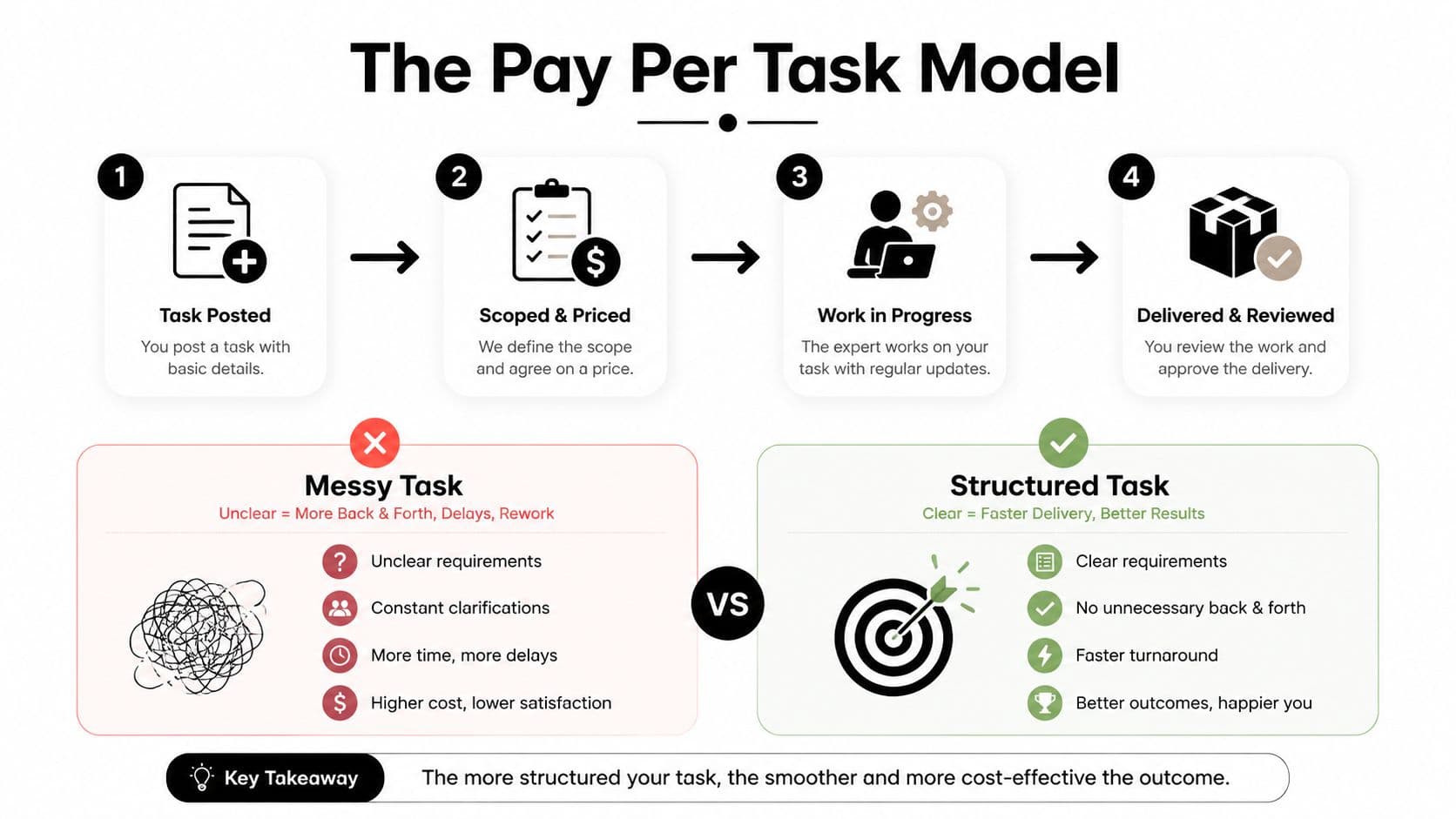
The distinction controls every later decision. A person can adapt, but a deliverable can be inspected. Pay per task works when the result is specific enough to approve without guessing what “done” means.
Defining Tasks That Get Done Right the First Time
A vague task transfers decision-making to the assistant without admitting it. “Clean up the CRM” might mean removing duplicates, standardizing fields, archiving old records, correcting spelling, or rebuilding the entire pipeline. Those are different jobs with different risks.
Use five parts in every brief.
Objective
Write one measurable outcome. “Prepare a qualified prospect list for outreach” is better than “research some leads,” but it still needs a boundary. State the audience, inclusion rule, and finished condition. For example, ask for companies in a named category, with a website and evidence that they serve a defined customer type.
The assistant should be able to read the objective and answer, “What single result am I responsible for?”
Inputs
Put the working material in the brief. Include links to the source folder, the spreadsheet template, the relevant CRM view, brand assets, and any account access required. Don't make the assistant search through old messages or ask which version of a file is current.
If credentials are necessary, use the platform's approved access method. Never paste sensitive passwords into a task description.
Output format
Describe the shape of the delivery. Name the file type, tab names, column order, naming convention, and location. For writing, specify the document length, heading structure, audience, and whether the assistant should draft, edit, or format. For images, state the required dimensions, file type, background treatment, and export location.
“Send me the results” is not an output format. “Return a Google Sheet with columns for company, website, role, source, qualification note, and review status” is.
Example
Attach one example of acceptable work. A sample row, approved email, finished slide, or correctly formatted image eliminates guesswork about tone and structure. Examples are especially valuable when the written brief sounds clear to you because you already know what you want.
Constraints
List what must not happen. Include deadlines, source restrictions, privacy rules, revision limits, contact rules, and style requirements. “Don't use AI rewrites,” “don't contact prospects by phone,” and “don't include data older than 90 days” are useful constraints when they apply. The assistant can't protect boundaries you haven't stated.
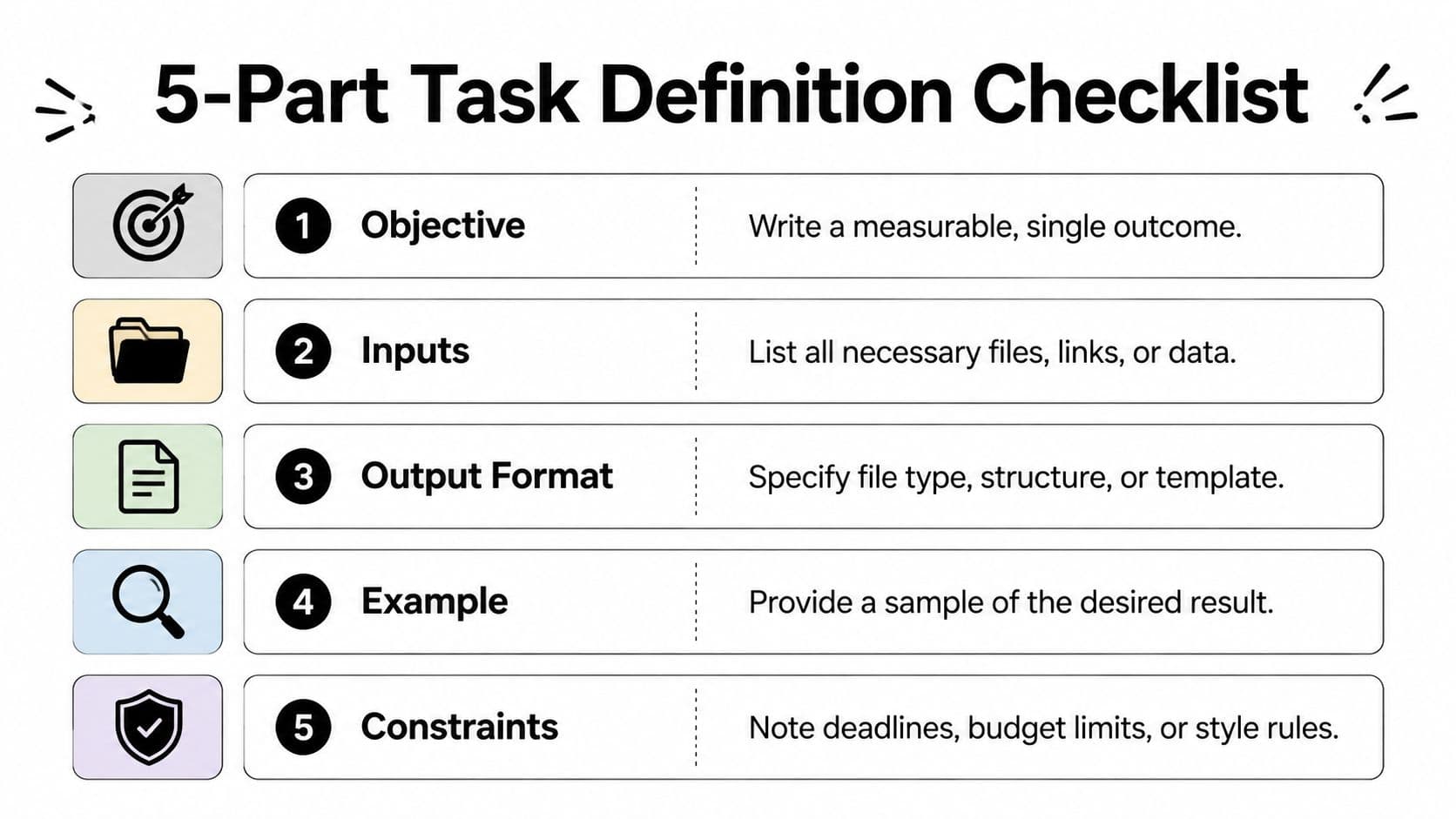
Before posting, copy this checklist:
- Objective: Can I describe one finished outcome?
- Inputs: Does the assistant have every file, link, and access detail?
- Output: Have I specified the exact format and destination?
- Example: Have I shown what acceptable work looks like?
- Constraints: Have I defined exclusions, timing, privacy, and revisions?
Detailed documentation has a measurable operational effect. Reported task completion rises from 65 to 75% without documentation to 88 to 93% with detailed SOPs, and to 90 to 95% when video walkthroughs are included. Reported error rates fall from 10 to 20% to under 2% under the strongest documentation model, with consistency stabilizing in about 7 to 15 days (delegation documentation benchmarks). A short screen recording often prevents more rework than another page of prose.
Setting Budgets, Timelines, and Revision Limits
Price the deliverable, then check the implied hourly economics. Don't start by asking what the assistant costs per hour and blindly multiply. Start with the value of a correct outcome, the complexity of the work, the expected review burden, and the consequence of failure.
Published pricing varies sharply. The global marketplace median is reported around $5 per hour, while U.S.-based VAs are often listed at $15 to $45 per hour, and executive or specialized assistants at $50 to $75 per hour (Virtual Assistant Institute pricing data). Other guides place common VA pricing around $10 to $75 per hour, depending on geography, experience, and specialization (GoLance's VA rate guide).
That spread makes a fixed task price meaningless without scope. A small administrative job may sit below $25, skilled research or writing commonly belongs in the $25 to $75 range, and specialized deliverables can move from $75 to $200 or more. These are working budget bands, not promises. The brief determines whether they're sensible.
Use a deadline with a review buffer
Give the assistant a firm delivery deadline, but keep an earlier internal deadline for your own review. If the work supports a launch, meeting, or client commitment, the delivery date shouldn't be the moment you first inspect it. Leave room to reject incomplete work, clarify a defect, or make a final decision.
Set a checkpoint when the task is large enough to fail expensively. A quick sample or midpoint review can expose a wrong interpretation before the assistant completes the entire batch.
Put revisions in writing
Include one or two revisions when the deliverable is subjective. Define what counts as a revision, then price work outside the original scope separately. A revision corrects an agreed output. It doesn't turn a research task into strategy or add a new audience after delivery.
| Task Type | Typical Price Range | Turnaround Window |
|---|---|---|
| Tactical admin, formatting, or simple data entry | Under $25 | Same day to a few days |
| Skilled research, transcription, or short-form writing | $25 to $75 | A few days |
| Specialized research, bookkeeping, or executive support | $75 to $200+ | Several days to a week |
| One-off deliverables such as research or data-entry batches | About $5 to $150 | Depends on batch size and scope |
The fairest setup protects both sides. The assistant knows what success means, and you know exactly when additional requests require a new task rather than a quiet expansion of the old one.
Delegating and Monitoring Without Micromanaging
A clean delegation loop has four moments: handoff, live thread, progress check, and final review. On a platform such as Fluidwave, the handoff includes the brief, budget, deadline, files, and acceptance criteria. The live thread then becomes the place for questions and status updates, rather than scattering decisions across email, chat, and comments.
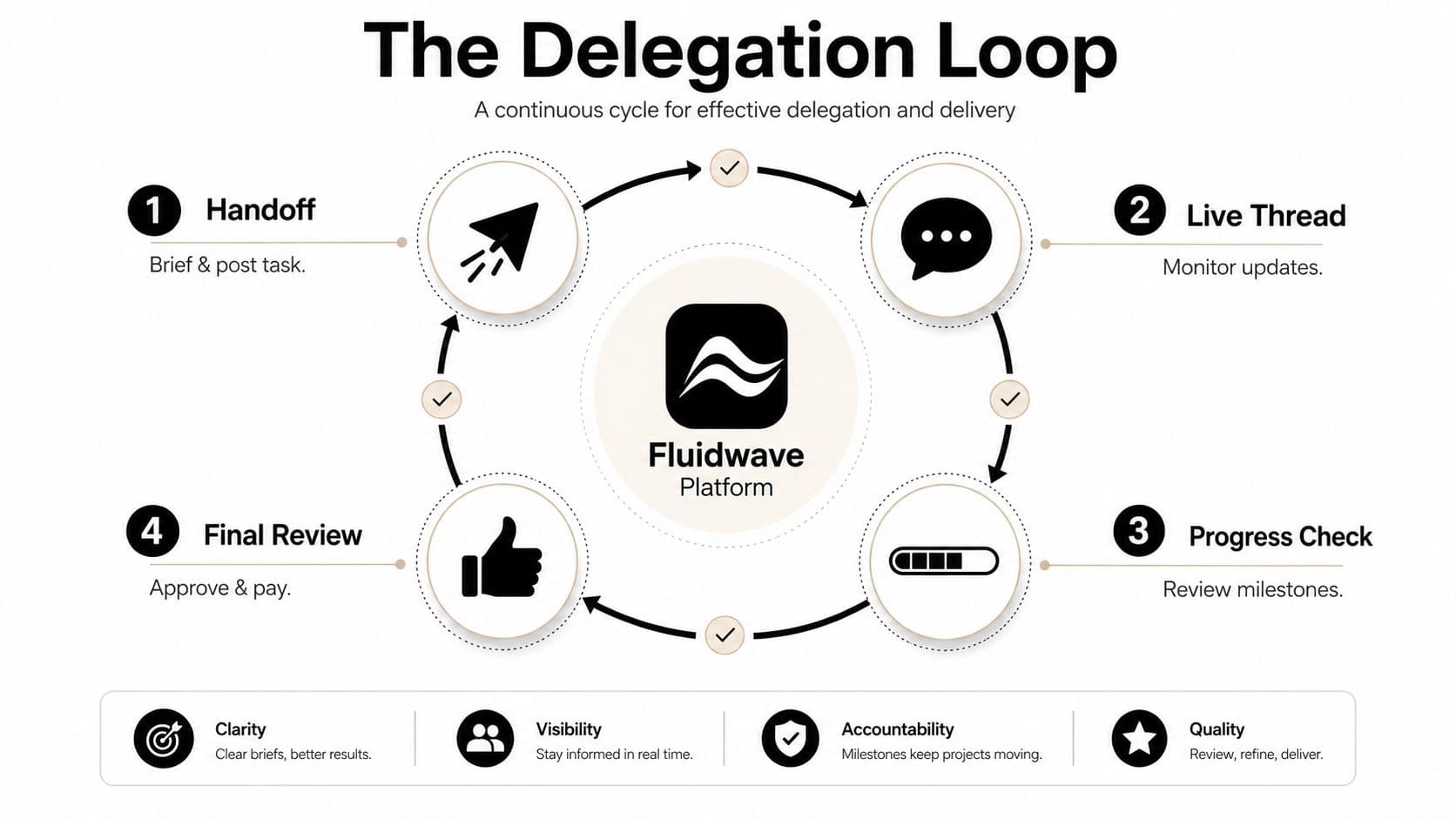
What to do at each checkpoint
At the start, confirm that the assistant understands the outcome, inputs, and exclusions. This is the best time to answer a question. A two-line clarification can prevent hours of work in the wrong direction.
During execution, stay quiet when the task is mechanical and the brief is complete. Don't ask for constant updates just to feel involved. Intervene when the assistant flags missing information, changes the method, encounters sensitive data, or appears to be adding work that wasn't approved.
At the midpoint, review evidence rather than effort. Ask for a sample row, a draft section, or a screenshot of the working state. If the sample passes, let the assistant finish. If it fails, correct the interpretation before the remaining work compounds the mistake.
At delivery, compare the result against the acceptance criteria. Check the actual file, not just the assistant's summary. Approve only when the agreed output is present, usable, and stored where your team expects to find it.
A good monitoring cadence is start, midpoint, delivery. More updates aren't automatically better updates.
Screenshots and short Loom-style walkthroughs beat dense paragraphs when the task involves a visual workflow. Bundle context into the brief, show the exact screen or example, and write self-check questions such as, “Does every row include a source?” or “Does every file follow the naming convention?”
For teams handling customer-facing operations, this guide to customer service companies can help frame the difference between simple task execution and support work that needs stronger process controls. The more a task touches customers, reputation, or private information, the more valuable explicit checkpoints become.
You can find more detail on assistant quality control, but the operating principle is simple. Monitor decisions and risk, not every click. A capable assistant should experience the thread as a safety net, not as a manager standing over their shoulder.
When Cheap Tasks Cost More Than Premium Ones
A low bid looks efficient until you spend an hour correcting it. A $5 task that needs three revisions, four clarification messages, and another quality check can cost more of your time than a $25 task delivered correctly on the first pass. The fee measures what you pay the assistant. It does not measure supervision, rework, delay, or the risk of a bad handoff.
Published virtual assistant rates vary by geography and specialization. Offshore general administrative work is commonly reported around $3 to $15 per hour, while U.S.-based bookkeeping and executive support can sit around $35 to $75 per hour (Wishup's virtual assistant industry report). These ranges do not make premium work automatically better. They show why scope, context, and consequences should determine the budget.
The hidden cost test
Ask three questions before accepting the lowest offer:
- Can you check the output mechanically? A templated data-entry batch is easy to verify. Client-facing copy requires judgment about tone, accuracy, and context.
- How much judgment does the task require? Research quality, classification rules, and brand decisions make misunderstandings expensive.
- What happens if the work is wrong? A private draft may tolerate correction. A customer email, financial record, or published asset may create a problem outside the task itself.
Set the quality bar before comparing bids. Require a fixed sample, define the acceptance criteria, and price revisions into the assignment. A cheap assistant who needs constant interpretation is not cheap. You are paying in management time.
Project-based pricing can also create clearer accountability than hourly billing. Reported data places project-based VA work at $29.34 per hour, compared with $20.15 per hour for hourly workers, while specialists average $3.67 more per hour than generalists (Virtual Assistant Institute statistics). Treat those figures as context, not a rate card. Experienced specialists charge for judgment, reliability, and a finished result.
| Task Type | Cheap ($3-$8) | Premium ($15-$30) |
|---|---|---|
| Mechanical data entry | Works when fields and examples are fixed | Useful when validation or cleanup matters |
| Lead list building | Suitable for narrow, easy-to-check criteria | Better when qualification requires judgment |
| Client-facing writing | Risky without strong examples and review | Better for tone, nuance, and fewer revisions |
| CRM cleanup | Acceptable for a documented batch | Better when records affect sales operations |
Decision rule: choose cheap for mechanical, templated work. Pay more for judgment-heavy, client-facing, or reputation-linked work.
Use a mixed roster. Give repeatable administration to a generalist, domain work to a specialist, and sensitive or high-consequence assignments to a premium assistant. Match capability to consequence, then judge the choice by total time saved, not the initial fee.
Building a Repeatable Pay Per Task System
A pay-per-task system earns back your time only when each assignment follows the same operating process. Set up intake, briefing, routing, review, and accountability once. The assistant can change. The workflow should not.
Start with one intake form. Require the objective, owner, deadline, budget, source materials, output format, example, constraints, and reviewer. A request missing any of these fields stays in draft. Sending an incomplete brief creates clarification loops, weak outputs, and avoidable review work.
Build the roster before the rush
Keep a shortlist of two or three trusted assistants for recurring work, and assign each person a defined lane:
- Generalist: Admin cleanup, formatting, file organization, and straightforward data work.
- Specialist: Bookkeeping, project coordination, content operations, or work requiring domain familiarity.
- Premium option: Sensitive, client-facing, urgent, or judgment-heavy assignments.
Maintain a review log for every completed task. Record clarification requests, defects, deadline performance, brief compliance, and revision count. Memory hides patterns. A written log shows which assistant fits each task type and where a low fee creates expensive supervision.
Run the week on a fixed cadence
Monday is intake. Collect requests, reject vague briefs, and turn approved work into standard task cards.
Tuesday is dispatch. Match each task to the right assistant tier, confirm the budget and deadline, and attach the correct template.
Thursday is the checkpoint. Review samples or progress only when the task carries meaningful risk, dependencies, or a high rework cost.
Friday is review. Approve finished work, record defects, update examples, and convert successful one-off assignments into reusable templates.
Keep acceptance checks beside the brief. A recurring CRM cleanup should specify the fields, filters, naming rules, sample records, and completion test. The next delegation then takes minutes instead of another long explanation.
Accountability depends on a clear owner. The requester owns the outcome, the assistant owns execution against the brief, and the reviewer owns acceptance. Set one channel for questions and require the assistant to flag blockers before the deadline. That rule prevents silent delays and makes responsibility visible.
Use a simple scorecard rather than vague impressions. Track accuracy, on-time delivery, clarification frequency, and revision burden by task category. Promote assistants who produce clean first drafts and reduce oversight. Pause assignments to people who repeatedly miss the brief, even if their per-task price looks attractive.
Fluidwave combines task management, delegation to human assistants, progress tracking, and pay-per-task handling without requiring a subscription for delegation. Visit Fluidwave to turn a clearly scoped task into a repeatable workflow, then build your roster around the work you want off your plate.
Focus on What Matters.
Experience lightning-fast task management with AI-powered workflows. Our automation helps busy professionals save 4+ hours weekly.