Mastering virtual assistant rates starts with understanding value. Rates reflect skills, market demand, and what you need a VA to accomplish. This guide breaks down pricing models, regional differences, skills that command premiums, hidden costs, and negotiation tactics so you can hire a VA who delivers measurable results.
June 21, 2025 (1y ago) — last updated January 19, 2026 (8mo ago)
Virtual Assistant Rates: Smart Hiring Guide
Master virtual assistant rates with practical pricing models, regional comparisons, hidden cost warnings, and negotiation tips to hire smarter.
← Back to blog
Virtual Assistant Rates: Smart Hiring Guide
Summary: Master virtual assistant rates with proven strategies from industry insiders. Discover real costs, hidden fees, and negotiation tactics to save money and hire smarter.
Introduction
Mastering virtual assistant rates starts with understanding value. Rates reflect skills, market demand, and what you need a VA to accomplish. This guide breaks down pricing models, regional differences, skills that command premiums, hidden costs, and negotiation tactics so you can hire a VA who delivers measurable results.
Understanding Virtual Assistant Rates in Today's Market

Virtual assistant rates aren’t random. They respond to demand, skill shortages, and business needs. VAs now do much more than email management—many act as strategic partners—so cost conversations are shifting from expense to investment.
From Cost Center to Profit Driver
Hiring a VA only on the basis of the lowest hourly rate often leads to disappointment. A skilled assistant can free up your time to focus on revenue-generating work. For example, handing off scheduling and follow-ups can help you close more deals and reclaim hours that directly contribute to growth. Review real-world job postings to see what employers are paying and shape realistic expectations for competitive offers.2
Demand for virtual assistance services rose significantly as remote work expanded; some reports estimate a notable increase in demand in 2024.1
Reading the Market in Real Time
Look at active job listings and recent hires rather than theoretical ranges. That practical research helps you set a realistic budget and post an attractive job that finds quality candidates quickly.2
Decoding Virtual Assistant Pricing Models That Actually Work

Choosing the right payment structure is as important as setting the rate. The wrong model can create budget stress and mismatched expectations. Below are the common models and when each makes sense. For an overview of common pricing structures, see industry references.3
Hourly vs. Project-Based Rates
-
Hourly pay: Best for unpredictable workloads, testing new relationships, or ongoing general support. Advantages include flexibility and paying only for work performed. Drawbacks include potential cost variability without strict tracking.
-
Project-based: Best for one-off projects with clear outcomes. Provides budget predictability but requires a detailed scope to avoid scope creep.
Retainers and Hybrid Agreements
-
Retainer: Pay a fixed monthly amount for a guaranteed block of hours or services. Works well for predictable ongoing needs (often 10–20 hours per month). Retainers usually get priority from VAs but typically don’t roll unused hours forward.
-
Hybrid: Combines retainer for core tasks with project-based fees for larger initiatives. This balances stability and flexibility for businesses with mixed needs.
| Pricing Model | Typical Rate Range | Best For | Pros | Cons |
|---|---|---|---|---|
| Hourly Pay | $20–$75+ per hour | Fluctuating needs | Flexible; easy to start | Cost can be unpredictable |
| Project-Based | Varies by project | One-off deliverables | Fixed cost; predictable | Requires detailed scope |
| Monthly Retainer | $400–$5,000+ per month | Ongoing support | Guaranteed availability; better value | Unused hours may not roll over |
| Hybrid Model | Combination | Ongoing + projects | Stability and flexibility | More complex to manage |
Choose the model that fits your workflow and budget: hourly for testing, project-based for clarity, retainers for steady support.
Regional Rate Reality Check: Where Your Dollar Goes Furthest
Geography plays a major role in rates. A VA in a major U.S. city may charge around $50 per hour, while an equally skilled professional in Southeast Asia might charge $8 per hour. That gap can be a bargain or a red flag depending on communication, reliability, and fit.
Decoding Global Price Tiers
Lower hourly rates often reflect differences in cost of living, not necessarily lower quality. Many regions have highly skilled professionals offering remote services at competitive prices. Use reputable regional data to guide expectations and identify where your budget buys the most value.4
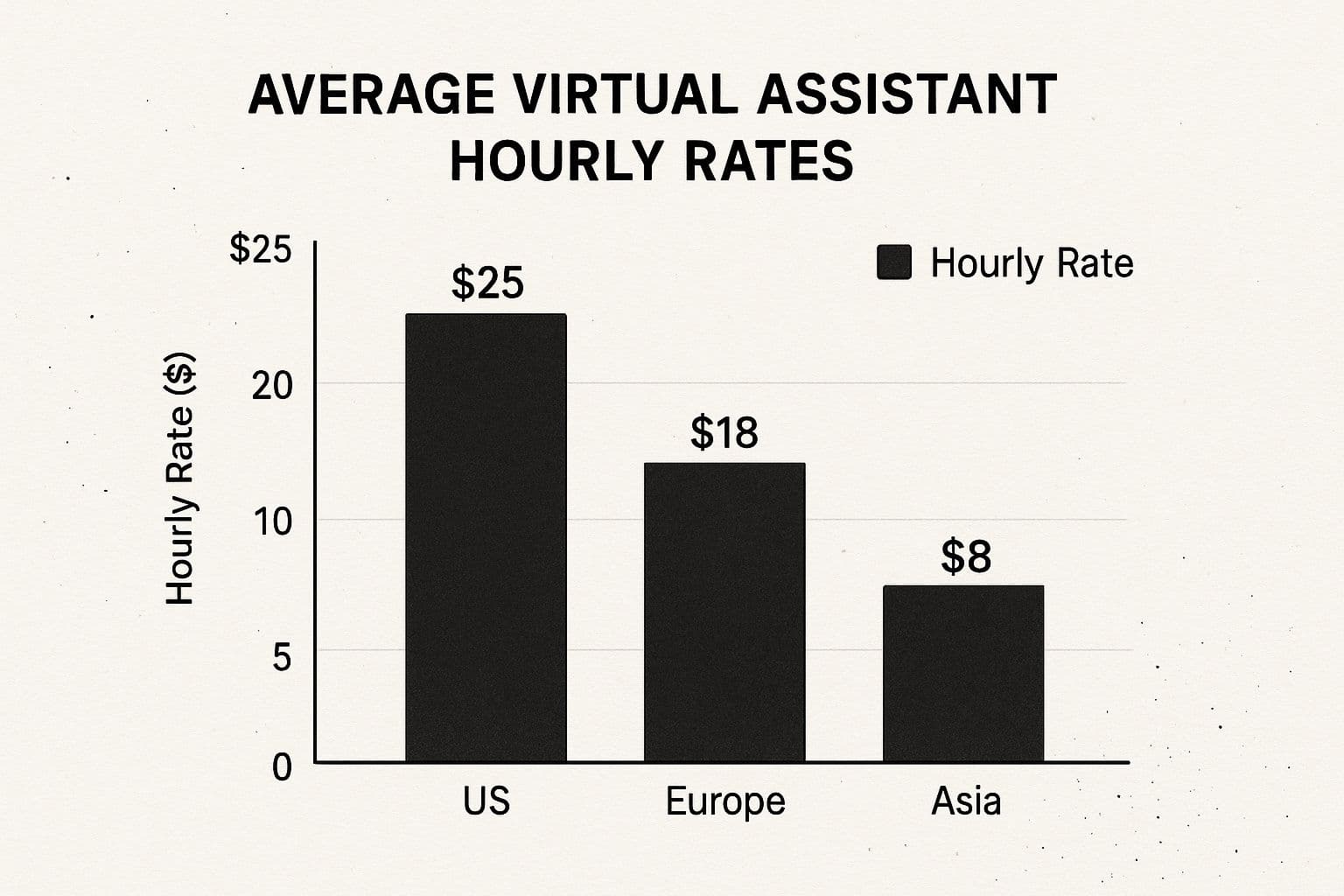
Virtual Assistant Rates by Region and Skill Level
| Region | Entry Level | Intermediate | Expert | Specialized Skills |
|---|---|---|---|---|
| North America (USA/Canada) | $15–$25/hr | $25–$40/hr | $40–$60/hr | $60–$100+/hr |
| Western Europe (UK/Germany) | $12–$20/hr | $20–$35/hr | $35–$55/hr | $55–$90+/hr |
| Eastern Europe | $8–$15/hr | $15–$25/hr | $25–$40/hr | $40–$70+/hr |
| Latin America | $7–$15/hr | $15–$25/hr | $25–$35/hr | $35–$60+/hr |
| Southeast Asia (Philippines) | $5–$10/hr | $10–$18/hr | $18–$25/hr | $25–$50+/hr |
| South Asia (India/Pakistan) | $4–$8/hr | $8–$15/hr | $15–$22/hr | $22–$45+/hr |
| Africa | $5–$12/hr | $12–$20/hr | $20–$30/hr | $30–$55+/hr |
This table highlights major cost differences and where budget stretches further. For country-specific salary expectations, consult local insights when possible.5
Beyond the Hourly Rate
When hiring internationally, consider:
- Communication skills: Test written and verbal fluency.
- Time zone overlap: Ensure several overlapping hours for collaboration.
- Cultural alignment: Important for marketing, sales, and support roles.
Skills That Command Premium Virtual Assistant Rates
Rates vary widely by skill. A basic email VA may charge $12/hour while a VA who manages complex project workflows could charge $85/hour. The difference comes down to technical expertise, strategic impact, and soft skills.
Technical Expertise That Saves Businesses Money
Technical VAs deliver automation, integrations, and analytics that cut manual work and improve outcomes. For example, a VA skilled in automation tools and CRMs can optimize lead flow and potentially increase conversions; automation has been shown to materially improve funnel efficiency in many case studies.6
Examples of high-impact technical work:
- Building dashboards to track marketing ROI
- Managing data migrations with validation
- Creating automated reports using Google Sheets and integrations
Soft Skills That Make VAs Indispensable
Soft skills are often the deciding factor in a long-term partnership:
- Masterful communication reduces back-and-forth
- Emotional intelligence anticipates team needs
- Organizational savvy keeps priorities on track
Specialized Niches and Demand Growth
Specialization leads to higher rates. The table below contrasts commoditized tasks with premium specialties.
| Skill Category | Commoditized Rate | Premium Rate | Demand Trend |
|---|---|---|---|
| Data Entry | $8–$15/hr | $25/hr | Flat |
| Executive Assistance | $15–$30/hr | $60/hr | +18% YoY |
| Copywriting | $10–$20/hr | $50/hr | +25% YoY |
| Digital Marketing | $12–$25/hr | $75/hr | +30% YoY |
| Technical Support | $10–$20/hr | $65/hr | +22% YoY |
To hire wisely, list your core needs, identify skills that create measurable returns, and match budget to skill level.
Hidden Costs That Can Double Your Virtual Assistant Budget

The headline rate is only the start. Additional costs—software, subscriptions, and onboarding—can increase your effective rate substantially. A $15/hour rate can become $28/hour once you factor in these extras.
Software, Tools, and Subscriptions
Common additional costs include:
- Project management tools (Asana, Trello, Monday.com): $10–$25 per user per month
- Communication software or a business phone line for professional use
- Specialized tools (graphic design, CRM, marketing automation): $20–$100+ per month
Decide which licenses you’ll provide and which the VA should supply. Some VAs include tool costs in their rates; others expect employer-supplied access.
Onboarding and Training Time
Onboarding takes time and budget. A $30/hour VA with 20 hours of training adds $600 before core work begins. Reduce this cost by documenting processes, building clear SOPs, and planning an efficient onboarding flow.
Negotiation Strategies That Create Win-Win Partnerships
Aim for mutual respect rather than aggressive haggling. Frame compensation conversations around value and outcomes, not only the hourly number. Share a clear scope and invite the VA to propose a fair structure.
Frame the Conversation Around Value
Start with responsibilities and expected outcomes. Ask, “For these responsibilities, what compensation structure would be fair?” Be transparent about budget; organized clients get more accurate estimates and better proposals.
Structure Incentives for Shared Success
Link pay to performance to create shared incentives:
- Project completion bonus for early or under-budget delivery
- Performance-based review after a 90-day trial with KPIs tied to a rate increase
- Revenue share for VAs directly impacting sales or lead generation
The intelligent virtual assistant market has recently shown rapid growth, underscoring the shift toward performance and results.7
Key Takeaways for Smart Virtual Assistant Rate Decisions
- Build a realistic budget that focuses on value, not just the lowest rate.
- Define success with KPIs so you can measure impact.
- Start with a paid 2–4 week trial to validate fit before committing long term.
Implement clear expectations, fair compensation, and productivity strategies to maximize ROI. For pay-per-task assistance, see Fluidwave’s platform for flexible delegation and results.
Common Questions (Q&A)
Q: How much should I budget for a VA?
A: Budget based on role and skill. Administrative support can range from $10–$30/hr; specialized roles often start at $30+/hr. Account for onboarding and tools when setting a final budget.
Q: Should I hire hourly, project-based, or on retainer?
A: Use hourly to test relationships, project-based for clear deliverables, and retainers for steady, ongoing work. Hybrid models combine stability and flexibility.
Q: How do I avoid hidden costs?
A: Clarify who pays for software and training up front, document processes to reduce onboarding time, and include those costs in your total budget.
1.
There Is Talent, “Virtual Assistant Statistics, Insights & Trends,” https://thereistalent.com/virtual-assistant-statistics-insights-trends/.
2.
RemoteFirstJobs, “Remote Virtual Assistant Jobs,” https://remotefirstjobs.com/remote-virtual-assistant-jobs.
3.
ScheduleThreads, “Pricing Structures,” https://www.schedulethreads.com/en/pricing.
4.
A Team Overseas, “20 Virtual Assistant Statistics You Should Know,” https://www.ateamoverseas.com/blog/20-virtual-assistant-statistics-you-should-know/.
5.
Nearshore Business Solutions, “Salary Expectations in Colombia,” https://nearshorebusinesssolutions.com/news/salary-expectations-in-colombia/.
6.
Zapier, case studies and automation resources, https://zapier.com.
7.
Scoop.Market.US, “Intelligent Virtual Assistant Statistics,” https://scoop.market.us/intelligent-virtual-assistant-statistics/.
Focus on What Matters.
Experience lightning-fast task management with AI-powered workflows. Our automation helps busy professionals save 4+ hours weekly.