Download our free change management plan template and guide. Navigate organizational change, define scope, manage stakeholders, & track success.
May 28, 2026 (3mo ago)
Free Change Management Plan Template 2026
Download our free change management plan template and guide. Navigate organizational change, define scope, manage stakeholders, & track success.
← Back to blog
A lot of teams land here at the same moment. A system rollout is approved. A reorg is coming. Two departments are about to merge. Leadership wants the transition to feel smooth, but the people doing the work can already see the gaps. Who needs to know what, when, and from whom? Who owns training? What happens when managers say they support the change but don't have time to coach their teams through it?
That's where a change management plan template either earns its keep or becomes another file nobody opens after kickoff.
Most templates fail because they stop at documentation. They collect goals, risks, and stakeholder lists, then sit in a shared drive while essential work moves into email threads, chat messages, and last-minute meetings. A useful template does the opposite. It turns a messy transition into assigned work, visible milestones, feedback loops, and follow-up actions that people can execute.
Why Most Change Initiatives Fail And How a Plan Helps
The warning signs usually show up early. Leaders announce a change before managers are ready to answer questions. Training gets scheduled after the rollout date is already locked. Employees hear broad promises but not what will change in their day-to-day work. By the time resistance becomes visible, the project team is already in recovery mode.

That's not a small risk. Prosci's research shows only 13% of organizations with poor change management met their project objectives, while UC Berkeley notes that only 30% of change initiatives are successful overall, according to the UC Berkeley change management toolkit.
A lot of organizations still respond to those odds with optimism instead of structure. They assume a strong business case will carry the work. It won't. The business case explains why leadership approved the change. The plan explains how people will get through it.
What bad planning looks like in practice
Most failing efforts have the same pattern:
- Scope without translation: The project team knows what's changing technically, but affected teams don't know how their workflow will change.
- Communication without segmentation: Everyone gets the same message, even though finance, operations, managers, and frontline staff need different answers.
- Training without timing: Training arrives too early, too late, or in the wrong format.
- Ownership gaps: Tasks exist, but no single person is accountable for moving them.
- Go-live obsession: Teams treat launch as the finish line instead of the midpoint.
Practical rule: If your template can't tell a manager what to do next week, it's not a plan yet.
What a real plan changes
A strong change management plan template gives the team a repeatable sequence. Define the change. Identify who's affected. map the risks. assign ownership. schedule communication. prepare training. track milestones. collect feedback. adjust.
That sounds simple, but simplicity is the point. During a change initiative, teams don't need more theory. They need a working operating document that keeps people aligned when pressure rises.
The best templates also force difficult conversations early. Is the sponsor visible enough? Are department heads prepared to handle pushback? Which teams face the biggest workflow disruption? What happens if adoption stalls after launch? If the template doesn't surface those questions, they still exist. They just hit later, when fixing them costs more time and credibility.
Anatomy of an Effective Change Management Template
A useful change management plan template has to do more than capture notes. It should work like a control panel for the initiative. Every section should help someone make a decision, assign work, or track whether the change is taking hold.
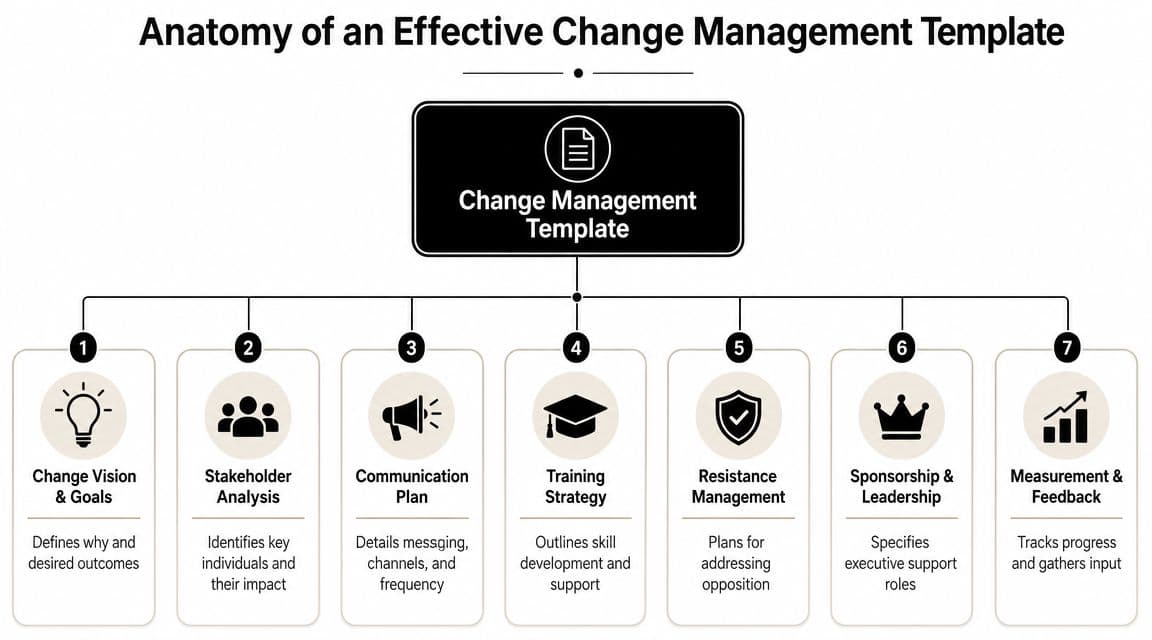
That's why modern guidance from AIHR and Asana emphasizes objectives, stakeholder roles, communication strategy, timelines, and risk management so the plan becomes operational rather than descriptive, as noted in AIHR's guide to a change management plan template.
The sections that matter most
A solid template usually includes these core parts:
- Change vision and goals: Spell out what's changing, why it matters, and what success should look like in practical terms.
- Scope and boundaries: Clarify what is included, what is not, and where the handoffs to adjacent teams sit.
- Stakeholder analysis: Identify affected groups, likely concerns, influence levels, and support or resistance patterns.
- Roles and responsibilities: Document who approves, who drives execution, who supports managers, and who owns follow-through.
- Communication plan: List audience, message, channel, sender, and timing.
- Training strategy: Define what each group must learn, how they'll learn it, and where support lives after launch.
- Risk and resistance management: Capture likely blockers, warning signs, mitigation actions, and escalation routes.
- Timeline and milestones: Show key dates, dependencies, review points, and decision gates.
- Measurement and feedback: Track adoption, engagement, impact, and post-launch issues.
Why each part earns its place
The weakest templates usually cut the “human” sections first. They keep scope, dates, and deliverables, then reduce communication and training to a paragraph or two. That shortcut causes trouble fast.
A stakeholder analysis matters because resistance doesn't spread evenly. One manager who resists the change without overt opposition can undermine a whole department. A communication plan matters because employees interpret silence as uncertainty, and uncertainty fills itself with rumors. A training plan matters because people don't adopt new behavior just because the system is live.
A template should connect technical rollout and behavior change in the same document. If those two tracks drift apart, the project starts saying one thing while the organization experiences another.
What to remove from your template
Many teams overload the document with content that looks thorough but slows execution. Cut or simplify:
| Keep | Remove or shrink |
|---|---|
| Clear owner fields | Long narrative summaries nobody updates |
| Milestone checkpoints | Generic change theory |
| Audience-specific messages | Repeated background information |
| Risk triggers and actions | Vague “monitor closely” notes |
| Post-launch support steps | Unused approval layers |
The rule is simple. If a section won't change a decision or trigger an action, it doesn't deserve much space.
Customizing the Template for Your Initiative
A change management plan template becomes useful only after it's shaped around the initiative in front of you. A software rollout needs a different level of readiness work than a policy change. A team restructure creates different resistance patterns than a merger. The template gives you the framework. Your job is to make each field specific enough that another manager could run with it.
The cleanest workflow starts with the sequence many practitioners use in the field: assess impact and readiness, segment stakeholders, build a milestone-based roadmap, then define a sustainment loop that continues after go-live. That structure aligns with monday.com's change management plan guidance.
Start with impact and readiness
Before writing messages or booking training, pin down what's changing for each group.
Use a simple set of prompts:
- What changes in the daily workflow
- What skills or habits need to change
- What systems, approvals, or dependencies are affected
- Where disruption is most likely
- Which managers are prepared to lead through it
A basic impact note can be short:
Sales managers will approve requests in the new system instead of by email.
Operations staff will follow a revised intake workflow.
Finance will use new reporting fields after cutover.
If your initiative includes process changes, pair this with a documented request path. Teams often benefit from using a structured workflow similar to a change request form process so scope changes and operational exceptions don't start flying around informally.
Segment stakeholders by influence and resistance
Don't dump everyone into a single “affected employees” category. That's where templates go flat.
A practical model is to sort groups by two dimensions:
- Influence on adoption
- Likely resistance level
That gives you four useful buckets:
- High influence, high resistance: Senior managers, team leads, process owners who can slow adoption if they aren't aligned.
- High influence, high support: Sponsors, respected department heads, internal champions.
- Low influence, high resistance: Individual contributors who may not block rollout but can create visible frustration or workarounds.
- Low influence, high support: Early adopters who can help normalize the change.
Build the roadmap around milestones, not intentions
A weak roadmap says “communicate,” “train,” and “launch.” A workable roadmap lists milestones with owners and completion criteria.
Examples:
- Sponsor announces the change to managers
- Managers receive their briefing pack and Q&A guide
- Impacted users complete role-based training
- Support channel opens before go-live
- First-week feedback review happens
- Adoption issues are triaged and assigned
Field note: Milestones should describe events you can verify, not hopes you can't measure.
Define ownership with a RACI
In this context, confusion usually shows up. Teams know what needs to happen, but they don't know who is driving it.
Here's a simple sample matrix you can adapt.
| Activity | Project Sponsor | Project Manager | Department Head | End User |
|---|---|---|---|---|
| Approve change vision and scope | A | R | C | I |
| Complete stakeholder analysis | C | A/R | C | I |
| Review department impacts | I | C | A/R | I |
| Approve communication schedule | A | R | C | I |
| Deliver team-level briefings | I | C | A/R | I |
| Attend training sessions | I | C | C | A/R |
| Report adoption issues after go-live | I | R | C | A/R |
| Review sustainment actions | A | R | C | I |
A quick reminder on the letters:
- R means does the work
- A means owns the outcome
- C means gives input
- I means needs visibility
If you have more than one “A” in a row for the same task, that's usually a warning sign. Shared accountability often becomes no accountability.
Add the sustainment loop before launch
Organizations often tack sustainment on at the end. That's backwards. Build it into the template before rollout starts.
Include:
- Feedback channels: surveys, office hours, manager check-ins, support inbox
- Observation points: what managers should watch for in the first few weeks
- Reinforcement actions: refresher training, process reminders, updated SOPs
- Ownership transition: when support moves from project team to business owner
At this point, a template stops being a planning artifact and becomes an operating plan.
Designing a Proactive Communication and Training Strategy
Take a company-wide software update as an example. The technical team is ready. The license is signed. The rollout date is fixed. What usually goes wrong isn't the software itself. It's the timing and quality of communication around it.
Employees don't need more announcements. They need useful context. Managers don't need a slide deck with slogans. They need talking points for the questions their teams will ask in the first ten minutes.
A simple communication rhythm that works
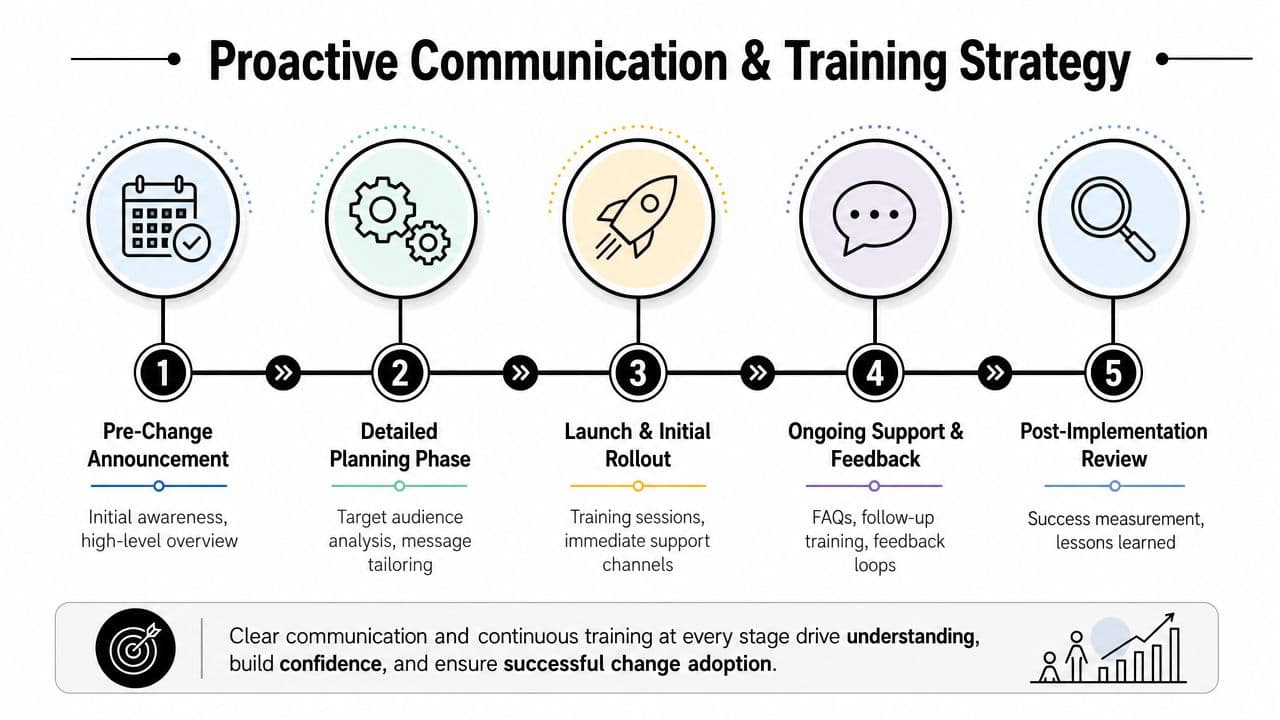
For a software rollout, I'd build the communication plan in waves rather than one big launch blast.
First wave. Leadership sends the initial message. It covers why the change is happening, what's known, what's still being worked out, and when people will hear more.
Second wave. Managers get a briefing pack before their teams do. That pack should include likely questions, workflow impacts, and the exact message leaders want reinforced.
Third wave. End users receive role-specific communication. Not generic company language. Actual details about what changes for them, where to get help, and what action they need to take.
Fourth wave. During rollout week, send short updates that answer real questions. What's live, what to do if something doesn't work, who is available for support.
Training should match the job, not the project schedule
A lot of training plans are built around what's convenient for the project team. That's a mistake. People retain training better when it's close to use, relevant to the tasks they perform, and reinforced after launch.
Good formats vary by audience:
- Live sessions: Best for managers, team leads, and groups that need discussion.
- Short recorded modules: Useful for repeatable task training and future onboarding.
- Office hours: Ideal for post-launch support and edge cases.
- Quick-reference guides: Good for high-frequency tasks people forget under pressure.
If you need a structured way to identify who needs what, this guide on how to build a clear training plan is a helpful companion to the template.
For communication scheduling, I'd map all key messages, channels, owners, and dates in one place. A dedicated project communications plan template helps keep those touchpoints from getting lost across email, chat, and meeting notes.
People rarely resist change in the abstract. They resist confusion, extra effort, and the fear of looking incompetent in front of peers.
What to avoid
Three communication mistakes come up constantly:
- Announcing too early with no specifics: People start speculating.
- Announcing too late: Managers feel bypassed and employees feel ambushed.
- Treating training as a single event: Adoption drops as soon as real-world questions appear.
The best plans assume people need repetition, clarity, and easy access to help.
Executing and Delegating Your Plan with Fluidwave
Once the template is filled out, the main challenge starts. Every communication, training task, review checkpoint, and follow-up action has to become visible work. If it stays inside the document, execution slips almost immediately.

Turn the plan into a live board
Set the initiative up as an active project, not a static file. A Kanban-style board is usually enough for most change efforts:
| Column | What belongs there |
|---|---|
| To Do | Upcoming communications, training prep, stakeholder meetings, support tasks |
| In Progress | Items actively being drafted, reviewed, delivered, or resolved |
| Waiting | Tasks blocked by approvals, dependencies, or missing input |
| Done | Completed deliverables with final owner confirmation |
Then create individual tasks from the template itself. Don't use broad placeholders like “handle communications.” Break work down into actual outputs:
- Draft sponsor announcement
- Prepare manager Q&A sheet
- Schedule role-based training sessions
- Build office-hours calendar
- Review post-launch feedback
- Update support documentation
- Assign adoption issues to department owners
Delegate the work that doesn't need your direct time
A platform like Fluidwave proves practical. It combines task management views with delegation to human virtual assistants on a pay-per-task basis. For a project manager or operations lead, that means support work can move without waiting for your calendar to clear.
Tasks worth delegating often include:
- Formatting communication packs: Turning rough draft content into clean manager-ready documents.
- Scheduling logistics: Coordinating training invites, reminders, room links, and attendance follow-ups.
- Feedback consolidation: Gathering survey comments, meeting notes, and issue logs into a usable summary.
- Status cleanup: Updating due dates, tagging owners, and keeping the board current.
That doesn't replace leadership, sponsorship, or stakeholder conversations. It does remove a lot of administrative drag that slows the plan down.
Keep a short operational cadence
A change initiative usually needs a tighter review rhythm than a standard project. I prefer a brief recurring check-in with these questions:
- What milestone is due next?
- Which audience hasn't received what they need yet?
- Where is resistance increasing?
- What's blocked?
- What can be delegated today?
If your change touches a platform rollout, it also helps to look at examples of change management for ServiceNow success, because enterprise implementations often fail at the handoff between technical deployment and user adoption.
Good execution is rarely dramatic. It's a steady pattern of assignments, follow-ups, and visible ownership.
Measuring Success and Sustaining Momentum
A change initiative isn't complete when the system goes live or the org chart changes. That moment just tells you deployment happened. It doesn't tell you whether people adopted the new way of working, whether managers reinforced it, or whether the business stabilized around the change.
Measure behavior, not just completion
The right review questions are straightforward:
- Are people using the new process the way it was intended?
- Are support requests showing the same confusion repeatedly?
- Are managers reinforcing the change or passively allowing workarounds?
- Which teams still need coaching or refresher training?
Use a consistent tracking method so those signals don't get buried. A practical reference point is this guide to project tracking metrics, especially if your team needs a clearer way to monitor progress after launch.
Sustainment needs owners and routines
Most changes fade because nobody owns reinforcement once the project team steps back.
Set a simple sustainment rhythm:
- Weekly early review: Gather support issues, manager observations, and adoption blockers.
- Targeted follow-up: Send refreshers only where confusion is visible.
- Ownership transition: Move long-term responsibility to the team that will live with the process.
- Lessons learned: Record what slowed adoption so the next initiative starts stronger.
The strongest change management plan template isn't the one with the most detail. It's the one that still drives action after launch, when enthusiasm drops and habits try to snap back.
If you want to turn your change management plan template into assigned work instead of another dormant document, Fluidwave gives you a practical way to organize tasks, track progress across views, and delegate administrative follow-up without building a heavy process around it. For project managers running live change initiatives, that's often the difference between a plan that looks complete and one that gets executed.
Focus on What Matters.
Experience lightning-fast task management with AI-powered workflows. Our automation helps busy professionals save 4+ hours weekly.