Build an effective change request form and workflow. Covers essential fields, approval stages, templates, and Fluidwave automation.
May 25, 2026 (4mo ago)
Build Your Change Request Form: Automate Workflow With
Build an effective change request form and workflow. Covers essential fields, approval stages, templates, and Fluidwave automation.
← Back to blog
A lot of teams are dealing with the same problem right now. A stakeholder sends a Slack message, a client mentions a “small tweak” on a call, someone updates a requirement in a comment thread, and suddenly the project has changed without anyone formally agreeing to the cost, timing, or downstream impact.
That's where a proper change request form stops being admin overhead and starts acting like project protection. The form matters, but its true value comes from connecting three things that are usually treated separately: the fields you collect, the workflow you enforce, and the system you use to run it day to day. If one of those pieces is weak, the process breaks.
Why Unmanaged Changes Silently Kill Projects
The ugly version of scope creep rarely arrives as a dramatic event. It shows up as a string of reasonable-sounding requests.
A sales lead asks for one extra approval step. A client wants one additional report. An internal manager asks whether the team can “also” support a slightly different use case. Nobody wants to be difficult, so the team says yes, or worse, says nothing and starts working. A few weeks later, deadlines slip, handoffs get messy, and people start arguing over what was approved.
That pattern is common because informal change feels fast in the moment. It avoids a meeting, avoids documentation, and avoids the discomfort of saying, “We need to assess this properly.” The cost comes later, when the project manager has to untangle conflicting assumptions, explain budget pressure, and repair trust with stakeholders who thought their request had already been committed.
If your team is already seeing that drift, this guide on managing project scope creep is worth reading alongside your change control process.
Small requests create big damage
A bad change process usually has three symptoms:
- No shared record: Requests live in email, chat, hallway conversations, or meeting notes.
- No impact review: Nobody checks effects on scope, schedule, cost, risk, or resourcing before work starts.
- No decision trail: Teams remember approval differently, which turns every dispute into a memory contest.
Practical rule: If a change can affect delivery, ownership, budget, timeline, or expected output, it needs to be visible and reviewable before work begins.
This isn't about being bureaucratic. It's about preventing avoidable confusion.
Formal change management is also tied to outcomes. Prosci reports that 73% of organizations with good change management programs met or exceeded objectives, versus 39% of those with fair programs, as cited by Pipefy's change request overview.
What a form actually fixes
A solid change request form forces clarity at the point where projects usually become vague. It makes someone define what they want, why they want it, what problem it solves, and who needs to approve it. That alone filters out a surprising amount of low-quality request traffic.
It also gives the project manager something more valuable than paperwork. It creates a decision record.
When changes go right, teams usually aren't more talented. They're more explicit. They capture the request, evaluate it before committing, and route it through a process that matches the size of the impact.
Anatomy of an Effective Change Request Form
A useful change request form doesn't ask for everything. It asks for the right things.
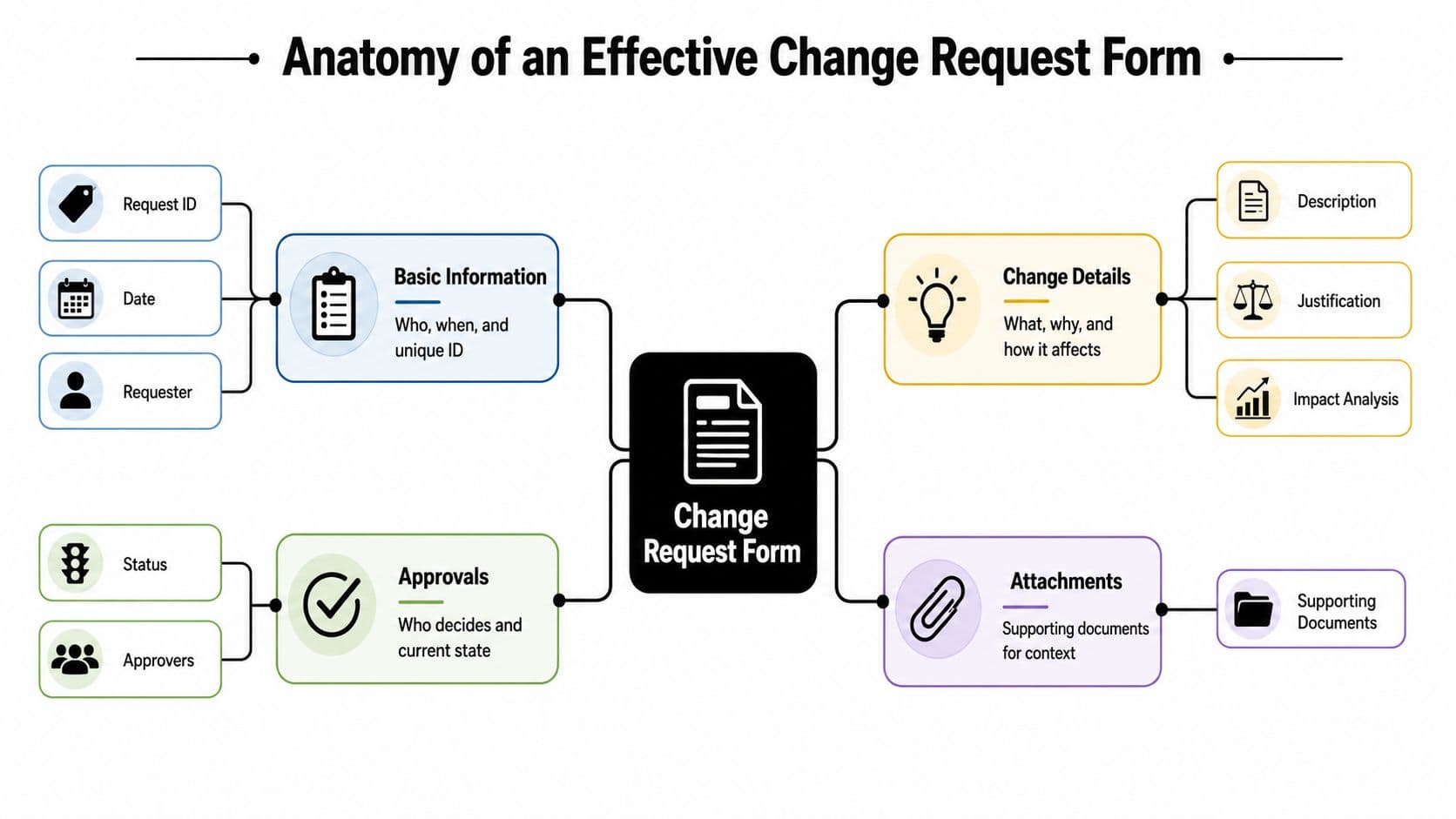
The strongest forms collect enough detail to support a decision without turning the requester into a full-time analyst. The University of California Office of the President change control template shows the backbone well: a robust form typically captures a unique change title, category such as scope, time, or cost, originator, justification, current workaround, and impact areas, turning an informal request into a traceable governance record, as shown in the UCOP change control template.
Start with identification fields
If the request can't be tracked, it can't be managed.
You need basic fields that establish ownership and make the request searchable later. That usually includes a request ID or unique title, submission date, requester name, business unit, manager, and primary contact details.
Good input is specific. “Add region-based approval rule for procurement requests” is usable. “Need workflow update” is not.
If your team is standardizing operational documents across departments, a reusable template system for internal workflows helps keep these fields consistent.
Capture the actual change, not a vague idea
Many forms fail when they ask “describe the change” and get back a sentence that creates more questions than answers.
Ask for:
- Requested change description: What should be different after approval?
- Category: Scope, time, or cost.
- Affected systems or deliverables: What part of the project or operation changes?
- Current workaround: What are people doing now to cope with the issue?
- Supporting documents: Screenshots, specifications, markups, contracts, or dependency notes.
A request like “Need report changes” is weak. A request like “Add a monthly export field for invoice status to the client reporting dashboard” gives the reviewer something concrete.
The form should reduce back-and-forth, not generate it.
Ask for business justification
A lot of requests sound urgent until someone asks why they matter.
Add fields for the reason behind the change. What problem does it solve? Is it tied to compliance, customer commitment, operational efficiency, or defect prevention? What happens if the team doesn't implement it now?
This is also where supporting legal or contractual context matters. If a requested change affects obligations, approval language, or commercial terms, a structured reference point like LegesGPT contract solutions can help teams gather the right documentation before sending the request into review.
Force an impact view before approval
This is the part that separates a real change request form from a glorified suggestion box.
Someone responsible for delivery needs to assess likely impact across scope, schedule, cost, risk, and resources. Even if your form starts with requester input only, your workflow should add these evaluation fields before final approval.
Here's a practical structure:
| Field Category | Field Name | Purpose & Example |
|---|---|---|
| Basic Information | Request ID or Title | Makes the request traceable. Example: “CR-017 Add supplier approval path” |
| Basic Information | Date Submitted | Shows when the request entered control |
| Basic Information | Originator | Identifies who raised the request and who can clarify it |
| Change Details | Category | Classifies the request as scope, time, or cost |
| Change Details | Description | States exactly what should change |
| Change Details | Current Workaround | Explains what users are doing now and why it's not ideal |
| Justification | Business Reason | Explains why the change matters and what problem it solves |
| Justification | Supporting Documents | Adds specifications, screenshots, or contract notes |
| Impact Analysis | Impact Areas | Notes which systems, teams, deliverables, or processes are affected |
| Impact Analysis | Risk Assessment | Flags likely operational or delivery risks if approved |
| Governance | Approver | Identifies who has authority to accept or reject |
| Governance | Status | Tracks whether the request is drafted, submitted, approved, rejected, implemented, or closed |
What works and what doesn't
What works is plain language, constrained input, and fields that map to decision-making.
What doesn't work is a bloated form with twenty open-ended questions that nobody wants to complete. Teams abandon those fast, then they go back to chat messages and side agreements.
The right form is detailed enough to protect the project, but tight enough that people will use it.
Mapping Your Change Request Workflow
A form by itself won't save you. Teams fail with beautifully designed forms all the time because nobody defined what happens after submission.
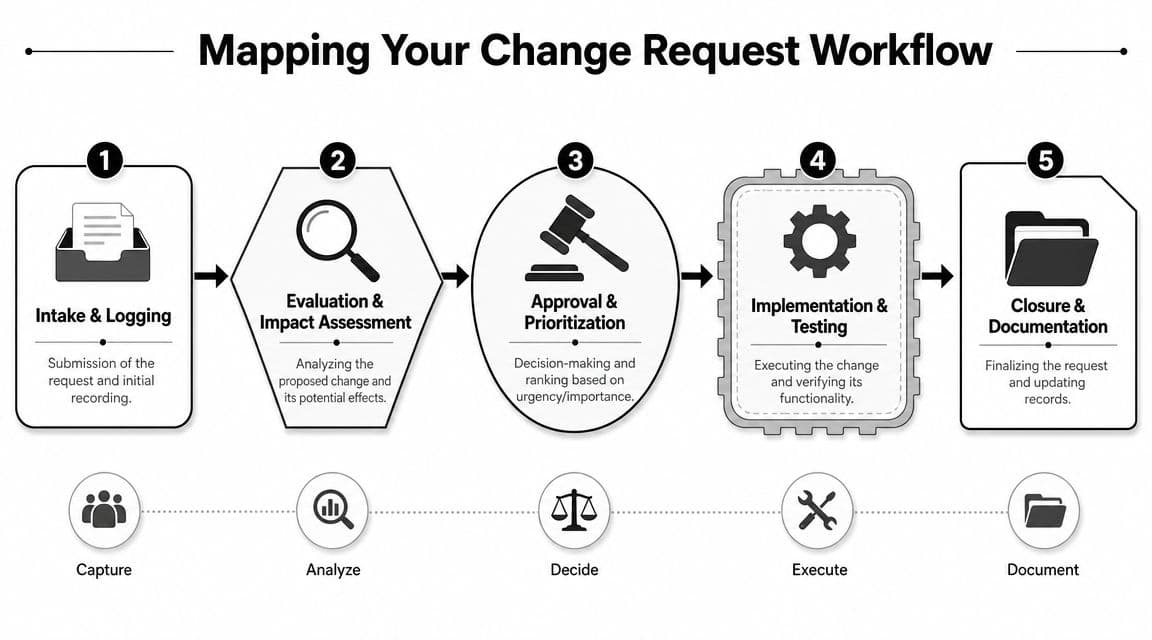
The better model is a controlled lifecycle. The UCOP structure frames change in five stages: initiation, analysis, resolution or approval, implementation, and verification or closing. In practice, that means every request moves through a known path instead of bouncing between inboxes.
If your team hasn't mapped this visibly yet, a simple process mapping approach for operational workflows makes hidden handoff problems much easier to spot.
Intake and logging
Every request should land in one place. Not some in email, some in chat, and some inside meeting notes.
At intake, the team checks whether the request is complete, assigns an owner, logs the request, and confirms whether it belongs in the formal process. At this point, they reject duplicates, ask for missing documentation, or return vague submissions for clarification.
A practical intake checklist:
- Check completeness: Title, requester, description, justification, and affected area should be present.
- Confirm category: Scope, time, or cost should be selected correctly.
- Assign owner: One person should shepherd the request through review.
- Record status: Draft, submitted, under review, or returned for edits.
Evaluation and impact assessment
Project discipline is evident here.
The team reviews what the change will alter, who it affects, and what trade-offs it creates. For smaller organizations, that may be the project manager and delivery lead. In larger environments, it may involve operations, finance, security, legal, or a change control board.
A useful assessment asks:
- What work must be added, removed, or revised?
- Which dates, dependencies, or approvals shift?
- What risks increase if the change is accepted?
- What happens if the request is delayed or rejected?
A change request should produce a decision, not a debate loop.
Approval and prioritization
Not every request deserves the same scrutiny. A low-impact wording fix and a major cross-team process revision shouldn't travel through identical approval paths.
Approval rules are important. Some teams route minor requests to a functional manager. Larger, riskier, or contract-affecting changes often need multi-party approval. Modern systems show how mature that governance can be. The Australian Bureau of Statistics describes a web-based process with constrained request types and limits users to one open change request per type, while other public-sector forms require dual-signature governance, as outlined in the ABS change request process.
That matters because it turns authorization into a control point, not a casual thumbs-up in chat.
Implementation, verification, and closure
Approved is not done.
Once accepted, the team needs to update delivery plans, notify stakeholders, complete the work, test the outcome, and then close the request with final documentation. Rejected requests also need closure notes, otherwise they reappear later as “open questions.”
A clean closeout usually includes:
- Implementation notes: What changed and when
- Verification evidence: Testing result, stakeholder confirmation, or operational check
- Final status: Closed approved, closed rejected, withdrawn, or superseded
- Change log update: So future teams can see the decision trail
The projects that stay stable aren't the ones with fewer change requests. They're the ones that route each request through a path everyone understands.
Best Practices and Common Pitfalls to Avoid
Most broken change processes don't fail because people dislike structure. They fail because the process is either too loose to control anything or too heavy to use in real work.
Do this, not that
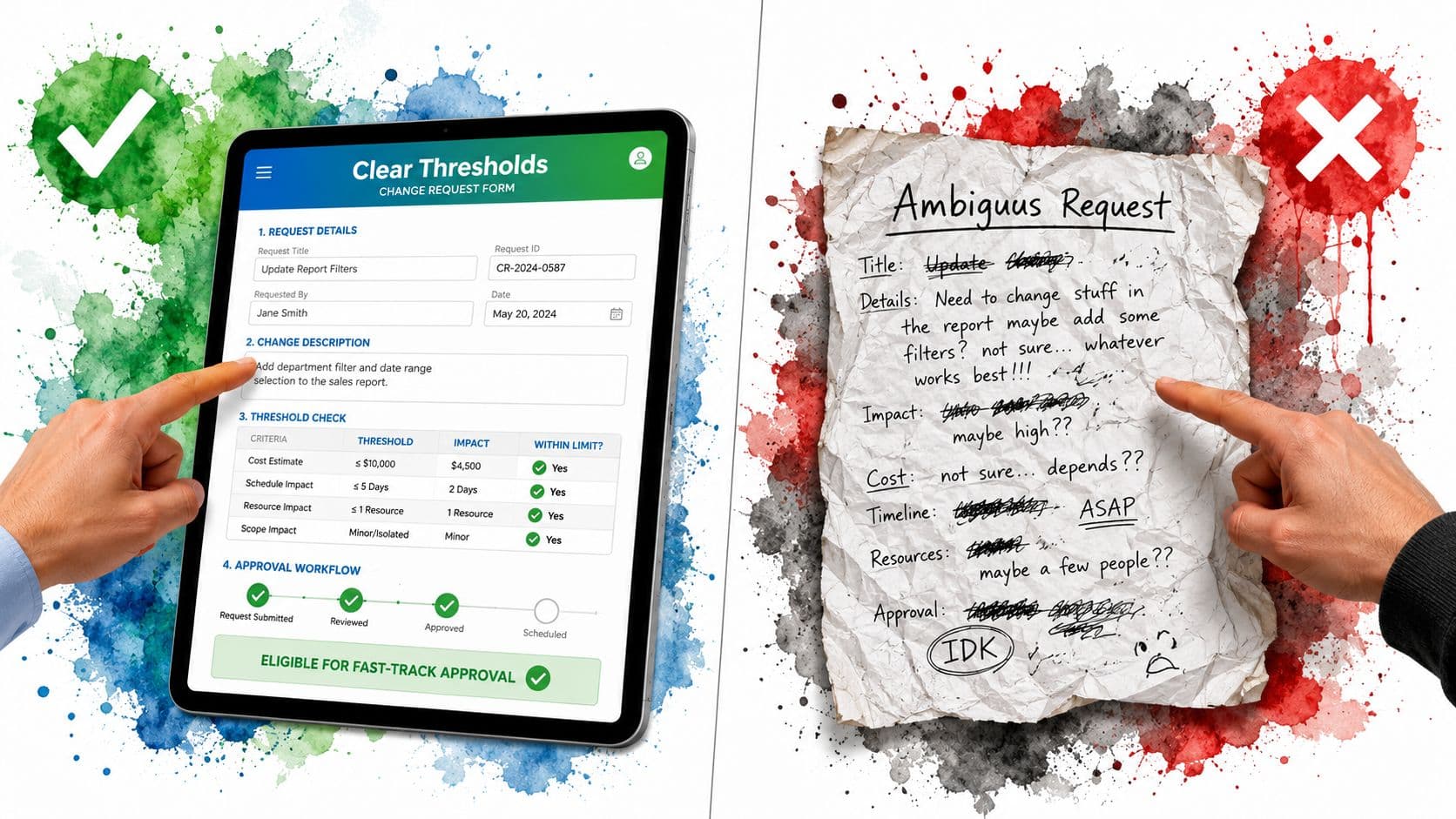
- Set thresholds, not blanket rules: Define what requires a formal change request. Don't force every cosmetic tweak through the same path as a major scope shift.
- Keep one visible change log: Track status, owner, decision, and implementation outcome in one place. Don't make people hunt through email threads.
- Require justification: Ask why the change matters. Don't approve work just because the requester sounds senior or urgent.
- Review downstream impact: Check schedule, cost, resources, and affected teams before approval. Don't let implementation teams discover the consequences after the decision.
- Communicate final decisions clearly: Tell stakeholders whether the request was approved, rejected, deferred, or returned for more detail. Don't leave status implied.
The common traps
One trap is treating the form as the process. It isn't. If people submit requests and nothing predictable happens next, they'll stop trusting the system.
Another is gold plating. Teams sometimes add improvements that nobody requested because the developer, analyst, or manager thinks it would be “better while we're in there.” That creates unapproved scope just as surely as client-driven change does.
Field lesson: Unapproved improvement is still unapproved change.
The third trap is silent approval. Someone says “sounds fine” in a meeting, the team interprets that as authorization, and later nobody agrees on what was approved. If the approval isn't recorded in the workflow, it's not reliable.
Keep the process usable
A practical process should feel controlled, not punishing.
That means short forms for low-risk requests, clear routing rules, fast feedback when submissions are incomplete, and a visible status trail. If people think the form is a black hole, they'll work around it. Once they work around it, your governance is gone.
The best test is simple. Can a requester submit a clear change in a few minutes, and can a reviewer make a sound decision without chasing five other people for context? If the answer is no, refine the process before rollout.
Automating Change Requests with Fluidwave
A change request process usually breaks at handoff points, not on the form itself. Someone submits a request, a reviewer misses it, approval lives in chat, implementation starts before the decision is recorded, and two weeks later the team argues about who authorized what.
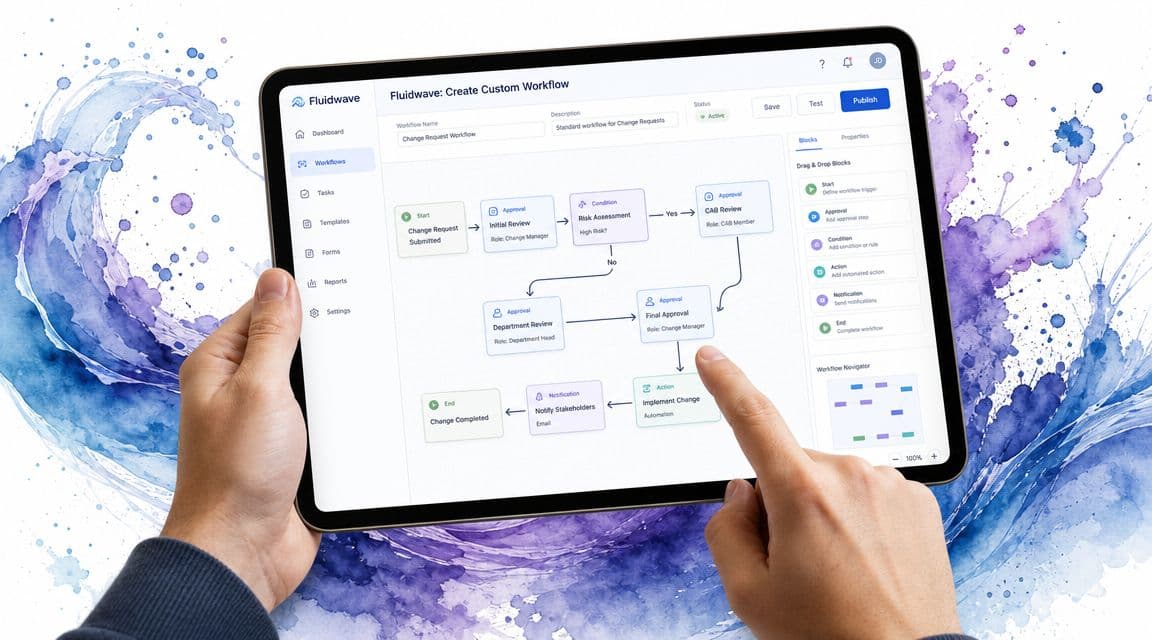
A task management platform fixes that only if you build the form, workflow, and automation as one system. Fluidwave is useful here because it lets you turn a static document into a controlled process that people can submit, review, approve, and track in one place.
Build the form as a reusable task template
Start by converting the change request form into a task template with required fields. Keep the requester-facing fields focused on what reviewers need to make a decision: request title, business reason, affected area, urgency, current workaround, attachments, and requested outcome.
Then add reviewer-only fields for impact assessment, approval decision, implementation owner, due date, and closure check. That split matters. It keeps intake simple for the requester while protecting the governance fields from casual edits later.
Teams get into trouble when they mix those two jobs in one open form.
Match your board to the lifecycle
The board should reflect the decision path, not just generic task stages. If your form collects one set of information, but your board shows a different sequence, people start improvising. That is how requests disappear into side conversations.
A Kanban board works well because status is visible without opening every record. Use stages such as:
- Submitted
- Needs Clarification
- Under Analysis
- Pending Approval
- Approved
- Rejected
- In Implementation
- Verification
- Closed
The value is not the board itself. The value is that the board mirrors the rules behind the form, so a submitted request enters a defined path instead of becoming another loose task.
Use automation for the repeatable parts
Approval rules become important once request volume rises. Manual triage works for a handful of changes. It fails once several requests are moving at once across scope, budget, operations, and delivery teams.
In Fluidwave, automation can route requests based on category, assign reviewers by affected department, create follow-up tasks after approval, and notify the requester when more detail is needed. A request tied to contract impact can go to commercial review. A request marked approved can create an implementation task and a verification step without a project manager rebuilding the same checklist each time.
For teams connecting requests across other systems, Unified AI agent connections can support the broader workflow around notifications, handoffs, and downstream updates.
Automate the handoffs. Keep the decisions with people.
Put judgment in the right places
Automation should handle routing, reminders, ownership, and status changes. Risk, cost, delivery impact, and stakeholder trade-offs still need a human decision.
That is the practical value of Fluidwave. It becomes the operating layer for the process you already defined. You can set up the form as a custom template, track requests in Kanban, list, or table view, use automation rules for assignment, and create linked tasks for analysis or implementation. Its AI prioritization features can also help sort incoming requests by urgency and likely impact, which is far better than letting the loudest stakeholder drive the queue.
Roll it out in the right order
If I were setting this up from scratch, I would keep the rollout sequence simple:
- Set the submission threshold: Decide which changes need formal intake.
- Build the template: Make required fields strict only where missing data blocks a decision.
- Create workflow states: Use stage names the team already understands.
- Assign decision rights: Be clear about who reviews, approves, implements, and closes.
- Automate repeatable actions: Add routing, reminders, assignments, and triggered tasks.
- Review real usage: Watch where requests stall, where fields confuse people, and where reviewers override the process.
A good setup does more than digitize a form. It connects the form design, the workflow behind it, and the platform that enforces both. That connection is what keeps change control usable under pressure.
Frequently Asked Questions About Change Management
What's the difference between a change request and a bug report
A bug report says something is broken relative to the agreed requirement. A change request says someone wants the agreed requirement, timeline, cost, or scope to be different.
That distinction matters because bugs usually flow into defect management, while change requests go through approval and impact review. If a “bug” is a new expectation, treat it as change.
Who should be on a change control board
Use people who can make real decisions, not people added for optics.
Typically, that means a mix of project ownership, delivery leadership, business representation, and any function that carries material risk if the change is approved. Depending on the environment, that may include operations, finance, legal, security, or product leadership. Keep the group small enough to decide, but broad enough to understand consequences.
How do you handle emergency changes
Create a fast-track path before you need it.
Emergency changes still need documentation, but the approval path can be compressed. Record who authorized it, why the standard path was bypassed, what was changed, and how the team verified the result afterward. If you don't log emergency decisions, they become the loophole that swallows the whole process.
At what project size does a formal process become necessary
Earlier than many might assume.
You don't need a heavyweight board for every small project, but once work involves multiple people, external commitments, budget sensitivity, or cross-functional dependencies, informal change handling starts getting expensive. A lightweight formal process is usually enough at first. The key is consistency, not ceremony.
What if stakeholders hate forms
They usually hate bad forms, slow approvals, and unclear outcomes.
If the form is short, the rules are clear, and the team responds predictably, most stakeholders adjust quickly. People resist change control when it feels like delay for delay's sake. They accept it when it prevents confusion and protects commitments.
If your team is still managing changes through chat, email, and memory, it's time to put the process somewhere visible. Fluidwave gives you a practical way to turn a change request form into a working system with templates, workflow states, automation, and delegated execution support, so approved changes move forward without dragging the whole team into admin.
Focus on What Matters.
Experience lightning-fast task management with AI-powered workflows. Our automation helps busy professionals save 4+ hours weekly.