Find the best task management software for your team or solo workflow. Compare top tools on features, pricing, automation, and delegation to choose confidently.
September 27, 2026 (Today)
Best Task Management Software for Teams and Solo Work
Find the best task management software for your team or solo workflow. Compare top tools on features, pricing, automation, and delegation to choose confidently.
← Back to blog
You've got a Slack thread asking for a deliverable, a Trello card with half the context, and a note in your phone that says “follow up with client.” By Friday, you're not struggling to work. You're struggling to remember where the work lives, who owns it, and what “done” means.
That's why choosing the best task management software isn't a matter of counting views, integrations, or five-star reviews. The right tool reduces coordination overhead. It makes ownership obvious, keeps decisions attached to tasks, and helps people decide what deserves attention next.
| Tool | Best fit | Main strength | Main trade-off |
|---|---|---|---|
| Fluidwave | Delegators, solo operators, small teams | Pay-per-task delegation and AI prioritization | Unnecessary if nobody delegates |
| Asana | Mid-sized cross-functional teams | Portfolio visibility and workload management | Per-seat cost and project overhead |
| ClickUp | Agencies consolidating many tools | Broad all-in-one feature set | Setup and maintenance burden |
| Todoist | Individuals and lightweight personal workflows | Fast capture and simple organization | Thin team accountability layer |
Why Most Task Management Comparisons Miss the Point
Most comparison articles treat task software like a shopping list. Tool A has boards. Tool B has timelines. Tool C has more integrations. Then the ranking turns into a feature-count contest, even though teams rarely lose time because they lack another view.
They lose time because a founder assigns work in Slack without enough context. A manager asks for a status update because the board is stale. An employee opens three systems to reconstruct a decision that should have been inside the task. Those minutes become recurring coordination work, and recurring coordination work becomes the operating system of the business.
The category is already substantial. The project management software market, a close proxy for business task management, was valued at USD 9.76 billion in 2025 and is projected to reach USD 23.09 billion by 2031, with a projected 15.42% CAGR from 2026 to 2031, according to Mordor Intelligence's project management software market analysis. A separate estimate places the task management software market at USD 4.5 billion in 2026, with a projection of USD 12.3 billion by 2033 and a 15.6% CAGR, which reinforces that this is now core operational infrastructure rather than a niche productivity category. The figures use different market definitions, so they shouldn't be treated as interchangeable.
The real benchmark is coordination
A useful task tool should answer five questions without a meeting:
- Who owns this? One accountable person, not an ambiguous group.
- What does completion require? The brief, files, decisions, and acceptance criteria stay with the task.
- What happens next? Dependencies, reminders, and handoffs are visible.
- What's blocked? Managers see exceptions instead of requesting universal status reports.
- What deserves attention now? Priority reflects deadlines, business impact, and capacity.
Market reporting points in the same direction. Task scheduling and tracking still hold the largest share, while AI-based task suggestions are described as the fastest-growing function in Grand View Research's task management software analysis. Buyers are moving from static lists toward decision support and automated routing, but many reviews still rank tools by whether they include lists, boards, and calendars.
Operational rule: If a tool creates another inbox for the team to check, it hasn't solved coordination. It has relocated it.
The best choice is therefore situational. It depends on how you delegate, how much cognitive load your workflow creates, how much reporting your team needs, and whether the budget is tied to seats or actual work. A solo founder, an operations manager, and an ADHD freelancer shouldn't receive the same recommendation.
The Five Criteria That Actually Matter
Run these checks during a trial. Don't browse the feature page and assume the tool will work. Create a realistic task, assign it, interrupt it, filter it, and review what the manager sees.
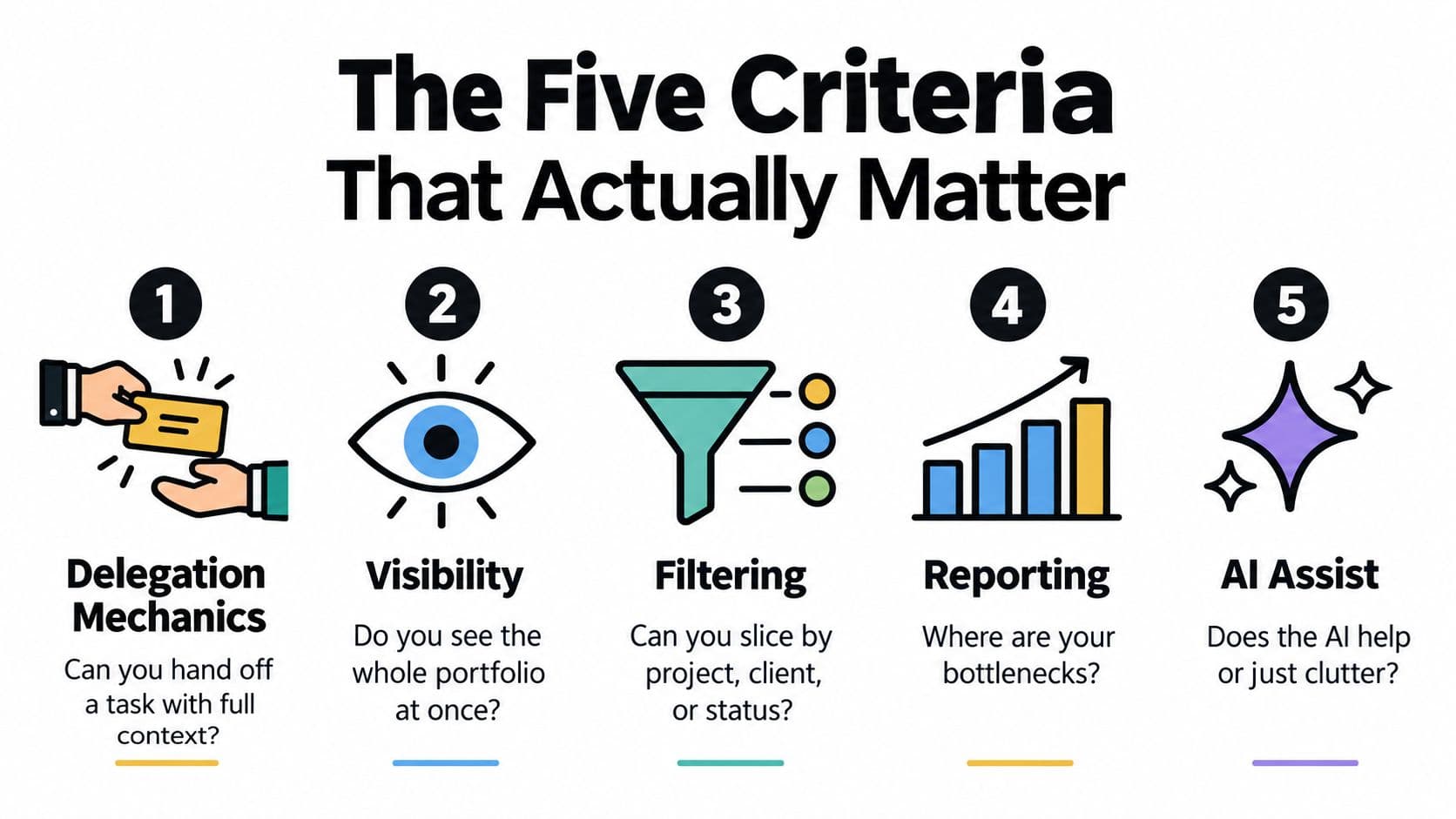
1. Delegation mechanics
Create a task for someone who wasn't in the original conversation. Add the objective, background, reference files, deadline, definition of done, and one likely question. Hand it off, then ask the assignee to start without contacting you.
If they still need clarification, the tool or your workflow hasn't captured enough context. Good delegation isn't just assigning a name. It transfers enough information for another person to act.
2. Visibility and filtering
Build a small portfolio with projects, owners, statuses, deadlines, and priorities. In fifteen minutes, try to answer: what is late, what is blocked, and what belongs to a specific client or team?
The test isn't whether the platform offers every view. It's whether you can reach the relevant slice without manual cleanup. A clean list often beats a powerful dashboard that nobody trusts.
3. Automation and AI
Set up one recurring template and one rule-based trigger. Then test any AI prioritization using tasks with different deadlines and business importance. Check whether the result is explainable and editable, rather than an opaque reshuffling of your work.
Automation should remove repetitive routing. AI should reduce decision fatigue. If the system generates more suggestions than useful actions, turn it off.
4. Coordination and accountability
Add a comment, mention a teammate, attach a document, change the status, and mark the task blocked. Then leave it alone and see whether the next person can reconstruct the decision from the task itself.
This check reveals whether the platform supports asynchronous work or merely stores a checklist. The strongest systems make follow-up visible without requiring a manager to chase every owner.
5. Reporting and pricing
Open the reporting area and look for bottlenecks, overdue work, stalled handoffs, and workload concentration. Ignore decorative charts that don't change a decision.
Then calculate the real bill. Include seats, guests, automation limits, AI allowances, storage, integrations, and the time someone will spend administering the system. The task management guide for online workflows is useful if you need to map those checks to a practical operating process.
How the Leading Tools Stack Up
The four tools below solve different coordination problems. Treating them as direct substitutes leads to poor buying decisions.
Fluidwave
Fluidwave is designed around delegated work, with AI-driven prioritization, multiple task views, real-time collaboration, and a pay-per-task model for assistant work. That combination suits founders, solo operators, neurodivergent users, and small teams that need to offload execution without adding another full-time seat.
Its specific win is the handoff. You can define a task, set a budget and timeline, and route the work to an assistant while keeping the outcome visible. The trade-off is equally clear: if your work is almost entirely personal and you never delegate, the delegation layer adds little value.
Asana
Asana remains the strongest conventional choice for a mid-sized operations team that needs portfolios, timelines, dependencies, and workload visibility. It gives managers a readable view across projects while keeping comments, owners, and deadlines attached to individual tasks.
Its win is structured oversight. The trade-off is the cost and administrative weight of maintaining projects, permissions, conventions, and seats. Casual delegators may pay for more operational structure than they use.
ClickUp
ClickUp is the breadth option. It can bring tasks, documents, whiteboards, time tracking, and multiple project views into one environment, which is attractive to agencies trying to replace a scattered stack.
The win is consolidation. The cost is complexity. A team needs someone to establish workspace rules, remove redundant views, and maintain the system. Without that ownership, ClickUp can recreate the original problem, with more places to configure and more ways for teams to organize work differently.
Todoist
Todoist wins at fast capture. It works well for individuals who need an inbox, projects, labels, due dates, and a quick way to turn thoughts into actionable tasks. Its simplicity lowers the friction of recording work, which matters when a system is only useful if people enter tasks.
The trade-off is its thinner delegation layer. It can support lightweight collaboration, but it isn't the right operational command center for complex cross-functional handoffs, portfolio reporting, or manager-level workload review.
| Tool Comparison Across the Five Criteria | Delegation | Automation & AI | Coordination | Reporting | Pricing Model |
|---|---|---|---|---|---|
| Fluidwave | Strong for assistant and contractor handoffs | AI prioritization and workflow automation | Task sharing and real-time updates | Practical task and progress visibility | Pay per delegated task, with plan options |
| Asana | Clear assignees, dependencies, and project ownership | Rules, templates, and workflow automation | Strong comments, mentions, and shared projects | Mature portfolios and workload views | Per-seat subscription |
| ClickUp | Flexible assignments and custom workflows | Broad automation and AI capability | Extensive, but configuration-heavy | Broad dashboards and custom reports | Per-seat subscription with plan limits |
| Todoist | Lightweight shared assignments | Simple recurring tasks and integrations | Fast capture and basic collaboration | Personal and lightweight project views | Free and paid tiers |
The choice comes down to the work pattern. Fluidwave is built for delegation, Asana for structured team operations, ClickUp for consolidation, and Todoist for personal execution.
Pricing Models and the Real Cost of Ownership
Sticker price is the least reliable part of a task-management decision. The actual cost appears after the team has created projects, added collaborators, configured automations, and started working around the tool's limits.
Per-seat subscriptions are easy to budget when every seat is active and every user needs the same capabilities. They become inefficient when a small team includes occasional contributors, clients, assistants, or executives who only review work. Pay-per-task delegation has the opposite shape. It can suit a small operator who delegates selectively, but a heavy delegator needs to monitor volume carefully.
The requested example is a five-person agency comparing Asana Business with 800 delegated tasks per month through Fluidwave. No verified price is provided for either scenario, so a responsible comparison can't assign invented dollar totals. Use the vendors' current pricing pages to enter the actual rates, then include the cost of unused seats and delegated work rather than comparing plan labels alone.
| Annual Cost Comparison Across Task Management Tools | Pricing Model | 5-User Annual Cost | Delegation Cost | Hidden Fees |
|---|---|---|---|---|
| Fluidwave | Pay per delegated task, with plan options | Calculate from current plan and usage | Calculate from completed delegated tasks | Possible plan limits, add-ons, or usage conditions |
| Asana | Per-seat subscription | Current Business rate multiplied by five users and twelve months | Usually included in seat access, subject to plan permissions | Guest rules, premium features, integrations, administration |
| ClickUp | Per-seat subscription | Current plan rate multiplied by five users and twelve months | Usually included in seat access, subject to plan permissions | AI, automation, storage, permissions, administration |
| Todoist | Individual or team subscription | Current team rate multiplied by active users and twelve months | Limited compared with dedicated delegation workflows | Advanced features, team permissions, administration |
A practical ownership formula
Use this model before you commit:
Twelve-month cost = subscription fees + usage fees + add-ons + administration time + migration and training time.
For a seat-based tool:
Annual subscription = active paid seats × monthly seat price × twelve months.
For a delegation model:
Annual delegation spend = completed delegated tasks × current per-task price, then add any plan or platform charges.
The guide to pricing transparency is relevant here because buyers should be able to understand what they pay for before adoption spreads across the team. Also estimate the cost of coordination left unsolved. If people still chase updates, rebuild briefs, or manually triage requests, the software's apparent affordability is misleading.
Matching Tools to Real Working Styles
The same product can feel liberating to one person and exhausting to another. The deciding variable isn't just team size. It's how work enters your system, how often you hand it off, and how much context you need to recover after an interruption.
The solo founder
A founder moving between product decisions, sales conversations, and investor updates needs rapid capture first. Todoist is the cleanest starting point because it keeps the act of recording work lightweight. Asana can organize the work, but its project structure may feel like overhead when one person owns most outcomes. ClickUp is usually overkill for a one-person shop unless the founder is deliberately consolidating documents, workflows, and multiple views.
Fluidwave makes more sense when the founder isn't only tracking work but actively offloading it. The winner is Todoist for self-execution and Fluidwave for a founder who delegates. That distinction matters more than a universal ranking.
The operations manager
A fifteen-person hybrid team has a different problem. The manager needs workload visibility, cross-functional ownership, dependencies, and a reliable way to surface blocked work without scheduling another meeting.
Asana is the strongest fit here because its portfolio and workload orientation support structured oversight across teams. ClickUp can work when the organization wants one highly configurable platform and is willing to appoint an administrator. Todoist is too lightweight for this coordination load, while a delegation-first platform may be unnecessary if employees already own and execute their work directly.
Management test: Ask whether the manager can identify the bottleneck in one view. If the answer requires interviews and spreadsheet work, reporting isn't doing its job.
The ADHD freelancer
An ADHD freelancer needs a low-friction inbox, clear next actions, and a way to restart after losing context. The research matters here because an academic study of adults with ADHD describes task-management difficulties as rooted in emotional, social, and relational contexts, not just poor organization, as discussed in the study on task management challenges among adults with ADHD.
Todoist may work when the freelancer mainly needs personal capture. Fluidwave is the better fit when external accountability, delegation, or assistance reduces the emotional load of getting started. ClickUp can create too many decisions, and Asana may bury a solo user under project structure.

Different working styles need different kinds of support. A clean personal inbox, an executive portfolio, and a dependable delegation channel are not the same product requirement.
From Tasks to Outcomes With Automation and Delegation
Automation, AI prioritization, and human delegation work best as one pipeline. Separating them creates a familiar failure mode: automation collects requests, AI produces suggestions, and the user still performs all the triage and execution.
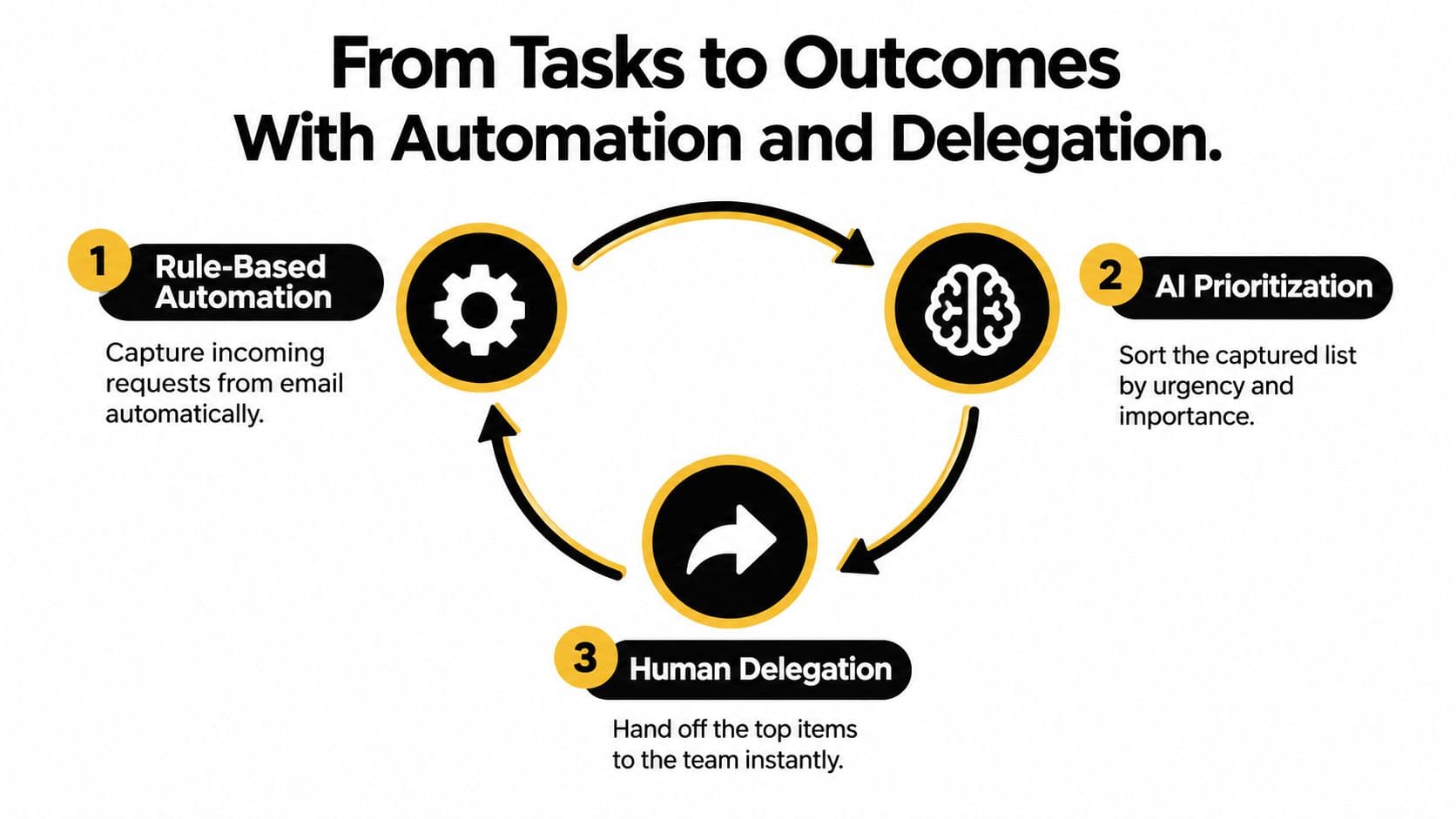
A practical weekly workflow looks like this:
- Capture automatically. An email, form submission, or internal request creates a structured task with the source context attached.
- Prioritize intelligently. The system ranks the queue using urgency, importance, deadlines, and the user's stated goals.
- Delegate deliberately. Routine research, data entry, scheduling, or preparation moves to an assistant or contractor with a clear brief.
- Review exceptions. The owner focuses on decisions, blocked work, and tasks that require judgment.
- Close the loop. The completed output returns to the original task, where the decision and evidence remain available.
Without that pipeline, a task platform becomes a second inbox. Users spend their time deciding which requests matter, rewriting instructions, and checking whether someone acted.
AI also needs guardrails. Automated routing can misclassify sensitive work, create false confidence, or obscure who made a consequential decision. For a useful discussion of the gap between apparent automation and real human oversight, read AI Frontiers' analysis of EU AI Act automation risks.
The workflow automation guide can help translate this model into concrete triggers and handoffs. Fluidwave's core design fits the model by combining AI prioritization with human delegation that is priced per task rather than locked entirely behind a seat subscription.
Which Task Management Software Should You Choose
Choose by operating pattern, not by the longest feature list.
- Choose Fluidwave if you delegate work, need external accountability, or run a small operation where adding seats doesn't reflect actual usage. Its pay-per-delegated-task model and AI prioritization address the handoff problem directly.
- Choose Asana if you manage a mid-sized, cross-functional team that needs portfolios, timelines, dependencies, and stakeholder visibility.
- Choose ClickUp if you're an agency prepared to absorb setup complexity in exchange for consolidating several work systems into one platform.
- Choose Todoist if you're an individual who wants a friction-free inbox, fast capture, and minimal team workflow baggage.
Avoid the wrong fit deliberately. Fluidwave is overkill if nobody delegates. Asana can bury solo users in project administration and become expensive for casual delegators. ClickUp demands an administrator who will maintain the workspace. Todoist lacks the accountability and portfolio controls that multi-team coordination usually requires.
| Best Task Management Software by Use Case | Best For | Skip If | Starting Price |
|---|---|---|---|
| Fluidwave | Delegators, neurodivergent operators, solo founders offloading work | Nobody delegates or needs external accountability | Check current pricing |
| Asana | Cross-functional teams needing portfolios and workload visibility | You work alone or delegate only occasionally | Check current pricing |
| ClickUp | Agencies consolidating multiple work systems | You want a simple personal task list | Check current pricing |
| Todoist | Individuals wanting quick capture and simple organization | You need deep team reporting and accountability | Check current pricing |
If your work is outcome-driven rather than merely task-driven, define the result before choosing the software. The OKR Hub's guide to choosing OKR software is a useful reference for connecting execution tools to measurable objectives.
Use this three-question filter:
- Do you delegate? Pick a tool with strong handoffs and accountability.
- Do you automate? Pick a system that can capture and route work without creating another queue.
- Do you just track? Pick the simplest tool your workflow will support consistently.
Answer those questions and the shortlist becomes clear in under a minute.
Fluidwave combines AI task prioritization, multiple work views, real-time collaboration, and pay-per-task delegation through virtual assistants. If your main problem is deciding what to do next and getting routine work off your plate, visit Fluidwave and test the workflow with a real task.
Focus on What Matters.
Experience lightning-fast task management with AI-powered workflows. Our automation helps busy professionals save 4+ hours weekly.