Learn how AI project management works in 2026, from core capabilities and real workflows to risks, metrics, and tools like Fluidwave that teams actually use.
September 15, 2026 (1d ago)
AI Project Management: A Practical Guide for 2026
Learn how AI project management works in 2026, from core capabilities and real workflows to risks, metrics, and tools like Fluidwave that teams actually use.
← Back to blog
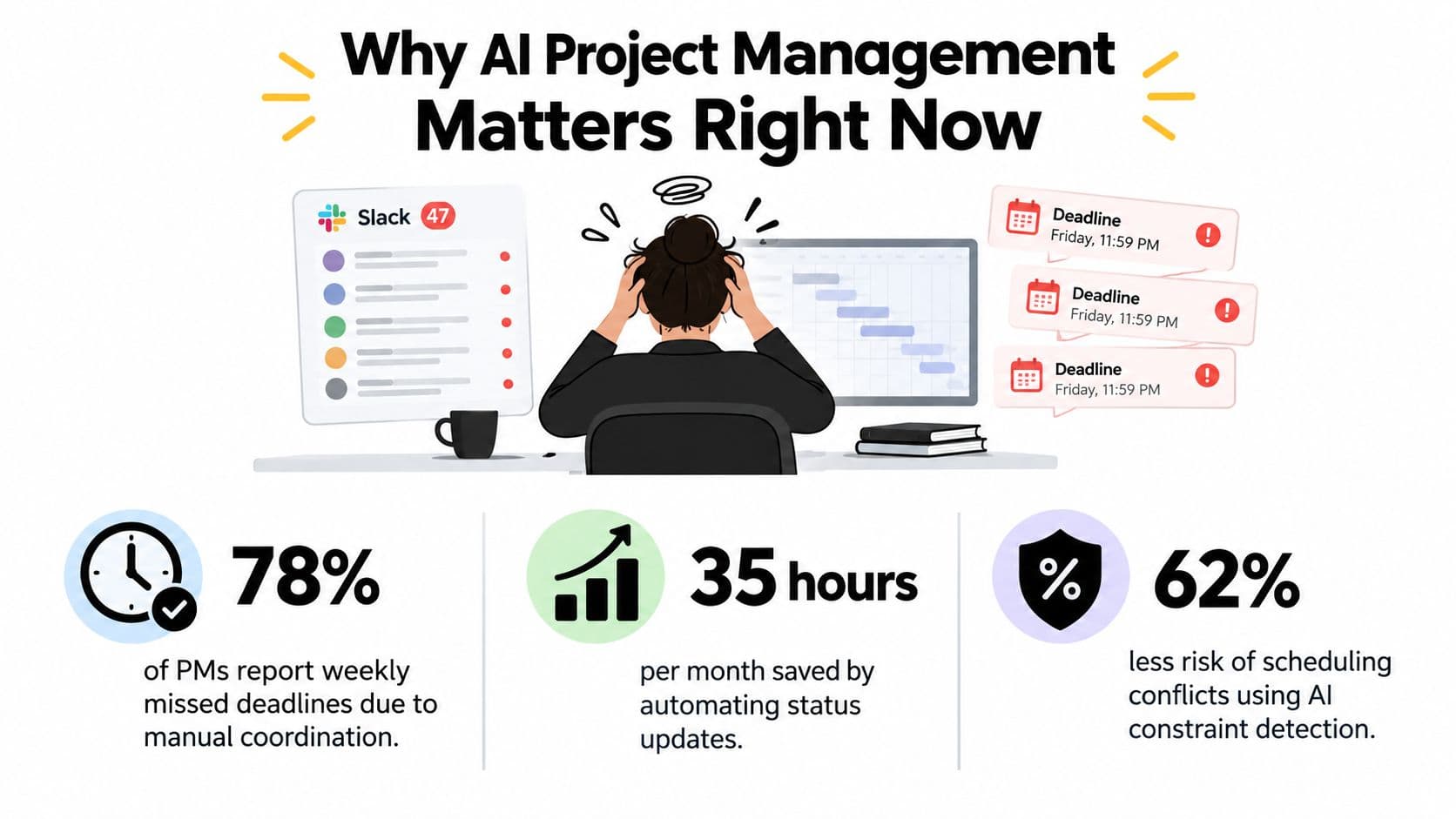
You arrive Monday morning to 47 unread Slack threads, a Gantt chart nobody updated on Friday, and three different deadline promises buried in evening messages. One teammate says the demo is still on track. Another has been waiting on a dependency. A stakeholder has already told leadership that delivery is moving forward.
The work itself hasn't become impossible. The problem is that the signals are scattered across tickets, chat, calendars, documents, and meetings. AI project management is an attempt to turn that noise into usable visibility, while keeping decisions, accountability, and relationships with people firmly in human hands.
Why AI Project Management Matters Right Now
A project manager can read every update and still miss the important change. A dependency slips, a specialist becomes overloaded, or a stakeholder changes scope in a conversation that never reaches the official plan. By the time the weekly report exposes the issue, the team is managing a crisis instead of preventing one.
That pressure is growing as teams distribute their work across locations and tools. People produce more status messages, stakeholders expect faster answers, and leadership wants early warning rather than a retrospective explanation. AI matters because it can scan those signals continuously, connect related changes, and present a focused set of questions for the PM to answer.
The market reflects that shift. A 2025 PMI community-led report projected the global AI project management market would grow from USD 2.5 billion in 2023 to USD 5.7 billion by 2028, a 17.3% CAGR. The report surveyed 2,314 project professionals across 129 countries, so this isn't a niche concern confined to one type of PMO.
Adoption is active, but uneven. In the IPMA AI Survey 2024, 42% of 345 respondents said they weren't using AI in project management, 35% were using it “just a bit,” and 23% reported active use. The practical conclusion is more useful than the headline: teams are moving from experiments toward everyday use, but most still need operating discipline.
Practical rule: Use AI to recover attention, not to surrender ownership.
The PM still decides whether a deadline is credible, whether a scope tradeoff is acceptable, and how to handle a frustrated stakeholder. AI can prepare the evidence, identify contradictions, and draft the update. That division lets the PM spend less time reconciling status noise and more time planning, unblocking, coaching, and making decisions.
What AI Project Management Actually Means
Start with one mental model. AI in project management is an operations co-pilot. It watches signals across approved tools, prepares routine project artifacts, identifies unusual patterns, and suggests a next action. The human PM remains the pilot who checks the instruments, understands the conditions, and decides where the team should go.
That differs from a basic automation rule. A rule says, “When a task changes to done, send a notification.” An AI-enabled system can examine the task, its dependencies, related discussions, current capacity, and previous project patterns before suggesting whether the next item should move, whether a risk deserves attention, or whether a status report needs context.
The main capability groups
- Scheduling and re-sequencing: The system can examine dependencies and constraints, then propose a schedule adjustment when work changes.
- Capacity forecasting: It can compare upcoming demand with recorded availability and surface likely overloads before assignments become commitments.
- Risk and blocker detection: It can connect late tasks, unresolved issues, dependency changes, and communication signals into a risk prompt for review.
- Status summarization: It can turn updates from tickets, comments, and meetings into a draft for different audiences.
- Conversational project queries: A PM can ask a plain-language question about delayed work, open blockers, or ownership instead of searching several views manually.
The useful boundary is clear. AI can recommend a sequence, but it shouldn't own scope. It can flag a capacity conflict, but it shouldn't make a sensitive people decision without context. It can draft a stakeholder message, but the PM should verify the facts and tone before sending it.
Research supports that augmentation model. One empirical study found a positive correlation between AI-enabled task automation and project manager productivity, with r = 0.62, while technological readiness strengthened the effect at β = 0.21, p = 0.004 (study details). The result doesn't mean a model creates value on its own. It means readiness changes what the tool can do for the team.
Core Capabilities That Change Daily PM Work
AI changes daily PM work most when the inputs are visible and the output can be reviewed. A team does not need to hand over judgment. It needs a system that turns scattered project signals into a usable starting point, then leaves consequential choices with people.
A useful capability map looks like this:
| Capability | Daily Problem Solved | Typical First Payoff |
|---|---|---|
| Automated scheduling | Dependencies and date changes require repeated manual edits | A draft plan that exposes sequencing conflicts |
| Resource allocation | Work gets assigned without a current view of capacity | Earlier visibility into overload and gaps |
| Risk detection | Small warning signs remain disconnected | A focused review of emerging blockers |
| Status reporting | PMs spend time collecting and formatting updates | A reviewable draft instead of a blank document |
Scheduling makes change visible
A testing task slips, and the demo depends on its output. An AI scheduling layer can identify that relationship, show the downstream tasks at risk, and suggest a revised order. The PM then checks quality requirements, stakeholder commitments, and assumptions before accepting any change.
That workflow prevents a common failure: discovering a dependency only after its impact has reached the calendar. The system prepares options. The team decides whether the new sequence is realistic.
AI task management practices become practical when tasks, ownership, dependencies, and changes remain in one current view. The benefit is a better starting point for the next planning conversation, not a calendar that manages the project by itself.
Resource suggestions add context to assignment decisions
Resource allocation depends on more than an empty calendar. Skills, availability, priority, and existing commitments all matter. A useful system might flag that an “available” engineer is already facing a competing commitment, or surface another owner with suitable capacity and experience.
The PM still checks context that project data may miss, including development goals, team dynamics, and work that has not yet been recorded.
Risk prediction needs even more care. It works best when teams maintain reliable historical data and record outcomes consistently. A systematic review of AI in project management found that many models lack real-world validation, overlook links among risk indicators, and give limited attention to what happens after delivery. Treat a risk score as a prompt for investigation, not a verdict.
Reporting saves collection time, while people supply meaning
An AI-generated weekly update can gather completed work, open issues, schedule movement, and recorded decisions. The PM adds context a model may not know reliably, such as why a sponsor accepted a tradeoff or why the team delayed a lower-value feature.
The same discipline should continue after delivery. A team can record whether a predicted risk materialized, whether an assignment worked, and which planning assumptions proved wrong. That measurement closes the gap between using AI and learning from its recommendations.
Time-saving features handle summaries, meeting preparation, and routine updates. Decision-improving features support scenario comparison, risk review, and capacity choices. Start with the first group while the team builds review habits, then add the second when its data and human readiness can support those decisions.
Real Workflows With Fluidwave in the Loop
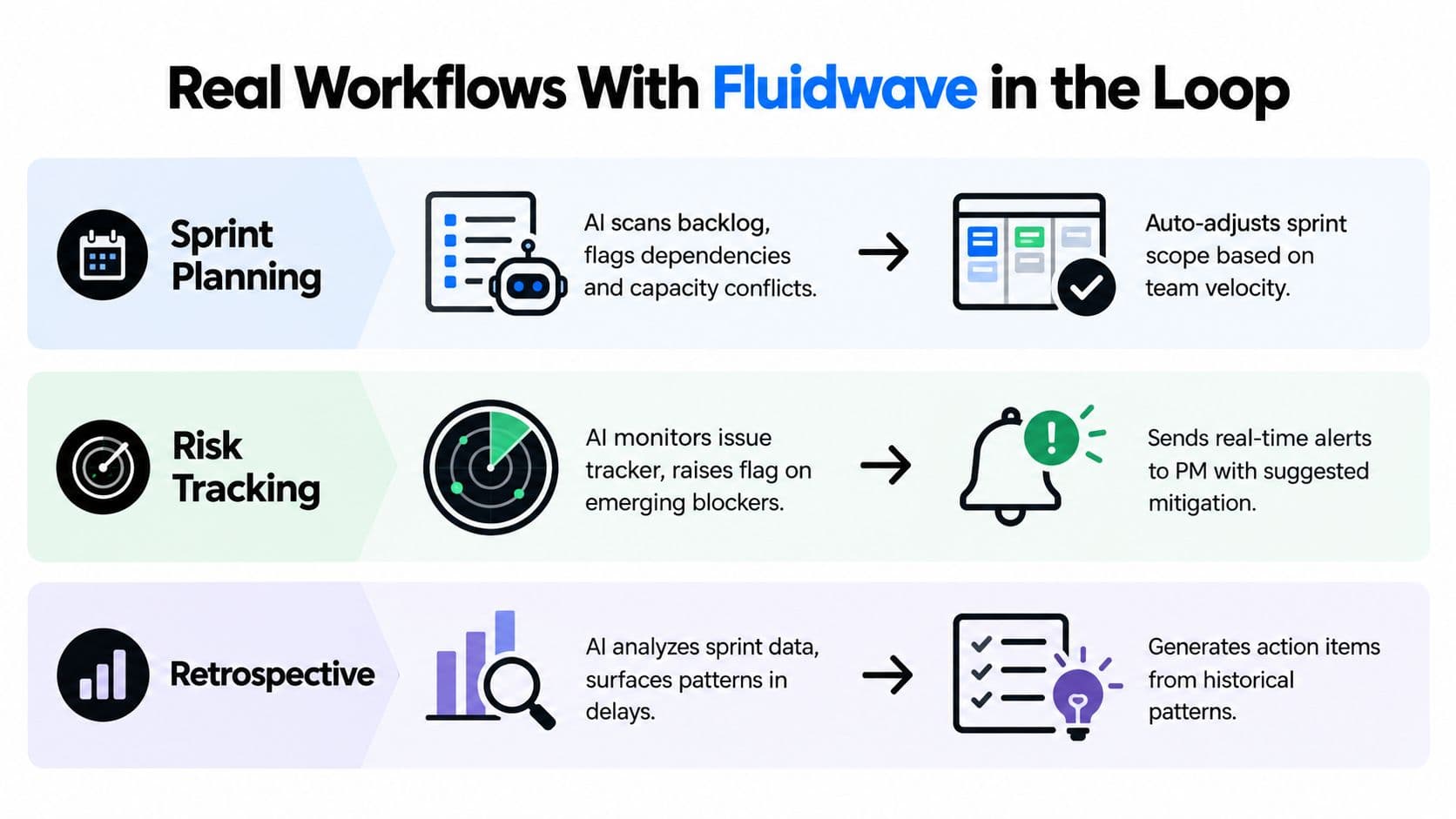
A tool becomes useful when a team can see the trigger, the automated step, and the approval point. Fluidwave can serve as one working environment for creating and organizing tasks, viewing projects, applying prioritization, and delegating work to human virtual assistants. The important design choice is that AI prepares the work while a named person approves consequential changes.
Sprint planning
On Monday, the trigger is a backlog ready for review. The assistant scans the tasks, identifies dependencies, compares planned work with known capacity, and proposes a draft sprint board. Instead of beginning with a blank board, the team spends a short meeting correcting assumptions, removing work, and confirming ownership.
The human gate is essential. The product lead confirms priority, the engineering lead checks feasibility, and the PM accepts only the changes that fit the team's actual commitments. If the proposed sprint includes a hidden dependency, the team can reject it before the schedule becomes a promise.
Stakeholder updates
At the end of the week, the trigger is the reporting deadline. A conversational agent gathers progress from approved task records and team discussions, then drafts a status email connected to the relevant objectives. The PM checks dates, removes unsupported conclusions, adds decisions that happened outside the system, and approves or rewrites the message.
That workflow is part of a broader step-by-step system for business efficiency, where reliable automation depends on clear inputs, ownership, and review points rather than on adding more tools.
Task delegation
An incoming request can be classified by topic and urgency, routed to a suitable owner, and attached to the correct project without someone retyping the same details across systems. A PM reviews the assignment when the request affects scope, sensitive information, or a high-priority commitment.
This is the practical difference between automation and abdication. AI can reduce rekeying and sorting. The PM decides whether the request belongs in the plan at all. For a wider view of how these patterns connect, see AI-powered workflow automation for project teams.
A short product walkthrough can help teams visualize the interaction between task records, automation, and human review:
A Practical Implementation Roadmap
A careful rollout is easier to manage than a company-wide launch. Use four phases, and make each phase earn the next one.
Audit
Spend two weeks mapping current workflows, data quality, and friction points. List the tasks that consume PM attention, identify where information goes stale, and select one workflow with a clear owner.
- Inputs: Existing task records, reporting routines, team interviews, and examples of missed handoffs.
- Exit criteria: One candidate workflow, a documented baseline, and a list of data exclusions.
- Failure mode: Choosing a flashy use case before checking whether the underlying records are complete.
Pilot
Run a six-week pilot with one team and one workflow. Write a hypothesis such as, “AI-generated status drafts will reduce preparation effort without increasing factual corrections,” then define the baseline, review process, and stop-or-scale decision before activation.
A pilot should be low-risk enough to stop without embarrassment. It should also be real enough to expose messy ownership, incomplete updates, and the exceptions that demonstrations leave out.
Expand
When the pilot clears its targets, add two adjacent workflows or teams. Integration, permission design, training, and shared terminology become part of the delivery plan. Leaders evaluating the wider market or an early-stage initiative may also find a US-based angel investors database useful for understanding the ecosystem around project management technology.
For task-centered teams, an AI-powered task management app can provide a practical place to test prioritization and delegation before expanding into more sensitive decisions.
Govern
Governance is ongoing work, not a launch document. Assign an owner for each workflow, schedule regular reviews, document model or prompt changes, and give users a channel for reporting bad suggestions. Review overrides as learning signals, not as evidence that users failed to follow the system.
Risks, Governance, and Human Readiness
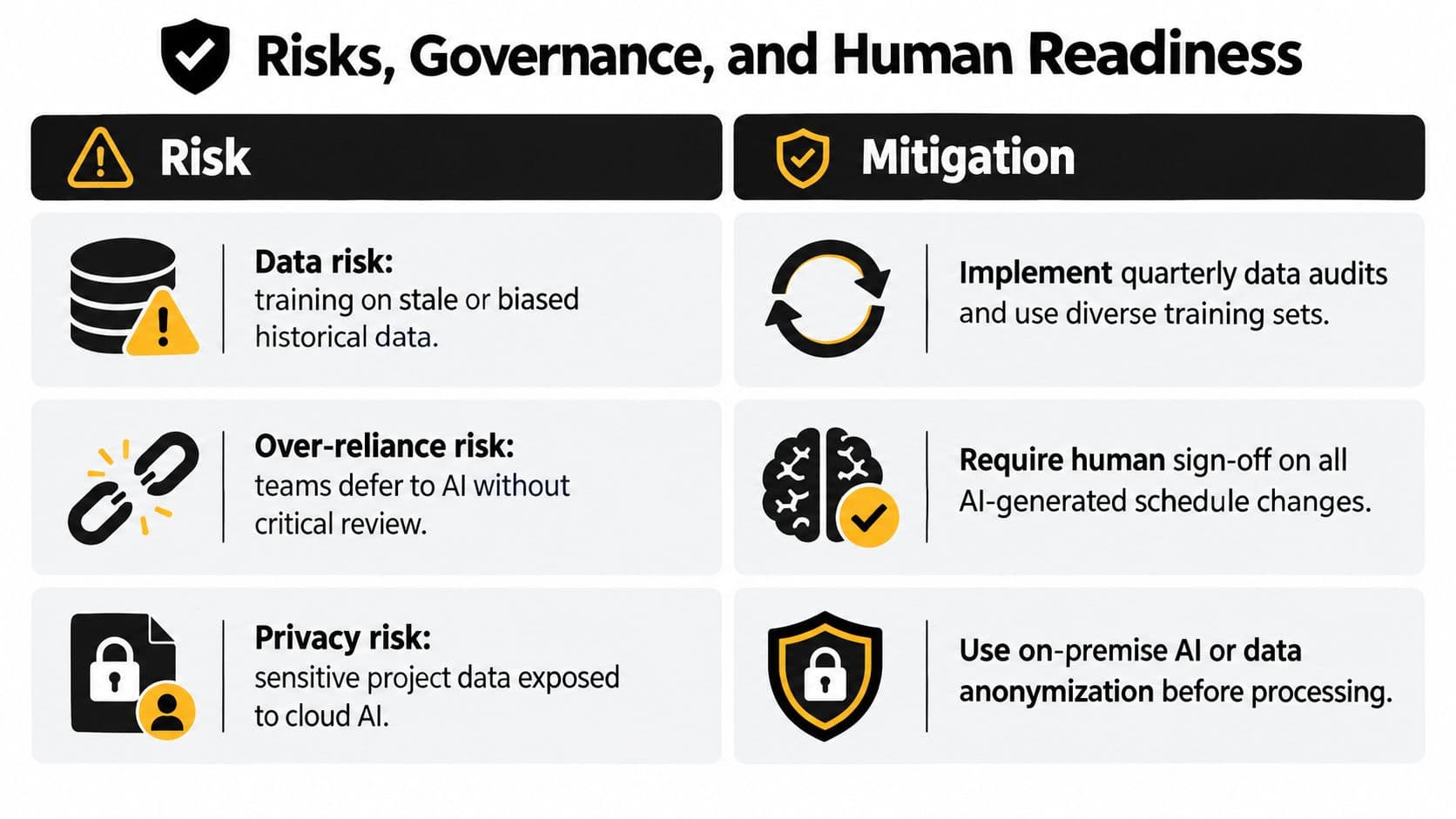
The productivity story is incomplete. A system can make a weak process faster, spread a mistaken recommendation more widely, and create confidence that the project data doesn't deserve.
The evidence points to organizational readiness as the central problem. A 2025 industry survey reported that 67% of AI projects fail, with stakeholder issues identified as the leading cause at 54.8% and poor data fundamentals next at 43.5% (survey report). A separate analysis identified skills gaps as the top implementation barrier at 56.5%, followed by internal resistance or change fatigue at 47.8%; privacy, security, ROI uncertainty, and governance concerns each reached 43.5% (analysis).
Four risks that need owners
- Data risk: Stale or biased project history can produce poor recommendations. Maintain a documented data review, identify excluded sources, and make missing data visible rather than filling gaps.
- Governance risk: An unreviewed output can become an automated mistake at scale. Add human checkpoints, approval logs, and a named owner for every workflow that changes schedules, assignments, or stakeholder communication.
- Skills risk: PMs can lose estimation and conflict-resolution practice if they accept every suggestion. Keep at least one planning ritual AI-free each cycle so the team continues to exercise judgment.
- Resistance risk: Senior contributors often reject opaque recommendations. Show the signals behind a suggestion, allow overrides, and record why the team disagreed.
Human-readiness test: If nobody can explain who reviews an AI output, what happens after an override, and how a bad recommendation gets corrected, the workflow isn't ready.
A team is better prepared when it has a reliable source of project truth, clear data ownership, defined escalation paths, trained users, and leadership that accepts a pilot may stop. Those conditions matter more than adding another feature to the tool shortlist.
Metrics That Prove AI PM Is Working
A busy team can finish on time and still lose hours to corrections, unclear handoffs, or excessive review. Judge an AI rollout by how work behaves throughout the workflow and after delivery, not by the final date alone.
Start with a pre-AI baseline, then compare it with results from the 30-day post-pilot period.
| Metric | Pre-AI Baseline | 30-Day Post-Pilot | Why It Matters |
|---|---|---|---|
| Cycle time | Median time from task creation to completion | Same measure after the pilot | Shows whether work moves faster through the system |
| Rework rate | Share of completed items reopened within 14 days | Reopened share after AI involvement | Reveals whether assignments and summaries arrive complete |
| Handoff quality | Cross-team acceptance rate and reviewer confidence | Acceptance and confidence after the pilot | Tests whether automation improves transfer between owners |
| Adoption | Use of AI suggestions, prompt-to-action conversion, and override frequency | Same measures after 30 days | Separates active use from passive availability |
Measure cycle time at the task level as well as the project level. A project may keep its external deadline while individual tasks move through review faster. That gain can remain hidden inside one delivery date.
Rework shows whether speed is real. If AI routes a task quickly but the receiving team reopens it because the requirements are incomplete, the workflow has moved delay from the schedule into correction work. Add a short reviewer-confidence rating to each handoff, so the dashboard records quality alongside speed.
Adoption also needs context. A high override rate can mean recommendations are poor, or it can show that a careful team is using AI to challenge its first assumption. Review the reasons in an override log before changing the workflow or judging user behavior.
The same measures should continue after the project closes. The systematic review cited earlier points to less attention on closure and downstream performance than on planning and execution. Check whether AI reduced post-delivery rework, clarified ownership, and preserved useful project knowledge. A cleaner weekly report is helpful, but it does not prove that the team became more effective.
Your First 30 Days With AI Project Management
Treat the first month as a controlled ramp. Don't turn on every assistant, connect every system, and ask the team to change its habits at once.
Week one
List recurring PM tasks that take more than 30 minutes each. Score them by frequency and suitability for automation, then choose two candidates. Good options include weekly status drafting, backlog cleanup, meeting action capture, and task routing.
Week two
Pilot one workflow in Fluidwave or another approved tool. Choose sprint planning or weekly status drafting, and assign a named human owner to every AI output. The owner checks accuracy, records overrides, and decides whether the recommendation becomes part of the official project record.
Week three
Add the second workflow only after the first has a working review rhythm. Begin recording cycle time, rework, handoff quality, and adoption so the team has a baseline by day 21 rather than relying on impressions.
Week four
Compare the baseline with the post-pilot results. Write down what helped, what the team rejected, which data was missing, and which decisions still require human judgment. Then choose the next workflow based on evidence, not novelty.
Keep three habits in place:
- Friday metrics check: Spend 15 minutes reviewing the dashboard and notable overrides.
- Shared override log: Record the recommendation, the decision, and the reason for changing it.
- Monthly readiness review: Revisit data quality, ownership, privacy, skills, and escalation rules.
The Monday scene should look different after this month, but not because the PM stopped reading updates. The difference is that the PM starts with a structured view of conflicts, risks, and decisions instead of manually reconstructing the week from scattered messages.
Fluidwave combines AI-assisted task creation and prioritization with multiple project views and delegation to human virtual assistants, giving teams a practical place to organize the operational layer while keeping approval with people. Visit Fluidwave to see how you can apply those capabilities to your first controlled AI project management workflow.
Focus on What Matters.
Experience lightning-fast task management with AI-powered workflows. Our automation helps busy professionals save 4+ hours weekly.