Learn how a work prioritization matrix helps you decide what to do, schedule, delegate, or drop. Includes templates, examples, and tips for teams.
September 2, 2026 (1mo ago)
Work Prioritization Matrix: A Practical Guide That Works
Learn how a work prioritization matrix helps you decide what to do, schedule, delegate, or drop. Includes templates, examples, and tips for teams.
← Back to blog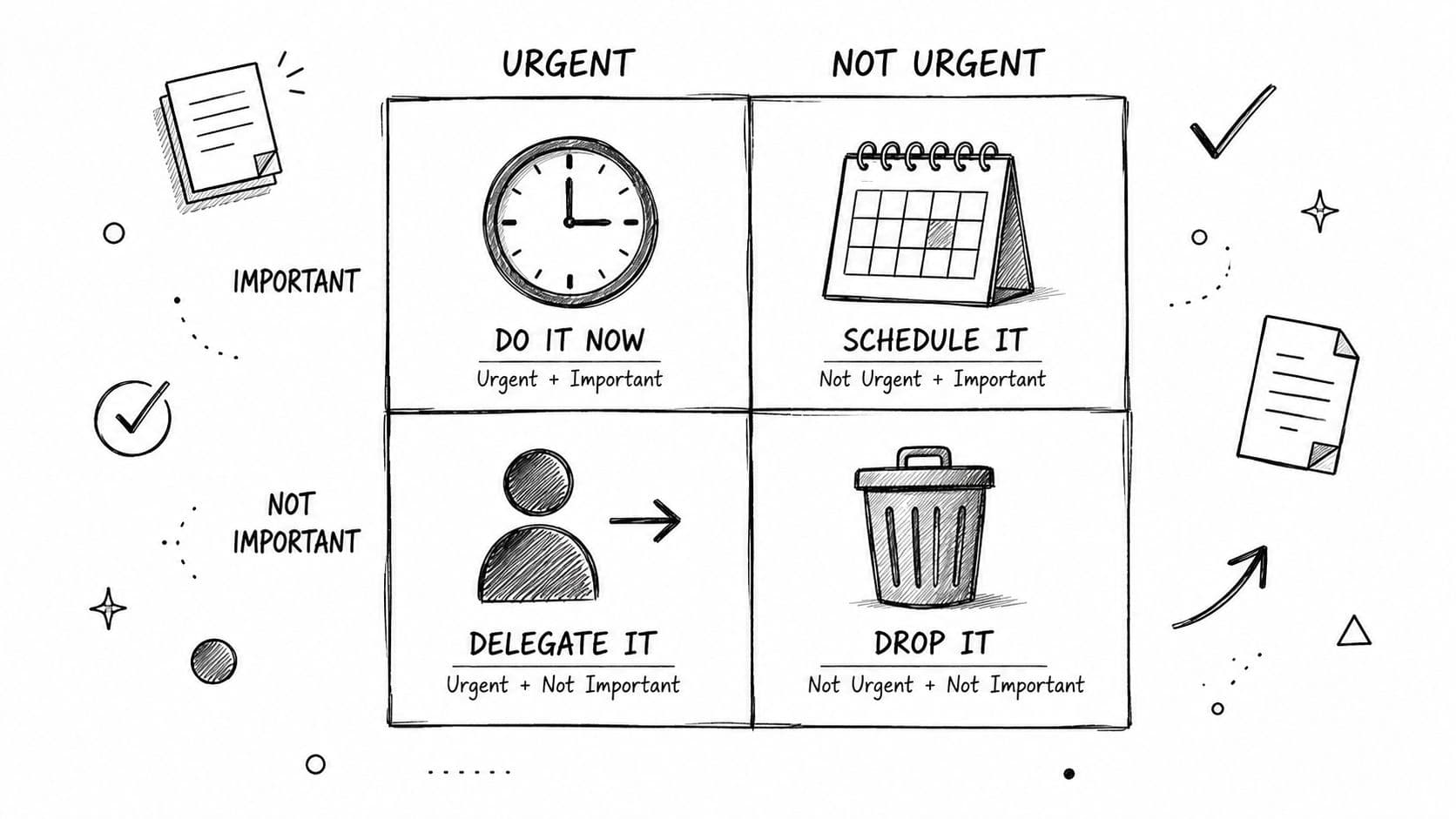
Monday morning starts with 47 unread messages, three deadlines by Friday, and a calendar already crowded with meetings. You answer the loudest request first, then another interruption arrives. By lunch, you've been busy for hours without feeling certain that you worked on the right thing.
A work prioritization matrix gives you a practical way to interrupt that pattern. It turns an unfiltered task list into decisions about what to do now, what to schedule, what to delegate, and what to eliminate. Used well, it doesn't promise perfect control over your workload. It gives you a clear next action before urgency takes over.
What a Work Prioritization Matrix Actually Does
A work prioritization matrix is a 2x2 decision grid. It places each task on two axes:
- Urgency: How soon does this require action, and what happens if you wait?
- Importance: Does this task materially support a meaningful goal, responsibility, or outcome?
Those questions create four operating states. A task that's both urgent and important belongs in Do First. An important task without immediate pressure belongs in Schedule. An urgent task that doesn't require your judgment or expertise belongs in Delegate. Work that's neither urgent nor important belongs in Drop, also called Eliminate.
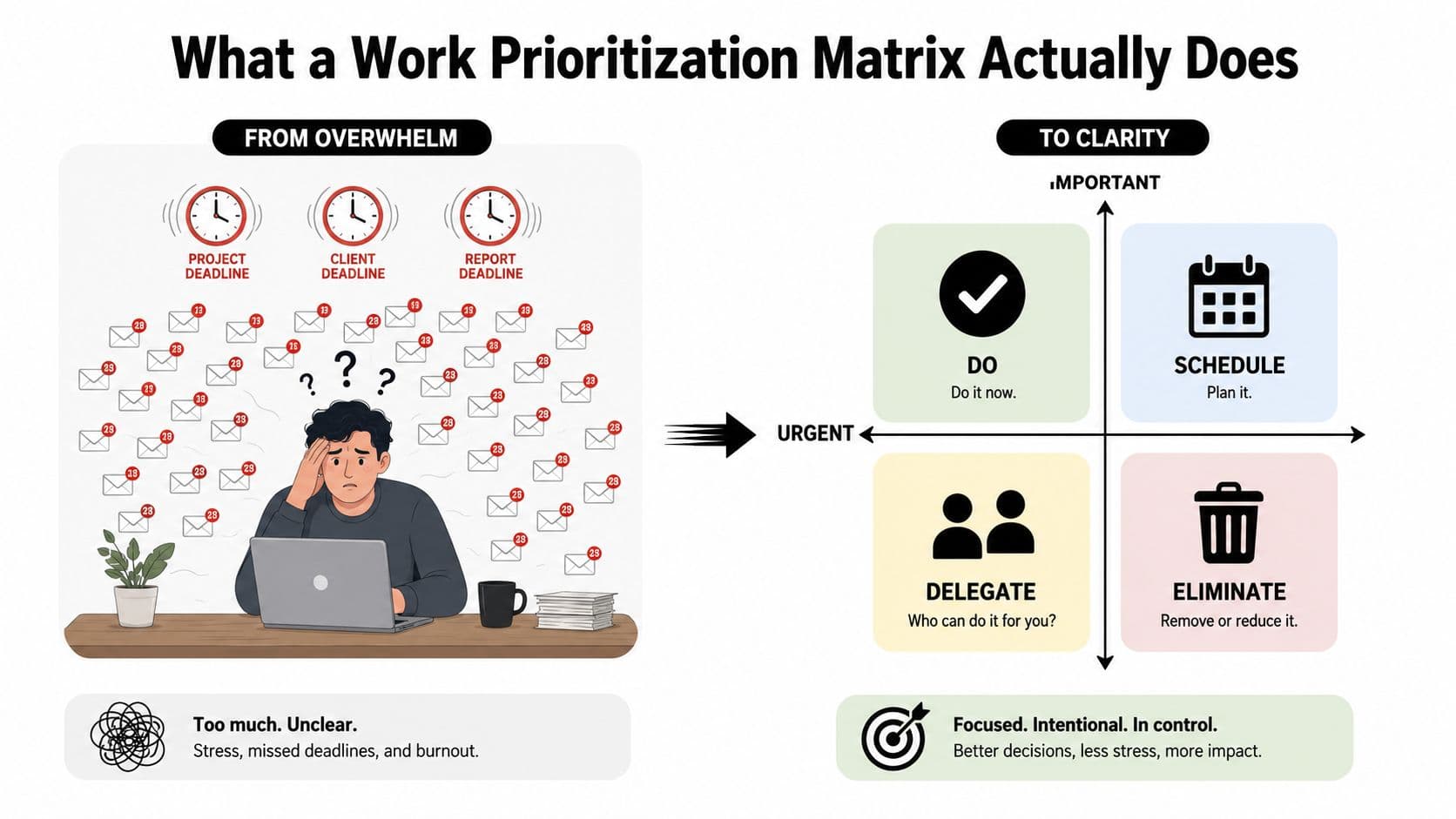
The matrix isn't a productivity trick that makes more hours appear. It's a sorting function. Its job is to separate signal from noise before you spend time, energy, or calendar space on execution. That distinction matters because a task can feel urgent because someone sent a message, while an important planning task can remain invisible because nobody is demanding it today.
The four actions behind the grid
| Quadrant | Meaning | Required action |
|---|---|---|
| Do First | Urgent and important | Work on it now or as the next priority |
| Schedule | Important but not urgent | Put it on the calendar with a clear next step |
| Delegate | Urgent but not important to you | Assign it to an appropriate owner |
| Drop | Neither urgent nor important | Eliminate it or keep it out of active work |
The familiar structure comes from the Eisenhower Matrix, which has been used as a durable way to separate urgent pressure from long-term value. Nielsen Norman Group describes prioritization matrices as long-established decision tools and identifies the same four combinations of urgency and importance in its overview of prioritization matrices.
Start with a list, not a blank grid. Write down every open commitment, then classify each item before deciding how much time it deserves. The matrix works because it forces an explicit decision. You can't hide behind a long list and call everything a priority.
This guide also addresses the part most quick explanations skip: what happens when five tasks land in the same quadrant. It covers the matrix's history, compares it with impact-effort and RICE, shows how to build one from a real workload, and connects the method to task views that can hold owners, deadlines, and follow-up.
Where the Eisenhower Matrix Came From
The idea began as a leadership principle rather than a productivity worksheet. In a 1954 public remark, Dwight D. Eisenhower described having “two kinds of problems, the urgent and the important,” then distinguished urgent demands from important responsibilities. The historical account and later development of the framework are summarized in Airtable's explanation of the Eisenhower Matrix.
Eisenhower didn't publish the four-box task system now associated with his name. Stephen R. Covey later systematized the distinction in his 1989 book The 7 Habits of Highly Effective People, turning the combinations of urgency and importance into the familiar four quadrants. That history matters because it prevents a common misunderstanding. The modern matrix is a late-20th-century management tool built from a mid-20th-century leadership principle, not a worksheet invented by Eisenhower himself.
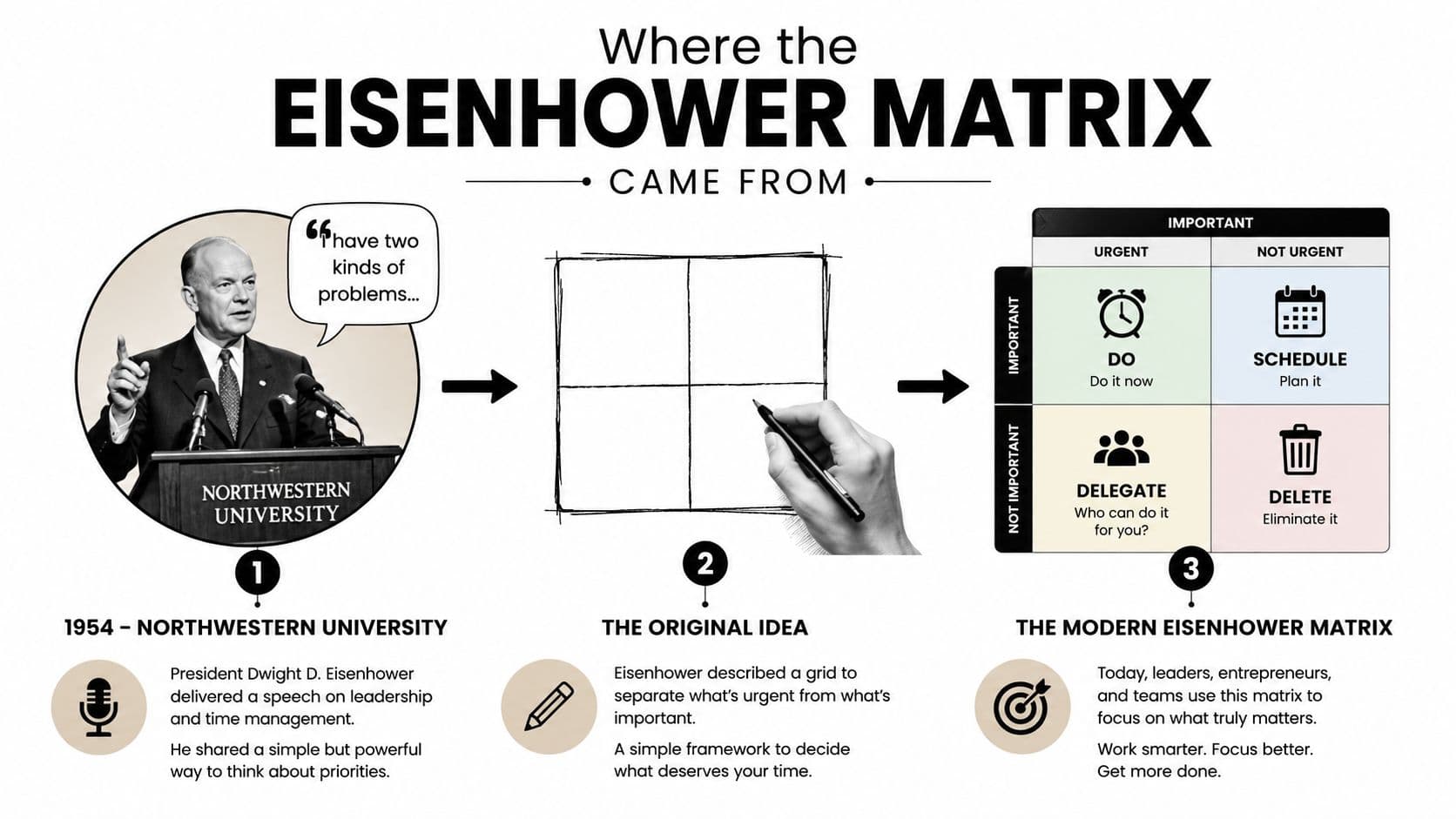
The structure survived because it fits the way people already organize work. An inbox contains incoming demands, a calendar holds planned commitments, a project board shows ownership, and a task list captures unfinished work. The matrix adds a decision rule to those familiar containers without requiring scoring math or specialized training.
That simplicity also explains its limits. The four quadrants tell you the category of a task, but they don't automatically rank every item inside that category. Two tasks can both be urgent and important, yet differ in dependency, consequence, effort, or available expertise.
For a practical application with concrete scenarios, the Eisenhower Matrix examples can help translate the historical model into everyday work. The important point is to treat the matrix as a foundation, not a complete theory of every prioritization decision.
Three Common Matrices and When Each One Fits
Different frameworks answer different questions. The Eisenhower Matrix asks, “What requires attention now?” Impact-effort asks, “Which option offers the most value for the work involved?” RICE asks, “Which candidate deserves priority after considering reach, impact, confidence, and effort?”
| Matrix | Axes or Inputs | Best For | Where It Breaks |
|---|---|---|---|
| Eisenhower | Urgency and importance | Daily triage, inbox review, personal workload | Several tasks tie, or importance is vague |
| Impact-effort | Value delivered and effort required | Product discovery and backlog grooming | Deadlines and time pressure disappear |
| RICE | Reach, Impact, Confidence, Effort | Comparing many features, experiments, or initiatives | Too much process for a short personal list |
Eisenhower for immediate workload decisions
Use Eisenhower when the main problem is a crowded day. It works well for sorting messages, requests, approvals, meetings, and deliverables because urgency is visible and the output is an action label. It also protects important work that doesn't have a loud deadline by giving it a dedicated Schedule quadrant.
The weakness appears when “important” means different things to different people. A revenue task, a customer commitment, and a manager's request may all feel important. The framework also struggles when several items occupy the same quadrant, since the grid doesn't provide an internal ranking.
Impact-effort for visible trade-offs
An impact-effort matrix plots expected value against the work required. A product team might use it during discovery to distinguish a high-impact, low-effort option from a low-impact, high-effort option. That visual contrast helps people discuss trade-offs without pretending that every idea deserves equal attention.
It isn't a strong standalone tool for deadline management. A low-effort task due today may need attention before a high-impact task planned for later, but urgency isn't represented on the grid. You'd need another rule or view to account for that constraint.
RICE for a larger candidate set
RICE uses Reach, Impact, Confidence, and Effort as inputs to a score. It suits teams comparing feature candidates or experiments where the consequences vary and a visual quadrant leaves too much ambiguity. The confidence input is particularly useful when the evidence behind reach or impact is uneven.
For a person choosing among a short list of daily tasks, RICE can create unnecessary estimation work. A useful overview of how different approaches compare is this guide to compare top prioritization methods, which places frameworks in context rather than treating one model as universally correct.
Use Eisenhower for a personal or team queue, impact-effort for a small set of value-versus-work choices, and RICE when a group must compare many uncertain candidates. For a broader look at practical ways to decide what comes first, see these task prioritization techniques.
Building Your Matrix From a Real Task List
Begin with a complete dump. Put open tasks in one place without sorting them while you write. Include the client reply, proposal, hiring review, recurring report, overdue documentation, product idea, meeting request, and the small administrative jobs that keep pulling your attention.
Then apply two practical tests. Some guidance treats urgency as a genuine deadline within the next 24 to 48 hours, while importance can mean progress toward a meaningful goal over the next 6 to 12 months. Those time frames are useful prompts, not universal laws, so adapt them to the responsibilities and commitments you carry. The definitions are outlined in this Eisenhower Matrix guide.
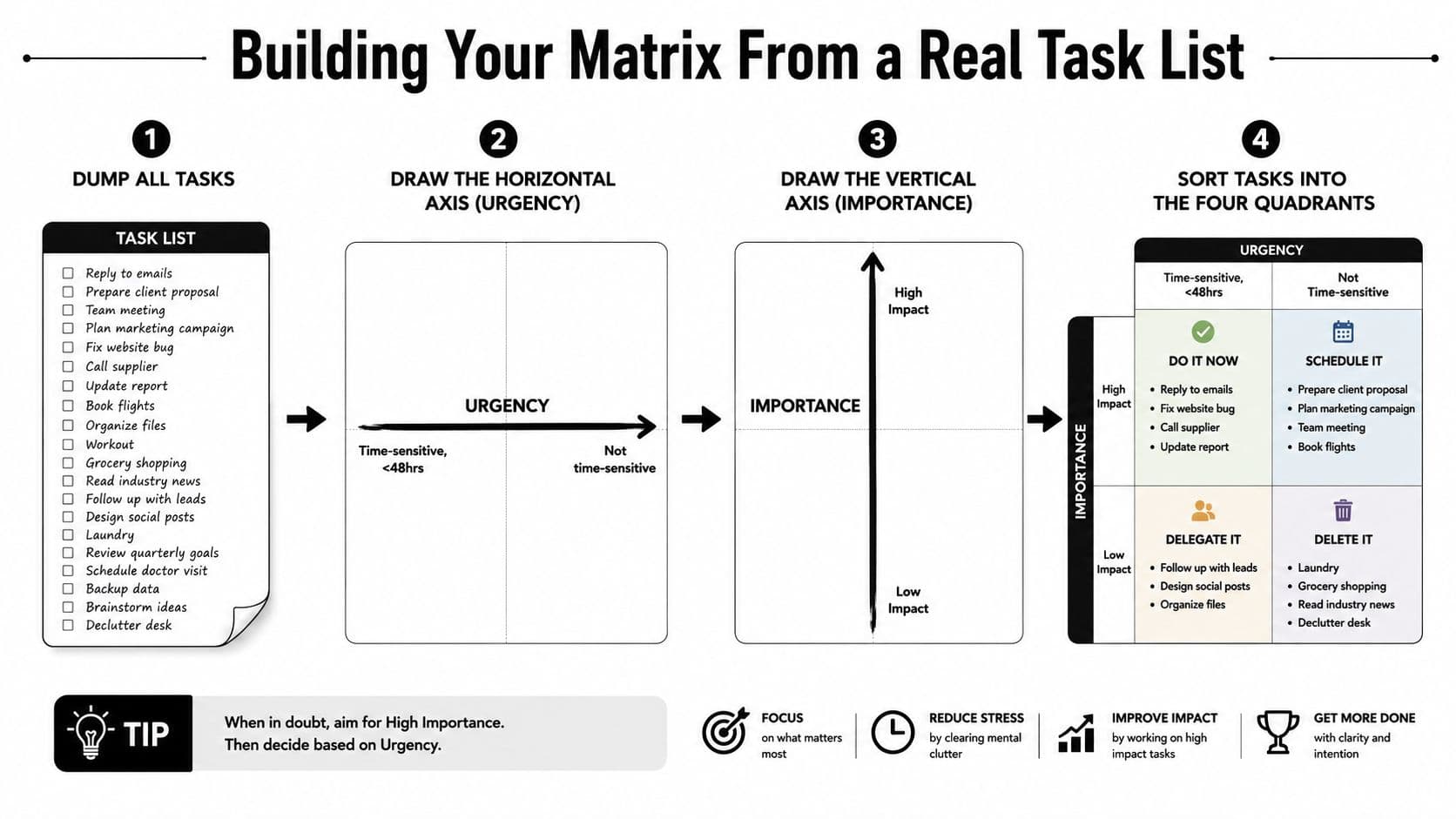
Draw urgency horizontally and importance vertically. Place urgent work on the left, not-urgent work on the right, high-importance work at the top, and low-importance work at the bottom. Sort each task into a quadrant, then assign a concrete action.
A practical weekly example
Do First
- Client proposal: Send the version needed for an imminent decision.
- Production blocker: Resolve the issue preventing a teammate from continuing.
- Executive approval: Complete the review that affects a current delivery.
Schedule
- Quarter planning: Reserve calendar time for the next planning cycle.
- Process documentation: Create the guide that will reduce repeated questions.
- Professional development: Choose a course or learning block tied to a longer-term goal.
Delegate
- Meeting notes: Assign transcription and capture the required format.
- Routine status update: Give ownership to the person closest to the underlying work.
- Calendar coordination: Ask an assistant or teammate to gather availability and propose times.
Drop
- Duplicate reporting: Remove a report nobody uses to make a decision.
- Unrequested research: Delete the task if no current project needs the result.
- Low-value meeting: Decline or remove it when there's no decision or contribution required.
For every scheduled task, choose a date and a next step. For every delegated task, name an owner and include the handoff context. A task that could wait a month without meaningful consequence deserves serious scrutiny. It may belong in Drop, or it may need to be rewritten so its real value becomes visible.
The matrix is a decision aid, not a contract. A scheduled task can become urgent, a delegated task can return to you when judgment is required, and a dropped task can become relevant when the project changes.
Breaking Ties When Tasks Land in the Same Quadrant
The matrix's largest blind spot is simple: a quadrant isn't a ranking. Five urgent and important tasks can sit together, and the labels alone won't tell you which one to start. A critique of the framework makes the same point about its weakness in comparing tasks within a single quadrant, as discussed in this analysis of priority matrix limitations.
Use lightweight tie-breakers before reaching for a complex scoring system.
- Check dependencies first. Start with the task that unblocks other work. If completing a brief lets two people begin their assignments, it may deserve attention before a standalone deliverable with a similar deadline.
- Estimate the cost of delay. Ask what each day of waiting costs in lost value, missed opportunity, customer impact, or operational risk. A task with a materially larger consequence from delay should move ahead.
- Compare effort to completion. If one item can be finished quickly and clears a blocker, complete it before beginning a larger task. This isn't permission to chase easy work. It's a way to create progress when the outcomes are otherwise comparable.
| Situation | First Tie-Breaker | When to Escalate to Weighted Scoring |
|---|---|---|
| One task blocks other work | Dependency order | When several dependency chains compete |
| Delay creates different consequences | Cost of delay | When estimates and stakes vary widely |
| Outcomes are similar | Effort to completion | When the quick win could distract from larger value |
| Several teams are affected | Shared impact and ownership | When reach, confidence, and effort remain disputed |
You can also ask who has the required authority or specialist knowledge. A task may be urgent and important, but if another person can make the decision faster, ownership should reflect that reality.
Escalate to RICE or another weighted model when stakes, reach, confidence, and effort differ enough that intuition feels arbitrary. The matrix remains useful as the first filter, while the scoring model handles the harder comparison. That isn't a failure. It's a signal that the decision has outgrown a simple visual triage tool.
Practical rule: Use the matrix to identify the decision class, then use a tie-breaker to choose the next task.
Using the Matrix Inside a Task Management Workflow
A matrix becomes useful when it changes what appears on your task board, calendar, and ownership records. A sticky note can classify a task, but it can't remind the delegate, preserve the handoff, or show whether a scheduled commitment has a realistic place in the week.
Start in list view. Capture every task, add a due date where one exists, and mark urgency and importance. This view is useful for cleaning up names, removing duplicates, and checking that each item has enough context for someone else to act.
Then use a Kanban board with four columns:
- Do: Current urgent and important work
- Schedule: Important work waiting for planned calendar time
- Delegate: Urgent work assigned to another owner
- Drop: Items removed from active execution

Suppose a routine client follow-up is urgent but doesn't require your expertise. Move it to Delegate, assign it to a teammate or assistant, and add a handoff note that explains the recipient, desired outcome, relevant history, and deadline. Mark the original task as watched or otherwise create a follow-up point, so delegation doesn't become disappearance. Teams that want to reduce repetitive outreach can also review this resource on how to speed up client follow-up with automation.
The calendar view handles the Schedule quadrant. A task isn't scheduled because it exists in a column. Give it a realistic time block, an owner, and a next action. If the calendar is full, that conflict is useful information. You may need to drop a lower-value commitment or renegotiate the deadline.
Automation can reduce repetitive sorting. Rules based on due dates, labels, or projects can pre-fill urgency and importance fields, while a tool such as Fluidwave can organize tasks across list, calendar, Kanban, table, and card views and support delegation to virtual assistants.
End with a short weekly review. Spend 10 minutes reviewing the board, dragging tasks when context has changed, checking delegated items, and committing calendar space to important work.
Best Practices for Individuals, Teams, and ADHD Users
A work prioritization matrix stays useful when the process is small enough to repeat. Individuals should keep each quadrant short, time-box the sorting session to 15 minutes, and review the matrix on a weekly rhythm rather than constantly rearranging it during focused work. If a task needs action, write the next visible step, not a vague label such as “marketing” or “website.”
For teams, agreement matters more than the color of the board. Define what high impact means for the current planning period, so two people sorting the same backlog use comparable judgment. Rotate the facilitator during reviews, record why disputed tasks moved, and make the matrix a shared decision record rather than one manager's private interpretation.
Keep the method accessible
People with ADHD or other neurodivergent working styles may benefit from reducing the number of decisions required at once. Pair each quadrant with one visible next action, use the simpler Eisenhower structure before introducing RICE, and rely on recurring templates so the system remembers the routine.
The matrix can support planning, but it isn't a treatment for ADHD. If symptoms interfere with work, relationships, or daily responsibilities, professional support may be appropriate, including learning about online psychiatry for adult ADHD. For practical workflow adaptations, see this guide to ADHD task management.
Retire the basic matrix when it no longer produces a usable queue. Move to weighted scoring when many candidates have materially different reach, impact, confidence, or effort. Move toward automation when due dates, project rules, and ownership patterns can classify work reliably. Keep the matrix as a quick triage layer if it still helps, but don't defend it when the team needs a ranked decision and the grid can't provide one.
The research cited in a productivity framework review found that prioritization behavior correlated with job performance at r = 0.26 and life satisfaction at r = 0.43, across 158 studies and more than 53,000 participants. Those figures describe prioritization behavior broadly, not proof that an Eisenhower grid causes better outcomes, but they support a practical conclusion: make deliberate prioritization a repeated behavior rather than a one-time sorting exercise. See the research-oriented review of task prioritization frameworks for the cited synthesis.
Create a task list today, sort it into Do First, Schedule, Delegate, and Drop, then resolve the first tie with dependency order, cost of delay, or effort to completion. Fluidwave lets you carry that structure into list, Kanban, calendar, and delegation workflows, so visit the platform and build a matrix that produces an assigned, scheduled next action instead of another static list.
Focus on What Matters.
Experience lightning-fast task management with AI-powered workflows. Our automation helps busy professionals save 4+ hours weekly.