Learn what is a work plan, its key components, and steps to create effective project plans for 2026. Turn your goals into action with our expert guide.
June 7, 2026 (4mo ago)
What Is a Work Plan: Create Effective Plans for 2026
Learn what is a work plan, its key components, and steps to create effective project plans for 2026. Turn your goals into action with our expert guide.
← Back to blog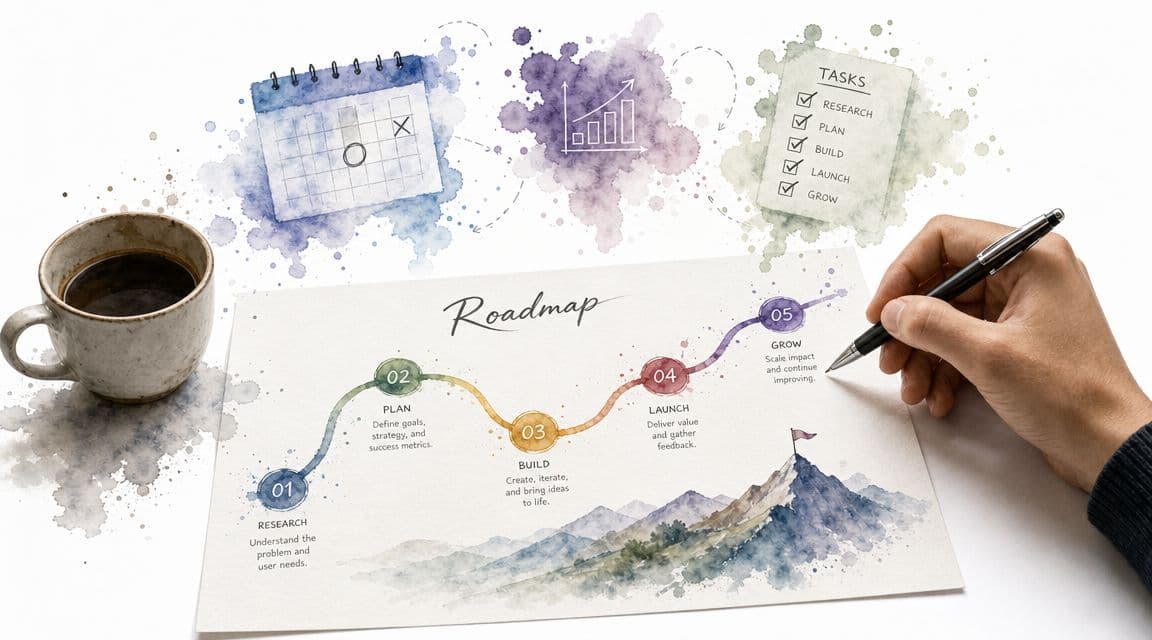
A work plan is a roadmap that turns a goal into actionable steps, guiding a project from start to finish. In practice, it defines the tasks, milestones, deliverables, resources, budgets, risks, and timelines needed to move from idea to execution.
If you're asking what is a work plan, you're probably already feeling the symptoms of not having one. A project kicked off with energy. Everyone nodded in the meeting. Then deadlines started slipping, people began working from different assumptions, and small requests piled up until the original scope barely looked familiar.
That's the moment when teams usually think they need more meetings. Most of the time, they need a better plan.
A work plan isn't paperwork for the sake of paperwork. It's the operating map for the work itself. When it's done well, it gives busy teams a shared view of what's happening, who owns what, and what needs to happen next. When it's done badly, it becomes a forgotten document in a folder no one opens again.
From Chaos to Clarity The Role of a Work Plan
A common project failure pattern looks like this. Leadership approves an initiative. A manager creates a rough list of tasks. The team gets moving fast because speed feels productive. A week later, two people are solving the same problem, one critical dependency wasn't spotted, and someone asks, "Wait, who was supposed to handle that?"
That's not a motivation problem. It's a planning problem.
A work plan gives shape to work before the work starts sprawling. Modern project guidance describes it as both an action plan and a living document, not something you write once and ignore. It converts strategy into measurable steps by setting goals, breaking the scope into smaller tasks, assigning responsibilities, scheduling deadlines, defining milestones, and building in contingency plans. That's the difference between hoping a project comes together and designing how it will come together in the first place, as described in ProjectManager's guide to making a work plan.
What changes once a team has one
Without a work plan, teams react. With one, they coordinate.
It's like the difference between a road trip with a route and a car full of people arguing over directions at every turn. You can still arrive without the map, but you'll waste time, miss exits, and frustrate everyone in the car.
Planning quality also matters beyond deadlines. The same project-management discussion notes that planning is linked to better work outcomes, and it highlights a study discussed by the University of Alabama at Birmingham showing that planning is a key factor in making flexible work arrangements translate into better work-life balance. That rings true in practice. Teams that know the plan usually spend less time chasing clarity late at night.
Practical rule: If people are asking the same coordination questions repeatedly, you don't have a communication issue first. You have a missing or weak work plan.
Where a work plan fits
A work plan sits between strategy and day-to-day execution. It's more concrete than a vision statement and more structured than a simple checklist. If you're trying to separate it from related concepts, it helps to compare it with a broader workflow. A workflow describes how work moves. A work plan defines the specific work, timeline, ownership, and control points for a particular initiative.
That's why good operators rely on work plans when the work crosses functions, includes dependencies, or has real consequences if it drifts.
More Than a To-Do List The Purpose of a Work Plan
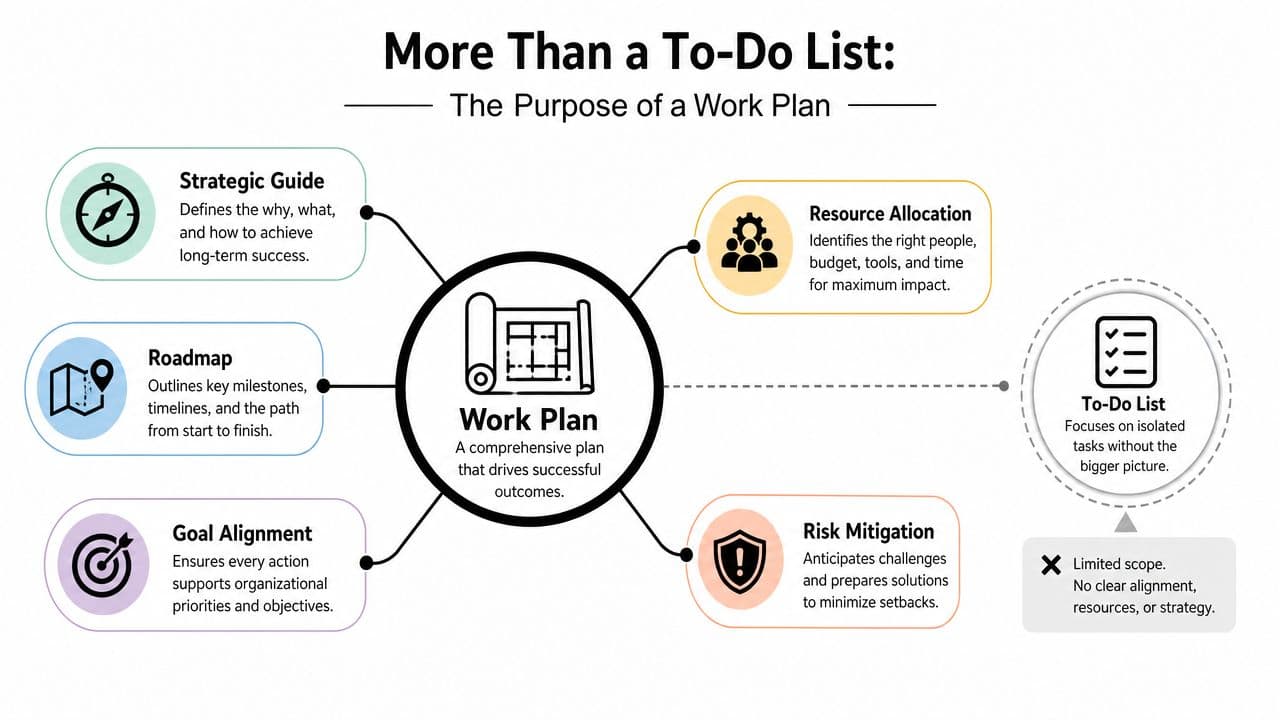
A to-do list tells you what needs doing. A work plan tells a team how a result will happen.
That distinction matters. People often confuse activity with progress, especially when a project is busy and visible. But movement isn't the same as control. A work plan acts more like an architect's blueprint than a checklist stuck to a monitor.
It aligns people before work gets messy
When a project has no real work plan, every person fills in the blanks differently. Marketing hears one goal. Operations hears another. Leadership assumes trade-offs were obvious. They usually weren't.
A solid work plan creates alignment by answering a few core questions early:
- What are we trying to achieve: The outcome should be clear enough that people can make day-to-day decisions without escalating every detail.
- What work is in bounds: Scope protects the team from "while we're at it" requests.
- Who owns each piece: Ownership removes the dangerous gray zone where everyone assumes someone else is handling it.
- How will we know we're on track: Milestones and deliverables create a baseline.
If your goals are still fuzzy, it helps to review practical examples of SMART goals before you draft the plan. A weak goal usually produces a weak plan.
It becomes a decision filter
This is the part many teams miss. A work plan isn't just a coordination document. It's a decision tool.
When new requests show up, the plan helps you ask:
| Question | Why it matters |
|---|---|
| Does this support the original goal? | If not, it may be scope creep dressed up as urgency |
| What task or deadline changes if we add this? | Added work always displaces something |
| Who owns the impact? | Shared pain with no owner becomes hidden delay |
That's why I rarely describe a work plan as administration. It's closer to a control panel.
A to-do list is personal memory support. A work plan is shared operational intent.
It connects strategy to execution
A project charter might explain why a project exists. A daily task list might show what someone is doing today. The work plan lives in the middle.
It translates broad intent into a usable structure that teams can run against. It's strategic enough to preserve the goal and detailed enough to guide the week. That middle layer is where many projects fail, not because the vision was wrong, but because nobody turned it into an executable path.
The Anatomy of an Effective Work Plan
A weak work plan usually fails for one of two reasons. It's too vague to guide action, or it's too detailed in the wrong places and misses the decisions that actually matter.
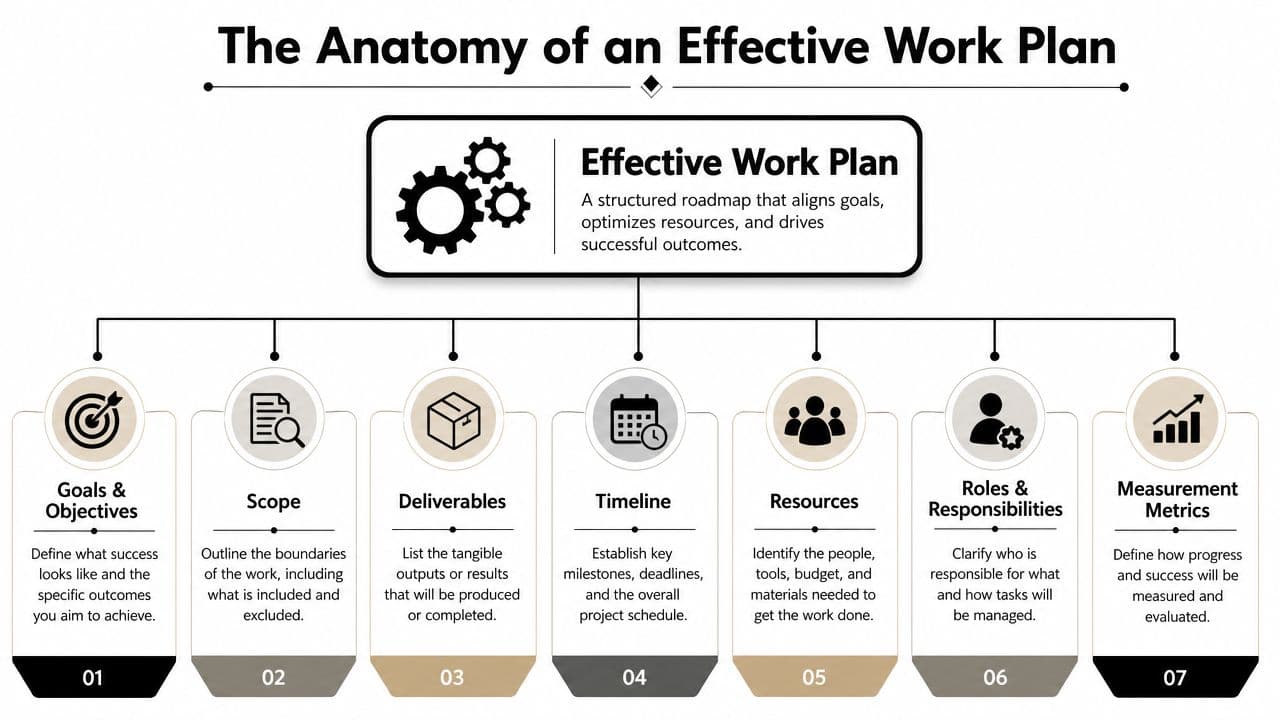
An effective plan includes a few parts that work together. Miss one, and the plan may still look complete while subtly creating risk.
The core components
Here's the practical checklist I use when reviewing a plan:
- Goals and objectives: This is the destination. If the goal is vague, the rest of the plan becomes interpretation.
- Scope: These are the boundaries. Good scope says what's included and what isn't.
- Deliverables: These are the visible outputs the team must produce.
- Tasks and activities: This is the work required to create each deliverable.
- Timeline and milestones: These establish pace, sequence, and review points.
- Resources: This includes people, budget, tools, and available capacity.
- Roles and responsibilities: This prevents ownership gaps and duplicate effort.
- Risk and contingency thinking: This prepares the team for what might go wrong.
- Measurement approach: This defines how progress will be checked during execution.
Not every project needs the same level of detail. A small internal initiative may need a light version. A cross-functional launch needs more structure.
Why scheduling details matter
A work plan isn't just a bucket of tasks. It functions as a schedule that specifies what will be done, who will do it, when each task starts and ends, and often the sequence in which activities must occur. MIT describes a work plan that way in its guidance on creating a work plan schedule.
That sequence is where real planning shows up.
If design must finish before development starts, and development must finish before training materials are written, those aren't just tasks. They are dependencies. A good work plan makes those dependencies visible early, when they can still be managed.
What each part prevents
The easiest way to understand the anatomy is to tie each element to the problem it prevents.
| Work plan element | What it prevents |
|---|---|
| Clear objective | Teams solving the wrong problem |
| Scope boundary | Endless add-ons |
| Named owner | "I thought someone else had it" |
| Milestone | Late discovery of delay |
| Resource view | Overloading the same people |
| Risk note | Surprise becoming crisis |
The best work plans don't try to predict everything. They make important assumptions visible before those assumptions hurt the project.
That's the true anatomy. Each part exists because a specific kind of failure is common.
How to Build Your Work Plan Step by Step
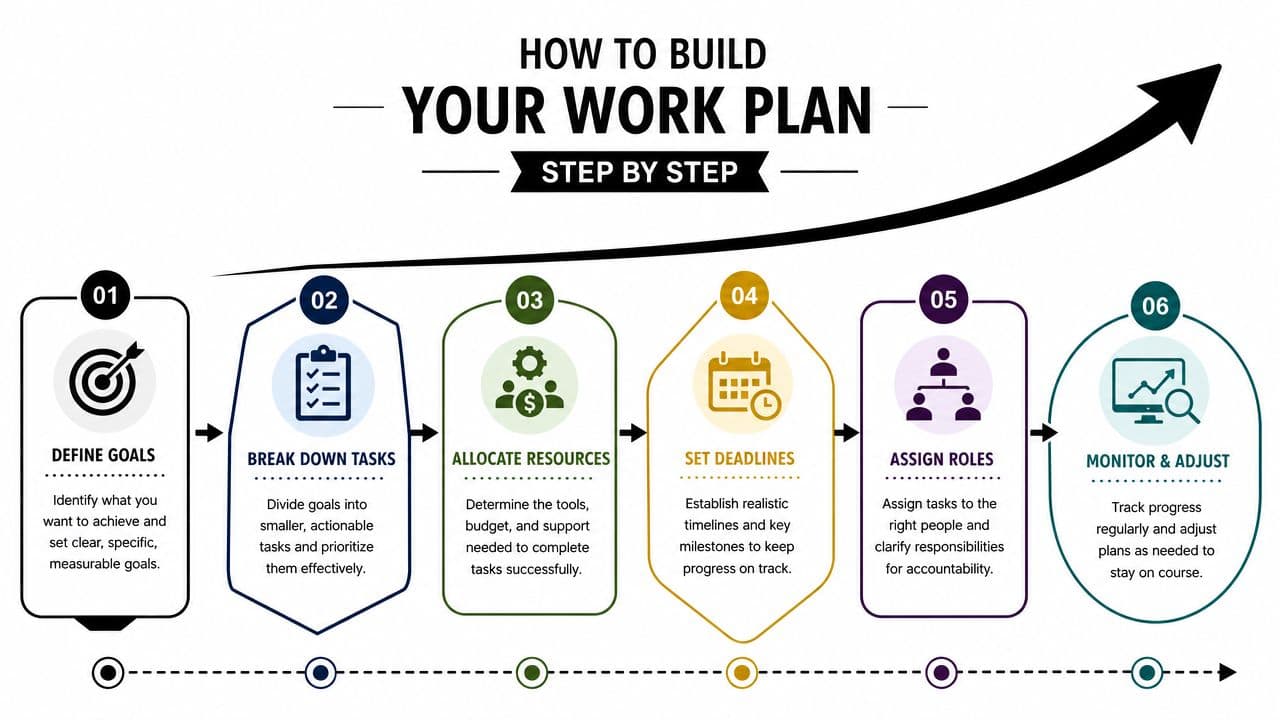
The fastest way to make a bad work plan is to open a document and start listing tasks. Start with the outcome instead. Tasks make sense only after the team agrees on where it's going and what constraints matter.
This visual gives the overall flow.
Start with the end in mind
Write the goal in plain language. If a smart colleague read it quickly, would they understand the intended result, the audience, and the success condition?
A simple mini-template works well:
- Goal
- Why it matters
- What "done" looks like
- Constraints
Example:
- Goal: Launch the new client onboarding process
- Why it matters: Improve handoff consistency between sales and operations
- Done looks like: New steps documented, owners assigned, team trained, process in use
- Constraints: Existing team capacity, launch timing, current tool setup
This is also the point where an action plan framework can help. If the outcome still feels broad, tighten it before you build the rest.
Break the work into chunks
Once the goal is clear, split it into major deliverables or workstreams. Then break each one down into tasks.
For example, a website launch might break into:
- Content: Draft copy, review, approvals
- Design: Page layouts, visual assets
- Development: Build pages, QA, fixes
- Launch prep: Redirects, tracking, sign-off
Don't break tasks down forever. Stop when a task is small enough that one owner can understand it and complete it without needing another planning session.
Field note: If a task is so broad that two people describe it differently, it isn't a task yet. It's a workstream.
Sequence the work and set checkpoints
Now put the tasks in order. Some tasks can run in parallel. Others depend on earlier work finishing first.
Teams often get overconfident in such situations. They know what needs doing, so they assume sequence will sort itself out. It rarely does.
Use these prompts:
- What has to happen first
- What can happen at the same time
- What decision gates need approval
- Where should the team pause and review progress
A milestone should represent a meaningful checkpoint, not just a date on a calendar.
Here's a useful walkthrough for teams that prefer seeing the process explained aloud:
Assign people, then test capacity
Ownership comes after sequencing, not before. Once you know the order of work, assign the person accountable for each task.
Then ask a tougher question: can those people do the work in the time available?
A simple planning table helps:
| Task | Owner | Dependency | Target timing | Risk note |
|---|---|---|---|---|
| Draft onboarding steps | Operations lead | None | Early phase | Needs stakeholder review |
| Review legal language | Legal | Draft complete | Mid phase | Turnaround may slip |
| Train account team | Enablement | Final process approved | Late phase | Scheduling conflict possible |
Plan for problems before they become real
Every work plan needs contingency thinking, even on small projects.
Focus on practical risks:
- Approval risk: A stakeholder may delay sign-off
- Capacity risk: A key owner may be overloaded
- Dependency risk: A required input may arrive late
- Change risk: Priorities may shift mid-project
For each risk, decide what you'll do if it happens. Not a long essay. Just a clear response. If legal review slips, maybe the team launches non-sensitive parts first. If a decision-maker goes quiet, maybe another approver is named in advance.
That's enough to turn a blank page into something useful. Not perfect. Useful. That's the standard that matters.
Bringing Your Work Plan to Life with Tools and Examples
A work plan earns its value after the kickoff meeting, not during it. If nobody checks it, updates it, or uses it to make decisions, it's just a polished document.
Two examples show how the same structure adapts.
Example one with a marketing launch
Say a team is launching a campaign for a new service. The work plan might include message development, asset creation, email setup, landing page work, internal approvals, and launch review. The goal is commercial. The shape of the plan is still operational.
The difference between a smooth launch and a stressful one usually comes down to visibility. Can the team see blockers early? Are approvals explicit? Does everyone know what must be ready before launch day?
Example two with software delivery
Now take a software feature release. The plan might cover requirements, design, development, testing, release prep, support documentation, and rollout communication.
Different project, same principle. The work plan keeps engineering, product, support, and leadership aligned on sequence and ownership. It also makes trade-offs visible. If testing runs long, everyone can see the effect on release timing.
A useful work plan shouldn't live in a slide deck after the planning meeting. It should live where people already manage work.
Turning the plan into a working system
Tools are important. A spreadsheet may be enough for a simple initiative. For active projects, teams require shared visibility, task ownership, status tracking, and a way to update the plan without rewriting it from scratch.
Options vary. Some teams use Asana, Monday.com, Trello, ClickUp, or Notion. Others use a more structured planning layer and then manage day-to-day execution elsewhere.
One option is Fluidwave's project planning template, which ties planning to task execution in views like Kanban, list, table, and calendar. It also supports delegation and real-time tracking, which is useful when a work plan needs to stay active instead of sitting in a document folder.
The key is not the brand name. The key is whether the tool helps the team keep the plan current. If updating the plan feels annoying, people stop doing it. Once that happens, the document stops reflecting reality and the project starts running on assumptions again.
Common Pitfalls and Best Practices for Success
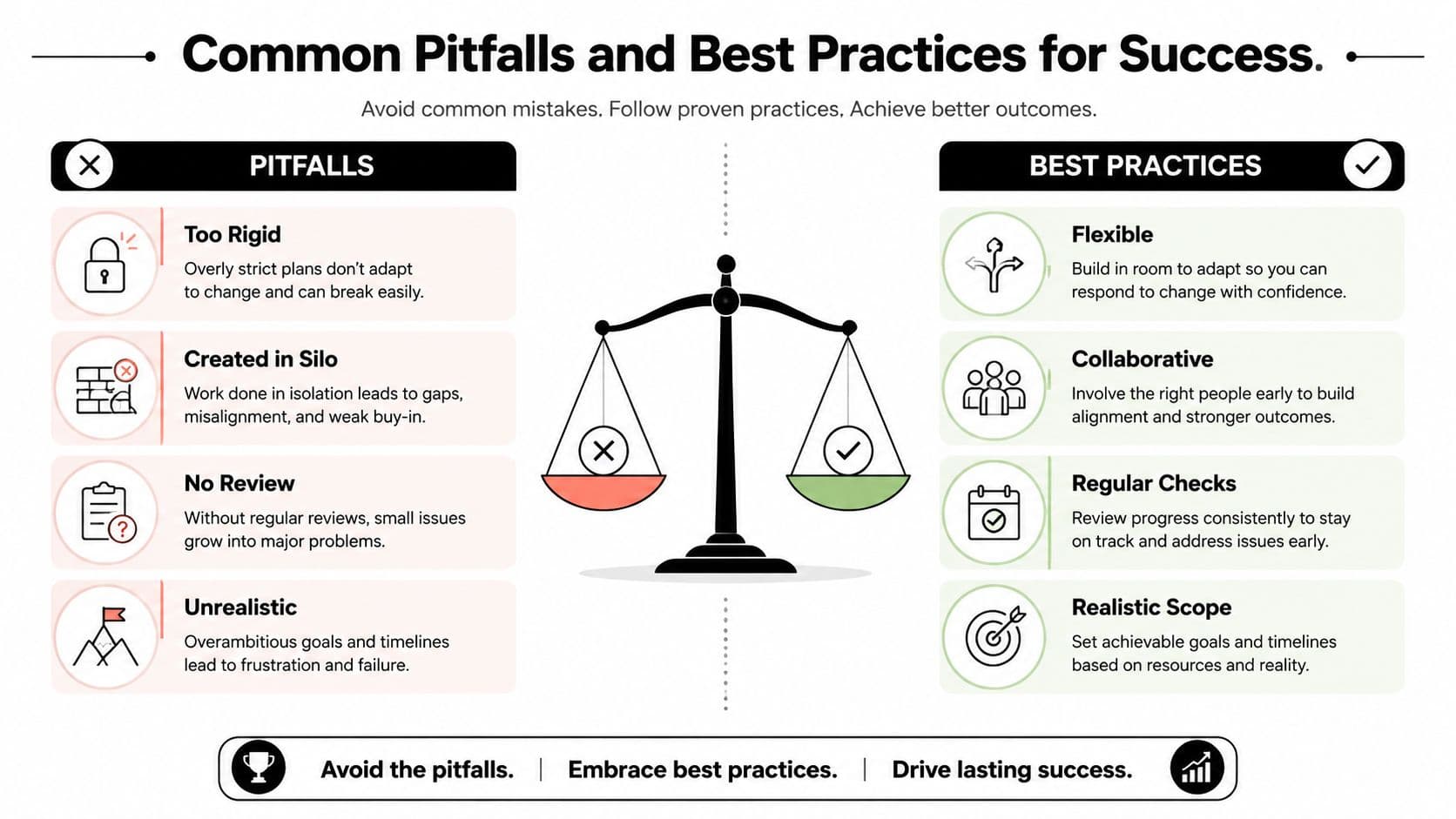
Most failed work plans don't fail because the original idea was poor. They fail because the plan was treated as static, private, or unrealistically detailed.
A frequently overlooked question is how to make a work plan adaptive instead of rigid. Even template-oriented guides emphasize that progress tracking and regular review are needed, which implies that work plans fail when teams treat them as static documents, as noted in Smartsheet's work plan template guidance.
What usually goes wrong
- Too rigid: The team follows the original dates even after assumptions have changed.
- Built in a silo: One person writes the plan alone, so hidden dependencies never surface.
- Too complex: The plan becomes so detailed that nobody wants to maintain it.
- Set and forgotten: The file exists, but the team runs the project from memory and chat threads.
What works better
- Keep it visible: Put the plan where the team already works.
- Review it regularly: Use milestone reviews or short check-ins to compare plan versus reality.
- Make ownership explicit: Every important task needs a named owner.
- Allow controlled updates: Plans should change when facts change, not when people get impatient.
- Celebrate milestones: Small wins keep the team engaged and make progress tangible.
Plans should be stable enough to guide action and flexible enough to survive contact with reality.
That's the practical answer to what is a work plan. It's not a document you finish. It's a management tool you keep using.
If your team needs a work plan that stays connected to actual execution, Fluidwave is one option to consider. It combines task organization, shared views, real-time collaboration, and delegation support so the plan can keep working after kickoff, not just during it.
Focus on What Matters.
Experience lightning-fast task management with AI-powered workflows. Our automation helps busy professionals save 4+ hours weekly.