Compare 8 time blocking methods, from Pomodoro to energy management, with practical templates and Fluidwave scheduling examples.
October 8, 2026 (Today)
8 Time Blocking Methods for Better Focus
Compare 8 time blocking methods, from Pomodoro to energy management, with practical templates and Fluidwave scheduling examples.
← Back to blog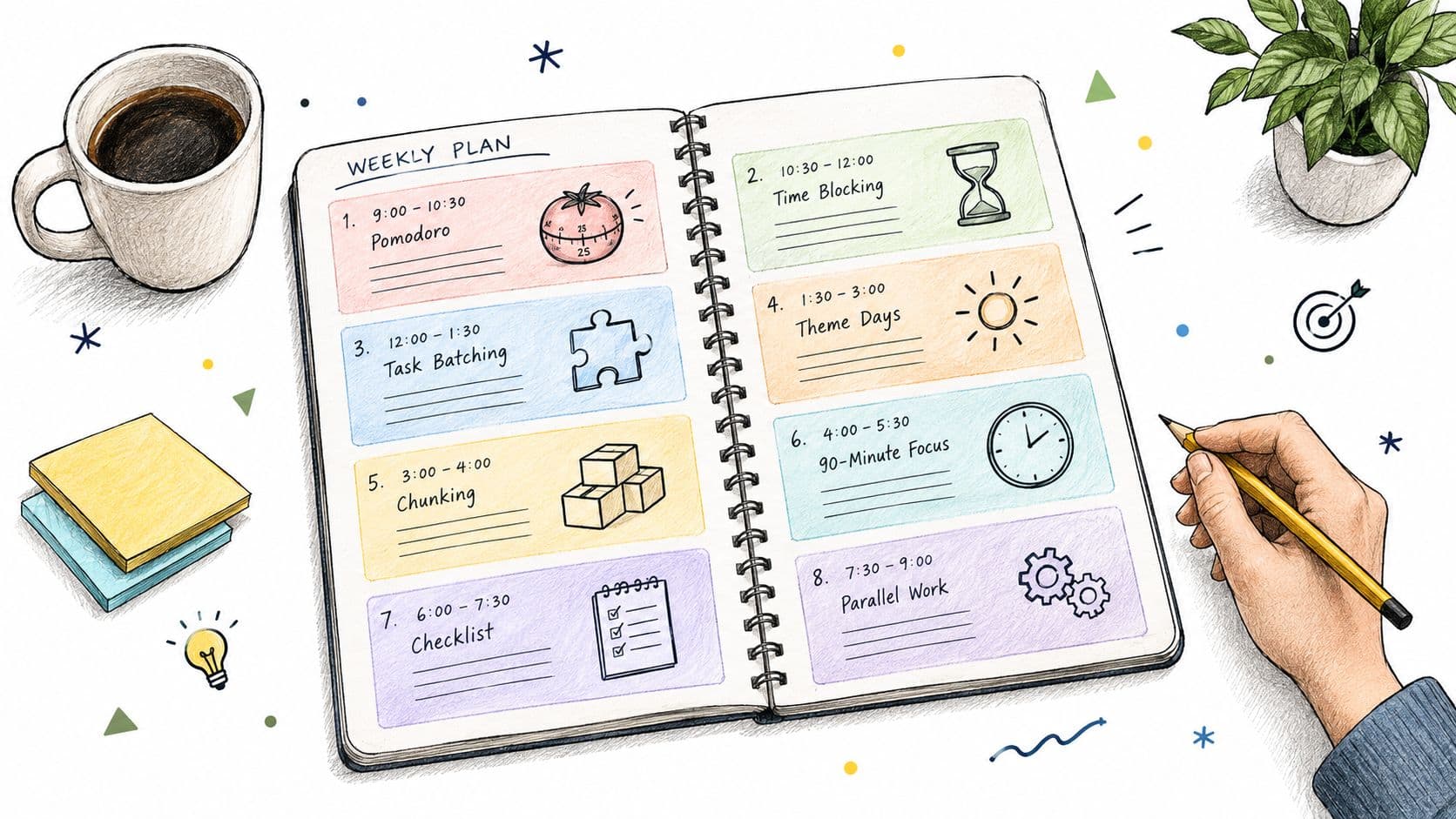
The best time block is the one you can protect. That sounds obvious, but much of the popular advice assumes every worker controls a quiet calendar and can defend long, uninterrupted sessions. Executives, managers, assistants, founders, and people with ADHD often work around meetings, urgent requests, collaboration, and unpredictable handoffs. A rigid schedule can become another source of rescheduling rather than a way to get important work done.
The useful question isn't “Which time blocking method is best?” It's “Which method fits this work, this energy pattern, and this interruption level?” Short intervals can help with activation, batching suits repeated tasks, timeboxing limits scope, and longer sessions support complex creation. Fluidwave can turn any of these choices into visible calendar blocks. Its unscheduled-task panel sits beside day, week, and month calendar views, so you can drag tasks onto the calendar, resize or move sessions, and split longer tasks while tracking remaining minutes. Its AI scheduling can also place prioritized tasks into available working hours, add breaks around calendar events, and divide longer tasks into multiple sessions.
A time blocking method should fit the work, not force every task into the same rhythm.
1. The Pomodoro Technique
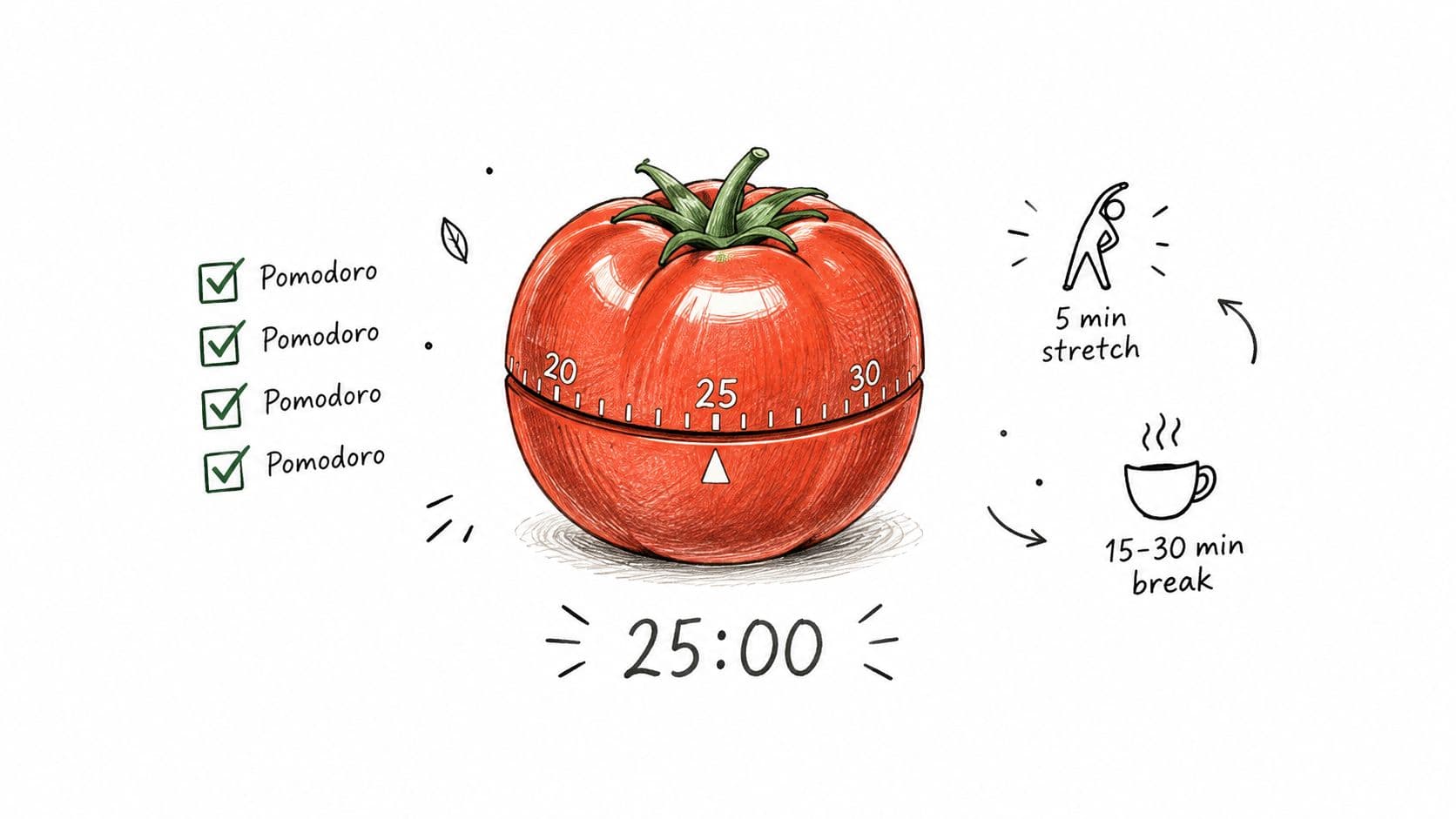
The Pomodoro Technique works best when starting is harder than continuing. You divide work into focused 25-minute intervals, then take a 5-minute break. After four intervals, take a longer break lasting 15 to 30 minutes. The structure gives a reluctant task a clear entry point without demanding a heroic stretch of concentration.
A software developer might use one interval to write a failing test, another to implement the smallest change, and a third to clean up the code before reviewing pull requests. A content writer can use several intervals for drafting, while an executive can reserve a short sequence for email without allowing the inbox to remain open all morning. Students can use the same rhythm for focused study, provided breaks involve movement or water rather than another screen.
The method is less useful for work that needs a long uninterrupted mental runway. Stopping halfway through a complex argument, architecture decision, or design concept can create unnecessary restart costs. It also fails when people treat every break as optional and turn the schedule into a chain of exhausting sprints.
Make each interval observable
Don't label a block “work on proposal.” Define the smallest visible result, such as “draft the opening section” or “review three sources.” A simple timer, a silenced phone, and a record of completed intervals make progress easier to see. If 25 minutes feels unnatural, test 20 or 30-minute intervals rather than abandoning the method.
Use Fluidwave to prepare task-sized blocks before the day begins. A task can be split into several sessions, with the remaining work visible after each interval. That prevents a vague task list from competing with the calendar.
- Protect the break: Walk, stretch, or hydrate instead of checking messages.
- Group related work: Use several intervals for one category before changing context.
- Track completion: Count finished intervals, but also check whether they produced useful output.
For a practical reset between intervals, use these brain break activities rather than defaulting to email.
2. Time Blocking with Task Batching
Task batching groups similar work into a shared block instead of scattering it across the day. It suits freelancers, executives, project managers, and assistants who lose time whenever they move between unrelated tools, decisions, or communication styles. The benefit isn't that every task becomes easy. The benefit is that the next task starts inside a familiar context.
An executive might create one email block in the morning and another in the afternoon. A freelancer could reserve Monday morning for administration and use the afternoon for client delivery. A project manager might collect status updates, reporting, and timeline maintenance into one operating block. A startup founder could reserve particular days for investor communication and other days for product work, as long as the business still has a route for urgent issues.
Batching becomes counterproductive when categories are too broad. “Everything else” is not a useful batch, and a six-hour communication block can become an invitation to react continuously. Start with a few clear categories, such as communication, administration, creative work, and meetings. Then adjust based on the work that moves through each category.
Give every batch a boundary
Place high-concentration batches during the energy window that suits them. Put routine communication in lower-energy periods when possible. Tell colleagues and clients when you review messages, and use an automated response outside those windows if delayed replies need context.
Fluidwave's list, Kanban, calendar, and other task views help you organize the work before you schedule it. A virtual assistant can also receive a grouped delegation request instead of a stream of disconnected instructions. That makes ownership clearer and reduces repeated setup.
Practical rule: Batch by the kind of attention a task requires, not merely by the department that requested it.
A freelancer managing several clients can create separate batches for proposals, production, revisions, and invoicing. The schedule remains flexible, but each block has a purpose. This task management approach for freelancers is particularly useful when client work competes with business administration.
3. The Time Matrix
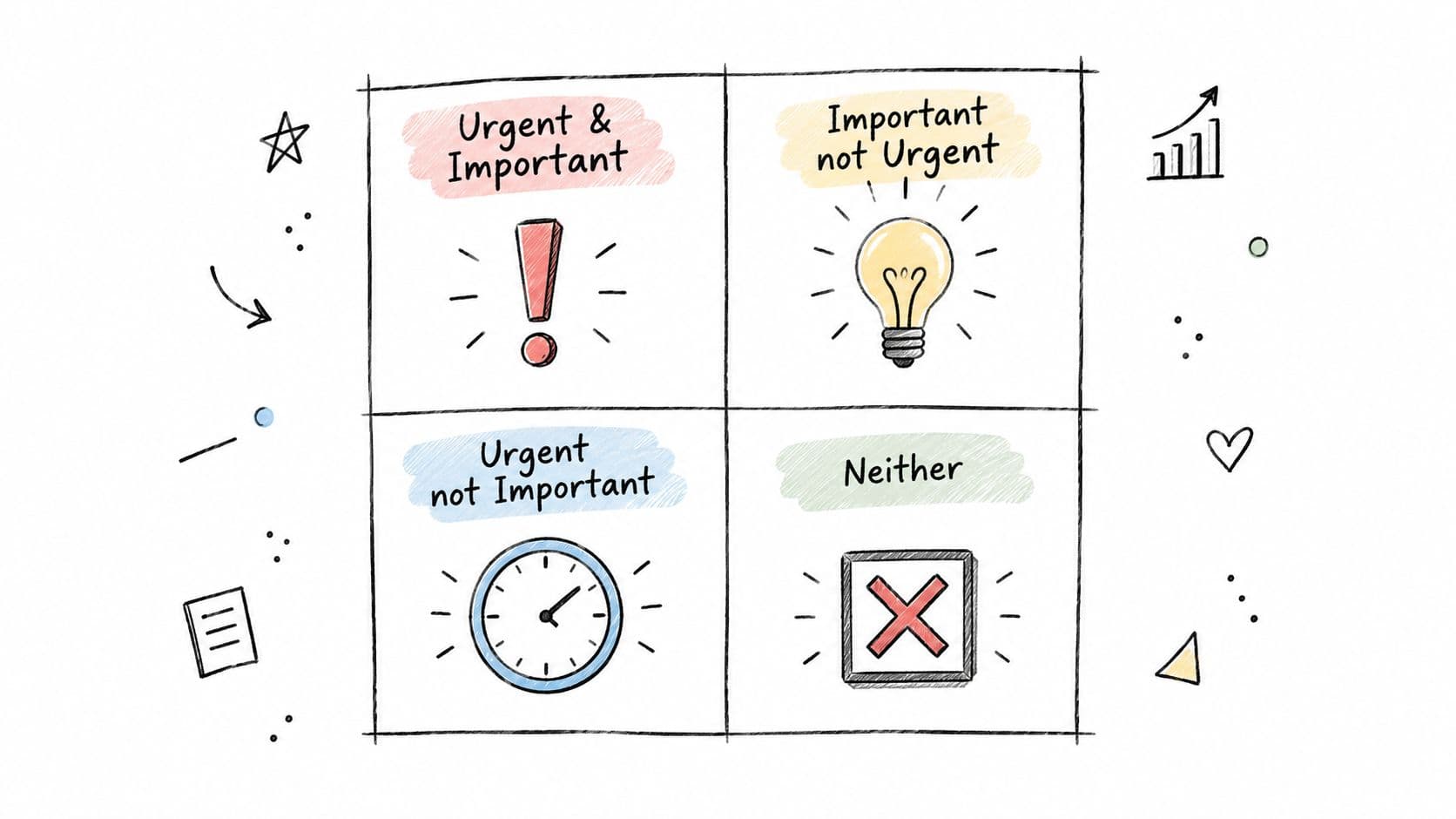
A time matrix decides what deserves calendar space before you decide when to do it. The Eisenhower Box sorts work into urgent and important, important but not urgent, urgent but not important, and neither urgent nor important. That distinction prevents the latest request from automatically becoming the next priority.
Start with the work that creates future capacity. Strategic planning, relationship building, process improvement, product development, and long-term hiring rarely create immediate pressure, yet postponing them keeps leaders in reaction mode. A founder might reserve strategy and product time before accepting every customer request. A project manager could schedule team development or process repair before recurring issues consume another week.
The four quadrants also signal how much flexibility each type needs. Real urgent and important work requires open space for disruption. Urgent but low-importance work often belongs with a delegate, an automated workflow, or a defined response window. Work that is neither urgent nor important should earn its place rather than occupy leftover time.
Use the matrix differently according to your work pattern. People with uninterrupted mornings can place important, non-urgent thinking there. People facing frequent interruptions should protect shorter strategic blocks and leave buffers around urgent work. Fluidwave can surface prioritized tasks, support calendar planning, and route suitable low-value work to virtual assistants. Its auto-prioritization helps maintain the queue, while the final decision about trade-offs remains with you.
A practical routing rule:
- Important and urgent: Schedule it promptly, including execution and follow-up time.
- Important, not urgent: Reserve it before reactive work fills the calendar.
- Urgent, not important: Delegate it, batch it, or assign a response window.
- Neither: Remove it, defer it deliberately, or leave it unscheduled.
The matrix works best alongside another method. Use it to choose what enters the calendar, then apply batching for repeated work or timeboxing for tasks that tend to expand. A full calendar only shows commitment. A prioritized calendar shows judgment.
4. Day Theming
Day theming works when your responsibilities are distinct and your calendar has enough control to protect focus. Assign each weekday a dominant type of work instead of rebuilding the week every morning. A founder could reserve Monday for finance and administration, Tuesday for product, Wednesday for sales, Thursday for team management, and Friday for strategy. An executive might use Tuesday for client meetings, Thursday for collaboration, and Friday for planning.
The method fits deep work that benefits from continuity, such as product development, writing, or strategic review. It also reduces switching between sales, operations, product, and leadership. Consultants handling several engagements can create a predictable rhythm, although client requests will still interrupt the pattern.
The trade-off is weekly rigidity. A sales call can appear on an operations day, and a customer problem may need attention immediately. Keep the theme as the default routing rule, then move or shorten the block when the business case justifies it. Do not let one exception erase the rest of the day.
Fluidwave's calendar view helps check whether each responsibility has enough room across the week. Auto-prioritization can place higher-value themed tasks ahead of lower-priority work, while automation routes suitable tasks to the assigned day. Delegation requests can also be grouped by theme for an assistant, reducing manual scheduling.
A workable template:
- Monday, administration: Finance, planning, documentation, and internal cleanup.
- Tuesday, creation: Product, writing, design, or other high-focus work.
- Wednesday, revenue: Sales conversations, proposals, and business development.
- Thursday, people: Team decisions, coaching, collaboration, and client meetings.
- Friday, strategy: Review, planning, risk decisions, and next-week preparation.
Use shorter blocks or buffers on days with frequent interruptions. Protect creation and strategy days when your energy is highest, and move routine requests to lower-energy periods. Day theming is strongest when combined with Fluidwave calendar planning: themes set the weekly structure, while task priority and changing demands determine what enters each block.
5. Time Blocking with Time Audit
A time audit exposes the gap between the calendar you planned and the week you lived. Track your work for a week or two, then build blocks around the observed pattern. This method suits schedules where important work repeatedly moves into evenings or remains unfinished despite a reasonable-looking calendar.
Use consistent categories such as meetings, client delivery, administration, breaks, communication, and strategic work. A spreadsheet is sufficient. Record what happened rather than what you intended to do. The useful finding may be uncomfortable: an executive might see reactive meetings consuming the week, while an entrepreneur discovers that administration is taking time from products or customers. A project manager may find that reporting belongs in one protected batch instead of scattered interruptions.
After the audit, compare time spent with business value. Reserve protected hours for high-value work, batch repeated tasks, and mark suitable work for delegation to a virtual assistant. Fluidwave keeps tasks connected to calendar blocks, so planned time can be compared with actual task time. Its auto-prioritization can help place higher-value work into limited open space, while calendar planning makes recurring capacity visible. Use the results to adjust estimates, not to create another planning ritual.
Ask four practical questions: Where did the time go? Which categories occupied the most space? What created value? Which activities advanced important outcomes? What repeated unnecessarily? Which work could be automated, batched, or delegated? Where did plans fail? Which blocks were too short, too vague, or too exposed to interruptions?
Keep the audit lightweight. The target is an honest schedule that reflects interruptions, energy, and actual capacity, not a perfect record of every minute.
Repeat the review when responsibilities, health, team structure, or workload changes. A calendar calibrated to an old role will gradually produce unreliable estimates.
6. The 90-Minute Ultradian Rhythm Method
Longer blocks suit work that needs continuity. Software engineers can use them for architecture and coding, writers for deep drafting, researchers for analysis, and designers for sustained creative decisions. The method generally pairs an intense work period of around 90 minutes with a recovery break of 15 to 20 minutes.
The attraction is simple. You don't have to rebuild concentration every few minutes, and the block gives complex work enough room to develop. The risk is assuming that every person or task benefits from the same duration. A meeting-heavy executive may not be able to protect a full session, and a person with ADHD may find a long block discouraging if task initiation fails.
Treat the duration as an experiment
Find your strongest energy window and place the most demanding work there. During the break, walk, stretch, or hydrate. Checking messages doesn't provide the same recovery as leaving the work context. Experiment with a shorter or longer personal interval if 90 minutes consistently produces either drift or premature fatigue.
Fluidwave calendar planning can protect these sessions around existing commitments. Mark the block clearly, use Do Not Disturb settings, and tell colleagues when you're unavailable. Keep administrative work and meetings outside the deep-work window whenever possible.
This approach works poorly in interruption-heavy roles unless the block has real protection. One promising alternative is a single protected deep-work session surrounded by open response time. The calendar then acknowledges the job's actual demands instead of pretending the entire day is controllable.
7. The Time-Box Time-Limit Method
Timeboxing sets a firm endpoint before work begins, making scope the main constraint. It fits writing, research, decision meetings, product specifications, and other tasks that can expand through perfectionism. The method is most useful when interruptions are manageable and the output can be defined in advance.
Start with the result, not the clock. A writer can reserve one box for a complete rough draft, then stop even if the prose needs polishing. A product manager might timebox a feature specification and record unresolved edge cases for later review. An executive can limit a decision meeting to its stated purpose and require one clear next action before ending. Consultants can protect the delivery window by separating research from additional questions that arise during the work.
The trade-off is deliberate discomfort. An unfinished task stays visible, but that pressure exposes weak scope decisions and prevents interesting details from consuming the available time. For exploratory work, begin with a looser research period, then apply a hard box once the question and expected output are clear.
Set the boundary before scheduling
Write a definition of “done enough” before starting. Choose a draft, recommendation, outline, review, or decision record as the required output. Use a visible timer, silence notifications, and capture unrelated ideas in a holding note. Fluidwave calendar alerts can mark the stopping point, while auto-prioritization helps place unfinished work against higher-value commitments.
Use these decision rules:
- Start with low-risk work: Practice on routine drafts or reviews before timeboxing sensitive decisions.
- Match the box to the output: Shorter boxes suit bounded reviews; broader questions need staged boxes rather than one inflated session.
- Respect the endpoint: Stop when the box closes, assess the remaining value, and schedule another box only when the benefit is clear.
- Protect interruption-heavy work: Leave response time around the box instead of pretending the entire day is available.
Timeboxing works best as one layer of a schedule. Pair a fixed box with task batching for follow-up work, then let Fluidwave adjust priorities when meetings or urgent requests change the plan.
8. Time Blocking with Energy Management
Energy management assigns work according to cognitive readiness rather than clock time alone. Reserve high-energy periods for architecture, strategy, hiring, important decisions, or difficult client conversations. Use lower-energy periods for administration, routine coding, inbox processing, documentation, and meetings.
The pattern differs by person. A software engineer may do complex architecture in the morning and routine implementation later. An entrepreneur can place strategy and hiring in a peak window, then move email to a lower-energy period. A neurodivergent professional might protect mornings for hyperfocus and use afternoons for collaboration. A virtual assistant can match demanding client tasks to stronger focus periods instead of treating every available hour as equivalent.
Build from observed patterns
Track energy with a simple 1-to-10 scale for 2 to 3 weeks, noting the task, time, and how you felt. That record separates genuine patterns from assumptions. Protect the strongest 2 to 3-hour window for the work with the highest consequence, but don't schedule demanding blocks back to back without recovery.
Fluidwave's flexible task views make it easier to reorder work by energy requirement and move tasks when the day changes. Share your peak and off-peak availability with colleagues so the schedule becomes a coordination tool rather than a private rule. This guidance on protecting your energy is especially relevant when constant availability is competing with high-value work.
Your peak hours are a scarce resource. Spend them on work that needs your best judgment, not work that merely happens to be visible.
Energy patterns can shift with seasons, health, sleep, caregiving, and role changes. Review the arrangement periodically. The strongest schedule isn't the one that looks most disciplined. It's the one that lets demanding work happen without exhausting the rest of the day.
8-Method Time-Blocking Comparison
| Method | 🔄 Implementation complexity | ⚡ Resources / setup required | ⭐ Expected effectiveness | 📊 Expected outcomes / impact | 💡 Ideal use cases / key advantage |
|---|---|---|---|---|---|
| The Pomodoro Technique | Low, simple countdown cycles | Minimal, timer or app | ⭐⭐⭐⭐ | Short bursts of focus, reduced procrastination, measurable session counts | Great for short tasks, ADHD support, quick momentum; minimal setup |
| Time Blocking with Task Batching | Medium, requires categorization and scheduling | Low–Medium, calendar/task tool | ⭐⭐⭐⭐ | Fewer context switches, higher quality output per task type | Best for email/admin batching, teams, and repetitive workflows; improves flow |
| The Time Matrix (Eisenhower Box) | Low–Medium, needs honest prioritization | Low, simple matrix or tool | ⭐⭐⭐⭐ | Clearer strategic focus, less reactivity, reduced time-wasters | Ideal for executives and strategic planning; clarifies what to delegate |
| Day Theming | Medium, weekly planning and discipline | Low, calendar + communication | ⭐⭐⭐ | Predictable weekly rhythm, deeper domain focus, easier delegation | Suits founders, consultants, and team coordination across domains |
| Time Blocking with Time Audit | High, tracking + analysis phase (1–2 weeks) | Medium–High, tracking tools and analysis time | ⭐⭐⭐⭐ | Data-driven blocks, revealed time drains, improved estimates and delegation | Best when you need factual baseline to redesign schedule and delegate |
| 90-Minute Ultradian Rhythm Method | Medium, protect longer uninterrupted blocks | Low–Medium, calendar, protected time | ⭐⭐⭐⭐ | Extended deep-work flow, higher-quality complex output, better recovery | Excellent for writers, researchers, engineers doing deep cognitive work |
| The Time-Box Time-Limit Method | Low–Medium, set hard stops and rules | Minimal, timer and clear scope | ⭐⭐⭐ | Reduced perfectionism, faster decisions, contained scope creep | Useful for brainstorming, meetings, and preventing overwork on tasks |
| Time Blocking with Energy Management | Medium–High, requires energy tracking and adjustment | Medium, tracking (2–3 weeks) and calendar alignment | ⭐⭐⭐⭐ | Sustainable high performance, less burnout, better task-to-energy fit | Best for knowledge workers, neurodivergent professionals, long-term output quality |
Build a Time-Blocking System You Can Keep
There isn't one winning method. Use Pomodoros when activation is difficult or tasks are naturally short. Use batching when repeated context switching is draining attention. Use the time matrix when the main problem is deciding what deserves space. Choose day theming when responsibilities divide cleanly across the week. Run an audit when your estimates are unreliable. Use 90-minute blocks for protected deep work, timeboxing for scope control, and energy management when the quality of your work changes across the day.
These methods work better as layers than as competing doctrines. The matrix can determine which tasks matter. Energy management can place them in the right hours. Batching can group the routine work, while Pomodoros or timeboxes can define how a smaller session operates. A day-themed week can provide the outer structure, with buffers for meetings, interruptions, and recovery.
Research on if-then planning supports making a block more specific than a vague calendar label. A meta-analysis covering 94 independent studies and more than 8,000 participants found that implementation intentions produced a medium-to-large improvement in goal attainment beyond goal intentions alone, with d = 0.65 (the planning research). In practical terms, replace “work on the proposal” with “If it is 9:00 a.m. on Tuesday, then I will open the proposal and draft for 60 minutes.” Your block should include a trigger, one observable action, and a fallback rule for interruptions.
A workable implementation sequence is straightforward:
- Audit the current week: Record meetings, reactive work, high-value work, and tasks that repeatedly run over.
- Choose one primary method: Start with the method that addresses your largest scheduling failure.
- Add realistic buffers: Leave space for transitions, overruns, recovery, and urgent work.
- Place tasks in Fluidwave: Use the unscheduled-task panel, then drag, resize, move, or split sessions on the calendar.
- Review auto-prioritized work: Let available working hours, existing events, breaks, and task priority shape the schedule.
- Test and adjust: Compare completed outcomes with planned blocks and revise durations, categories, or delegation choices.
Newport's method treats schedule revision as part of time blocking. If a meeting or urgent request disrupts the plan, rebuild the remaining day instead of abandoning the system. A short evening review can also help, and his practice includes spending roughly 10 to 20 minutes planning the next day (this explanation of the method). The goal isn't to defend every original block. It's to keep the most important work visible after reality changes.
For people with ADHD or other neurodivergent working patterns, flexibility matters more than moral pressure. Research describes time management, prioritization, organization, attention regulation, and deadline difficulty as recurring workplace challenges, while a dedicated occupational intervention for adults with possible ADHD was registered in January 2025, indicating that workplace-specific support remains an emerging area (the occupational intervention research). Use fewer priorities, shorter or flexible windows, transition time, visible task states, accountability, and a reset block for unfinished work. A missed block is a scheduling event to recover from, not evidence that the person failed.
Consistency matters more than a perfect calendar. Build a schedule that can survive interruptions, protect the work that matters, and make the next action obvious. If the system repeatedly requires heroic discipline, change the system.
Fluidwave combines calendar-based task blocks, AI scheduling, automatic prioritization, flexible task views, and delegation to human virtual assistants. Use Fluidwave to turn your chosen time blocking method into a practical schedule, protect priority work, and adapt the day when tasks or meetings change.
Focus on What Matters.
Experience lightning-fast task management with AI-powered workflows. Our automation helps busy professionals save 4+ hours weekly.