Task management for freelancers made simple. Learn how to organize clients, batch work, automate tasks, delegate to VAs, and reclaim your billable hours today.
August 30, 2026 (1mo ago)
Task Management for Freelancers That Actually Works
Task management for freelancers made simple. Learn how to organize clients, batch work, automate tasks, delegate to VAs, and reclaim your billable hours today.
← Back to blog
You've got three client messages waiting, a revision request buried in an email thread, an invoice you still haven't chased, and a personal appointment competing for the same afternoon. Nothing on its own looks difficult. Together, they turn a billable workday into a series of small recoveries, with your attention repeatedly dragged away from the work clients pay for.
Effective task management for freelancers isn't mainly about maintaining a prettier to-do list. It's about protecting billable capacity from coordination overhead, scattered information, unclear ownership, and work that should have been automated, delegated, or rejected. Freelancers spend a substantial share of their working time on administration, and a 2025 freelance study summarized by MyHours' time-management statistics reports that 47% spend around 10% to 20% of their time on unproductive tasks, including client acquisition, accounting, and customer care.
That lost time affects more than your schedule. It compresses your effective hourly rate, makes deadlines feel tighter than they should, and encourages you to accept more work to compensate for capacity you never had. The system below treats your freelance operation as one connected workflow, from intake to delivery, invoicing, delegation, and weekly review.
Why Freelance Task Management Falls Apart
A Tuesday can look manageable until the handoffs begin. You open Client A's project file, answer Client B's Slack message, notice Client C has moved a deadline, and remember an invoice that needs follow-up. Then a revision arrives without clear scope. The afternoon goes into reconstructing the request instead of producing the next deliverable.
The failure is structural. Client work, administration, communication, and personal obligations enter the same mental channel without a reliable capture system. Each notification demands a decision, and each decision creates another context switch. The cost is not only distraction. It is billable capacity spent coordinating work rather than completing it.
The workload is substantial. A 2025 freelance study summarized by MyHours reports that 69% of freelancers work more than 39 hours per week, including 31% working 39 to 40 hours, 29% working up to 50 hours, and 9% working more than 50 hours. The same source indicates that 47% spend around 10% to 20% of their time on unproductive tasks, including client acquisition, accounting, and customer care. For a 40-hour week, that represents around 4 to 8 hours that can go to administration instead of billable delivery.
Where Freelance Hours Go
| Activity | % of Week | Billable? |
|---|---|---|
| Client delivery | Remaining working time after coordination and administration | Usually |
| Client acquisition, accounting, and customer care | Around 10% to 20% for 47% of freelancers | Usually no |
| Task capture, prioritization, and follow-up | Varies by workflow | Usually no |
| Revisions caused by unclear scope | Varies by project | Only when included in scope |
The table's categories are approximate, but the operating problem is clear. A freelancer can work a long week and still have much less productive capacity than the calendar suggests. Unrecorded coordination is still work, even when no invoice reflects it.
Task switching adds another penalty. A freelancer statistics review from SchedulingKit describes research on attention residue and task switching, including a task diary study in which participants reported an average of 50 task shifts over a single work week. Messages, revisions, approvals, scheduling, and delivery then compete for attention across several clients. Changing tabs does not close the unfinished work in your head.
Practical rule: Treat coordination as a real operating cost. If you don't capture it, schedule it, or bill it when appropriate, it will still consume time.
Tool fragmentation increases that cost. One task sits in Gmail, another in Slack, a third in Notion, while the relevant context remains in memory. A 2025 workplace report summarized by Miro's research on momentum at work found that 79% of workers blamed constant emails and messages, 57% said they had to redo work in different tools or apps, and 55% pointed to endless reporting and updates. The report also described workers spending three hours on maintenance work for every one hour of momentum work.
A usable system must therefore control intake, keep client context together, separate production from coordination, and make ownership visible. The goal is not a fuller task list. It is fewer hours lost between tools, messages, approvals, and the work clients hired you to deliver.
Building a Single Source of Truth for Client Work
A client sends a revision in Slack, adds a different deadline in email, and leaves a third request in Notion. By the afternoon, three versions of the same job compete for attention. The fix is to treat those apps as intake channels, not project systems. That protects billable hours from coordination work and keeps tool fragmentation from deciding your day.
Use one capture point. It might be an inbox-style app, a paper notebook you process consistently, or a voice memo you transcribe during review. The format matters less than the rule: every request enters one searchable list before it becomes part of your working plan.
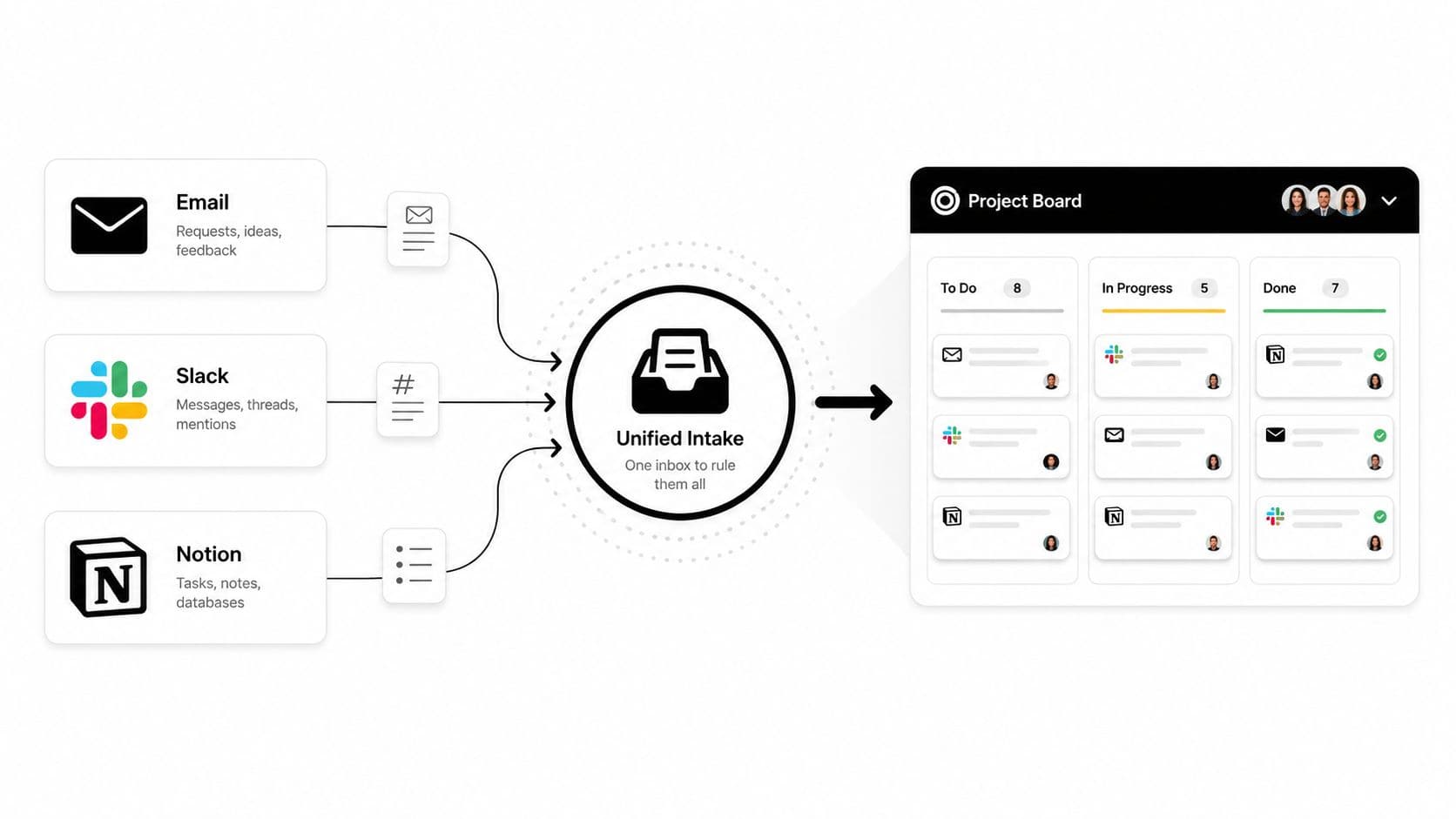
The Unified Intake Funnel
Run a short triage ritual twice a day. Collect new requests, clarify obvious gaps, and place each task into one of three buckets:
- Today: Work that must receive attention during the current working day.
- This Week: Confirmed work that belongs in the current weekly plan but does not need action immediately.
- Backlog: Ideas, optional improvements, future requests, and tasks without a committed deadline.
Name tasks consistently, such as Client A | Website copy | Draft homepage hero | Deep work. The client, project, deliverable, and energy requirement should be visible without opening a long note. Add the deadline, estimated effort, billable status, and link to the original conversation.
Set a boundary around stale intake. Nothing should remain outside the central list for more than 48 hours. That includes an email thread you intend to remember, a WhatsApp request you plan to transfer later, or a note in a second project app.
Moving Context Without Losing It
Keep the original conversation when migrating a request. Create the central task, paste the relevant decision or requirement, attach the source link, and mark the original message as processed. If the request is ambiguous, record the clarification question as a separate task instead of treating the work as ready.
A project board can hold status, owner, deadline, priority, billable classification, and context in one place. For a practical structure, use a project tracker format designed for client work as a reference point. The objective is one reliable answer to, “What is the next useful action, and where is the context?”
Batching Client Work Into Focused Production Blocks
A client message arrives while you are drafting, then a revision request interrupts the draft, and a quick invoice check turns into an hour of switching between tools. By afternoon, the calendar is full but the billable deliverable is still unfinished. Batching protects production time from that coordination overhead.
Start by rating tasks against deadline pressure, client value, and effort. A low-effort item due today may come before a high-value deliverable due later. A demanding creative task may need the first available focus period, before small requests consume the energy required to finish it. The goal is not a perfect score. It is a defensible order that keeps billable work from being displaced by whichever notification arrived last.
Group work by the mental context it requires:
- Deep production: Writing, design, development, editing, analysis, and other sustained-focus work.
- Communication and approvals: Email, client messages, revision questions, status updates, and feedback review.
- Administration: Invoicing, scheduling, file organization, reporting, and pipeline maintenance.
- Strategic work: Proposals, positioning, learning, creative direction, and service development.
A Calendar That Protects Output
Reserve 90-minute focus blocks with a 15-minute buffer when the work needs sustained attention. The buffer covers setup, notes, short breaks, and minor issues without pushing every later commitment off schedule. Theme days can serve the same purpose, with one period for client communication, another for delivery, and a separate window for administration.
Choose the arrangement that fits your energy and client obligations. A designer may reserve mornings for visual production and afternoons for reviews. A consultant may group research before calls and write recommendations afterward. Keep similar tasks together whenever possible, because every context change takes time away from work that clients can be billed for.
Write an interruption protocol before an interruption occurs. A blocked production task, a client issue affecting today's delivery, or an urgent access problem may justify breaking the block. A new idea, general status question, or non-urgent revision belongs in the next communication window.
Clients usually accept boundaries when the response window is clear. They object to uncertainty, not to the existence of a schedule.
Set expectations during onboarding. Tell clients when messages are reviewed, when production happens, and which channel handles urgent matters. An auto-reply can reinforce the boundary, provided it does not promise instant responses you cannot maintain.
A benchmark from Agiled's task-management statistics reports that individual contributors average 4.2 hours per day on task work, with only 53.3% of that time being productive focused work. It also reports that 12.4% average more than 6 hours of task work daily, while 40.3% average more than 4 hours. For freelancers, the practical lesson is simple: a less crowded calendar can produce more finished work when it protects the portion of task time that supports delivery.
Automating the Recurring Jobs That Drain Your Week
Recurring work is easy to underestimate because each instance feels small. Invoicing, follow-up emails, social posting, client status updates, file backups, and report generation can each look harmless until they interrupt a production block.
Start with a 30-day audit log. For every recurring task, record when it happened, what triggered it, how long it took, whether judgment was required, and what went wrong. After a month, rank candidates by hours saved per week, not by how impressive the automation sounds.
A Practical Automation Filter
Automate a task when it has most of these characteristics:
- Frequent: It appears repeatedly in your working cycle.
- Predictable: The steps are substantially the same each time.
- Low judgment: A person mainly transfers, formats, reminds, or checks information.
- Clear trigger: A defined event can start the workflow.
- Recoverable: An error can be spotted before it harms a client relationship.
Group workflows by operating area. Financial operations might create invoice reminders after a deliverable changes to approved. Client communication might send a status notification when a milestone moves. Content distribution might schedule approved posts. File and project hygiene might create a standard folder structure when a new project begins.
A useful trigger-action pair could be: new client added to the CRM, folder template created, welcome document sent, kickoff invitation scheduled. Another could be: task marked ready for review, client notification drafted, approval deadline added, follow-up reminder scheduled.
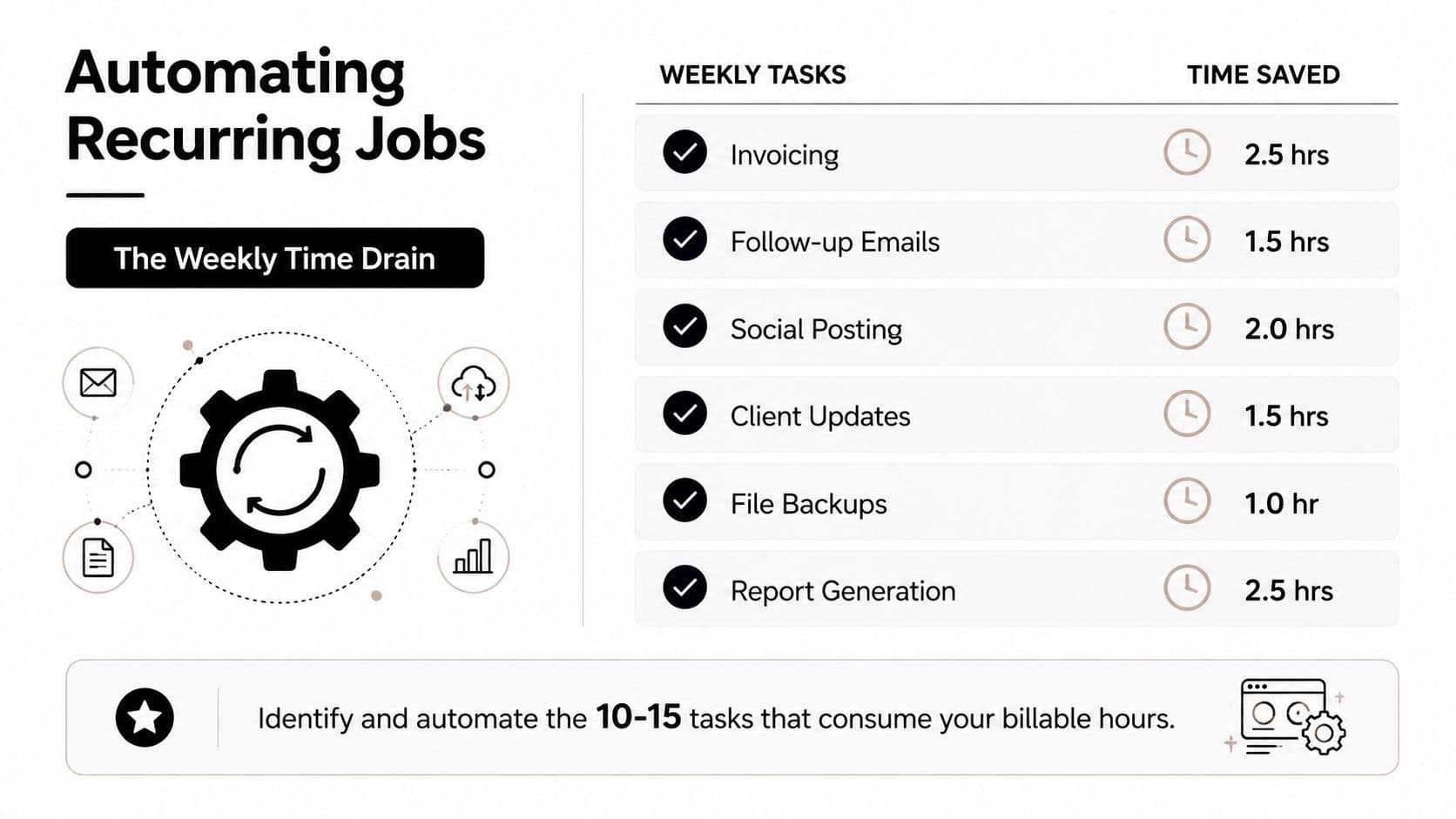
Delegation belongs beside automation, not underneath it. Keep client judgment, creative direction, sensitive negotiations, and final quality control in-house. Move repeatable research, formatting, list maintenance, scheduling, and administrative preparation to a virtual assistant when the instructions can be written clearly.
The workflow automation guide is useful for thinking in trigger-action pairs rather than isolated shortcuts. A platform such as Fluidwave can combine task organization, multiple task views, automated prioritization, and pay-per-task delegation, which makes it relevant when recurring work needs both software handling and human follow-through.
A caution: automation creates maintenance work of its own. Workflows can break without notice when a field changes, an integration expires, or a client changes the way they submit information. Review important automations monthly, test the output, and keep a visible owner for every workflow.
Delegating to a Virtual Assistant Without Losing Margin
A virtual assistant should protect billable hours, not create another coordination job. Start with your effective hourly rate, the billable revenue left after overhead divided by the hours required to earn and support it. Administration, client communication, corrections, and management all belong in that time calculation.
Use a clear cost test. If a task takes three hours at an effective rate of $60 per hour, it uses $180 of your capacity. If a VA completes it at $20 per hour, the direct cost is $60. Under those assumptions, delegation protects margin, provided the output meets your standard and the remaining time does not disappear into repairs.
The comparison is a decision model, not a market statistic. Add briefing time, review time, software costs, revisions, and the cost of delay before approving the handoff. A low task price can still be expensive if you must explain the work repeatedly or correct every delivery.
Score the Work Before You Hand It Off
Rate potential tasks on repetition and skill mismatch, using a scale from 1 to 5. High repetition with low specialist value usually points toward automation or delegation. Low repetition with high judgment usually stays with you.
| Task Type | Repetition Score (1-5) | Skill Mismatch Score (1-5) | Recommended Action |
|---|---|---|---|
| Invoice preparation | 5 | 4 | Automate or delegate |
| File naming and folder cleanup | 5 | 5 | Delegate |
| Final client strategy | 1 | 1 | Keep |
| Routine research collection | 4 | 4 | Delegate with a defined brief |
| Repeated status formatting | 4 | 5 | Automate first, delegate exceptions |
| Unclear, low-value request | 2 | 5 | Drop or clarify before assigning |
Pay-per-task pricing limits hourly creep. Define the deliverable, format, source materials, deadline, revision allowance, communication window, and acceptance criteria. Agree on a price for each deliverable, so a small administrative task cannot expand into an open-ended time block. This guide to pay-per-task virtual assistants explains the model in more detail.
A simple delegation agreement should cover:
- Scope: What the assistant will produce and what falls outside the assignment.
- Revisions: How many correction rounds are included.
- Communication: Where questions go and when responses are expected.
- Access: Which tools, folders, and credentials are available.
- Confidentiality: How client information and files must be handled.
- Handoff: What condition marks the task complete.
Use a four-week onboarding sequence. Week one covers shadowing and documentation. Week two uses supervised execution. In week three, the VA completes work in parallel while you compare the outputs. Week four moves routine work to the VA, with your review focused on exceptions rather than every action. That progression protects quality without keeping you trapped in daily coordination.
Templates and Workflows You Can Reuse Every Week
Templates earn their place by preventing repeated decisions. They also preserve client context when your calendar becomes crowded. The three below are deliberately plain, because a workflow that needs a manual to operate won't survive a busy week.
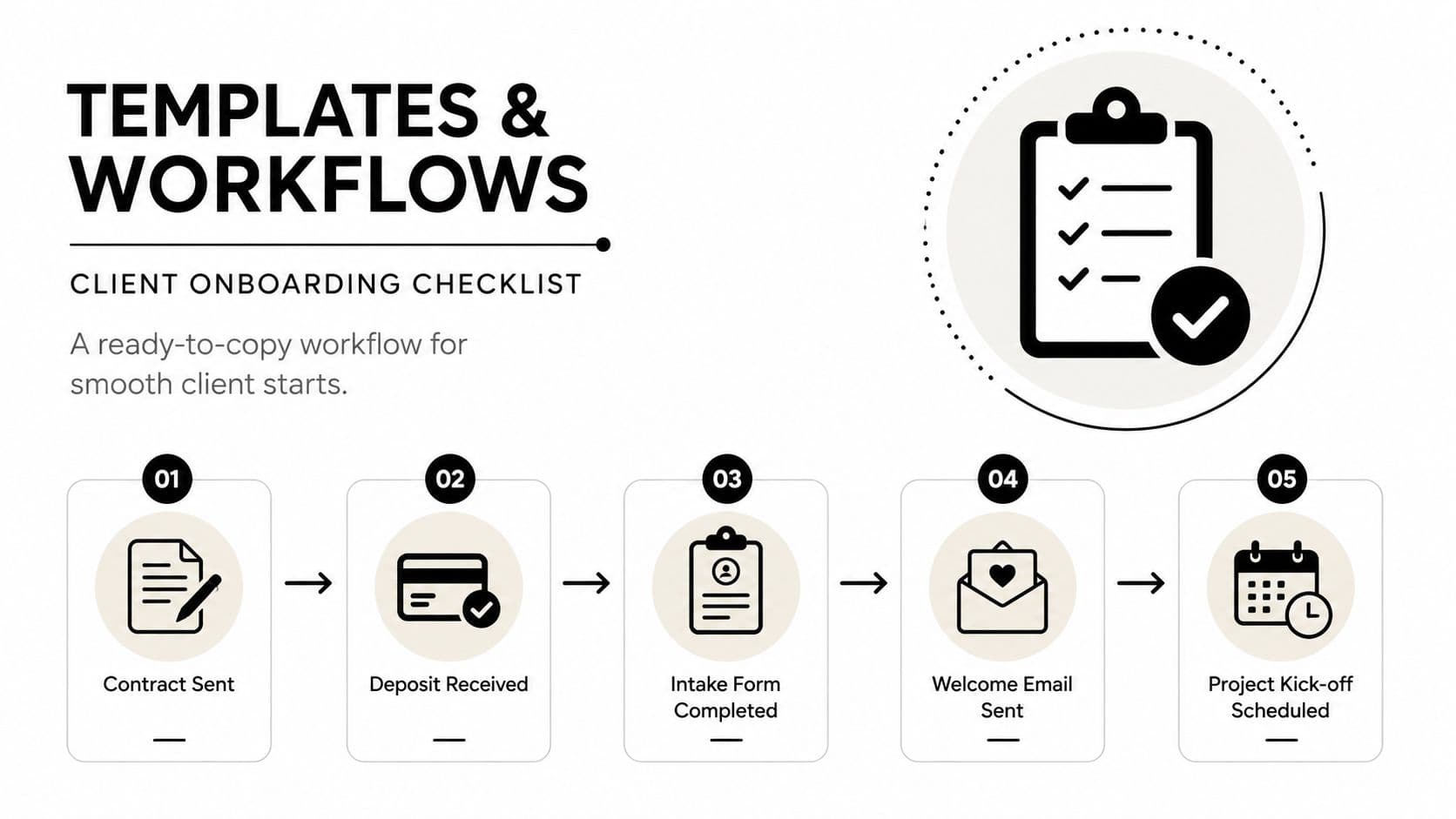
Client onboarding checklist
Trigger: A client signs the agreement or confirms the project start.
Copy these fields into your project system:
- Contract sent
- Deposit received
- Intake form delivered
- Shared folder created
- Kickoff call booked
- Communication channel pinned
- First deliverable scoped
- Client owner
- Internal owner
- First deadline
- Billing status
- Open questions
The VA takes ownership after the contract and deposit are confirmed. You retain responsibility for scope, pricing, and the first deliverable. The VA can create the folder, send the intake form, prepare the welcome message, and schedule the kickoff using approved templates.
Weekly review
Trigger: The first working session of the week, Sunday or Monday.
Run this checklist:
- Close completed tasks and archive outdated requests.
- Capture new client asks from every communication channel.
- Review pipeline health and outstanding invoices.
- Check upcoming deadlines and capacity.
- Review the VA workload balance.
- Test key automations and inspect recent failures.
- Select the next-week priority list.
- Place production blocks on the calendar.
The VA takes ownership of invoice reminders, folder checks, status preparation, and any routine follow-ups. You decide which work deserves protected production time and which commitments should be renegotiated.
Project handoff document
Trigger: A project changes owner, reaches a milestone, or enters a new delivery phase.
Use these exact fields:
- Scope summary
- Deliverables and current status
- Open threads
- Asset links
- Decision log
- Contact directory
- Risks and dependencies
- Next-step owner
- Approval deadline
- Billing status
- Revision history
The handoff point is the completed context check. The VA should be able to identify the next action, source materials, deadline, and escalation condition without searching old conversations. If any of those fields are missing, the handoff isn't ready.
A lightweight template often beats a complex workspace that nobody updates. Choose the format your future self can maintain when two clients are asking for revisions and a third is waiting for an invoice.
Your Weekly System for Staying on Top of Everything
Here is the exact 30-minute review that keeps the system from collapsing. Close completed work, move new requests into the single intake, check priority scores, and reserve production blocks before meetings or messages take the available billable hours.
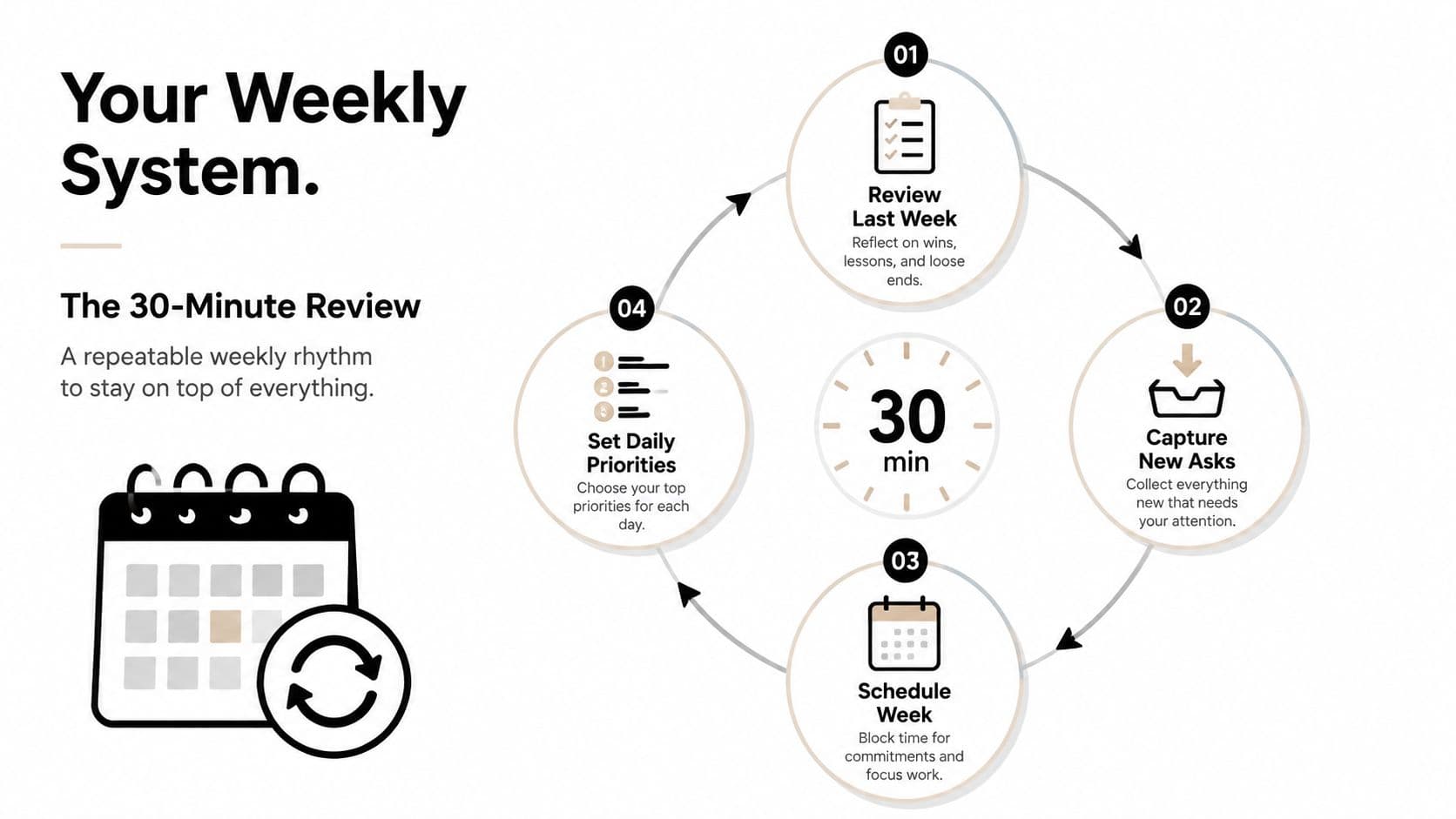
The weekly rhythm
Use themes as guardrails, not rigid rules. A sample calendar might look like this:
- Monday: Client communication, approvals, and weekly setup.
- Tuesday: Deep production for the highest-priority deliverables.
- Wednesday: Batch administration, invoicing, file hygiene, and delegated-task review.
- Thursday: Deep production, strategic work, or complex revisions.
- Friday: Follow-ups, project handoffs, pipeline review, and planning.
Move the days when client deadlines require it. Keep the boundaries. Communication needs a defined place, and administrative work needs a named home so neither spreads across every production block.
At the start of each day, check Today, the triage bucket for work due now or requiring action today, confirm the first production block, and choose the task that creates the most useful progress. At the end, update status, record the next action, move unfinished work, and capture new requests before closing the system.
Triggers that keep the system honest
Delegate a task when it is repeatable, documented, and lower value than the work you could complete in the same time. Keep it personally when it requires specialist judgment, client trust, sensitive information, or a decision that changes scope.
Reserve a 15-minute Friday check for invoices, follow-ups, handoffs, and automation queues. Track billable hours recovered and coordination hours used. A simple weekly comparison shows whether the workflow protects delivery time or creates another layer of administration.
A knowledge-worker productivity survey summarized by Speakwise's task-management overload analysis found 30 productive hours out of 40 weekly hours, with 3.6 hours spent on internal communication, 2.8 hours searching for or requesting information, and 2.2 hours in unnecessary meetings. For independent professionals, the operating rule is practical: keep task status, intake requirements, and ownership visible before coordination consumes delivery time.
If the rhythm breaks for two consecutive weeks, audit the system before adding another tool.
Find the failure point. Intake may be split across channels, deadlines may be unclear, the VA may receive incomplete briefs, or an automation may fail without warning. Fix the broken rule, remove unnecessary steps, and return to the smallest system that keeps client work visible and billable time protected.
Fluidwave combines AI-driven task organization, auto-prioritization, multiple task views, workflow automation, and pay-per-task delegation with human virtual assistants. Visit Fluidwave to centralize freelance tasks, offload repeatable coordination work, and reserve more time for paid delivery.
Focus on What Matters.
Experience lightning-fast task management with AI-powered workflows. Our automation helps busy professionals save 4+ hours weekly.