Master project planning and design in 2026 with proven strategies for scope, timelines, resources, and risk that actually deliver results.
September 22, 2026 (Today)
Project Planning and Design: A Practical Guide for 2026
Master project planning and design in 2026 with proven strategies for scope, timelines, resources, and risk that actually deliver results.
← Back to blog
The kickoff is on Monday, but the team is already opening Figma, Jira, or a spreadsheet and assigning tasks. The sponsor wants a launch date. The developer wants clearer requirements. The designer wants room to explore. Everyone is busy, yet nobody can explain what “done” means, which decisions are fixed, or what happens when the schedule slips.
That tension is why project planning and design should be treated as a working feedback loop between scope, data, and execution. A plan gives the team a baseline. Design connects the work to user value, constraints, dependencies, and risk. Execution then tests the assumptions, producing information that should change the plan when reality demands it.
The practical objective isn't a flawless document. It's a shared, usable model of the work that people can estimate, challenge, execute, measure, and revise without hiding bad news.
When Planning Gets Skipped and Everything Falls Apart
A website redesign can be labelled a six-week project while the team is still guessing what the work includes. In one such project, designers opened their tools on day one and treated a loose brief as the scope. No one had confirmed which pages were included, who approved content, how existing integrations would be handled, or what the client meant by “launch.”
The early work looked productive. By week six, the homepage was promising, but the supporting templates were unfinished. Content arrived late because no approver had been assigned. The developer then found that the proposed navigation depended on changes to a system no one had inspected. The launch moved from six weeks to fourteen. Designers repeated work, the lead developer burned out, and the client stopped trusting status reports because each green update was followed by another surprise.
A widely cited 2026 project-management benchmark found that only 36% of organizations mostly or always complete projects on time, 49% mostly or always complete them on budget, and 42% mostly or always deliver the full benefits expected from projects (project-management benchmark data). Meeting a budget target while missing the deadline or intended result is a design failure across cost, timing, and value.
Practical rule: Every late surprise started as an unanswered question that someone allowed into execution.
The same pattern affects thesis work, product launches, and client engagements. The guidance in Thesis Book Project tips applies well beyond academic projects: define requirements, sequence dependencies, assign review time, and treat revision as planned work rather than leftover time.
Historical project data reinforces the need for a visible baseline. About a third of projects are never baselined, and only 58% of teams mostly or always apply a defined methodology (project failure statistics and planning data). Without a baseline, activity can look like progress. Without an agreed method, people make local decisions that later conflict.
The practical explanation in why projects fail is equally direct: scope, schedule, roles, and decision rights need to be visible before urgency turns assumptions into commitments. A workable plan is a feedback loop. Establish the starting model, test it through execution, then revise scope, timing, or design when evidence shows that the model is wrong.
What Project Planning and Design Actually Mean
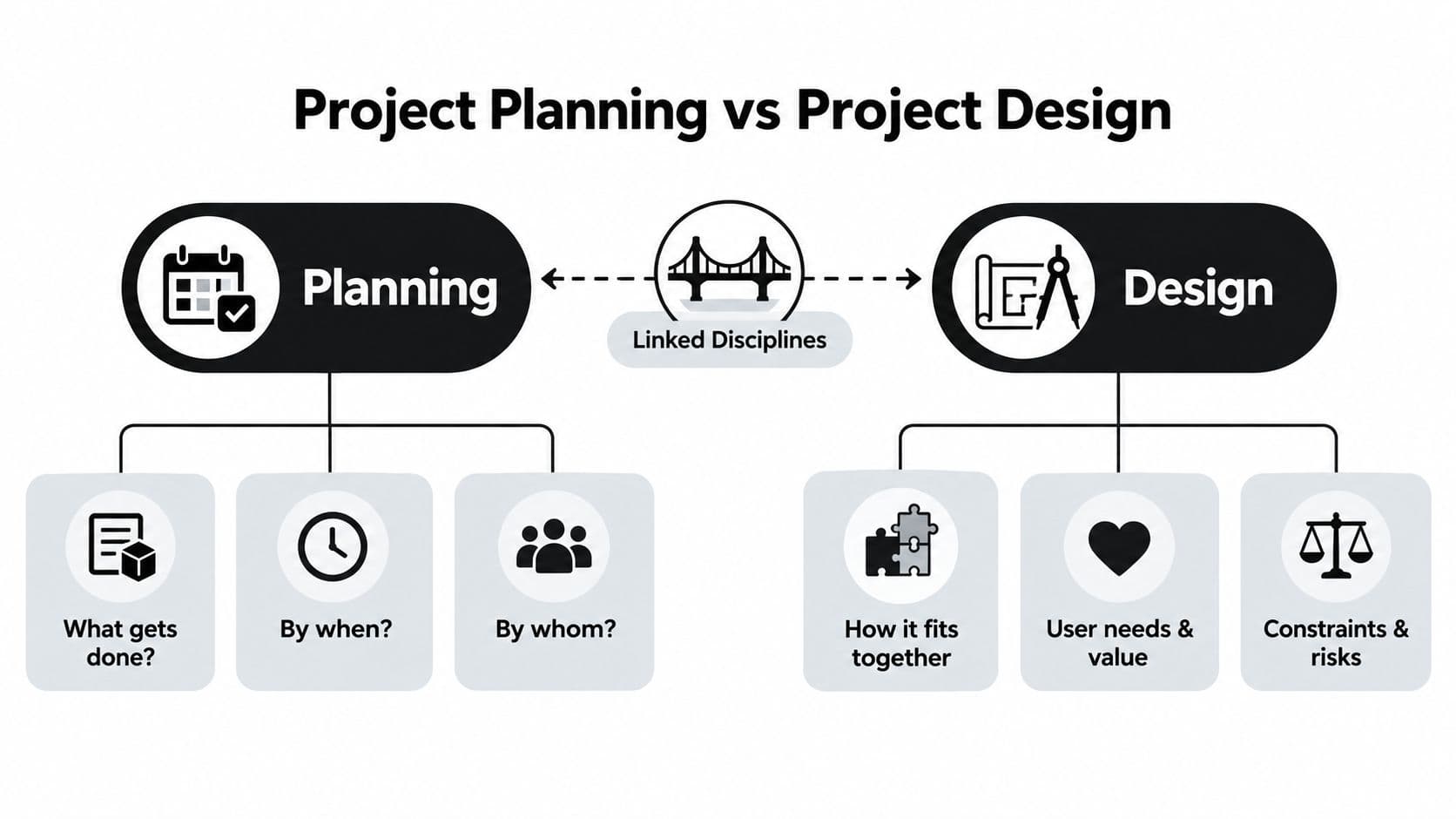
Project planning answers the operational questions: what gets done, by when, by whom, and at what cost. Project design answers the structural questions: why this work matters, how the pieces fit together, which constraints shape the solution, and how the team will learn during execution.
Think of planning as a flight plan and design as the aircraft's control system. The flight plan identifies the destination, route, fuel requirements, timing, and crew responsibilities. The control system lets the aircraft respond to weather, changing conditions, and information from instruments. A schedule without design becomes a list. Design without planning becomes an attractive concept nobody can deliver.
A useful project model includes six connected elements:
- Goals: The business or user outcome the project must produce.
- Scope: The boundaries that define included work, excluded work, assumptions, and constraints.
- Schedule: The sequence of activities, dependencies, milestones, and decision points.
- Resources: The people, skills, tools, budget, information, and availability required.
- Risk: Conditions that could affect delivery, quality, adoption, compliance, or value.
- Governance: Who decides, who approves, how changes are evaluated, and when issues escalate.
These elements aren't independent. A shorter deadline may require additional people, reduced scope, faster decisions, or greater risk acceptance. A new compliance requirement may change the design, add verification work, and move the critical path. A missing subject-matter expert is both a resource constraint and a delivery risk.
A practical work plan guide helps translate intent into visible work, but the plan must remain connected to the design logic behind that work. The team should be able to explain not only what a task is, but also which requirement it supports, which dependency it affects, and what evidence will prove completion.
Good project planning and design therefore overlap throughout the lifecycle. The initial baseline matters, but so do the reviews that test whether the baseline still reflects reality.
Defining Scope and Breaking Work Into Deliverables
Run this sequence early, before the team creates a detailed task list.
Start with a boundary, not a wish list
Write one sentence that names the outcome, audience, and completion condition. For an internal onboarding rollout, a useful statement might be: “Create and launch an onboarding experience that gives new employees the required information, access, and first-week support.”
Then record three boundaries:
- In scope: onboarding content, access checklist, manager guidance, and launch communications.
- Out of scope: replacing the HR system, redesigning company-wide training, and rewriting every policy.
- Constraints: the available subject-matter experts, the launch date, the approval path, and the systems the team must use.
If you need a more formal boundary document, use this scope of work explanation as a reference point. The important part is not the format. It's forcing the sponsor and delivery team to agree on what they won't add later.
Build the WBS around deliverables
A Work Breakdown Structure, or WBS, is a deliverable-oriented hierarchy that decomposes the total project scope into progressively smaller work packages (PMI guidance on applying a WBS). Start with the final outcome, identify major deliverables, and decompose each until a person can estimate, assign, and verify the work.
For the onboarding example, the hierarchy could look like this:
- Onboarding rollout
- Onboarding content
- Role-specific checklist
- First-week guide
- Manager briefing
- Access readiness
- Account request process
- Equipment checklist
- Access verification
- Launch
- Communications
- Pilot review
- Release approval
- Onboarding content
The 8/80 rule can help with sizing. Treat a work package smaller than eight hours or larger than eighty hours as a signal to inspect the decomposition, not as an unbreakable law. A large package often hides dependencies. A tiny package may create administrative noise without improving control.
PMI's 100% Rule says the WBS should include all project deliverables and all project work. If an activity isn't represented, it has no natural owner, estimate, or place in scope control (PMI's WBS explanation).
Trace each requirement to a reason
Requirements traceability closes the gap between “someone asked for it” and “the project needs it.” NIST defines traceability analysis as mapping relationships among requirements, system elements, and verification artifacts so stakeholder requirements connect to system requirements and are justified end to end (NIST systems engineering guidance).
| Technique | Purpose | Key Output |
|---|---|---|
| Scope definition | Establish boundaries and constraints | Approved scope statement |
| WBS | Decompose scope into manageable deliverables | Deliverable hierarchy and work packages |
| Requirements traceability | Connect needs to implementation and proof | Traceability matrix |
For onboarding, “new hires need system access before their first working day” should connect to an access-readiness deliverable and a verification step. That chain gives the team a reason for the work and a test for completion. It also makes change conversations easier because a proposed addition can be assessed against a goal, deliverable, owner, and constraint.
Designing Timelines That Survive Reality
A website redesign can appear on track until the team discovers that development started before content architecture was settled. The schedule then absorbs rework, approval delays, and a launch date no one can defend. Durable timelines make sequence, dependency, uncertainty, and decision points visible before dates create false confidence.
Build the network first, then add dates. Start with the Critical Path Method, or CPM. CPM identifies the longest path through the schedule network, which sets the shortest possible project duration (critical path scheduling guidance). If a critical activity slips, completion slips unless the team changes scope, sequence, resources, or another assumption.
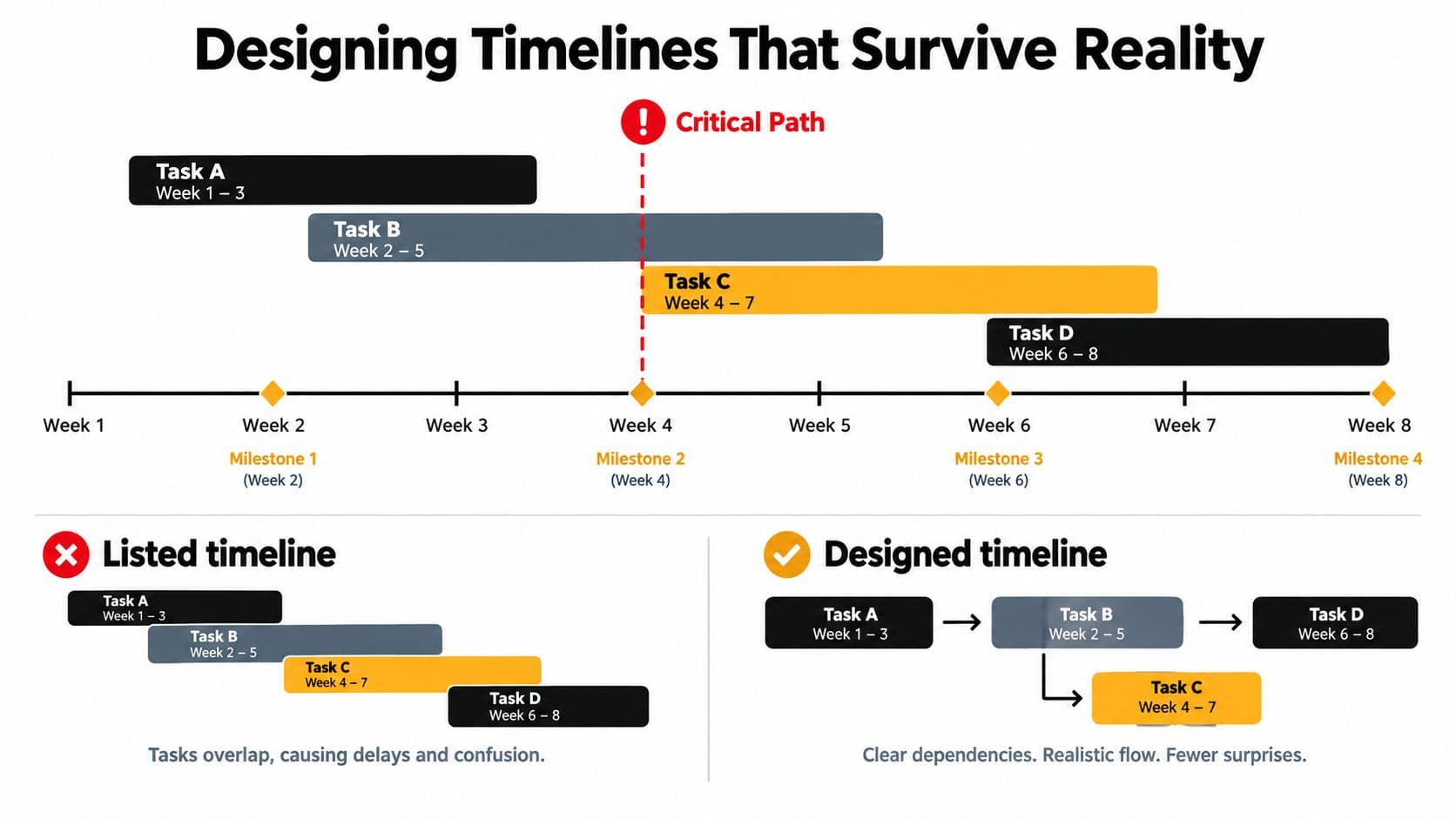
Map dependencies before assigning dates. A redesign may require content architecture before page templates, template decisions before development, and development before technical acceptance. Some tasks can run in parallel, but parallel work increases coordination and can create rework when an upstream decision changes. Use it where the time saved outweighs that coordination cost.
CPM analysis typically uses a forward pass to calculate earliest starts and finishes, a backward pass to check the schedule, and float calculations to identify activities with scheduling flexibility. Float helps only when the team can see and manage it. Hiding flexible work in a crowded timeline makes the plan look exact while wasting available options.
Schedule discipline: Anchor dates to outcomes the sponsor recognizes, not to a forest of internal task completions.
Set milestone baselines for approved scope, a completed prototype, validated integration, and launch readiness. For uncertain work, estimate optimistic, likely, and pessimistic outcomes. That range gives the sponsor a clearer choice between a fixed date, broader scope, or additional capacity.
For larger or higher-risk schedules, start with a CPM network, quantify uncertainty in activity durations, and run a Monte Carlo schedule-risk simulation to estimate completion-date probability and contingency needs (PMI schedule-risk analysis). The purpose is practical: show how much confidence the date deserves.
When the timeline slips, reset the plan instead of reporting optimism. Show the baseline, actual progress, remaining work, critical dependencies, and available decisions. Shape scope by removing, deferring, simplifying, or resequencing deliverables, then communicate the revised commitment with its assumptions.
Allocating Resources, Risks, and Handoffs
A plan becomes executable when it names the people, decisions, and conditions required at each point. “Design complete” isn't a resource plan. It doesn't tell you whether the right reviewer is available, whether the developer has enough uninterrupted time, or whether approval depends on someone already committed elsewhere.
Assign roles to work packages, then inspect concentration. If one person owns several activities on the critical path, you've found a capacity risk even if the staffing sheet looks full. A dedicated team usually offers focus and faster coordination. A shared model may be more economical, but it introduces queueing, context switching, and competing priorities that the schedule must acknowledge.
Make risk actionable
A risk register should capture a condition, its potential effect, a response, and an owner. Use probability and impact qualitatively or with an agreed scoring scale. The score matters less than the conversation it creates.
| Risk | Probability | Impact | Response | Owner |
|---|---|---|---|---|
| Subject-matter expert unavailable for review | Medium | High | Mitigate with a backup reviewer and scheduled review window | Project lead |
| Content approval arrives late | High | Medium | Avoid delay by setting an approval deadline and escalation route | Content owner |
| Integration behaves differently in production | Medium | High | Mitigate with an early technical spike and test environment | Technical lead |
| Sponsor adds a major deliverable | Medium | High | Transfer decision through formal change review | Sponsor |
| Minor visual inconsistency remains at launch | Medium | Low | Accept within agreed quality threshold | Design lead |
Response choices should be explicit:
- Avoid: Change the approach so the threat no longer exists.
- Mitigate: Reduce the likelihood or impact through earlier validation.
- Transfer: Move ownership or exposure through a supplier, contract, or specialist.
- Accept: Acknowledge the risk and define what happens if it occurs.
Engineer the handoffs
Handoffs fail when teams exchange responsibility without exchanging evidence. For every boundary, define the artifact, receiving role, acceptance criteria, and escalation path. A design-to-development handoff might require approved screens, component behavior, content states, accessibility decisions, and a list of unresolved questions.
A resource gap can trigger a risk response. A risk response may change the schedule. A handoff without acceptance criteria can create a defect that looks like a people problem but is a design failure.
Frameworks and Templates for Teams and Solo Pros
Frameworks earn their overhead only when they solve a real coordination problem. A solo consultant managing a small client engagement doesn't need the same ceremony as a cross-functional team coordinating discovery, engineering, compliance, and executive approval.
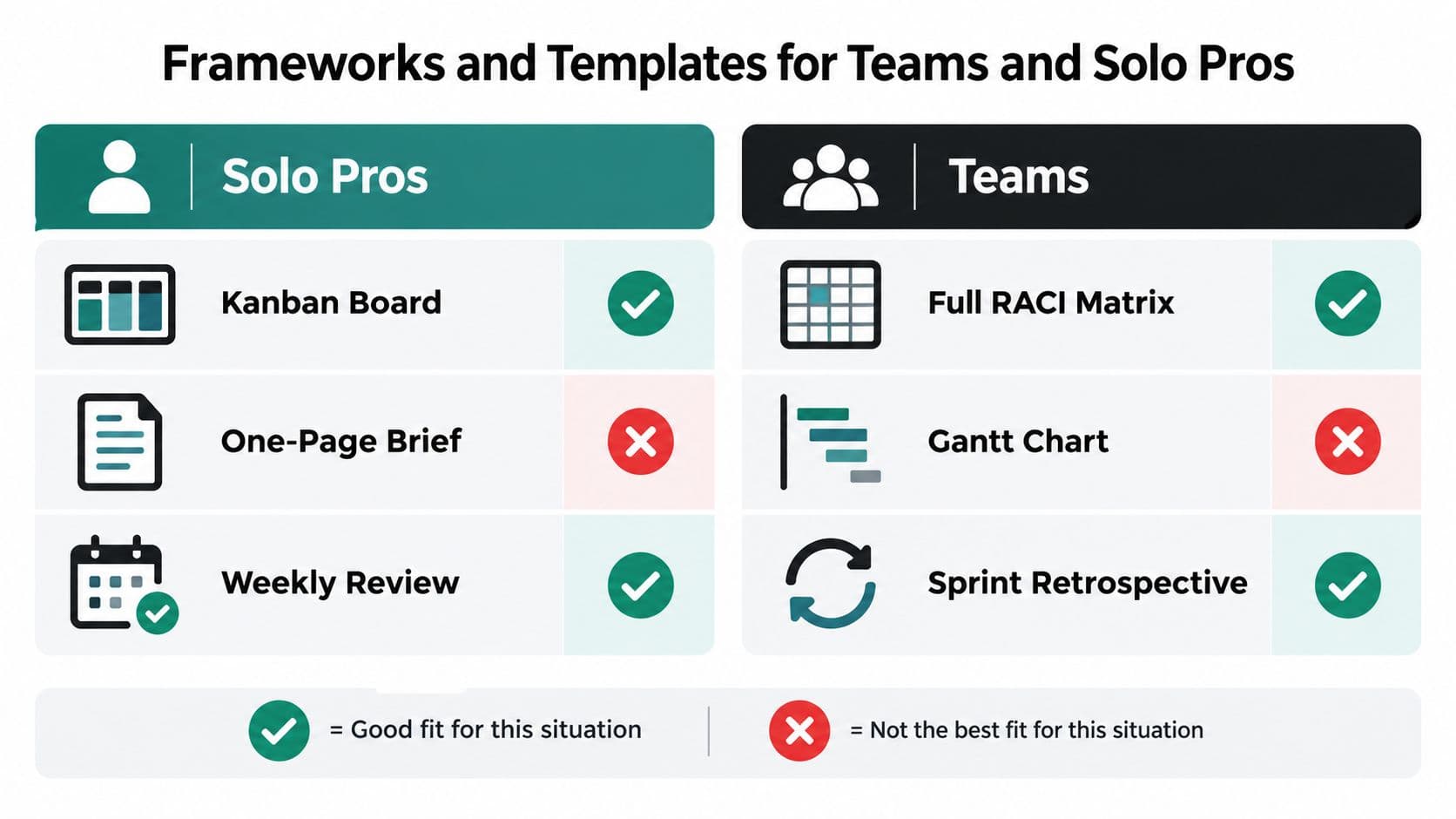
For solo professionals, a lightweight operating system usually works better:
- Kanban board: Make queued, active, blocked, review, and complete work visible.
- One-page brief: Record the outcome, scope boundaries, client decisions, risks, and acceptance condition.
- Weekly review: Reconcile commitments, actual progress, open questions, and next actions.
The board should reduce memory load, not become another project. Track the information that changes decisions, such as owner, priority, estimate, blocked reason, due date, and acceptance criteria.
Teams need more structure when dependencies and decision rights multiply. Waterfall with phase gates fits fixed-scope, regulated, or hardware-adjacent work where approvals and documentation must precede the next phase. Scrum fits product discovery where the team needs short learning cycles and can refine the solution through iteration. A hybrid stage-gate model works when leaders need upfront commitments but the delivery team still needs room to test and adapt.
Choose by answering three questions:
- How stable is the scope?
- How cross-functional is the team?
- How much certainty does the sponsor need at commitment?
Stable scope and high certainty favor stage gates. Uncertain scope and high learning demand favor iterative delivery. Mixed conditions usually call for a hybrid, with firm boundaries around funding, safety, compliance, or launch decisions and flexible detail inside those boundaries.
For tool selection, compare workflow features rather than brand labels. A practical resource such as how Exayard compares to Bluebeam can help illustrate the value of evaluating tools side by side. Fluidwave is one option for configuring project work around states, owners, priorities, estimates, blocked reasons, due dates, and acceptance criteria, while teams can also adapt established templates from PMI or their existing work-management platform.
Treating Design as a Feedback Loop, Not a One-Time Phase
A signed plan can fail before execution begins. Unfamiliar work may be underestimated, user behavior misunderstood, dependencies missed, or expected capacity lost after kickoff. Locking the approved plan makes new evidence disruptive instead of useful.
Run the project as a loop: plan, execute, measure, revise. Scope changes when evidence changes. Estimates improve when actual performance replaces assumptions. Risks also change, as the team resolves some threats and uncovers others.
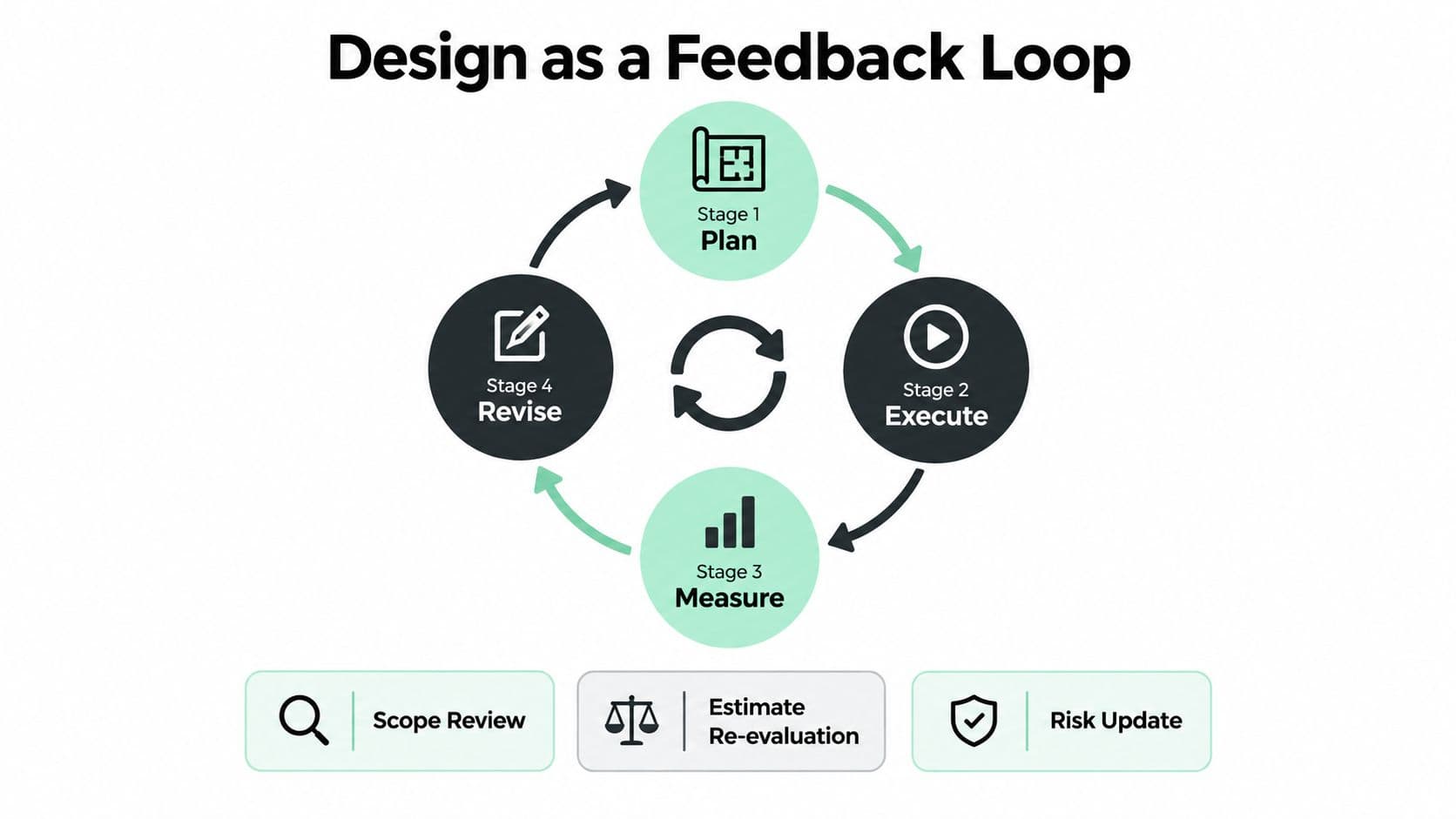
Put three mechanisms into the team's regular cadence:
- Variance review: Compare planned and actual progress, remaining effort, new dependencies, and forecast completion each week. Keep the discussion factual, then make the decisions the variance requires.
- Stakeholder check-in: Ask what has changed in priorities, user expectations, policy, or constraints. This exposes scope drift while the team still has options.
- Post-delivery learning: Compare intended outcomes with user experience. Carry the findings into the next brief, estimate, and risk register.
Data quality deserves direct attention. A 2025 study of construction planning ranked lack of accurate and timely data as the top hindrance, with a mean score of 4.20 out of 5, and a 2025 residential-building review found that planning and design decisions can drive a 16 to 45% performance gap when user feedback and in-situ measurements aren't built into the process (construction planning study). The delivery lesson is practical: design decisions improve when the team collects evidence after implementation and feeds it into the next decision.
Use checkpoints to control change, not create constant churn. Each review should answer three questions: what changed, what does it affect, and which decision or baseline needs updating? That discipline keeps scope, budget, and capacity aligned with the conditions the team is facing.
Your First Week With a Real Project Plan
Don't spend the first week polishing a template. Use the time to create a baseline the team can challenge and still believe.
Day 1: Write a one-page scope statement. Name the outcome, in-scope work, exclusions, assumptions, and the single hardest constraint. If the team can't agree on that constraint, the project isn't ready for detailed scheduling.
Day 2: Build the WBS from deliverables, then decompose until each work package can be estimated and assigned. Put a named owner beside every package, including review, approval, testing, documentation, and launch work.
Day 3: Create a milestone-based schedule. Map dependencies, identify the critical path, record estimate ranges where uncertainty is material, and mark the decisions that could change the finish date.
Day 4: Check resource capacity, log the top five risks, and design the handoff points. For each handoff, specify the artifact, receiving person, acceptance criteria, and escalation route.
Day 5: Run a 30-minute stress test with the team. Ask which assumption is weakest, which dependency is hidden, which owner lacks capacity, and what scope would move first if the date became fixed. Commit to the first iteration and schedule the next variance review.
The point of week one isn't a perfect plan. It's a usable baseline that connects scope, deliverables, timing, people, evidence, and decisions. Strong project planning and design gives the team permission to revise because everyone can see what changed and why.
Fluidwave helps turn that baseline into visible work with configurable boards, task ownership, priorities, estimates, due dates, blocked reasons, acceptance criteria, collaboration, and delegation through virtual assistants. Visit Fluidwave to create a project workspace, define the first tasks and deadlines, and give your team a practical place to execute and update the plan.
Focus on What Matters.
Experience lightning-fast task management with AI-powered workflows. Our automation helps busy professionals save 4+ hours weekly.