Discover how project management software for consultants streamlines client projects, tracks milestones, and boosts productivity.
February 13, 2026 (8mo ago)
Boost Your Workflow with project management software for consultants
Discover how project management software for consultants streamlines client projects, tracks milestones, and boosts productivity.
← Back to blog
Boost Your Consulting Workflow with PM Software
Project management software for consultants can transform chaotic client work into a predictable, scalable process. By consolidating tasks, timelines, and communications in one central place, you can accelerate delivery, improve client satisfaction, and grow your practice.
Why Spreadsheets Are Holding Your Consultancy Back
Let’s be honest: we’ve all been there. Spreadsheets feel familiar. They’re “free.” So, you build a quick task tracker for one client, a budget sheet for another, and before you know it, you’re drowning in a sea of disconnected files. What started as a simple solution quickly becomes a serious liability.
You start burning hours just trying to keep the ship afloat—manually updating timelines, digging through email chains for that one piece of client feedback, and praying you’ve opened the actual final version of Project_Plan_Final_v3_USE_THIS_ONE.xlsx. This isn’t just inefficient; it’s a recipe for disaster. Missed deadlines, unchecked scope creep, and garbled communication are the inevitable result of a system that simply can’t keep up with the demands of modern consulting.

The True Cost of “Free” Tools
Those “free” tools come with a hefty price tag. Every minute you spend on administrative busywork is a minute you aren’t billing or delivering the high‑value strategic work your clients pay for. This eats directly into your bottom line and slams the brakes on your ability to scale.
Let’s break down the real pain points of the spreadsheet‑and‑email shuffle:
- No Single Source of Truth: Key information is scattered everywhere—emails, chat messages, multiple spreadsheet versions. This is where confusion starts and mistakes happen.
- Lack of Visibility: Getting a quick, accurate snapshot of all your projects, their progress, and any looming risks is practically impossible. You’re flying blind.
- Clunky Client Collaboration: Emailing sensitive documents back and forth is inefficient and insecure. Consolidating client feedback from multiple threads is a nightmare.
- Leaky Billing: Manually tracking hours is a notoriously error‑prone process. It almost always leads to under‑billing and lost revenue.
The real issue is that manual tools force you to work on your administrative tasks instead of in your business delivering expert value. The goal is to completely flip that script.
This isn’t just a hunch; it’s a global trend. North America is leading the charge, with the U.S. market for this software projected to hit a massive US$4,926.2 million by 2030. This data, highlighted in recent research about project management software market growth, underscores a clear industry shift away from cobbled‑together methods toward smarter, centralized platforms.1
Ultimately, graduating from spreadsheets isn’t just about getting organized. It’s a strategic move to build a more professional, profitable, and scalable consulting practice.
Pinpointing Your Actual Needs as a Consultant
It’s tempting to jump straight into software demos, but I’ve seen too many consultants get dazzled by flashy features they’ll never use. This is a classic recipe for buyer’s remorse. Before you look at a single product, you need to get crystal clear on what you actually need.
The best way to start is by forgetting about software for a moment and focusing entirely on your own process.
Take a hard look at your entire project lifecycle, from that initial discovery call all the way to sending the final invoice. How do you handle proposals? What does client onboarding look like? Where do you track tasks, manage feedback, and pull together reports?
Be brutally honest with yourself. Where do things fall apart?
Moving from Pain Points to a Feature Wishlist
Once you’ve identified the weak spots in your workflow, you can begin to translate those problems into a concrete feature wishlist. Don’t just write down vague goals like “get more organized.” Dig deeper.
For instance, if scope creep is a constant battle, what you really need is a tool with clear task dependencies and a client portal where the project scope is locked in and formally approved. If you dread invoicing every month, then a non‑negotiable feature becomes integrated time tracking that can automatically generate invoices.
Here are a few common consultant headaches I’ve seen and the features that directly address them:
- The Problem: Feeling scattered and overwhelmed while juggling multiple clients.
- The Feature Solution: A high‑level portfolio or dashboard view that gives you a quick status update on every project at a glance.
- The Problem: Inconsistent project setups and constantly reinventing the wheel.
- The Feature Solution: Customizable project templates. This lets you standardize your kickoff process for different types of consulting engagements.
- The Problem: Struggling to clearly communicate progress and prove value to clients.
- The Feature Solution: Strong reporting tools that can generate clean, client‑facing status reports and performance dashboards.
The goal isn’t to find the software with the most features. It’s to find the software with the right features for the way you actually work. Everything else is just expensive noise.
Differentiating Must-Haves from Nice-to-Haves
With your feature list in hand, it’s time for the most important step: sorting it into two categories. Every single feature is either a must‑have or a nice‑to‑have. This simple exercise is your defense against being sold on a cool‑but‑unnecessary bell or whistle.
A “must‑have” directly solves one of your core business problems—something that impacts your efficiency, client satisfaction, or profitability. A “nice‑to‑have” might be convenient, but your business would run just fine without it. Many solo consultants find that their core needs boil down to just a few key areas; our guide on project management for freelancers can help you think through those absolute essentials.
To make this process more concrete, I recommend creating a simple checklist to score each feature based on your unique workflow. It forces you to think critically about how you would actually use something.
My Consulting Workflow Feature Checklist
Use this table to score the importance of key software features based on your specific business needs and daily tasks.
| Feature | My Importance Score (1‑5) | Must‑Have or Nice‑to‑Have? | Notes on My Specific Use Case |
|---|---|---|---|
| Task Management & Dependencies | |||
| Time Tracking | |||
| Client Portal/Guest Access | |||
| Customizable Project Templates | |||
| Invoicing & Billing Integration | |||
| Reporting & Dashboards | |||
| File Sharing & Storage | |||
| Mobile App |
By creating a documented set of requirements before you ever visit a product website, you put yourself in the driver’s seat. You’ll be evaluating tools against your own well‑defined needs, not just reacting to a sales pitch. This is how you find a platform that genuinely supports your consulting business.
The Non‑Negotiable Features Every Consultant Needs

Alright, you’ve done the internal work—you’ve mapped out your workflows and pinpointed exactly where things get messy. Now, it’s time to turn that insight into a concrete checklist. The market for project management software is incredibly crowded, and every provider claims their tool is the ultimate solution.
Your job is to cut through the noise. Forget the flashy bells and whistles for a moment and zero in on the core functions that actually make a consultant’s life easier and more profitable. These aren’t just “nice‑to‑haves”; they are the foundational pillars of a system truly built for consulting.
Time Tracking That Flows Directly Into Invoicing
For any consultant, our time is our inventory. It’s the one thing we’re selling. Manually logging hours in a spreadsheet and then painstakingly transferring that data into an invoice is more than just a hassle—it’s a direct threat to your revenue. Think about it: a few minutes missed here, a small task forgotten there. It adds up, and over a year, those little gaps can mean thousands in lost billings.
This is why seamless time tracking and invoicing sits at the very top of the list. It’s absolutely non‑negotiable.
Look for a tool where you can click a button and start a timer from within the task you’re working on. This creates a direct, undeniable link between the work performed and the time billed. The best platforms then let you pull all that tracked time into a professional‑looking invoice with just a few clicks. It transforms one of the most dreaded administrative chores into a quick, error‑free process that directly impacts your bottom line.
Secure Client Portals for Collaboration
Let’s be honest: managing projects over email is a recipe for disaster. It’s inefficient, insecure, and creates endless confusion. A dedicated client portal changes the entire dynamic of your client relationships. It gives you a single, secure, branded space to communicate, share files, and get approvals.
A truly useful client portal must have:
- Granular Permissions: You need absolute control over what clients can see and do. Can they just view progress, or can they actively comment on tasks? This is key to managing scope creep and keeping everyone focused.
- A Central File Hub: No more digging through endless email threads for the “final_final_v3” version of a document. All project files live in one organized, easy‑to‑find place.
- Crystal‑Clear Communication: All feedback, questions, and approvals are logged directly on the relevant tasks. This creates a permanent record that eliminates any “he said, she said” arguments down the road.
“A well‑run client portal isn’t just a project management feature. It’s a powerful statement to your clients that you are organized, professional, and transparent, which is invaluable for building trust.”
Powerful Reporting and Dashboards
As a consultant, you are constantly demonstrating your value. You have to prove that your work is moving the needle. This is where powerful, easy‑to‑understand reporting becomes your best friend. You need the ability to instantly generate reports that show project progress, budget burn, and other key metrics.
These dashboards aren’t just for your internal use; they are critical client communication tools. Giving clients a real‑time window into the project’s health shows accountability and keeps everyone aligned. It’s how you manage expectations and prove the ROI on their investment in you.
The market statistics back this up. Cloud‑based project management software is on track to capture 53% of the market’s revenue share by 2035, a trend fueled by consultants who need instant access to project data from anywhere. By choosing a tool now, you’re getting in on a market projected to grow from USD 8.02 billion in 2026 to USD 18.9 billion by 2035. You can dig deeper into the numbers in this analysis of the project management software market.2
By focusing your search on these three core areas—billing, collaboration, and reporting—you can ensure the project management software for consultants you pick will be a true engine for your business, not just another monthly subscription. These features also form the backbone of a more streamlined approach, which you can read about in our article on the broader goals of automated project management.
Finding the Right Fit in a Crowded Market
Stepping into the world of project management software can feel like walking into a massive, noisy department store. Every aisle is packed with options, each one screaming that it’ll solve all your problems. Honestly, the sheer number of choices is enough to cause decision paralysis. The trick is to narrow the field by understanding the main categories that actually matter to consultants.
This isn’t about finding the “best” tool, but the best fit for your specific consulting practice. Your goal is to create a shortlist of platforms that align with how you work, how you bill, and how you collaborate with clients. There’s a reason the global project management software market is exploding—it’s projected to hit USD 23.09 billion by 2031, a huge leap from an estimated USD 11.27 billion in 2026. This rapid growth, detailed in recent market intelligence reports, tells you one thing: professionals are ditching makeshift spreadsheets for dedicated platforms.3
All‑in‑One Platforms vs. Specialized Tools
Your first big decision point is whether to go with a flexible, all‑in‑one platform or a more focused, specialized tool. They serve very different needs.
- All‑in‑One Platforms (e.g., Asana, Monday.com): Think of these as the jack‑of‑all‑trades. They are incredibly powerful and customizable, letting you build just about any workflow you can dream up. The catch? That flexibility often comes with a steep learning curve and can require a ton of setup to get it dialed in for a consulting workflow.
- Specialized Tools (for Professional Services): These are built from the ground up for service‑based businesses like ours. They often come with pre‑built features for client management, invoicing, and resource planning right out of the box. This can be a huge time‑saver, but they can feel a bit rigid if your process doesn’t perfectly match their intended workflow.
The Rise of Hybrid Models and Delegation
Lately, a new category has started to emerge, one that blends traditional task management with modern delegation and automation. This is where solutions like Fluidwave are starting to change the conversation. This model gets a key reality for many consultants: you often need to delegate administrative work but don’t have the budget or need for a full‑time assistant.
This screenshot shows how a modern platform like Fluidwave combines your own task management with on‑demand assistance. The interface is designed to let you manage your own to‑do list while seamlessly delegating other tasks to AI or human assistants.
“This hybrid approach is a potential game‑changer. It shifts the focus from simply managing tasks to actually getting them done, often without you having to do the work yourself.”
This brings a totally different set of evaluation criteria to the table. Suddenly, the question isn’t just about software features, but about your business model.
- Pricing Model: Do you prefer a predictable monthly subscription, or does a usage‑based, pay‑per‑task model make more sense for your fluctuating workload?
- Workflow Philosophy: Are you a hands‑on consultant who loves deep customization, or would you rather offload routine tasks to focus on high‑value client work?
- Simplicity vs. Complexity: Do you really need a tool with endless features, or is a clean, focused interface that supports delegation more valuable?
By thinking through these bigger‑picture questions, you can move beyond a simple feature‑to‑feature comparison. To help you weigh your options, our detailed task management software comparison provides a deeper look at different platforms. This approach helps you build a shortlist based not just on what a tool can do, but on how it will fundamentally support your business.
Making the Switch Without Disrupting Your Business
You’ve finally done the hard part—you’ve evaluated the options, sat through the demos, and picked your new project management software. It’s tempting to breathe a sigh of relief, but the real work is just getting started. I’ve seen it time and again: a successful rollout has very little to do with the software itself and everything to do with your implementation plan.
The whole point is to weave this new platform into your business with as little disruption as possible. A chaotic, “everyone switch over on Monday” approach is a recipe for disaster. It creates frustration, tanks productivity, and often leads to the team abandoning the tool before they’ve even given it a fair shot. The key is a thoughtful, phased approach.
Start with a Single Pilot Project
Before you even think about moving your entire client portfolio, start small. Pick one upcoming project to be your guinea pig—ideally, something relatively straightforward without a dozen stakeholders or a ridiculously tight deadline. This controlled test run is your chance to learn the software’s quirks and figure out your ideal workflows in a low‑stakes environment.
You're going to hit snags. You’ll discover better ways to structure tasks or realize a feature doesn’t work quite like you thought. It’s far better to iron out those kinks on one project than to find yourself firefighting across your entire business. Think of it as a dress rehearsal before the big show.
“A pilot project isn’t about perfection; it’s about learning the system safely. The real goal is to build a repeatable process you can confidently roll out to every other client engagement.”
This is the point where you truly decide if an all‑in‑one platform is enough, or if you need the specialized or even AI‑driven tools that are becoming more common for consultants.
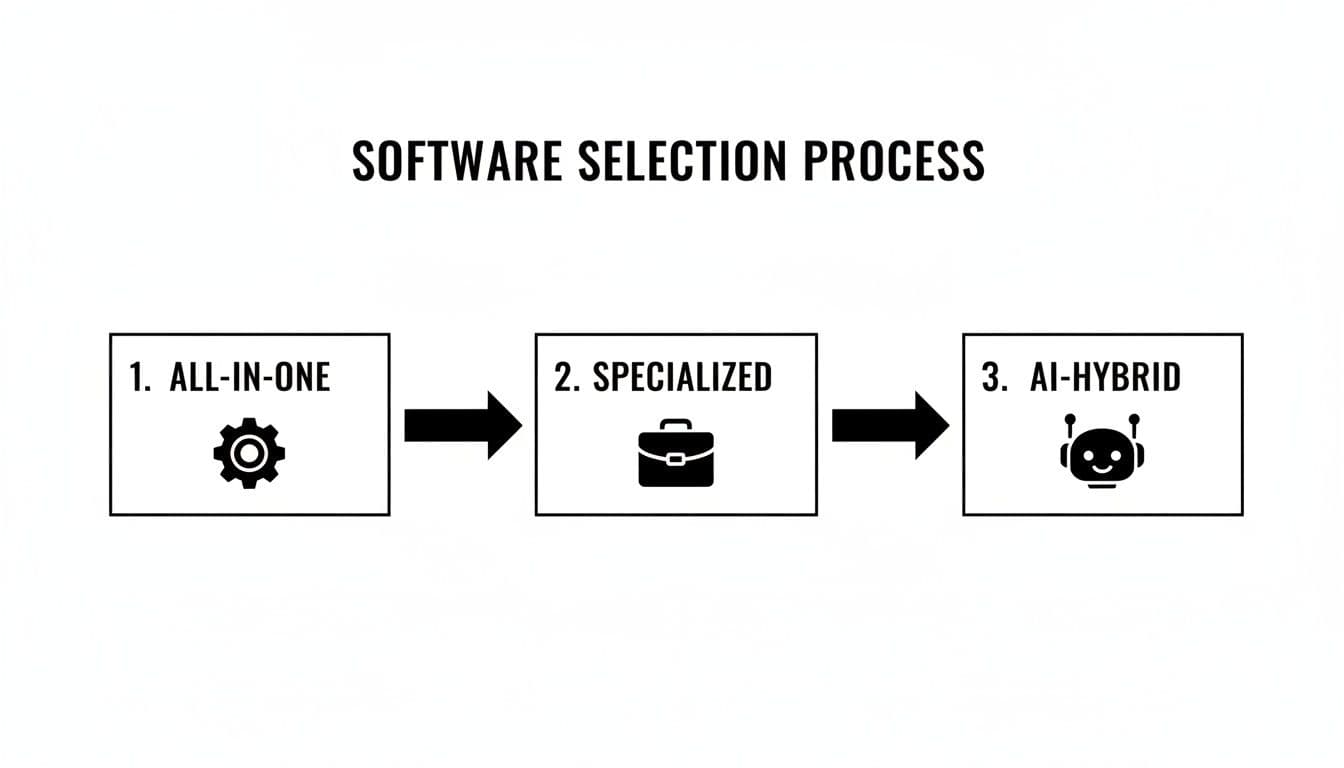
The flowchart here really maps out that decision‑making journey, from general tools to the highly tailored solutions consultants often need to manage complex, client‑facing work.
Master Your Data Migration and Templates
Once your pilot project wraps up successfully, you can start the wider implementation. First up is data migration, and my best advice is to be ruthless. You do not need to import every task, comment, and file from the last five years.
- Active Projects First: Focus all your energy on migrating current, ongoing client work. This is non‑negotiable.
- Archive the Rest: For completed projects, just export the key reports and deliverables to a cloud storage folder. A clean slate in your new system is a gift you give your future self.
- Build Your Templates: This is where the magic happens. Take what you learned from the pilot and build out standardized project templates. If you offer three main consulting packages, create a unique template for each one, pre‑loading it with your standard phases, task lists, and client checklists. This single action will save you hundreds of hours over the next few years.
To make sure everything clicks into place, it helps to master marketing workflow management as a core skill. Understanding how work actually flows from start to finish is what minimizes disruption. Nailing these early steps builds momentum and proves the tool’s value right away, making it an essential part of how you do business.
Common Questions from Consultants
How Much Should I Expect to Pay?
This is always the first question, and the truth is, the price range is huge. You can find free tools with bare‑bones features all the way up to enterprise systems that run hundreds of dollars a month. For most solid, reputable platforms, you’re typically looking at a $10 to $50 per user, per month subscription.
But here’s a critical point for consultants: your workload isn’t always consistent. You have busy months and slower ones. This is where a usage‑based pricing model can be a much smarter financial move. Some platforms, like Fluidwave, let you pay per delegated task instead of locking you into a fixed monthly seat license. This way, your software costs scale directly with your revenue—you’re not paying for a tool that’s just sitting there during a quiet spell.
“The key is to look past the sticker price and think about the total value and ROI. If a slightly more expensive tool saves you five billable hours a month, it’s already paid for itself several times over.”
The Single Most Important Feature for a Solo Consultant
Every consultant’s practice is different, but if I had to pick one feature that delivers the most immediate business impact, it’s integrated time tracking and invoicing. Why? Because it directly connects the work you do to the money you earn.
Think about it: the ability to track billable hours against specific project tasks and then, with a click, turn that data into a professional invoice is a massive time‑saver. It slashes your admin overhead, but more importantly, it plugs the revenue leaks that come from unbilled hours. That’s a common—and very costly—problem when you’re tracking time manually.
Convincing Clients to Use a New Portal
Getting clients on board with a new tool can feel like a chore, but it all comes down to the pitch. Don’t frame it as something you need them to do. Instead, position it as a direct benefit that makes their life easier and gives them more control.
When you introduce the client portal, highlight what’s in it for them:
- 24/7 Visibility: They can see project progress anytime they want, without having to wait for your next email update.
- A Single Source of Truth: No more digging through email chains. All files, feedback, and approvals are in one organized spot.
- Efficient Communication: It cuts down on inbox clutter and ensures their feedback is never lost in the shuffle.
I’ve found that a quick, two‑minute walkthrough during the kickoff call is usually all it takes. Once clients see it as a tool for transparency and efficiency, getting them to use it is rarely an issue.
—
Ready to stop managing tasks and start delegating them? Fluidwave combines powerful project management with AI and on‑demand virtual assistants, so you can focus on what you do best. Explore how it works at https://fluidwave.com.
Frequently Asked Questions (Q&A)
Q1: How can project management software reduce admin time for consultants?
A1: By centralizing tasks, timelines, and client communications, PM software cuts duplicate work, speeds up approvals, and automatically tracks time for accurate invoicing.
Q2: Should I choose an all‑in‑one platform or a specialized tool?
A2: All‑in‑one platforms offer flexibility with potential setup effort, while specialized tools are often quicker to implement for service‑oriented workflows. Your best choice depends on your process, team size, and need for customization.
Q3: How do I onboard clients to a new client portal?
A3: Frame it as a benefit, provide a brief 2‑minute walkthrough during kickoff, and emphasize benefits like 24/7 visibility, a single source of truth, and streamlined feedback. This reduces resistance and builds trust.
Footnotes follow with sources and links cited in the text.
1.
Research and market trend data referenced in this article are drawn from Research Nester, which projects the North American market to reach US$4,926.2 million by 2030. See https://www.researchnester.com/reports/project-management-software-market/4176.
2.
Additional market context cites a forecast that cloud‑based project management software could capture about 53% of the market’s revenue share by 2035, growing from USD 8.02 billion in 2026 to USD 18.9 billion by 2035. See https://www.researchnester.com/reports/project-management-software-market/4176.
3.
For broader market expansion insights, see Mordor Intelligence’s industry reports on project management software systems: https://www.mordorintelligence.com/industry-reports/project-management-software-systems-market.
Focus on What Matters.
Experience lightning-fast task management with AI-powered workflows. Our automation helps busy professionals save 4+ hours weekly.