Discover how to increase work efficiency with actionable strategies for workflow audits, smart automation, and deep focus. Get real-world tips today.
December 13, 2025 (10mo ago)
How to Increase Work Efficiency Without Burning Out
Discover how to increase work efficiency with actionable strategies for workflow audits, smart automation, and deep focus. Get real-world tips today.
← Back to blog
Boost Work Efficiency Without Burnout
Summary: Practical strategies to boost efficiency without burnout: workflow audits, time blocking, automation, delegation, and deep-focus techniques.
Introduction
Before you can boost your efficiency, you have to get honest about where your time is actually going. It’s tempting to jump straight to a new app or time-management trick, but without clear data on your habits you’re just guessing. This article shows a practical path: run a one-week workflow audit, adopt time management frameworks, automate repetitive work, protect deep focus, delegate smartly, and build sustainable habits.
1. Find Your Baseline: The One-Week Workflow Audit
A workflow audit isn’t about judging how you work; it’s about collecting facts so you can make better decisions. Think of it like a personal budget—you can’t save time until you know where it’s being spent.
Track your activities for one full work week to uncover hidden patterns. You’ll likely find shallow tasks and interruptions consume more hours than you expect, leaving little room for the deep work that actually drives results.
High-Impact vs. Low-Impact Work
Separate what moves the needle from what drains attention:
- Deep work: mentally demanding tasks that create value, like strategy, coding, or creative design.
- Shallow work: routine tasks that don’t need peak brainpower—emails, scheduling, simple admin.
- Distractions: unplanned interruptions that break focus, such as notifications or quick questions.
Tagging activities helps you map your day and spot opportunities to protect your deep work.
Your One-Week Productivity Snapshot
Track daily activities for a week and note energy levels. Use simple time blocks and categorize each entry as Deep Work, Shallow Work, Admin, or Break.
| Time Block (e.g., 9–10 AM) | Task Performed | Task Type | Energy Level | Notes/Distractions |
|---|---|---|---|---|
This data reveals patterns you can act on—for example, scheduling shallow tasks when your energy dips or reserving mornings for uninterrupted focus.
The audit gives honest data so you can stop guessing about productivity and start making targeted changes.
For a larger operational view, see our guide on measuring operational efficiency.
2. Implement a Proven Time-Management Framework
With your baseline in hand, move from tracking to managing time intentionally. A framework gives rules for your day so you protect focus and align daily work with your goals. Experiment to see what fits your style; the aim is smoother days, not extra complexity.
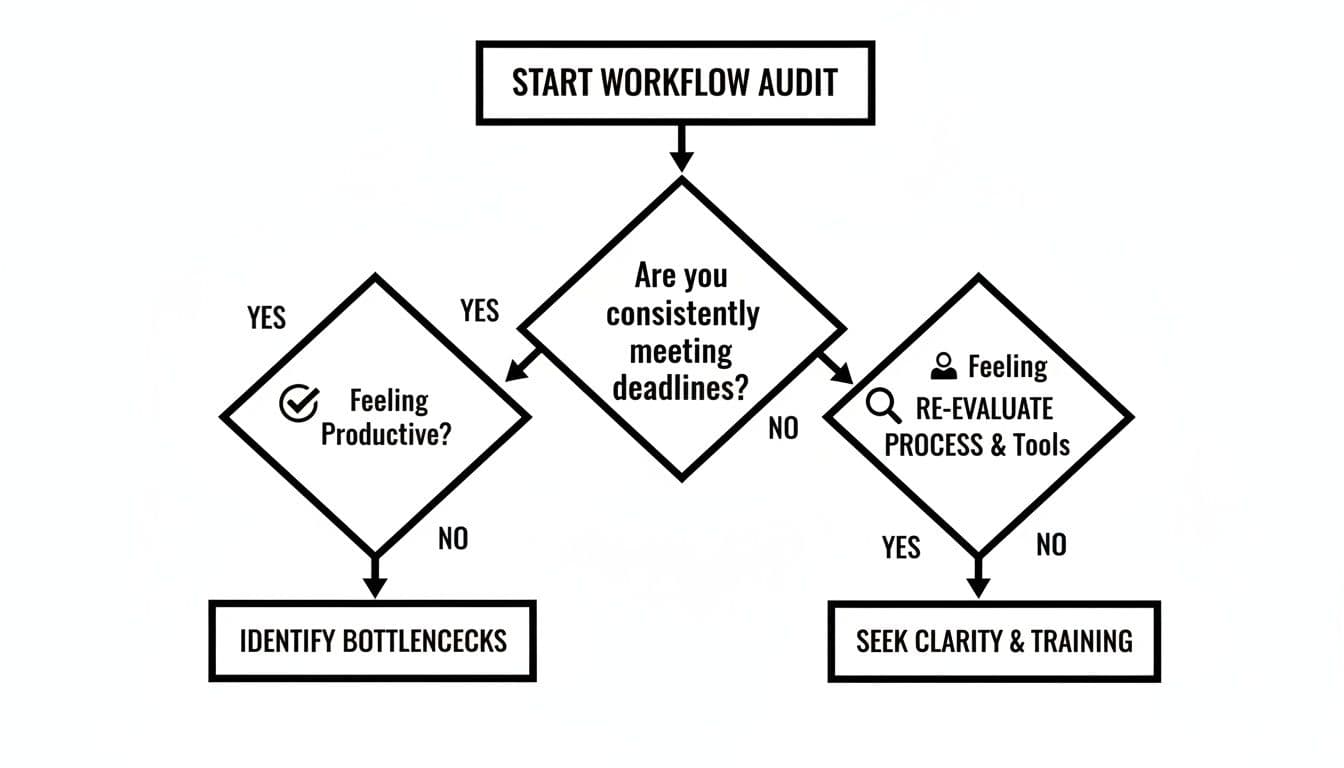
Pomodoro Technique for Intense Focus
Work in focused 25-minute sprints, then take a 5-minute break. After four cycles, take a longer break of 15–30 minutes. This chops big tasks into manageable chunks and conditions your brain to lock in during each timed sprint.
The rhythm is especially useful for people who struggle with distractions or procrastination and can help neurodivergent professionals manage attention without burning out.
Eisenhower Matrix for Prioritization
Sort tasks into four quadrants to decide what to do, schedule, delegate, or eliminate. This forces clarity between urgent work and important strategic work, helping you protect long-term priorities.
Time Blocking for an Intentional Schedule
Give every part of your day a purpose by blocking calendar time for tasks. Treat focus blocks like meetings: non-negotiable appointments with your most important work. For more methods, see mastering time with proven frameworks.
3. Work Smarter with Automation and AI Tools
Big efficiency gains come from handing off repetitive, low-impact tasks. Automation and AI let you reclaim hours so you can focus on strategic, creative work.
Find Your Automation Hotspots
Look for tasks that are repetitive, rule-based, or time-consuming but low-skill. Use your workflow audit to spot frequent shallow tasks—start automating those first.
Build Simple Automated Workflows
Tools like Zapier and Make can connect your apps without code. For example, automate lead capture so contacts go to your CRM, create a follow-up task, and notify the sales channel in Slack—what took minutes per lead now happens instantly.
Let Generative AI Handle the First Draft
Use tools like ChatGPT to create first drafts of emails, summarize reports, or brainstorm. Let AI do the grunt work for the first 80% and spend your time on the final 20%—the judgement and polish only humans can provide.
Top performers are far more likely to use AI, and many professionals report meaningful time savings with automation2. A PwC survey found a large share of employees report higher productivity when using AI tools3.
Automation augments people’s abilities, freeing them from monotonous tasks so they can focus on work that needs human insight.
Learn more about AI-powered workflows in our guide on workflow automation.
4. Cultivate Deep Focus in a Distracted World
Your ability to concentrate is your greatest asset. Focus isn’t just willpower—it’s about designing an environment where focus is the easiest choice.

Design Your Digital Sanctuary
Audit your notifications and turn off non-essential pop-ups. Use Focus Modes or Digital Wellbeing to create strict boundaries. A tidy desktop and a minimal taskbar reduce visual clutter and prevent low-priority items from nagging at your attention.
Engineer Your Physical Environment
Create a dedicated work spot, hide tempting devices, and use noise-canceling headphones if needed. Interruptions can occur every few minutes and often cost significant refocus time—sometimes up to about 23 minutes to fully resume a task1.
Structural Focus Techniques
- Task batching: group similar tasks (for example, clear email in two 30-minute blocks) to reduce context-switching.
- Time blocking: schedule guarded focus periods on your calendar and communicate them to your team so they respect that time.
These approaches help neurodivergent professionals by adding predictable structure and reducing decision fatigue. For more on focus at work, see how to focus at work.
5. Amplify Impact Through Smart Delegation
Efficiency isn’t about doing everything yourself. Delegation lets you move from doer to director—freeing your time for high-impact work.
What to Delegate
Pick tasks that are time-consuming but low-impact, teachable, or outside your core strengths. Document processes with checklists or quick videos so others can follow them accurately.
Leverage Virtual Assistants
A virtual assistant can manage calendar tasks, filter email, book travel, and handle research. Start small—delegate one or two low-risk tasks and expand as trust and communication improve. Fluidwave offers on-demand support that many teams use to reclaim hours each week.
Delegation requires clear communication, expectations, and feedback; it’s not abdication.
6. Build Sustainable Habits for Lasting Productivity
Tools and hacks help, but long-term efficiency rests on sustainable habits that protect your energy. Peak performance is about systems that keep you healthy and focused day after day.
Align Work with Natural Rhythms
Notice when you’re sharpest and schedule deep work then. Save lower-energy periods for routine tasks. Aligning work to your natural cycles conserves mental energy and reduces wasted effort.
The Science-Backed Power of True Downtime
Short breaks, quality sleep, and good nutrition are productivity essentials. Real downtime means disconnecting from work—take short walks, prioritize 7–9 hours of sleep, and fuel your brain with good food.
When your work feels meaningful, motivation becomes a renewable resource. Gallup reports low global engagement, and teams with high engagement show notably better productivity—evidence that purpose matters for sustainable performance4.
Frequently Asked Questions
How can I boost efficiency when I have ADHD?
Blend structure with novelty. Use time-blocking and the Pomodoro Technique, keep visual progress trackers like Trello or Asana, and schedule demanding tasks for your peak hours. Build in flexibility and buffer time.
What’s the easiest way to start automating my work?
Pick one small repetitive task—sorting emails, saving attachments, or copying data between apps—and automate it with a no-code tool like Zapier or IFTTT. Quick wins build confidence for bigger automations.
How do I stay efficient on a team with different work styles?
Define a shared goal, agree on a single source of truth (project management tool), standardize communication channels, and respect each other’s focus time by keeping meetings essential and agenda-driven.
Quick Q&A — Common User Questions
Q: What’s the first thing I should do to improve efficiency?
A: Run a one-week workflow audit to see where your time goes and identify the biggest low-impact drains.
Q: Which time-management method works best?
A: There’s no one-size-fits-all. Try Pomodoro, Eisenhower prioritization, and time blocking to see which combination fits your work style.
Q: How quickly will I see results from automation?
A: Small automations can save minutes or hours immediately; compounding these wins across tasks leads to large weekly savings.
Ready to stop juggling tasks and start directing results? Fluidwave combines intelligent task management with on-demand virtual assistants to help you automate the mundane and focus on what truly matters. Start streamlining your workflow for free.
1.
Gloria Mark, Daniela Gudith, and Ulrich Klocke, “The cost of interrupted work: more speed and stress,” CHI Conference on Human Factors in Computing Systems, 2008. https://www.ics.uci.edu/~gmark/chi08-mark.pdf
2.
Slack, “How top performers use AI and automation to get more done,” Slack research and resources. https://slack.com/
3.
PwC, “AI at work: workforce productivity and adoption survey,” PwC research. https://www.pwc.com/
4.
Gallup, “State of the Global Workplace” and employee engagement research (2024). https://www.gallup.com/
Focus on What Matters.
Experience lightning-fast task management with AI-powered workflows. Our automation helps busy professionals save 4+ hours weekly.