Discover 8 executive time management tips on prioritization, delegation, focus and automation, with practical examples you can use this week.
November 25, 2026 (Today)
8 Executive Time Management Tips for Busy Leaders in 2026
Discover 8 executive time management tips on prioritization, delegation, focus and automation, with practical examples you can use this week.
← Back to blog
Ask an executive to name the three things that will decide the year and most answer in seconds. Ask them to open last week's calendar and point to the hours spent on those three things, and the answer takes longer, or doesn't come at all.
That gap is the problem worth solving. It isn't a discipline failure, and it doesn't close with a new task app. It closes with a handful of structural decisions: what gets a slot before anything else gets one, what never reaches your desk, and what becomes a written record instead of another meeting.
Meetings expand to fill the space offered. Messages arrive in bursts that reset your attention every few minutes. A request somebody else marked urgent lands on you because nobody wrote down who else could own it. Each of those is a design choice, even when it feels like weather.
This list covers eight "executive time management tips" that hold up in a real week, the kind with a board call on Wednesday, a hiring loop that keeps stalling, and a strategy memo nobody has touched since March. Every item includes one first step you can take this week and the point where an assistant or a teammate should take the work over. None of them require you to become a different person.
Start with the one that matches the mess you're in right now.
1. Time Blocking Executive Calendar
Say a CEO's Wednesday opens with a 7:30 request to review board slides, then five meetings before lunch, then a hiring debrief that runs forty minutes long. The strategy work she named as the year's priority hasn't had a slot since February. Nothing dramatic happened. The calendar filled with commitments that had owners, and the strategy didn't have one.
Where the honest record lives
Time blocking assigns every working hour a purpose before the week starts: strategy, one-on-ones, email, travel, open buffer. For executives the calendar is usually the only honest record of where attention went, because memory smooths over the fragments. A Harvard Business School study that followed large-company CEOs for 13 weeks, logging where they were, who they were with, what they did, and what they focused on, makes the case for auditing the full 24 hours rather than just office hours (Harvard Business School summary of the CEO time study). Evenings, prep, and recovery belong in the picture.
The scheduling split from a related Harvard CEO study is a useful sanity check on how much should stay unplanned: 75% of executive time was scheduled in advance while 25% remained spontaneous, and average sleep came to 6.9 hours a night (CNBC's reporting on the Harvard CEO study). A calendar with zero white space breaks the first time a customer calls.
First step this week
Audit the last two weeks and label blocks by function rather than by attendee name. Then:
- Block two or three sessions, not eight. Give the quarter-changing work a slot and watch whether you defend it.
- Leave 15 minutes between meetings. Notes, transitions, and the overrun you keep pretending won't happen.
- Publish your block categories. Color coding on a shared calendar tells your assistant which blocks are movable and which aren't.
- Put a buffer on Friday afternoon. Thursday-night requests land there instead of on Monday morning.
Once the categories hold for two weeks, hand the defense to your assistant. They protect the blocks, negotiate the conflicts, and book the buffer without asking you. Several of these structures are compared in this guide to time blocking methods.
2. Eisenhower Matrix for Priority Triage
Three things land in a founder's inbox before 10 a.m.: an investor asking for a board update, a vendor chasing an invoice, and an engineer who needs approval to ship. All three read as urgent. Only one decides the quarter, and it's the one with the least obvious deadline.
The box most leaders avoid
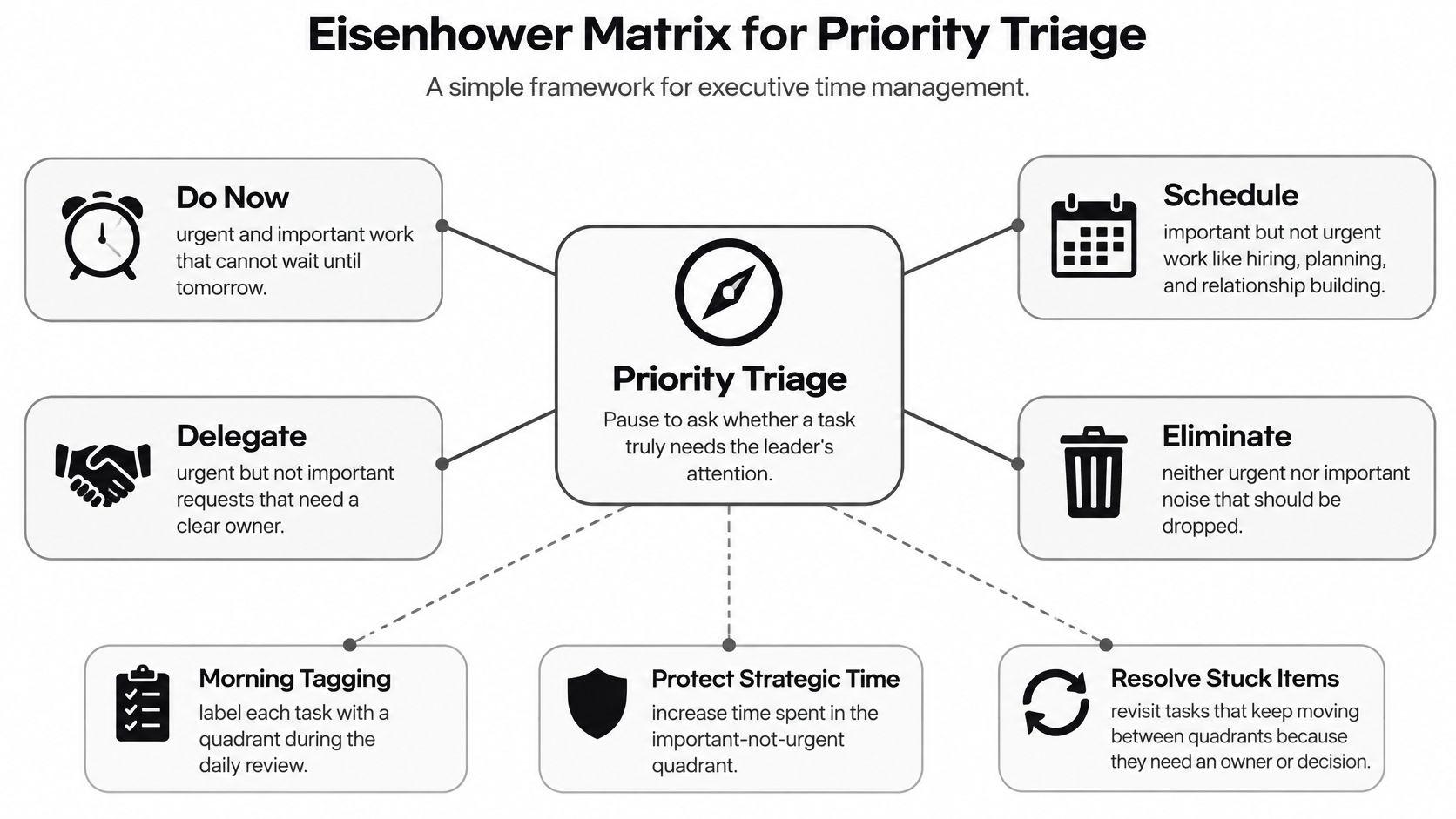
The Eisenhower Matrix sorts work into four cells: do now, schedule, delegate, eliminate. The value isn't in the labels, it's in the pause. A task that feels urgent but scores low on importance usually belongs in delegate, and the reason it reached you is that nobody owns it. That's an ownership problem, not a time problem, and no calendar trick fixes it.
The quadrant that pays for itself is schedule: important, not urgent. Hiring plans, pricing decisions, key relationships, next quarter's narrative. Those items never announce themselves, which is why they slip.
Practical rule: if a task has stayed in "do now" for three days, it was never urgent. It's either unimportant or unowned.
First step this week
Tag your task list with a quadrant each morning before you open email. Then hold three constraints.
- Cap "do now" at what can't wait until tomorrow. In practice that's one or two items, not six.
- Watch the important-not-urgent number. Track weekly hours spent there and try to move it up by one block.
- Follow the wanderers. Items that drift between quadrants for weeks need a named owner or a decision, not better sorting.
Here's the concept in motion before you build your own version.
The triage itself takes ninety seconds once you're practiced at it. What takes longer is the conversation about delegation. Your assistant can run the first pass, flag anything that's drifted for more than a week, and draft the handoff notes for the delegate quadrant, which leaves you only the judgment calls.
3. Delegation Framework and Executive Support
A COO who still approves every routine purchase order himself isn't being careful. He's created a queue that only he can clear. Delegation fails for one reason more often than any other: the task leaves your desk but the decision doesn't.
Tiered authority, written down
Give every recurring task a tier. Tier one means do it and tell me afterward. Tier two means research it and bring me a recommendation with the trade-offs. Tier three means don't act without my sign-off. Most leaders hand over work at tier one while acting as if it's tier three, then wonder why the handoff didn't save time.

Write the brief before the handoff, not after. One page, four fields: the outcome you want, the deadline, the format of the output, and the decisions the person can make alone. A founder sending competitor research to a virtual assistant with a written brief and an output template gets usable work back. The same founder sending "look into competitors" gets a document nobody asked for.
First step this week
Pick one recurring task you've done three times in the last month and write the brief for it. Then:
- Start low-risk. Formatting decks, updating project trackers, compiling research shortlists. Build trust before you hand over anything sensitive.
- Schedule a check-in after the second handoff. Two or three cycles in, the brief usually needs one adjustment.
- Keep a not-delegated list. Review it monthly; the items that survive are either yours or avoiding a conversation.
- Review the first month's output weekly. Not to check the person, to fix the brief.
A virtual assistant or chief of staff can absorb scheduling, document prep, research, and admin once the tiers exist. The task categories worth moving first are set out in this list of executive assistant tasks.
4. Weekly Review and Planning Ritual
Drift is the failure mode that never announces itself. Nobody sees the stalled project or the follow-up that fell three weeks behind until a customer mentions it. A weekly review catches those before they compound, which is cheaper than explaining them later.
The session, not the system
Thirty to sixty minutes, same slot every week, fixed checklist. The practice comes from David Allen's Getting Things Done, and the version that survives contact with a real executive calendar is narrower than the original: what shipped, what's open, what's stalled, and what next week must contain. No project planning, no reorganized task lists, no new app evaluations.
The session pays off most in the follow-up column. Executives accumulate commitments in meetings faster than they close them, and a review is the only place where "I said I'd send that" becomes visible.
A review that runs long is doing planning work that belongs in a separate block. Keep it to the checklist.
First step this week
Book the review as a recurring event with your own name on it and treat it like a client meeting. Then:
- Use a fixed checklist. Five to seven prompts, same every week, so the session doesn't expand to fill the time.
- Name three outcomes at the end. Not a task list, three results next week has to produce.
- Send a short priorities note. A managing director who closes Friday with a 45-minute review and a paragraph to the leadership team spends less time repeating himself on Monday.
- Brief your assistant first. Ten minutes before the review, they surface delegated items and anything awaiting your response.
The review also exposes ownership gaps. A product executive I'd point to ran hers and found three projects with no named owner, all of them marked green on the last status report. The fix took a single conversation each.
5. Deep Work Sessions for Strategic Thinking

Strategy, board writing, and complex analysis don't fit in the gaps between meetings. They need one stretch of uninterrupted attention, and most executives never schedule one, so the work gets done badly at 9 p.m. or not at all. Cal Newport's argument in Deep Work holds up in practice: sustained concentration is now scarce among senior leaders, which makes it disproportionately valuable.
Why an hour isn't a deep work session
The interruption pattern is what kills these sessions, not the length. Microsoft's 2025 Work Trend Index, built on aggregated and anonymized Microsoft 365 signals across global users, found employees were interrupted by meetings, email, or chat notifications every two minutes during core work hours, with roughly 275 interruptions per day for the highest-volume users (Microsoft Work Trend Index on the frontier firm). A 90-minute block with a live inbox isn't a block at all.
Research on interruption overload finds frequency predicts perceived overload most strongly when the underlying work is complex, and a 2023 field experiment with 247 participants found that reducing notification-driven interruptions improved performance and reduced strain (review of executive context-switching statistics). The lesson for a CFO blocking early mornings for budget modeling: notifications off, door closed, phone face down, and one stated goal written at the top of the page.
First step this week
Book one two-hour session in your sharpest window, and put a sentence in the calendar title describing the output. "Draft the three-year model, first pass," not "focus time."
- Set the goal before you sit down. Without it, the session turns into reading.
- Announce the window. A team that knows you're dark from 8 to 10 stops testing whether you're really dark.
- Keep a capture pad. Distracting thoughts get written down and parked, not acted on.
- Start at one per week. Two good sessions beat five abandoned ones.
Your assistant's job here is defense, not content: refusing the invitation that overlaps the block, holding the follow-up messages until it ends, and rescheduling the session rather than deleting it when the week shifts.
6. Batched Email and Message Windows
Email and chat are the two systems most likely to eat an executive's day, and the instinct to stay responsive makes it worse. Batching means choosing when to engage. It doesn't mean going dark; it means your attention follows a schedule instead of every arrival.
The cost of staying current
Picture an operations executive with three open channels. She checks email at 9 a.m., 1 p.m., and 4:30 p.m., and her team knows a phone call is the escalation route for anything on fire. Nothing gets missed, because the urgency threshold is explicit rather than implied. Compare that to the leader who keeps a live inbox open all day and answers within four minutes, which trains everyone to expect four minutes.
That same telemetry data puts the fragmentation in plain terms: 48% of employees and 52% of leaders described their work as chaotic and fragmented, which is the predictable result of a day built from two-minute slices rather than a sign of weak discipline. The measurement that matters is interruption density, interruptions per focused hour, not total hours worked.
First step this week
Pick three windows and publish them. Then:
- Tell your team which channel means urgent. One route, clearly named, and everything else can wait for the next window.
- Turn off non-essential notifications. Keep alerts for the named escalation route and silence the rest.
- Handle the two-minute rule. If a message takes less than two minutes, answer it inside the window and clear it.
- Write an auto-reply that states response times. A managing partner's note that says "I read messages at 1 and 4:30; call this number for anything urgent" removes the guesswork.
An assistant can triage inbound before it ever reaches you: sorting requests into answer-now, draft-a-reply, and schedule-a-call. That's the difference between you processing your inbox and someone else processing it for you.
7. Meeting Discipline and Calendar Defense
The Harvard CEO study that tracked 27 chief executives continuously for about three months each, collecting nearly 60,000 hours of observation, found that 72% of work time was spent in meetings and only 28% working alone, with an average of 37 meetings per week and a 9.7-hour normal weekday (Management Consulting's summary of the Harvard CEO time study). Senior leadership is a coordination job, so the goal isn't fewer meetings. It's fewer meetings that didn't need you.
The question that clears a calendar
Ask every organizer one question before you accept: what decision is this meeting making, and what's my role in it? If the answer is "to keep you informed," a written update does the same job in a fifth of the time. Amazon's practice of opening meetings with silent reading of a narrative memo works for the same reason: written thinking forces precision that discussion lets people skip.
The growth curve explains why calendars keep losing. Microsoft reported a 153% global increase in meetings per week for the average Teams user between the start of the pandemic and spring 2022, and overlapping, double-booked meetings rose 46% per person in one year (Microsoft Work Trend Index on hybrid work). Acceptance is the default; declining is a decision.
First step this week
Change your default meeting length to 25 or 50 minutes for anything internal, and send one recurring meeting to a written update instead.
- Decline the double-booking every time. Accepting both teaches your team that overlaps are survivable.
- Require the decision in the invite. A CEO who asks for the decision needed before the session and declines invitations without an agenda gets a shorter week within a month.
- Build one update template. Weekly progress, risks, decisions needed, published in writing.
- Audit recurring meetings each quarter. Any series that has lost its purpose gets cancelled, not inherited.
A chief of staff can own this: screening invitations against your role, converting status series into written updates, and reassigning attendance where a teammate can represent you. What they can't do is decide that you don't need to be in the room. That one stays with you.
8. Energy Management and Protected Recovery Time
Your calendar can be perfectly blocked and still produce bad decisions if those blocks land in the wrong hours. Energy determines what a slot is worth. Scheduling a hard call at 6 p.m. after nine hours of context switching is how leaders end up reversing themselves the next morning.
Schedule the demand to the energy
The pressure is widespread, not personal. Microsoft's 2025 Work Trend Index, drawing on survey responses from 31,000 professionals across 31 countries alongside Microsoft 365 productivity signals, reported that 80% of employees and executives lacked sufficient time and energy to meet rising expectations, while 53% of leaders said productivity needed to improve (Microsoft's announcement of the 2025 Work Trend Index). Adding tasks to a full week doesn't solve that. Repricing the hours does.
For leaders whose attention and task initiation vary across the day, rigid scheduling is the wrong prescription. Evidence on workplace adjustments found that accommodation-equivalent practices were associated with better workplace adaptation among workers with high ADHD traits, and their absence was associated with substantially higher maladjustment odds (research on workplace adjustments and ADHD traits). Written decisions, visible next actions, flexible focus periods, and shorter meeting formats aren't accommodations for a few. They're good design for anyone whose cognitive load changes through the day.
First step this week
Track energy for two weeks, three times a day, on a scale of one to five. Then:
- Place demanding work in your highest window. Major decisions mid-morning, admin in the trough.
- Protect one evening or weekend block. Recovery that's scheduled survives; recovery that's hoped for doesn't.
- Create a shutdown ritual. Tomorrow's top three tasks, written before you close the laptop.
- Take the walk. Twenty minutes between back-to-back meetings costs less than the reset it buys.
An assistant can hold the boundaries that protect recovery: no early-morning bookings, no Friday-night sends, a real lunch break between calls. The deeper work of matching demand to energy is yours, and the practices in this guide on how to protect your energy cover the recovery side, including why your brain won't shut off when work never formally ends.
How each executive time management tip compares
| Item | Main Problem Solved | Setup Effort | Delegation Fit |
|---|---|---|---|
| Time Blocking Executive Calendar | Prevents ad hoc requests from crowding out priorities | Moderate: audit time and maintain calendar blocks | Good: assistants can protect blocks and coordinate availability |
| Eisenhower Matrix for Priority Triage | Separates urgent, important work from low-value tasks | Low: classify tasks during a regular review | High: identifies tasks to delegate or eliminate |
| Delegation Framework and Executive Support | Reduces leader bottlenecks through clear task handoffs | High: define authority, expectations, and procedures | Excellent: designed to assign work to assistants or team members |
| Weekly Review and Planning Ritual | Catches stalled commitments and plans the coming week | Moderate: schedule a recurring review and use a checklist | Good: pair the review with an assistant briefing |
| Deep Work Sessions for Strategic Thinking | Creates uninterrupted time for demanding, high-value work | Moderate: schedule focus blocks and communicate availability | Limited: support can protect the time, but the work itself is executive-led |
| Batched Email and Message Windows | Reduces interruptions and context switching | Moderate: set message windows, rules, and escalation paths | Good: an assistant can triage inbound requests |
| Meeting Discipline and Calendar Defense | Cuts low-value meetings and protects executive time | Moderate: establish agenda, duration, and attendance rules | Good: assistants can screen invitations and coordinate schedules |
| Energy Management and Protected Recovery Time | Aligns demanding work with peak energy and reduces burnout | Moderate: track energy and establish breaks and shutdown routines | Limited: assistants can help protect the schedule, but routines are personal |
Putting These Executive Habits to Work
No executive needs all eight methods at once. The sequence matters more than the list. Delegation comes before blocking, because a protected block only survives if the work it displaces has somewhere else to go. The weekly review comes next, since it's the mechanism that tells you whether the blocks held. Then blocking, triage, and meeting discipline.
Pick one habit this week, such as a fixed weekly review or a single protected deep work block, and track how the calendar changes over two weeks. Add the second habit only after the first has held for two weeks straight. Two habits that survive beat eight that get installed in January and abandoned by March.
The failure patterns are predictable enough to name. A block that everyone can see but nobody respects collapses the first time someone books over it, which is why publishing the categories matters as much as creating them. A weekly review that turns into project planning doubles in length and disappears by month two. A delegation brief without decision limits comes back for approval on every item, which means the work never left.
Measure the right things. Count protected sessions held, interruptions per focused hour, and hours spent in important-but-not-urgent work. None of those show up on an activity report, and all three predict whether the quarter's real work gets done.
If you want the task side of this to run itself, Fluidwave's auto-prioritization packs visible tasks into free time in priority order, and its AI scheduling reads your Google Calendar and writes back only the sessions you confirm, so the plan stays in your hands.
Fluidwave turns the calendar decisions in this article into a working plan: it orders your tasks by urgency and importance, finds free time inside your working hours, and blocks sessions for the work that moves the quarter, while a network of virtual assistants can take defined tasks off your list on a pay-per-task basis. Start by capturing the three outcomes you named in your next weekly review, let auto-prioritization place them, and confirm only the sessions you want. You can see how it works at Fluidwave.
Focus on What Matters.
Experience lightning-fast task management with AI-powered workflows. Our automation helps busy professionals save 4+ hours weekly.