Your complete guide to a successful Angular to React migration. Covers evaluation, concept mapping, hybrid strategies, code, testing, and pitfalls.
May 12, 2026 (5mo ago)
Seamless Angular to React Migration Playbook
Your complete guide to a successful Angular to React migration. Covers evaluation, concept mapping, hybrid strategies, code, testing, and pitfalls.
← Back to blog
You're probably staring at an Angular codebase that still works, still ships, and still irritates everyone who has to touch it.
That's the fundamental starting point for most angular to react migrations. Not hype. Not a framework beauty contest. It usually starts when a feature that should take a day turns into a week because routing is tangled, shared state is brittle, and no one wants to own the oldest parts of the UI. The app keeps delivering value, but the cost of change keeps rising.
I've seen teams get this wrong in two predictable ways. One group treats migration like a technical cleanse and rewrites everything at once. The other keeps talking about migration for months without deciding what problem they're solving. The first burns time. The second burns morale. A workable migration sits in the middle. It starts with a hard audit, translates patterns deliberately, ships React alongside Angular, and treats testing and rollout as part of the migration itself, not cleanup work for later.
Planning Your Move Evaluating Your Angular App
A migration proposal falls apart fast if the only argument is “React is more popular.” Popularity matters, but only if it connects to hiring, maintenance, delivery speed, and user experience. You need a case that both engineering and leadership can use to make a decision.
The market signal is real. As of 2025 to 2026, 40.58% of professional developers prefer React compared to 17.75% for Angular, and React records 27,732,689 NPM weekly downloads versus Angular's 3,615,187 according to DevsData's Angular vs React comparison. In practice, that usually means a broader hiring pool, easier onboarding, and less friction when you need specialist help.
Audit the app before you touch the stack
Start with an inventory, not a roadmap. I want four things on paper before anyone creates a React component:
-
Feature map
- Which routes drive revenue, retention, or daily usage?
- Which screens change often?
- Which ones are effectively frozen?
-
Dependency map
- What components depend on which services?
- Where are the shared models, interceptors, guards, and custom directives?
- Which parts of the app are tightly coupled through side effects instead of contracts?
-
Pain map
- Slow builds
- Fragile tests
- Heavy template logic
- Hard-to-reason RxJS chains
- Areas where simple UI changes require edits across many files
-
Operational map
- Release frequency
- Defect hotspots
- Onboarding pain for new developers
- Parts of the app only one person understands
If you skip that audit, you don't have a migration plan. You have a rewrite impulse.
Practical rule: Migrate the parts that hurt delivery first, not the parts that are easiest to talk about in architecture meetings.
A structured fit-gap review helps here. If your team needs a reusable template for evaluating current-state versus target-state workflows, these product gap analysis methods are useful because they force you to compare business needs against actual implementation gaps instead of arguing in abstractions.
Prioritize by cost of change
A lot of Angular apps have one deceptive trait. The UI may look modular, but the behavior is centralized in services, subscriptions, and route-level assumptions. That's why I rank targets by cost of change, not by component size.
A small card widget can be a bad first candidate if it relies on app-wide state, custom pipes, and hidden parent-child coupling. A larger but isolated screen is often safer.
Use a simple prioritization model like this:
| Candidate area | User impact | Coupling | Change frequency | Migration priority |
|---|---|---|---|---|
| Reporting dashboard | High | High | Medium | Later |
| Settings screens | Medium | Low | Low | Early |
| Task list view | High | Medium | High | Early |
| Auth flows | High | High | Low | Later |
The business case gets stronger when you connect technical pain to delivery outcomes. If onboarding is slow because the app relies on deep Angular-specific patterns and undocumented conventions, document that. If key workflows keep regressing because shared services are overloaded, document that too. Even basic internal documentation examples can expose how scattered the current knowledge base is. Here, disciplined specs and artifacts are vital, and a concrete reference like this process documentation example shows the true level of clarity migration work needs.
Define what success looks like
Don't start with “replace Angular.” Start with a narrower definition:
- A new feature can ship in React without touching legacy routing
- Shared auth works across Angular and React
- Critical user journeys remain stable during coexistence
- The team can support both stacks without hidden ownership gaps
That gives the migration boundaries. It also protects you from the classic trap where the migration becomes a permanent side project with no visible finish line.
Translating Frameworks Mapping Angular to React Patterns
The hardest part of angular to react isn't syntax. It's unlearning how your team thinks about app structure.
Angular encourages explicit architecture through modules, services, dependency injection, decorators, and framework-managed patterns. React gives you primitives. That freedom is useful, but it can also create a messy second system if your team replaces one opinionated framework with five unrelated libraries and a handful of tribal conventions.
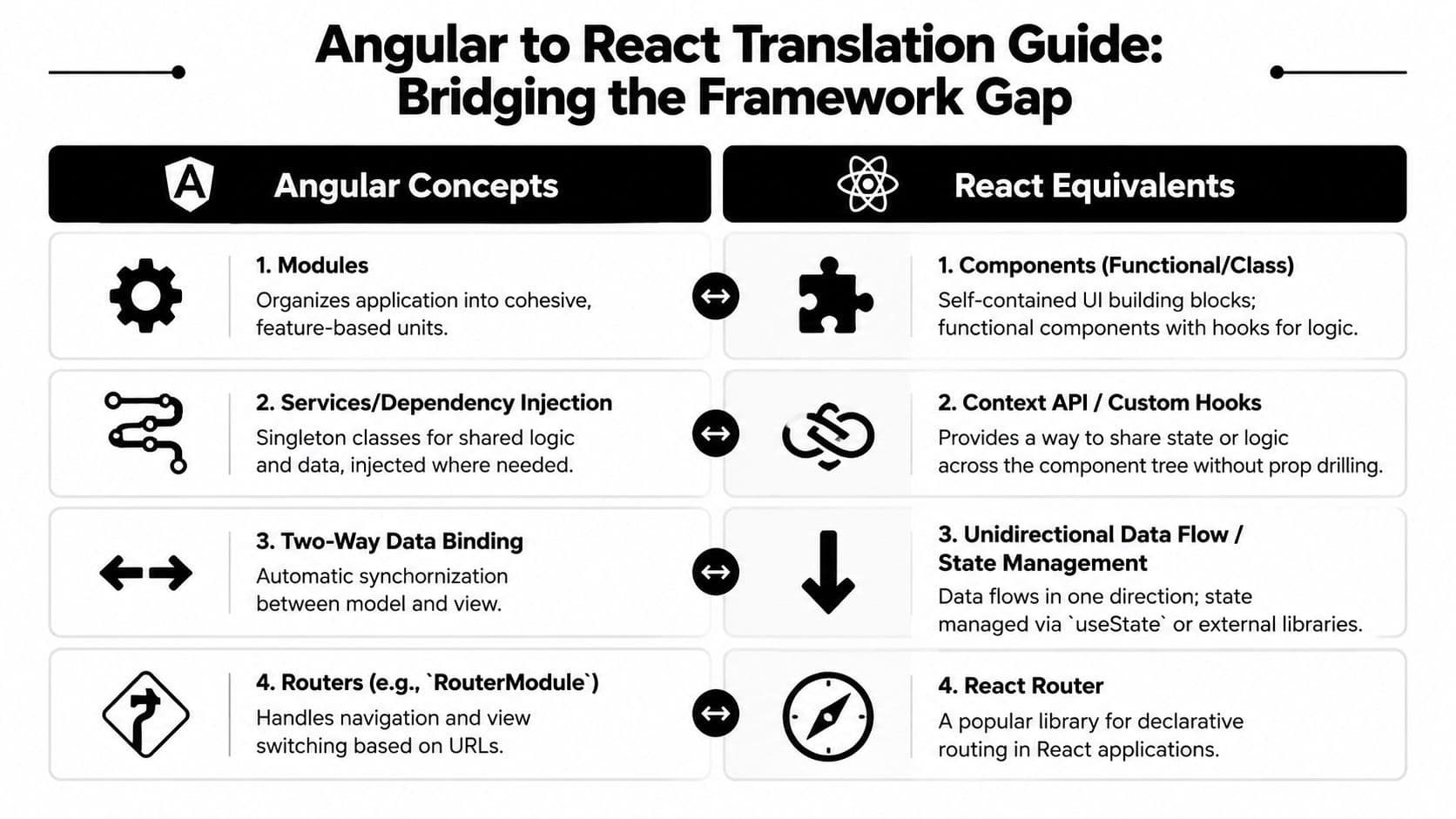
The mental model shift
Here's the translation I use with teams:
| Angular | React |
|---|---|
| Modules organize features | Components and folder boundaries organize features |
| Services hold shared logic | Context, custom hooks, or dedicated data/state libraries |
| Dependency injection provides dependencies | Composition and explicit imports provide dependencies |
ng-if and ng-for control templates | Conditional rendering and .map() in JSX |
| Two-way binding syncs model and view | One-way data flow with state updates and event handlers |
| Angular router handles navigation | React Router commonly fills that role |
The temptation is to force one-to-one replacements. That usually creates awkward React code. An Angular service doesn't automatically become a Context. If the logic is local to a feature, a custom hook is usually cleaner. If the data is server-owned, React Query style patterns often fit better than rebuilding a service layer exactly as it existed.
What usually maps cleanly and what does not
Some conversions are straightforward:
- Template conditionals become JSX conditionals.
- Loops become array mapping.
- Inputs and outputs become props and callback handlers.
- Simple pipes often become plain JavaScript formatters.
Other areas need more design work:
- Dependency injection becomes explicit wiring. That's healthier in React, but it means teams lose some of Angular's built-in structure.
- RxJS-heavy flows may stay as observables in some areas, or they may be simplified into fetch-plus-cache patterns depending on the use case.
- NgRx stores don't have a single obvious replacement. Redux may fit. Zustand may fit.
useReducermay be enough. Server state should not be shoved into client state just because that's what the Angular app did.
The best React migration is usually less clever than the Angular system it replaces.
That's why staffing matters. Teams that haven't built production React before often underestimate how many architectural choices React leaves open. If you need a benchmark for role expectations, team leads often review market profiles for react developers to calibrate the skill mix needed for migration work, especially around hooks, performance tuning, and state architecture.
Don't ignore Angular's strengths
There's a practical trade-off many migration plans leave out. A 2025 experiment found that Angular consumes 21.66% less energy than React for equivalent CRUD apps, with Angular's zoneless Signals in v17+ cited as a reason for lower overhead in that scenario, according to MakersDen's CTO blueprint on migrating Angular to React. If your users spend all day in battery-sensitive dashboards or dense data screens, that matters.
That doesn't mean “stay on Angular.” It means be selective. Some teams should keep compute-heavy or frequently repainting views in Angular longer, while moving faster-changing workflows into React first. Migration isn't religion. It's systems design with constraints.
The Strangler Fig Approach for a Seamless Transition
The safest migration is the one users barely notice.
That's why I push teams toward the Strangler Fig pattern unless there's a very unusual reason not to. You keep the Angular app alive, route real traffic through it, and replace parts of the system gradually. The old shell shrinks over time. The new React surface grows inside it.

The approach is a strong fit for large applications because it supports phased rollout with lower risk. MakersDen's migration strategies guide describes the incremental Strangler Fig method as a proven strategy for large-scale transitions and links it to 80% developer satisfaction for React versus 60% for Angular in the 2021 State of JS survey.
What coexistence actually looks like
In practice, there are three common setups:
-
React inside Angular
- Good for migrating leaf components first
- Useful when Angular still owns routing and page composition
- Common for tables, cards, panels, and isolated widgets
-
Angular and React as separate microfrontends
- Good when product areas already have strong boundaries
single-spaor Module Federation can help- More setup, but cleaner ownership
-
Route-by-route replacement
- Angular owns legacy routes
- React owns new routes
- Shared shell handles auth, navigation, and session concerns
I usually avoid starting with a full microfrontend split unless the org already has the platform maturity for it. In many cases, embedding React in Angular first is simpler and produces fewer rollout surprises.
Shared state and routing are where migrations go sideways
Hybrid apps fail at the seams.
Routing is one seam. If Angular and React both think they own navigation, you'll get broken back buttons, duplicate guards, and inconsistent page state. Pick a single source of truth for route ownership at each phase. During early migration, that source is often Angular. React mounts inside route containers until enough pages have moved to justify a router handoff.
Auth is the second seam. Don't authenticate twice. Put session, token refresh, user identity, and permission checks behind a shared boundary. Sometimes that's a thin JavaScript module. Sometimes it's a platform service exposed to both stacks. What matters is consistency.
A migration schedule should also reflect how teams already ship. If your organization struggles to release in small slices today, it won't suddenly become disciplined during a framework transition. An iterative process stops being theory and becomes release hygiene in this context.
Migrate boundaries before you migrate ideology. Shared auth, navigation, and error handling need rules early.
A practical sequence
I like this order:
- Start with leaf UI that doesn't own global state.
- Move a vertical slice next. UI, feature logic, tests, and route handling for one workflow.
- Introduce shared utilities only after at least two migrated features justify them.
- Replace routing and legacy services later, once the React surface is large enough to support the move.
What doesn't work is migrating random components because they look easy. You end up with a React island chain, but no usable migration path to remove Angular itself.
From Components to Hooks Practical Code Transformation
Most of the migration effort happens in ordinary, repetitive work. Not strategy decks. Not architecture diagrams. It's converting one real component at a time without breaking behavior.

Take a familiar example: a task table in Angular.
The Angular version often has a template with *ngFor, *ngIf, pipes for formatting, a class with ngOnInit, injected services for fetching data, and a couple of subscriptions that update filters and pagination. None of that is conceptually hard. The difficulty is that the behavior is spread across template syntax, decorators, class fields, and service calls.
A practical translation pattern
The React version usually gets cleaner if you break the conversion into layers:
-
Template to JSX
*ngIfbecomes standard conditional rendering*ngForbecomes.map()- class bindings become expressions
- pipes become utility functions
-
Component class to function
- state fields become
useState ngOnInitside effects usually becomeuseEffect- event handlers become local functions
- outputs become callback props
- state fields become
-
Service calls to data hooks
- simple feature-local data fetching can live in a custom hook
- shared app data may need a dedicated state or cache layer
- don't move every Angular service into one giant React context
Here's the practical point teams miss. A React rewrite is often the right moment to delete incidental complexity. If the Angular component needed three subscriptions because data, filters, and route params were managed in separate places, React doesn't require you to preserve that split.
Migration heuristic: Translate behavior faithfully. Translate structure skeptically.
For enterprise codebases, automation can help with the first draft. AI-assisted frameworks have been reported to reduce manual code transformation effort by 60% to 70%, with reported post-migration benchmarks including 23% smaller bundle sizes, 41% faster time-to-interactive, and 28% runtime performance improvements in AngularJS-to-React scenarios, according to the enterprise migration research summary on RePEc. That's useful for repetitive conversions, especially templates and straightforward state changes.
The catch is that AI is weakest where migrations are most fragile. It won't reliably clean up ownership boundaries, state normalization, rendering strategy, or cross-feature abstractions. It can convert syntax. It can't make architectural judgment for you.
A quick visual walkthrough helps when you're training a team on the shape of these changes:
Where teams usually stumble
The common mistakes are predictable:
-
Porting lifecycle thinking directly
- React effects are not Angular lifecycle hooks with different names.
- If you use
useEffecteverywhere, you'll recreate old complexity.
-
Over-centralizing state
- Not every shared value belongs in Context or Redux.
- Keep state near the feature until you have a real reason to lift it.
-
Rebuilding Angular abstractions
- Teams sometimes create service registries and DI-like wrappers in React.
- Most of the time, direct composition is simpler.
-
Keeping too much template logic
- JSX tolerates inline logic, but unreadable render trees are still unreadable.
- Pull formatting and mapping into helper functions when it improves clarity.
A good migration rhythm is simple. Convert one component. Compare behavior side by side. Write tests. Clean the structure while context is fresh. Then move on.
Ensuring Stability Testing and Performance Tuning
A migration without a serious test strategy becomes a bug delivery mechanism.
Teams tend to underinvest here because the migration already feels expensive. That's backwards. Testing is what makes incremental migration possible. Without it, every release becomes a referendum on whether the hybrid app can still be trusted.

A useful example comes from VTS. In its large-scale migration involving 70+ engineers, automated testing with Jest and Enzyme was used to ensure zero regressions, alongside an incremental method that started with leaf nodes and then moved vertically through services and routing layers, as summarized in this migration write-up from iQuasar.
Test the boundary, not just the component
The initial step involves writing unit tests for new React components. That's necessary, but it's not enough.
The dangerous bugs usually live at the Angular-React boundary:
- Angular passes stale props into a mounted React subtree
- A React event updates state, but Angular doesn't react to it correctly
- Shared auth or feature flags differ across the two runtimes
- Route transitions remount components unexpectedly and lose local state
That's why the testing stack has to cover multiple levels:
| Test level | What to test | Typical tools |
|---|---|---|
| Unit | React component rendering, hooks, utility logic | Jest, React Testing Library |
| Integration | Angular shell to React island communication | Jest plus app-specific harnesses |
| End-to-end | Login, navigation, saves, filters, permissions | Cypress or Playwright |
If I had to cut one category, I would cut broad shallow unit coverage before I cut boundary tests. A hybrid app can survive a missing unit assertion. It won't survive invisible contract drift between frameworks.
Performance work should start during migration
React isn't automatically fast because you rewrote the component in JSX. A sloppy React port can easily re-render more than the Angular original.
Use profiling early. Look at:
- Repeated renders caused by unstable callback props
- Expensive derived values recalculated on every render
- Large lists that need memoization or virtualization
- Context updates that invalidate too much of the tree
The standard toolkit still matters: React.memo, useMemo, and useCallback can help, but only when they match an actual profiler finding. If a team sprinkles them everywhere, the code gets harder to reason about and often doesn't get meaningfully faster.
Fast React comes from good state boundaries first. Memoization is cleanup, not rescue.
Stabilize release behavior, not just code behavior
The migration test plan should also include release checks:
- Can Angular and React error reporting be traced to the same user flow?
- Can feature flags disable the new path quickly?
- Can you observe route-level failures before users report them?
- Are SSR or SEO concerns affected for public-facing pages?
Those checks sound operational because they are. Stability isn't just “the test suite passed.” Stability means the app behaves predictably in production while two frontend systems coexist.
Deployment Pitfalls and Your Migration Checklist
Deployment is where a lot of careful migration work gets undone.
The code is fine. The tests are decent. Then the first partial rollout hits production and users find the cracks that only appear when feature flags, shared state, routing, and real traffic interact at once. The final stretch of angular to react is less about framework knowledge and more about release discipline.
The rollout mistakes I see most often
The first is state drift. Angular and React both show the same account, filter, or permission model, but they don't refresh from the same source at the same time. Everything looks correct in staging and then goes strange under real usage.
The second is build complexity hiding ownership problems. Teams keep both stacks in one repository, but no one defines who owns shared contracts, bundle boundaries, or versioning rules. The build works until someone changes a shared model and breaks a migrated route that looked unrelated.
The third is decommissioning too late. Once React owns a feature, the Angular version has to stop evolving. If teams keep patching both sides “just in case,” Angular never really shrinks.
Roll out in slices you can observe
Here, phased release beats confidence.
A practical production sequence looks like this:
- Internal users first
- Let staff and support teams hit the React path before customers do.
- Feature-flagged cohorts next
- Release by account, workspace, or route segment.
- Observe behavior before widening traffic
- Watch error logs, user flows, and support volume.
- Keep rollback cheap
- If a flag can't disable the new path quickly, it isn't a safe rollout.
For teams formalizing this stage, it helps to review established zero downtime deployment strategies so the frontend rollout isn't isolated from the release mechanics underneath it.
A migration checklist worth using
Most checklists fail because they're too abstract. This one is deliberately operational.
- Audit complete
- Feature inventory, dependency mapping, and pain points documented.
- Scope defined
- First migration targets chosen by business value and coupling, not convenience.
- Hybrid architecture chosen
- Embedded React, route split, or microfrontend boundary decided.
- Shared contracts locked down
- Auth, user state, routing ownership, and error handling have one source of truth.
- Transformation patterns documented
- Teams agree how services, forms, directives, and state move into React.
- Testing in place
- Unit, boundary integration, and end-to-end coverage exist for migrated flows.
- Performance baselines captured
- You know what “good enough” looked like before the move.
- Feature flags wired
- New React paths can be exposed gradually and disabled fast.
- Legacy freeze rules defined
- Once a feature migrates, Angular doesn't keep receiving parallel enhancements.
- Removal plan scheduled
- Old routes, services, and dependencies have explicit retirement criteria.
A written migration plan matters more than many engineering groups realize, because it forces ownership decisions before release pressure blurs them. If your team needs a practical template for that discipline, this guide on how to write a project plan is a useful reference for turning migration intent into accountable execution.
One final point. The best migration isn't the one with the prettiest architecture diagram. It's the one where users keep working, developers stop dreading changes, and the old system disappears on schedule instead of haunting the repo for years.
If your team is reworking how tasks, workflows, and collaboration happen during a complex software transition, Fluidwave can help reduce the operational noise around the project. It combines AI-driven task management, real-time collaboration, and delegated execution so teams can keep migration work moving without losing focus on day-to-day delivery.
Focus on What Matters.
Experience lightning-fast task management with AI-powered workflows. Our automation helps busy professionals save 4+ hours weekly.