Discover agile methodology terms with clear definitions and practical examples to boost your project skills.
March 13, 2026 (4mo ago)
Agile Methodology Terms: Quick Guide to Core Concepts - agile methodology terms
Discover agile methodology terms with clear definitions and practical examples to boost your project skills.
← Back to blog
At its heart, Agile is a way of managing projects that embraces iterative progress and adapting to change. It’s really all about helping teams deliver real value to customers faster by breaking down huge, overwhelming projects into smaller, more manageable pieces. This approach isn't just for software developers anymore; folks in marketing, product, or operations need a solid grasp of these core agile methodology terms to keep up.
A Quick Reference to Essential Agile Terms
If you’ve ever sat in a meeting hearing words like "sprint," "backlog," or "Scrum" and wondered what they actually mean, you've come to the right place. This guide is meant to be a practical reference, cutting through the jargon to give you simple definitions you can actually use.
The move to Agile isn't just a trend; it's a massive shift in how industries work. A recent State of Agile Report found that a staggering 97% of organizations now use Agile methods in some form. The adoption rate among software teams alone is now 86%, which is a huge jump from just 37% back in 2020.
What’s driving this? For 52% of businesses, it's the relentless pressure to deliver things faster and more efficiently.
Navigating This Guide
To help you find what you’re looking for quickly, we've organized all the key agile methodology terms into logical groups. The table below is a handy index, letting you jump straight to the concepts that matter most to you right now.
Quick Lookup Agile Term Categories
| Category | Key Terms Included | Primary Focus |
|---|---|---|
| Foundational Concepts | Agile Manifesto, Iterative Development, Incremental Development | The core principles and mindset behind all Agile practices. |
| Scrum Framework | Sprint, Scrum Master, Product Owner, Daily Scrum | Roles, events, and artifacts specific to the popular Scrum framework. |
| Kanban Framework | Kanban Board, WIP Limits, Continuous Flow, Cycle Time | Visualizing workflow, limiting work in progress, and optimizing efficiency. |
| Planning & Metrics | User Story, Epic, Velocity, Burndown Chart | The artifacts and data used for planning, estimation, and tracking progress. |
This structure is designed to help you decode the language of modern project management. As we go through each term, we’ll also show you how these concepts map to practical task management and delegation within a tool like Fluidwave.
Foundational Concepts of Agile Methodology
Before you can really get your hands dirty with frameworks like Scrum or Kanban, you have to get the core ideas that started the whole Agile movement. These aren't just trendy buzzwords; they represent a complete shift in how effective teams think about their work, prioritizing flexibility, customer value, and always getting better.
Think of it this way: anyone can follow a recipe (the framework), but a real chef understands the techniques behind it, like how to properly sauté or braise (the foundational concepts). These concepts are the "why" behind every sprint, every Kanban board, and every user story.
The Agile Manifesto: The Guiding Philosophy
The origin story of modern Agile starts with the Agile Manifesto. Back in 2001, a group of forward-thinking software developers got together to hash out a better way to build products. Their work resulted in a simple but powerful document built on four core values:
- Individuals and interactions over processes and tools
- Working software over comprehensive documentation
- Customer collaboration over contract negotiation
- Responding to change over following a plan
This doesn’t mean things like documentation or planning are unimportant. Not at all. It just sets a priority: when faced with a choice, Agile teams will always value the items on the left more. This mindset is the true foundation of the entire methodology.
Iterative and Incremental Development
You'll often hear "iterative" and "incremental" used together, but they're actually two different—though related—ideas. Nailing this distinction is pretty important.
Iterative development is all about building through refinement in cycles. In each cycle, or iteration, you improve on what you’ve already built. Picture an artist sketching a portrait. They start with a rough outline, then add layers of detail and shading in successive passes. Each pass refines the work until it's finished. We dig into this cyclical approach in more detail in our guide on what is an iterative process.
Incremental development, on the other hand, is about delivering the product in complete, usable chunks. Imagine building a house one fully finished and functional room at a time. First, you deliver a working kitchen. Next, a finished bathroom. Each "increment" adds a new, self-contained piece of value.
The real magic of Agile happens when you combine these two. Teams work in iterative cycles (like sprints) to deliver finished increments of a product. This lets them get feedback early and often, making sure they're always building the right thing.
Why These Concepts Matter
Understanding these foundations helps you see the bigger picture. Agile isn't a rigid rulebook; it's a philosophy of adaptation. This mindset gives teams the ability to navigate the inevitable uncertainty of project work and consistently deliver value, even when requirements change—and they almost always do.
For a great look at how these principles are applied from a product manager's point of view, this guide to the agile product development process offers some fantastic, practical insights.
You can see these concepts in action right inside Fluidwave. When you create a task, you're defining a small increment of work. As you delegate that task to a virtual assistant and provide feedback, you're engaging in an iterative cycle of refinement. The Kanban view in Fluidwave helps you visualize this entire flow, moving tasks from "To Do" to "Done" and delivering incremental value with every completed card. It’s how you make massive projects feel manageable.
Decoding the Scrum Framework and Its Terms
If Agile is the overall mindset, then Scrum is the specific playbook most teams use to put those principles into practice. Think of it as a lightweight but structured framework that helps teams tackle complex projects and deliver real value, one step at a time. To really get it, you need to understand its core roles, events, and artifacts—the building blocks of any successful Scrum setup.
There's no denying how widespread Scrum has become. A whopping 87% of Agile teams use Scrum or a hybrid version of it. But just because it's popular doesn't mean it's easy. A lot of teams hit some very real roadblocks. According to recent data, 46% struggle with inconsistent processes, and 43% point to cultural clashes as a major hurdle. For a deeper look at the challenges teams face, you can find more statistics on Agile adoption at Parabol.
The Core Roles in Scrum
A great Scrum team is a small, self-sufficient unit built around three distinct roles. Each has its own focus, and when they work together, they create a well-balanced team that can get things done.
- Product Owner (PO): This person is the champion for the customer and other stakeholders. The PO’s main job is to own and manage the Product Backlog, constantly prioritizing it to make sure the team is always working on the most valuable thing next. They are the project's chief strategist, focused on the what and the why.
- Scrum Master: It's a common mistake to think of the Scrum Master as a traditional project manager, but their role is really more of a servant-leader. Their focus is entirely on the process. They make sure the team follows Scrum practices, facilitate the key meetings, and clear any obstacles that get in the team's way.
- Development Team: This is the cross-functional group of pros who do the actual work of building the product. They are self-managing, meaning they have the autonomy to decide how to turn backlog items into a finished, working product.
Key Scrum Events
Scrum’s events—sometimes called ceremonies—create a steady rhythm for the team. They are designed as regular chances to inspect the work and adapt the plan. All of these events are time-boxed, giving them a clear and finite duration.
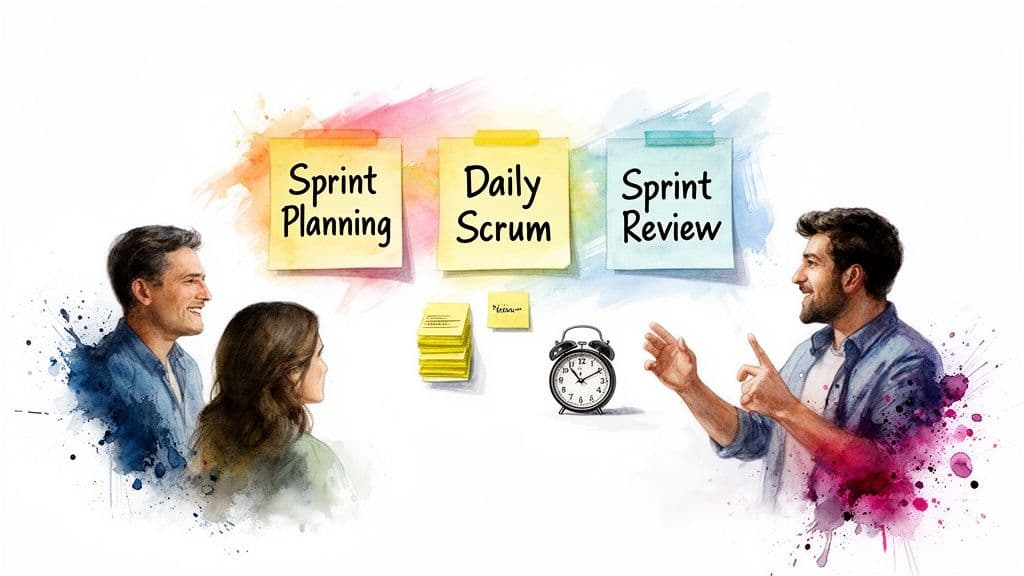
The Sprint The Sprint is the very heartbeat of Scrum. It's a fixed period, usually between one and four weeks, where the team focuses on creating a "Done," usable piece of the product. Once a Sprint's length is set, it stays consistent, providing a predictable rhythm for everyone.
During a Sprint, the team is protected from any changes that would threaten the Sprint Goal. The commitment to quality never changes.
Imagine a marketing team running a two-week Sprint. Their goal might be to "Launch the summer social media campaign." Every task—from creating graphics to writing copy—is aimed squarely at achieving that one objective.
Sprint Planning This is where every Sprint begins. The whole Scrum Team gets together to figure out what they can deliver in the upcoming Sprint and how they'll get it done. The output of this meeting is the Sprint Backlog, which is basically their game plan for the Sprint.
Daily Scrum You might know this as the Daily Stand-up. It’s a quick, 15-minute sync-up for the Development Team. The goal isn't to give a status report to a manager; it's for the team to check their progress toward the Sprint Goal and adjust their plan for the next 24 hours.
Sprint Review At the end of the Sprint, the team holds a Sprint Review. It’s an informal session where they show stakeholders what they’ve built. This is all about gathering feedback on the work and making adjustments to the Product Backlog for future Sprints.
Sprint Retrospective The final event is the Sprint Retrospective. This is the team's chance to look inward and reflect on their own process. They talk about what went well, what didn't, and create a plan for improvements to try in the very next Sprint.
Scrum Artifacts Explained
The artifacts in Scrum are just tools that make work and value visible. They're designed for maximum transparency, making sure everyone is on the same page.
- Product Backlog: This is the single source of truth for all work that needs to be done on the product. It's a living, prioritized list of features, fixes, and improvements that the Product Owner manages.
- Sprint Backlog: This is made up of the Product Backlog items the team picks for the Sprint, plus their plan for delivering them. It’s the Development Team’s forecast of what they believe they can accomplish.
- Increment: An Increment is the sum of all the work completed during the current Sprint, combined with the work from all previous Sprints. By the end of a Sprint, the new Increment must be "Done"—meaning it’s in a usable state and meets the team's agreed-upon Definition of Done.
Understanding Kanban and Visual Workflow Terms
If Scrum's time-boxed sprints feel a bit too rigid for your team's day-to-day reality, Kanban might be the answer. It’s a much more fluid approach to Agile that prioritizes a smooth, continuous flow of work over fixed-length development cycles.
This methodology is a lifesaver for teams dealing with a constant stream of tasks, like IT support, operations, or content marketing. The whole point is to make your work visible, helping everyone see what’s coming, what’s being worked on, and where things are getting stuck. It’s less of a strict process and more of a system for seeing—and fixing—inefficiencies in real-time.
The Kanban Board
The Kanban Board is the heart and soul of this whole system. Think of it as your team's single source of truth—a visual command center showing every task's journey from start to finish. A simple board usually starts with three columns: "To Do," "In Progress," and "Done."
As task cards move from left to right across these columns, anyone can see the status of every piece of work in a single glance. That visual clarity is what makes it so powerful; it immediately flags bottlenecks and shows you where your process is working beautifully.
WIP (Work in Progress) Limits
Now for one of the most critical—and often misunderstood—agile methodology terms in the Kanban world: the WIP (Work in Progress) Limit. This is a simple but powerful rule that caps the number of tasks that can be in any single "active" column at one time.
For instance, your team might decide the "In Review" column can have a WIP limit of 3. That means a fourth task can't enter the review stage until one of the existing three moves on to "Done." It has to wait.
This might seem counterintuitive, but WIP limits are critical. They stop team members from getting overloaded and force the team to focus on finishing tasks instead of constantly starting new ones. This "stop starting, start finishing" mindset is what helps identify and resolve bottlenecks.
Cycle Time
Cycle Time is a core Kanban metric. It measures the actual time it takes to complete a task, starting from the moment work actively begins (when it's pulled into "In Progress") until it’s finished. This shouldn't be confused with Lead Time, which tracks the entire duration from the initial request.
- Quick Example: A support ticket is created at 9:00 AM. An agent pulls it into their "Working On It" column at 10:00 AM and marks it as resolved at 11:30 AM. The Cycle Time for that ticket is 1.5 hours.
When you start tracking Cycle Time, your team’s delivery becomes much more predictable. Knowing your average helps you give stakeholders realistic ETAs instead of just guessing. For a deeper dive, our guide on setting up an effective Kanban board for project management has you covered.
Fluidwave’s Kanban view is built on these very principles. You can create custom columns that perfectly mirror your workflow and visually drag tasks through each stage. While we don't enforce hard WIP limits, successful teams use the column counts as a guide to keep everyone focused and maintain a healthy, efficient flow of work.
8. Essential Agile Planning Artifacts and Metrics
Great Agile projects don't just run on guesswork. They're driven by a handful of tangible items and key metrics that turn abstract goals into a clear, manageable plan. These "artifacts," as they're called, are the concrete tools teams use to define their work, while metrics give them the feedback they need to track progress and make smart adjustments. Mastering these is what separates a team that's just "doing Agile" from one that's truly excelling at it.
The move toward this kind of flexible project management isn't just a trend; it's a fundamental shift in how businesses operate. The Agile Methodology Market is set to explode, growing from $0.48 billion in 2024 to an estimated $1.94 billion by 2034. That's a compound annual growth rate of roughly 15%, which just shows how vital these concepts have become for staying competitive.
The Hierarchy of Work Items
In any Agile framework, work isn't just a giant, messy to-do list. It's broken down into a logical hierarchy that helps everyone—from developers to stakeholders—understand both the big picture and the small, crucial details.
- Epic: Think of an epic as a major project goal or a big feature. It’s a large chunk of work that's way too big to tackle in a single sprint, like "Overhaul the Customer Onboarding Experience."
- User Story: This is where an epic gets broken down into smaller, more manageable pieces. A user story frames a requirement from the end-user's perspective, making it clear why the work is being done. The classic format is: "As a [type of user], I want [an action or goal] so that [I can achieve a benefit]." For our onboarding epic, a story might be: "As a new user, I want a guided product tour so that I can learn the key features quickly."
- Task: Tasks are the final, granular steps needed to complete a user story. They are the specific to-dos for the development team. For that guided tour story, tasks could include "Design the tour UI," "Write the copy for each step," and "Implement the front-end logic."
If you want to get better at writing these, our guide on creating a user story template is a great place to start.
Key Planning Artifacts
These artifacts are the living documents that keep the team aligned and the work transparent. They aren't meant to be set in stone; they evolve as the project goes on.
Product Backlog The Product Backlog is the single source of truth for the entire project. It's a master list of every feature, fix, and improvement the product needs. The Product Owner is in charge of this list, constantly refining and reordering it to make sure the team is always working on what will deliver the most value next.
Sprint Backlog Where the Product Backlog covers the whole project, the Sprint Backlog is all about the here and now. At the start of a new sprint, the team pulls a selection of high-priority items from the top of the Product Backlog. This selection becomes the Sprint Backlog—it's the team's commitment and concrete plan for what they will deliver in the upcoming sprint.
Critical Agile Metrics for Tracking Progress
Metrics in Agile aren't about pointing fingers or micromanaging. They're about giving the team the data it needs to understand its own process and find ways to get better. When used right, they help build a culture of collective ownership and continuous improvement.
Velocity Velocity is simply a measure of how much work a team typically gets done in one sprint, usually measured in story points. After a few sprints, a team's velocity tends to stabilize. This gives them an incredibly powerful tool for forecasting, letting them predict with reasonable accuracy how much work they can get done in the future.
It's a common misconception that velocity is about speed. It's not. It's about predictability. A team with a steady velocity of 30 points can confidently tell stakeholders what's achievable in the next quarter.
Burndown Chart A Burndown Chart is a simple but effective visual tool that tracks work remaining against time. The vertical axis shows the total story points left in the sprint, and the horizontal axis shows the days. As the team completes work, the line on the chart "burns down" toward zero. It gives everyone a quick, at-a-glance status check on whether the team is on track to meet their sprint goal.
While these metrics are core to Scrum, other Agile methods like Kanban have their own ways of visualizing workflow and measuring performance.
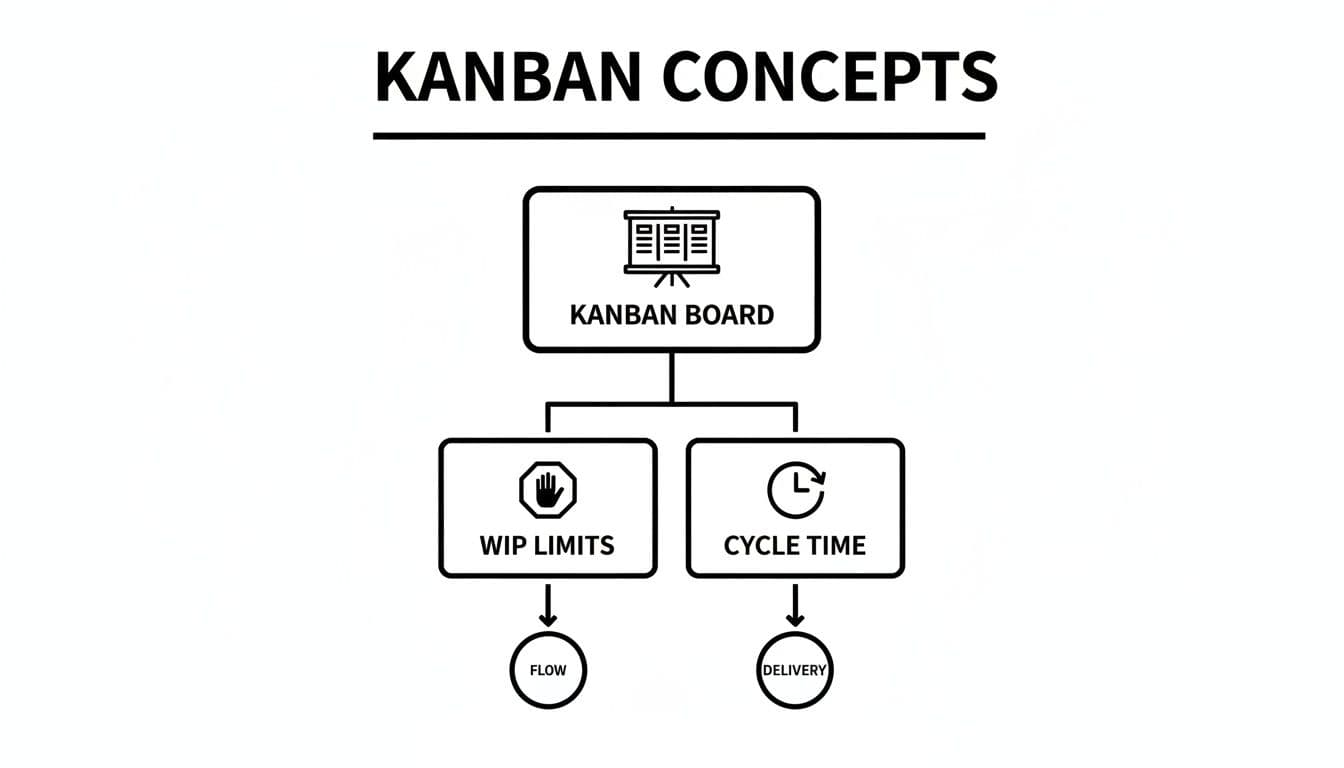
The diagram above shows how a Kanban Board provides the foundation for applying WIP (Work in Progress) Limits to create a smooth flow, which in turn is measured by metrics like Cycle Time to predict delivery.
Frequently Asked Questions About Agile Terminology
Even after you learn the definitions, it's totally normal to have questions about how these Agile concepts connect in the real world. Reading a term in a glossary is one thing; using it correctly with your team is a whole other challenge.
This section tackles some of the most common points of confusion we hear from teams. Think of it as a practical guide to help you bridge the gap between knowing the vocabulary and truly understanding how it all fits together.
What Is the Main Difference Between Agile and Scrum?
This is easily one of the most common mix-ups. The simplest way to remember it is that Agile is the philosophy, and Scrum is a specific framework for putting that philosophy into practice.
Agile is a mindset, a set of principles centered on flexibility, responding to change, and delivering value to the customer in small chunks. Scrum, on the other hand, is a specific recipe with clearly defined roles (like a Product Owner and Scrum Master), events (like Sprints and Daily Scrums), and rules.
You can be Agile without using Scrum—many teams use Kanban instead. But if you're using Scrum correctly, you are, by definition, practicing a form of Agile.
Are Story Points the Same as Hours?
No, and this is a crucial distinction for any team trying to estimate work. Hours are an absolute measure of time, plain and simple. Story Points are a relative measure of effort, complexity, and risk, all rolled into one.
A 2-point story isn't meant to take exactly twice as long as a 1-point story. It's just considered roughly twice as "big" when you factor in all the work involved. This deliberate abstraction helps teams get away from notoriously unreliable time estimates. It shifts the conversation from "How many hours will this take?" to "How big is this task compared to other things we've done?" This is what allows you to calculate a team's Velocity.
Can I Use Agile Methods If I Work Alone?
Absolutely. While Agile was born out of the need for better software development teams, its core principles are fantastic for individuals, too. People often call this "Personal Agile," and it's a great way to bring focus and clarity to a complex workload.
Here are a few ways you can apply it on your own:
- Create a personal Kanban board: A simple "To Do," "In Progress," and "Done" board works wonders for visualizing your work.
- Set a WIP (Work in Progress) limit: Discipline yourself to only work on one or two big things at a time. This is the secret to getting into a state of deep focus.
- Run a weekly "retrospective": Spend 15 minutes every Friday reflecting on what went well, where you got stuck, and what you can do to improve your process next week.
This approach is perfect for freelancers, entrepreneurs, or anyone trying to manage a demanding list of personal and professional goals.
What Is the Difference Between a Sprint Backlog and a Product Backlog?
The key difference here is all about scope and timing. The Product Backlog is the single source of truth for the entire product. It's a master list of every feature, fix, and idea that could ever be worked on, all prioritized by the Product Owner. It's a long-term, living document.
The Sprint Backlog is a much smaller, more immediate list. It contains only the specific items the team has pulled from the top of the Product Backlog and committed to completing during the current Sprint.
A great analogy is to think of the Product Backlog as a restaurant's entire menu. The Sprint Backlog is the specific set of orders the kitchen is focused on cooking and serving in the next 30 minutes. One is the grand vision; the other is the immediate plan of action.
Feeling buried under your to-do list? Fluidwave combines AI-powered task management with on-demand virtual assistants to help you conquer your workload. Delegate tasks, automate your processes, and get more done without the stress. See how Fluidwave can help you get organized.
Focus on What Matters.
Experience lightning-fast task management with AI-powered workflows. Our automation helps busy professionals save 4+ hours weekly.