Wondering what is workflow management? Learn how to define, implement, and optimize workflows to boost productivity and reduce chaos for your team.
July 23, 2026 (3mo ago)
What Is Workflow Management? a Practical Guide for Teams
Wondering what is workflow management? Learn how to define, implement, and optimize workflows to boost productivity and reduce chaos for your team.
← Back to blog
You're in the middle of a busy week, and the work still feels oddly slippery. One teammate is waiting on approval, another is chasing a missing file, and someone else just asked, “Who owns this now?” That kind of confusion usually isn't a people problem, it's a process problem.
Workflow management is the system that turns that kind of drift into a clear path. It defines how work moves, who handles each step, what happens first, and how you keep progress visible without babysitting every task. In a well-run restaurant kitchen, orders don't bounce around randomly, they move from ticket to prep to plate in a defined sequence. Workflow management does the same thing for business work, only the “orders” are client onboarding, content approvals, invoice reviews, IT requests, and a hundred other recurring tasks.
Workflow management has become a major enterprise category, not a niche productivity trick. Independent industry reporting estimates the global workflow automation market at about $26.5 billion in 2024 and projects it will surpass $78 billion by 2030 ElectroIQ's workflow automation statistics. That growth says something simple, companies aren't buying workflow tools just to stay tidy. They're using them to run operations with less friction, fewer handoffs, and better control.
Moving Beyond Organized Chaos
Teams don't often feel “unorganized” in a dramatic way. They feel it in smaller, daily annoyances, a request that slipped through the cracks, a duplicate task someone already finished, or a deadline that got missed because nobody was sure who was next. The work still gets done, but it takes extra messages, extra meetings, and extra mental effort to keep it on track.
That's where workflow management changes the game. Instead of relying on memory, hallway conversations, and “I thought you had it,” you create a visible route for work to follow. The result is less guessing and less interruption, which is a big deal for anyone juggling too many priorities at once.
A kitchen is a better model than a to-do list
A to-do list tells you what exists. A workflow tells you what happens next. In a restaurant kitchen, the ticket doesn't just sit there as a reminder, it moves through a sequence, from prep to cooking to plating to service, and each person knows where their part begins and ends.
Business work needs the same clarity. A client onboarding workflow might start when sales closes the deal, move to account setup, then to welcome materials, then to a kickoff call, then to a check-in after launch. If that sequence is vague, each handoff becomes a fresh decision point, and that's where cognitive load starts piling up.
Practical rule: if people keep asking “what do I do with this next,” the workflow is too loose.
The bigger point is that workflow management is no longer a side topic for ops teams. It's become core operational infrastructure across finance, HR, procurement, IT, and other functions, because companies need repeatable processes that can be tracked and improved. The market size reflects that shift, but the day-to-day benefit is simpler, fewer surprises and less mental clutter for the people doing the work ElectroIQ's workflow automation statistics.
The Core Building Blocks of a Workflow
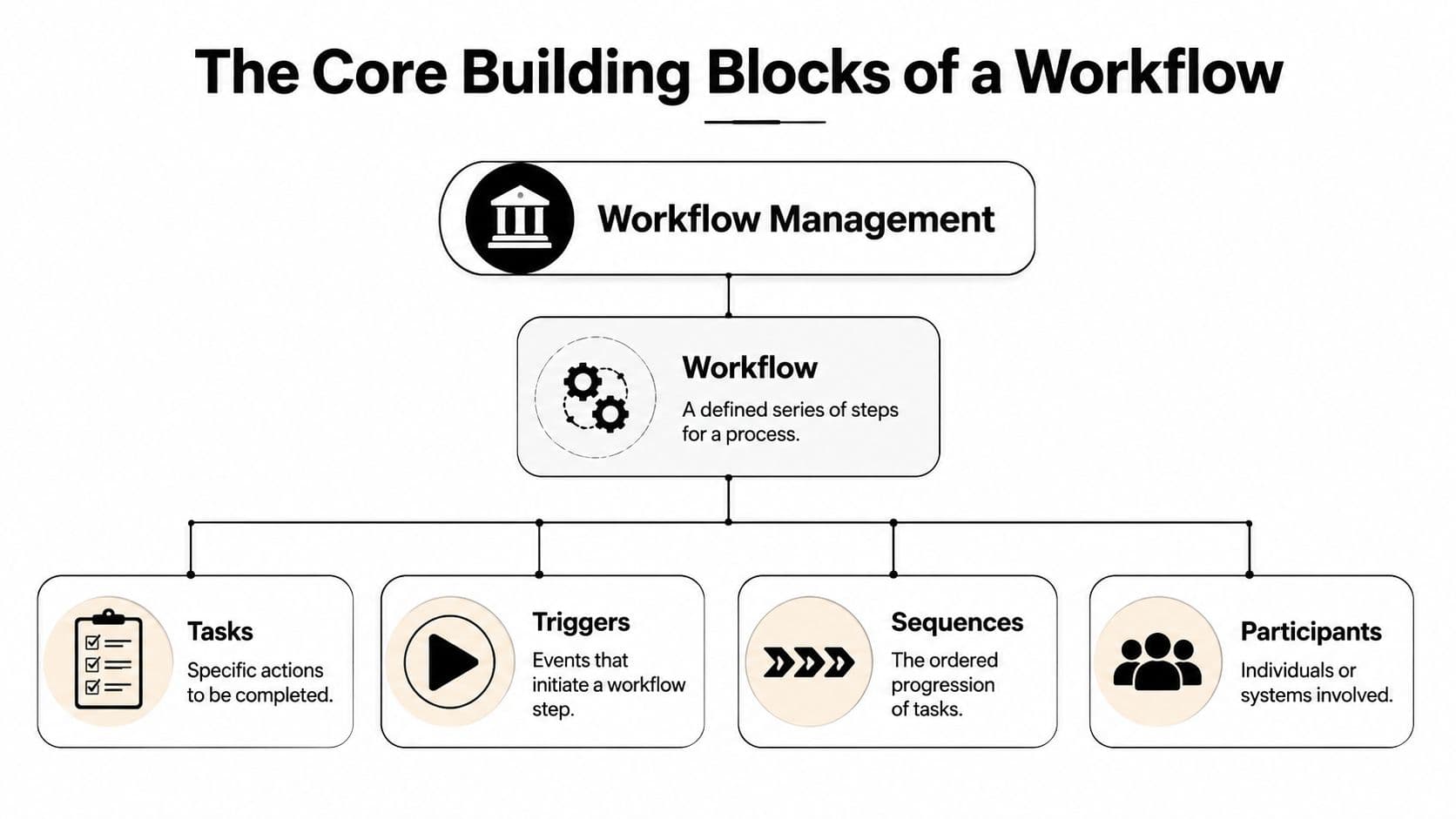
A workflow is basically a recipe with responsibilities attached. You need the action itself, the event that starts it, the order it follows, and the people or systems that carry it out. If one of those pieces is missing, the process gets fuzzy fast.
The four ingredients that matter
Here's the simplest way to think about it.
| Building block | What it does | Why it matters |
|---|---|---|
| Tasks | The specific actions to complete | Keeps the work concrete |
| Triggers | The event that starts a step | Prevents work from stalling |
| Sequences | The order of movement | Reduces confusion over what comes next |
| Participants | The people or systems involved | Clarifies ownership |
A good workflow doesn't just name tasks, it shows how they connect. That's why enterprise vendors describe workflow management as a sequence-based system that must be designed, executed, monitored, and optimized so work moves in a defined order and outcomes are more reliable Atlassian's workflow management overview. TechTarget uses similar language, focusing on creating, documenting, monitoring, and improving the steps needed to finish a task Atlassian's workflow management overview.
The four main workflow types
Not every workflow behaves the same way. NetSuite breaks them into sequential, state-machine, rules-driven, and parallel types NetSuite's workflow management guide.
| Type | Best fit |
|---|---|
| Sequential | Approvals, onboarding, anything that must happen in order |
| State-machine | Work that moves through defined stages or statuses |
| Rules-driven | Actions triggered by conditions or if-then logic |
| Parallel | Work that can happen at the same time across multiple people |
A sequential workflow is easy to picture, one step hands off to the next. A parallel workflow is closer to a film shoot, where editing, design, and distribution can all move together once the core brief is approved. Rules-driven workflows matter when the process depends on conditions, not just timing. State-machine workflows are useful when status itself tells you what's happening, which is why they're common in systems that need visible progress tracking NetSuite's workflow management guide.
The useful takeaway is that workflow management is not one-size-fits-all. The structure has to match the nature of the work, or else the process feels like a formality instead of a help.
Real-World Benefits of Taming the Chaos
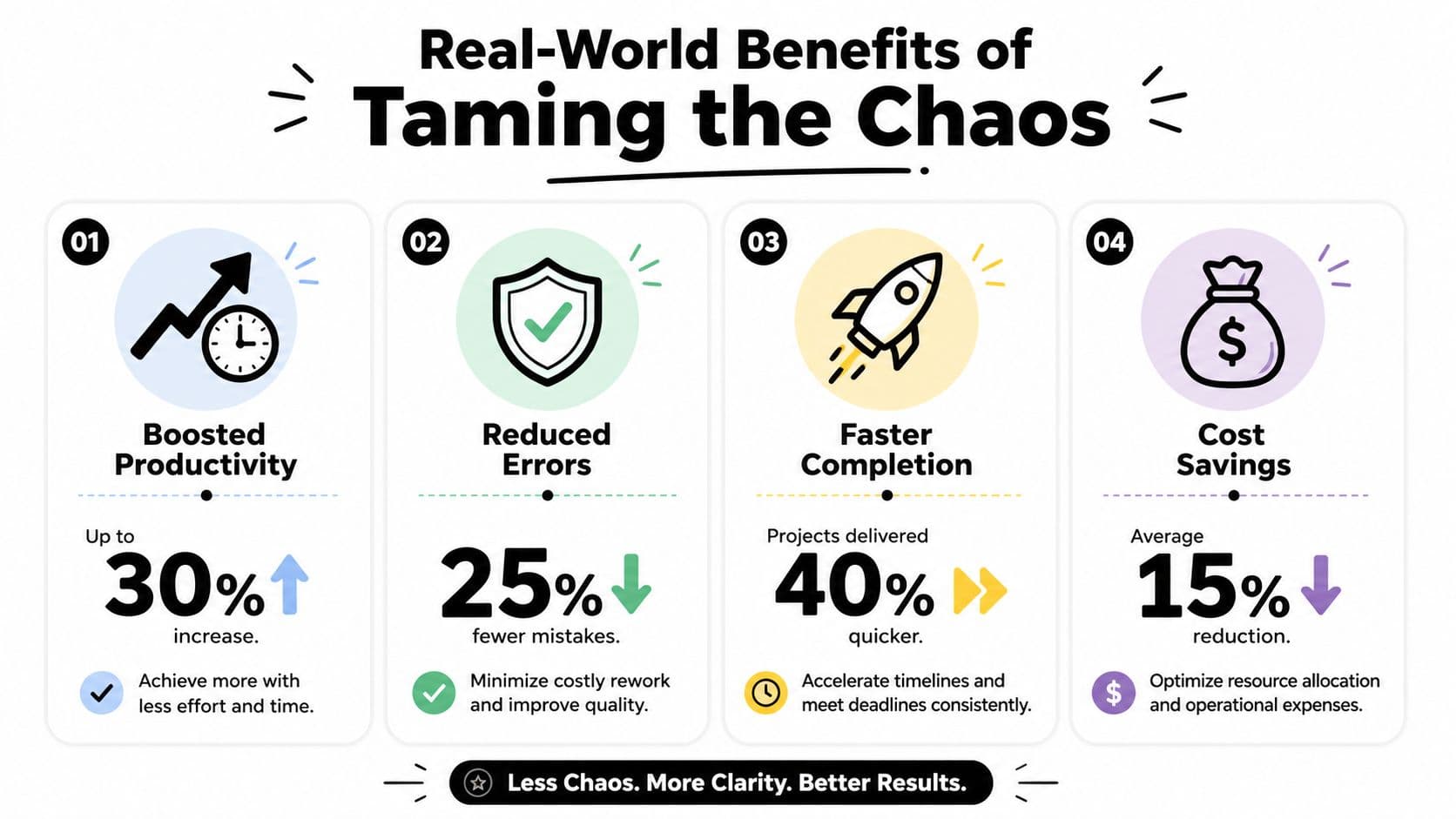
The first benefit people notice is less friction. Instead of checking three places for the same update, the team can see where the work stands and who's responsible for the next move. That doesn't just save time, it lowers the number of small decisions people have to make all day.
Less mental clutter, more actual work
Busy professionals don't just lose time to tasks, they lose it to context switching. Workflow management reduces that pressure by making the next step obvious, which means fewer interruptions and fewer “quick questions” that break concentration. It also helps teams avoid the morale drain that comes from ambiguous ownership.
The business case is real. Multiple industry studies report 25-30% productivity improvements after organizations adopt workflow automation, and some report 30-40% gains within the first year of full deployment ProProfs Project's workflow automation statistics. At the employee level, automation can save about 3.6 hours per week on repetitive tasks, which gives people more time for higher-value work ProProfs Project's workflow automation statistics.
Why the benefits show up so quickly
The gains usually come from simple things that add up. A manager doesn't need to ask for status updates every hour. A reviewer doesn't need to dig through email to find the latest version. An operator doesn't need to manually route every request because the process already knows where it belongs.
That's also why workflow management improves compliance and auditability. When steps are defined and tracked, it's easier to show what happened, when it happened, and who handled it. In practice, that means less guessing during reviews and fewer gaps when someone needs to trace a decision later.
Progress becomes easier to trust when the process leaves a trail.
If you've ever felt that your team was busy but not moving, this is usually the missing layer. The work isn't failing because people don't care. It's failing because the structure makes every handoff slightly harder than it should be.
How to Design and Implement Your First Workflow

Start with one process that matters and isn't too messy. Client onboarding works well because the pain of its inefficiency is widely recognized when it goes wrong, but it's still simple enough to map without drowning in exceptions. A workflow gets useful fast when it solves a real bottleneck instead of trying to redesign everything at once.
Step 1, choose one repeatable process
Pick a workflow that happens often and has a clear finish line. For example, new client onboarding usually includes intake, account setup, welcome materials, kickoff, and handover to ongoing support. That kind of process gives you enough structure to improve without creating a giant project.
Step 2, map the current path
Write down the process from start to finish before you change anything. A detailed map should include the inputs required, the sequence of tasks, the stakeholders involved at each step, and the final outputs or deliverables Splashtop's workflow management guide. That map shows where work slows down, where people duplicate effort, and where decisions keep getting repeated.
Step 3, assign owners and decision points
Every step needs a clear owner. If two people both think they're responsible, the task will sit. If nobody is responsible, it'll drift. Owners don't have to do every piece themselves, but they do need to know when the work enters their lane and when it leaves.
Step 4, choose the right tool for the job
Sometimes a checklist is enough. Sometimes you need a workflow platform that can route, notify, and track work across multiple people. If you're looking at lightweight automation for small recurring tasks, you can start with a simple tool like Fluidwave's microtask generator, then expand as the process becomes more defined.
Step 5, watch the process and adjust it
A workflow is never finished on day one. You need to watch where it stalls, where people improvise, and where the handoffs still feel awkward. That's the point where the process stops being a document and starts becoming an operating system for the team.
Good workflows make the next step obvious, not just documented.
A simple example helps here. In client onboarding, the manager might assign intake, then the account lead confirms scope, then operations prepares the setup, then the client success team schedules the kickoff. Each step has a name, an owner, and a handoff, which is exactly what turns messy coordination into a repeatable system.
Common Challenges and Best Practices
The biggest mistake teams make is treating automation like the goal. It isn't. A fast process that's built on a bad assumption just lets the mistake happen sooner, and at larger scale. That's why workflow design has to include human judgment, especially when a process includes exceptions or changing conditions.
A good reminder is to check whether the process is resilient, not only whether it's efficient. Commentary in the workflow management field warns against optimizing for speed alone, because AI can accelerate weak workflows just as easily as strong ones StackGo's workflow management best practices. That matters most when a process has judgment calls, customer edge cases, or compliance risks that can't be handled by rules alone.
Where workflow efforts usually break
Most failures come from one of three places. The workflow is too rigid, so people stop following it. The team wasn't involved in designing it, so they don't trust it. Or the tool was chosen before the process was understood, which usually means the software gets blamed for problems the process created.
A simple self-check can help before you roll anything out. If the workflow only works when everything goes perfectly, it's brittle. If no one can explain why a step exists, it probably shouldn't be there. If managers have to keep overriding the system, the workflow needs another pass.
Best practice: involve the people who do the work every day, because they'll spot the bottlenecks faster than anyone reading a diagram.
This is also where some teams get better results by using a quick diagnostic first. A tool like Fluidwave's “Are you a bottleneck” quiz can help surface where ownership, delay, or overload is showing up in the flow.
What actually works
Start small, because small workflows are easier to fix. Keep the logic visible, because hidden rules create confusion. Leave room for exceptions, because real work doesn't stay neat for long. The best processes are clear enough to follow and flexible enough to survive normal variation.
The goal isn't perfect control. The goal is a workflow that reduces friction without stripping away judgment. That balance is what keeps people using it after the first rollout excitement fades.
Supercharging Your Workflows with AI and Automation

Once you understand the structure of a workflow, AI becomes much easier to use well. It doesn't replace the process, it removes a lot of the manual overhead around it. That includes routing tasks, flagging deadlines, and helping people decide what should happen next.
AI is strongest where repetition is the problem
The best use of automation is often the dull part of the job. If a recurring request always goes to the same role, a rules-based system can handle it. If someone needs help deciding who should take a task, AI-assisted delegation can shorten the time between “we need this done” and “it's in the right hands.”
That's the practical bridge between workflow theory and modern tools. You still need a defined process, but AI helps keep that process moving without as much manual checking. In a busy team, that means fewer stalled tasks and less mental overhead for managers who are already balancing too many priorities.
If you're comparing tools or thinking about where AI fits into operations, it also helps to look at the broader ecosystem. A useful starting point is this roundup of leading US AI investors, which gives context on how much attention intelligent automation is getting across the market.
Where Fluidwave fits in
Fluidwave combines task management with AI-driven delegation, so people can turn goals into tasks, assign ownership, and keep work moving across views like list, calendar, Kanban, and cards. It also supports automation for recurring flows, and its AI Pomodoro tool fits the same idea, helping people protect focus while they work through defined tasks. For teams that want a more guided system, that mix of structure and automation is the natural next step after basic workflow mapping.
The point isn't to add software for its own sake. The point is to reduce the number of decisions people have to make just to keep work moving. That's where workflow management becomes more than organization, it becomes a way to protect attention.
If you're ready to turn scattered handoffs into a cleaner operating rhythm, start by mapping one recurring process this week and testing one simple automation, then explore Fluidwave to see how AI-assisted task management can support the way your team works.
Focus on What Matters.
Experience lightning-fast task management with AI-powered workflows. Our automation helps busy professionals save 4+ hours weekly.