Discover how to stay on task with proven strategies. This guide offers practical tips for beating distractions and boosting productivity for all minds.
December 5, 2025 (10mo ago)
Stay on Task Proven Tips to Boost Your Focus
Discover how to stay on task with proven strategies. This guide offers practical tips for beating distractions and boosting productivity for all minds.
← Back to blog
If you're serious about learning how to stay on task**, you have to use strategies that work with your brain, not against it. That means ditching the generic advice like "just focus harder," which is especially unhelpful for busy professionals and neurodivergent thinkers who have to navigate a world full of unique distractions just to keep their momentum going.
The Real Cost of a Distracted Mind
We’ve all been there. You walk into the office (or sit down at your home desk) with a crystal-clear plan, ready to dive into your most important project. But then an "urgent" email pops up. You handle it. A Slack notification dings. You check it. Before you know it, it's lunchtime, and that one critical task is still sitting right where you left it.
This isn’t a personal failing; it's the reality of modern work.
This cycle of distraction feels frustrating on a personal level, but when you zoom out, the collective impact is staggering. Globally, only 21% of employees report being actively engaged at work. This widespread disengagement is a direct result of the constant struggle to stay on task, and it carries a massive economic weight. Think about this: an estimated $438 billion was lost worldwide last year just from this lack of engagement, according to Gallup's State of the Global Workforce report.
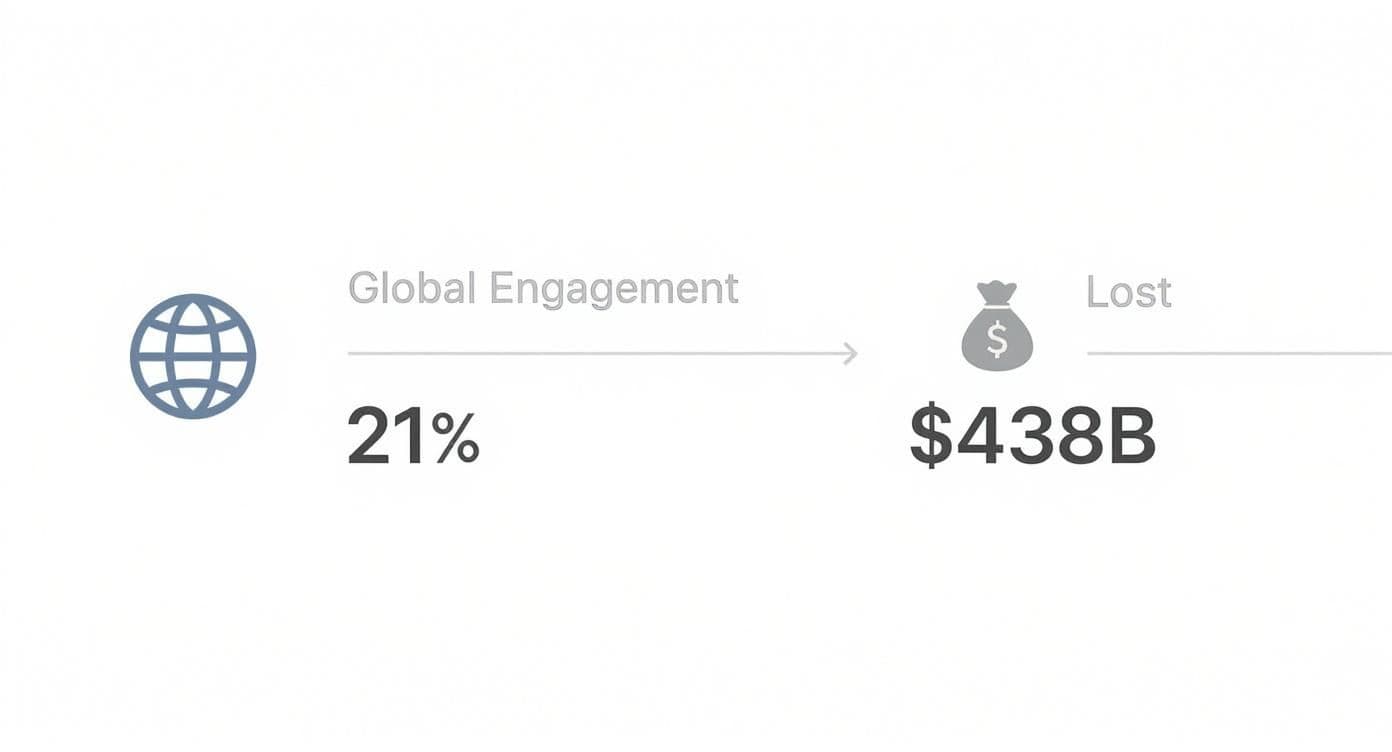
This data really drives home how the personal battle to stay focused scales up into a significant challenge for the entire global economy.
More Than Just Wasted Minutes
The cost isn't just financial. Constantly switching between tasks drains your mental battery, leaving you feeling exhausted and unproductive even after a packed day. It slowly chips away at your confidence and is a fast track to burnout. Every time an interruption pulls you out of a state of deep work, it can take over 20 minutes just to get back into that focused groove.
The Financial Drain in Plain Sight
When you start adding up all those "little" interruptions, the numbers get big, fast. Those seemingly harmless moments—a quick social media check, a "got a minute?" from a colleague, an unexpected meeting—can easily eat up more than an hour of your most productive time every single day.
Curious to see how this affects your own bottom line? You might be shocked by what you find when you use our distraction cost calculator to put a real number on that lost productivity.
The small interruptions we dismiss throughout the day are often the biggest culprits. Here’s a quick look at how they accumulate.
The High Cost of Common Distractions
| Distraction Source | Average Time Lost Per Day | Potential Weekly Productivity Loss |
|---|---|---|
| Unplanned Colleague Interruptions | 30 minutes | 2.5 hours |
| Non-Work-Related Notifications | 25 minutes | ~2 hours |
| Context Switching Between Apps | 20 minutes | ~1.5 hours |
| Searching for Information | 15 minutes | 1.25 hours |
As you can see, what feels like a minor detour can quickly derail an entire week's worth of focused effort.
The real goal isn't just to cram more into your day. It’s about creating an environment where you can do your best work without constant friction. This guide will give you actionable techniques to help you master your attention and build a more focused, fulfilling workday.
Design an Environment for Deep Work
Your workspace is either your greatest asset or your worst enemy when it comes to focus. It's a common mistake to think willpower is all you need to fight off the constant pings and visual clutter. In reality, you have to build a space that tells your brain, "It's time to concentrate."
This isn't about having a perfectly minimalist, magazine-worthy office. It's about creating a practical sanctuary for focus.
Don't underestimate the impact of your environment. Studies have shown that the average office worker gets interrupted every three minutes. What’s truly staggering, though, is that it takes an average of 23 minutes to get fully back on track after each one of those interruptions. Think about how much time that adds up to over a single day.
Tame Your Digital Domain
Let's be honest: your digital workspace is probably the biggest source of those focus-shattering interruptions. A chaotic desktop and a browser with 20 tabs open is the online equivalent of trying to work in the middle of a loud party. Getting this under control is absolutely essential.
Here are a few things you can do right now to reclaim your digital space:
- Clear the Desktop Clutter: Drag all those random files and shortcuts into a single "To Sort" folder. A clean desktop provides a sense of calm and removes the visual temptation to click on something other than your current task.
- Use Website Blockers: Stop relying on self-control alone. Tools like Freedom or Cold Turkey are brilliant for blocking access to social media, news sites, and other black holes of productivity for set periods.
- Silence the Noise: Turn off all non-essential notifications on your computer and phone. If an alert isn't directly tied to the task you’re working on, it can wait.
I once worked with a project manager who was drowning in distractions while working from home. We set her up with a strict notification-blocking schedule and a clean digital desktop. The result? She cut her unintentional task-switching by over 50% in the first week.
Optimize Your Physical Space
Your physical environment sends constant, subtle signals to your brain. A desk piled high with old coffee mugs, random papers, and clutter creates a low-level visual static that chips away at your attention.
You don’t need a fancy setup, just an intentional one. A tidy workspace is a cornerstone of focused work; you can find some great quick desk decluttering tips for better productivity that make a real difference.
Start by clearing everything off your desk that isn't absolutely necessary for what you're doing right now. This one simple action can dramatically reduce visual noise and open up mental space.
Think about sensory inputs, too. Good lighting can reduce eye strain, helping you stay locked in for longer. For others, a pair of noise-canceling headphones playing instrumental music or white noise is the key to drowning out a noisy household or office.
Experiment and see what works for you. Your environment should be supporting your focus, not sabotaging it.
Find a Time Management System That Fits You
A perfectly organized desk is a great first step, but it won’t keep you on track if your time management system is fighting against the way your brain is wired. The internet is littered with rigid, one-size-fits-all strategies that just don't work for most people because they ignore personal work styles, fluctuating energy levels, and the unique demands of our jobs.
The real secret to staying on task is finding a system that feels less like a set of rules and more like a natural extension of how you already work. It's about building a personalized framework for your day, not forcing yourself into a box.
Before you jump into a new method, it helps to get a clear picture of where your time is actually going. A quick time audit can be a real eye-opener. Resources like Time Auditing Reveals Focus As The Real Leverage Not Busyness are brilliant for this, showing you the reality of your schedule so you can start making meaningful changes.
The Flexible Power of Time Boxing
You've probably heard of the Pomodoro Technique: work for 25 minutes, then take a five-minute break. It’s famous for a reason, but its true power isn’t the strict 25/5 rule—it’s the underlying principle of time boxing.
Time boxing is simply the practice of dedicating an intentional, uninterrupted block of time to a single task. The key is to make it work for you.
- For Creative Work: If you’re a writer or designer, 25 minutes is barely enough time to get into a state of flow. Don’t be afraid to stretch your focus blocks to 45 or even 60 minutes, followed by a solid 10-minute break to step away and recharge.
- For Analytical Tasks: When you're buried in a spreadsheet or deep in data analysis, longer stretches are often more productive. Try a 90-minute session followed by a 15-minute break. This can help you maintain momentum without hitting a wall.
The point isn't to obey a timer. It's to create a sustainable rhythm that protects your focus and honors your brain's natural energy cycles, making it far easier to stay locked in for longer.
Group Similar Work with Task Batching
Task batching is another simple but incredibly effective strategy. It's built on a simple premise: switching between different types of tasks—like writing emails, then designing a graphic, then making a call—creates mental friction that slows you down.
By grouping similar activities, you stay in the same mental "mode," which saves a ton of cognitive energy.
Think of a content creator. Instead of trying to script, film, and edit in one chaotic session, they might dedicate an entire afternoon just to editing videos. This allows them to maintain a single, focused mindset, which almost always results in faster work and a better final product.
Prioritize with a Proven Framework
So, you’ve batched your tasks, but now you have a list of things to do. Where do you even start? This is where a simple decision-making framework can be a game-changer.
The Eisenhower Matrix is a classic for a reason. It's a simple grid that helps you sort tasks based on their urgency and importance. We have a great guide on how to organize tasks and schedule your week using the Eisenhower Matrix that breaks it down. It gives you a clear, visual map of what needs your immediate attention, what you can schedule for later, what you should delegate, and what you can just delete.
When you combine flexible time boxing, smart task batching, and clear prioritization, you're not just following a system—you're building one that actually works with you, not against you.
Use Technology and Delegation to Your Advantage
https://www.youtube.com/embed/dJH678GR7E-8
In a world buzzing with notifications, technology can feel like the enemy of focus. I get it. But what if we flipped the script? When you learn to use tech intentionally, it can become your single greatest ally in the mission to stay on task.
The key is to stop being a passive consumer of technology and start actively directing it. Make it work for you, not the other way around.
A great place to start is by automating the small, repetitive tasks that quietly drain your mental energy throughout the day. Think about all the time you might spend on manual data entry, chasing people with reminder emails, or pulling the same standard reports week after week. These things are necessary, but they rarely move the needle on your most important projects.
The data backs this up. A huge seventy-seven percent of professionals agree that automating routine tasks would make them more productive. Globally, this kind of automation is already saving workers an average of 3.6 hours every week. And looking ahead, projections suggest that tools like generative AI could boost labor productivity by up to 0.6 percent annually through 2040—but only if we learn how to use that reclaimed time effectively. You can read more about the future of work and AI productivity with McKinsey.
Smart Delegation in Action
Automation is one piece of the puzzle; smart delegation is the other. I'm not talking about just dumping tasks on someone else's plate. True delegation is a structured process that frees you up for high-impact work while empowering your team to own their responsibilities.
This is where modern project management tools, especially those built with templates, are a game-changer.
Let's imagine a marketing team lead, Sarah, who needs to get a new social media campaign off the ground. In the past, this was a recipe for chaos—a messy trail of emails, Slack messages, and constant follow-ups just to see where things stood.
Now, she uses a project template in Fluidwave:
- The Main Task: "Launch Q3 Social Media Campaign."
- Sub-Tasks: The template instantly populates all the necessary steps, like "Draft Ad Copy," "Design Visuals," and "Schedule Posts," each with pre-set deadlines.
- Assignments: Sarah assigns each sub-task to the right person with a single click.
- Automated Nudges: The system automatically sends reminders as deadlines approach. No more awkward "just checking in" messages from Sarah.
A templated approach like this transforms delegation from a high-interruption activity into a smooth, low-friction workflow. It creates clarity for everyone involved and, most importantly, allows Sarah to focus on campaign strategy instead of getting bogged down in administrative weeds.
The difference is stark when you see it side-by-side. Instead of constant interruptions to check progress, a template provides a single source of truth that everyone can rely on.
Smart Delegation with Project Management Templates
| Delegation Step | Manual Process (High Interruption) | Template-Based Process (Low Interruption) |
|---|---|---|
| Task Assignment | Send individual emails or DMs for each task. | Assign all tasks in one go within a pre-built template. |
| Providing Context | Re-explain project goals and attach files in multiple messages. | All context, files, and dependencies are stored in the template. |
| Deadline Tracking | Manually check in with each person via email or chat. | Automated reminders are sent to task owners. |
| Status Updates | "Can you give me an update on the ad copy?" | Check the project dashboard for real-time progress. |
| Final Review | Team members send completed work at different times for review. | Team members mark tasks complete; you get a single notification. |
Using a structured template minimizes the back-and-forth, giving you and your team long, uninterrupted blocks of time to do deep work.
Leveraging AI without Creating Busywork
AI assistants are another incredible tool for offloading some of that cognitive weight. They can be invaluable for tasks like summarizing long documents, pulling initial research, or even drafting the first version of an email or report.
But here’s the trick: use AI as a collaborator, not a replacement for your own thinking. Ask it to generate ideas, but you're the one who refines them. Have it draft a report, but you're the one who adds the nuance and strategic insight.
This approach keeps you in the driver's seat. It ensures the final output is high-quality and actually aligned with your goals, rather than creating a new layer of AI-generated busywork for you to manage.
Not sure where to begin with improving your own delegation skills? Take a few minutes to discover your strengths and weaknesses with our free delegation style quiz and get some personalized tips. By thoughtfully combining automation, smart delegation, and AI assistance, you can build a powerful system that protects your focus and multiplies your impact.
Build Resilient Routines for Lasting Focus
Your ability to consistently stay on task isn’t about raw willpower. It’s directly tied to your mental and physical state. I've learned over the years that real, lasting focus comes from building sustainable habits that treat your attention like a muscle—it needs both consistent training and proper recovery.
This is where you need to shift from just managing your time to proactively managing your energy.

Most of us wait until we're completely drained before taking a break, but by then, the damage is already done. A much smarter approach is to build strategic breaks into your day before you feel like you desperately need them.
Prime Your Brain with a Workday Startup
How you start your day sets the entire tone. Instead of diving straight into your inbox and letting other people’s priorities hijack your focus, I highly recommend creating a simple “workday startup” routine. Think of it as a ritual that signals to your brain that it's time to shift gears and get into a productive state.
This doesn't have to be some elaborate, hour-long affair. A simple 15-minute sequence is all it takes:
- Review Your Top 3 Priorities: Glance at your task list and pull out the three most critical things you need to accomplish. Just three.
- Tidy Your Workspace: Spend two minutes clearing your physical desk and closing unnecessary browser tabs. A clean space equals a clearer mind.
- Set Your Intention: Take one quiet moment to visualize what a successful, focused day looks like.
This small investment of time creates a powerful psychological buffer between your personal life and your work, making it far easier to drop into a state of deep focus.
A consistent startup routine does more than just organize your to-do list; it calms the reactive part of your brain that gets pulled in a dozen different directions. It’s a proactive way to defend your most valuable asset: your attention.
Master the Art of the Strategic Break
Breaks are not a sign of weakness; they're a requirement for peak cognitive performance. But let's be honest, not all breaks are created equal. Mindlessly scrolling through social media for 15 minutes often leaves you feeling more drained than refreshed.
The key is to use breaks to truly reset your attention.
- Micro-Breaks for a Quick Reset: After a solid block of focused work (like one Pomodoro session), just stand up. Stretch. Look out a window for 60 seconds. This tiny action is surprisingly effective at preventing mental fatigue from creeping in.
- Movement Breaks to Boost Energy: A short 5-10 minute walk can do wonders. Research consistently shows that even light physical activity improves blood flow to the brain, which helps with creativity and problem-solving.
Disconnect Cleanly with a Shutdown Ritual
Just as critical as your startup routine is your shutdown ritual. At the end of the day, it’s so tempting to just slam your laptop shut and walk away. The problem is, this often leaves work-related thoughts swirling in your head all evening, preventing you from truly unplugging.
A proper shutdown ritual provides closure. Before you sign off, take ten minutes to:
- Review What You Accomplished: Take a moment to acknowledge the progress you made. It feels good and reinforces a sense of accomplishment.
- Plan for Tomorrow: Briefly outline your top priorities for the next day. This way, you can hit the ground running without any morning indecision.
- Say "End of Day": It sounds silly, but verbally or mentally declaring your workday over is powerful. This simple act helps create a firm boundary between work and personal time, allowing you to fully recharge and come back stronger tomorrow.
Questions We Hear All the Time About Staying on Task
Even when you've got a solid plan, life happens. It’s one thing to read about these strategies, but it's another thing entirely to put them into practice when things get hectic. Let's tackle some of the most common hurdles people face when trying to wrangle their focus.
"My ADHD Brain Fights Me on This. What Actually Works?"
I hear this a lot, and it's a great question. Many of the classic productivity tips just don't mesh well with an ADHD brain. The secret isn't about forcing a system that doesn't fit; it's about externalizing everything so your brain doesn't have to carry the load.
-
Get it out of your head and in front of your eyes. Time blocking is a game-changer, but only if you can see it. A big calendar on your wall or a color-coded digital one can make time feel more tangible. Visual timers are also brilliant for this.
-
Make your tasks ridiculously small. "Write the report" is a recipe for procrastination. Instead, break it down until the first step is almost laughable. Think: "Open the document and write the headline." That's it. That's the whole task for now.
-
Try "body doubling." This is a fantastic technique where you work alongside someone else, even if you're not collaborating. Just having another person quietly working in the same room or on a video call provides a subtle accountability that can keep you anchored to your task.
Above all, give yourself some grace. The goal here is consistency, not perfection.
"I'm So Overwhelmed, I Don't Even Know Where to Start."
That feeling of being completely swamped is paralyzing, isn't it? When your to-do list looks like a mountain, just picking a starting point feels impossible. The best thing you can do is break that paralysis with one small, concrete action.
My go-to move here is the 'brain dump.' Set a timer for 15 minutes and write down every single thing that's taking up space in your head—tasks, worries, ideas, you name it. Don't try to organize it. Just get it all out.
Once you've done that, ignore the urge to tackle the biggest, scariest item on the list. Instead, find one small, meaningful task you can knock out in less than 30 minutes. Finishing something, anything, gives you a hit of momentum that can carry you into the next task.
"How Do I Deal with 'Urgent' Interruptions from My Team?"
You can't just build a wall around your focus time, especially when you're part of a team. The reality is, interruptions will happen. The trick isn't to eliminate them completely, but to manage how they impact your flow so they don't send your entire day off the rails.
A simple first step is to set clear expectations. Use the status feature in your team's chat tool to signal when you're in deep work mode—something like "Focusing until 2 PM" lets people know you're not available for anything non-urgent.
For those truly urgent pings, I use a "capture and continue" approach. Quickly write down the request, let your colleague know you've got it and when you'll look at it ("Got it, I'll jump on this after my current task"), and then immediately turn your attention back to what you were doing. This acknowledges their need without totally sacrificing your focus.
Ready to stop juggling and start focusing? Fluidwave combines smart task management with powerful delegation tools, giving you the structure to reclaim your day and the support to get more done. See how Fluidwave can transform your workflow.
Focus on What Matters.
Experience lightning-fast task management with AI-powered workflows. Our automation helps busy professionals save 4+ hours weekly.