Learn how to improve time management skills with concrete steps. This guide covers prioritization, scheduling, delegation, and tips for ADHD/neurodivergence.
May 18, 2026 (4mo ago)
How to Improve Time Management Skills: A Realistic Guide
Learn how to improve time management skills with concrete steps. This guide covers prioritization, scheduling, delegation, and tips for ADHD/neurodivergence.
← Back to blog
Most time management advice starts from the wrong premise. It assumes your job is to fit more into the day.
That usually makes busy people worse at managing time, not better. They end up with a prettier calendar, a longer task list, and the same old problem: too much low-value work sitting next to the few things that require their judgment, creativity, or leadership.
A more useful question is this: what should only be done by you, and what should stop living on your plate? That's the part many guides skip, even though it's the part that determines whether your schedule becomes calmer or just more crowded.
Beyond Doing More The Real Goal of Time Management
Time management isn't about squeezing every minute until nothing human is left. It's about protecting attention for work that matters.
That distinction gets lost fast, especially for executives, founders, and high-output professionals. They don't usually fail because they lack effort. They fail because they carry too many decisions, too many follow-ups, and too many tasks that should've been delegated, automated, postponed, or dropped.
edX makes this gap plain in its guidance on time management. Most time management advice underexplains the hardest part for busy professionals: deciding what to delegate or drop. It also points out that time management isn't just about fitting more work into the day. It's about protecting attention for high-value work that only you can do, as noted in this edX guide to improving time management skills.
That matches what shows up in real life. People rarely need another reminder to "use a planner." They need permission and a method to stop treating every incoming request as equally worthy of their time.
Practical rule: If a task is important but not uniquely dependent on your expertise, it belongs in a system, not in your head.
The best executive time management strategies tend to work for the same reason. They don't glorify busyness. They narrow focus, reduce reactive decisions, and make room for higher-level work.
Here are the trade-offs individuals have to face:
- More responsiveness often means less strategic progress. If you answer everything quickly, you may never finish the work that compounds.
- More personal control can mean more bottlenecks. If everything has to go through you, your team slows down and your calendar fills with cleanup.
- More tasks completed doesn't always mean more value created. Clearing shallow work can feel productive while your most important project stalls.
Good time management is selective. Sometimes the smartest move is to schedule something. Sometimes it's to delegate it. Sometimes it's to let it die.
Find Where Your Time Really Goes With a Time Audit
Before changing your system, you need evidence. Not perfect evidence. Just enough to stop guessing.
Harvard Business Review frames time management as awareness, arrangement, and adaptation. Awareness comes first, because if you don't know where your time goes, every fix is based on fiction. HBR's point is simple and important: tracking time, scheduling priorities, and reviewing what worked is a behavioral practice, not just an app problem, as described in this Harvard Business Review article on time management.

Run a low-friction audit for one week
Don't build a complicated tracker. Use a notes app, paper notebook, spreadsheet, Google Calendar, or Toggl if you already like timers. The method matters less than consistency.
Track your day in rough blocks. Every 30 to 60 minutes, note what you were doing.
Capture these categories:
- Planned work: Work you intended to do, such as writing, planning, analysis, or client prep.
- Reactive work: Email, Slack, urgent requests, approvals, and interruptions.
- Meetings: Internal, external, recurring, or ad hoc.
- Admin: Scheduling, filing, expense tasks, status updates, and low-value maintenance.
- Recovery: Lunch, breaks, walks, transitions, and the time it took to restart.
- Hidden drift: Phone scrolling, tab hopping, "quick checks," or vague busywork.
The point isn't to judge yourself. It's to see patterns that your memory smooths over.
Questions your audit should answer
At the end of the week, review the log and look for friction points.
A useful audit will usually reveal:
- Where your best energy goes. Did your highest-focus hours go to priority work or to inbox cleanup?
- Which tasks expand unnecessarily. Some tasks look small but repeatedly eat chunks of the day.
- Who interrupts you most. That may be coworkers, clients, your own notifications, or your own habit of checking.
- What should never stay on your plate. Repetitive tasks often become obvious once they're visible.
- Which meetings create motion without progress. If a meeting produces no decision, it may be occupying prime time for little return.
Don't ask, "Where did the week go?" Ask, "What kept stealing first-rate hours from first-rate work?"
What to do with the results
Sort each recurring activity into one of four buckets.
| Bucket | Meaning | Example |
|---|---|---|
| Keep | This is high-value and needs your direct involvement | Strategy review, key client conversation |
| Redesign | It matters, but your current way of doing it is sloppy or slow | Weekly reporting, meeting prep |
| Delegate | Someone else can own it with a clear handoff | Scheduling, research prep, inbox triage |
| Delete | It doesn't justify the time it consumes | Optional status calls, duplicate tracking |
If you're learning how to improve time management skills, this is the point where the work becomes real. Many individuals don't have a motivation problem. They have a visibility problem.
Prioritize Your Tasks With Proven Frameworks
Once you've audited your time, the next challenge is brutal in a quieter way. You now know what exists. You still have to decide what deserves attention today.
A lot of professionals use a task list without a real prioritization method. That's one reason people stay reactive. In a 2024 survey summarized by Timewatch, only 18% of people had a dedicated time-management system, and 50% of Eisenhower Matrix users felt their work was under control every single day in the same reporting, according to Timewatch's time management statistics. Structure helps because it removes repeated decision-making.
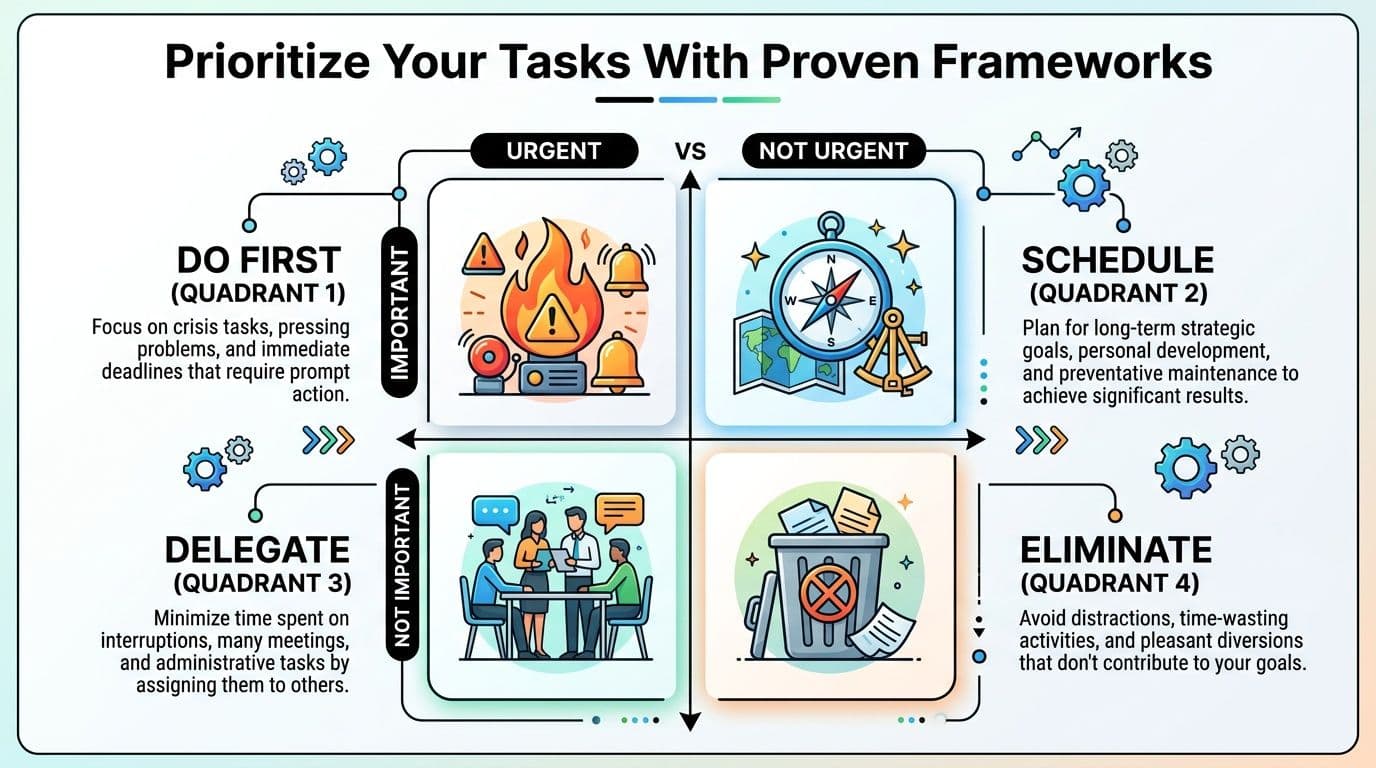
Eisenhower Matrix versus MITs
Both methods work. They solve different problems.
| Method | Best for | Strength | Risk |
|---|---|---|---|
| Eisenhower Matrix | Overloaded professionals with mixed demands | Separates urgency from importance | People over-label everything urgent |
| MITs | People who freeze when the list is too long | Forces daily focus on a few meaningful tasks | Can ignore admin reality if used carelessly |
The Eisenhower Matrix is useful when your day is full of requests, meetings, pings, and operational work. It divides tasks into four groups: do, schedule, delegate, eliminate.
The MIT method means choosing a small number of Most Important Tasks for the day. These are the tasks that would make the day worthwhile even if everything else got messy.
How to use the Eisenhower Matrix in real life
This method works best when you're sorting mixed inputs, not when you're trying to plan an idealized day.
Try it with examples like these:
- Urgent and important: Resolve a client escalation, submit a board deck due today, fix a payroll issue.
- Important but not urgent: Write a hiring plan, prepare next quarter priorities, outline a keynote.
- Urgent but not important for you: Reschedule meetings, chase routine approvals, gather background documents.
- Neither: Optional calls without an agenda, duplicated reporting, informational busywork.
If you want more examples of streamlined task management strategies, that guide can help translate prioritization into everyday work choices without overcomplicating it.
For a deeper look at sorting tasks by value and urgency, Fluidwave also has a practical piece on task prioritization techniques.
When MITs work better
Some people, especially those who get overwhelmed by visual clutter, do better with a simpler rule. Pick two or three MITs, define what "done" means, and protect time for them before opening the floodgates.
This is especially effective when:
- Your role requires original thinking: writing, strategy, design, analysis
- You procrastinate through ambiguity: the MIT gives the day a center
- You have ADHD or task initiation difficulty: fewer choices often lowers friction
A long list creates false comfort. A short list creates commitment.
The mistake is treating prioritization like positive thinking. It isn't. It's a decision architecture. The right framework should make it easier to say no, defer, delegate, or delete.
Design Your Ideal Week With Intentional Scheduling
A priority list doesn't protect itself. If it never gets calendar space, reactive work will eat it.
The practical fix is intentional scheduling. Not because calendars are magical, but because they turn preference into commitment. Time blocking and Pomodoro, for instance, become useful. One gives structure to the week. The other helps you start and stay with demanding work.

Karyakeeper reports that it takes 23 minutes and 15 seconds to refocus after an interruption, and that the average employee is productive for only 2 hours and 53 minutes per day in its summary of time management statistics. That's why protecting focus time isn't a nice extra. It's one of the most impactful changes you can make, as outlined in these Karyakeeper time management statistics.
Build the week before the week starts
Don't start from your inbox on Monday morning. Start from your priorities and constraints.
A solid weekly plan usually includes:
- Fixed commitments first: meetings, school pickups, recurring obligations, appointments
- Focus blocks next: reserved time for work that needs concentration
- Admin windows: email, approvals, follow-ups, and routine maintenance
- Buffers: space for overrun, transit, decompression, and real life
This is the logic behind time blocking. Each category of work gets a home. That lowers the number of decisions you have to make in the moment.
If you want examples of how to lay this out, this guide to time blocking your schedule shows how to assign work modes to specific parts of the day.
Use time blocking for protection, not perfection
A common mistake is scheduling every hour too tightly. Then one delay wrecks the day and people abandon the system.
A better approach is looser and more durable:
- Assign themes to parts of the day. Deep work in the morning, meetings in the afternoon, admin late day.
- Keep blocks larger than the task feels. Most work takes longer when context, prep, and restart time are included.
- Leave white space. Empty space isn't wasted. It's what keeps the plan from collapsing.
- Put the hard thing where your brain is strongest. Not where the calendar happened to be empty.
Here's a quick visual if you want a guided walkthrough of planning blocks that people can consistently stick to.
Use Pomodoro when starting feels harder than doing
Pomodoro is often misunderstood as a rigid timer trick. Its real value is reducing the emotional weight of beginning.
If you're avoiding a task, tell yourself you only need one short sprint. That lowers resistance. Once attention locks in, you can keep going or reset for another round.
This works well for:
- Writing tasks that feel too open-ended
- Review work that requires steady concentration
- Backlogged admin that benefits from containment
- Transition-heavy days when your brain keeps resisting the next thing
Time blocking decides when the work happens. Pomodoro helps you enter it.
Systemize Your Workflow With Automation and Delegation
Time management breaks down at the point where capable people keep acting as the backup system for everything. They chase updates, rewrite the same emails, reschedule meetings, rebuild status notes, and carry small operational tasks in their heads until the day fills with maintenance work.
That pattern is common with senior leaders and with neurodivergent professionals who have learned to compensate by overmanaging details. It looks responsible. It also burns attention on work that does not need your brain.
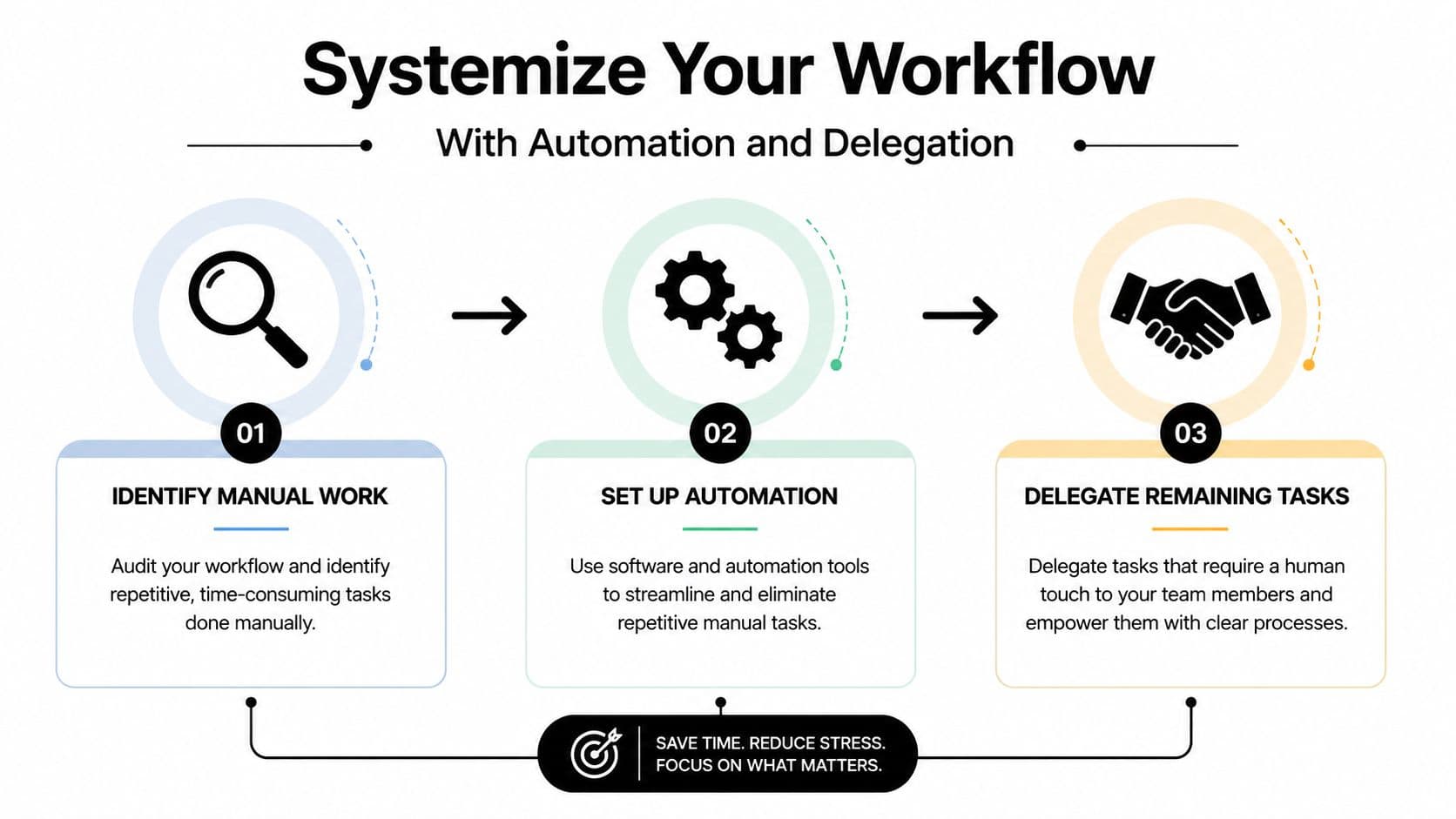
Standardize first, then automate, then delegate
Bad processes get faster when you automate them. They do not get better.
Start by standardizing repeat work. Use templates for meeting agendas, client follow-ups, handoff notes, and weekly updates. Write the checklist once. Name the steps in order. Decide what "done" means. That small bit of setup matters because automation and delegation both fail when the task itself is still fuzzy.
Next, automate the predictable parts. Good candidates include recurring reminders, task creation, intake routing, calendar booking, invoice prompts, and status-change notifications.
Then delegate the work that still needs a human but does not need you. Research prep, scheduling, document cleanup, travel coordination, first-draft summaries, and inbox triage are common examples.
Use a keep, automate, delegate, eliminate filter
Run recurring tasks through four questions:
- Keep: Does this require your judgment, authority, or relationship?
- Automate: Does it follow clear rules often enough to justify setup?
- Delegate: Can another person do it well from a clear brief?
- Eliminate: Would anything break if this stopped happening?
That last question is the one people skip.
Old reports survive because nobody wants to be the one who stops sending them. Meetings stay on the calendar because canceling feels riskier than attending. Manual trackers live on long after the team has stopped using them. Real time gains often come from removal, not better execution.
Delegation works when the handoff reduces questions
Poor delegation creates shadow work. You assign the task, then spend the next two days answering pings, clarifying standards, and checking half-finished drafts.
A useful handoff includes five parts:
- Outcome: the exact result you want
- Deadline: when it is due, and whether there is a draft checkpoint
- Constraints: budget, tools, tone, approvals, red lines
- Format: email draft, spreadsheet, shortlist, slide, calendar invite
- Owner: one person who is accountable
I often tell clients to judge delegation by interruption count. If the assignee has to come back six times for missing context, the problem is rarely willingness. The brief was incomplete.
This matters even more for people with ADHD or other neurodivergent traits. Delegation can remove working-memory load, but only if the system externalizes expectations. A written checklist, a clear owner, and visible next steps beat verbal handoffs every time. If that is a recurring challenge, this guide to time management for adults with ADHD pairs well with this step.
For some clients, habit support also helps the new system stick. A habit tracking app for neurodivergent users can reinforce recurring reviews, handoff routines, and follow-through without relying on memory alone.
One option in this category is Fluidwave, which combines task organization, automation features, and pay-per-task delegation to human assistants. That can help when recurring admin, research support, or structured follow-up keeps landing back on your plate.
The goal is not to get better at carrying too much. The goal is to build a workflow where fewer things require your attention in the first place.
Adapt Time Management for a Neurodivergent Brain
A lot of time-management advice often assumes a very specific brain. One that estimates time cleanly, transitions on command, remembers tasks when they aren't visible, and doesn't stall at the starting line.
Many professionals don't work that way. Especially people with ADHD and other neurodivergent traits.
That doesn't mean they need more discipline. It usually means they need less friction, more visibility, and better external supports. The best system is the one your brain will use when you're tired, overloaded, or behind.
Make the system easier to enter
If task initiation is hard, reduce startup demands.
Instead of "work on quarterly planning," define the first visible action. Open the document. Review last quarter notes. Draft three bullet points. Tiny entry points matter because they lower resistance.
If standard planners vanish into the background, make tasks visual and external:
- Use visible boards: Kanban-style views can help with out-of-sight, out-of-mind problems.
- Keep today's work narrow: Too many active tasks can create paralysis.
- Use body-doubling or accountability: Another person's presence can make task initiation easier.
- Make reminders location-based: Put prompts where the work happens, not buried in one app tab.
For readers who want more strategies specific to this experience, this article on time management for adults with ADHD is worth reading.
Adjust the methods instead of abandoning them
Neurodivergent professionals often quit systems that could work if they were modified.
Time blocking is a good example. A rigid, minute-by-minute calendar may create shame the moment the day slips. A better version is flexible blocking. Schedule categories of work, not a brittle script. Use one priority block, one admin block, and one recovery buffer instead of trying to control every hour.
Pomodoro can help too, especially when starting is the problem. But don't treat the standard interval as sacred. Some people need shorter sprints to get moving. Others need longer blocks once hyperfocus kicks in.
The right system should support your brain on a bad day, not only impress you on a good one.
Build for memory, momentum, and recovery
Neurodivergent time management gets much better when people stop relying on recall.
Try these shifts:
- For memory: Keep one trusted capture point. Not three apps, two notebooks, and flagged emails.
- For momentum: Define "minimum viable progress" for every important task.
- For overwhelm: Limit active priorities and hide the rest until needed.
- For recovery: Put decompression into the schedule. A fried brain doesn't suddenly become organized through pressure.
- For habits: If streaks and visible cues help, a dedicated habit tracking app for neurodivergent users can provide structure without forcing a generic productivity model.
A lot of shame lifts when people realize the problem wasn't personal failure. The system demanded strengths they couldn't reliably access under stress.
That's why sustainable time management always needs adaptation. Not just awareness. Not just planning. A system that works with your wiring will outperform an ideal system you avoid, resent, or forget to use.
If your workload keeps expanding faster than your available attention, it may be time to stop managing everything manually. Fluidwave can help you organize tasks, prioritize work, and delegate specific items when they don't need to stay on your plate.
Focus on What Matters.
Experience lightning-fast task management with AI-powered workflows. Our automation helps busy professionals save 4+ hours weekly.