Discover project management software for creative teams that streamlines workflows, boosts collaboration, and accelerates project delivery.
February 3, 2026 (8mo ago)
Optimize Workflows with project management software for creative teams
Discover project management software for creative teams that streamlines workflows, boosts collaboration, and accelerates project delivery.
← Back to blog
== Optimized Article ==
Why Generic Project Management Tools Fail Creative Teams
Let's be real: the world of creative production is a different beast entirely from IT or manufacturing. While they all demand organization, the creative process is iterative, subjective, and often sparked by sudden inspiration. A designer doesn’t just check off “Task A” and move on to “Task B.” They explore, experiment, and pivot. Generic project management software, though, is typically built on a foundation that just doesn't get that.
Think of it like conducting a symphony. A generic tool is like handing out sheet music and just hoping for the best. A tool actually built for creatives, on the other hand, acts as the conductor. It harmonizes individual contributions, cues different sections at just the right moment, and makes sure the entire ensemble works together to create something beautiful.
The Human Cost of Poor Tools
When the software doesn't fit the workflow, it’s the team that pays the price. The biggest casualty is creative flow—that state of deep, uninterrupted focus where brilliant work actually happens. The constant administrative drag of manually updating task statuses, chasing feedback through endless email chains, or digging through a maze of folders for the latest file version completely shatters that concentration.
This friction leads directly to:
- Wasted Time: Creatives end up spending way too many hours on “work about work” instead of the work that matters.
- Creative Burnout: Fighting against a clunky, ill-fitting system is mentally draining and chips away at passion.
- Missed Deadlines: Disorganized feedback loops and poor version control inevitably lead to rework and delays.
The real problem with generic tools isn’t just that they’re inefficient. It’s that they slowly suffocate the very thing they’re supposed to support—creativity. They impose a rigid structure that stifles the organic, and sometimes messy, process of innovation.
Unique Creative Challenges
Creative workflows come with their own set of unique pain points that standard software was never designed to solve. For instance, managing huge asset files with multiple versions is a daily battle. Then there’s the challenge of navigating subjective feedback—comments like “make it pop” or “it just needs more energy”—which requires visual proofing and annotation tools that most platforms simply don’t have.
The market’s rapid expansion shows just how widespread this need for specialized solutions has become. The creative project management software market grew from $2.61 billion to $3.05 billion last year and is projected to hit $5.66 billion by 2029.1
Grasping the foundational duties of project management helps clarify why these specialized tools are so critical. You can see the contrast by looking into the core IT project managers' responsibilities and comparing them to the needs of a creative director. The goal is to find a system that supports, rather than obstructs, the creative process. If your team is struggling with visibility, our guide on workflow visualization tools can offer some clarity.
Core Features That Actually Support Creative Workflows
When you start digging into project management software for creative teams, you’ll find that most feature lists look suspiciously similar. It’s easy to get lost. The problem is, many of these tools are just generic task-trackers dressed up in a more colorful UI.
To find something that genuinely helps your team—instead of adding another layer of complexity—you need to look past the marketing fluff. It’s not about creating more tickets or Gantt charts. It’s about finding a system that gets that the creative process is messy and rarely follows a straight line. The right software provides a flexible framework that supports iteration, simplifies feedback, and keeps your assets from spiraling into chaos.
As this chart shows, creative teams operate at a unique intersection. They need the structure of traditional project management but also require specialized tools that fit their unique way of working.
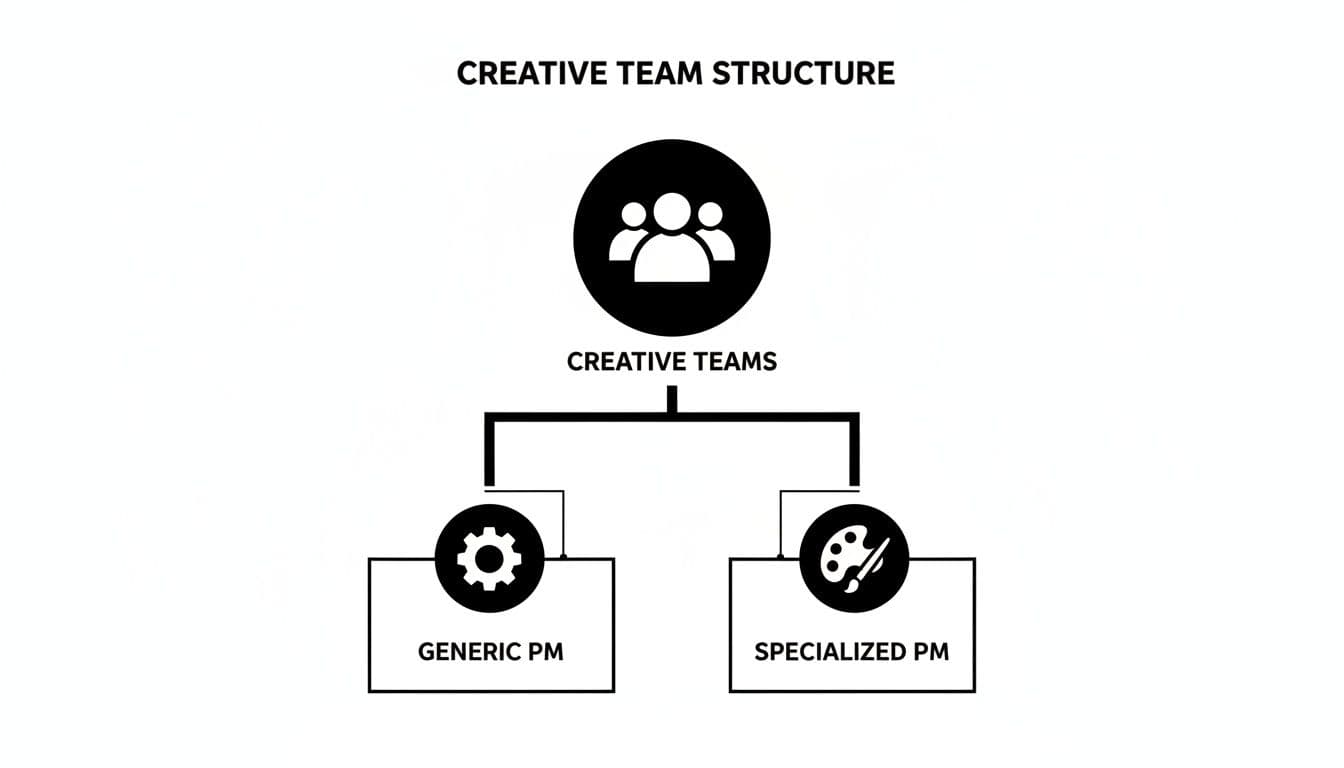
The goal is to find a tool that bridges that gap, giving creatives the freedom they need within a structure that keeps projects moving forward.
Visual Proofing and Annotation Tools
Let’s be honest: the feedback loop is often the most painful part of any creative project. We’ve all been buried in email chains filled with vague comments like “make it pop” or “it needs more energy.” It’s frustrating, inefficient, and a total momentum killer.
This is exactly why visual proofing tools are a game-changer. They’re non-negotiable.
Instead of trying to translate a visual idea into words, stakeholders can click directly on the design, video frame, or web page and drop a comment right where it belongs. This immediately eliminates guesswork and ensures every piece of feedback is specific, contextual, and actionable. What was once a chaotic, scattered conversation becomes a single, organized dialogue happening right on the creative asset itself.
By centralizing feedback directly onto creative assets, teams can cut down review cycles significantly. What once took days of back-and-forth emails can be resolved in a single, focused session, keeping project momentum high.
This isn’t just a nice-to-have feature; it’s a fundamental shift in how creative work gets reviewed. It saves an incredible amount of time and prevents the kind of misinterpretations that send projects off the rails.
Centralized Digital Asset Management
"Where’s the final version of the logo?" If you’ve ever heard (or asked) that question, you know it can derail an entire morning and lead to costly mistakes. Creative teams produce a staggering volume of files—images, source files, videos, copy docs. Without a central hub to manage them, you’re basically guaranteed chaos.
A solid project management tool for creatives will either have a Digital Asset Management (DAM) system built-in or integrate perfectly with one. This creates a single source of truth for every file, giving you:
- Intuitive Version Control: No more
logo_final_v2_final_FINAL.ai. You can easily track revisions, compare versions, and restore an older one if needed. Everyone knows they’re working on the right file. - Clear Approval Statuses: See at a glance if an asset is a work-in-progress, waiting for review, or approved and ready to go.
- Searchable Metadata: Tag assets with keywords, project codes, or usage rights so you can quickly find and repurpose them down the road.
Workflows That Mirror Creative Thinking
Creatives are visual thinkers. So why are so many project management tools just glorified spreadsheets and endless lists? Those rigid formats can feel stifling and completely counterintuitive to how creative work actually gets done.
This is where visual project tracking methods like Kanban boards come in. They let your team see the entire workflow at a glance, moving tasks from “To-Do” to “In Progress” to “Review” with a simple drag-and-drop. It provides an immediate, shared understanding of who is doing what, where a project stands, and where the bottlenecks are.
A great tool doesn’t just manage tasks; it understands the flow of creative work. It should naturally accommodate a modern graphic design process, for instance, from briefing and concepting to revision and final delivery. When the software’s structure lines up with how your team already thinks and works, it stops being an administrative burden and becomes a true partner in the creative process.
Essential vs. Nice-to-Have Software Features for Creatives
When you’re comparing different platforms, it’s easy to get overwhelmed by feature lists. Not all features are created equal, especially for creative teams. This table breaks down what’s truly essential from what’s simply a nice bonus.
| Feature Category | Essential for Creatives | Nice-to-Have | Why It Matters |
|---|---|---|---|
| Collaboration | Visual proofing & annotation tools | Real-time collaborative document editing | Eliminates vague feedback and streamlines the review process, which is often a major bottleneck. |
| Asset Management | Centralized file storage with version control | AI-powered asset tagging | Prevents using outdated files and creates a single source of truth for all project assets. |
| Workflow | Customizable, visual workflows (Kanban, etc.) | Pre-built creative project templates | Lets teams map out their unique creative process instead of forcing them into a rigid, linear structure. |
| Task Management | Clear task assignments and deadlines | Time tracking and resource allocation | Ensures everyone knows who is responsible for what and when it’s due, keeping projects on track. |
| Integrations | Seamless integration with creative tools (e.g., Adobe) | Integrations with accounting or CRM software | Reduces friction by letting creatives work within their preferred applications without constant switching. |
Focusing on the "essential" column first will ensure you choose a tool that solves your team's biggest day-to-day challenges. The "nice-to-have" features can then help you decide between your top contenders.
How to Choose the Right Software for Your Team
Picking the right project management software for a creative team isn’t just a tech decision; it’s a cultural one. You’re choosing a new home for your team’s ideas and energy. The most feature-packed tool is dead on arrival if your team hates using it, so the whole process has to start with your people.
Before you even glance at a product demo, take the time to map out how your team actually works right now. Pull everyone in—designers, copywriters, producers—and get painfully honest about the good, the bad, and the ugly of your current process. This isn’t just about drawing a flowchart; it’s about finding the exact moments of friction a new tool must solve.
Start with a Workflow Autopsy
Think of this first step as a “workflow autopsy.” You’re looking for the cause of death for project momentum and creative flow. Where do things grind to a halt? Is it the feedback loop from hell? The endless hunt for the latest file version? Or the constant confusion over who’s doing what next?
Get granular. Trace the journey of a typical project from the initial spark to final delivery.
- Briefing: How do projects kick off? Is it a well-structured brief or a cryptic Slack message sent at 5 PM on a Friday?
- Execution: Where does the actual creative magic happen? How are massive design files or video assets being passed around?
- Review & Feedback: What does the approval gauntlet look like? Is it a chaotic mess of annotated PDFs, email threads, and contradictory comments?
- Delivery: How do final files make their way to the client? Is there a clear, organized handoff, or is it a last-minute scramble?
Mapping this out gives you a concrete scorecard of pain points. This list is your most valuable asset when you start looking at software because it helps you focus on solving your real, everyday problems.
Involve Your Team to Ensure Buy-In
Trying to force a new tool on a creative team is a guaranteed way to fail. The only path to genuine adoption is to make them part of the decision. Once you’ve got a shortlist of a few contenders, don’t just have managers watch the demos. Let the people who will live in the tool day-in and day-out take it for a real test drive.
Set up trials with small, real-world projects. Assign a couple of team members to run a live project in each platform you’re evaluating. This shifts the conversation from a theoretical, “Does it have X feature?” to a much more practical, “How does this feel to use?” You’ll uncover usability quirks and workflow synergies you’d never spot on a feature checklist. To learn more about getting your team aligned, check out our guide on task management software for teams.
The goal of a software trial isn’t to test every single feature. It’s to see if the tool’s core philosophy aligns with your team’s natural way of working. Does it reduce friction or add more clicks?
Ask Vendors the Right Questions
By the time you get on a call with a salesperson, you should be armed with a crystal-clear picture of your team’s needs. This lets you drive the conversation instead of sitting through a generic pitch.
Here are the questions that truly matter:
- Integrations: “How does your platform connect with Adobe Creative Cloud, Figma, and Slack? Can you show me a live demo of that integration in action, not just a screenshot?”
- Scalability: “Our team is growing. How does your pricing and feature set scale as we add more people and projects? What are the hidden costs we should know about?”
- Onboarding & Support: “What does your onboarding look like for creative teams specifically? Do you provide hands-on training, or are we just given a link to a knowledge base?”
The market is overwhelmingly moving toward cloud-based tools, which are expected to keep growing as teams demand better real-time collaboration. This trend, highlighted by industry analysis about the creative project management software market, means that vendor stability and support are more critical than ever. Ultimately, you’re not just buying another subscription; you’re looking for a partner that will genuinely amplify your team's creative output.
Using AI and Automation to Unlock Creative Potential
Let’s cut through the noise. The conversation around AI in the creative world often spirals into dystopian fears of replacement, but that’s not what’s happening in the project management space. The real story is far more practical and, frankly, empowering.
The true value of AI here isn’t about replacing your team’s talent; it’s about eliminating the soul-crushing administrative grind that kills creativity. Think of it as giving your team a brilliant, tireless assistant—one who handles the tedious, repetitive tasks that drain mental energy and shatter focus. It automates the noise so your team can find the signal.
This isn’t just a concept; it’s where the industry is moving. While the general project management market grows steadily, the AI-enabled sector is projected to expand at a remarkable 40% CAGR. Why the explosion? Because knowledge workers currently spend around 60% of their time on administrative overhead. That’s a massive opportunity for intelligent tools to step in and give people their time back.
Making Administrative Tasks Invisible
Imagine your lead designer starting their day without spending thirty minutes just trying to figure out what to tackle first. That’s the promise of AI-driven task prioritization. A smart system can analyze deadlines, dependencies, and stakeholder importance to surface the most critical task at any given moment.
This isn’t about micromanagement; it’s about providing instant clarity. It cuts through the clutter and lets your team dive straight into high-impact work.
AI can also handle other crucial but low-value tasks that bog everyone down:
- Automated Reminders: Forget the project manager having to chase people for updates. The system can send gentle, automated nudges to stakeholders when their feedback is due.
- Intelligent Routing: When a designer marks an asset as “Ready for Review,” the platform automatically sends it to the right people in the right order—from copy chief to creative director to client—no manual hand-offs required.
By making these processes invisible, you dramatically reduce the mental load on your team. This frees up precious cognitive bandwidth for what they were actually hired to do: solve complex creative problems.
The real power of AI in a creative context is its ability to create a buffer between your team and the chaos of project administration. It acts as a gatekeeper, protecting the state of deep focus that is essential for producing exceptional work.
More Time for Deep, Strategic Thinking
When your team isn’t drowning in status updates and manual task management, something powerful happens. They get their time back. Not just a few extra hours, but high-quality, uninterrupted blocks of time needed for deep, strategic thinking.
This is where the magic happens. It’s when a copywriter can experiment with a dozen headlines to find the perfect one, or when a brand strategist can truly immerse themselves in market research without constant interruptions.
The project management software transforms from a simple task tracker into a strategic partner that actively clears the path for better work. Our article on AI-powered workflow automation dives deeper into how teams can reclaim this valuable time.
How AI Empowers, Not Replaces
Let’s be crystal clear: an algorithm can’t replicate human intuition, empathy, or artistic vision. No AI is going to dream up the next big campaign idea or design a logo that perfectly captures a brand’s soul.
Instead, intelligent automation acts as a powerful amplifier for human talent. It handles the logical, process-driven side of project management so that humans can fully own the creative, subjective, and strategic side.
- Before AI: A designer spends 20% of their day on design and 80% managing feedback, hunting for files, and updating tasks.
- With AI: That ratio flips. The designer spends 80% of their day in a creative flow state because the software is handling the administrative friction in the background.
Ultimately, using a smart project management tool isn’t about removing the human element from creative work. It’s about protecting it, nurturing it, and giving it the space it needs to truly flourish.
A Practical Guide to Onboarding Your Creative Team
Let’s be honest: even the best project management software is just expensive shelfware if your team doesn’t use it. The first few weeks of implementation are critical. This is where a new tool either becomes an indispensable part of the workflow or fades into the background. Your biggest challenge isn’t the technology—it’s overcoming that natural, human resistance to change.
Success here isn’t about flipping a switch and hoping for the best. It’s about framing the transition as a shared upgrade, not another top-down mandate. A disruptive, "big bang" rollout is a recipe for disaster with creative professionals. Instead, you need a phased, empathetic approach that shows your team exactly how this platform will solve their biggest headaches and give them back what they value most: time.

The goal is to make the software feel like a trusted partner from day one, not just another administrative chore to check off.
Build Project Templates for Repeatable Success
One of the fastest ways to get buy-in and reduce friction is to build out project templates from the get-go. Your team runs through the same types of projects all the time, each with a predictable sequence of steps and stakeholders. By pre-building these workflows into the software, you make it ridiculously easy for anyone to spin up a new project the right way, every time.
Think about your most common creative requests and map out a template for each one.
- Social Media Campaign: A template could pre-populate tasks for copywriting, design, scheduling, and reporting, with all the dependencies already linked.
- New Landing Page: This might include steps for wireframing, content writing, mockups, development handoff, and QA testing.
- Video Production: You could map the entire process from scriptwriting and storyboarding through shooting, editing, and those inevitable review cycles.
These templates bake your team’s best practices right into the system, ensuring consistency and making it simple for new hires to get up to speed without reinventing the wheel.
Establish Clear Communication Protocols
Introducing a new platform is the perfect chance to put an end to chaotic communication. We’ve all lived through the pain of trying to find feedback buried in a long email thread or a forgotten Slack channel. Now is the time to declare the new software as the single source of truth for all project-related conversations.
The ground rule should be simple: If it’s not in the platform, it didn’t happen. This one principle forces all feedback, approvals, and status updates into a central, searchable place where everyone can see it.
This means actively training your team on how to communicate within the tool. Use @mentions for direct questions to a specific person. Use task comments for feedback tied to a particular deliverable. Use project-line discussion boards for bigger-picture updates. Setting these expectations early prevents the new tool from becoming just another source of notification noise.
Run Training with Live Projects
Forget those generic, feature-dump training sessions. The absolute best way to get a creative team on board is to have them use the new software on a real, live project. This hands-on approach makes the training immediately relevant and far more practical than a hypothetical demo.
Pick a small, low-risk project and a few enthusiastic team members to be your pilot group. Have them run the entire project—from the initial brief to final delivery—inside the new platform. This real-world test drive will uncover questions and workflow efficiencies you’d never find in a sterile training environment.
Once that pilot project wraps, you’ve created a small group of internal champions. They can share their genuine experiences and help their colleagues navigate the learning curve, which makes the company-wide rollout feel much more organic and peer-led. When it comes to onboarding, showing your team how a tool will improve their day-to-day creative life is always more powerful than just telling them.
Frequently Asked Questions About Creative PM Software
Even with the best plan, picking new software can feel like navigating a minefield of questions. This is especially true for creative teams, where the right tool has to fit not just a process, but a culture. Let’s dig into some of the most common questions that pop up when creative leaders start looking for a better way to manage their work.
Can’t We Just Use a Generic Tool Like Trello or Asana?
This is almost always the first question, and it’s a good one. Tools like Trello or Asana are project management powerhouses for a reason—they’re great for general task tracking. But for the nitty-gritty of creative production, they often come up short.
Think of it like trying to film a movie with your smartphone. You can do it, but you’re missing the specialized lenses, lighting, and audio gear that make the final product shine.
The gaps really show up in the details. Generic tools don’t have built-in visual proofing, which sends your team scrambling through messy email chains or Slack DMs to give feedback. They also struggle with version control for large design files, making it a nightmare to find the actual final version. Specialized project management software for creative teams is designed from the ground up to handle the messy, non-linear, and highly visual nature of creative work.
How Do We Get Our Creatives to Actually Use New Software?
This is the million-dollar question. Adoption is the biggest hurdle, and you can’t just force it. The secret is to bring your team into the fold from day one.
Let your designers, writers, and video editors test-drive the final contenders. Give them a real say in the decision. When people help choose the tool, they’re invested in making it work.
Once you’ve picked a platform, frame the rollout around what it does for them.
- Show them how it kills their most hated tasks, like hunting down stakeholders for feedback.
- Demonstrate how it saves them from digging through five folders to find the latest asset.
- Make sure it has an interface that’s actually intuitive and easy on the eyes. If the software feels like a chore, they just won’t use it.
My advice? Start with a small pilot project and a few of your most enthusiastic team members. Their success will build momentum and create internal champions who can help get everyone else on board.
What’s the Difference Between Project Management and Creative Workflow Management?
Great question. People often use these terms interchangeably, but they’re really two different views of the same landscape.
Project management is the 30,000-foot view. It’s about the ‘what’ and the ‘when’—tracking major milestones, deadlines, and resources for the entire project, from kickoff to launch.
Creative workflow management, on the other hand, is the ground-level view. It’s all about the ‘how.’ It zooms in on the specific, iterative steps a single creative asset goes through: 1) Briefing and Ideation 2) Drafting and Design 3) Internal Review 4) Client Feedback and Revisions 5) Final Approval and Handoff.
The best software for creative teams does both, seamlessly. It gives managers the high-level oversight they need while providing the specialized tools (like proofing dashboards and approval queues) that creatives depend on to get the work done.
A platform that only does one or the other inevitably creates friction. You need a system that connects the big-picture project plan directly to the day-to-day creative execution.
How Much Should We Budget for Creative Project Management Software?
Pricing is all over the map, but most platforms run on a per-user, per-month subscription. This model is great because it lets you scale your costs as your team grows.
Generally, you can expect the tiers to look something like this:
- Entry-Level Plans: $5–$15 per user/month
- Advanced Plans: $20–$45+ per user/month
Some newer platforms are shaking up this model, offering a free tier for core features and then a pay-per-use model for more advanced services like delegating tasks. When you’re building your budget, don’t forget the soft ROI. The right tool easily pays for itself by giving your team back hours in their day, preventing costly errors, and cutting down on creative burnout.
Ready to eliminate the administrative grind and give your team the freedom to do what they do best? Fluidwave combines smart automation with a network of skilled human assistants to handle the “work about work.” See how Fluidwave can transform your creative workflow.
Q&A: Quick Answers to Common Creative PM Questions
Q: Can’t I just use Trello or Asana for creative work?
A: They’re great for general task tracking, but they often miss visual proofing, asset version control, and unique creative workflows. A tool built for creatives handles feedback directly on assets and supports non-linear ideation.
Q: How can we ensure our team actually adopts new software?
A: Involve your team from the start. Run real-world pilots, collect feedback, and highlight time-saving improvements that matter to creatives. Friendly champions help drive broader adoption.
Q: How should we approach budgeting for a creative PM tool?
A: Start with per-user pricing and consider the soft ROI: time saved, fewer reworks, and reduced burnout. Plan for scalability as your team grows and projects increase in complexity.
1.
Cognitive Market Research, Creative Project Management Software Market Report, projected growth to $5.66B by 2029. https://www.cognitivemarketresearch.com/creative-project-management-software-market-report
2.
MindMesH Academy, IT Project Managers’ Responsibilities. https://www.mindmeshacademy.com/blog/articles/it-project-managers-responsibilities
3.
FluidWave, Workflow Visualization Tools. https://fluidwave.com/blog/workflow-visualization-tools
4.
Web Design NYC, Graphic Design Process. https://www.webdesignatny.com/graphic-design-process/
5.
FluidWave, AI-powered workflow automation. https://fluidwave.com/blog/ai-powered-workflow-automation
Focus on What Matters.
Experience lightning-fast task management with AI-powered workflows. Our automation helps busy professionals save 4+ hours weekly.