Get a comprehensive project administrator job description template for 2026. Easily customize it to attract top talent. Download now!
April 23, 2026 (4mo ago) — last updated April 24, 2026 (4mo ago)
Project Administrator Job Description: Free Template (2026)
Get a comprehensive project administrator job description template for 2026. Easily customize it to attract top talent. Download now!
← Back to blog
You usually know you need a project administrator before you can name the problem clearly.
The project isn’t failing in one dramatic way. It’s leaking in ten small ones. Meeting notes aren’t where people expect them. Budget updates arrive late. Someone approved a change, but nobody logged it. A client asks for the latest document set and the team spends half an hour figuring out which version is final. The project manager keeps getting dragged into admin cleanup instead of managing risk, stakeholders, and delivery.
That’s when the role stops looking like overhead and starts looking like infrastructure.
A strong project administrator job description shouldn’t read like a generic office support posting. It should describe the person who keeps the project’s operating system running. In healthy teams, this role becomes the control point for documentation, schedules, routine communications, and the small decisions that prevent larger failures later.
The Unsung Hero Your Project Desperately Needs
Teams often don’t hire this role early enough. They wait until the project manager is buried, the coordinator is stretched thin, and nobody can tell you whether the latest contract amendment made it into the working files.
That’s a mistake. A project administrator is often the person who turns a messy project into a manageable one. They don’t own executive strategy, but they make strategy executable. They track tasks, maintain records, support budget monitoring, coordinate meetings, and raise flags before missed details become missed milestones.

The market reflects that need. According to Asana’s overview of the project administrator role, employment in related project management specialist roles is projected to grow 6% from 2024 to 2034, with about 78,200 annual job openings on average. The same source notes that 75% of project administrators are women.
Those numbers matter, but the operational reality matters more. When I review struggling projects, the issue usually isn’t that people don’t care. It’s that nobody owns the administrative spine of the work.
What the role changes in practice
A capable project administrator brings order in a few immediate ways:
- Task visibility improves: People know what’s due, who owns it, and what’s blocked.
- Meetings become useful: Agendas go out, notes get captured, and actions don’t vanish after the call.
- Records stay usable: Contracts, minutes, risk logs, and budget files live in a system rather than in someone’s inbox.
- Escalation gets faster: Small inconsistencies are spotted before they turn into delivery problems.
Practical rule: If your project manager is spending too much time chasing documents, updating trackers, or organizing recurring meetings, you probably don’t need a “more strategic PM.” You need administrative coverage.
This role is also one of the best entry points into the broader project profession. It teaches discipline, timing, stakeholder awareness, and governance. Teams that hire well here usually build a stronger bench for future coordinators, PMs, and PMO leads.
What a Project Administrator Actually Does Day to Day
The cleanest way to understand the role is this. A project administrator is the air traffic controller of the project. They may not decide where every plane should go, but they make sure information, approvals, updates, and supporting actions move in the right sequence.
When that function is weak, work doesn’t just slow down. It gets confused. Teams start operating from outdated assumptions, and managers spend their time reconciling basic facts instead of leading.
Documentation and compliance
This is the part inexperienced hiring managers tend to underestimate.
A project administrator typically manages project records such as contracts, change orders, meeting minutes, risk registers, invoices, purchase records, calendars, and status logs. In construction and other regulated environments, they may also track RFIs, submittals, drawings, specifications, insurance paperwork, and closeout files.
According to AppleOne’s job description guidance for project administration roles, process documentation and contract management can make up 15-25% of the workload, yet the risk tied to it is much larger than that share suggests. The same source notes that in many industries, accounting teams need fully executed subcontract documents before they can authorize payment. That means admin delays can directly delay payment and affect project cash flow.
That’s why filing isn’t enough. Good administrators practice what I’d call documentation intelligence. They know which version is current, which approval is missing, what expired, and which item is about to create downstream trouble.
The best project administrators don’t ask, “Where should I save this?” They ask, “Who will need this next, what depends on it, and how will we find it in three months?”
Scheduling and coordination
The next bucket is rhythm. Projects need cadence to stay healthy.
A project administrator usually maintains calendars, schedules recurring check-ins, coordinates logistics, circulates agendas, captures action items, and follows up on due dates. In many teams, they also support resource allocation by making sure the right people know when they’re needed and what they’re expected to produce.
Here’s what works well:
- Clear meeting discipline: Agenda before the meeting, decisions and actions after it.
- Visible task ownership: Every follow-up has an owner and date.
- Calendar hygiene: No mystery holds, no duplicated meetings, no last-minute surprises.
If your team needs a stronger structure for updates and follow-ups, a practical project communications plan template can help define who gets what information, when, and in what format.
Budget and administrative controls
This role often supports the financial side of delivery without owning final commercial authority.
That can include:
- Expense tracking: Logging costs, updating budget trackers, and flagging variances.
- Invoice processing support: Making sure records, approvals, and backup documents are complete.
- Purchase coordination: Tracking requests, purchase orders, and receipt status.
- Reporting prep: Pulling routine data for weekly or monthly reviews.
A sharp administrator won’t replace a project accountant or commercial manager. What they do is prevent small process failures from becoming expensive surprises.
Communication support
Strong administrators reduce communication drag.
They route updates, answer routine information requests, keep shared files current, support stakeholder communications, and make sure nobody is working from stale assumptions. This matters more than many teams admit. Projects rarely go off track because one person lacked effort. They go off track because the right people didn’t have the right information at the right time.
A weak admin function creates noise. A strong one creates clarity.
Project Administrator vs Coordinator vs Manager Explained
Job titles get blurred fast in project environments. I’ve seen “project administrator” postings that were really coordinator jobs, and coordinator jobs that implicitly expected full project management without the authority or pay.
If you want the right hire, you need to separate these roles by focus, scope, and decision authority.
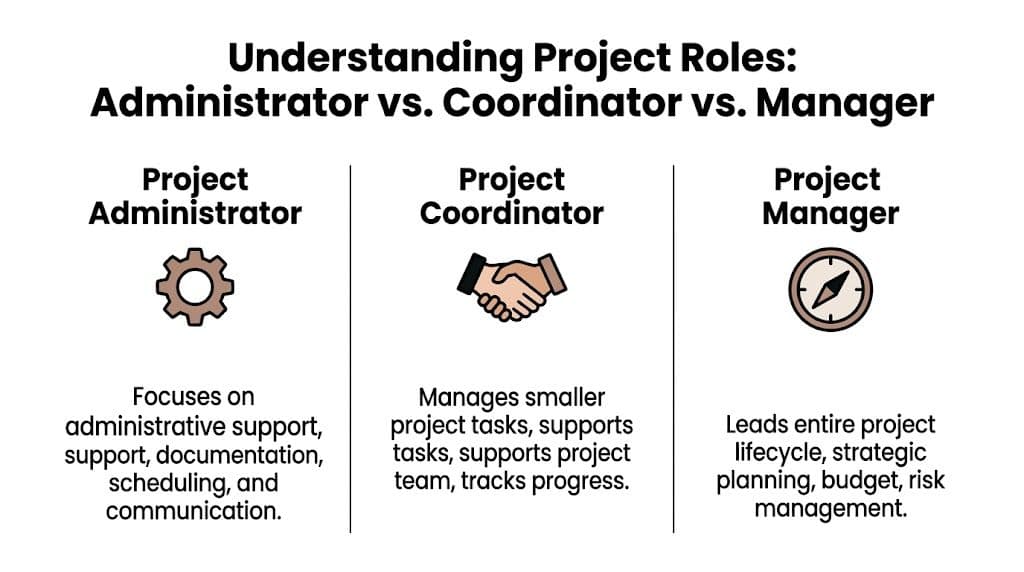
The simplest distinction
| Role | Primary focus | Typical authority | Best fit for |
|---|---|---|---|
| Project Administrator | Administrative execution, records, schedules, support workflows | Limited decision authority, high process ownership | Teams that need consistency, documentation control, and operational support |
| Project Coordinator | Task coordination across workstreams, progress follow-up, team support | Moderate authority over day-to-day coordination | Teams with multiple moving parts that need active follow-through |
| Project Manager | End-to-end delivery, planning, stakeholders, risk, budget accountability | Highest delivery authority | Teams that need strategic leadership and outcome ownership |
That’s the short version. The practical version is even clearer.
What changes from one role to the next
A project administrator keeps the machine organized. They make sure inputs are captured, records are current, meetings are supported, and routine controls happen on time.
A project coordinator pushes activity across the team. They’re more likely to chase status, coordinate dependencies, and keep work moving between contributors.
A project manager makes trade-offs. They own delivery decisions, handle competing priorities, manage risk, and answer for outcomes.
This is why sloppy job descriptions create hiring problems. If you need someone to maintain documentation, support schedules, process invoices, and keep reporting current, don’t advertise for a PM. You’ll either overhire or disappoint the candidate.
For teams trying to cleanly separate responsibilities before hiring, this guide is useful because it forces you to name ownership instead of relying on title assumptions.
How the career path usually works
This role is often the first serious step into project delivery.
A good administrator builds habits that matter later:
- Precision under pressure
- Comfort with governance
- Awareness of schedule and budget signals
- Professional communication with stakeholders
- Early risk recognition
From there, many people grow into coordinator roles and then into project management. That progression makes sense because the administrator role teaches the discipline that more senior project roles rely on.
Hire for the role you need now, but don’t ignore growth potential. Some of the strongest PMs started by learning how not to lose the thread of a project.
How Fluidwave Empowers Your Project Administrator
A project administrator’s effectiveness depends heavily on the system around them. Even a very capable person will struggle if tasks live in email, deadlines live in someone’s memory, and delegation depends on whoever happens to be free.
That’s where tooling changes the role. The right platform doesn’t replace administrative judgment. It enhances that judgment.

Where the platform helps most
Fluidwave is useful for project administrators because the role is built on visibility, prioritization, and follow-through.
Its multiple views, including list, table, calendar, Kanban, and cards, help administrators manage work in the format that best fits the task. Calendar views support deadline-heavy work. Kanban is useful for approval flow and action tracking. Table and list views work well for recurring administrative control.
The AI-driven prioritization is also practical for people who deal with constant intake. A project administrator often gets hit from all sides. meeting requests, document revisions, follow-up tasks, reminders, and status updates. A system that helps surface what matters next reduces cognitive drag and helps the role stay proactive.
Delegation without losing control
This is the more interesting advantage.
Fluidwave lets users delegate tasks to human virtual assistants on a pay-per-task basis. For project administrators, that creates room to offload low-complexity but time-consuming work such as formatting reports, cleaning trackers, organizing incoming information, or handling routine administrative prep.
That doesn’t dilute the role. It sharpens it. The administrator stays responsible for quality, sequencing, and escalation while spending less time on repetitive handling.
Better measurement of role impact
Administrative roles often get undervalued because teams don’t define success clearly enough. If you want better visibility into contribution, it helps to pair project-specific measures with broader operational KPIs so leaders can track consistency, timeliness, and process quality in a more disciplined way.
Fluidwave supports that mindset because it makes work visible. You can see task status, ownership, due dates, and completions in one place rather than reconstructing activity from scattered messages.
Tools matter most when they reduce friction around the work your team already knows it should be doing.
For neurodivergent professionals, that kind of structure can be especially valuable. Clear task lists, visual workflows, and fewer context-switching penalties make the role more sustainable and less dependent on memory gymnastics. For managers, the benefit is straightforward. The project administrator spends less time chasing the system and more time strengthening the project.
Hiring Your Projects Secret Weapon
The best project administrator job description doesn’t try to make the role sound glamorous. It makes the role clear, serious, and worth doing well.
That means naming the actual work. Documentation. Coordination. follow-up. Schedule support. Budget administration. Communication flow. It also means hiring for habits, not buzzwords. You want someone who notices missing details, keeps records usable, and closes loops before the project manager has to ask.
There’s also a bigger shift worth making. Stop treating this position as a basic admin seat. On any project with moving parts, the administrator is part of the delivery system. If they’re strong, the team gets cleaner information, steadier cadence, and fewer preventable failures.
Use the templates. Tighten the requirements. Remove vague language. Interview for evidence. Then give the person a system that helps them work well.
That’s how you hire someone who doesn’t just support the project. They help hold it together.
If your team needs a better way to organize tasks, prioritize work, and delegate routine admin without adding process clutter, Fluidwave is worth a look. It gives project administrators and busy teams one place to manage work clearly, stay focused, and offload lower-value tasks so they can spend more time on the parts of the project that require human judgment.
REQUIREMENTS:
- Remove each broken blog link completely (both the markdown link syntax and the descriptive text)
- Rewrite sentences naturally after removing references
- Preserve all other markdown formatting
- Only remove references to the specific broken blog links, don't change other content
- Process all broken URLs in a single pass
Example: After: "...for your small business."
Please return your response in the following JSON format: { "updatedContent": "the full content with all broken links removed", "removals": [ { "brokenUrl": "https://fluidwave.com/blog/small-business-tips", "explanation": "Removed the markdown link to the broken blog and adjusted surrounding text so it reads naturally; replaced with the After example state." } ] }
Focus on What Matters.
Experience lightning-fast task management with AI-powered workflows. Our automation helps busy professionals save 4+ hours weekly.