Feeling overwhelmed? Design a personal organization system tailored to your life—a practical framework that captures ideas, decisions, and spaces so you can reduce stress and get more done.
August 25, 2025 (1y ago) — last updated February 15, 2026 (7mo ago)
Build a Personal Organization System for Focus
Create a personalized system to manage tasks, notes, and spaces—cut stress, boost focus, and get more done with practical, repeatable steps.
← Back to blog
Build a Personal Organization System for Focus
Stop feeling overwhelmed. Learn to build a personal organization system that simplifies your life, boosts productivity, and reduces stress.
If you’re tired of losing ideas, missing deadlines, or feeling scattered, a personal organization system is the tool that changes that pattern. It isn’t about a perfect desk or a color-coded planner—it’s the operating system for your life: a set of simple, repeatable habits and tools that keep everything running smoothly.
What is a personal organization system?

Think of it like an OS for your daily life. Your calendar, task list, note app, and physical spaces are the "programs"—your system makes them talk to each other so nothing falls through the cracks. Without a system, you run on default settings and pay for it with stress, missed commitments, and mental clutter.
Why you need one
Common signs you need a system:
- You’re always overwhelmed and can’t decide what to tackle first.
- Important things get missed (deadlines, appointments, follow-ups).
- Physical or digital clutter makes finding info slow and stressful.
- Deep focus feels impossible because distractions win.
A good system isn’t about rigidity—it’s about freeing up mental energy so you can focus on meaningful work and relationships.
Your blueprint: core building blocks
This guide uses four stages you can apply immediately: Capture, Process, Organize, Review. Use these building blocks to design a system that fits your goals and daily rhythm.
1) Capture
You must reliably collect ideas, tasks, and input as they arrive. Keep capture simple and fast:
- A single notebook or bullet journal for quick notes.
- A notes app (Evernote, Apple Notes) that syncs to all devices.
- A task manager inbox (Todoist, Fluidwave) for quick task entry.
Tip: Limit capture points. The fewer places you check, the less you’ll lose.
2) Process
Set a regular time to triage captured items. Ask for each item: “Is this actionable?”
- No → trash or file as reference.
- Yes → decide the next physical action and add it to your task list or calendar.
This step prevents an inbox from becoming a junk drawer.
3) Organize
Give processed items a clear home:
- Project list (multi-step outcomes)
- Calendar (time-sensitive events)
- Next actions list (tasks you can do now, organized by context)
- Reference system (digital filing cabinet)
When everything has a predictable place, confidence grows and anxiety falls.
4) Review
Weekly reviews are the glue that keeps a system accurate and useful. During a weekly review:
- Clear your inboxes
- Update project statuses
- Schedule key tasks on your calendar
- Re-prioritize for the week ahead
A short, consistent review beats occasional overhauls.
Foundational methods to borrow from
Before inventing from scratch, study proven frameworks and mix what fits.
Getting Things Done (GTD)
David Allen’s GTD is focused on clearing your mind by externalizing everything. Five steps: Capture, Clarify, Organize, Reflect, Engage. Great if you face high volumes of inputs and need a reliable processing routine.
Internal resource: /blog/how-to-get-things-done
PARA (Projects, Areas, Resources, Archives)
Tiago Forte’s PARA organizes digital information by actionability. It’s ideal for knowledge workers and anyone with a growing digital library.
Internal resource: /blog/how-to-organize-my-life
Bullet Journal (BuJo)
Ryder Carroll’s Bullet Journal is an analog-first method focused on rapid logging and reflection. It’s flexible and ideal for creative thinkers.
Comparison at a glance
| Method | Core idea | Best for | Key benefit |
|---|---|---|---|
| Getting Things Done (GTD) | Externalize to reduce mental load | Busy professionals | Prevents things from slipping through cracks |
| PARA | Organize digital files by actionability | Knowledge workers | Consistent system across tools |
| Bullet Journal | Flexible analog planning | Creatives and pen-and-paper users | Encourages reflection and focus |
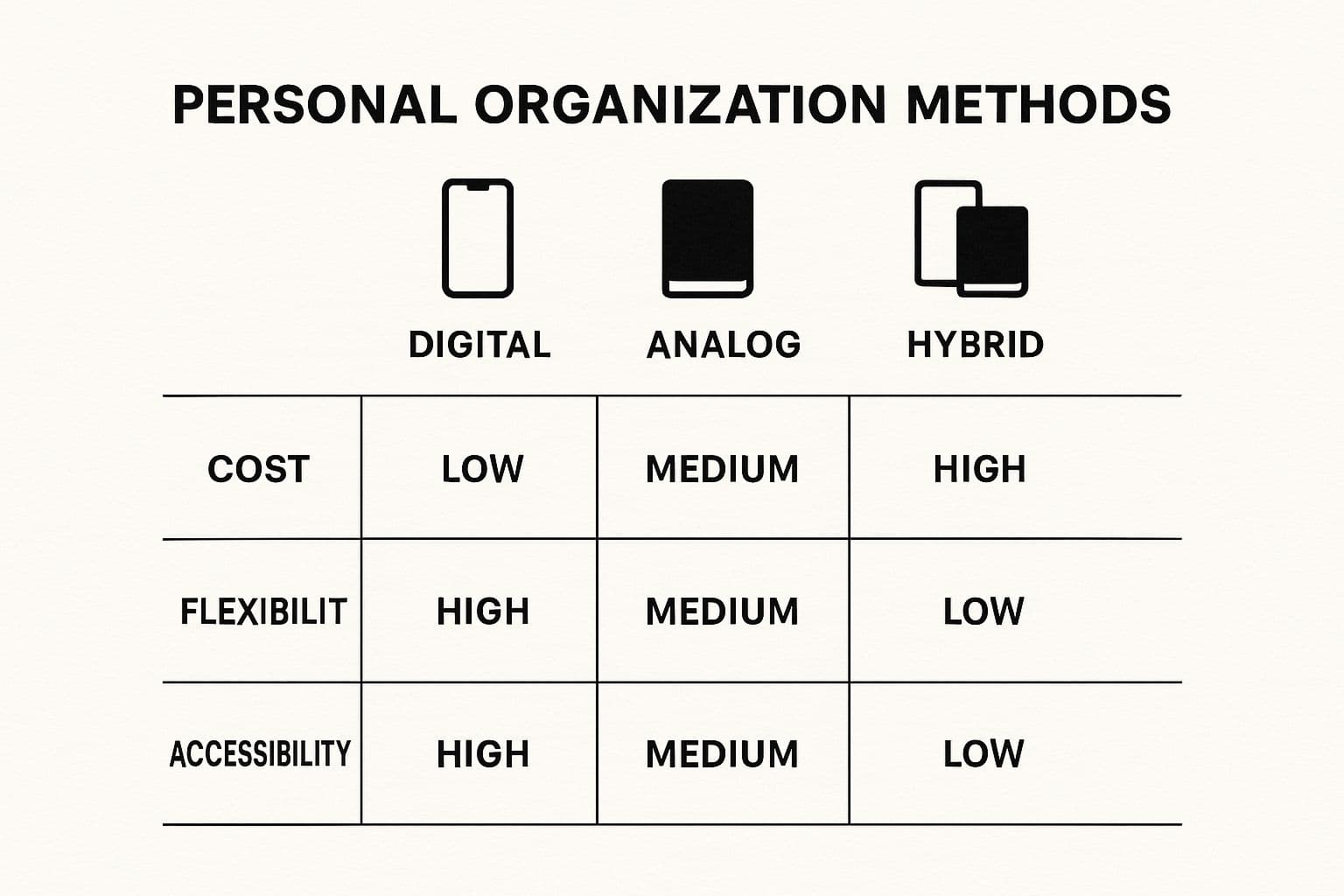
A hybrid approach (digital + analog) often gives the best balance.
How to build your system from scratch — step-by-step

Follow these practical steps over a weekend and refine during the first 2–3 weeks.
- Choose one capture tool (notebook or app).
- Pick one task manager and one calendar.
- Define a simple project list and a next-actions list.
- Create a weekly review ritual (30–60 minutes).
- Use a reference folder (digital) for non-actionable info.
Start with one pain point (email, tasks, or notes). Solve it well before layering other parts of the system.
Choosing tools: digital, analog, or hybrid
Digital tools are powerful for search, automation, and collaboration (Todoist, Asana, Notion, Google Calendar, Fluidwave). Analog tools (bullet journals, notebooks, whiteboards) add focus and intentional friction that helps prioritization.
Avoid "tool paralysis." Pick a small set of tools you enjoy and actually use.
Recommended starter setup:
- Capture: Phone notes or a small notebook
- Tasks: Todoist or Fluidwave
- Calendar: Google Calendar
- Reference: Notion or Evernote
Physical organization matters
Organizing your physical space reduces cognitive load. The home organization market growth shows people invest in tangible order to create calm. Simple routines—like a nightly 5-minute desk tidy—go a long way.
How organization fuels personal growth
A reliable system frees up time, energy, and attention. With less mental clutter you focus on long-term goals, creativity, and relationships. Every small habit (weekly reviews, prioritized to-dos) compounds into progress.
Personal development and organization feed each other: structure creates space for opportunity.
Common questions
Q: How long does it take to set up?
A: Allow a dedicated 2–4 hour setup, then expect 2–3 weeks to refine. Use weekly reviews to iterate.
Q: Biggest mistake?
A: Overcomplicating the system. Start small and expand once habits stick.
Q: Digital or paper?
A: Use a hybrid approach—let the task decide the tool. Calendar and recurring reminders are digital; quick daily prioritization can be paper.
3 Concise Q&A (quick reference)
Q1. What is a personal organization system? A1. A practical framework to capture, process, organize, and review tasks, ideas, and spaces so you stay on top of what matters.
Q2. How long does setup take? A2. A focused 2–4 hours for setup, with 2–3 weeks to refine habits.
Q3. Digital, analog, or hybrid—what should I pick? A3. A hybrid approach often works best, using digital for search and reminders and analog for focus and prioritized decisions.
Internal linking opportunities (suggested)
- /blog/how-to-organize-my-life
- /blog/how-to-get-things-done
- /blog/personal-productivity-systems
- /products/fluidwave
(Replace with exact internal URLs on your site where relevant.)
Quick checklist to get started today
- Pick one capture tool.
- Choose a task manager and calendar.
- Process your inbox once per day and do a weekly review.
- Identify 3 active projects and define the next action for each.
- Commit to one week of consistent use, then refine.
Ready to build a system that combines digital power with analog clarity? Fluidwave offers task and project views designed to slot into this workflow. Start small, review weekly, and iterate.
(Author and published date remain unchanged.)
1.
David Allen, Getting Things Done: The Art of Stress-Free Productivity. Getting Things Done.
2.
Tiago Forte, PARA framework. PARA.
3.
Ryder Carroll, The Bullet Journal Method. Bullet Journal.
4.
Weekly reviews and their value in productivity. Harvard Business Review.
5.
American Psychological Association, Clutter and stress. Clutter.
Focus on What Matters.
Experience lightning-fast task management with AI-powered workflows. Our automation helps busy professionals save 4+ hours weekly.